
@victor-software-house/pi-curated-themes
v0.2.1
Published
Curated dark terminal themes for pi, adapted from iTerm2-Color-Schemes


Readme
pi-curated-themes

Curated dark terminal themes for pi, adapted from iTerm2-Color-Schemes to pi's 51-token theme model.
Variant naming
This package ships the semantic variant as the default theme name.
Examples:
catppuccin-mochalovelacemellow
If alternate variants are introduced later, only the non-default variants should gain suffixes.
Included themes (65)
Adventure, Adwaita Dark, Arcoiris, Arthur, Atom, Aura, Black Metal (Bathory), Black Metal (Burzum), Black Metal (Khold), Box, Brogrammer, Carbonfox, Catppuccin Mocha, Citruszest, Cursor Dark, Cutie Pro, Dark Modern, Dark Pastel, Dimmed Monokai, Doom Peacock, Dracula+, Earthsong, Everforest Dark Hard, Fahrenheit, Flatland, Flexoki Dark, Front End Delight, Fun Forrest, Galizur, GitHub Dark Colorblind, GitHub Dark High Contrast, Glacier, Gruber Darker, Gruvbox Dark, Gruvbox Dark Hard, Gruvbox Material, Guezwhoz, Hacktober, Hardcore, Havn Skumring, IC Orange PPL, iTerm2 Smoooooth, iTerm2 Tango Dark, Japanesque, Jellybeans, Kanagawa Wave, Kurokula, Later This Evening, Lovelace, Material Darker, Matte Black, Mellow, Miasma, Nvim Dark, Popping And Locking, Sea Shells, Sleepy Hollow, Smyck, Tomorrow Night, Tomorrow Night Bright, Tomorrow Night Burns, Twilight, Vague, Vesper, Xcode Dark hc
The curation list is in curated.toml.
The current implementation roadmap is in ROADMAP.md.
What "semantic" means
Source palettes define 16 ANSI colors plus background/foreground/cursor. pi requires 51 tokens for tool panels, diff colors, markdown, syntax highlighting, thinking borders, and footer readability.
A semantic variant assigns pi tokens by role:
successis always green/teal (hue 80-200)erroris always red/warm (hue <50 or >320)warningis always yellow/amber (hue 30-80)- All three are guaranteed 25+ degrees of hue separation
When a palette lacks a needed hue, the missing color is derived by mixing a canonical hue with the theme's foreground.
Install
Recommended:
pi install npm:@victor-software-house/pi-curated-themesAlternative:
pi install git:github.com/victor-software-house/pi-curated-themesUse
Select a theme in /settings, or set it in ~/.pi/agent/settings.json:
{
  "theme": "catppuccin-mocha"
}
Theme names follow the pattern {slugified-name}.
Development tools
This repository uses mise to manage local runtimes for development tasks:
mise installPinned tools:
node = "lts"bun = "latest"uv = "latest"
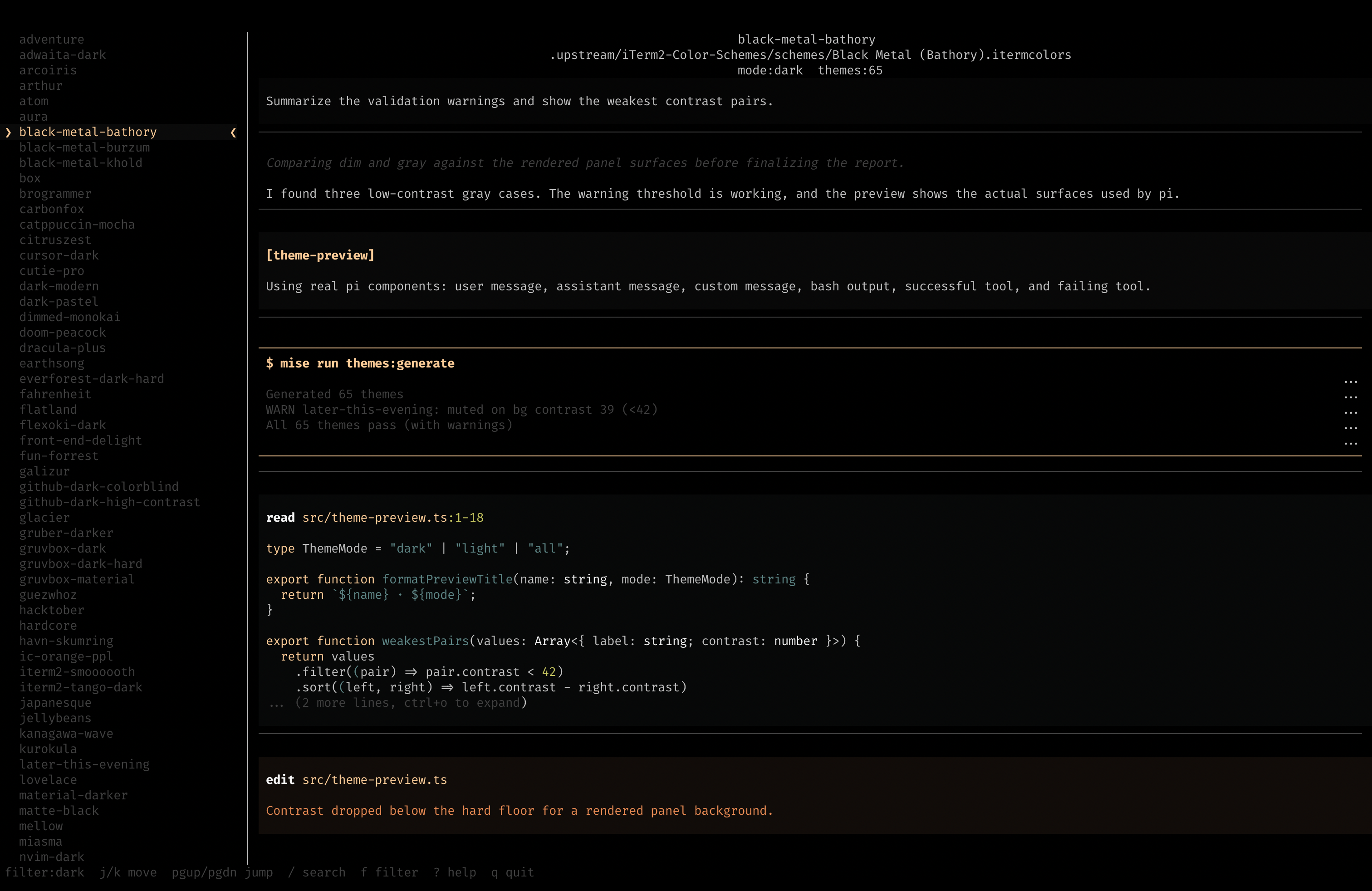
Theme preview
Run the interactive preview TUI with mise:
mise run preview
mise run preview -- light
mise run preview -- all
The task runs scripts/list-themes-tui.ts, which uses Bun to resolve its npm dependencies on demand.
If the matching @victor-software-house/pi-curated-themes package version is already installed in pi, the preview shows an Enter keybinding that sets the selected theme in ~/.pi/agent/settings.json. The current pi theme is also marked in the list when it belongs to this package.
The preview currently uses a TypeScript example snippet so syntax highlighting matches supported pi preview behavior.
Generating themes
# 1. Fetch upstream color schemes
bash scripts/fetch-upstream.sh

# 2. Generate all curated themes
mise run themes:generate

# 3. Generate a single theme
mise run themes:generate --name "Catppuccin Mocha"

# 4. Validate without regenerating
mise run themes:validate
Validation
Validation is intentionally lightweight.
Current validation checks only for generator output that is structurally unusable, such as collisions where accent becomes identical to error.
The project no longer uses a separate policy file for contrast thresholds or pair-matrix validation.
Upstream
Color palettes originate from mbadolato/iTerm2-Color-Schemes (MIT licensed). The .itermcolors XML plist files are parsed directly — no Ghostty dependency.
Release process
This repository uses semantic-release with npm trusted publishing.
Release model:
fix:-> patch (visual tuning)feat:-> minor (new themes)feat!:-> major (renames, removals)docs:andchore:-> no release unless they include a breaking change
Release automation:
- Lefthook runs
commitlintoncommit-msglocally. - GitHub Actions runs commitlint and repository checks in CI.
- Merging to
mainruns.github/workflows/publish.yml. semantic-releasedetermines the next version from commit history.- GitHub release creation and
npm publish --provenance --access publicrun from GitHub Actions OIDC.
Current status:
@victor-software-house/pi-curated-themesis published on npm.- npm trusted publishing is configured for
victor-software-house/pi-curated-themesand.github/workflows/publish.yml. - Historical tag
v0.1.0was pushed sosemantic-releasecan continue from the existing published version.
Do not use NPM_TOKEN for GitHub Actions publishing.
License
MIT