
@vii7/awesome-sankey-chart
v0.2.13
Published
SVG Charts - Donut and Sankey


Readme
Sankey Chart
Overview
This repository contains a Sankey chart library, and resources for creating beautiful data visualizations.
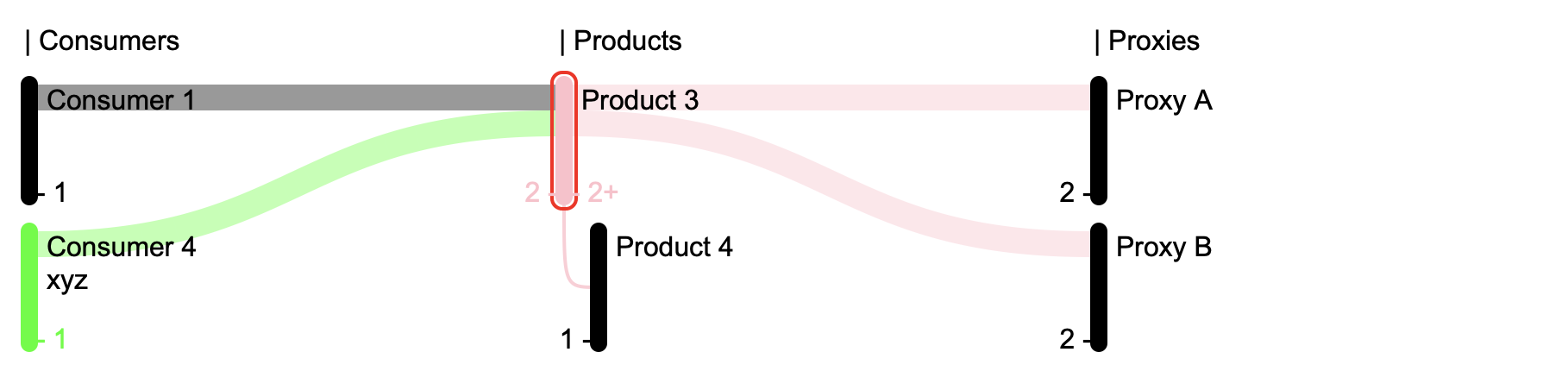
Quick Start Example
Here's a simple example using plain vanilla javascripts without any third party dependencies:
<head>
  <title>Sankey Chart Demo</title>

  <script src="../dist/vanilla/event-handler.js"></script>
  <script src="../dist/vanilla/sankey-chart-data.js"></script>
  <script src="../dist/vanilla/sankey-chart.js"></script>
</head>

<body>

  <svg id="sankey-chart-svg" width="900" height="600"></svg>

  <script>
    // Initialize the SankeyChartData with demo data
    const chartData = {
      name: "MockData",
      "nodes": [
        { kind: "product", name: "Product 1" },
        { kind: "product", name: "Product 2", "tags": ["abc"] },
        { kind: "product", name: "Product 3", color: "pink" },
        { kind: "product", name: "Product 4" },
        { kind: "product", name: "Product 5" },
        { kind: "consumer", name: "Consumer 1" },
        { kind: "consumer", name: "Consumer 2" },
        { kind: "consumer", name: "Consumer 3" },
        { kind: "consumer", name: "Consumer 4", "tags": ["xyz"] },
        { kind: "proxy", name: "Proxy A" },
        { kind: "proxy", name: "Proxy B" },
        { kind: "proxy", name: "Proxy C" },
        { kind: "proxy", name: "Proxy D" }
      ],
      "relations": [
        { source: { kind: "consumer", name: "Consumer 1" }, "target": { kind: "product", name: "Product 3" } },
        { source: { kind: "consumer", name: "Consumer 4" }, "target": { kind: "product", name: "Product 3" } },
        { source: { kind: "product", name: "Product 3" }, "target": { kind: "proxy", name: "Proxy B" } },
        { source: { kind: "product", name: "Product 3" }, "target": { kind: "proxy", name: "Proxy A" } },
        { source: { kind: "product", name: "Product 3" }, "target": { kind: "product", name: "Product 4" } },
        { source: { kind: "product", name: "Product 5" }, "target": { kind: "proxy", name: "Proxy A" } },
        { source: { kind: "product", name: "Product 5" }, "target": { kind: "proxy", name: "Proxy B" } },
        { source: { kind: "product", name: "Product 5" }, "target": { kind: "proxy", name: "Proxy C" } },
        { source: { kind: "product", name: "Product 5" }, "target": { kind: "proxy", name: "Proxy D" } },
        { source: { kind: "product", name: "Product 2" }, "target": { kind: "proxy", name: "Proxy D" } }
      ]
    };

    const chartDataOptions = {
      defaultColor: "black",
      kinds: [
        { name: 'consumer', title: 'Consumers' },
        { name: 'product', title: 'Products' },
        { name: 'proxy', title: 'Proxies' }
      ],
      showRelatedKinds: true,
      selectAndFilter: true,
      tagColorMap: {
        "abc": "#ff0000",
        "xyz": "#00ff00"
      }
    };

    const partialData = false;
    const sankeyChartData = new SankeyChartData(chartData, chartDataOptions, partialData);
    sankeyChartData.selectNode({ kind: "product", name: "Product 3" });
    sankeyChartData.selectNode(undefined);

    const svg = document.getElementById('sankey-chart-svg');
    const sankeyChart = new SankeyChart(svg);
    sankeyChart.setData(sankeyChartData);
    sankeyChart.render();

  </script>
</body>
Add Context Menu
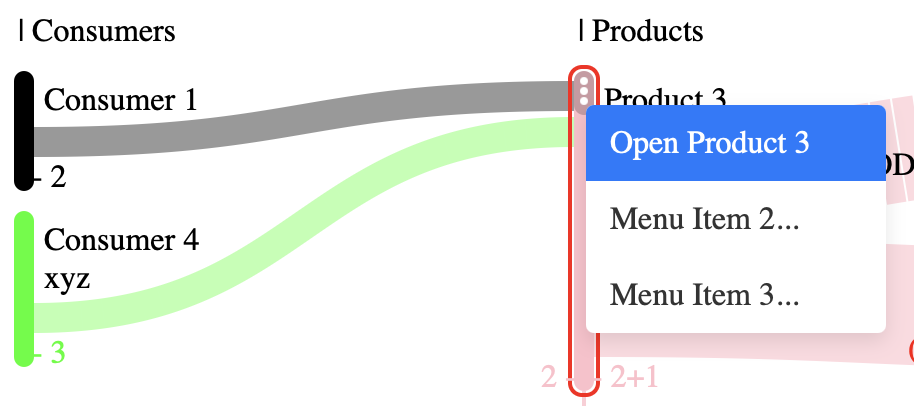
In this section, we demonstrate how to add a custom context menu to the Sankey chart. A context menu provides additional options and actions when a user right-clicks on a selected element within the chart. This can enhance the user experience by offering quick access to relevant features.
Below is an example of how to create and display a context menu using plain HTML, CSS, and JavaScript:
<style>
  .context-menu {
    position: absolute;
    top: 50px;
    left: 0;
    background-color: white;
    box-shadow: 0 4px 10px rgba(0, 0, 0, 0.1);
    border-radius: 4px;
    overflow: hidden;
    display: none;
    width: 150px;
    z-index: 1000;
  }

  .context-menu ul {
    list-style: none;
    margin: 0;
    padding: 0;
  }

  .context-menu .menu-item {
    padding: 10px 12px;
    cursor: pointer;
    transition: background-color 0.3s ease;
    font-size: 1em;
    color: #333;
  }

  .context-menu .menu-item:hover {
    background-color: #007bff;
    color: white;
  }
</style>

<div id="contextMenu" class="context-menu"></div>
<script>
const sankeyChartData = new SankeyChartData(chartData, chartDataOptions);
const svg = document.getElementById('sankey-chart-svg');
const sankeyChart = new SankeyChart(svg);
sankeyChart.setData(sankeyChartData);
/* Add Context Menu */
const contextMenu = document.getElementById("sankey-chart-contextMenu");
function populateContextMenu(event, selectedNode) {
contextMenu.innerHTML = "";
contextMenu.style.display = "block";
contextMenu.style.left = `${event.pageX}px`;
contextMenu.style.top = `${event.pageY}px`;
const items = [
{
label: "Open " + selectedNode.name,
url: "https://example.com/item1",
target: "same"
},
{ label: "Menu Item 2...", url: "https://example.com/item2" },
{ label: "Menu Item 3...", url: "https://example.com/item3" }
];
const list = document.createElement("ul");
contextMenu.appendChild(list);
// Add new menu items
items.forEach((item) => {
const menuItem = document.createElement("li");
menuItem.classList.add("menu-item");
menuItem.textContent = item.label;
menuItem.addEventListener("click", (event) => {
alert(`You clicked on ${item.label}`);
list.style.display = "none";
});
list.appendChild(menuItem);
});
return items;
}
sankeyChart.addContextMenuListeners(populateContextMenu);
// Close menu if clicked outside
document.addEventListener("click", (event) => {
contextMenu.style.display = "none";
});
</script>
Add Minimap
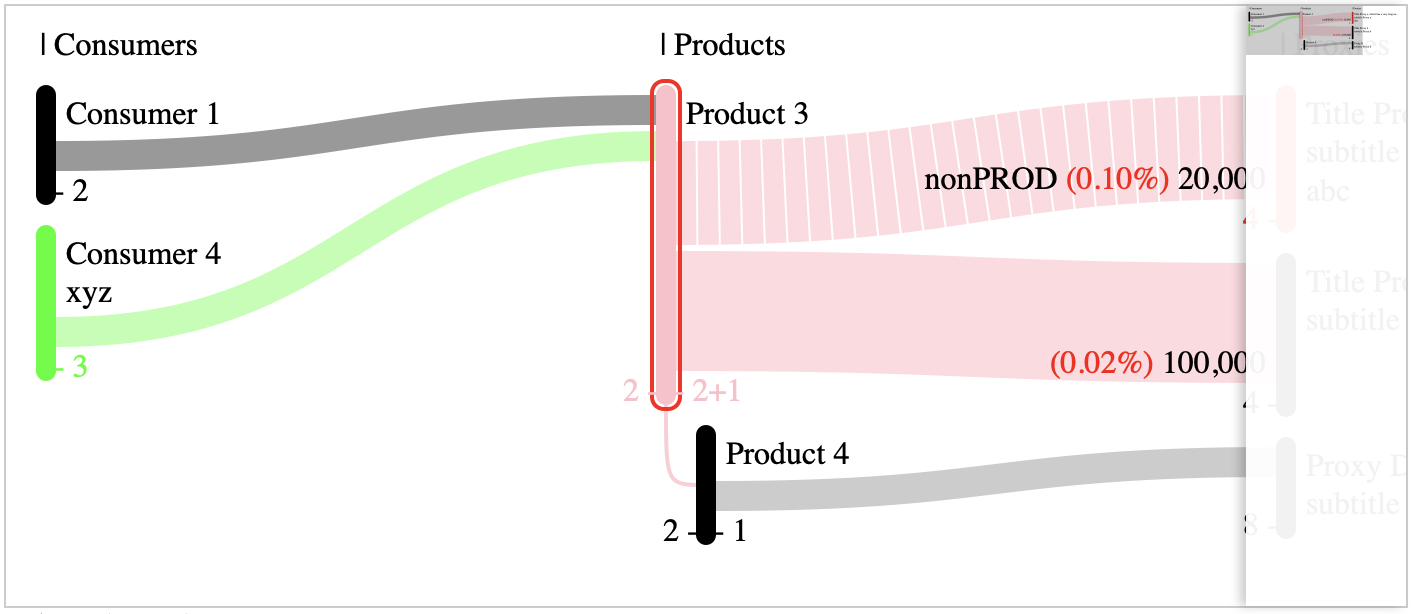
In this section, we demonstrate how to add a minimap to the Sankey chart. A minimap provides an overview of the entire chart, allowing users to navigate large charts more easily.
Below is an example of how to create and display a minimap using plain HTML, CSS, and JavaScript:
<style>
  .minimap-container {
    display: flex;
    position: relative;
    width: 400px;
    height: 300px;
    border: 1px solid #ccc;
  }

  .minimap-viewport {
    overflow: auto;
  }

  .minimap-viewport::-webkit-scrollbar {
    display: none;
  }

  .minimap-pane {
    width: 80px;
    box-shadow: -3px 0 5px -4px black;
    background-color: rgba(255, 255, 255, 0.9);
    backdrop-filter: blur(3px);
  }

  .minimap-visible-section {
    fill: rgba(0, 0, 0, 0.2);
  }
</style>
<div id="container" class="minimap-container">
  <!-- Main Viewport -->
  <div id="mainViewport" class="minimap-viewport">
    <svg id="sankey-chart-svg"><!-- Add your SVG content here --></svg>
  </div>
</div>
<script src="../dist/vanilla/minimap.js"></script>
<script>
const svgElement = document.getElementById('sankey-chart-svg');
const containerElement = document.getElementById('container');
const mainViewElement = document.getElementById('mainViewport');
new Minimap(svgElement, containerElement, mainViewElement);
</script>Chart Data Options
Each option lets you customize the behavior and appearance of your Sankey chart. You can adjust these parameters based on your data visualization needs.
{
  "kinds": [
    {
      "name": "consumer",
      "title": "Consumers"
    },
    {
      "name": "product",
      "title": "Products",
      "includeAlternative": true
    },
    {
      "name": "proxy",
      "title": "Proxies"
    }
  ],
  "showRelatedKinds": true,
  "showSameKindsOnNonSelected": false,
  "selectAndFilter": true,
  "tagColorMap": {
    "abc": "#ff0000",
    "xyz": "#00ff00"
  }
}kinds: This is an array of objects. Each object represents a node type and contains:name: A unique identifier used internally (for example, "consumer", "product", "proxy").title: The display name used column name.includeAlternative(optional): When set to true (as seen for "product"), it instructs the library to consider alternative variations or representations for that node type when applicable.
showRelatedKinds: A boolean flag that, when true, causes the chart to display nodes that are related to the currently selected node—even if they belong to a different kind. This can provide additional context around connections between node types. Only relevant when node is selected.showSameKindsOnNonSelected: A boolean flag that controls whether nodes of the same kind should remain visible even if they are not selected. When set to false, only nodes that are selected or directly related will be emphasized. Only relevant when node is selected.selectAndFilter: Another boolean flag that enables interactive behavior. When true, selecting a node automatically filters other nodes or links according to the selection criteria, highlighting only the parts of the chart that are related.tagColorMap: An object that maps tag names to color codes. When nodes have tags (for example, "abc" or "xyz"), this map assigns specific colors to them. It helps in visually distinguishing nodes by tag in your chart.
Rendering Options
{
  "defaultColor": "black",
  "renderKindAsColums": true,
  "nodeColumnWidth": 250
}defaultColor: Specifies the fallback color (here "black") used for nodes if no explicit color or tag-based color is provided.renderKindAsColums: When set to true, nodes are rendered in separate columns based on their kind. This layout can help visually separate different types of nodes in the chart.nodeColumnWidth: The set pixel width (here 250) for each node column when renderKindAsColums is enabled. This controls how much horizontal space each group of nodes will occupy.
CDN
https://cdn.jsdelivr.net/npm/@vii7/awesome-sankey-chart/
Release notes
v0.1.21 > v0.2.0
changes
- options - typo fixed:
nodeColumnWith>nodeColumnWidth - small improvements