
@violetjs/inkline
v0.3.0
Published
Hand-drawn vector inking for SVG and Canvas: pens with pressure, human-like strokes, fills, line-and-wash style, draw-on animation and GIF/WebM export.


Readme
@violetjs/inkline
English | 简体中文
用于 SVG 与 Canvas 的手绘矢量绘图库。输入图形或 SVG path,它会像人一样作画:规划笔画、运笔、施压,再给图形上色。同一份结果既能输出成 SVG,也能画到 Canvas 上。
- 像画出来的,而不是加了抖动。 转角处断笔并交叉越界,长线分几笔画完,闭合图形在起笔处首尾重叠。
- 带压感的笔。 内置签字笔、钢笔、马克笔与 G 笔,每支笔的压感强度都可调,也可以自己写笔。
- 填充与淡彩。 七种图案填充,外加一种水彩感的淡彩:朝光一侧留出纸白,背光侧加短排线。
- 直接用于现有图表。 用
inkSvg原地重画 Mermaid、Graphviz 或 D3 的输出,布局、文字与颜色都保留。 - 绘制动画。 整幅图按笔画依次、同时或交错重放;跳转、暂停和倒放都不重新生成。
- 导出 GIF 与 WebM。 把动画离线渲染成 GIF 或 WebM 视频,尺寸、帧率与时长都可指定。
- 结果确定。 相同输入与 seed 总是得到相同输出,修改一个图形不会影响其他图形。
- 体积小,不绑定框架。 默认笔加 SVG 渲染器打包后约 10 KB(gzip),只有一个依赖。
安装
npm install @violetjs/inkline快速上手
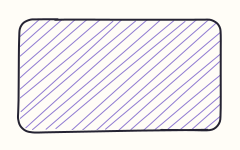
import { draw, fills, rect, styles } from "@violetjs/inkline";
import { renderSvg } from "@violetjs/inkline/svg";

const drawing = draw(
	{
		width: 240,
		height: 150,
		items: [{ id: "card", path: rect(20, 20, 200, 110, 12), fillRole: "surface" }],
	},
	{ style: { ...styles.natural, fill: fills.hachure }, seed: 35 },
);

const palette = { paper: "#fffdf7", ink: "#252332", surface: "#8f7ad1" };

// SVG markup as a string. In the browser, mountSvg(drawing, palette) returns an <svg> element.
const svg = renderSvg(drawing, palette);
场景由若干图元组成。每个图元有稳定的 id、一条 path,以及可选的颜色角色:fillRole,和默认为 ink 的 strokeRole。颜色角色在渲染时按调色板解析,所以换色不用重新生成。
样例
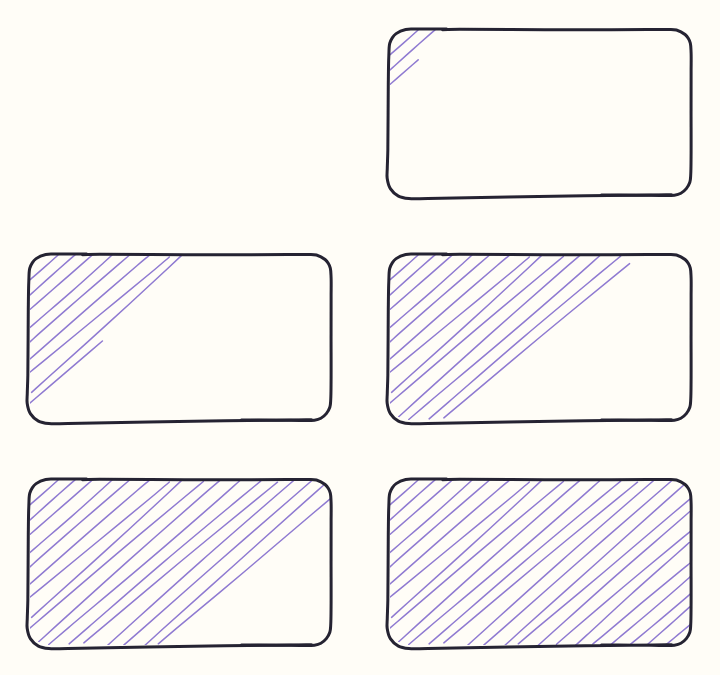
每段代码都摘自 examples/ 中的文件,上方的图就是该文件的输出。图形样例只展示传给 draw 的 style 与 items,调用与渲染同快速上手,图形顺序与代码行一致。
笔
const style = styles.natural;
const items: SceneItem[] = [
	{ id: "a", path: rect(20, 20, 100, 80), style: { ...style, pen: fineliner } }, // constant width
	{ id: "b", path: rect(150, 20, 100, 80), style: { ...style, pen: inkpen } }, // tapers at both ends
	{ id: "c", path: rect(280, 20, 100, 80), style: { ...style, pen: marker } }, // translucent chisel nib
	{ id: "d", path: rect(410, 20, 100, 80), style: { ...style, pen: gpen } }, // hairline to bold
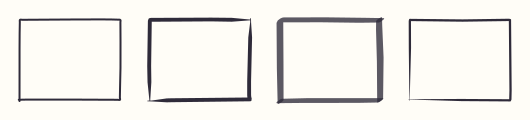
];fineliner(签字笔)是默认的笔:圆笔尖、恒宽,以原生描边输出。inkpen(钢笔)起收笔收细;marker(马克笔)是半透明扁笔尖,笔画重叠处颜色加深;gpen(G 笔)是漫画勾线用的软尖笔,随压力从发丝线变到粗线。要改参数,用对应的工厂函数,比如 createGPen({ pressure: 0.5 });压感强度从 0(恒宽)到 1。
手法
const style = styles.natural;
const items: SceneItem[] = [
	{ id: "a", path: rect(20, 20, 100, 80), fillRole: "card", style: styles.neat },
	{ id: "b", path: rect(150, 20, 100, 80), fillRole: "card", style: styles.natural },
	{ id: "c", path: rect(280, 20, 100, 80), fillRole: "card", style: styles.draft }, // every stroke twice
	{
		id: "d",
		path: rect(410, 20, 100, 80),
		fillRole: "card",
		style: { ...style, hand: hands.inking },
	},
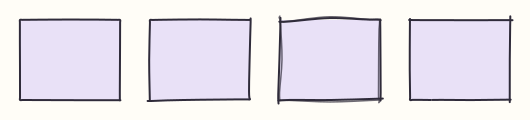
];手法负责把几何变成笔画。从左到右:neat(工整)与 natural(自然)适合图表和界面;draft(草稿)每一笔画两遍,像随手的速写;inking(勾线)在转角处抬笔、线条交叉越界,像漫画线稿。createHand 可以按自己的参数创建手法。
填充
const style = styles.natural;
const items: SceneItem[] = [
	{
		id: "a",
		path: rect(20, 20, 100, 80),
		fillRole: "sky",
		style: { ...style, fill: fills.hachure },
	},
	{
		id: "b",
		path: rect(150, 20, 100, 80),
		fillRole: "rose",
		style: { ...style, fill: fills["cross-hatch"] },
	},
	{
		id: "c",
		path: rect(280, 20, 100, 80),
		fillRole: "mint",
		style: { ...style, fill: fills.dots },
	},
	{
		id: "d",
		path: rect(410, 20, 100, 80),
		fillRole: "sun",
		style: { ...style, fill: fills.solid },
	},
	{
		id: "e",
		path: rect(20, 130, 100, 80),
		fillRole: "sky",
		style: { ...style, fill: createPatternFill("hachure", { gap: 10, angle: 60 }) }, // wider gap, steeper lines
	},
	{
		id: "f",
		path: rect(150, 130, 100, 80),
		fillRole: "rose",
		style: { ...style, fill: fills.zigzag },
	},
	{
		id: "g",
		path: rect(280, 130, 100, 80),
		fillRole: "mint",
		style: { ...style, fill: fills.dashed },
	},
	{ id: "h", path: rect(410, 130, 100, 80), fillRole: "sun", style: lineWashStyle }, // wash
];
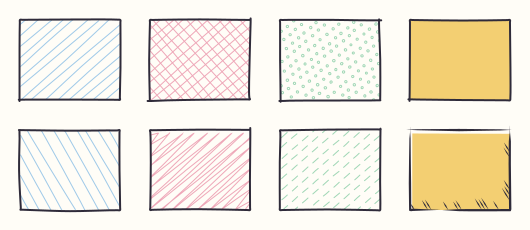
fills 包含 hachure、cross-hatch、zigzag、zigzag-line、dashed、dots 与 solid;createPatternFill 调整图案的间距与角度,createWashFill 是水彩感的淡彩。图案线条由描边用的同一手法和笔画出;evenodd 与 nonzero 两种填充规则下,孔洞都会留空。
线稿淡彩
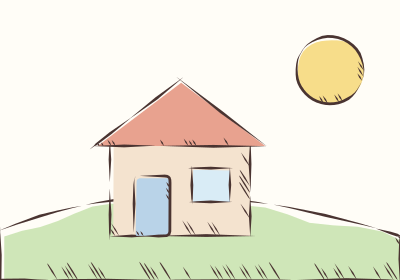
const style = lineWashStyle;
const items: SceneItem[] = [
	{ id: "hill", path: pathFromSvg("M0 230C120 180 260 190 400 236V280H0Z"), fillRole: "grass" },
	{ id: "sun", path: circle(330, 70, 34), fillRole: "sun" },
	{ id: "wall", path: rect(110, 140, 140, 96), fillRole: "wall" },
	{
		id: "roof",
		path: polygon([
			[94, 146],
			[180, 80],
			[266, 146],
		]),
		fillRole: "roof",
	},
	{ id: "door", path: rect(134, 176, 36, 60, 4), fillRole: "door" },
	{ id: "window", path: rect(192, 168, 38, 34), fillRole: "glass" },
];
lineWashStyle 组合了勾线手法、G 笔与淡彩填充。每个图形只需一种基础色:淡彩朝背光侧错开,朝光一侧留出纸白,较大的图形在背光侧加短排线。
图表
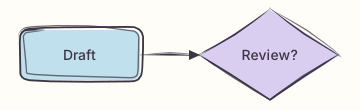
const style = { ...styles.draft, pen: gpen };
const items: SceneItem[] = [
	{
		id: "draft",
		path: rect(20, 30, 120, 50, 8),
		fillRole: "sky",
		label: { text: "Draft", x: 80, y: 55 },
	},
	{
		id: "review",
		path: polygon([
			[270, 10],
			[340, 55],
			[270, 100],
			[200, 55],
		]),
		fillRole: "lilac",
		label: { text: "Review?", x: 270, y: 55 },
	},
	{ id: "edge", path: line(140, 55, 200, 55), pinEnds: true }, // ends stay on the node edges
	{
		id: "head",
		path: polygon([
			[200, 55],
			[189, 50],
			[189, 60],
		]),
		fillRole: "ink",
		strokeRole: "none",
		style: { ...style, fill: fills.solid },
	},
];
用自己的布局画图时,把节点与连线的几何传进来即可;Mermaid 等现成的 SVG 见 Mermaid 与其他 SVG。label 以给定点为中心绘制文字;pinEnds: true 让连线端点精确落在给定位置,箭头才能对齐。
Mermaid 与其他 SVG

import { gpen, styles } from "@violetjs/inkline";
import { inkSvg } from "@violetjs/inkline/dom";
import mermaid from "mermaid";

const source = `flowchart LR
	idea([Idea]) --> draft[Draft] --> review{Review?}
	review -- yes --> publish[Publish]
	review -- no --> draft`;

mermaid.initialize({ startOnLoad: false, theme: "neutral" });
const { svg } = await mermaid.render("flow", source);

const host = document.querySelector("#diagram") as HTMLElement;
host.innerHTML = svg;
// inkSvg reads computed styles and sizes, so the SVG must already be in the document.
inkSvg(host.querySelector("svg") as SVGSVGElement, { style: { ...styles.draft, pen: gpen } });
@violetjs/inkline/dom 中的 inkSvg 把页面上已经渲染好的 SVG(比如 Mermaid、Graphviz 或 D3 的输出)原地重画:图形换成 inkline 的笔触,布局、文字、箭头标记和颜色都保留。虚线保留虚线样式,紧贴文字的背景不加框,对同一张 SVG 重复调用不会画出两层。它要读取实际样式和尺寸,所以需要浏览器 DOM。参数见 inkSvg。
勾画矢量画稿
本页顶部的插画就是下面 inkArtwork 的输出,输入是画稿的色面路径、实墨区域路径,以及带线宽的描摹中心线。
/** Vector artwork: flat color regions under solid ink areas and centerlines with their own widths. */
export interface Artwork {
	width: number;
	height: number;
	palette: Palette;
	/** Fill role for a full-size background rectangle. */
	paperRole?: string;
	/** Color role for ink areas and centerlines without their own role. */
	inkRole: string;
	colors: { role: string; paths: string[] }[];
	ink: { path: string; role?: string }[];
	strokes: { width: number; path: string; role?: string }[];
}

export function inkArtwork(art: Artwork): string {
	const items: SceneItem[] = [
		...(art.paperRole
			? [
					{
						id: "paper",
						path: rect(0, 0, art.width, art.height),
						strokeRole: "none",
						fillRole: art.paperRole,
					},
				]
			: []),
		...art.colors.flatMap(({ role, paths }) =>
			paths.map(
				(d, i): SceneItem => ({
					id: `${role}-${i}`,
					path: pathFromSvg(d, "evenodd"),
					strokeRole: "none",
					fillRole: role,
				}),
			),
		),
		...art.ink.map(
			({ path, role }, i): SceneItem => ({
				id: `ink-${i}`,
				path: pathFromSvg(path, "evenodd"),
				strokeRole: "none",
				fillRole: role ?? art.inkRole,
			}),
		),
		// Each centerline keeps the width it was traced with; the G pen tapers it by pressure.
		...art.strokes.map(
			({ width, path, role }, i): SceneItem => ({
				id: `stroke-${i}`,
				path: pathFromSvg(path),
				lineWidth: width,
				strokeRole: role ?? art.inkRole,
			}),
		),
	];
	// lineWashStyle already uses the G pen; flat colors instead of the wash keep the artwork's own shading
	const style = { ...lineWashStyle, fill: fills.solid };
	const drawing = draw(
		{ width: art.width, height: art.height, items },
		{ style, seed: 7, width: 1.6 },
	);
	// One decimal place is plenty for a large drawing and keeps the markup smaller.
	return renderSvg(drawing, art.palette, { decimals: 1, background: false });
}
动画
动画需要 DOM,这个样例没有配图。
import { createPlayer, createSchedule, draw, rect, styles } from "@violetjs/inkline";
import { mountSvg, seekSvg } from "@violetjs/inkline/svg";

/** Call in a browser; cancel the returned player when removing the host. */
export function animateCard(host: HTMLElement) {
	const drawing = draw(
		{ width: 240, height: 150, items: [{ id: "card", path: rect(20, 20, 200, 110, 12) }] },
		{ style: styles.natural, seed: 35 },
	);
	const palette = { paper: "#fffdf7", ink: "#252332" };
	const schedule = createSchedule(drawing, { mode: "stagger" });
	const svg = mountSvg(drawing, palette, { schedule });
	host.append(svg);
	const player = createPlayer({
		duration: schedule.duration,
		onFrame: (time) => seekSvg(svg, time),
	});
	player.play();
	return player;
}
描边沿路径逐渐显现,变宽笔画从起笔处生长出来,填充淡入。动画只改变哪些部分可见,从不重新生成。Canvas 上每帧调用 drawCanvas(drawing, canvas, palette, { schedule, time })。
导出
import { createSchedule, draw, fills, rect, styles } from "@violetjs/inkline";
import { exportGif } from "@violetjs/inkline/export";

/** Call in a browser: renders the draw-on animation offline and resolves with a GIF. */
export async function exportCard(): Promise<Blob> {
	const drawing = draw(
		{
			width: 240,
			height: 150,
			items: [{ id: "card", path: rect(20, 20, 200, 110, 12), fillRole: "surface" }],
		},
		{ style: { ...styles.natural, fill: fills.hachure }, seed: 35 },
	);
	const palette = { paper: "#fffdf7", ink: "#252332", surface: "#8f7ad1" };
	const schedule = createSchedule(drawing, { mode: "stagger" });
	return exportGif(drawing, palette, { schedule, width: 360, hold: 1.5 });
}
exportGif 按编排离线逐帧绘制,文件与播放速度、暂停无关。传入 duration 可把较长的编排压进较短的文件。exportWebm 通过 WebCodecs 写出 WebM 视频,先调用 canExportWebm() 确认浏览器能否编码。两者都需要浏览器。全部参数见 API 文档。
API
API 文档列出了每个导出与参数。主要入口:
| 导入路径 | 导出 |
| --- | --- |
| @violetjs/inkline | draw、几何函数(rect、circle、ellipse、line、polyline、polygon、curve、arc、pathFromSvg)、风格、手法、笔、填充、动画编排与扩展接口 |
| @violetjs/inkline/svg | renderSvg、mountSvg、seekSvg、updateSvgPalette、pathData |
| @violetjs/inkline/canvas | drawCanvas |
| @violetjs/inkline/dom | inkSvg |
| @violetjs/inkline/export | exportGif、exportWebm、canExportWebm |
运行环境
- ES2022 与原生 ES 模块:2022 年及以后发布的浏览器;
renderSvg需要 Node.js 18 及以上。 mountSvg、seekSvg、drawCanvas与inkSvg需要浏览器 DOM。exportGif与exportWebm需要OffscreenCanvas,exportWebm还需要 WebCodecs。- 自带的类型声明需要 TypeScript 5 及以上。