
@vishal2612200/agentpack
v0.4.3
Published
Local context engine for AI coding agents. Ranks relevant repo files and builds compact task-focused context packs for Claude Code, Codex, Cursor, Windsurf, MCP, and CI workflows.

Maintainers
 dev_vishal_sharma
Readme
AgentPack







Your agent starts cold. AgentPack hands it the map.
AgentPack ranks relevant repository files and builds compact task-focused context packs for Claude Code, Codex, Cursor, Windsurf, Copilot, Cline, Kiro, OpenCode, MCP tools, CI jobs, and markdown-based LLM workflows.
It analyzes your repo locally, compresses selected context into a token budget, and gives coding agents a ranked starting map before they spend tool calls rediscovering routes, services, tests, configs, and repo rules.
Use it when the repo is too large to paste and you want a repeatable context map around likely relevant routes, services, tests, configs, and recent changes.
This npm package is a launcher and wrapper for the Python CLI agentpack-cli, giving JavaScript-heavy teams a familiar install path while keeping the Python implementation as the source of truth.
AgentPack is a context preparation tool, not a coding agent. It stays local, deterministic, and explainable: no hosted LLM calls, no embeddings, and no vector database for scan, summarize, rank, pack, stats, or benchmark.
Try the read-only task router without writing context files:
npx @vishal2612200/agentpack route --task "fix auth token expiry"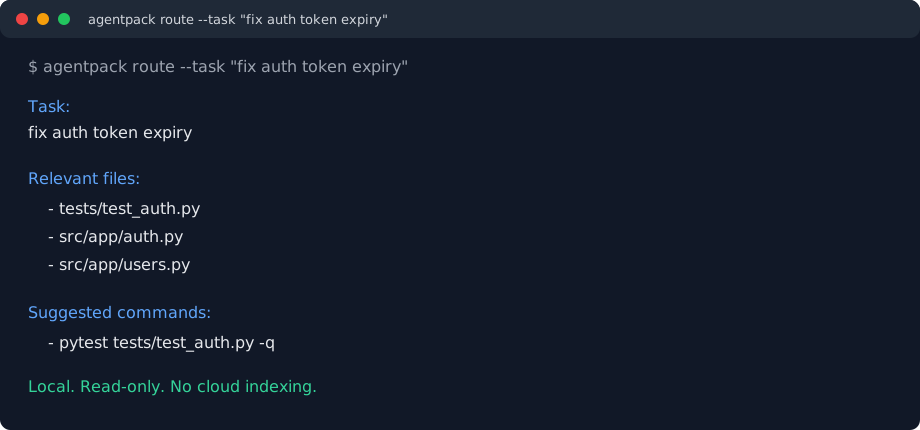
Status: alpha (v0.4.3). Works, tested, and used in real sessions. Python and JavaScript/TypeScript are the best-supported languages. Current benchmarks are useful regression checks, not broad proof that AgentPack improves coding-agent success. API may change before 1.0.
Platform note: macOS, Linux, and Windows are supported. Windows support targets PowerShell plus Git for Windows.
Name note: PyPI package is
agentpack-cli, npm package is@vishal2612200/agentpack, and the command isagentpack. This project is unrelated to AgentPack dataset papers or other repos with the same name.
Latest Update
0.4.3 adds bounded route planning, explicit PR-target handling, managed Git
hook repair, release evidence gates, and patched Python/npm dependency locks.
It also includes the core-first architecture map controls, dashboard runtime
fixes, graph identity fixes, and expanded installation guidance.
npx @vishal2612200/agentpack work "fix auth token expiry"
npx @vishal2612200/agentpack learn --json
npx @vishal2612200/agentpack finish
npx @vishal2612200/agentpack doctor
Before vs After
Without AgentPack, a cold coding-agent session often starts with manual repo orientation:
Task: fix auth token expiry

Agent:
- searches for auth files
- opens nearby middleware and config
- may miss related tests
- spends early turns building a repo map
With AgentPack:
agentpack route --task "fix auth token expiry"Task:
fix auth token expiry
Relevant files:
- tests/test_auth.py
- src/app/auth.py
- src/app/users.py
Suggested commands:
- pytest tests/test_auth.py -qFeatures
- Task-focused packing: ranks files from git changes, task terms, symbols, imports, related tests, configs, churn, repo history, and deterministic offline summaries.
- Budget-aware compression: emits
full,diff,symbols,skeleton, orsummaryviews instead of all-or-nothing file dumps. - Local code intelligence: extracts roles, domains, entrypoints, definitions, dependencies, env reads, side effects, and external systems using static analysis.
- Task router: MCP and CLI surfaces route a task to relevant files, scoped rules, installed skills, suggested commands, and safety warnings without executing skills automatically.
- Agent integrations: installs Claude Code, Cursor, Windsurf, Codex, Antigravity, VS Code tasks, git hooks, and MCP configuration.
- Freshness and deltas: records task source, git state, snapshot hashes, selected-file deltas, stale-context warnings, MCP task/repo auto-refresh signals, and a machine-readable
agentpack:freshnessblock in markdown fallback artifacts. - Measurable quality: benchmark expected-file recall, token efficiency, misses, and public smoke suites.
What this npm package is
@vishal2612200/agentpack is a Node launcher for the Python package agentpack-cli.
On first run it:
- Finds Python 3.10+.
- Creates a per-version virtual environment in your user cache directory.
- Installs the matching
agentpack-cliversion from PyPI. - Proxies every command to the real
agentpackCLI.
The Python CLI remains the source of truth. The npm package exists so JavaScript-heavy teams can install AgentPack with the toolchain they already use. This wrapper installs the core CLI; optional Python extras such as watch and mcp are documented below.
Install
npm install -g @vishal2612200/agentpack
agentpack --version
Release trust signals:
- PyPI core package uses GitHub Actions trusted publishing.
- npm wrapper is published with npm provenance.
- GitHub Releases include release-check, benchmark, wheel verification, and registry evidence.
- Next hardening targets are release checksums, SBOM output, and SLSA-style provenance.
Requirements:
- Node.js 18+
- Python 3.10+; tested on Python 3.10-3.14
- macOS, Linux, or Windows with PowerShell plus Git for Windows
First project
cd your-project
agentpack init --agent codex
printf '%s\n' "fix auth token expiry" > .agentpack/task.md
agentpack pack
Use the agent that matches your editor or CLI:
agentpack init --agent claude
agentpack init --agent cursor
agentpack init --agent windsurf
agentpack init --agent codex
agentpack init --agent antigravity
agentpack init creates local .agentpack/ state, installs the selected integration when supported, seeds .agentignore with safe defaults, and imports obvious generated/noisy rules from git ignore sources. agentpack pack reads .agentpack/task.md, ranks relevant files, and writes the adapter-specific context output.
Keep task text concrete. Name feature, route, service, or file path. Broad repo-meta tasks such as improve context pack quality or fix stats noise can pull README or tool internals by keyword.
For a guided setup:
agentpack quickstart --task "fix auth token expiry"Project scope
AgentPack is:
- A local context engine for building task-focused packs for AI coding agents.
- A CLI, MCP server, hook runner, and integration layer.
- A summary cache, import graph, ranking engine, semantic repo map, and token-budget selector.
- An eval harness for measuring whether selected files match files you actually changed.
AgentPack is not:
- A coding agent.
- A hosted service.
- A semantic code search engine.
- A replacement for normal source inspection on critical changes.
- Proven across a large public benchmark suite yet.
Quality bar
AgentPack is best treated as a ranked starting map. It can reduce repeated orientation work, but the agent and reviewer still own correctness.
| Signal | What good looks like |
|---|---|
| Token reduction | Measure against raw repo text for your repo; savings depend on task, ignores, and budget |
| Pack size | Usually 8k-25k tokens for a specific task |
| Pack time | Seconds on a warm cache; first summarize pass is slower |
| Recall | Expected files appear near the top; validate with agentpack benchmark --misses |
| Precision | Good enough to reduce exploration; summaries and repo maps may still include noise |
| Freshness | Task or repo-stale MCP reads auto-refresh; static packs are clearly marked by task, git, and snapshot checks |
Use real repo evals instead of trusting compression numbers:
agentpack benchmark --init
# add historical tasks and files actually changed
agentpack benchmark --compare --misses --public-table
agentpack benchmark --public-repos --prove-targets --misses --public-table
Daily workflow
printf '%s\n' "fix billing webhook retry handling in app/api/billing/route.ts" > .agentpack/task.md
agentpack pack
agentpack stats
If results look noisy, tighten task text first, then add repo-specific generated paths to .agentignore or run agentpack ignore sync.
agentpack ignore sync refreshes imported generated/noisy rules from the root .gitignore, nested .gitignore files, .git/info/exclude, and your global git ignore while leaving your manual .agentignore entries alone.
Useful commands
agentpack status
agentpack doctor --agent all
agentpack pack --agent auto --task auto
agentpack migrate --path ~/src --discover --agent all
agentpack explain --file path/to/file.py
agentpack benchmark --sample-fixtures --misses
agentpack global-repair-hooks
agentpack repair --agent all
agentpack doctor reports the installed version, available CLI commands, MCP registration, stale context, and exact repair or upgrade command. Generated agent rules use the available command surface; older installs fall back to agentpack pack --task auto instead of referencing commands they do not support.
agentpack migrate --discover scans existing repo folders and applies the same integration repair across many repos after an upgrade.
agentpack global-repair-hooks refreshes ~/.git-templates/hooks/, reasserts git config --global init.templateDir, and repairs the current repo's .git/hooks/ so older copied hooks switch over to the safe GitAutoRepack runner.
Native host enforcement skeletons and blocked-status stubs live in native-integrations/ in the source repo. They are marked advisory, not enforced, until host APIs expose mandatory pre-edit/pre-tool hooks.
Optional watch and MCP workflows
The watch and mcp commands use optional Python dependencies. If you need those workflows today, add the Python extras to a pipx install or use a virtual environment. Avoid global pip3 install on system-managed Python: many macOS/Linux distributions block it with PEP 668's externally-managed-environment.
pipx install agentpack-cli
pipx inject agentpack-cli "agentpack-cli[all]"
PIPX_AGENTPACK="$(pipx environment --value PIPX_BIN_DIR)/agentpack"
"$PIPX_AGENTPACK" watch
"$PIPX_AGENTPACK" mcp
Install pipx with your OS package manager first if needed: brew install pipx, sudo apt install pipx, sudo dnf install pipx, or sudo pacman -S python-pipx; then run pipx ensurepath.
Use the explicit pipx binary path above for watch and mcp so those commands do not resolve back to the npm wrapper on PATH. The npm wrapper still works well for the core setup, pack, status, doctor, explain, repair, and benchmark commands.
Python selection
By default, the wrapper tries the Windows py -3 launcher on win32, then python3, then python. To force a specific interpreter:
AGENTPACK_PYTHON=/opt/homebrew/bin/python3 agentpack --versionCache location
The wrapper installs the Python CLI under:
$XDG_CACHE_HOME/agentpack-npm/<version>/or, if XDG_CACHE_HOME is unset:
~/.cache/agentpack-npm/<version>/Override the cache path with:
AGENTPACK_NPM_CACHE_DIR=/tmp/agentpack-cache agentpack --versionTo force a clean reinstall of the Python CLI for this npm package version, remove the matching cache directory and run agentpack --version again.
Troubleshooting
agentpack npm wrapper: Python >=3.10 is required.
Install Python 3.10+ or set AGENTPACK_PYTHON=/path/to/python3 (or python.exe on Windows).
failed to install agentpack-cli==<version>
Check that Python can reach PyPI. Corporate networks may need standard package index or proxy configuration. Avoid global pip3 install on system-managed Python; many macOS/Linux distributions block it with PEP 668's externally-managed-environment. Use pipx or a virtual environment for direct Python installs.
Optional Python watch and mcp extras can be added to a pipx install:
pipx install agentpack-cli
pipx inject agentpack-cli "agentpack-cli[all]"
Install pipx with your OS package manager first if needed: brew install pipx, sudo apt install pipx, sudo dnf install pipx, or sudo pacman -S python-pipx; then run pipx ensurepath.
agentpack: command not found
Make sure your global npm bin directory is on PATH:
printf '%s/bin\n' "$(npm prefix -g)"Security and privacy
AgentPack scans, summarizes, ranks, and packs locally. It does not call an LLM API for the core pack flow. Context files are written into your repository under .agentpack/ and integration-specific local files.
Links
- Full docs: https://github.com/vishal2612200/agentpack
- PyPI package: https://pypi.org/project/agentpack-cli/
- npm package: https://www.npmjs.com/package/@vishal2612200/agentpack
- Issues: https://github.com/vishal2612200/agentpack/issues