
@vivinkv28/strapi-2fa-admin-plugin
v0.1.15
Published
Reusable Strapi admin 2FA plugin

Maintainers
 vivinkv28
Readme
@vivinkv28/strapi-2fa-admin-plugin
Strapi 5 plugin for OTP-based admin authentication.
This package adds the backend flow for:
- admin email/password validation
- OTP challenge creation
- OTP resend and verification
- rate limiting for login, verify, and resend
- final Strapi admin session creation only after OTP verification
UI Preview
Login Screen
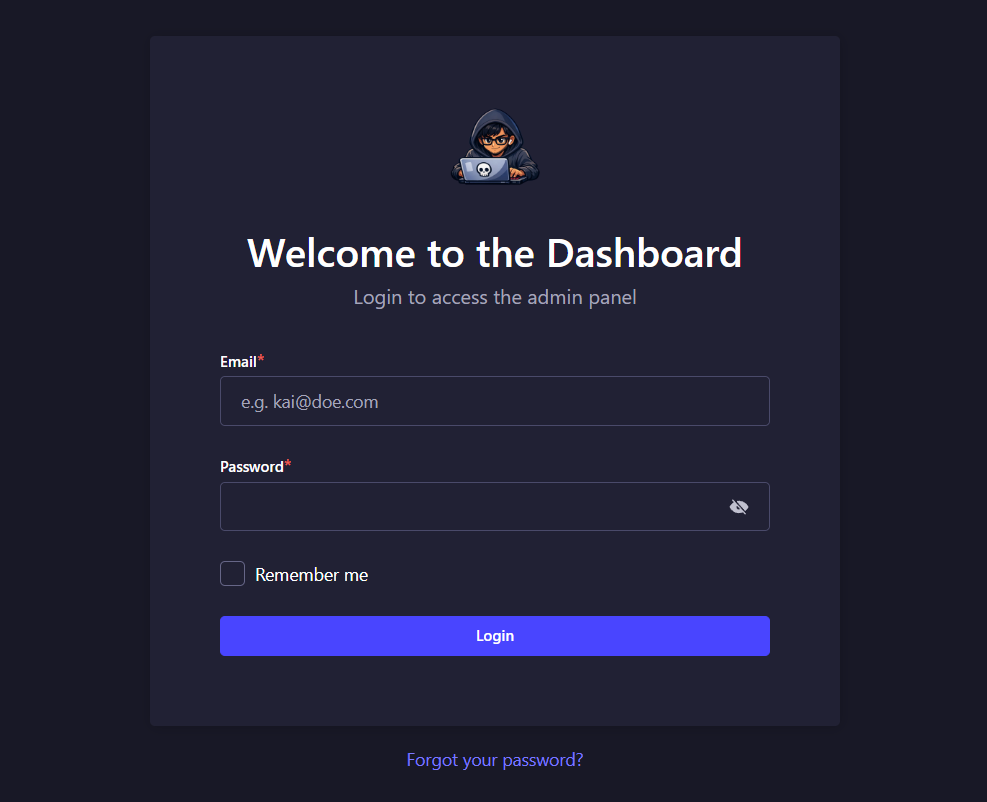
The first step collects the admin email and password before starting the OTP challenge flow.
OTP Screen
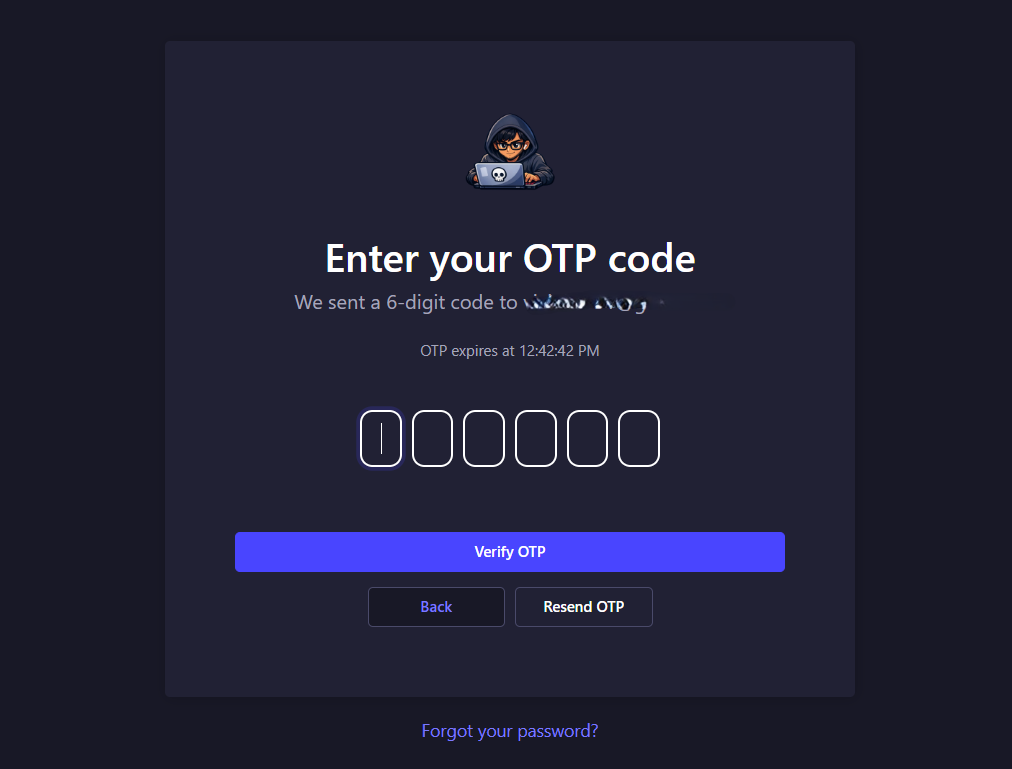
The second step shows the OTP input, resend action, and inline validation feedback during verification.
Important
This package does not automatically replace the default Strapi admin login UI.
You need two parts:
- this plugin for the backend OTP logic
- a host-project patch for the Strapi admin login UI
The good part is that this npm package now includes the host patch source directly, so you can copy it into your Strapi project.
Endpoints
After installation, the plugin exposes:
POST /api/admin-2fa/loginPOST /api/admin-2fa/verifyPOST /api/admin-2fa/resend
Requirements
- Strapi 5
- Node.js
20.xor22.x - a configured Strapi email provider
Install
npm install @vivinkv28/strapi-2fa-admin-pluginEnable The Plugin
Update config/plugins.ts:
import type { Core } from "@strapi/strapi";

const config = ({ env }: Core.Config.Shared.ConfigParams): Core.Config.Plugin => ({
  "admin-2fa": {
    enabled: true,
    config: {
      otpDigits: env.int("ADMIN_OTP_DIGITS", 6),
      otpTtlSeconds: env.int("ADMIN_OTP_TTL_SECONDS", 300),
      maxAttempts: env.int("ADMIN_OTP_MAX_ATTEMPTS", 5),
      maxResends: env.int("ADMIN_OTP_MAX_RESENDS", 3),
      rateLimitWindowSeconds: env.int("ADMIN_OTP_RATE_LIMIT_WINDOW_SECONDS", 900),
      loginIpLimit: env.int("ADMIN_OTP_LOGIN_IP_LIMIT", 10),
      loginEmailLimit: env.int("ADMIN_OTP_LOGIN_EMAIL_LIMIT", 5),
      verifyIpLimit: env.int("ADMIN_OTP_VERIFY_IP_LIMIT", 20),
      verifyEmailLimit: env.int("ADMIN_OTP_VERIFY_EMAIL_LIMIT", 10),
      resendIpLimit: env.int("ADMIN_OTP_RESEND_IP_LIMIT", 10),
      resendEmailLimit: env.int("ADMIN_OTP_RESEND_EMAIL_LIMIT", 5),
      debugTimings: env.bool(
        "ADMIN_OTP_DEBUG_TIMINGS",
        env("NODE_ENV", "development") !== "production"
      ),
    },
  },
});

export default config;
Email Provider
This plugin sends OTP emails through Strapi's email plugin.
If your email provider is not configured correctly, login will fail when OTP delivery is attempted.
Recommended Server Settings
If your Strapi app runs behind a proxy, make sure config/server.ts is configured correctly so admin cookies work as expected.
Example:
import type { Core } from "@strapi/strapi";

const config = ({ env }: Core.Config.Shared.ConfigParams): Core.Config.Server => ({
  host: env("HOST", "0.0.0.0"),
  port: env.int("PORT", 1337),
  url: env("URL", "http://localhost:1337"),
  proxy: env.bool("IS_PROXIED", env("NODE_ENV", "development") === "production"),
  app: {
    keys: env.array("APP_KEYS"),
  },
});

export default config;
Host Patch Files Included In The Package
This package includes the admin UI patch source under:
host-patch/
  apply-strapi-admin-2fa-patch.js
  strapi-admin-2fa-patch/
    services/
      auth.js
      auth.mjs
    pages/
      Auth/
        components/
          Login.js
          Login.mjs
These are the files you can copy into your Strapi project to get the same admin OTP UI pattern.
If you want to view the same host patch files on GitHub, use:
- host-patch folder
- apply-strapi-admin-2fa-patch.js
- services/auth.js
- services/auth.mjs
- pages/Auth/components/Login.js
- pages/Auth/components/Login.mjs
That gives users both options:
- install from npm and copy the bundled files
- inspect the admin UI source directly on GitHub before integrating it
What The UI Patch Does
The bundled host patch changes the Strapi admin login flow to:
- enter admin email and password
- call
POST /api/admin-2fa/login - show an OTP screen
- enter the OTP code
- call
POST /api/admin-2fa/verify - optionally resend OTP with
POST /api/admin-2fa/resend
The included login patch UI contains:
- email and password step
- OTP step
- 6-digit OTP box UI
- paste support
- backspace and focus handling
- resend OTP button
- back button
- inline error handling
How To Use The Included Host Patch
Copy these files from the package into your Strapi project:
host-patch/apply-strapi-admin-2fa-patch.js->scripts/apply-strapi-admin-2fa-patch.jshost-patch/strapi-admin-2fa-patch/services/auth.js->scripts/strapi-admin-2fa-patch/services/auth.jshost-patch/strapi-admin-2fa-patch/services/auth.mjs->scripts/strapi-admin-2fa-patch/services/auth.mjshost-patch/strapi-admin-2fa-patch/pages/Auth/components/Login.js->scripts/strapi-admin-2fa-patch/pages/Auth/components/Login.jshost-patch/strapi-admin-2fa-patch/pages/Auth/components/Login.mjs->scripts/strapi-admin-2fa-patch/pages/Auth/components/Login.mjs
Then wire the patch script in your Strapi project's package.json:
{
  "scripts": {
    "prebuild": "node scripts/apply-strapi-admin-2fa-patch.js",
    "predev": "node scripts/apply-strapi-admin-2fa-patch.js",
    "predevelop": "node scripts/apply-strapi-admin-2fa-patch.js",
    "postinstall": "node scripts/apply-strapi-admin-2fa-patch.js"
  }
}
Request Flow
Login
POST /api/admin-2fa/login
Content-Type: application/json
{
"email": "[email protected]",
"password": "super-secret-password",
"rememberMe": true,
"deviceId": "browser-device-id"
}Verify
POST /api/admin-2fa/verify
Content-Type: application/json
{
"challengeId": "***",
"code": "123456"
}Resend
POST /api/admin-2fa/resend
Content-Type: application/json
{
"challengeId": "***"
}Environment Variables
Suggested defaults:
ADMIN_OTP_DIGITS=6
ADMIN_OTP_TTL_SECONDS=300
ADMIN_OTP_MAX_ATTEMPTS=5
ADMIN_OTP_MAX_RESENDS=3
ADMIN_OTP_RATE_LIMIT_WINDOW_SECONDS=900
ADMIN_OTP_LOGIN_IP_LIMIT=10
ADMIN_OTP_LOGIN_EMAIL_LIMIT=5
ADMIN_OTP_VERIFY_IP_LIMIT=20
ADMIN_OTP_VERIFY_EMAIL_LIMIT=10
ADMIN_OTP_RESEND_IP_LIMIT=10
ADMIN_OTP_RESEND_EMAIL_LIMIT=5
ADMIN_OTP_DEBUG_TIMINGS=false
Test Checklist
After setup, test:
- correct email/password shows OTP screen
- correct OTP logs in successfully
- resend OTP works
- invalid OTP shows an error
- expired OTP restarts the flow properly
- wrong email/password fails safely
Security Note
Email OTP improves admin security, but it is still weaker than TOTP, WebAuthn, or passkeys.