
@volter/cyclotron
v0.5.211
Published
A free, open-source game editor by videogame.ai using Blender 5.2 compiled to WebAssembly, Code-OSS, three.js, TypeScript and React.


Readme
Cyclotron by videogame.ai
A free, open-source game editor by videogame.ai, built from Blender 5.2 compiled to WebAssembly, Code-OSS, three.js, TypeScript and React.
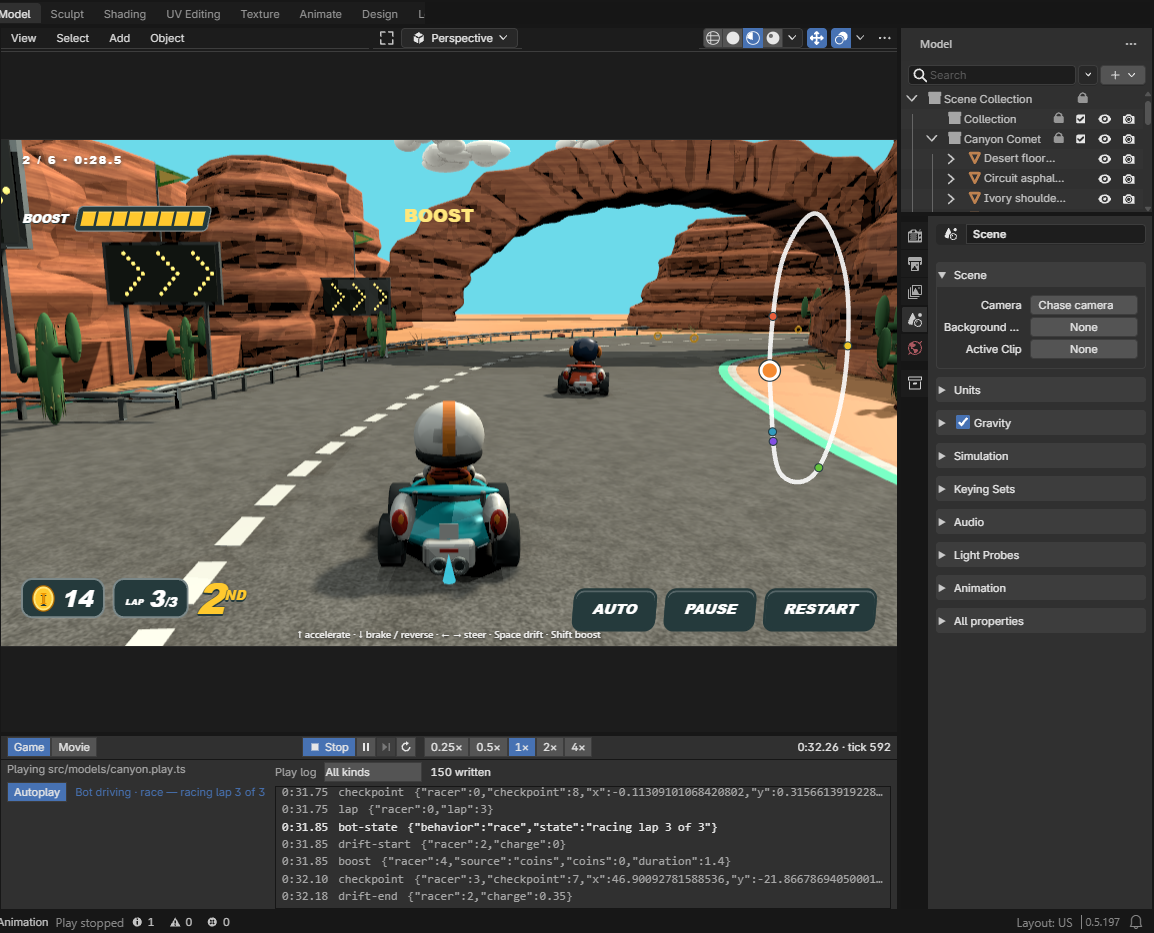
npx @volter/cyclotron create my-race --template playableThe starter game is Canyon Comet: a three-lap kart race against five rivals through a desert canyon, with its Blender scene, the bpy scripts that built it, a TypeScript play script and a React HUD.
Node.js 24. Without it, the one-line install at cyclotron.videogame.ai sets up everything and opens the same starter game.
For a model, run npx @volter/cyclotron without arguments. It opens the current
project, or prepares ~/Documents/Volter Models/Untitled Model with a saved cube
and Chat ready. Later launches reopen that starter and preserve your edits.
What it's made of
| Part | Tool |
| --- | --- |
| Editor shell | VS Code (Code-OSS) |
| Rendering | three.js |
| Gameplay | TypeScript — src/models/canyon.play.ts |
| UI | React — src/ui/ |
| 3D modelling | Blender 5.2 compiled to WebAssembly |
Game and Animation
The Game | Animation switch at the left of the bottom panel's header chooses what that panel is for.
Game (the default for a model with a *.play.ts beside its .blend) shows the Game
panel: Play / Stop, Pause / Resume, Step one tick, Restart, speed (0.25× to 4×) and the
game's clock — simulation time and tick. Beside them, the Autoplay toggle lets the game's
own bot drive (a play script offers one with play.autoplay(controller)), with a line saying
who is driving, and the play log as it is written, filterable by kind. Autoplay is off at every
Play and Restart, and any key or click in the game hands control back to you. A bot exists
only once the game runs, so the panel says "Available once the game is running" while stopped
(pressing Autoplay then arms it for the next Play) and "No autoplay — this game doesn't
provide a bot" for a game without one. Animation (the default otherwise) shows Blender's
animation editors: the Timeline, the Dope Sheet's Action Editor (pick the clip an armature
plays) and the NLA editor. Switching to Animation leaves a running game running, and the
editors then show what it animates, read-only. Each model keeps your choice for the session.
Your agent
- Chat: Sign in with ChatGPT, or use the agent already installed on your machine.
- Chat starts Codex or Claude Code when installed and signed in; other agents are available in its agent picker.
- Each project declares a Blender MCP server for Claude Code and Codex. It passes the agent's requests to the editor's Blender, which runs them as
bpy. AGENTS.mdexplains how to interpret images, videos, specifications and existing assets;CLAUDE.mdimports the same instructions. For a new game, the agent matches a static 3D scene and React UI screenshot to the visual reference before implementing gameplay, including framing, palette and color management.- New projects include
tsconfig.jsonbefore the editor opens, ready for TypeScript play scripts and React UI source. - From the project folder,
npx --no-install cyclotron chat status,chat send "your prompt", andchat stopcontrol the same conversation visible in the editor.sendrequests a native Chat submission; itssubmissionConfirmed: falsereceipt does not confirm a started turn. Status reports busy state and pending requests.
Commands
Run from the project folder with npx --no-install cyclotron <command>;
--help prints the full list.
| Command | What it does |
| --- | --- |
| create <folder> [--template models\|playable] | A new project. |
| upgrade [version] | Moves the project's @volter packages and its engine pin to one release (default: latest). From a project on any earlier version, run it as npx @volter/cyclotron@latest upgrade (a plain npx @volter/cyclotron runs the project's own older version). Prints what changed and what to run next. |
| add-play [folder] | Makes a models project playable: adds the Play and React UI dependencies, the manifest's UI root and resolution, the adapter's regionIncludes.ui, and — when the project has no *.play.ts yet — a first play script for the project's own model (its default .blend, or its only one): <model>.play.ts moves the model's first object with the arrow keys or WASD and offers Autoplay a wander behaviour, game-state.ts beside it holds what it publishes, and src/ui/game.tsx draws that over Play. It does not copy Canyon Comet, the playable template's game. Never overwrites a file; prints what it added, what it left and the next step (npm install when dependencies changed, then reload the editor). |
| status | console | The editor's state, and its unresolved console entries. Entries print to stderr; the command exits 1 only for an unresolved error — warnings alone exit 0. eval ends by the same rule. |
| eval <JavaScript> | eval --list | Runs code against the live editor; --list prints what is in scope and a few common tasks. |
| camera --position x,y,z --target x,y,z [--fov n] | Poses the current document's viewport camera. Coordinates are Blender's: metres, Z up (the command converts them to the stage's Y up). --fov is the vertical field of view in degrees. |
| capture [--region document\|play\|page] [--name words] [--out file.png [--force]] | Saves what the person sees as a PNG and prints its path (default .volter/captures/[<name>-]<region>-<time>.png). The editor shows the picture in its corner for a few seconds, captioned with --name when given. document is the active document with its overlays; play is the live Play frame with its UI. --out refuses to replace an existing file unless --force is given. |
| play [state] | play play\|stop\|pause\|resume\|restart | play step [count] | play speed <0.25\|0.5\|1\|2\|4> | play mode [game\|animation] | play autoplay on\|off | The Game panel's controls, for the model document on screen, and its state as JSON afterwards (mode, playing, the play script, and the clock: simulation time, tick, paused, speed). Pause stops the script's update calls; step runs one 1/60 s update of a paused game; speed scales the dt the script is handed; restart begins again on a fresh copy of the model. A control lands on the next drawn frame, so play state reads its effect. play and restart switch the document to Game mode. autoplay on lets the game's bot drive until a person presses a key or clicks in the game; the state's autoplay says { on, available, by, armed, driver, why }, why being the reason there is no bot to switch (stopped or not yet running, or no bot), which a refused autoplay on prints too. Under eval the same commands are await editor.command('volter.model-play.pause'), …('volter.model-play.speed', { speed: 2 }). |
| screenshot [<target>] | The active document's render, or a model file or entity staged on its own. |
| chat status | chat send "<prompt>" | chat stop | The editor's Chat conversation. |
The editor's address
edit prints http://editor-<id>.localhost:<port>/?project=<name>: each project has its own
host (a stable hash of its folder), and http://127.0.0.1:<port>/ redirects there. A tool that
drives the editor in a browser should bind that printed host and reuse its tab. Binding
127.0.0.1:<port> opens a fresh tab each time, the editor yields the previous one, and tabs pile
up. Running edit again prints the same address and focuses the open tab.
Free and open source
- Price: free.
- Editor: AGPL-3.0-only.
- Blender and starter
bpyscripts: GPL-3.0-or-later. - Other starter source: MIT.