
@wangjian2254/pi-web
v1.0.25
Published
Web UI for the pi coding agent


Readme
Pi Web
pi 编程智能体的本地浏览器界面。Pi Web 与 pi 共用本机配置和会话文件,可在浏览器中查找和继续对话、运行智能体、配置模型与资源,并查看项目文件。
中文微信群:请查看 GitHub Discussions 帖子。
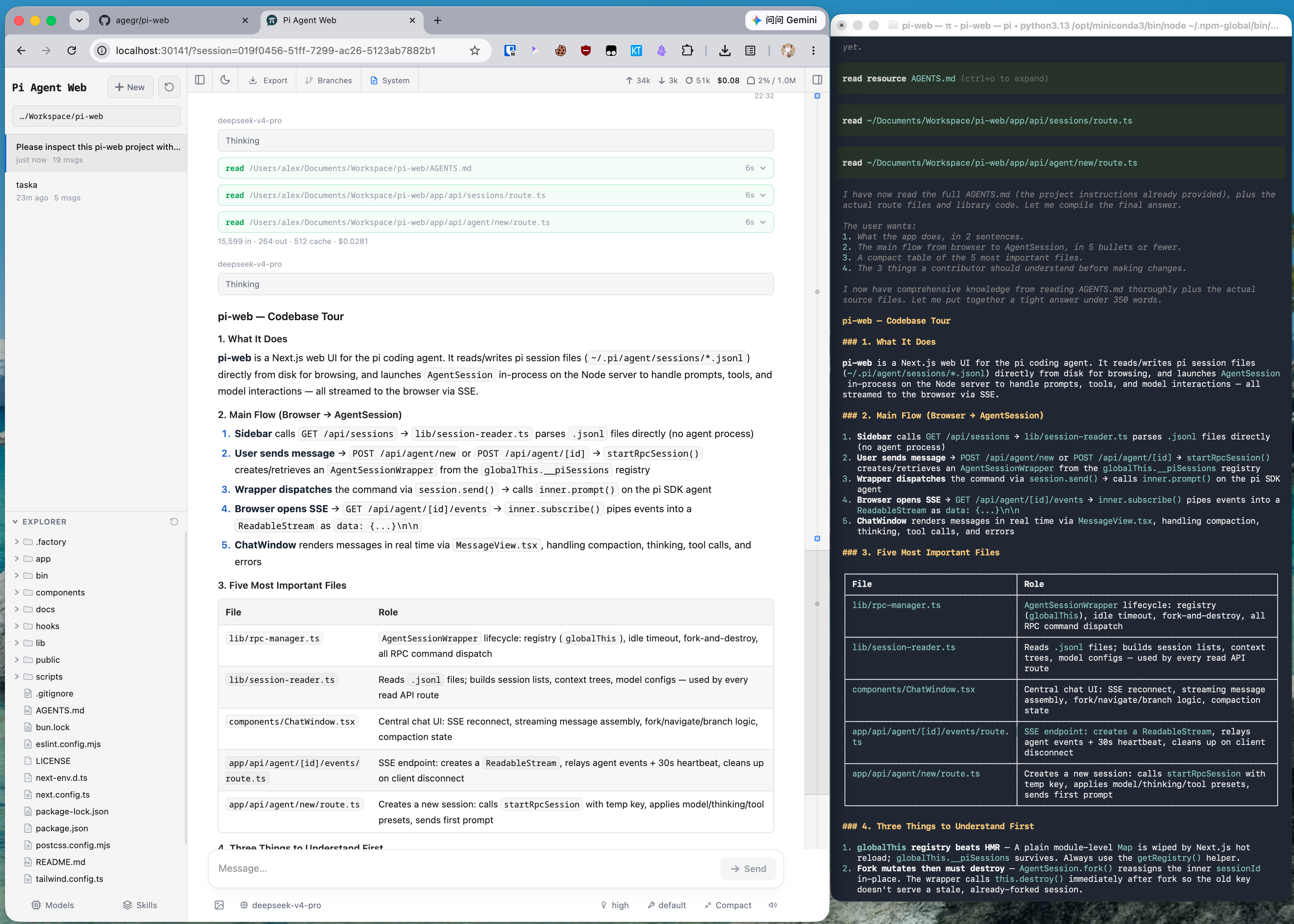
功能
- 会话工作区:按项目查找、继续、重命名、导出和删除对话,并查看运行状态、上下文占用、花费和压缩信息。
- 两种分支方式:新会话会从较早的消息创建独立会话文件;从此处编辑会在当前会话内创建分支。
- 项目文件工具:浏览和上传文件、查看 Git Diff,并预览源码、Markdown、图片、音频、PDF 和 DOCX;文件变化后会自动刷新。
- Git worktree:从侧边栏切换 checkout,同时把同一仓库不同 worktree 的会话归在一起。
- 网页配置:无需离开 Pi Web,即可管理 Provider 登录和 API Key、模型、模型测试、插件包及技能。
- 英文和简体中文界面:Pi Web 首次打开时跟随浏览器语言,也可从顶部栏切换语言。
快速开始
Pi Web 要求 Node.js 22.19.0 或更高版本。先用 node --version 检查版本,然后运行:
npx @wangjian2254/pi-web@latest服务就绪后,命令行会尝试自动打开浏览器。如果没有打开,请访问 http://127.0.0.1:30141。Pi Web 默认仅监听 127.0.0.1。
如果尚未配置模型 Provider,请打开**模型(Models)**面板登录或添加 API Key。
如需全局安装 pi-web 命令:
npm install -g @wangjian2254/pi-web@latest
pi-web
更新前先用 Ctrl+C 停止正在运行的进程,再次执行同一条安装命令。卸载时运行 npm uninstall -g @wangjian2254/pi-web。
配置
端口和主机名以命令行参数为准,优先于对应的环境变量。--no-open 与 PI_WEB_NO_OPEN=1 中任意一个都会关闭自动打开浏览器。
| 参数或环境变量 | 用途 | 默认值 |
| --- | --- | --- |
| --port <端口>、-p <端口> 或 PORT | 服务端口 | 30141 |
| --hostname <主机>、-H <主机> 或 PI_WEB_HOSTNAME | 监听主机名 | 127.0.0.1 |
| --no-open 或 PI_WEB_NO_OPEN=1 | 不自动打开浏览器 | 自动打开 |
例如:
pi-web -p 8080 -H 0.0.0.0 --no-openHTTP 代理
服务端的模型和 API 请求会读取标准的 HTTP_PROXY、HTTPS_PROXY 和 NO_PROXY 环境变量。
macOS 或 Linux:
HTTP_PROXY=http://127.0.0.1:7890 \
HTTPS_PROXY=http://127.0.0.1:7890 \
NO_PROXY=localhost,127.0.0.1 \
npx @wangjian2254/pi-web@latest
Windows PowerShell:
$env:HTTP_PROXY = "http://127.0.0.1:7890"
$env:HTTPS_PROXY = "http://127.0.0.1:7890"
$env:NO_PROXY = "localhost,127.0.0.1"
npx @wangjian2254/pi-web@latest
注意事项
- 智能体数据:Pi Web 默认读取
~/.pi/agent下的 pi 数据,包括sessions/<编码后的工作目录>/<时间戳>_<uuid>.jsonl中的会话文件。可通过PI_CODING_AGENT_DIR指定其他 pi agent 目录。 - 文件系统访问:Pi Web 必须能读取智能体数据目录及会话记录中的工作目录。与现有 pi 会话共用数据时,请让 Pi Web 运行在与 pi 相同的文件系统环境中。
- 共享配置:模型面板使用 pi 的模型、设置和凭据存储,因此两种界面都能看到相关更改。
- 文件访问边界:文件浏览器仅能访问在 Pi Web 中选择过的工作目录,以及它已识别的项目或会话根目录;它不是通用的文件系统浏览器。
- Git worktree:切换器何时显示、如何创建 worktree,以及删除会产生什么影响,见 Pi Web 里的 Worktree。
开发
npm install
npm run dev
开发服务器运行在 http://127.0.0.1:30141。常用检查命令:
npm test
node_modules/.bin/tsc --noEmit
npm run lint
日常开发时不要运行 next build 或 npm run build。它们会写入 .next/,可能干扰开发服务器;仅在发布流程中执行构建。
仓库结构
app/             Next.js 界面和 API 路由
components/      React 界面组件
hooks/           客户端状态和交互 hooks
lib/             会话、智能体、模型、文件、Git 和安全逻辑
public/          静态资源和 PWA 文件
bin/             npm CLI 入口及启动参数解析
docs/            面向用户和贡献者的专题文档
架构说明和详细文件地图见 AGENTS.md。