
@wawp/n8n-nodes-wawp
v0.0.10
Published
Wawp nodes for n8n

Maintainers
 wawpapp
Readme
n8n-nodes-wawp
Wawp Nodes for n8n — Wawp integration that lets you manage WhatsApp sessions, authentication, chats, contacts, groups, channels, labels, statuses, and send messages (text/media/location/poll/etc.) from your n8n workflows.
- Website: https://wawp.net
- Community: https://www.facebook.com/groups/wawpcommunity
- Author: Wawp ([email protected])
n8n is a fair-code licensed workflow automation platform.
Quick Start (Wawp for N8N)
- Navigate to N8N Settings > Community nodes.
- Install @wawp/n8n-nodes-wawp by added to npm Package Name input.
- Create a free Wawp account.
- Connect your WhatsApp number using a QR code on wawp site or by N8N.
- Insert the instance id and access token into the Credential to connect with.
- Customize your selected notification messages.
Important: When entering phone numbers, always include the country code (e.g., 966 for Saudi Arabia). Do not include the
+symbol or00prefix.
A Wawp account is required to access all plugin features.
Free plan: Create a new account and send 50 WhatsApp messages/month.
> 👉 Try Wawp for FREE (250 Messages/Month) – Promo landing > 📌 Facebook Community – Join other users for support, advice, and tips. 📚 Getting started – Step-by-step guides, FAQs, and tutorials.
Installation
Follow the official guide to install community nodes:
https://docs.n8n.io/integrations/community-nodes/installation/
Then install this package on your n8n instance (via UI “Community nodes” or CLI):
# in your n8n container / host
npm install @wawp/n8n-nodes-wawp
Nodes Included
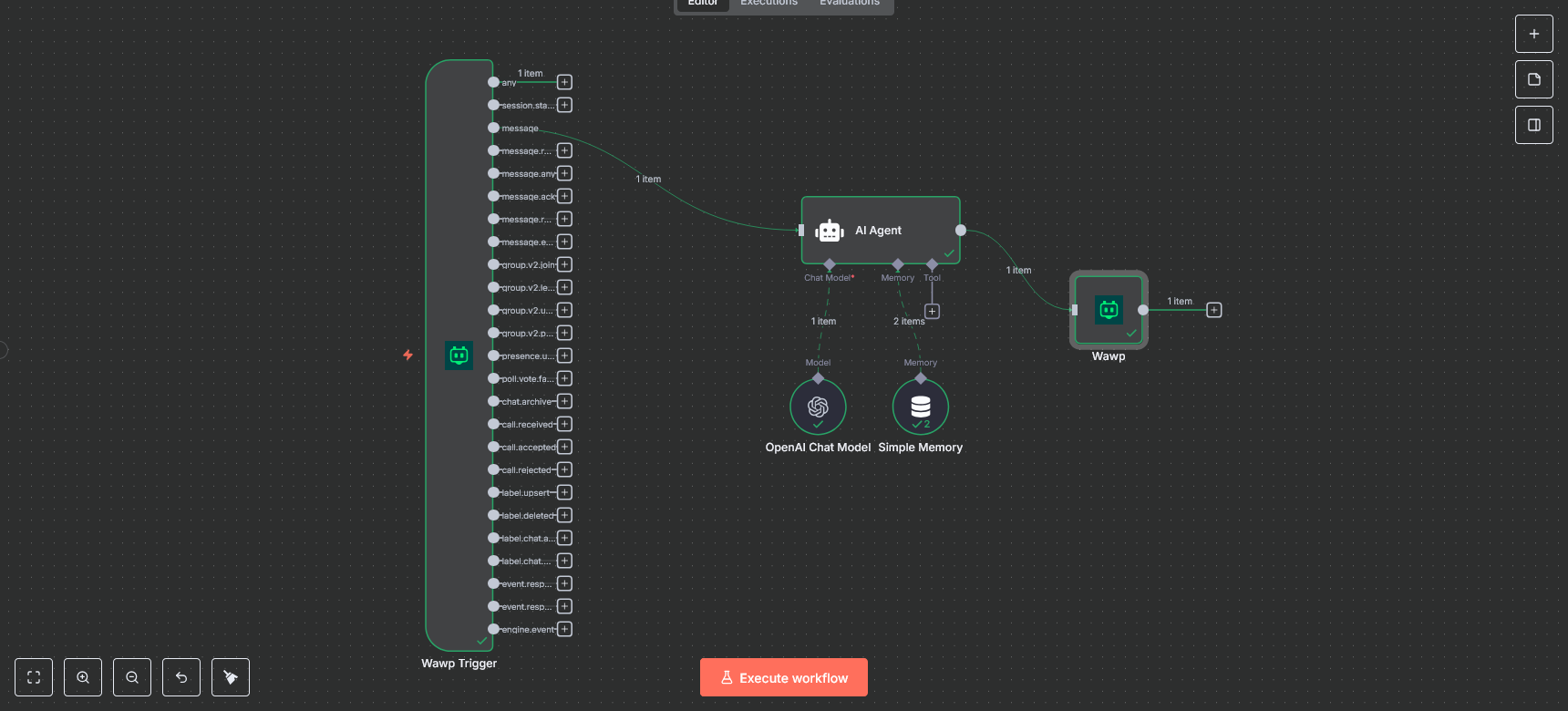
1) Wawp Trigger (webhook)
Receives events from Wawp (e.g. message, message.reaction, message.ack, group.v2.join, presence.update, etc.).
Has a switch-like multi-output: one “any” output + one output per specific event.
Use Test URL (/webhook-test/) while designing, and Production URL (/webhook/) when deployed.
Icon support: place wawp.png/wawp.svg in nodes/WawpTrigger/ (bundled to dist via gulp build:icons).
2) Wawp (main action node)
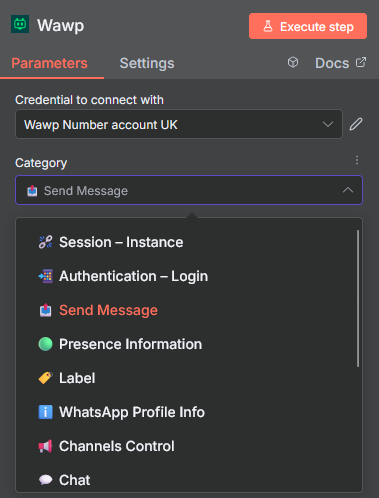
A single node with Categories to keep the UI tidy. Each category exposes only the operations it needs.
⛓️💥 Session – Instances: Create / Start / Stop / Restart / Delete / Logout / Get Info / Me
📲 Authentication – Login: Get QR (raw & image), Request Code
📤 Send Messages: Send Text / Image / PDF / Voice / Video / Location / Poll / Contact Vcard, Mark Seen, Start/Stop Typing, Reaction, Star
🟢 Presence information: Set presence, Get presence by chatId
🏷️ Labels: List / Create / Update / Delete, Labels for a Chat (get/save), Chats with a Label
ℹ️ WhatsApp Profile info: Get profile, Set display name, Set “About” status, Upload/Delete picture
📢 Channels Control: List / Create / Get / Delete, Preview messages, Follow/Unfollow, Mute/Unmute, Search (view/text), Metadata (views/countries/categories)
💬 Chats: List / Overview, Delete chat, Picture, Messages (list/clear/read/byId/delete/edit/pin/unpin), Archive/Unarchive, Mark unread
🔊 24 Hour Status: Text / Image / Voice / Video / Delete
🪪 Contacts: List all, Get, Check phone exists, About, Profile picture, Block/Unblock, Upsert contact
🪪 LIDs: List, Count
👥 Groups: List / Create, Join info / Join, Count / Refresh, Get / Delete / Leave, Picture get/set/delete, Description / Subject, Security (info-admin-only & messages-admin-only) get/set, Invite code get/revoke, Participants get/add/remove, Admin promote/demote
🏗️ What is a Webhook?
A webhook is an HTTP POST request sent from Wawp to your n8n instance whenever an event occurs on WhatsApp.
- Push-Based: You don't ask for updates; Wawp sends them automatically.
- Real-Time: Events arrive within milliseconds of occurring.
- Selective: You choose which event types to receive in your Wawp dashboard.
Webhooks vs. Polling: Polling wastes API quota and introduces latency. Webhooks are delivered instantly, making your workflows much more responsive and efficient.
🚀 Quick Webhook Setup for n8n
- Use the Wawp Trigger node in your n8n workflow.
- While designing, use the Test URL. For production, use the Production URL.
- Configure the URL in your Wawp Dashboard under the Webhook section of your instance.
- If testing locally, use a tool like ngrok to expose your local n8n instance to the internet.
🆔 WhatsApp ID (JID) Reference
In the Wawp ecosystem, every entity is identified by a unique string called a JID. Understanding these suffixes is critical for routing messages correctly.
| Suffix | Identity Type | Description |
| :--- | :--- | :--- |
| @c.us | Individual / Contact | Standard personal or business account. Used for 1-on-1 chats. |
| @g.us | Group | Identifies a multi-user group conversation. |
| @newsletter | Channel | Represents a public Broadcast Channel or Newsletter. |
| @lid | Lookup ID | Privacy-preserving identifier used to mask real phone numbers. |
| @broadcast | Broadcast List | Identifiers for legacy broadcast lists or status. |
💡 Pro Tip: When storing IDs in your database/CRM, always store the full JID (e.g.,
[email protected]) to ensure compatibility and prevent collisions.
🔐 Security & Best Practices
- Idempotency: Wawp may send the same event multiple times if your server is slow to respond. Always check the
event.idto prevent duplicate processing. - Immediate Response: Always ensure your webhook endpoint responds with
200 OKas quickly as possible. n8n does this automatically, but avoid long-running nodes before the response if possible. - Validate Source: For higher security, add a secret query parameter to your webhook URL (e.g.,
?secret=my_token) and validate it within your workflow.
🛠️ Common Event Types
| Event | Description |
| :--- | :--- |
| message | New message received (text, image, video, etc.) |
| message.reaction | User reacted to a message with an emoji |
| message.revoked | User deleted/recalled a message |
| message.ack | Message status changed (sent → delivered → read) |
| group.participants.update | User joined or left a group |
| presence.update | User's online status or typing state changed |
| status.update | User posted a new WhatsApp Status (Story) |
For more detailed documentation, visit the Wawp API Docs.