
@waynechang65/ptt-crawler
v3.2.0
Published
A web crawler module designed to scarp data from Ptt.

Maintainers
 waynechang65
Readme
ptt-crawler




ptt-crawler 是一個專門用來爬批踢踢(Ptt)各版資料的爬蟲模組。
ptt-crawler is a web crawler module designed to scrape data
from Ptt.
:heavy_exclamation_mark:注意 (Attention):heavy_exclamation_mark:
[!IMPORTANT]
:thumbsup:3.1.0 版本,利用非同步並發處理,爬取內文效率大增,依照測試結果,時間可減少81%以上。 (Benchmark)Version 3.1.0: Utilizes asynchronous concurrent processing to significantly boost content crawling efficiency, reducing processing time by over 81% according to our benchmark results. (Benchmark)
:thumbsup:3.0.1 版本,利用並發處理,爬取內文效率大增,依照測試結果,時間可減少77%以上。 (Benchmark)Version 3.0.1: Utilizes concurrent processing to significantly boost content crawling efficiency, reducing processing time by over 77% according to our benchmark results.
(Benchmark)
:bookmark:3.x.x 版本,主要利用「物件導向類別」進行使用,仍保留原本 2.x.x版本的模組函式呼叫介面(如:initialize(), getResults(),...)。 但是,預計在4.0.0以後的版本,把原2.x.x版本函式(Deprecated)刪除,請留意!!!Version 3.x.x: It primarily utilizes an object-oriented class for usage, but still retains the original 2.x.x module function call interfaces(e.g., initialize(), getResults(), etc.). However, these 2.x.x functions are deprecated and are planned for removal in versions 4.0.0 and later. Please take note!
前言 (Overview)
批踢踢(Ptt)是台灣最大的BBS(Bulletin Board System), 也是許多台灣大數據分析常參考的資料庫。 不過,大多數Ptt爬蟲都是用python程式所寫。 本人為了在Node.js上爬批踢踢(Ptt)的資料, 乾脆就自己用javascript打造一個簡單的爬蟲模組,並且分享給大家使用。
Ptt is the largest and most famous Bulletin Board
System (BBS) in Taiwan, and also an important reference database for big data
analysis. However, most PTT crawler modules are written in Python.
To scrape data from PTT using Node.js, I created a simple crawler module in
JavaScript and have shared it for public use.
這個爬蟲模組能做什麼事? (What can it do ?)
- 爬批踢踢(Ptt)任意的版上資料
Scrape posts from any board on PTT. - 可以爬多頁資料
Scrape multiple pages at once. - 爬資料時,可選擇是否忽略置底文
Option to skip pinned posts. - 爬的資料以單一帖發文為單位,其中包含該帖的超連結、推文數、主題、
作者名稱、發文日期以及是否被標記(Mark)等
Scraped data includes hyperlinks, rates, titles, authors, dates, and marks. - 針對發文,可選擇是否要爬所有內文(含留言)
Option to scrape the full content (including comments) for each post. - 內建請求重試機制,提高在不穩定網路下的爬取成功率
Built-in request retry mechanism to improve success rate in unstable network conditions. - 提供進度回報 (
onProgress),即時監控爬取狀態
Provides progress reporting (onProgress) for real-time monitoring of crawling status.
注意事項 (Prerequisites)
- 本模組依賴 Puppeteer,在您第一次安裝或執行時,
它會自動下載一個與模組相容的 Chromium 瀏覽器(大小約 170-250MB),
因此初次設定可能需要幾分鐘的時間。
This module relies on Puppeteer. On the first installation or execution, it will automatically download a compatible Chromium browser (around 170-250MB), so the initial setup might take several minutes. - 需要 Node.js ≥ 22.12.0(由 Puppeteer 25 要求)。
Requires Node.js >= 22.12.0 (required by Puppeteer 25). - 本模組已針對 Linux (包含 Docker 環境) 進行優化,
會自動偵測並設定合適的瀏覽器啟動參數。
This module is optimized for Linux, including Docker environments. It will automatically detect and set the proper launch arguments for the browser.
如何在您的專案使用? (How to use it in your project ?)
利用 npm 套件進行下載
Use npm to installnpm install --save @waynechang65/ptt-crawler在您的專案環境中,引用 @waynechang65/ptt-crawler模組。
Include @waynechang65/ptt-crawler package in your project// CommonJS const { PttCrawler } = require('@waynechang65/ptt-crawler');// ES Module (for js) import { PttCrawler } from '@waynechang65/ptt-crawler'; // ES Module (for ts) import { PttCrawler, MergedPages, Progress, DebugOptions } from '@waynechang65/ptt-crawler';接下來,用async函式包含下面幾行程式就搞定了。
Add the code below to an async function in your projectconst pttCrawler = new PttCrawler(); try { // *** Initialize *** // concurrency: 並行數量 (預設 5) // concurrency: The number of concurrent requests (default: 5) // retry: 開啟/設定重試選項 (預設 delay: 2000, maxAttempts: 10) // retry: Enable/configure retry options (default: delay: 2000, // maxAttempts: 10) await pttCrawler.init({ concurrency: 5, retry: { delay: 2000, maxAttempts: 10 } }); // *** Crawl *** const ptt = await pttCrawler.crawl({ board: 'PokemonGO', pages: 3, skipPBs: true, getContents: true, onProgress: (progress) => { // e.g., { type: 'crawling_pages', message: 'Crawling page 1 of 3...', // current: 1, total: 3, percent: 33.33 } console.log(`${progress.message} ${progress.percent.toFixed(2)}%`); } }); console.log(ptt); } catch (error) { console.error(error); } finally { // *** Close *** await pttCrawler.close(); }爬完的資料會透過函式
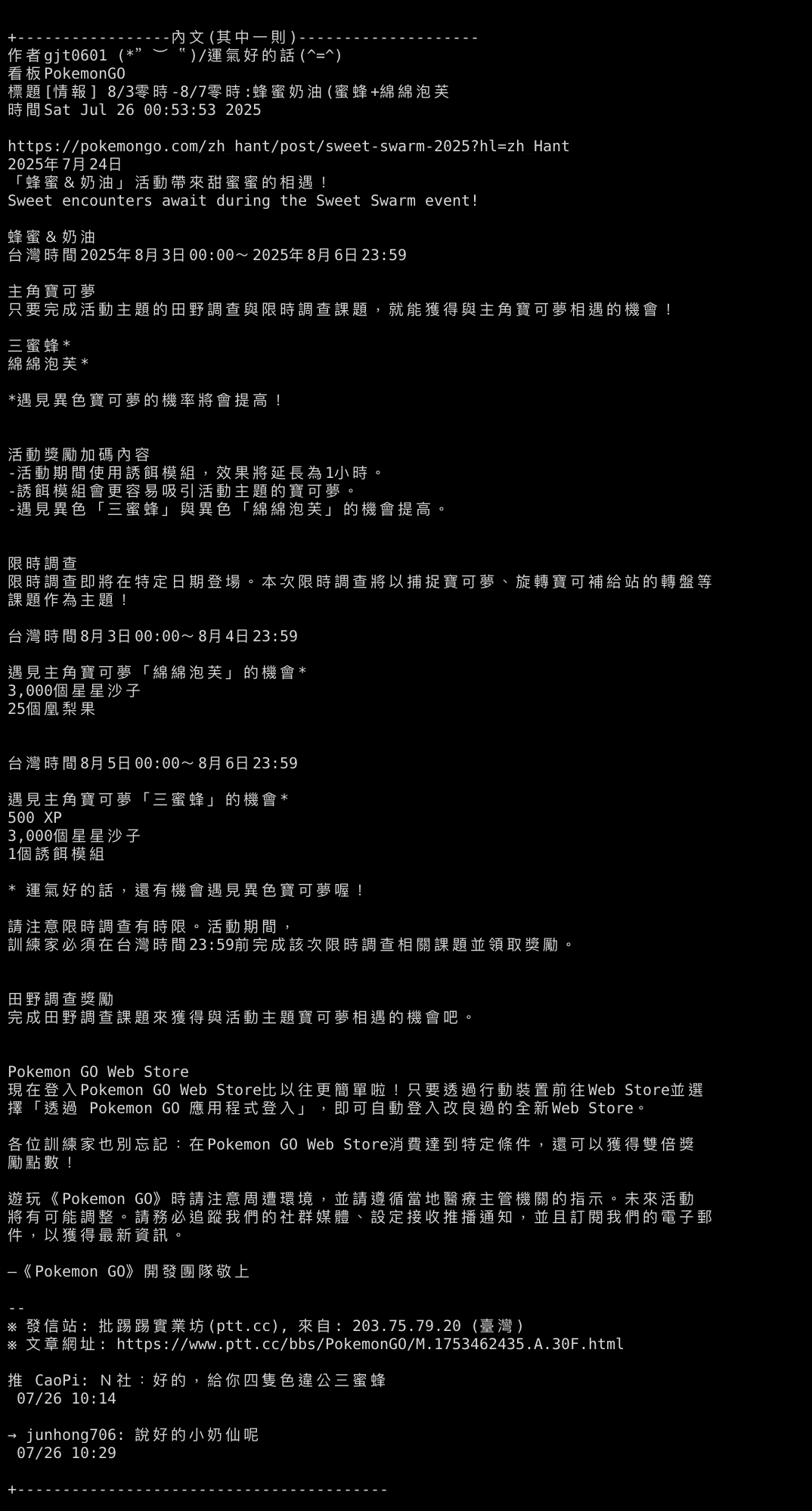
crawl()回傳一個物件,裏面各陣列放著爬完的資料,結構如下:
Thecrawl()function returns an object containing the scraped data, with the structure shown below.// 回傳的物件會實作 MergedPages interface // The return value is an object that implements the MergedPages interface. interface MergedPages { titles: string[]; urls: string[]; rates: string[]; authors: string[]; dates: string[]; marks: string[]; contents?: string[]; // Only exists when getContents is true }或者是可以透過
resultsToObjects()轉成物件陣列格式(Post[]),以便使用forEach、Map、...等陣列函式操作:
Alternatively, you can convert it into an array of objects (Post[]) usingresultsToObjects(), in order to use array functions like forEach, Map, etc.// 回傳的物件會實作 Post interface // The return value is an object that implements the Post interface. interface Post { title: string; url: string; rate: string; author: string; date: string; mark: string; content?: string; }
欄位說明 (Field Descriptions):
rates: 推文數。可能的文字為'爆'、'XX'(X1, X2...) 或數字。rates: The recommendation count. Possible values include'爆'(viral),'XX'(e.g., X1, X2), or a number.marks: 文章標記。例如'M'(標記)、'S'(鎖定) 等。marks: Post markers, such as'M'(marked) or'S'(locked).contents: 當getContents為true時才會包含此欄位, 陣列中的每個元素是一篇文章的完整內文(包含留言)。contents: This field is only included whengetContentsistrue. Each element in the array is the full content of a post, including comments.
如何跑範例程式? (How to run the example ?)
從GitHub下載ptt-crawler專案程式
Clone ptt-crawler from GitHubgit clone https://github.com/WayneChang65/ptt-crawler.git在ptt-crawler專案環境中,下載必要模組。
Install dependencies in the cloned ptt-crawler foldernpm install透過 npm 直接使用以下指令。(實際範例程式在 ./examples/demo.ts or demo.cjs)
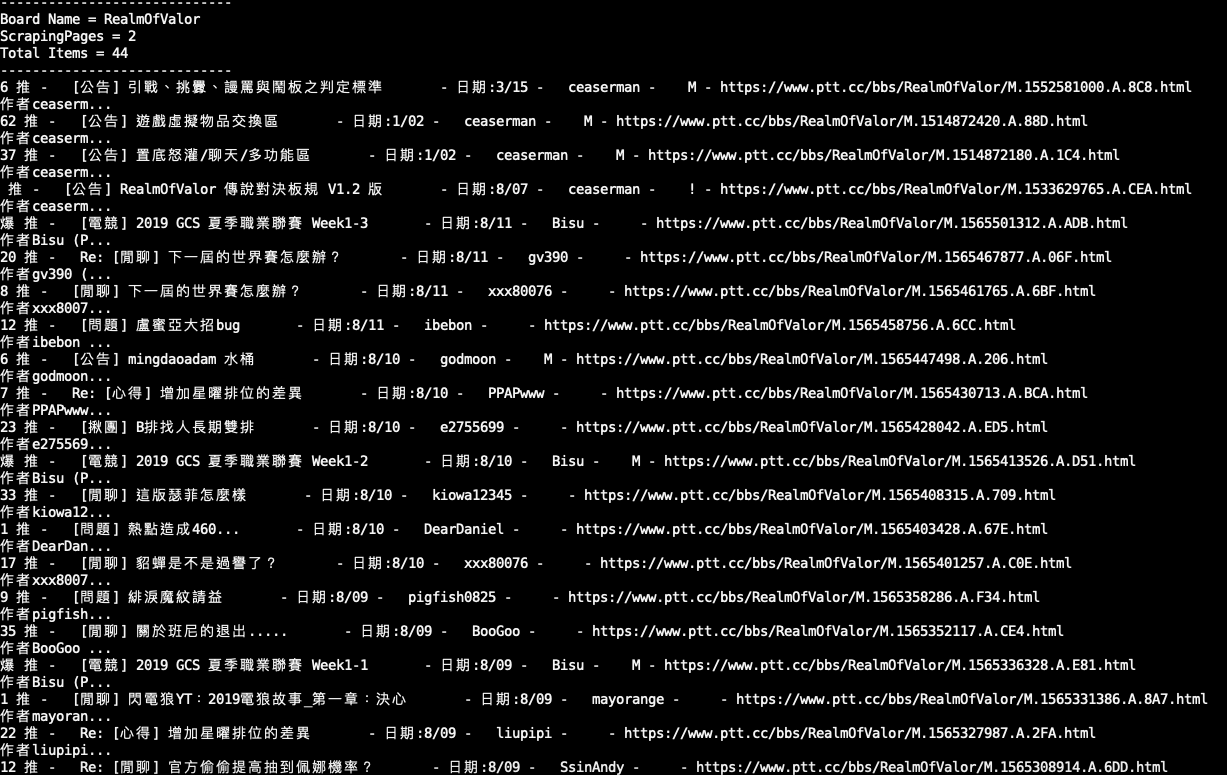
Run it with npm. (the demo example is in ./examples/demo.ts or demo.cjs)# for ts npm run start# for cjs npm run start-cjs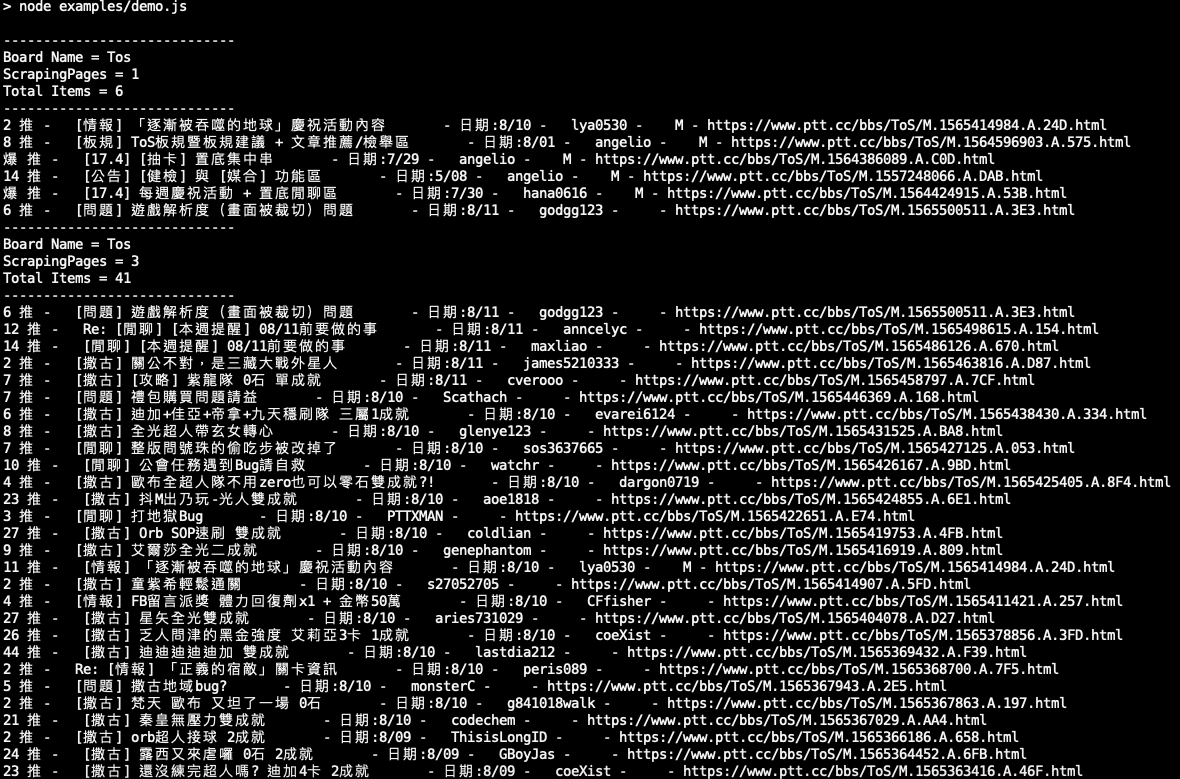
如何執行測試 (How to run tests)
本專案使用 vitest 進行測試。您可以透過以下指令執行測試:
This project uses vitest for testing. You can run tests
with the following command:
# Mock test
npm run test
# e2e test
npm run test:e2e基本方法 (Base Methods)
new PttCrawler(options: LaunchOptions): 建立一個爬蟲實例 (create a instance).options: Puppeteer 的LaunchOptions物件,可用來客製化瀏覽器行為。
(Puppeteer'sLaunchOptionsobject to customize browser behavior).
init(initOption: InitOptions): 初始化爬蟲 (initialize the crawler).initOption:concurrency(number): 爬取內文時的併發數量。基本上,併發的設定越高, 資料爬取時所使用的平行處理就會越多。理論上,這應該能提升效率並縮短完成時間。然而, 如果併發數值設定得太高,而電腦的處理能力又有限,效率可能不僅無法顯著提升, 記憶體的消耗反而會增加。因此,這個數值應該根據可用的系統資源來進行調整。預設值:5。
The number of concurrent requests for scraping contents. Basically, the higher the concurrency setting, the more parallel processing will be used for data crawling. In theory, this should improve efficiency and shorten the completion time. However, if the concurrency value is set too high and the computer’s processing power is limited, efficiency may not improve significantly and memory consumption could increase instead. Therefore, this value should be adjusted based on the available system resources. Default:5.debug(DebugOptions): 除錯參數設定物件。
An object to configure debug settings.enable(boolean): 啟動或關閉除錯模式。預設值:false。
Globally enable or disable debug mode. Default:false.printCrawlInfo(boolean): 印出爬蟲一般訊息。預設值:false。
Print general crawling information. Default:false.printRetryInfo(boolean): 印出重試的訊息。預設值:false。
Print details of retry attempts. Default:false.printWorkersInfo(boolean): 印出併發 Workers 的訊息。預設值:false。
Print concurrent worker status. Default:false.saveResultToFiles(boolean): 將爬蟲結果存成檔案。預設值:false。
Save the final results to a JSON file. Default:false.
retry(AttemptOptions): 重試參數設定物件。這機能很重要, 特別是網路不穩定的時候可以透過重試機制讓流程不致於中斷, 至於要設定重試一次等多久或是要重試幾次,還是得看容許度跟需求。
An object to configure retry settings. This feature is very important, especially when the network is unstable, as it uses a retry mechanism to prevent the process from being interrupted. As for how long to wait between retries or how many times to retry, that should be configured based on tolerance and specific requirements.delay(number): 重試等待的毫秒數。預設值:2000。
The time to attempt in milliseconds.
Default:2000.maxAttempts(number): 最大重試次數。預設值:10。
The maximum number of attempts. Default:10.
crawl(options: CrawlerOptions): 開始爬資料 (start to scrape data).options:board(string): 欲爬的 PTT 版名。預設值:'Tos'。
The name of the PTT board to crawl. Default:'Tos'.pages(number): 要爬的頁數。預設值:1。
The number of pages to crawl. Default:1.skipPBs(boolean): 是否忽略置底文。預設值:true。
Whether to skip pinned posts. Default:true.getContents(boolean): 是否爬取內文。預設值:false。
Whether to scrape the content of each post. Default:false.onProgress(function):(progress: Progress) => void爬取進度的回呼函式。(progress: Progress) => voidA callback function to receive progress updates.
close(): 關閉爬蟲並釋放資源 (close the crawler and release resources).resultsToObjects(results): 將爬取到的資料從陣列結構轉換為物件陣列 (transform the crawled data from a struct of arrays to an array of post objects).results(MergedPages):crawl()方法回傳的MergedPages物件 (TheMergedPagesobject returned from thecrawl()method).- Returns:
Post[]-Post物件的陣列 (An array ofPostobjects).
getHotBoards(): 取得 PTT 熱門看板列表 (get the list of hot boards on PTT).Returns:
HotBoard[]-HotBoard物件的陣列 (An array ofHotBoardobjects).interface HotBoard { name: string; // 看板名稱 (board name) class: string; // 分類 (class) title: string; // 標題 (title) }這個熱門看版並非即時爬取,只是透過JSON的方式儲存,隨時間可能內容會有差異。 不過,熱門看板變化性不高,加上入板的最後幾名人氣也相對很低,所以短時間更新也沒必要了。 這函式功能,主要是讓未來可能被利用為MCP server做準備,一般使用者會用到機率相對也不會太高。
This list of popular boards is not scraped in real-time; it is simply stored as a JSON file. Consequently, the content may become outdated over time. However, the list of popular boards is relatively stable. Furthermore, the last few entries on the list have comparatively low popularity, so frequent updates are unnecessary. The main purpose of this function is to prepare for its potential future use as an MCP server; the likelihood of it being used by a general user is also quite low.
錯誤處理 (Error Handling)
在使用 crawl() 函式時,建議使用 try...catch 區塊包覆,
以捕捉可能發生的錯誤(例如:看板名稱不存在、網路連線問題、
PTT 伺服器無回應等)。同時,finally 區塊可以確保 close() 函式
在任何情況下都能被執行,以正常關閉瀏覽器並釋放資源。
When using the crawl() function, it is recommended to wrap it in a
try...catch block to handle potential errors (e.g., board not found,
network issues, or no response from the PTT server). Additionally,
using a finally block ensures that the close() function is always
executed to properly close the browser and release resources.
舊版函式 (Deprecated Functions)
[!WARNING]
以下函式是為了向後相容而保留,但已不建議使用。它們在未來的版本中可能會被移除。
The following functions are kept for backward compatibility but are deprecated. They may be removed in a future release.
為了維持舊版程式的相容性,您仍然可以這樣使用:
For backward compatibility, you can still use them as follows:
// CommonJS
const { initialize, getResults, close } = require('@waynechang65/ptt-crawler');

// ES Module
// import { initialize, getResults, close } from '@waynechang65/ptt-crawler';

async function run() {
    try {
        // *** Initialize ***
        await initialize();

        // *** GetResult  ***
        let ptt = await getResults({
            board: 'PokemonGO',
            pages: 3,
            skipPBs: true
        });
        console.log(ptt);

    } catch (error) {
        console.error(error);
    } finally {
        // *** Close      ***
        await close();
    }
}

run();
參考網站 (Reference)
貢獻一己之力 (Contribution)
ptt-crawler 雖然是一個小模組,但本人還是希望這個專案能夠持續進步!
若有發現臭蟲(bug)或問題,請幫忙在Issue留言告知詳細情形。
歡迎共同開發。歡迎Fork / Pull Request,謝謝。:)
Although ptt-crawler is a small project, I hope it can continue to improve.
If you find any bugs or have issues, please report them by creating an issue.
Contributions are welcome!
Feel free to fork the repository and submit a pull request. Thank you! :)