
@waynesutton/agent-ready
v0.3.0
Published
Convex component that makes your app readable by AI agents out of the box: serves llms.txt, agents.md, and a per-site markdown file live by default with ETag caching, RFC 8288 Link headers, and Accept: text/markdown negotiation. Advanced opt-ins: llms-ful

Maintainers
 waynesutton
Readme
@waynesutton/agent-ready


A Convex component that makes your app readable by AI agents out of the box. Register it with app.use(agentReady) and it generates and serves llms.txt plus a per-site markdown file at your site root, live by default, with ETag caching, Accept: text/markdown content negotiation, and an RFC 8288 Link discovery header on every response. No config file required.
Advanced features are one flag away: agents.md, llms-full.txt, a readiness score endpoint, robots.txt, sitemap.xml, RSS, agent analytics, AI-assisted descriptions, a browsable /markdown site, React, Svelte, and Expo widgets, an AgentLinks footer, and a CLI with an interactive wizard. See Advanced.
Upgrading from 0.2.x? See what's new in 0.3.0 and how to upgrade for the feature comparison and the one wrapper change to make. Existing installs keep their publish state: draft stays draft, live stays live.
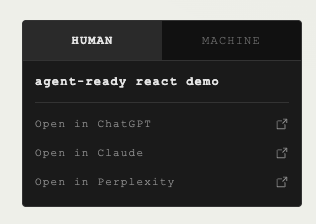
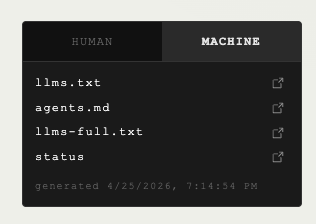
Widget preview
| Human view | Machine view |
| --------------------------------------------------------------------------------------------------------------------------------------------------------------------------------------- | --------------------------------------------------------------------------------------------------------------------------------------------------------------------------------------- |
|  |
|  |
|
Why this exists
LLMs and coding agents read your app through standard discovery files. llms.txt tells an agent what your product is and which pages matter. agents.md documents your API. llms-full.txt ships your long-form docs. Today most teams hand-write these, forget to update them, or never ship them at all.
@waynesutton/agent-ready is a Convex component that keeps these files in sync with your Convex backend, caches the output, serves it over HTTP with ETag support, and ships React, Svelte, and Expo widgets so humans can see what machines see. It also generates /markdown pages that humans can read as HTML and agents can request as raw markdown.
Quick start
Three steps. No config file required. Files are live as soon as they generate.
1. Install the package
npm install @waynesutton/agent-ready @convex-dev/crons @convex-dev/workpool2. Register the component
// convex/convex.config.ts
import { defineApp } from "convex/server";
import agentReady from "@waynesutton/agent-ready/convex.config.js";
import crons from "@convex-dev/crons/convex.config.js";
import workpool from "@convex-dev/workpool/convex.config.js";

const app = defineApp();
app.use(crons);
app.use(workpool);
app.use(agentReady);
export default app;
3. Mount the routes
// convex/http.ts
import { httpRouter } from "convex/server";
import { registerRoutes } from "@waynesutton/agent-ready";
import { components } from "./_generated/api";

const http = httpRouter();
registerRoutes(http, components.agentReady);
export default http;
Run npx convex dev. Your deployment now serves, live:
/llms.txtwith sensible zero-config defaults until you customize it/site.mdthe per-site markdown summary (renamed to/{your-app-slug}.mdonce you set an app name, or setAGENT_READY_SITE_SLUG/ thesiteMdPathoption)/agents.mdAPI documentation for agents/llms-statusJSON status
Every response includes Link: </llms.txt>; rel="describedby"; type="text/markdown" (RFC 8288), a named Cloudflare Agent Readiness Discoverability check.
You will see this once in the console after the first generation:
[agent-ready] Simple mode active. Serving /llms.txt and /your-site-name.md (live).
[agent-ready] Add <link rel="alternate" type="text/markdown" href="/your-site-name.md"> to your root layout for full discoverability.
[agent-ready] Review before publishing? Set publish: "draft". Enable advanced features: https://github.com/waynesutton/agent-ready-component#advanced
Review before publishing
Files are live by default. If you want editorial review first, opt into draft:
{
  "settings": {
    "publish": "draft"
  }
}
Draft mode returns 404 on the public routes (localhost preview still works). Flip back to live with npx agent-ready go-live or set publish: "live".
Backward compatibility: testMode: true from earlier versions still works and maps to publish: "draft". Existing draft installs keep gating exactly as before.
Add the alternate link tag
Add this to your app root layout (index.html, app.html, or your root component) so DOM-reading crawlers find the markdown twin:
<link rel="alternate" type="text/markdown" href="/your-site-name.md" title="Markdown version" />Three ways to deliver it:
- Add the tag to your root layout yourself (recommended, shown above)
- Mount
AgentReadyWidgetorAgentLinks, which inject the tag intodocument.headautomatically (deduped) - On Convex static hosting, add the tag directly to the hosted
index.html
Copy this prompt
Paste this into Cursor, Claude, or any coding agent to wire the component into your app:
Install @waynesutton/agent-ready in this Convex app:
1. npm install @waynesutton/agent-ready @convex-dev/crons @convex-dev/workpool
2. In convex/convex.config.ts: import agentReady from "@waynesutton/agent-ready/convex.config.js",
   plus crons and workpool configs, and call app.use(crons), app.use(workpool), app.use(agentReady).
3. In convex/http.ts: import { registerRoutes } from "@waynesutton/agent-ready" and call
   registerRoutes(http, components.agentReady).
4. Add <link rel="alternate" type="text/markdown" href="/site.md" title="Markdown version">
   to the app root layout HTML.
5. Run npx convex dev and verify curl -i <deployment>.convex.site/llms.txt returns 200
   with a Link: </llms.txt>; rel="describedby" header.
Files are live by default. Do not add publish: "draft" unless I ask for review-before-publish.
Simple vs advanced
| Capability | Simple (default) | Advanced (opt-in) |
| --- | --- | --- |
| llms.txt | On, live | |
| /{site-name}.md per-site markdown | On, live | |
| agents.md | On, live | |
| robots.txt with AI bot rules and Content-Signal block | On, set robotsTxtEnabled: false to opt out | |
| sitemap.xml | On, set sitemapEnabled: false to opt out | |
| Content-Signal header (all-yes default) | On, tune with contentSignals | |
| RFC 8288 Link describedby and discovery headers | On, all routes | |
| Token count headers (X-Markdown-Tokens, X-Original-Tokens) | On, all content routes | |
| YAML frontmatter on markdown twins | On | |
| HTML alternate tag injection (widget/AgentLinks) | On when mounted | |
| Accept: text/markdown negotiation on /markdown | On when markdown site enabled | |
| llms-full.txt | | fullTxtEnabled: true |
| Readiness score endpoint /llms-readiness | | readinessEndpointEnabled: true |
| RSS feed /feed.xml | | rssEnabled: true |
| /.well-known/agent-skills and /.well-known/agent-skills/index.json | | agentSkillsEnabled: true |
| /.well-known/api-catalog (RFC 9727) | | apiCatalogEnabled: true |
| Agent-friendly 404 page at /404.md | | notFoundPageEnabled: true |
| Canonical-path Accept: text/markdown negotiation | | registerCanonicalPageRoutes in convex/http.ts |
| Agent analytics | | analyticsEnabled: true |
| AI descriptions | | aiDescriptionsEnabled: true |
| Setup wizard, settings panel, cron tuning | | npx agent-ready setup |
Enable everything at once with npx agent-ready agent-ready, or pick flags in agent-ready.config.json and run npx agent-ready sync. See Advanced.
Static hosting is optional. Agent files are Convex HTTP routes on https://<deployment>.convex.site with or without @convex-dev/static-hosting. If you do pair them, use app-owned root routing (no httpPrefix in convex/convex.config.ts) and register agent-ready routes before the static catch-all. See INTEGRATION.md for the mount order and the SPA fallback 404 tradeoff.
AgentLinks footer
A tiny dependency-free nav that shows both discovery files to humans and crawlers. Mounting it also injects the alternate <link> tag into document.head.
React:
import { AgentLinks } from "@waynesutton/agent-ready/react";

<AgentLinks siteMdPath="/your-site-name.md" />
Svelte:
<script lang="ts">
  import { AgentLinks } from "@waynesutton/agent-ready/svelte";
</script>

<AgentLinks siteMdPath="/your-site-name.md" />
Plain HTML for any other stack:
<nav aria-label="AI agent resources" class="agent-links">
  <a href="/llms.txt" rel="describedby">llms.txt</a>
  <a href="/your-site-name.md" rel="alternate" type="text/markdown">your-site-name.md</a>
</nav>
Muted styling by default. Pass className (React) or class (Svelte) to restyle it.
Full install guide
Use this section when you want the widgets, the wizard, and the advanced features in an existing Convex React or Svelte app.
Before you start
You need:
- A Convex app with
convex/convex.config.ts - Node 20 or newer
- Convex CLI 1.36 or newer
- A public app URL for your generated files
To upgrade Agent Ready to the latest published npm version:
npm install @waynesutton/agent-ready@latestIf Convex will host your frontend too, install static hosting:
npm install @convex-dev/static-hostingUninstall the package
Remove only Agent Ready:
npm uninstall @waynesutton/agent-readyIf you installed the full set from this guide and no other code uses those packages, remove them together:
npm uninstall @waynesutton/agent-ready @convex-dev/crons @convex-dev/workpoolIf you installed Convex static hosting only for this integration, remove it too:
npm uninstall @convex-dev/static-hostingThen remove the related code from your app:
- Delete
app.use(agentReady)fromconvex/convex.config.ts - Delete
registerRoutes(http, components.agentReady)fromconvex/http.ts - Remove
AgentReadyWidget,UpdateBanner, and any@waynesutton/agent-readyimports from your frontend - Remove generated wrapper files under
convex/agentReady/if you are no longer using them - Delete
agent-ready.config.jsonif you do not plan to reinstall
For more context on removing or changing component wiring, see the Convex docs for Using Components and Understanding Components.
Markdown site routes
The quick start covers registration and base routes. For the browsable markdown site, also mount registerMarkdownRoutes in convex/http.ts:
import { registerRoutes, registerMarkdownRoutes } from "@waynesutton/agent-ready";

registerRoutes(http, components.agentReady);
registerMarkdownRoutes(http, components.agentReady);
If you use Convex static hosting, register it in convex/convex.config.ts too:
import staticHosting from "@convex-dev/static-hosting/convex.config.js";

app.use(staticHosting);
The full route surface:
https://your-deployment.convex.site/llms.txtlive by defaulthttps://your-deployment.convex.site/{your-app-slug}.mdper-site markdown, live by defaulthttps://your-deployment.convex.site/agents.mdlive by defaulthttps://your-deployment.convex.site/llms-statushttps://your-deployment.convex.site/llms-full.txtwhen enabledhttps://your-deployment.convex.site/llms-analyticswhen enabledhttps://your-deployment.convex.site/robots.txtwhen enabledhttps://your-deployment.convex.site/sitemap.xmlwhen enabledhttps://your-deployment.convex.site/.well-known/agent-skillswhen enabledhttps://your-deployment.convex.site/feed.xmlRSS feed when enabledhttps://your-deployment.convex.site/markdownmarkdown site when enabled, serves HTML or markdown based onAccept: text/markdownwithVary: Accepthttps://your-deployment.convex.site/llms-markdown-indexmarkdown page index when enabledhttps://your-deployment.convex.site/llms-readinesswhen enabled
Mount registerMarkdownRoutes before any SPA or static fallback. That keeps /markdown from being swallowed by your frontend router.
You can add callbacks later:
registerRoutes(http, components.agentReady, {
  onEvent: async (ctx, req, route) => {
    console.log(`[agent-ready] ${route} requested`);
  },
});
If your app already defines /sitemap.xml or /robots.txt, skip those routes to avoid conflicts:
registerRoutes(http, components.agentReady, {
  skipRoutes: ["/sitemap.xml", "/robots.txt", "/feed.xml"],
});
The setup wizard detects existing routes automatically and prints the right skipRoutes snippet.
Add the widget (optional)
The widget shows humans what agents see, injects the alternate <link> tag into document.head, and includes a collapsible Advanced section on the MACHINE tab linking back to Advanced.
React:
// src/App.tsx
import { AgentReadyWidget, UpdateBanner } from "@waynesutton/agent-ready/react";

export default function App() {
  // Convex deployment URL. Used to fetch /llms-status and /llms-readiness.
  const appUrl = import.meta.env.VITE_CONVEX_SITE_URL as string;
  // Public production domain. Used for visible file links and AI chat prompts.
  // Optional. When omitted, the widget falls back to status.appUrl, then window.location.origin.
  const publicAppUrl = import.meta.env.VITE_SITE_URL as string | undefined;

  return (
    <>
      <UpdateBanner appUrl={appUrl} />
      <AgentReadyWidget
        appUrl={appUrl}
        publicAppUrl={publicAppUrl}
        position="floating-bottom-right"
        theme="dark"
      />
    </>
  );
}
Svelte:
<script lang="ts">
  import { AgentReadyWidget } from "@waynesutton/agent-ready/svelte";

  const appUrl = import.meta.env.VITE_CONVEX_SITE_URL as string;
  const publicAppUrl = import.meta.env.VITE_SITE_URL as string | undefined;
</script>

<AgentReadyWidget {appUrl} {publicAppUrl} position="floating-bottom-right" theme="dark" />
Expo:
import { AgentReadyExpoWidget } from "@waynesutton/agent-ready/expo";

export default function App() {
  return (
    <AgentReadyExpoWidget
      appUrl={process.env.EXPO_PUBLIC_AGENT_READY_URL!}
      publicAppUrl={process.env.EXPO_PUBLIC_SITE_URL}
    />
  );
}
Vite tip: set VITE_CONVEX_SITE_URL to your .convex.site deployment URL and VITE_SITE_URL to your production domain. Without VITE_SITE_URL, a dev .convex.site URL can leak into your production bundle.
Run the setup wizard (optional)
npx agent-ready setupThe wizard asks for your app name, URL, description, cron interval, analytics preference, AI description preference, publish preference (live by default, draft as opt-in), RSS feed preference, markdown site preference, and widget display preference. The markdown site and the MARKDOWN widget tab are separate choices, so /markdown can stay live while the tab stays hidden. Choose hidden when you want files like llms.txt, agents.md, llms-full.txt, robots.txt, sitemap.xml, feed.xml, and /markdown to keep generating without showing the widget. If you choose visible, the wizard can print React or Svelte install code for your root layout. It writes agent-ready.config.json, scaffolds Convex wrapper files at convex/agentReady/, syncs the config to your deployment, and schedules the cron.
Verify locally
Start Convex and your frontend in two terminals:
npx convex devnpm run devOr run Convex and a frontend command from one terminal:
npx convex dev --run-sh 'vite'Then check the component:
curl -i http://127.0.0.1:3210/llms.txt
curl -i http://127.0.0.1:3210/markdown
curl -i -H "Accept: text/markdown" http://127.0.0.1:3210/markdown
npx agent-ready status
npx agent-ready links
Open your app. The widget should show HUMAN, MACHINE, and MARKDOWN tabs. A TEST MODE badge appears only when publish is "draft".
Deploy
Deploy your Convex backend:
npx convex deployIf you host the frontend on Convex static hosting:
export VITE_CONVEX_URL="https://your-deployment.convex.cloud"
export VITE_CONVEX_SITE_URL="https://your-deployment.convex.site"
npx @convex-dev/static-hosting deploy
Then sync your config and generate production files:
npx agent-ready sync --prod
npx agent-ready regenerate --prod
Go live (draft installs only)
Files are live by default. If you opted into publish: "draft" (or still have the deprecated testMode: true set), public routes return 404 until you flip live:
npx agent-ready go-live --prodVerify the public files:
curl -i https://your-deployment.convex.site/llms.txt
curl -i https://your-deployment.convex.site/agents.md
curl -i https://your-deployment.convex.site/llms-status
Expect 200 OK.
Check production status at any time:
npx agent-ready status --prodIf you want the older standalone guide, docs/install.md and docs/install.html now point back to this README.
Advanced
Everything below is off by default and enabled per flag in agent-ready.config.json under settings, followed by npx agent-ready sync and npx agent-ready regenerate. Note that robots.txt, sitemap.xml, discovery headers, and Content-Signal are on by default in simple mode; the flags below only appear here so you can turn them off or tune them:
{
  "settings": {
    "fullTxtEnabled": true,
    "readinessEndpointEnabled": true,
    "robotsTxtEnabled": true,
    "sitemapEnabled": true,
    "rssEnabled": true,
    "agentSkillsEnabled": true,
    "apiCatalogEnabled": true,
    "notFoundPageEnabled": true,
    "analyticsEnabled": true,
    "aiDescriptionsEnabled": true,
    "markdownSiteEnabled": true,
    "discoveryHeaders": true,
    "contentSignals": { "search": true, "aiInput": true, "aiTrain": false }
  }
}
Each flag maps to a route or behavior in the Simple vs advanced table. npx agent-ready agent-ready enables the full readiness set in one command. The setup wizard, settings panel, and cron tuning are also part of the advanced surface and stay out of your way until you use them.
Agent readiness
Make your app pass the isitagentready.com scan with one command:
npx agent-ready agent-readyThis enables all agent readiness features: Content-Signal headers, x-markdown-tokens and x-original-tokens, discovery Link headers, robots.txt with AI bot rules and a Content-Signal block, sitemap.xml, RSS feed at /feed.xml, /.well-known/agent-skills plus its index.json digest, /.well-known/api-catalog (RFC 9727), a /404.md recovery page linked from llms.txt, the /llms-readiness self-score endpoint, markdown content negotiation, and the /markdown site viewer. If widgetShowMarkdownTab is already false, this command keeps it hidden while the markdown pages stay live.
Scan your deployment to verify:
npx agent-ready scan --url https://your-deployment.convex.site
npx agent-ready scan --url https://your-deployment.convex.site --strict
The scan scores essential checks only: discovery files, markdown negotiation, and a real 404 probe. Optional protocol endpoints (agent-skills, api-catalog, RSS, readiness) are reported but never lower the score, matching how public scanners treat missing MCP-style extras. An SPA fallback answering 200 for unknown paths is reported as a known limit, not a failure. Homepage Link header and thin-HTML checks are informational.
Use --strict before shipping. It also verifies a real page serves markdown through Accept: text/markdown.
Settings panel (optional)
Add an admin page to manage pages, cache, and actions. The panel ships as a React component you can mount on any route. It takes your Convex query results and mutation callbacks as props, so it works with any app layout.
// src/pages/Settings.tsx (or wherever you want it)
import { useQuery, useMutation, useAction } from "convex/react";
import { api } from "../convex/_generated/api";
import { AgentReadySettingsPanel } from "@waynesutton/agent-ready/react";

export default function Settings() {
  const status = useQuery(api.agentReady.content.getCacheStatus);
  const pages = useQuery(api.agentReady.content.listPages, { includeAllStatuses: true });
  const regenerate = useAction(api.agentReady.content.regenerateAll);
  const rollback = useMutation(api.agentReady.content.rollbackCache);
  const publish = useMutation(api.agentReady.content.publishPage);
  const draft = useMutation(api.agentReady.content.draftPage);
  const archive = useMutation(api.agentReady.content.archivePage);

  return (
    <AgentReadySettingsPanel
      cacheStatus={status}
      pages={pages}
      onRegenerate={() => regenerate({})}
      onRollback={(fileType) => rollback({ fileType })}
      onPublishPage={(path) => publish({ path })}
      onDraftPage={(path) => draft({ path })}
      onArchivePage={(path) => archive({ path })}
    />
  );
}
The wrapper functions at convex/agentReady/content.ts and convex/agentReady/analytics.ts are scaffolded automatically by npx agent-ready setup. They bridge the component API to your browser clients. If you skipped the wizard, see the wrapper code in INTEGRATION.md.
Not using React? The Convex wrapper functions work with any framework. Build your own settings UI using useQuery/useMutation equivalents for Svelte, Vue, or vanilla JS.
Features
- Convex component with isolated tables: your app schema stays untouched
- Live by default:
llms.txt,agents.md, and the per-site markdown file serve as soon as they generate. Opt intopublish: "draft"for review-before-publish (deprecatedtestMode: truestill maps to draft) - Per-site
/{site-name}.mdmarkdown summary with ETag/304, slug derived from your app name - RFC 8288
Link: </llms.txt>; rel="describedby"header on every component response AgentLinksfooter component for React and Svelte plus a plain HTML snippet- ETag-aware HTTP handlers return
304 Not Modifiedwhen content is unchanged - Durable workpool-backed generation with retries
- Runtime cron interval updates via
@convex-dev/crons - Optional agent analytics with threshold callbacks
- AI description generation via Claude or OpenAI, opt-in, 100 item cap, rate-limited
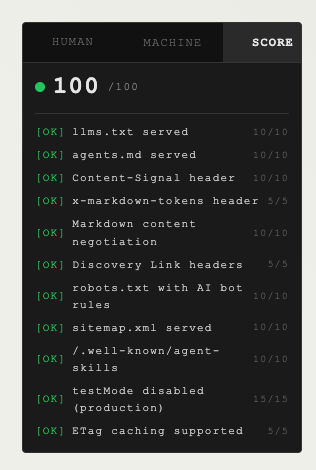
- Drop-in React and Svelte widgets with HUMAN, MACHINE, MARKDOWN, and SCORE tabs. Expo gets a React Native widget with HUMAN, MACHINE, and MARKDOWN tabs
/markdownsite viewer with per-page HTML for humans andAccept: text/markdownresponses for agents- SCORE tab shows readiness score with color-coded checks from
/llms-readiness Content-Signal,x-markdown-tokens,x-original-tokens, andLinkdiscovery headers on every content response, all on by default- Auto-generated
robots.txtwith AI bot directives and a Content-Signal block,sitemap.xmlwith markdown URLs, both on by default with zero-config fallbacks. Optional RSS feed at/feed.xml,/.well-known/agent-skillswithindex.jsondigest,/.well-known/api-catalog, and/404.md - Readiness self-score endpoint (
/llms-readiness) with scored checks across discoverability, content, bots, and protocol, plus unscored bonus checks for the agent-skills digest index, API catalog, and 404 page npx agent-ready agent-readyenables all readiness flags in one commandnpx agent-ready scanaudits your deployment (CI-friendly, exits non-zero below 80)npx agent-ready linksprints copyable discovery and AI chat URLs, useful when the widget is hidden- Config-driven widget visibility:
widgetVisible,widgetShowFiles,widgetShowAppName,widgetShowDescription,widgetShowMeta,widgetShowScoreTab,widgetStatusVisible,widgetCleanMode,widgetDesktopCollapse,widgetShowHumanTab,widgetShowMachineTab,widgetShowChatLinks,widgetShowChatGPT,widgetShowClaude, andwidgetShowPerplexityinagent-ready.config.jsoncontrol the widget without code changes. Props still work as overrides - CLI covering setup, sync, status, links, regenerate, rollback, go-live, agent-ready, scan, analytics, cleanup, versions, and per-page state transitions
- Both demo apps hosted entirely on Convex via
@convex-dev/static-hosting
Widget display modes
Control which tabs, content sections, and AI chat links the widget shows. Set these in agent-ready.config.json under settings, or pass them as props directly on the widget component. Props override config values.
| Setting | Default | Effect |
| ----------------------- | ------- | -------------------------------------------------------------------------------------------------------------------------------------------------------------------------------------------- |
| widgetVisible | true | Show or hide the entire widget. Set false to keep generating files and serving routes while rendering no widget |
| widgetCleanMode | false | Strips app name and description, keeps tabs and links functional |
| widgetStatusVisible | true | Show or hide the status link (/llms-status) on the MACHINE tab |
| widgetShowFiles | true | Show or hide the copyable file rows (llms.txt, agents.md, llms-full.txt) on the HUMAN tab |
| widgetShowAppName | true | Show or hide the app name on the HUMAN tab. widgetCleanMode: true hides it regardless of this value |
| widgetShowDescription | true | Show or hide the app description on the HUMAN tab. widgetCleanMode: true hides it regardless of this value |
| widgetShowMeta | true | Show or hide the meta footer with the last generated timestamp on the MACHINE tab |
| widgetShowHumanTab | true | Show or hide the HUMAN tab |
| widgetShowMachineTab | true | Show or hide the MACHINE tab |
| widgetShowMarkdownTab | follows markdownSiteEnabled | Show or hide the MARKDOWN tab. Unset, it matches markdownSiteEnabled, so it is hidden in simple mode. Set true to force the tab on, or false to keep /markdown pages live without showing them in the widget |
| widgetShowScoreTab | false | Show or hide the SCORE tab |
| widgetDesktopCollapse | true | Show the Phosphor caret toggle and start collapsed on desktop. Set false to keep the widget always expanded on desktop. CLI npx agent-ready setup prompts for this with a true default |
| widgetShowChatLinks | true | Show or hide all three AI chat links on the HUMAN tab |
| widgetShowChatGPT | true | Show or hide the "Open in ChatGPT" link |
| widgetShowClaude | true | Show or hide the "Open in Claude" link |
| widgetShowPerplexity | true | Show or hide the "Open in Perplexity" link |
When all tabs are hidden, the widget renders nothing. When only one tab is visible, its tab button still renders so the label shows, but there is nothing to toggle.
To hide the widget while keeping generated files live:
{
  "settings": {
    "widgetVisible": false
  }
}
Then run:
npx agent-ready sync
npx agent-ready links
Mobile collapse
Below 480px the widget renders a compact tab strip with a Phosphor caret toggle and starts collapsed. Tapping HUMAN, MACHINE, or SCORE switches the active tab without expanding. Tapping the caret expands or collapses the active panel. All three behaviors are tunable per widget instance:
| React prop | Svelte prop | Default | Notes |
| ------------------------ | ------------------------ | ------- | -------------------------------------------------------------------------------------------------------------------------------------------------------------------------------------------------------------------------------------------------------------------------------------------------------- |
| mobileCollapse | mobileCollapse | true | Set to false to keep the widget always expanded on mobile. |
| mobileBreakpoint | mobileBreakpoint | 480 | Pixel width that triggers the mobile presentation. |
| defaultMobileCollapsed | defaultMobileCollapsed | true | Initial collapsed state when the widget first enters the collapsed presentation. |
| desktopCollapse | desktopCollapse | true | Show the Phosphor caret toggle on desktop too. Resolves from prop, then widgetDesktopCollapse in agent-ready.config.json, then true. Width and insets stay at desktop values; only the toggle and panel show/hide behavior is enabled. Pass false to keep the widget always expanded on desktop. |
Example config for a minimal MACHINE-only widget with no chat links:
{
  "settings": {
    "widgetShowHumanTab": false,
    "widgetShowMachineTab": true,
    "widgetShowScoreTab": false,
    "widgetShowChatLinks": false
  }
}
Example React props override:
<AgentReadyWidget
  appUrl={appUrl}
  showHumanTab={true}
  showMachineTab={true}
  showChatGPT={false}
  showPerplexity={false}
  cleanMode={true}
/>
Sync and regenerate
After editing agent-ready.config.json, push the changes to your deployment:
npx agent-ready sync
npx agent-ready regenerate
Production deployment
Add --prod to any command to target your production deployment instead of dev. The full production lifecycle looks like this:
npx convex deploy
npx agent-ready sync --prod
npx agent-ready regenerate --prod
Files are live by default. If your install is in publish: "draft", add npx agent-ready go-live --prod to the list.
Verify production status and files:
npx agent-ready status --prod
npx agent-ready scan --url https://your-deployment.convex.site --prod
curl -i https://your-deployment.convex.site/llms.txt
CLI reference
| Command | What it does |
| ------------------------- | ---------------------------------------------------------------------------- |
| setup | Interactive first-run wizard, writes agent-ready.config.json, calls sync |
| sync | Reads agent-ready.config.json and applies it to the deployment |
| status | Prints cache status, current versions, and publish state |
| links [--url <url>] | Prints copyable discovery file URLs and AI chat links |
| regenerate | Builds fresh llms.txt, agents.md, and llms-full.txt |
| rollback --file <name> | Swaps the active cache entry for the previous version |
| go-live | Sets publish: "live" with a confirmation prompt (draft installs) |
| agent-ready | Enables all readiness flags, syncs, and regenerates |
| scan --url <url> | Audits deployment endpoints, exits non-zero below 80 |
| scan --url <url> --strict | Adds markdown page negotiation checks for CI before release |
| generate-descriptions | Fills empty page descriptions when AI descriptions are enabled |
| publish-page --path <p> | Sets page status to published |
| draft-page --path <p> | Sets page status to draft |
| archive-page --path <p> | Sets page status to archived |
| restore-page --path <p> | Clears deletedAt on a soft-deleted page |
| analytics | Prints agent request summary for the last 30 days |
| cleanup | Trims expired analytics rows and orphan cache entries |
| versions --path <p> | Lists version history for one page |
Add --prod to any command to target your production deployment. For example: npx agent-ready go-live --prod, npx agent-ready status --prod, npx agent-ready scan --url https://your-deployment.convex.site --prod.
Demo apps
The repo includes React, Svelte, and Expo demos. React and Svelte are full Convex apps with GitHub OAuth for admin access. Expo consumes the same Convex .site routes from a mobile app.
Before running either demo, create a GitHub OAuth app at github.com/settings/applications/new. Set the Authorization callback URL to your Convex HTTP Actions URL plus /api/auth/callback/github (for example, https://your-deployment.convex.site/api/auth/callback/github). The callback points to Convex, not localhost. Set the Homepage URL to http://localhost:5173 for local dev.
Then set the GitHub secrets on your Convex deployment:
npx convex env set AUTH_GITHUB_ID "your-github-client-id"
npx convex env set AUTH_GITHUB_SECRET "your-github-client-secret"
npx convex env set SITE_URL "http://localhost:5173"
npx convex env set ADMIN_EMAILS "[email protected]"
For production, set the same values with --prod and use your deployed frontend URL for SITE_URL.
Run the React demo:
cd example-react
npm install
npm run dev
Run the Svelte demo:
cd example-svelte
npm install
npm run dev
Run the Expo demo:
cd example-expo
npm install
EXPO_PUBLIC_AGENT_READY_URL=https://your-deployment.convex.site npm run start
The React and Svelte demo URLs become https://your-deployment.convex.site. The widget, the files, and the host app live on the same domain. Expo points at that same Convex site URL. See SETUP.md for full production deploy instructions.
Documentation
README.md#installis the canonical install guide for adding this Convex component to your React, Svelte, or Expo appdocs/upgrading.mdlists what's new in 0.3.0, a 0.2.x vs 0.3.0 comparison, and the upgrade stepsdocs/install.mdpoints package readers back to the README install guidedocs/install.htmlis the same redirect-style install entry point as a standalone HTML pageSETUP.mdis the author release guide for shipping this package to GitHub, npm, and Convex static hostingINTEGRATION.mdcovers every integration path in a format optimized for AI coding agentsCONTRIBUTING.mddocuments the widget contract for community ports (Vue, Solid, Angular)prds/agent-readiness-v1.mdis the canonical design spec
License
Apache 2.0. See LICENSE.