
@webccc/cli
v0.1.9
Published
Run Claude Code in your web browser - A powerful web-based terminal interface for Claude CLI

Maintainers
 webccc
Readme
Web Claude Code




Run Claude Code directly in your web browser with a powerful terminal interface. Access Claude CLI anywhere, anytime.
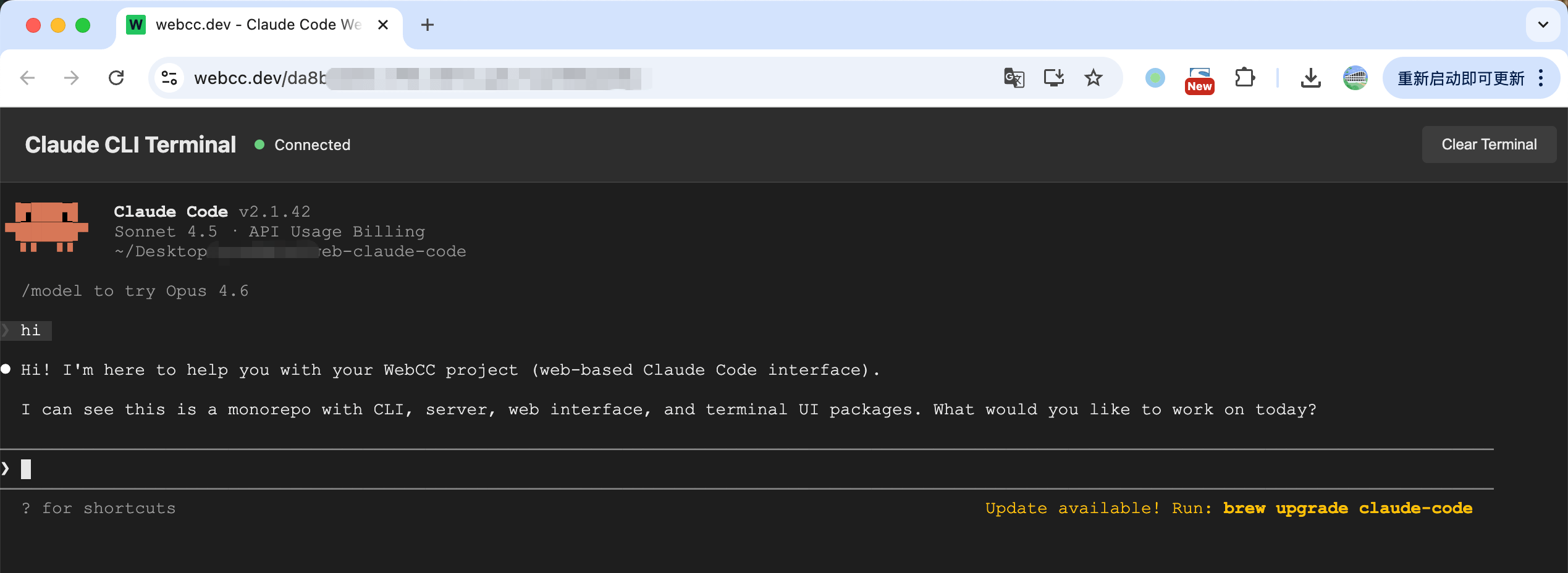
Why Web Claude Code?
Traditional Claude CLI requires a terminal application and local setup. Web Claude Code brings Claude to your browser with:
- 🌐 Browser-Based: No local terminal required - access Claude Code from any browser
- 🚀 Quick Setup: One command to start -
webccand you're ready - 🔄 Real-time Sync: WebSocket-powered bidirectional communication with Claude CLI
- 💾 History Persistence: Terminal history saved across sessions
- 📱 Mobile Friendly: Works on tablets and mobile devices
- 🎨 Beautiful UI: Modern terminal interface with xterm.js
- 🌍 Remote Access: Share your Claude session with online mode
🚀 Quick Start
Install globally:
npm install -g @webccc/cliStart the server:
webccThe CLI will prompt you to select a mode:
- Local mode: Start a local server and connect via browser
- Online mode: Connect to remote server (ws.webcc.dev) for session sharing
After starting, open your browser and navigate to the displayed URL (typically http://localhost:4000).
Note: You need to create a .env file with required configuration before running.
⚙️ Configuration
Create a .env file in your project directory:
# Required: Anthropic API Configuration
ANTHROPIC_BASE_URL=http://your-api-url:3000/api
ANTHROPIC_AUTH_TOKEN=sk-ant-xxxxx

# Optional: Customize as needed
PORT=4000
HOST=0.0.0.0
CLAUDE_PATH=claude
WORK_DIR=/path/to/your/project
Then simply run webcc.
📋 Configuration Reference
Required Settings
| Variable | Description |
| ---------------------- | --------------------------------------- |
| ANTHROPIC_BASE_URL | Your Anthropic API base URL |
| ANTHROPIC_AUTH_TOKEN | Your Anthropic API authentication token |
Optional Settings
| Variable | Default | Description |
| ---------------------------- | ---------------------------- | -------------------------------- |
| PORT | 4000 | Web server port |
| HOST | 0.0.0.0 | Web server host |
| CLAUDE_PATH | claude | Path to Claude CLI executable |
| WORK_DIR | Current dir | Working directory for Claude CLI |
| ANTHROPIC_MODEL | claude-sonnet-4-5-20250929 | Primary Claude model |
| ANTHROPIC_SMALL_FAST_MODEL | claude-sonnet-4-5-20250929 | Fast model for quick tasks |
💡 Usage Examples
Example 1: Local Mode Setup
# Create .env file
echo "ANTHROPIC_BASE_URL=http://localhost:3000/api" > .env
echo "ANTHROPIC_AUTH_TOKEN=sk-ant-xxxxx" >> .env

# Start CLI
webcc

# Select "local" mode when prompted
# Then open http://localhost:4000 in your browser
Example 2: Online Mode (Session Sharing)
# Create .env file (same as above)
echo "ANTHROPIC_BASE_URL=http://localhost:3000/api" > .env
echo "ANTHROPIC_AUTH_TOKEN=sk-ant-xxxxx" >> .env

# Start CLI
webcc

# Select "online" mode when prompted
# CLI will connect to ws.webcc.dev
# Multiple browsers can connect to the same session using the token
📦 Requirements
Node.js >= 14.0.0
Claude CLI installed and accessible in PATH
expect tool (for PTY support):
# macOS
brew install expect

# Ubuntu/Debian
sudo apt-get install expect

# Windows
# Use WSL (Windows Subsystem for Linux)
🛠️ Troubleshooting
Error: Failed to start CLI: spawn claude ENOENT
Solutions:
- Verify Claude CLI is installed:
which claude - Add
claudeto your PATH - Or specify full path in
.env:CLAUDE_PATH=/usr/local/bin/claude
Error: Error: listen EADDRINUSE :::4000
Solutions:
- Change port in
.env:PORT=8080 - Or stop the process using port 4000:
lsof -ti:4000 | xargs kill
Error: Failed to start CLI: spawn expect ENOENT
Solution: Install expect for your platform:
# macOS
brew install expect

# Ubuntu/Debian
sudo apt-get install expect

# Windows
# Use WSL (Windows Subsystem for Linux)
🤝 Contributing
Contributions are welcome! Please feel free to submit a Pull Request.
License
MIT