
@webnori/pdsa
v0.0.9
Published
PDSA (Plan-Do-Study-Act) continuous-improvement CLI with a per-project Kùzu graph memory. Native AOT binary, delivered per-platform.

Maintainers
 psmon
psmonReadme
@webnori/pdsa
English · 한국어
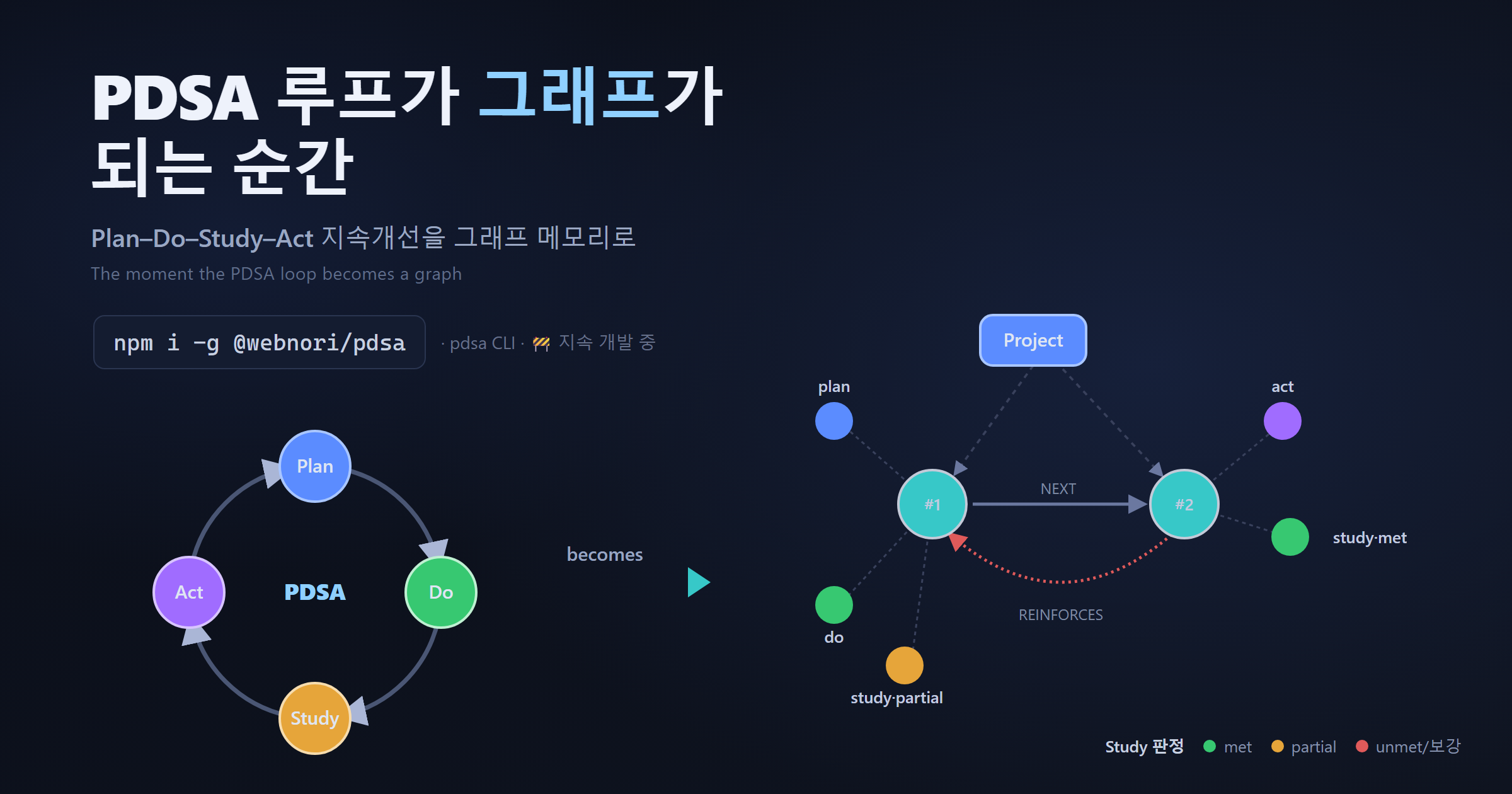
A CLI support tool for the PDSA (Plan–Do–Study–Act) continuous-improvement loop × graph engineering. The expected evaluation you set in Plan is judged in Study by an LLM (met/partial/unmet), and every cycle accumulates into a per-project Kùzu graph memory — a "long-term memory for AI agents." A .NET Native AOT single executable; only the binary for your OS/arch is installed. 🚧 Under active development.
Install
npm install -g @webnori/pdsa
pdsa version
Supported platforms: Windows x64, Linux x64, macOS (Apple Silicon / arm64).
On install, npm fetches only the package (@webnori/pdsa-*) that matches your platform (no network postinstall).
Closed-loop cycle (expected → verdict → reinforce)
pdsa project set my-repo       # pick a project (per-project graph DB)
pdsa plan  "what & why & how"  # sets a verifiable EXPECTED evaluation → starts a cycle
pdsa do    "what you did"      # organizes Plan→Do
pdsa study "results/metrics"   # LLM judges vs. expected: met | partial | unmet
pdsa act   --note "memo"       # learnings + auto-links a REINFORCE cycle if needed
pdsa status                    # progress + expectation hit-rate (recall)
pdsa eval                      # per-cycle expected / verdict / actual + hit-rate
pdsa view # local graph viewer- Plan — the LLM sets a verifiable expected evaluation (metric).
- Study — records a verdict (met/partial/unmet) vs. expected + the measured actual.
- Act — if reinforcement is needed, the next
pdsa planauto-links a reinforcement cycle (REINFORCESedge);--freshopts out. - Recall — expectation hit-rate (
met / cycles-with-a-verdict), instatus/eval/viewer.
Graph viewer (pdsa view)
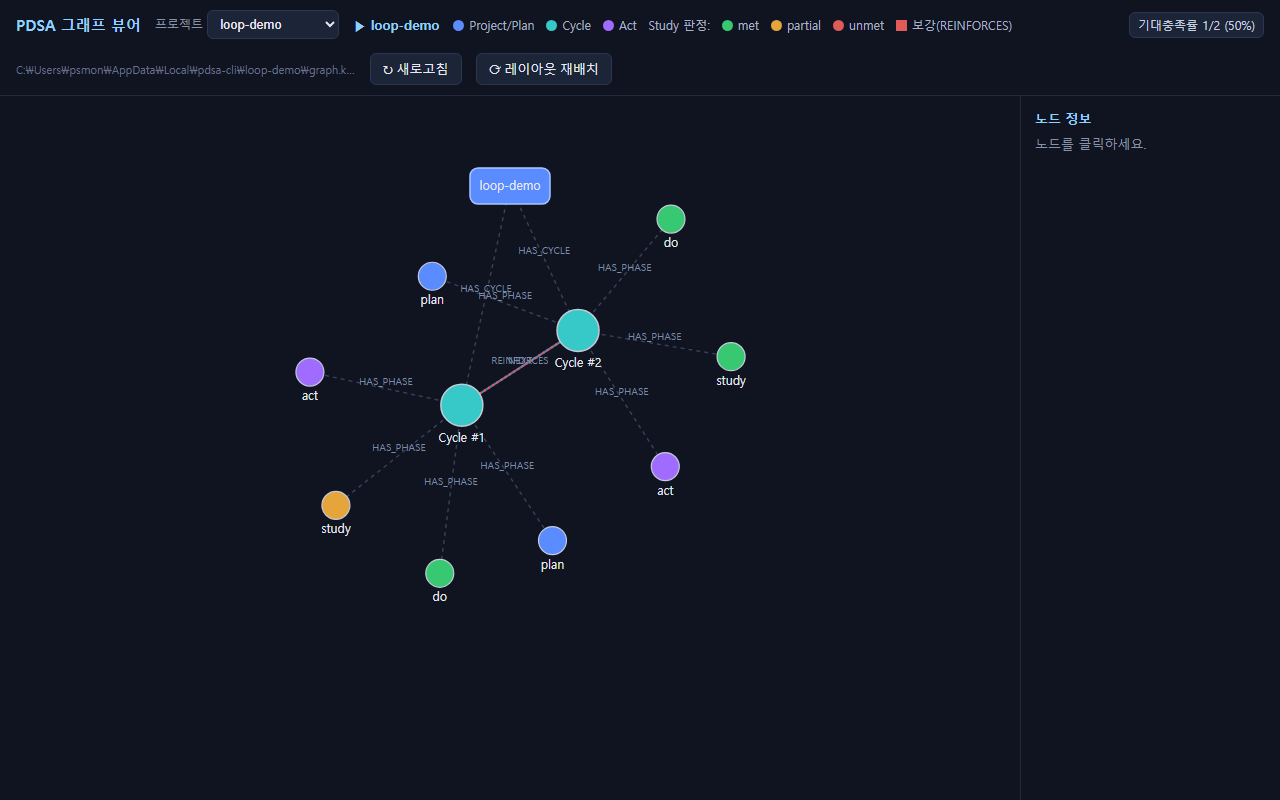
Visualizes the accumulated PDSA graph in a local web viewer: a project dropdown and hit-rate badge
in the header, Study nodes colored by verdict (met=green, partial=orange, unmet=red), and REINFORCES
edges linking reinforcement cycles.
LLM providers · auth modes — for judging/coaching
Attach the LLM in several ways. Without an LLM, inputs are still recorded to the graph; only judging/coaching is skipped.
# ① OpenAI(-compatible) API key — default
pdsa config key <key>                     # or key-file <path> (keeps the key out of config)
pdsa config model <model>                 # default: gpt-5.6-terra

# ② Keyless open-weight (local / compatible) — ollama · vLLM · LM Studio …
pdsa config provider local                # http://localhost:11434/v1, no auth (private ranges auto-allowed)
pdsa config provider openai-compat <URL>  # any OpenAI-compatible endpoint
pdsa config allow-insecure-no-auth true   #   explicit opt-in to use a REMOTE endpoint with no auth

# ③ GPT OAuth (refresh token) — device-code login
pdsa config oauth device-endpoint <URL> && pdsa config oauth endpoint <token-URL> && pdsa config oauth client <id>
pdsa config login

# ④ Codex (ChatGPT subscription) — reuses the official `codex login` token  [experimental]
codex login && pdsa config auth codex

# ⑤ Claude Code (claude -p) — uses your already-logged-in Claude, no key
pdsa config auth claude-cli

pdsa check                                # verify with a real round-trip (any mode)
pdsa config show                          # current auth / model / language (key masked)
Load priority: env vars → global config ({LocalAppData}/pdsa-cli/openai.json) → repo .secret/openai.json.
⚠️ Note on Claude Code (
claude -p)
- Check Anthropic's policy first and use it only within the terms of your Claude Code (Claude subscription) plan — i.e. inside the Claude Code environment.
claude -pis not the official API path; it invokes the agent CLI as a subprocess. It has startup latency and, due to the agent's internal context, can use tokens inefficiently (burning subscription credits faster). For bulk/automated use, prefer an official API key (①).
Language (English / 한국어)
Show help and the recorded PDSA coaching in your preferred language. With nothing set, it auto-detects the OS locale (Korean → Korean, otherwise English).
pdsa config lang en          # pin: en | ko | auto
pdsa --lang ko <command>     # this invocation only  (or env PDSA_LANG=ko)
Priority: --lang > PDSA_LANG > config lang > OS locale > default en. The chosen language drives both
the help and the coaching text that gets recorded.
Related reading
- PDSA — History, Theory, and the Quality Legacy (why this is built on PDSA; PDCA vs. PDSA, fact-checked): https://github.com/psmon/akka-graph-loop/blob/main/PDSA.md
Links
- Repo · full docs (EN/KO): https://github.com/psmon/akka-graph-loop
- 한국어 README: https://github.com/psmon/akka-graph-loop/blob/main/npm/pdsa/README-ko.md
MIT