
@weibaohui/context-razor
v0.4.9
Published
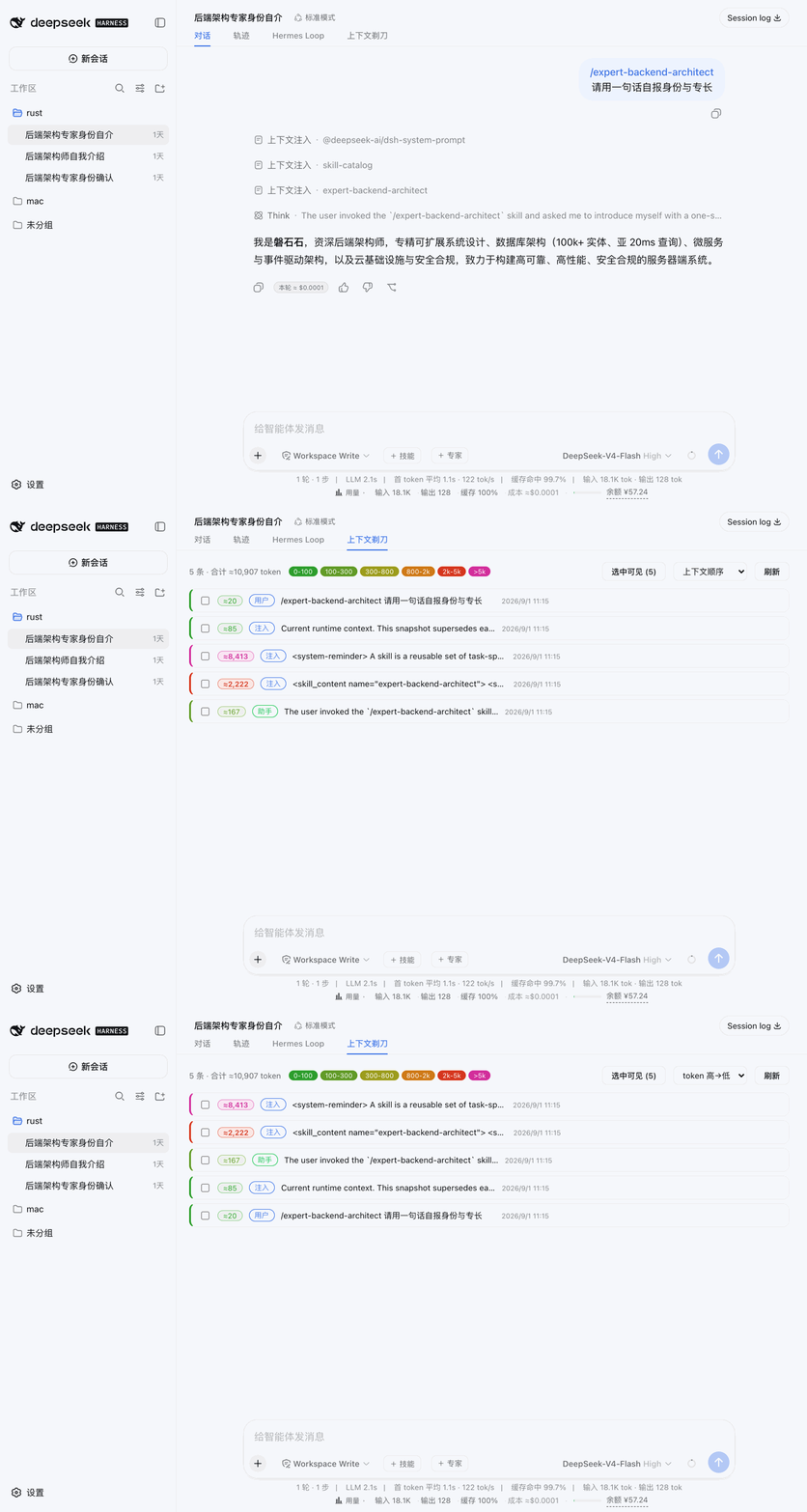
dsh 插件 · 上下文剃刀:把当前会话上下文逐条列出(角色/预览/≈token/占比,cl100k 估算),类型筛选与超阈值标红一眼锁定大头,勾选后精确裁剪——不经 LLM 总结,删了什么一目了然。

Maintainers
 weibaohui
Readme
@weibaohui/context-razor


上下文剃刀:把当前会话上下文逐条列出来——角色、预览、≈token(cl100k_base 估算,与技能市场同词表)——超阈值标红,勾选后精确裁剪。压缩不知道裁了什么,剃刀让你自己挑。
核心功能
- 逐条列出:当前会话模型可见的每条上下文(用户/助手/工具结果)按序排列,带预览、字符数与 ≈token 估算,点 ⋯ 查看全文与真实 usage
- 占比标注:每条的 token 徽章同时显示其占全部上下文的百分比(如
≈5728 · 15%),一眼看出谁是上下文大头 - 类型筛选:按类型一键过滤——用户 / 注入 / 助手,以及各工具名(bash、skill、read、edit…按会话实际出现的动态生成)。多选 toggle,与 token 量级筛选正交叠加
- 超阈值标红:可调阈值(默认 500 token,本地记忆),超限条目红色高亮;「只看超阈值」过滤 + 「token 高→低」排序,大头一眼可见
- 精确裁剪:勾选任意条目一键删除——连续段自动合并处理。删除走宿主 surface replace 协议(与官方 compaction 同款机制),不经 LLM 总结,删了什么、删了多少完全由你决定。每行尾部带 ✕ 快捷按钮,单条直接删与勾选后多选批量删走同一确认弹窗
- 不重排:本插件不会改变上下文条目顺序,只会剔除选中条目;「token 高→低」排序仅影响页面显示,模型可见顺序始终由会话 surface 决定
- 安全护栏:会话运行中禁止裁剪(等当前回合结束);每次替换附带一条 notice 标记消息,模型知道这段历史被你移除了,需要时会主动向你确认
- 非破坏:append-only 日志保留全部痕迹(宿主机制如此)。「删除」= 从模型视野与界面投影中移除
安装
dsh plugin --profile web add @weibaohui/context-razor -w装完重启 dsh web 即生效。入口:打开会话 → 顶部「上下文剃刀」标签(Hermes Loop 右侧),自动锁定当前会话。
删除的实现方式
dsh 会话是 append-only 事件日志(深冻结 + zstd 校验),物理删除不存在也不必要。本插件的裁剪 = 仿官方 dsh-compaction-tool-result-pruner 协议:对每个连续段追加一条 compaction/prune 计价事件 + 一条带 surfaceOp: {op:'replace'} 的 notice 标记消息(sourceEventSeqs 覆盖全部被影子化节点)。被删节点从此不进 deriveMessages()——模型看不到、UI 不再渲染、token 不再计入上下文,而日志留痕可审计。
联系我 :飞书群

版本兼容性
本插件与 DeepSeek Harness(@deepseek-ai/dsh)的版本对应关系:
| 插件版本 | 适配 dsh 版本 | 备注 | |---------|--------------|------| | 0.4.5 | 0.1.7-rc.2 | 当前版本,已在 @deepseek-ai/[email protected] 下验证运行 |
发版约定:每次发布新版本时,请在上表追加一行,记录该插件版本实际验证所用的
@deepseek-ai/dsh版本。package.json的engines.dsh声明最低支持版本;本表记录实际验证版本,二者配合使用。