
@weibaohui/dsh-favorites
v0.1.1
Published
dsh 插件 · 会话收藏夹:左侧会话行收藏/星标,收藏夹主面板支持文件夹分门别类、备注、自定义显示名、继续会话、Fork 新会话、会话基本统计与 fork 关系图。

Maintainers
 weibaohui
Readme
@weibaohui/dsh-favorites


会话收藏夹插件:把任意会话收藏进一个浏览器收藏夹式的管理面板——文件夹分门别类、备注、自定义显示名、继续会话、Fork 新会话、基本统计,外加一张清晰展示会话之间 fork 派生关系的关系图。

效果演示
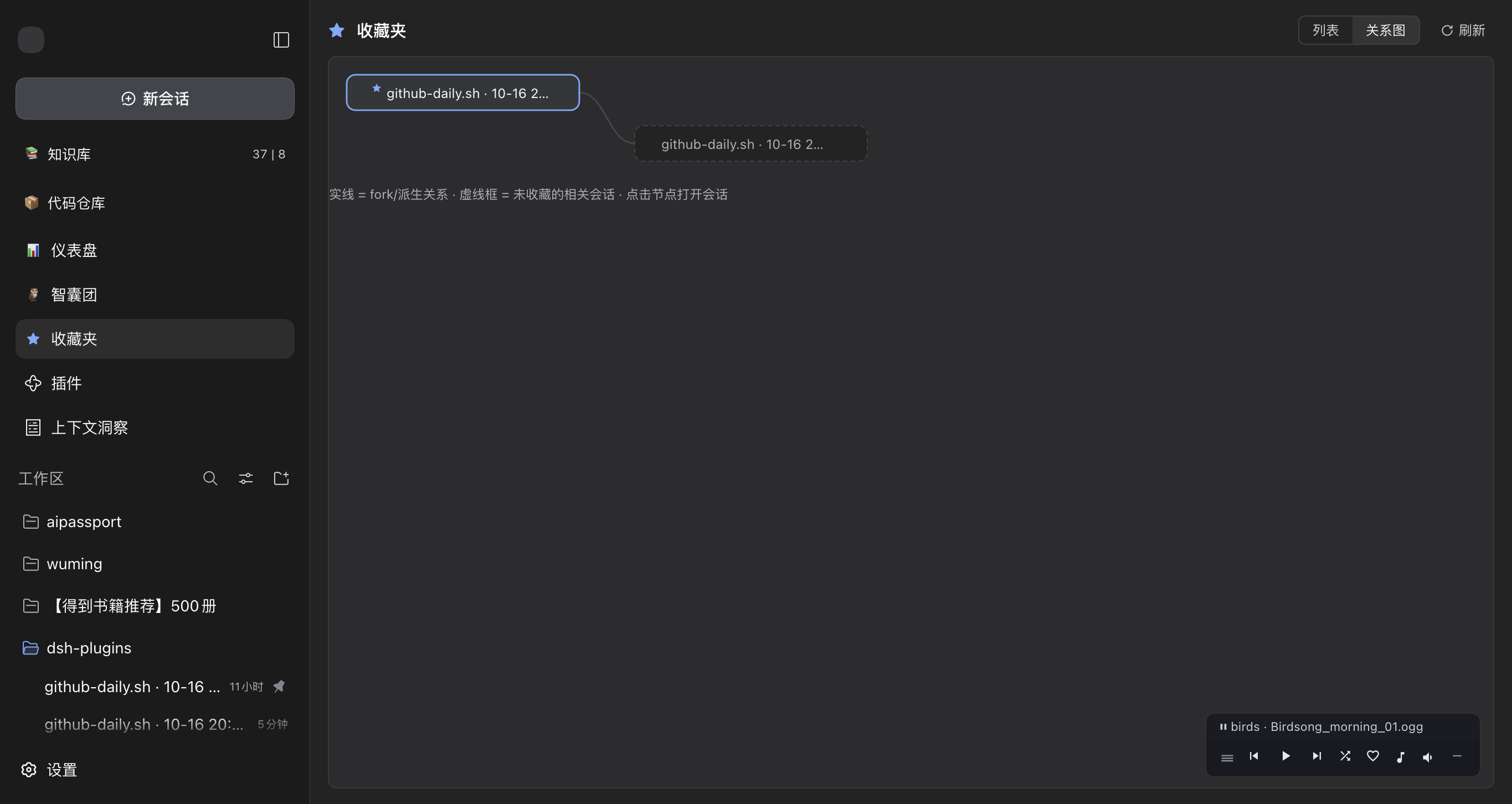
| 列表视图(备注 + 统计 + 操作) | fork 关系图 | 会话行收藏入口 |
|---|---|---|
| |  |
|  |
|
核心功能
- 两处收藏入口:每个会话的
⋯菜单新增「收藏到收藏夹 / 从收藏夹移除」,行尾悬停出现 ☆ 星标按钮一键切换;收藏状态实时同步到收藏夹面板(乐观更新 + 失败回滚 + toast 提示,绝不假成功) - 文件夹分门别类:像浏览器收藏夹一样新建 / 重命名 / 删除文件夹,收藏移入移出;删除文件夹时其中的收藏自动回落「未分类」,永不丢失
- 继续会话:面板内一键切回该会话(走宿主
uiWorkspace.openSession,与侧栏点击行为一致) - Fork 新会话:从收藏的会话派生新会话并自动打开;空白会话禁用并提示原因(走宿主公开
sessions.forkAPI,子会话带自增标题) - 两种重命名:「显示名称」只改收藏夹内的展示名(可选,覆盖会话标题,原标题以副行显示);「重命名会话」走宿主 API 修改会话真实标题,全局生效
- 备注:每个收藏可写一段自由备注,列表内直接预览,编辑弹窗即改即存
- 基本统计:轮次、步数、输出 token、模型耗时、Fork 子会话数、最近活动时间——读宿主
sessionStats投影,不激活会话 - fork 关系图:以收藏的会话为根,绘制 fork 派生关系的分层流程图——实心星标节点为收藏,实线为派生边,虚线框为相关但未收藏的会话(祖先链自动上溯、派生子树自动展开),点击节点直接打开;subagent 会话不计入,避免淹没主线
- 失效兜底:宿主里已删除的会话标记「已失效」(用收藏时的信息展示),可一键移除,不影响其他收藏
- 明暗主题跟随:全部颜色走宿主
--dsw-*设计 token,设置页切换 浅色/深色/跟随系统 即时跟随 - 中英双语:文案走宿主 locale 注册表(zh / en)
安装
dsh plugin --profile web add @weibaohui/dsh-favorites -w装完重启 dsh web 即生效。
使用
- 收藏会话:在左侧会话列表把鼠标悬停到任意会话行,点行尾 ☆ 星标;或打开会话的
⋯菜单点「收藏到收藏夹」 - 打开收藏夹:点侧栏「全局面板」里的 ⭐ 收藏夹,进入管理面板
- 分门别类:左侧文件夹列底部输入框回车新建文件夹;条目上点「移动到…」选择目标文件夹(或「未分类」);文件夹行悬停可重命名 / 删除
- 加备注 / 改显示名:条目上点「编辑名称与备注」,显示名留空则显示会话标题
- 改会话真名:条目上点「重命名会话」,修改的是会话本身的标题(侧栏同步生效)
- 继续 / Fork:点「继续会话」切回该会话;点「Fork 新会话」派生新会话并自动打开,fork 出的子会话会出现在关系图里
- 看关系图:面板右上角切到「关系图」——收藏的会话为根,实线边是 fork 派生关系,虚线框是相关但未收藏的会话,点击任意节点打开对应会话
- 清理:条目上点「移除收藏」;删除文件夹时其中的收藏自动回到「未分类」
实现说明(给维护者)
- 客户端半体零 npm 依赖:fork 关系图是手写分层森林布局 + SVG(收藏 ∪ 祖先链 ∪ 派生子树,上限 400 节点,环安全),构建用 verbatim wrap(
npm run build:client),改动client/*.js后必须重跑 - 会话行操作全部走宿主一等插槽,零 DOM 手术:
sidebar.workspaces.session.menu.item(order 500)、sidebar.workspaces.session.row.action(order 250)、sidebar.panellist+mainkeyed slot(order -95) - fork 关系字段名注意:客户端
sessions.list运行时行的 lineage 字段叫parentId(类型声明SessionSummary.parentSessionId只对应冷摘要面),且 fork 出的子行要等一次sessions.refresh()才带上它——图布局两种字段名都认,面板 fork 成功后会主动刷新一次宿主列表 - 数据存宿主
storageDomain(域dsh_favorites,表folders+entries,每表带valueSchema,坏记录backup-and-skip),插件卸载不清数据,重装即回 - HTTP API(
/dsh-favorites/api/*)每条路由先过connection.requestRejection信任栅栏(Host/Origin + 浏览器认证),存储写入全部await(表 put 返回 Promise,200 即已落盘) - 控制台诊断口:
window.__dshFavorites(services()/sessionsSnap()/graph()),与生态其他插件的window.__dshXxx惯例一致 - 离线验证:
npm test(42 项:schema/归一化/路由旅程/栅栏拒绝/关系图布局/boot 冒烟);npm run verify:storage用宿主真实存储包做「写入 → 关闭 → 重启 → 逐字读回」旅程(缺包自动跳过)
联系我 :飞书群

版本兼容性
本插件与 DeepSeek Harness(@deepseek-ai/dsh)的版本对应关系:
| 插件版本 | 适配 dsh 版本 | 备注 | |---------|--------------|------| | 0.1.0 | 0.2.0-rc.2 | 当前版本,已在 @deepseek-ai/[email protected] 下真机安装验证运行 |
发版约定:每次发布新版本时,请在上表追加一行,记录该插件版本实际验证所用的
@deepseek-ai/dsh版本。package.json的engines.dsh声明最低支持版本;本表记录实际验证版本,二者配合使用。
License
MIT