
@weibaohui/dsh-fde-tools
v0.3.6
Published
dsh 插件 · FDE 工具箱全家桶:安装一个插件带上一批常用 dsh 插件(代码仓库 / 挂载盘 / 知识库 / 定时任务 / 自动续跑 / 界面微调 / 自动复盘 / 文件管理 / 智能标题 / 任务看板 / 插件市场 / 上下文 / IM 接入 / 侧栏增强 / QA 工作台 / Agent 团队 / 执行流程图 / 使用量仪表盘),面板看状态、一键补装与检查更新,快照还原防依赖丢失。

Maintainers
 weibaohui
Readme
@weibaohui/dsh-fde-tools


FDE 工具箱全家桶:安装一个插件,带上一批插件(当前 19 件)。
装进 profile 后,设置里出现「FDE 工具箱」,列出全家桶成员的安装状态:
缺什么点「安装」(或「补装」一键带齐);「检查更新」对照 npm latest,
有新版逐个或一键「更新」。宿主侧用 pnpm 装包并把成员追加进
dsh.profile.bundles,装完/更新完提示重启 dsh 生效。必装成员(登录门禁)缺失时面板会醒目提示。
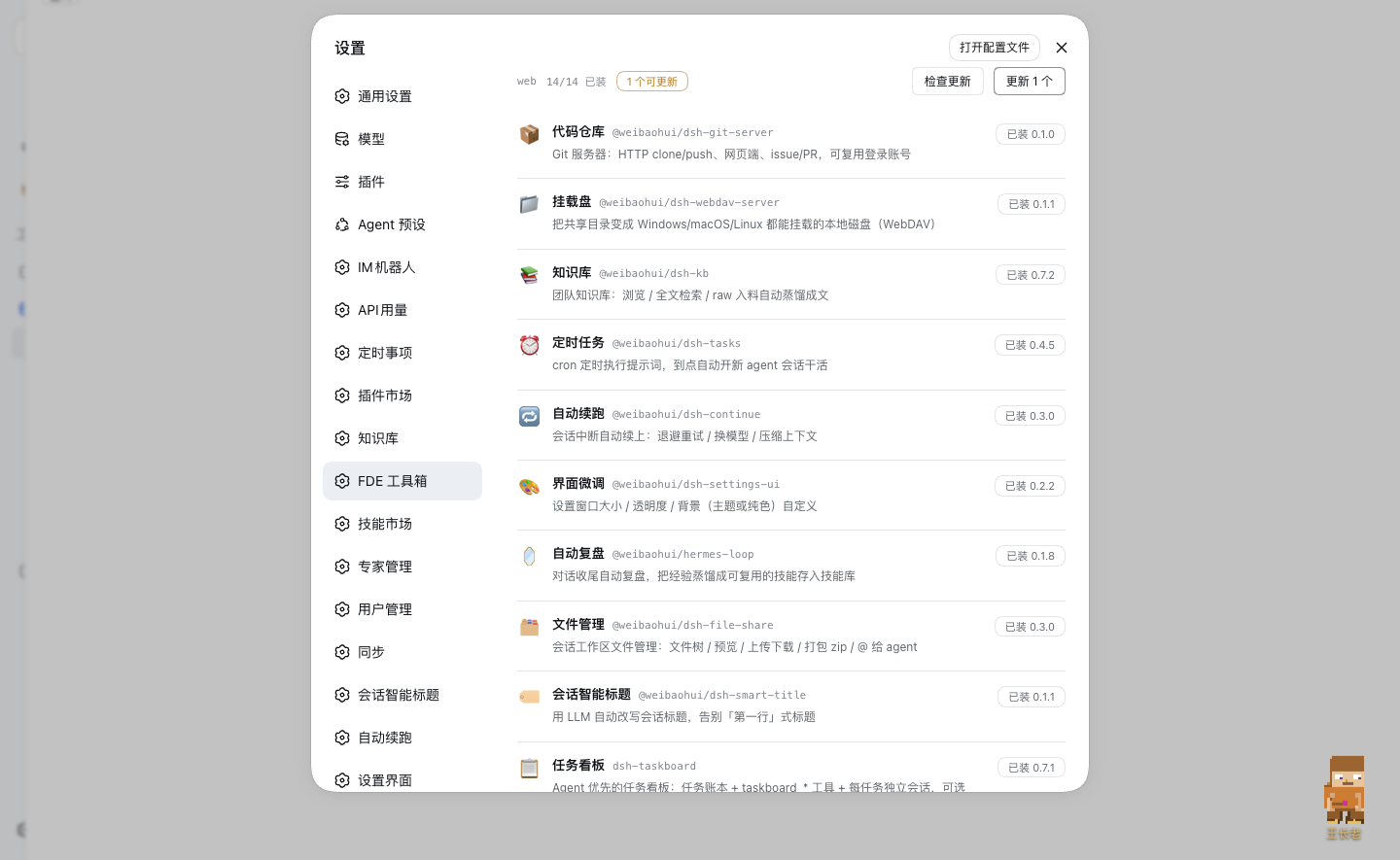
全家桶成员
| 成员 | 说明 |
| --- | --- |
| 🔐 user-management(必装) | 登录门禁:未登录弹登录/注册页,用户/角色/审计、TOTP 两步验证 |
| 📦 dsh-git-server | Git 服务器(内嵌 ts-gogs):HTTP clone/push、网页端、issue/PR |
| 📁 dsh-webdav-server | 共享目录变挂载盘:WebDAV,三平台可挂,令牌认证 |
| 📚 dsh-kb | 团队知识库:浏览 / 全文检索 / raw 入料自动蒸馏成文 |
| ⏰ dsh-tasks | 定时任务:cron 到点自动开新 agent 会话干活 |
| 🔁 dsh-continue | 自动续跑:会话中断自动退避重试 / 换模型 / 压缩上下文 |
| 🎨 dsh-settings-ui | 界面微调:设置窗口大小 / 透明度 / 背景 |
| 🪞 hermes-loop | 自动复盘:对话收尾蒸馏经验成可复用技能 |
| 🗂️ dsh-file-share | 会话工作区文件管理:文件树 / 预览 / 上传下载 / 打包 zip / @ 给 agent |
| 🏷️ dsh-smart-title | 会话智能标题:用 LLM 自动改写,告别「第一行」式标题 |
| 📋 dsh-taskboard | Agent 优先的任务看板:任务账本 + agent 工具 + 每任务独立会话 |
| 🛒 dshmarket | 可视化插件市场:逛一逛,点一下,装好 |
| 🧠 dsh-context | 上下文仪表盘 + /context 命令,看清上下文组成与演化 |
| 💬 @xmanrui/dsh-im | 十一种 IM 渠道和公网 AI Office 接入本机 Harness |
| 🧭 dsh-better-sidebar | VSCode 式右侧边栏(资源管理器/编辑器/终端/git/浏览器),按会话隔离 |
| 🧪 dsh-qa | 本地 QA 测试工作台:需求/用例/缺陷/里程碑全流程、实时看板与日历、AI 登记 + 门禁审批(PolyForm 非商业许可) |
| 🤝 @nanmicoder/dsh-agent-teams | 一句话组建多代理团队:队长拆解带依赖的任务、持久成员协作、实时任务 DAG 面板 |
| 📊 dsh-flow | 执行流程图:会话执行过程画成四泳道流程图,实时生长、双击下钻子代理,可切列表视图 |
| 📈 dsh-dashboard | 使用量仪表盘:token / 费用 / 模型 / 工具榜统计,gridstack+ECharts 卡片可拖拽编排,支持自定义公式与 AI 编排 |
成员清单在 src/installer.js 的 PACK,加一行即扩包(range 取 npm latest 加 ^),面板与接口自动跟上。
安装
dsh plugin --profile web add @weibaohui/dsh-fde-tools- 重启 dsh,设置里出现「FDE 工具箱」
- 「补装 N 个」(或逐个点「安装」)
- 再重启一次,全家桶生效
装完显示「重启 dsh 后生效」提示:
- 用 http://127.0.0.1:3080(本机直连)打开 dsh 时,提示旁有「立即重启」按钮——插件按启动时的原样参数拉起新的 dsh 进程,等端口就绪后旧进程自动退出,页面自动刷新,不用去终端;
- 局域网地址或经 HTTPS 网关打开时,出于安全考虑(重启只信任本机直连请求)按钮不出现,请在终端重启;
- dsh 由 launchd / systemd 等服务守护时,一键重启自动停用(避免和服务管理器打架),请用系统服务方式重启。
工作原理
- dsh 的插件 = profile
package.json的依赖 +dsh.profile.bundles里的加载层; 纯 npm 依赖聚合带不动子插件(reconcile 只认 profile 直接依赖), 所以引导器在宿主侧替你执行pnpm add <member>@<range>并追加 bundles。 - 快照还原:pnpm 在 profile 里跑 add 有清掉
link:/file:依赖的前科, 安装前把依赖和 bundles 快照到<profile>/.fde-tools-install-snapshot.json, 装完 diff,丢了就按快照补回再pnpm install(≤2 轮),仍失败则报错并给出快照路径。 - 构建脚本自动放行:依赖带安装期构建脚本(如 dsh-git-server 的 better-sqlite3、
dsh-better-sidebar 的 node-pty)时,pnpm 会拦下并退出非零;引导器识别
ERR_PNPM_IGNORED_BUILDS,把包以包名@版本: true写进pnpm-workspace.yaml的allowBuilds后自动重试一次。 - 已在 profile 依赖里的成员(无论 npm / link / github spec)一律跳过,不会覆盖现有安装方式。
环境变量
| 变量 | 作用 |
| --- | --- |
| DSH_FDE_TOOLS_PROFILE | 手动指名所属 profile(名或绝对路径);缺省自动扫描 ~/.dsh/profiles |
| DSH_FDE_TOOLS_PNPM | 手动指名 pnpm 可执行文件;缺省按 PATH → ~/.local/bin/pnpm → 宿主同前缀的 pnpm.cjs 顺序探测 |
| DSH_HOME | dsh 主目录(缺省 ~/.dsh) |
License
MIT
版本兼容性
本插件与 DeepSeek Harness(@deepseek-ai/dsh)的版本对应关系:
| 插件版本 | 适配 dsh 版本 | 备注 | |---------|--------------|------| | 0.3.2 | 0.1.7-rc.2 | 已在 @deepseek-ai/[email protected] 下验证运行 | | 0.3.5 | 0.1.7-rc.2 | 已在 @deepseek-ai/[email protected] 下验证运行 | | 0.3.6 | 0.1.7-rc.2 | 当前版本,已在 @deepseek-ai/[email protected] 下验证运行 |
发版约定:每次发布新版本时,请在上表追加一行,记录该插件版本实际验证所用的
@deepseek-ai/dsh版本。package.json的engines.dsh声明最低支持版本;本表记录实际验证版本,二者配合使用。