
@weibaohui/dsh-process
v0.6.9
Published
dsh 插件 · 工艺管理:「工艺」是可复用的多阶段·多环节 agent 工作流模板——定义阶段、环节指令、门禁与流转规则,agent 按工艺分阶段推进。支持浏览/编辑(表单与 YAML 双向同步)/校验/导入导出/AI 生成,内置库只读、我的库可写;面板可直接发起运行,逐环节开真实会话执行、门禁评审,看板跟踪全程。
Downloads
1,796

Maintainers
 weibaohui
Readme
@weibaohui/dsh-process


工艺管理插件:把「工艺」(Process,多阶段 · 多环节的 agent 工作流模板)接进 dsh web——浏览、编辑、校验、导入导出、AI 生成,agent 能用工具读工艺库、按工艺分阶段推进。
核心功能
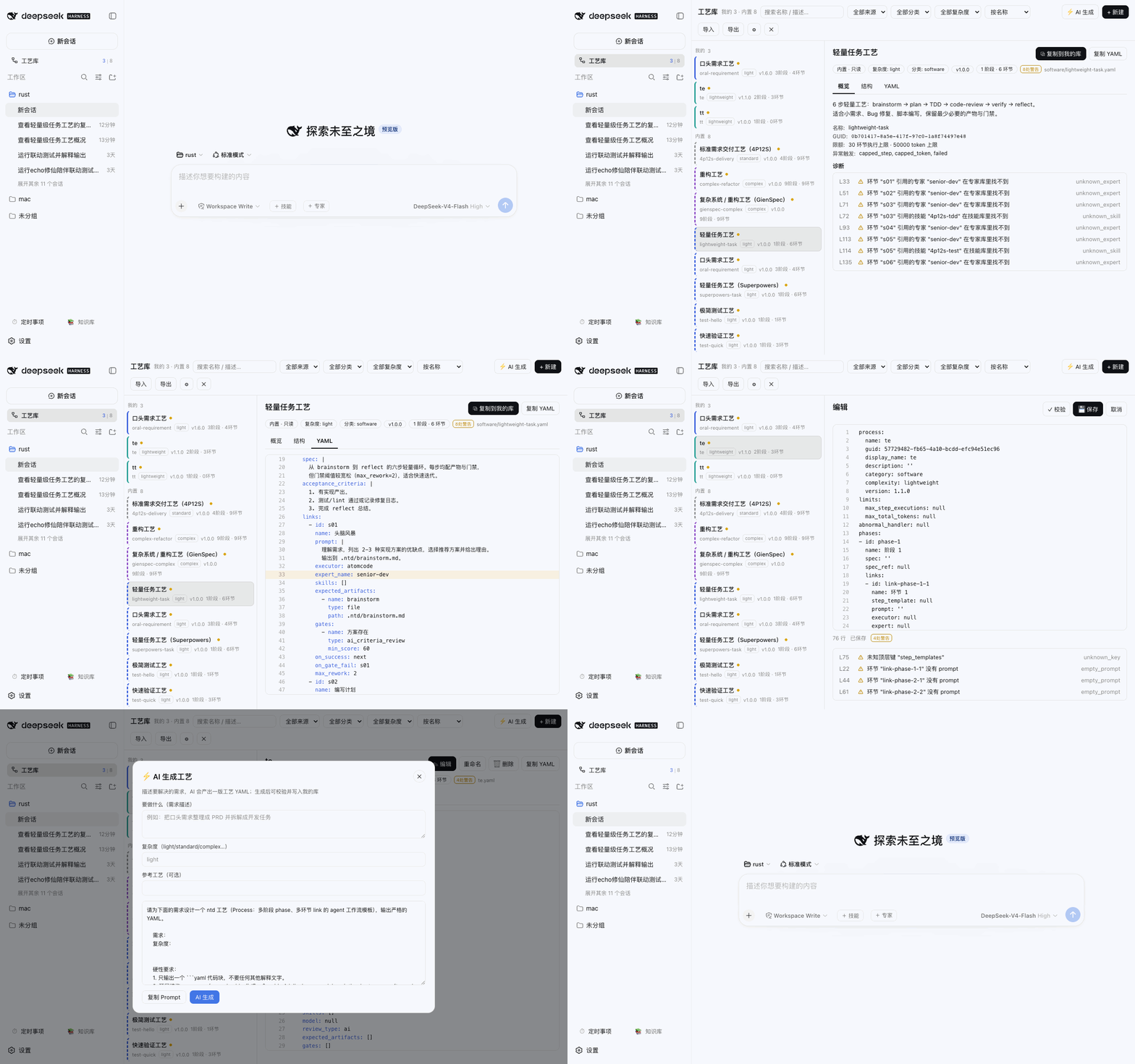
- 双库浏览:我的库(默认
~/.ntd/processes,可写)+ 内置库(默认~/.ntd/bundled/processes,只读),递归扫描分类子目录;侧栏入口实时显示「我的 | 内置」计数,根目录均可在设置里改 - 详情三视图:概览(元信息 / 限额 / 异常触发 / 诊断清单)、结构(阶段 → 环节树,prompt / 执行器 / 专家 / 技能 / 门禁 / 流转全字段展示)、YAML(行号 + 着色,诊断点击跳行高亮)
- 编辑器:行号 + 边写边校验(300ms 防抖),错误阻止保存、警告只黄标;
⌘/Ctrl+S保存;乐观锁——外部(其他编辑器)改过文件会 409,给「重新加载 / 仍然覆盖」二选一 - 校验器:语法错 / 缺 name / phases 空 / 环节 id 重复 /
on_gate_failgoto:指向不存在的环节 = 错误;缺 guid、未知专家/技能引用(对照专家库、技能库)、未知键 = 警告 - 全套 CRUD:新建(带注释骨架)/ 复制内置到我的库(自动换 guid,注释与未知字段保留)/ 重命名(改显示名,文件名与标识不变)/ 删除(移入
.trash) - 导入导出:多文件导入(重名可选覆盖,逐文件报结果)、单个 yaml 下载、全库 zip
- 实时同步:fs.watch 两个根目录 → SSE 变更帧 → 界面秒级刷新,别的编辑器改了这边立刻看到
- ⚡ AI 生成工艺:输入需求 + 复杂度 → 真实 agent 会话产出一版工艺 YAML → 校验 → 预览确认 → 写入我的库
- agent 协作:
process_list/process_get/process_validate/process_save四个工具 + systemPrompt 段(按工艺推进:一环节一交付、门禁不过按on_gate_fail流转);内置库对 agent 同样只读 - 不发明格式:100% 复用工艺 YAML 原生格式,编辑走 Document API,注释、键序、未知字段往返不丢
安装
dsh plugin --profile web add @weibaohui/dsh-process装完重启 dsh web 并刷新页面,侧栏「新会话」下方出现「工艺」入口即成功。零配置:默认读写 ~/.ntd 下的工艺目录(沿用历史路径,可在 ⚙ 设置里改根目录、扫描深度、是否校验专家/技能引用)。
使用
- 点侧栏「工艺」打开全屏工艺库(侧栏保持可点;
Esc、点击会话行、打开任务看板都会自动关闭;与任务看板互斥) - 左列选工艺,右侧概览 / 结构 / YAML 三个 tab 查看;
↑↓键盘切换 - 「✎ 编辑」进 YAML 编辑器,边写边校验,
⌘S保存;内置库条目显示「⧉ 复制到我的库」 - 「+ 新建 ▾」空白工艺(带注释骨架)或复制现有;「⬆ 导入」支持拖拽多文件;「⬇ 导出」单文件或全库 zip
- 「⚡ AI 生成」:描述需求,AI 产出 → 校验 → 预览 → 写入
- 任意会话里让 agent 干活:
按工艺 lightweight-task 执行这个需求/用 process_save 把这套流程存成工艺
数据与安全
- 工艺文件本身就是数据源(无独立数据库);所有写路径只针对我的库,内置库一律 403
- 路径白名单:拒绝
..、绝对路径、点目录;删除先进.trash(列表隐藏,可手工找回) - 根目录等配置走 dsh settings 服务(
dsh-process命名空间),会随 dsh-sync 同步
开发
npm install
npm test            # host 单测(校验器 / 存储 CRUD / 工具 / 错误映射)
npm run build:client
npm run check
link: 方式安装到 web profile 后,改 client/index.js 跑 npm run build:client 刷新即生效;host 侧改动需重启 dsh web。
可视化表单编辑(v0.4)
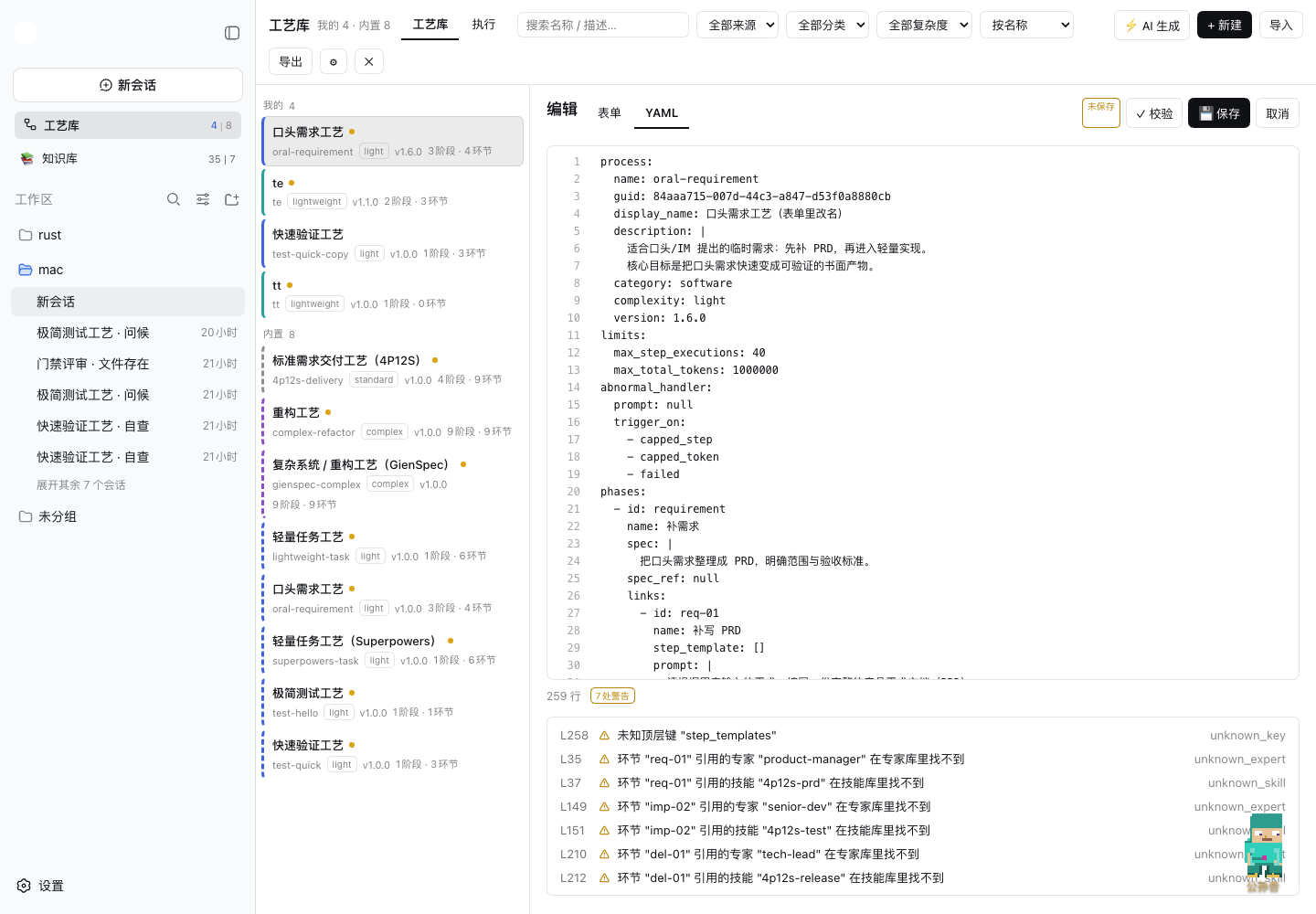
「✎ 编辑」后可在表单 / YAML 两种模式间随时切换,同一份数据源双向实时同步——表单里改一个字段,YAML 立刻变;YAML 手改,表单立即反映。编辑走 Document API,注释与未知字段往返不丢。
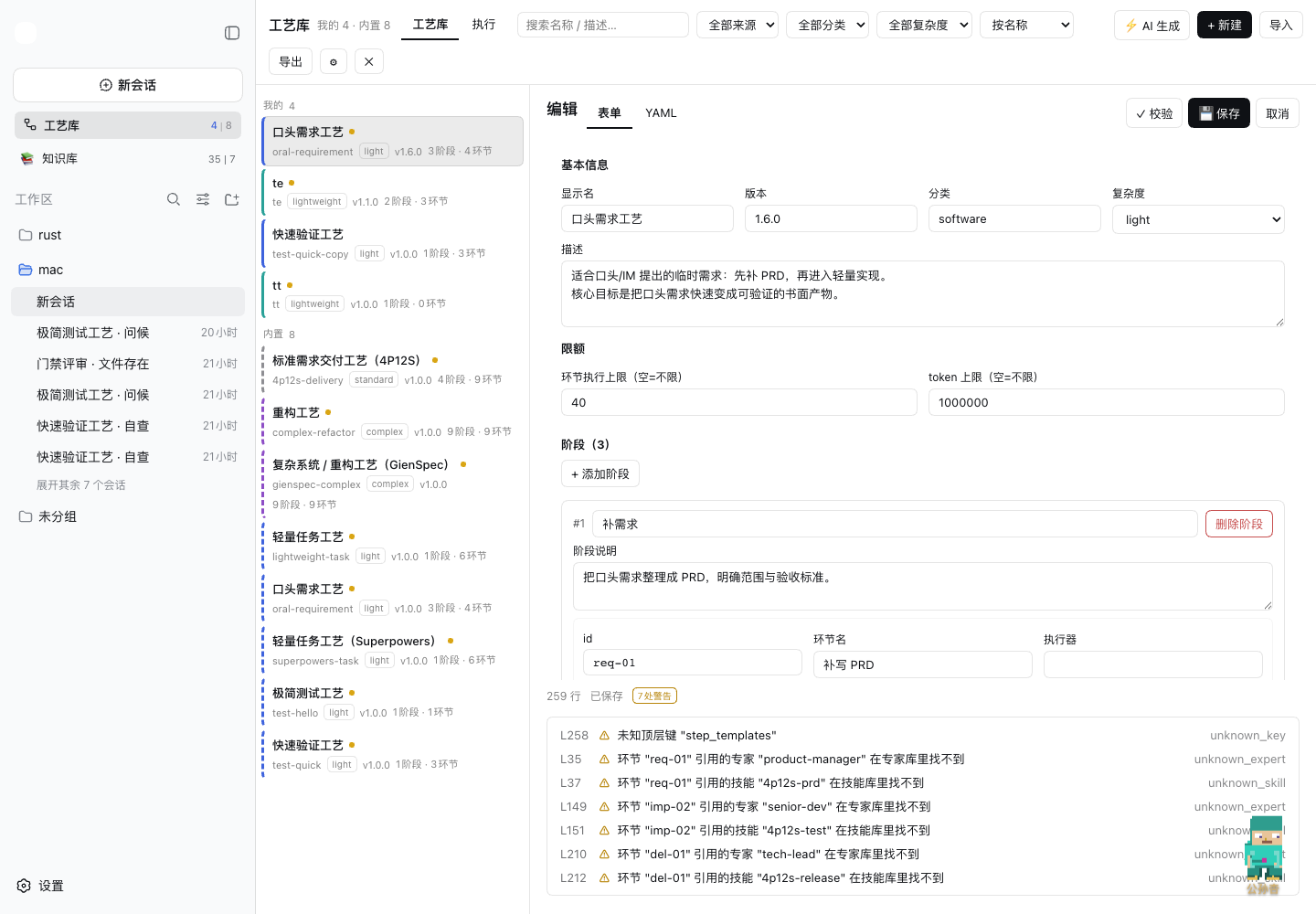
- 全字段可视化:基本信息(显示名 / 版本 / 分类 / 复杂度 / 描述)、限额、阶段(名 / 说明)、环节(id / 名 / 执行器 / 专家 / 模型 / 复核方式 / 技能 / 返工上限 / 指令 prompt / 验收标准)、门禁(名 / 类型 / 产物 / 分数线)逐项表单化
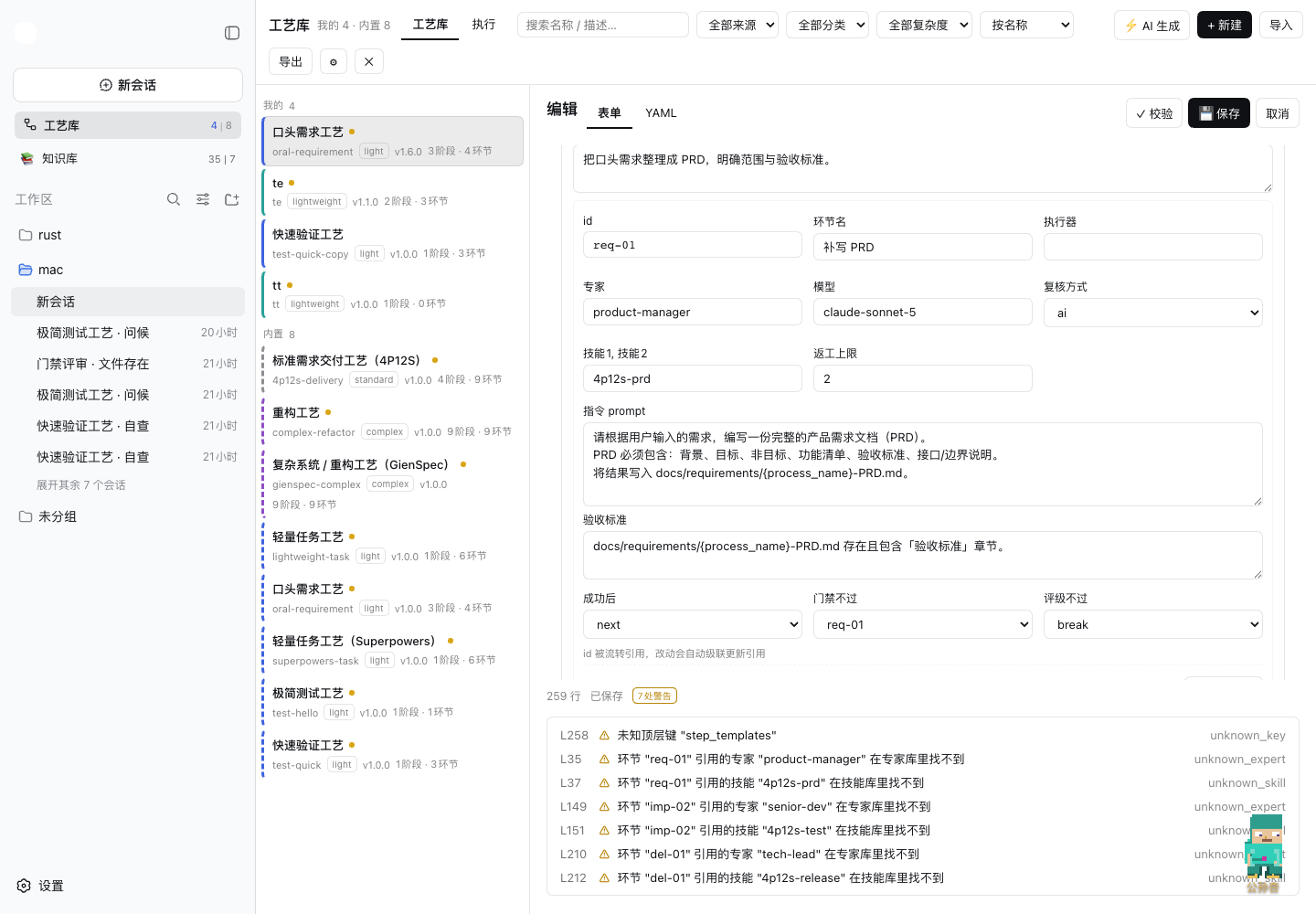
- 流转下拉:成功后 / 门禁不过 / 评级不过直接下拉选,自动收集全库环节 id 作为跳转选项
- id 级联改名:环节 id 改动自动更新所有
on_success/on_gate_fail/on_rating_fail引用(含goto:前缀),不会把流转改断
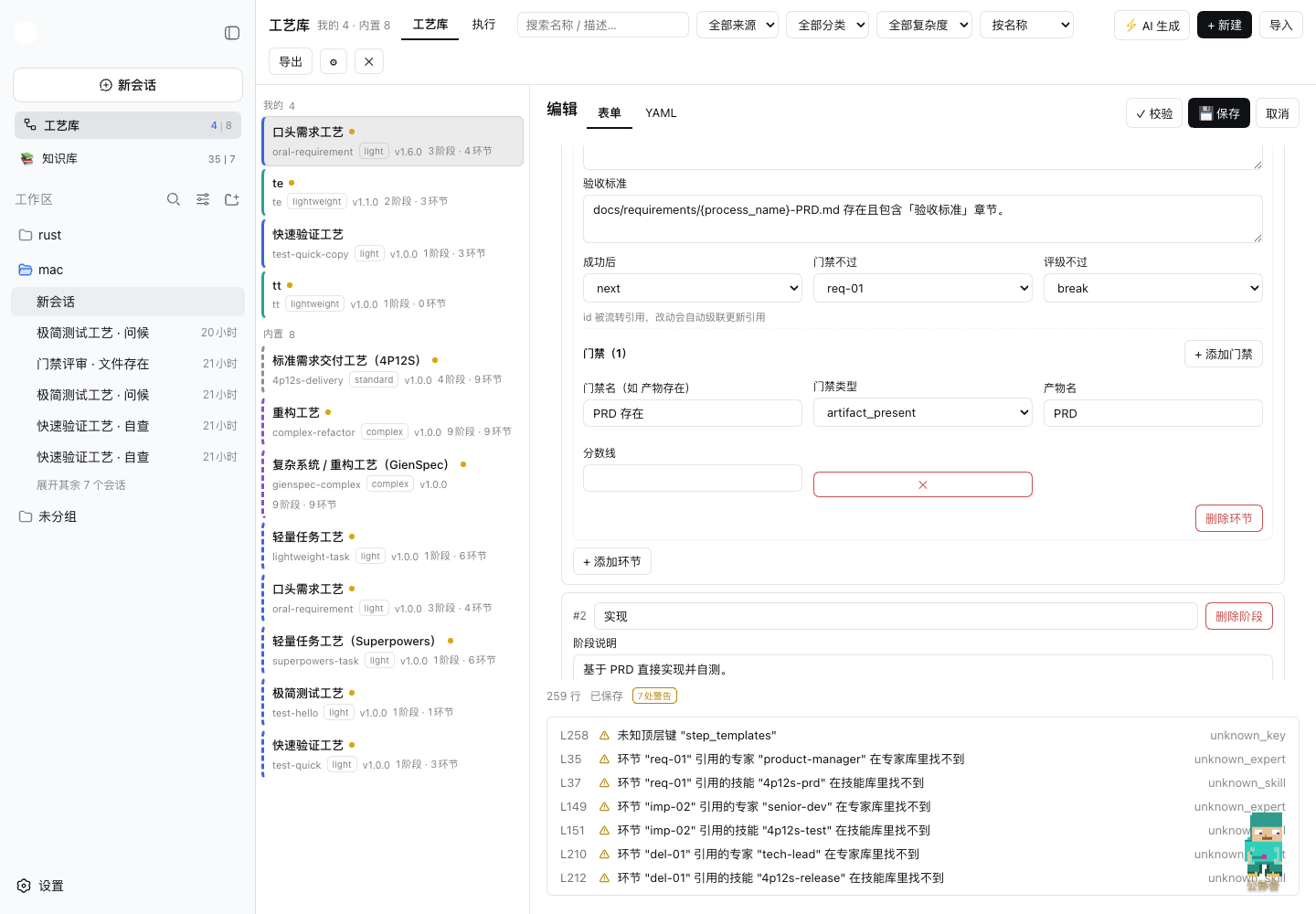
- 阶段 / 环节 / 门禁可增删:
+ 添加阶段/+ 添加环节/+ 添加门禁一键加卡;删除带级联(删环节自动清引用,删阶段连其下所有环节一起清) - YAML 模式保持行号 + 边写边校验;表单模式对语法错误自动降级提示(修好即恢复)
按工艺执行(v0.2)
工艺不只是文档——面板顶部切到「执行」即可发起一次真实运行:
- 发起:工艺详情页「▶ 按工艺执行」(可选绑定工作区,会话挂进侧栏对应工作区)
- 运行名称:运行条目名 = 「需求首行摘要」(不带工艺名,需求为空才退回工艺名),执行列表、运行看板、环节会话与门禁评审会话的标题统一用它——同一工艺反复发起也能一眼区分
- 驱动:每个环节开一个全新 dsh 会话执行环节指令;宿主逐环节推进,on_success / on_gate_fail / goto: 由代码层流转,模型无权越规
- 门禁:ai_criteria_review 由独立评审会话对照 min_score 打分;不过 → 按配置返工(max_rework 代码封顶)或 break 暂停等人
- 裁决:门禁未过时看板弹出「重试本环节(返工清零)/ 跳过本环节 / 中止运行」;随时可暂停 / 继续 / 停止
- 看板:运行列表(状态胶囊 + 进度 + token 合计)+ 运行看板(阶段分组、环节卡:尝试次数、返工计数、门禁分数、token 用量、实时输出尾巴);每个环节一键「打开会话」跳到对应 dsh 会话
- token 统计:每个环节为全新会话,宿主在 assistant/message 事件逐步上报 usage,插件按会话求和 = 该环节消耗(含门禁评审会话,单独挂
gateUsage);运行合计随台账持久化,悬停徽标看输入/输出拆分 - 产物收集(观察制):只认会话里真实发生的文件写操作——write / edit 的结果事件带 hunk diff,str-replace-editor 从调用参数推(create / str_replace / insert;view 只读不算),按路径累计 +n/−n 变更统计(git diffstat 口径,上下文行不计)与 diff 文本;看板「产物」区按环节列出,环节卡「查看文件」打开文件树,点文件看 diff 变更 / 完整内容 双视图(1MB 截断、二进制识别);预览读取走双重白名单(路径必须在产物列表内 + 解析后必须落在运行工作区内)
- 台账:运行落盘 ~/.dsh/dsh-process/runs.json(快照冻结,改工艺不影响进行中的运行);宿主重启后运行自动转暂停,可继续
路线
- ✅ ~~v0.3/v0.4:结构化表单编辑(Document API 往返不丢)~~(已上线,见「可视化表单编辑」)
- 回收站恢复 UI、工艺市场、token 限额强制、流程图节点点击联动环节卡
联系我 :飞书群

版本兼容性
本插件与 DeepSeek Harness(@deepseek-ai/dsh)的版本对应关系:
| 插件版本 | 适配 dsh 版本 | 备注 | |---------|--------------|------| | 0.6.5 | 0.1.7-rc.2 | 当前版本,已在 @deepseek-ai/[email protected] 下验证运行 | | 0.6.4 | 0.1.7-rc.2 | 已在 @deepseek-ai/[email protected] 下验证运行 |
发版约定:每次发布新版本时,请在上表追加一行,记录该插件版本实际验证所用的
@deepseek-ai/dsh版本。package.json的engines.dsh声明最低支持版本;本表记录实际验证版本,二者配合使用。