
@weibaohui/dsh-sync
v0.4.9
Published
dsh 插件 · 多机同步与多协议备份:Git(分支→PR→合并、冲突交 AI)+ WebDAV + 本地文件夹三种协议各一个页签一个开关;技能/会话/设置/插件清单独立开关与策略;纯备份协议与 git backup 布局一致(backup/<实例ID>/);快照本地优先、多协议通用上云与恢复回退。

Maintainers
 weibaohui
Readme
@weibaohui/dsh-sync


多机同步插件:让多台机器上的 dsh 通过一个私有 Git 仓库(GitCode / GitHub / GitLab / Gitee / 自建,0.4.5 起)保持一致——技能、会话、设置、插件清单都能同步。除 Git 完整同步外,还支持 WebDAV 与 本地文件夹 两种纯备份协议,各协议一个页签一个开关。
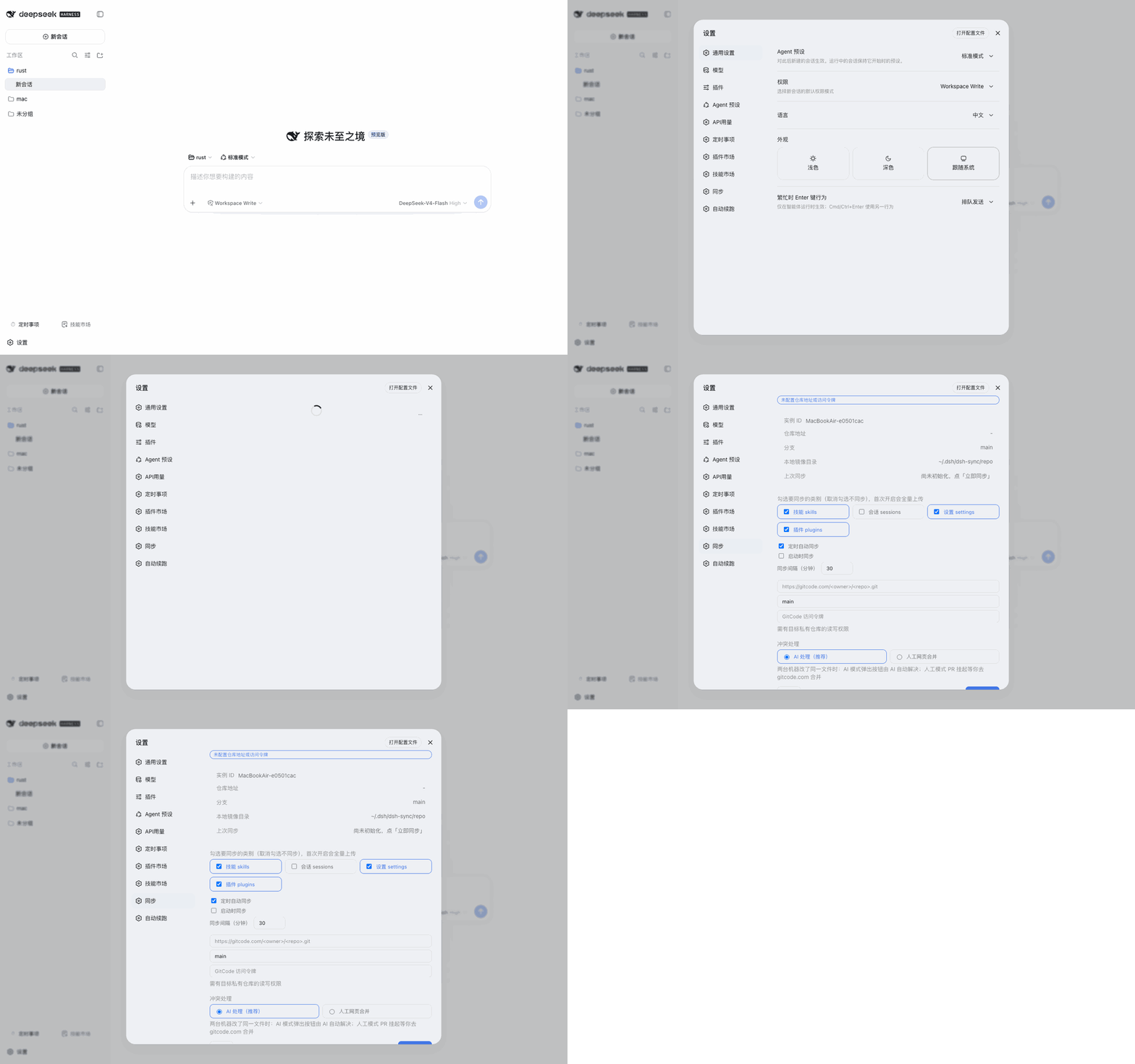
核心功能
- 多协议备份,一个协议一个页签一个开关:
- Git 仓库(默认开):完整的 分支 → PR → 合并 同步语义,冲突显化、AI 语义合并
- WebDAV(默认关):填地址/账号/密码/子目录即可,兼容坚果云、Nextcloud、Alist 等一切标准 WebDAV 服务;每次同步按 sha1 清单增量上传(只传变化的文件、删除同步传播)
- 本地文件夹(默认关):填一个目录(支持
~)即可;每次同步整目录原子镜像(tmp-swap,中断不留半截备份) - 未开启的协议只显示开关;开启后出现地址参数配置与「测试连接」
- 纯备份协议的内容与布局和 git 的备份策略完全一致:
backup/<实例ID>/…,本地永不被读回覆盖;单协议失败不影响其他协议
- 四类内容可同步,每类独立开关 + 独立策略:
- 技能 skills(默认开,策略=并集):覆盖
~/.dsh/skills、~/.agents/skills、~/agents/skills三个根;新增都收、双方改动交 AI 语义合并 - 会话 sessions(默认关,策略=备份):写
backup/<实例ID>/,各机云上独立,本地永不被覆盖 - 设置 settings.yaml(默认开,策略=备份):机器专属配置不打架,想共享键用「AI 智能对齐」逐键并
- 插件清单(默认开,策略=备份):各机 bundle/依赖清单互不覆盖(跨机整文件覆盖曾致宿主 crash loop)
- 四种策略:备份(各机独立,永不被覆盖)/ 并集(新增都收、逐文件三方、冲突交 AI)/ 覆盖·远端为准(本地只读镜像,远端删本地也删)/ 覆盖·本地为准(只推不拉)
- 技能 skills(默认开,策略=并集):覆盖
- 快照:本地优先,通用上云,勾选才传
- 「立即快照」默认只落本机(
~/.dsh/dsh-sync/snapshots/,滚动保留 30 份,超窗真删除真释放);勾选「上传到云端」才写入所有已启用的云端协议(git →backup/<实例ID>/snapshots/,WebDAV / 本地文件夹同布局),永久存档 - 每天首个同步自动打一份本地快照;范围=设置+插件清单(可选含技能),永远不含会话(体积大头)
- 一键恢复:本地快照直接恢复;本地没有的按 git → WebDAV → 本地文件夹 依次回退取回;恢复前自动把当前状态再拍一份(pre-restore-*)
- 「立即快照」默认只落本机(
- 分支 → PR → 合并:每台机器的变更以 PR 形式提交,冲突显化为一个待合并的 PR,绝不静默覆盖
- 同步前自动回填:每次推送前先把远端新增、本机没动过的内容拉回本机,本机快照不会误删别的机器推上来的新技能/新配置
- AI 智能对齐:点「AI 智能对齐」,先自动回填远端新增,再由 AI 对两边都改过的文件做语义合并(动手前自动备份本机文件),合并后由系统自动推送
- AI 一键解决冲突:出现冲突时设置页冒出「AI 解决冲突」按钮,点击后由系统取回冲突分支与 main 制造冲突工作树,AI 只做本地语义解冲突,推送与 PR 合并由系统自动完成
- 浏览远端备份:点「浏览远端」可查看云端仓库的完整目录树,自动识别
backup/<实例ID>/下每台机器的备份并标记本机;在树中勾选文件后「预览拉取」会给出安全判定(哪些可拉、哪些会被阻止及原因),确认后才写入本地——写入前自动拍一份 pre-remote-pull 安全快照- 跨机安全提示(不阻止拉取):另一台机器的 插件清单(本地已有时)和 settings.yaml 跨机拉取时会⚠警告(覆盖机器专属配置可能导致宿主崩溃),但允许用户自行决定是否拉取;技能文件可安全跨机拉取;本机自己的备份无警告(恢复语义)
- 浏览是只读的:远端 main 拉进独立 ref(
refs/dshsync/browse,强制更新——该 ref 相对远端 main 常处于回退状态,见 0.4.7),不写工作树、不动分支,与同步循环无竞争(有目标 refspec 的 fetch 会写FETCH_HEAD,写的是同步循环自己也会取的同一个分支 tip)
- 安全(0.4.5 起支持多托管方):GitCode(默认)/ GitHub / GitLab / Gitee 四个托管方,保存时按 host 调 REST 判定仓库是否私有,公共仓库一律拒绝保存;自建/未知主机的私有性无法校验,保存前必须由用户在风险弹窗里显式确认(见「托管方支持与泄露风险」);访问 token 只写不回读
- 凭据不出域:AI agent(冲突处理/智能对齐/远端对齐)的提示词不含任何访问令牌——需要凭据的 git 推送、PR 查询/合并全部由插件 host 侧完成,token 不会随提示词发送给模型服务(0.4.1 修复)。git 子进程同样不经 argv 携带 token(argv 可被
ps全机看到),改为GIT_ASKPASS环境变量注入(0.4.1);conflictMode=manual时所有 AI 入口(自动触发 + 手动按钮)一律关闭,ai才放行 - 残余风险提示:「智能对齐」的本质是把待合并文件的内容交给模型做语义判断——若
settings.yaml等文件内含其他机密(如模型 apiKey),这些值仍会进入模型上下文(这是语义合并功能的固有性质,无法在保留功能的前提下消除);介意者请把conflictMode设为manual或关闭对应同步开关 - 拉取安全:pull 只回写本地没动过的远端变更,本地改过的内容不会被覆盖
安装
dsh plugin --profile web add @weibaohui/dsh-sync -w装完重启 dsh web 即生效。
本地打包与测试
1. 打包
npm run check          # 语法检查(src + client)
npm test               # 离线测试 82 项
npm run build:client   # 改了 client/index.js 必须先重建,否则打进去的是旧界面
npm pack               # → weibaohui-dsh-sync-<version>.tgz
tar -tzf weibaohui-dsh-sync-0.4.8.tgz   # 应只含 src/、client/、cordis.patch.yml、package.json、README.md
发布时 npm publish 会自动跑 prepublishOnly(build:client + check + test),无需手工前置。
2. 装进本地 profile 验证
Desktop 的 profile 名是 desktop;先完全退出 Desktop(profile 的 package.json 有文件锁):
dsh plugin --profile desktop add file:C:\path\to\weibaohui-dsh-sync-0.4.8.tgz
# 或从 npm 装发布版:dsh plugin --profile desktop add @weibaohui/dsh-sync -w
# 普通 web profile:dsh plugin --profile web add @weibaohui/dsh-sync -w
装完重启即生效。若只想跑一次端到端、不碰真实 profile,可用仓库内脚手架
(真实 dsh-app-boot + 真实 dsh-settings,用 file URL 直接加载工作区 src/index.js):
node .repro/harness4.mjs real,结果写入 .repro/out4-real.json。
3. 开发期免「改一次装一次」
把 profile 里的安装副本换成指向源码目录的 junction(Windows 需开发者模式或管理员),
之后改 src/index.js → 重启 dsh;改 client/index.js → npm run build:client → 刷新页面:
$dst = "$env:USERPROFILE\.dsh\profiles\desktop\node_modules\@weibaohui\dsh-sync"
Rename-Item $dst "$dst.bak"
New-Item -ItemType Junction -Path $dst -Target "D:\GfKaifaApplication\dsh-sync"
回滚:删除 junction,把 dsh-sync.bak 改回原名。
4. 验证与排障
- 设置页保存后,
GET /dsh-sync/api/status的persist.fileOk应为true,并可看到~/.dsh/dsh-sync/settings.json生成;重启 dsh 后值应保留。 GET /dsh-sync/api/diag显示schemaKind/descriptorVisible/lastPersist:宿主写回失败时persist.hostOk=false,此时 UI 提示「已保存到本地」。
使用
- 到 GitCode(默认)或 GitHub / GitLab / Gitee 创建一个私有仓库(插件不会代建)
- 打开 Web UI → 设置页 → dsh-sync → Git 页签,先在「仓库托管方」按钮组点选托管方(默认 GitCode,会自动补上地址前缀并保留已填的 owner/repo),再填仓库地址与 access token,保存
- 按需开关四类同步内容
- 之后每次修改,通过同步操作把本机变更推成 PR;多机之间即可保持一致
- 日常可点「AI 智能对齐」让 AI 先回填远端新增、语义合并双方改动;出现冲突时设置页会出现「AI 解决冲突」按钮,点一下即可
- 需要从其他机器恢复个别文件时,点「浏览远端」→ 在远端目录树中找到文件并勾选 → 「预览拉取」确认安全判定 → 「应用」写入本地(自动拍安全快照)
Windows 用户注意(路径转换)
在 Windows 的 Git Bash 里,MSYS2 runtime 会对传给原生 .exe 的参数做 POSIX→Windows 路径转换。
若路径中某个目录名带点(如 C:\Users\x\.dsh\dsh-sync\repo),这个点会被当成路径分隔符,
路径被改写成 C:\Users\x\dsh\dsh-sync\repo(点消失、多出一级),git 于是在不存在的目录里执行并报 fetch failed。
这是 Git for Windows 的既有行为,官方定性为 wontfix(git-for-windows#685)。 本插件自 0.4.2 起做了两层防护:
- host 侧:git 子进程在 Windows 下自动注入
MSYS_NO_PATHCONV=1与MSYS2_ARG_CONV_EXCL='*'(仅该子进程,不写全局环境) - AI 侧:三个 AI 提示词都带 Windows 前置保险——先判定平台,再自检路径是否被改写,每条 git 命令前置开关,
并用
git -C <影子仓库> rev-parse --show-toplevel确认目录真实可达后才动手;验证失败即停止汇报
⚠️ 请不要把
MSYS_NO_PATHCONV=1写进.bashrc或全局环境——全局设置会影响其它程序, Git for Windows 官方也专门警告过这一点(build-extra#376)。 只在你自己的终端里按"每条命令前置"的方式临时使用即可。
设置持久化与排障(0.4.3)
点「保存」后设置被写到两处,任何一处成功都能跨重启生效:
- 宿主 settings 文档(profile 的
cordis.patch.yml)——由 dsh 的 settings/config-editor 服务写回,成功时与宿主设置页完全一致; - 自持文件
~/.dsh/dsh-sync/settings.json(0600,仅本机)——不依赖宿主 settings 通道,保存即落盘。
重启后的合并优先级:内置默认 < 插件 config.sync < 宿主文档 < 自持文件 < 本次运行内存覆写。 若宿主通道在运行中被确认写入过(文档 mtime 更新),则以宿主文档为准;否则自持文件生效——这正是为了在宿主写回失败时仍能跨重启保留设置(见下)。
- 宿主写回失败时(宿主日志出现
No configurable plugin entry "dsh-sync"或Plugin entry "dsh-sync" is no longer configurable),设置仍然写入自持文件,UI 提示 「设置已保存到本地(宿主设置写回失败,重启后仍生效)」,不再静默成功。 Config永不为undefined:schemastery 不可用(< 3.18.4 没有.volatile())时使用自铸 Config,宿主依旧能识别本插件设置并投影字段。 schemastery 加载已加固:逐候选校验.volatile()是否存在,全部不可用才降级,并且始终打印一行警告。- 排障端点:
GET /dsh-sync/api/diag返回schemaKind/schemasterySource/schemasteryError/descriptorVisible/documentPath/lastPersist/settingsFile/fileSettingsKeys等;GET /dsh-sync/api/status的persist字段给出fileOk/fileError/hostOk/hostError。 - token / webdavPassword 与宿主文档一致地存放在自持文件里(明文、仅本机、
0600),永不回显;置空保存即清除。 - 卸载或换机时可安全删除
~/.dsh/dsh-sync/settings.json,插件会回到默认值。
托管方支持与泄露风险(0.4.5)
支持 GitCode(默认)/ GitHub / GitLab / Gitee:页面「仓库托管方」按钮组切换,切换只改地址前缀、保留已填的 owner/repo。保存时按 host 调对应 REST 判定私有性(GitCode
PRIVATE-TOKEN、GitHubAuthorization: Bearer、GitLabPRIVATE-TOKEN、Giteeaccess_token),判定为公共仓库一律拒绝保存。自建/未知主机无法校验:「私仓校验」是防泄露的唯一闸门,而这个闸门只对上面四个托管方有效。填自建/未知 host(如
https://git.internal.corp/...)时插件判不了它是不是私有仓库,保存会返回400 UNVERIFIED_REPO并弹出风险确认:如果是公开仓库,上传后有密钥泄露危险:同步的 settings 组会整文件上传本机
~/.dsh/settings.yaml(可能含其它插件的明文密钥)。请确认该仓库是私有仓库、并接受此风险后再继续。确认后本次保存才放行(
allowUnverifiedRepo标记不落盘,每次保存都要重新确认)。请务必确认仓库为私有。非 GitCode 的功能差异:PR 创建/合并、「AI 冲突处理」(
conflict/run)、「清理遗留分支」(prune-branches) 目前仍是 GitCode 专属;其他托管方走「只推分支」的降级路径(prSkipped),这些入口会返回明确错误而不是静默失败。登录用户名按托管方:GitHub 需要
x-access-token,其余用oauth2(经DSH_SYNC_USER传给 askpass 助手;token 依旧只走环境变量、不进 argv)。
更新日志(0.4.3 → 0.4.9)
0.4.3–0.4.5 围绕同一条问题链:「点保存 → 提示成功 → 重启 dsh 后设置回到默认」。0.4.3 修根因,0.4.4 补面板状态层与保存语义,0.4.5 扩展托管方并明确泄露风险闸门;0.4.6 收尾同一批 Windows 环境下暴露的问题(覆盖镜像不生效 + 测试夹具的环境假设);0.4.7 修另一条独立的线:「浏览远端」报 400(浏览 ref 的非快进更新被 git 拒绝);0.4.8 修桌面版 AI 对齐不可用(apiproxy 基地址写死 3080)与「远端 main 被改写后同步基线失效、会话日志永久挂账」。
0.4.3 —— 修复「保存后重启又回默认」
现象:点「保存」提示成功,重启 dsh 后仓库地址、token、同步开关等又变回默认值。
根因:插件导出 Config 时拿到的是 undefined——可加载到的 @deepseek-ai/schemastery 是 3.18.1,没有 3.18.4 才引入的 .volatile()。于是宿主 ctx.settings.describe() 不再列出 dsh-sync;保存走宿主通道时抛 No configurable plugin entry "dsh-sync"(日志另见 Plugin entry "dsh-sync" is no longer configurable);该异常被 catch 成一行 warn、接口仍返回 200,设置只留在本次运行的内存里,重启即丢。
改动:
@deepseek-ai/schemastery由 devDependencies 移入 dependencies;loadSchemastery()逐个候选校验typeof S.object({}).volatile === 'function',全部不可用才降级,并始终打印告警(不再静默失败);Config永不为undefined:schemastery 不可用时改用自铸 Config(纯 JSON 结构 +toJSON()+'~standard'.validate,不依赖 schemastery),宿主仍能识别本插件设置;- 自持持久化层
~/.dsh/dsh-sync/settings.json(0600,仅本机):保存即落盘,不依赖宿主写回;重启后的合并优先级为 内置默认 < 插件 config.sync < 宿主文档 < 自持文件 < 本次运行内存覆写; - 可观测性:
PUT /dsh-sync/api/settings回传persist{fileOk,hostOk},新增GET /dsh-sync/api/diag与status.persist;宿主写回失败时 UI 提示「设置已保存到本地(宿主设置写回失败,重启后仍生效)」,不再假装成功。
验证:离线测试 69 项(45 通过 + 24 例沙箱内 spawn EPERM,与本次改动无关);真机在 Desktop 的 desktop profile 上「保存 → 完全退出 → 重启」,值不再丢失。
0.4.4 —— 面板/状态层与保存语义
问题:面板看着像「没保存」——首次状态请求失败后表单永远是空的,输入过程中被轮询回写覆盖,token 不回显所以看不出「已配置」。保存语义也含糊:空字符串既可能是「清空」也可能是「没填」。
改动:
- 状态轮询失败不再静默:顶部错误行 + 重试入口;轮询成功即回填表单,但仅在用户没动过表单时(
dirtyRef由原生 input/change 捕获置位),保护正在编辑的内容; - token 输入框显示「已配置」标记(始终不回显明文);新增「清空仓库地址」按钮(二次确认);
PUT /dsh-sync/api/settings语义固定:null= 显式清除(内存覆写、自持文件、宿主文档三处同删,并写clearedKeys墓碑层,避免重启后被宿主 config 层复活);''= 保持不变(兼容旧客户端整表单提交);响应回传applied/ignored/cleared/persist,一个键都没写时提示「没有可保存的修改(空字段已跳过)」;status增加persist字段;gitAvailable加 60s 缓存(减少轮询时的 git 探测);acquireLock容忍首装时的 ENOENT 竞态。
验证:离线测试 72 项(48 通过 + 24 例沙箱 spawn EPERM)。
0.4.5 —— 多托管方与泄露风险闸门
改动:
- 设置页 Git 页签新增「仓库托管方」按钮组:GitCode(默认)/ GitHub / GitLab / Gitee / 其他·自建;切换只改地址前缀,保留已填的 owner/repo;
- 保存时按 host 判定仓库是否私有:GitCode(
PRIVATE-TOKEN+api.gitcode.com/api/v5)、GitHub(Authorization: Bearer+api.github.com)、GitLab(PRIVATE-TOKEN+ urlencoded project path)、Gitee(access_token查询参数);公共仓库一律拒绝保存(回传isPublic); - 自建/未知主机无法校验私有性:返回
400 { code: 'UNVERIFIED_REPO', needConfirm: true, host },由风险弹窗让用户显式确认后带allowUnverifiedRepo: true重发;该标记不落盘,每次保存都要重新确认; - 非 GitCode 的能力边界:PR 创建/合并、
conflict/run(AI 冲突处理)、prune-branches(清理遗留分支)仍是 GitCode 专属,其他托管方走「只推分支」降级(prSkipped),入口返回明确错误而不是静默失败; - askpass 用户名按托管方:GitHub 用
x-access-token,其余用oauth2(经DSH_SYNC_USER传给 askpass 助手;token 依旧只走环境变量、不进 argv)。
泄露风险(使用者必读):见上一节「托管方支持与泄露风险(0.4.5)」——settings 组会把本机 ~/.dsh/settings.yaml 整文件上传,其中可能含其它插件的明文密钥,因此「仓库是不是私有」是唯一的防泄露闸门;填自建/未知主机时请自行确认仓库为私有。
验证:离线测试 78 项(54 通过 + 24 例沙箱 spawn EPERM),其中 test/providers.test.mjs 4 项覆盖「公共仓库拒绝、私有仓库放行、自建主机二次确认、token 不进 URL」。
0.4.6 —— Windows 覆盖镜像与测试环境
现象:Windows 上把技能/会话策略设为「远端为准(只读镜像)」后,本地乱改的文件不会被远端版本冲掉——镜像看着是只读,实际不生效。
根因:runPull 的覆盖组循环用 git diff --no-index --name-status 列出 live 与镜像目录的差异,再用 m[2].startsWith(src.from) 过滤出 live 侧路径。Windows 上 git 的默认输出会给含反斜杠的路径加双引号并转义("D:\\...\\feed/SKILL.md",core.quotePath=false 也管不住),且目录与文件名之间用 / 拼接,于是前缀比较恒为 false,整个覆盖循环静默空转(首次同步还能吃到远端文件,只是因为普通三方 pull 路径写入了 live 上本来不存在的文件)。
改动:
gitDiffNameStatus改用git diff --no-index --name-status --no-renames -z,返回[status, path]数组(NUL 分隔、不加引号、不转义);- 新增
normGitPath()(去引号 + 分隔符统一为/),前缀比较与relFrom都在归一化路径上做;顺带删掉循环里未使用的remoteHave探测。
验证:进程内 harness 用真实 git 输出驱动 runPull(stub 掉子进程):live 的 SKILL.md 为「本地乱改」时 applied=1,内容被覆盖为远端版本;测试侧修复后真机(Windows 正常终端)复跑 npm test:先是 78 项 = 77 通过 + 1 失败(行尾 CRLF,见下条),0230b10 修复后复跑 78 项 = 78 通过 + 0 失败(81.2s)。0.4.5 时的 5 例失败全部是上游 main 既有的 Windows 环境问题,已逐条修掉。
行尾/字节一致性(同一条循环的第二个问题):覆盖循环原先用 fs.copyFile 直接从 shadow 工作树取文件,而 Git for Windows 安装默认 core.autocrlf=true,checkout 会把 LF 换成 CRLF —— 于是同一个 runPull 里两条路径写出的字节不一致:常规路径用 gitShowBuf('FETCH_HEAD:path') 写仓库字节(LF),镜像路径写工作树字节(CRLF)。用户实机 test/multi-instance.test.mjs:169 报的就是这个:actual 'from r1 v1\r\n' / expected 'from r1 v1\n'(内容确实被冲回远端版本,只是行尾不对)。
改动:新增 shadowFileBuf(binary, repoDir, repoRel, worktreeFile),优先 git show HEAD:<repoRel> 取原始字节,取不到(未跟踪内容等)才退回工作树文件;目录分支与 file: true 单文件分支都改用它 + atomicWriteFile,不再 fs.copyFile 工作树文件。
验证:harness 把 shadow 工作树设成 CRLF、git show 返回 LF —— 改动前 AFTER live = "from r1 v1\r\n"(精确复现实机失败),改动后 AFTER live = "from r1 v1\n" 且调用日志出现 show HEAD:skills/dsh/feed/SKILL.md;file: true 的单文件分支同样验证通过。
同一批 Windows 修复(测试侧,不改产品行为):test/multi-instance.test.mjs 的 remote 覆盖用例 + test/conflict-ai.test.mjs 三例 + test/sync.test.mjs 的 askpass 用例,此前在 Windows 上必失败(上游 main 同样失败,与 0.4.3–0.4.5 无关):
test/conflict-ai.test.mjs:夹具用join(seed,'skills','foo.md').replace('skills/foo.md','foo.md')改写路径,Windows 下join产出反斜杠、replace 不匹配 → 改为直接join(seed,'foo.md');裸仓库路径同时当eff.repoUrl,而parseRepoUrl只认gitcode.com/<owner>/<repo>,Windows 反斜杠路径解析为 null 会让finalizeConflictBranch提前返回merged:true→ 传给eff.repoUrl前把分隔符转成/;test/sync.test.mjs:askpass 用例硬编码execFile('/bin/sh', ...),Windows 上没有/bin/sh(Git for Windows 自带usr/bin/sh.exe)→ 先探测/bin/sh与 PATH 中git.exe旁边的usr/bin/sh.exe,都找不到才 skip 该用例。
0.4.7 —— 修复「浏览远端」报 400(非快进 ref 更新被拒)
现象:Git 页签点「浏览远端」只弹一行 HTTP 400,不给任何原因;换安装方式(本地编译、tgz、npm)都一样。
根因:浏览会把远端 main 抓进插件私有 ref refs/dshsync/browse,refspec 是 <branch>:refs/dshsync/browse(没有 +)。这个 ref 会相对远端 main「回退」——每次 PR 合并/变基都会让 main 走到不再是缓存提交后代的位置。此时 git 以 ! [rejected] main -> refs/dshsync/browse (non-fast-forward) 拒绝更新(实测:远端对象已取回、FETCH_HEAD 照写,只有本地 ref 不动),fetchBrowseRef 抛错 → 服务端 catch 返回 400 {error}。
现场证据(本机影子仓库 ~/.dsh/dsh-sync/repo):refs/dshsync/browse 停在 75b890bf…(22:06:15 首次写入成功),而远端 main 已是 2603c1a4…(本地 22:54 同步经 PR 合入后拉到的提交),git merge-base --is-ancestor 75b890bf… 2603c1a4… 退出码 1(非祖先);22:56:25 那次 fetch 写了 FETCH_HEAD、改了 .git/objects,唯独 ref 没动 —— 正是「非快进被拒」的签名。所以这是「用过一次之后迟早会坏」的 bug,与安装方式无关。
改动:
src/index.js的fetchBrowseRef:refspec 改为+<branch>:refs/dshsync/browse(强制更新)。该 ref 是插件私有命名空间,强更没有副作用;顺带更正了「浏览不触碰 FETCH_HEAD」的错误注释与本文档描述(有目标 refspec 的 fetch 确实会写FETCH_HEAD,写的是同步循环自己也会取的同一个分支 tip);client/index.js的getJson:失败时读响应体,把服务端的error(或code)文本作为错误信息抛出(超 300 字符截断)。此前只抛'HTTP ' + r.status,所以任何 400 在界面上都只剩一个状态码。
验证:新增回归用例「浏览远端:远端 main 非快进前进后仍能浏览」(test/remote-browse.test.mjs);机制侧用 git bundle 内部传输复现非快进拒绝(! [rejected] … (non-fast-forward)、FETCH_HEAD 仍被写、ref 不变),refspec 加 + 后变为 (forced update)。
临时绕过(0.4.7 之前):git -C "$env:USERPROFILE\.dsh\dsh-sync\repo" update-ref -d refs/dshsync/browse,下次浏览会以「首次写入」成功。
0.4.8 —— 桌面版 AI 对齐不可用 + 同步基线失效导致会话永久挂账
现象 1(桌面版):设置页点「AI 智能对齐」,输出框里只有一行 fetch failed(「AI 解决冲突」同样);dsh web 下却正常。
根因 1:apiproxy 基地址写死 http://127.0.0.1:3080(只有环境变量 DSH_WEB_URL 能覆盖,而该变量仅 dsh web CLI 会注入会话环境)。桌面宿主的 Web 服务用随机端口(本机实测 127.0.0.1:43120),插件进程里仍是 3080 → undici 直接抛 fetch failed,异常被 agent 任务的 catch 原样写进 job.output,界面上就只剩这一行,看不到任何原因。
改动 1:
- 新增
setApiproxyPort(port);apply()里用ctx.webServer.port覆盖基地址(与宿主自己的authenticatedUrl(desktopLoopbackBrowserUrl(webServer.port))同一口径),DSH_WEB_URL与 3080 保留为兜底; - 网络失败重新包装成
apiproxy 连接失败(基地址 http://127.0.0.1:43120):…,不再只给裸fetch failed。
现象 2(Windows / 多机):同步后云端 sessions/ 一直停在很久以前的提交,本机会话日志推不上去,插件自己的状态里 pendingBoth 挂着一个 session.v4.jsonl.zstd,「待语义合并文件」每轮都是它。
根因 2:state.lastSyncedCommit 里的旧远端 main 被改写(force-push、或平台合并 PR 丢弃了旧 tip)后,旧提交在本机对象库里还在,却已不是新 main 的祖先。reconcileRemote 直接 git diff lastSynced FETCH_HEAD 来判定「远端改过哪些文件」——凡是内容与旧 tip 不同的文件都算「远端改过」,于是一直在追写的会话日志被误判 bothModified → 推送时按 preserve 把它在影子仓库里回退成远端版本(git checkout FETCH_HEAD -- <path>)→ 写进 pendingBoth 并逐轮携带,只有 AI 对齐成功才会销账;而 AI 对齐恰好就是现象 1 挂掉的那条路 ⇒ 永久卡死(每次同步只推得动 plugins)。
改动 2:
- 新增
resolveSyncBase():git merge-base --is-ancestor <lastSynced> FETCH_HEAD不成立时退化为git merge-base(真正的共同祖先);连共同祖先都没有(无关历史)则按「基线重建」处理,不把本地文件当成远端改动;reconcile 与 pull 两条路径都改用它; - 新增
revalidatePendingBoth():挂账基线已失效时重新核对——远端在纠正后的基线上确实没改过该文件就自动销账(本地版本下次同步正常推送),真改过则把记账基线修正到共同祖先;升级到 0.4.8 后,本机现存的这种挂账会自己解开; runPush的未合并/异常返回路径(无新提交、PR 有冲突、抛错)统一走restoreBaseline():把影子仓库 HEAD 恢复到远端 main 并同步lastSyncedCommit,避免下一轮基线与FETCH_HEAD错位。
验证:离线测试 82 项,新增 test/baseline-guard.test.mjs 3 项——基线可达性判定(可达/被丢弃的旧 tip/无关历史/未同步)、挂账复核(失效挂账自动销账 + 真改过的挂账基线修正)、apiproxy 基地址(3080 兜底、宿主端口覆盖、失败信息带基地址);git 侧语义用本地仓库复核(merge-base --is-ancestor 退出码、merge-base 回退值、diff --name-only <共同祖先> FETCH_HEAD -- <path> 对远端未改动的文件为空)。
真机验证(2026-10-07,Windows + DSH Desktop,实装 0.4.8):
- 「AI 智能对齐」不再报
fetch failed(基地址取到宿主随机端口,本机实测http://127.0.0.1:43120); - 升级后本机原有的挂账自动解开:
state.pendingBoth归空,影子仓库sessions/出现新提交2e930da(2026-10-07 00:32:48),并随 PR!25合并进远端 main(d6b1a13),lastSyncedCommit随之更新;此前该会话卡了约 3 小时 45 分,期间每轮只推得动plugins/; - 用户在本机确认:设置页「AI 智能对齐」正常,点击同步后
session也能同步上去。
0.4.9 —— 设置页首帧整块崩溃 + 子路径反代部署全 404(issue #14)
两个问题均由用户 SDWSXXR 报告并附完整分析与 patch(issue #14),本版在其 patch 基础上落地。
现象 1:打开「设置 → dsh-sync」整块不渲染,只有一张错误卡 Cannot read properties of null (reading 'instanceId'),必现。
根因 1:SettingsSection 里 generalEl/gitEl/webdavEl/localEl 四个数组无条件构造,直接读 status.instanceId 等字段;首帧 status 必为 null,构造即抛 TypeError,被外层 catch 捕获渲染成错误卡。原有的 body = status === null ? 加载态 : … 守卫位于构造之后,永远执行不到。
改动 1:在全部 hooks 之后、generalEl 构造之前插入早退分支——status === null 时渲染加载态(请求失败时附错误文案 + 重试按钮)。
现象 2:DSH Web 经反代挂在子路径(如 https://host/app/dsh/)时,「保存」报 404、状态显示读取失败;请求丢掉反代前缀打到站点根。
根因 2:客户端把 API 基址写死为绝对路径 const API = '/dsh-sync/api',绝对路径不受 <base href> 影响,子路径部署下必然 404。
改动 2:API 基址改由 document.baseURI 推导(与宿主官方客户端同口径),根路径部署推导结果不变;极端环境退回原绝对路径。
验证:新增 test/client-settings-null-status.test.mjs 回归测试 2 项——首帧渲染加载态且 __skErrors 无记录(无修复时该测试如预期失败)、status 到达后正常渲染 instanceId 与页签;全量 84 项通过。client/bundle.js 相对 0.4.8 的差异经构建管线核对仅含上述两处改动。
联系我 :飞书群

版本兼容性
本插件与 DeepSeek Harness(@deepseek-ai/dsh)的版本对应关系:
0.4.3 / 0.4.4 / 0.4.5 / 0.4.6 / 0.4.7 / 0.4.8 六个版本的详细改动说明见上文「更新日志(0.4.3 → 0.4.8)」。
| 插件版本 | 适配 dsh 版本 | 备注 |
|---------|--------------|------|
| 0.4.8 | 0.1.7-rc.2 | 修复两条与 Windows/桌面版相关的独立问题:(1) 桌面版 AI 智能对齐/解决冲突只报 fetch failed——apiproxy 基地址写死 http://127.0.0.1:3080,而桌面宿主 Web 服务用随机端口(实测 43120),改为 apply() 用 ctx.webServer.port 覆盖(DSH_WEB_URL/3080 保留兜底),网络错误信息带上尝试过的基地址;(2) 远端 main 被改写后同步基线失效 → 会话日志永久挂账——lastSyncedCommit 不再是远端 tip 的祖先时 git diff 基线 FETCH_HEAD 会把本机正在写的文件误判 bothModified(推送时按 preserve 回退成远端版本,且只能靠 AI 对齐销账),新增 resolveSyncBase() 退化到 git merge-base、revalidatePendingBoth() 自动销账失效挂账、runPush 未合并路径 restoreBaseline() 恢复 HEAD;离线测试 82 项(新增 3 例基线守护/apiproxy 回归) |
| 0.4.7 | 0.1.7-rc.2 | 修复:Git 页签「浏览远端」报 400。浏览 ref(refs/dshsync/browse)相对远端 main 常处于回退状态,refspec 无 + 时 git 以 non-fast-forward 拒绝(远端对象已取回、FETCH_HEAD 已写,仅本地 ref 不动)→ 改为强制更新;客户端 getJson 失败时读响应体 error,不再只显示 HTTP 400;离线测试 79 项(新增 1 例浏览回归) |
| 0.4.6 | 0.1.7-rc.2 | 修复 Windows:远端为准(只读镜像)策略的覆盖循环因 git 路径引号转义 + 分隔符不一致而静默空转(gitDiffNameStatus 改 -z 解析 + normGitPath 归一化比较);镜像写入改为从 HEAD 取仓库原始字节,不受 core.autocrlf 影响;同步修掉 4 例只在 Windows 必失败的上游测试环境假设(conflict-ai 夹具路径、askpass 的 /bin/sh);离线测试 78 项 |
| 0.4.5 | 0.1.7-rc.2 | 新增 GitHub / GitLab / Gitee 托管方(页面按钮组,默认 GitCode);provider 感知的私仓校验(GitHub/GitLab/Gitee 走各自 REST,自建/未知主机无法校验 → 保存时风险确认 + UNVERIFIED_REPO/allowUnverifiedRepo);非 GitCode 时 prune-branches/conflict/run 给出准确错误;askpass 用户名按 provider(GitHub x-access-token);离线测试 78 项 |
| 0.4.4 | 0.1.7-rc.2 | 面板/状态层与保存语义:状态轮询失败不再静默(错误行 + 重试)、用户编辑期间不再被轮询覆盖、token「已配置」标记、「清空仓库地址」按钮;PUT 支持 null 显式清除(空串 = 保持不变)并回传 applied/ignored/cleared/persist;被清除的键写进自持文件墓碑(cleared),避免重启后被宿主 config 层复活;gitAvailable 加 60s 缓存;离线测试 72 项 |
| 0.4.3 | 0.1.7-rc.2 | 修复:保存配置后重启 dsh 又回到默认配置。新增自持设置文件 ~/.dsh/dsh-sync/settings.json(保存即落盘、重启后生效,不依赖宿主 settings 写回);Config 永不 undefined(自铸 Config 兜底,宿主仍可识别);schemastery 加载加固(拒绝 < 3.18.4 无 .volatile() 的副本,失败不再静默);PUT /settings 响应带 persist,宿主写回失败时 UI 提示「已保存到本地」;新增 GET /dsh-sync/api/diag 与 status.persist;离线测试 69 项(新增 settings-persist 7 项 + 跨重启回归 2 项) |
| 0.4.2 | 0.1.7-rc.2 | 修复 issue #10(Windows):Git Bash 的 POSIX→Windows 路径转换会把目录名里的点拆成路径段(C:\Users\x\.dsh\... → C:\Users\x\dsh\...),git 于是在不存在的目录里执行而报 fetch failed。git 子进程在 win32 下注入 MSYS_NO_PATHCONV=1 + MSYS2_ARG_CONV_EXCL='*'(仅子进程,绝不写全局);三个 AI 提示词加入 Windows 前置保险(判定平台 → 路径自检 → 每条命令前置开关 → rev-parse --show-toplevel 验证目录可达,失败即停);离线测试 60 项全绿 |
| 0.4.1 | 0.1.7-rc.2 | 安全修复(issue #9):AI agent 提示词不再携带 GitCode 访问令牌(prepare/finalize 收归 host 侧);git 子进程改经 GIT_ASKPASS env 注入凭证,argv 不再出现 token;conflictMode=manual 现在关闭全部 AI 入口(含手动按钮端点);离线测试 52 项全绿 |
| 0.4.0 | 0.1.7-rc.2 | 新增 WebDAV / 本地文件夹备份协议(每协议一页签一开关)、快照多协议通用上云与恢复回退;离线测试 45 项全绿(含伪 WebDAV 服务器 wire 级集成测试) |
| 0.3.5 | 0.1.7-rc.2 | 新增 ~/agents/skills(无点目录)技能根,随技能开关与策略一起同步/快照 |
| 0.3.2 | 0.1.7-rc.2 | 修复宿主将 volatile 字段物化为 {} 导致的设置毒化(saneConfigValues 清洗 + 移除 Config 兼容字符串字段) |
| 0.3.1 | 0.1.7-rc.2 | 适配 0.1.7 settings 模型(导出 volatile Config,ctx.settings.update 持久化),面板改动重启不再丢失 |
| 0.2.3 | 0.1.7-rc.2 | 已在 @deepseek-ai/[email protected] 下验证运行 |
| 0.3.0 | 0.1.7-rc.2 | 新增远端备份浏览+选择性拉取+AI对齐+文件预览;已在 @deepseek-ai/[email protected] 下验证运行 |
发版约定:每次发布新版本时,请在上表追加一行,记录该插件版本实际验证所用的
@deepseek-ai/dsh版本。package.json的engines.dsh声明最低支持版本;本表记录实际验证版本,二者配合使用。