
@weibaohui/experts-management
v0.5.11
Published
dsh 插件 · 专家管理:管理 WorkBuddy 兼容格式的专家与专家团队(plugin.json + Agent MD + 技能集),浏览/安装 50+ 内置专家市场;每个专家注册为「仅用户可调用」的技能,在对话输入框用 /expert-名称 即可以该专家的身份执行任务(宿主确定性注入角色定义与技能清单,不占用模型目录 token);支持编辑已安装专家与一键分享到市场(fork → PR)。

Maintainers
 weibaohui
Readme
@weibaohui/experts-management


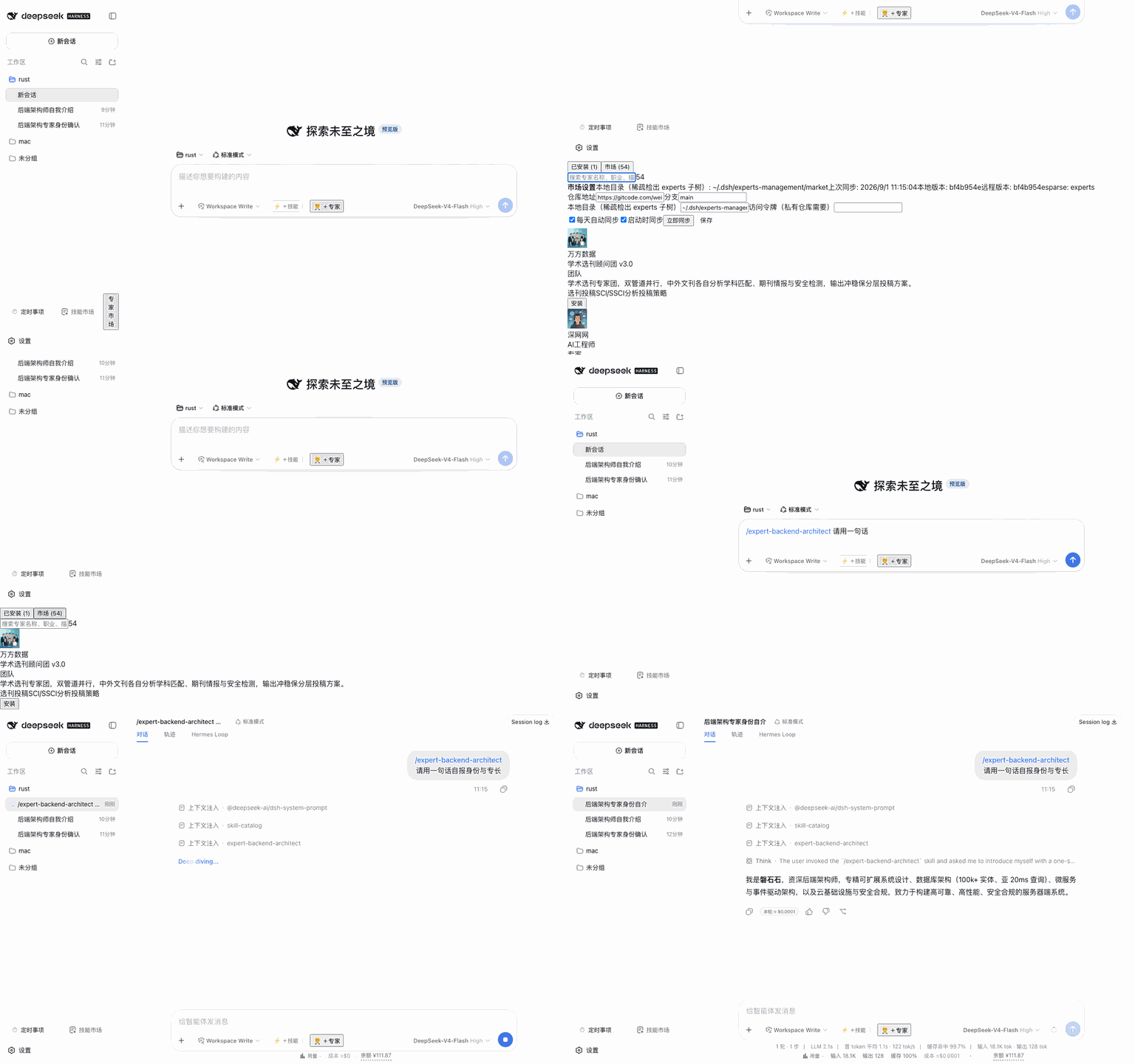
专家管理插件:管理 WorkBuddy 兼容格式的专家与专家团队(单个专家 / 多人团队),浏览安装 50+ 内置专家;每个专家注册为「仅用户可调用」的技能,在对话输入框输入 /expert-名称(或点 composer 工具行的「+专家」按钮)即可以该专家的身份执行任务。
核心功能
内置专家:ntd-resource 仓库的
experts/子树经 git 稀疏检出(只拉专家目录,不拉 400MB+ 的技能库),按来源分组浏览、搜索、详情预览、一键安装用户库管理:专家装到
$DSH_HOME/experts(插件的唯一内置来源,不读取任何专家应用自身的目录);其他目录可经extraSources配置显式纳入团队专家:完整支持
expertType: team——负责人 + 成员列表 + 各自头像;注入时使用负责人的角色定义(对齐 WorkBuddy 行为)角色注入:每个专家在宿主技能注册表里是一个
disable-model-invocation语义的技能——不进模型目录(零 token 污染),仅保留/expert-名称用户手势;发送消息时宿主确定性注入完整角色定义 + 关联技能清单(链接指向 SKILL.md,模型按需加载)输入框 + 专家:composer 工具行新增「+ 专家」按钮,弹出带搜索框的专家候选浮层——专家/专家团分两个 tab(计数跟随搜索过滤)、各自按显示名排序,行内展示显示名与
expert-名称字面量(👥 标记团队);支持键盘 ↑/↓/Enter/Esc,选中即把/expert-名称写入草稿,发送时该专家的角色定义注入该条消息专家详情:角色定义全文、关联技能、团队成员、快捷指令、plugin.json 原文、文件清单与体积
内置自动同步:与技能市场同款管线——clone
--depth 1 --filter=blob:none --sparse+ 每日 fetch/reset,支持 GitCode 私有仓库 access token(只写不回读)编辑已安装专家:角色定义(Agent MD)全文编辑、元数据表单(显示名/职业/描述/标签/快捷指令/默认开场,中英双语)、关联技能管理(从技能库复制副本进专家、移除仅删专家副本)、头像上传——仅「我的」(用户库)专家可编辑,内置只读;保存即生效
分享专家:详情弹窗一键分享——AI 读取本机 GitCode 令牌,fork 官方仓库 → 建分支 → 提交专家目录到
experts/子树 → 创建 PR;提示词可编辑,执行过程实时可见(与技能分享同管线)
安装
dsh plugin --profile web add @weibaohui/experts-management -w装完重启 dsh web 即生效。
使用
- 打开 Web UI → 设置 → 左侧「专家管理」section 即完整管理页(可搭配 dsh-settings-ui 插件把设置窗口调大/全屏)
- 「内置」视图浏览/搜索/安装专家(内置检出在插件自己的目录,不碰 ntd 应用);「我的」视图管理用户库
- 详情页可预览角色定义全文、团队成员、关联技能与 plugin.json
- 对话时点输入框工具行的「+ 专家」按钮(可搜索;或直接输入
/expert-backend-architect),该专家的角色定义即注入本轮对话 - 内置页工具行的「内置设置」里可配置仓库地址、分支、access token、稀疏检出目录与自动同步
专家定义格式(WorkBuddy 兼容)
~/.dsh/experts/backend-architect/
├── .codebuddy-plugin/plugin.json   ← 入口定义(name/expertType/displayName/skills/…)
├── agents/backend-architect.md     ← 角色定义(YAML frontmatter + 正文)
├── skills/fullstack-dev/SKILL.md   ← 关联技能
└── avatars/expert.png              ← 头像
开发
npm install
npm run check        # 语法检查
npm test             # node --test
npm run build:client # 生成 client/bundle.js
联系我 :飞书群

版本兼容性
本插件与 DeepSeek Harness(@deepseek-ai/dsh)的版本对应关系:
| 插件版本 | 适配 dsh 版本 | 备注 |
|---------|--------------|------|
| 0.5.9 | 0.1.7-rc.2 | 当前版本;修复降级路径 Config 导出 null——宿主 settings schema() 不排除 null,会炸 settings.describe() 拖垮整份设置文档(同 dsh-continue#4) |
| 0.5.6 | 0.1.7-rc.2 | 修复宿主将 volatile 字段物化为 {} 导致的设置毒化(saneConfigValues 清洗 + 移除 Config 兼容字符串字段) |
| 0.5.5 | 0.1.7-rc.2 | 适配 0.1.7 settings 模型(导出 volatile Config,ctx.settings.update 持久化),面板改动重启不再丢失 |
| 0.5.3 | 0.1.7-rc.2 | 当前版本,已在 @deepseek-ai/[email protected] 下验证运行 |
发版约定:每次发布新版本时,请在上表追加一行,记录该插件版本实际验证所用的
@deepseek-ai/dsh版本。package.json的engines.dsh声明最低支持版本;本表记录实际验证版本,二者配合使用。