
@wholezb/storage
v0.0.25
Published
This is a tool library that supports session Storage, local Storage, cookie, map to store data


Readme
@wholezb/storage
这是一个同时支持 sessionStorage、localStorage、cookie、map 存储数据的工具库(This is a tool library that supports session Storage, local Storage, cookie, map to store data.)
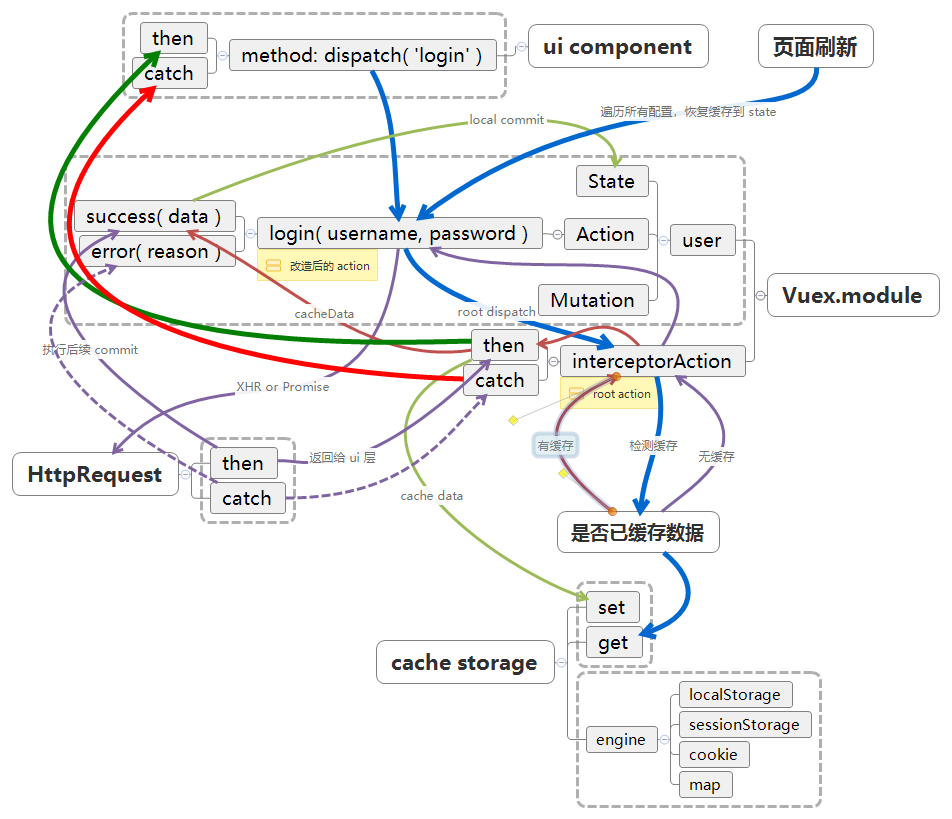
Setup
install:
npm i @wholezb/storagestarting with v0.0.20, esm is supported. You need to add configuration for vue-cli to correctly translate the es module in node_modules:
// vue.config.js:
module.exports = {
    transpileDependencies: [
      '@wholezb/*' // all of node_module for '@wholezb'
    ]
}
setup:
import Storage from '@wholezb/storage';
Vue.use(Storage);

new Vue({
  store: store,
  storage: new Storage.Store({ config: StorageConfig }),
  render: h => h(App)
}).$mount('#app');
For example, the following 'Action' need to be adapted to use automatic caching:
// before
const Actions = {
  login(context, params) {
    return Vue.http.post('/api/v2/user-system/login/login', params)
              .then(({ data }) => {
                return Object.freeze(data);
              })
              .catch(reason => {
                console.warn(reason);
              });
  }
};
Reform:
// after
const Actions = {
  login(context, params) {
    // 'this' points to store
    return this.dispatch(
      this.interceptor,
      {
        type: 'user/login',
        force: false, // default false, whether to force a new request for data
        handler() {
          return Vue.http.post('/api/v2/user-system/login/login', params)
                    .then(({ data }) => {
                      // please don't commit here, otherwise you can't automatically restore the cache to state.
                      return Promise.resolve(data.data);
                    })
                    .catch(reason => {
                      return Promise.reject(reason);
                    });
        },
        success(data) {
          // ...some commit, and acting on automatic restore to state
          context.commit('logInfo', data);
        },
        error(reason) {
          // capture errors to prevent dispatch to callers
          console.warn('error:', reason);
        }
      }
    );
  }
};
Feature
Automatically complete the integration with Vuex.Store, contain the following feature:
- Configure the 'Action', that needs to be cached to cache to the specified type of storage as required
- Specify the expiration time of the cache
- Support for localStorage, sessionStorage, cookie, memory (map)
- Automated recovery caching in 'store.state'
Usage
new Storage.Store(options)
options.unique:
type: String
Unique code, if specified,'key'will become'key@[unique]'.
Domain space cannot be distinguished when debugging locally. This parameter can solve the problem of data confusion when multiple websites are debugging at 127.0.0.1.
options.state:
type: Object
This parameter is used to override the default global cache configuration:
// default
{
  expire: 0,
  storage: StorageType.sessionStorage // default storage engine
}
global state config
expire: Number
the number of seconds that are timed out, 0 means never timed out.storage: String
storage engine(localStorage, session Storage, cookie, memory)
options.config:
type: Array
cache rule.
example:
[
  { type: 'user/login', storage: StorageType.localStorage, expire: 1800 }
]
config item options
type: String
Generally set toaction path,e.guser/login. It can also be any key, but may need the assistance ofoption.unique, or a custom cache recovery strategystorage: String
storage engine(localStorage, sessionStorage, cookie, memory)expire: Number(unit/seconds)
the number of seconds that are timed out, 0 means never timed out.restore: restore?: boolean | 'commit' | RestoreHandler(
whether application initialization automatically restores cachingdefault: false)- true : Automatic use of interceptor action
- false : Disable cache recovery
- 'commit'
(0.0.25): Automatic use of Store.commit- RestoreHandler : Custom method for cache recovery
option: Object
(Renamed from 'cookie' to 'option' on 0.0.24)// Whether to obfuscate the cache key(`default: true`) // support from v0.0.24 unique?: boolean; // Define when the cookie will be removed. Value can be a Number which will be interpreted as days from time of creation or a Date instance. If omitted, the cookie becomes a session cookie. expires?: number | Date; // A String indicating the path where the cookie is visible. path?: string; // A String indicating a valid domain where the cookie should be visible. The cookie will also be visible to all subdomains. domain?: string; // Either true or false, indicating if the cookie transmission requires a secure protocol (https). secure?: boolean;