@williamt-ifit/semantic-release-config-verified-experiment
v1.0.2
Published
iFit Semantic-release shareable config
Downloads
32

Maintainers
 williamt-ifit
Readme


@ifit/semantic-release-config
Semantic-release shareable config for IFIT Webviews
This package contains 2 configs. Both configs will:
- update version in
package.json - generate tag and release notes on github
- tag PRs that are included in that version
| config | description |
| ------------------------------------- | -------------------------------------------------------------------------------------------------------------------------------------------------------------------------------------------------------------- |
| Default config (index.js) | Handles Github only releases. Defaults to only running in test branch (docs to change branch) Also bumps swagger.{yml | yaml} file |
| NPM config (npm.js) | Publishes to NPM registry before creating Github Release |
- Why do I want this
- How it Works
- Installation
- Usage
- Testing that it worked
- Informing fellow Devs
- Development
- Misc
Why do I want this
semantic-releaseautomates the whole package release workflow including: determining the next version number, generating the release notes and publishing the package.
This removes the immediate connection between human emotions and version numbers, strictly following the Semantic Versioning specification.
Highlights
https://semantic-release.gitbook.io/semantic-release/#highlights
auto-version bumps
Release notes (based on the commits)

Notify maintainers and users of new releases
Avoid potential errors associated with manual releases
How it Works
Semantic release determines the next version by reading the conventional commits since the last version tag (with format v#.#.#). Here's in an in depth of how it works: https://semantic-release.gitbook.io/semantic-release/#how-does-it-work
Here's an example (taken from the docs) of the release type that will be done based on commit messages.
| Commit Message | Release type |
| ----------------------------------------------------------------------------------------------------------------------------------------------------------------------------------------------------- | ------------------------------------ |
| fix(pencil): stop graphite breaking when too much pressure applied | Patch Release (#.#.x) |
| perf(pencil): sharpen to reduce dull lines | Patch Release (#.#.x) |
| feat(pencil): add 'graphiteWidth' option | Minor Feature Release (#.x.0) |
| perf(pencil): remove graphiteWidth option BREAKING CHANGE: The graphiteWidth option has been removed. The default graphite width of 10mm is always used for performance reasons. | ~~Major~~ Breaking Release (x.0.0) |
Note: Any commit types not of
fix|perf|feator not containingBREAKING CHANGEwill NOT trigger a version bump. Here are the docs from semantic-release.
Installation
yarn add -D @ifit/semantic-release-configExpectations
:bangbang: IMPORTANT :bangbang: The following are required setup/config.
Correct version tagging
The releases will work off of version tags formatted like v#.#.#.
As such, we'll need to tag the current main branch with the latest version BEFORE merging in ifit/semantic-release-config
This can be done on github as a release.
Correct repository config
In order for the github commits and release notes to work, @semantic-release/github expects that your package.json has repository config that follows this standard: https://docs.npmjs.com/files/package.json#repository
For example, if you were adding/updating that value for this repo, it would be:
"repository": "github:ifit/semantic-release-config"Or put verbosely:
"repository": {
  "type" : "git",
  "url" : "https://github.com/ifit/semantic-release-config.git"
}
Usage
Default config:
In package.json:
{
  "release": {
    "extends": "@ifit/semantic-release-config"
  }
}
In travis.yml
before_deploy:
  - npx semantic-release@16
NPM Package config:
In package.json:
{
  "release": {
    "extends": "@ifit/semantic-release-config/npm"
  }
}
In travis.yml
deploy:
  provider: script
  skip_cleanup: true
  script:
    - npx semantic-release@16
  on:
    branch: master
Environment variables
The following tokens are expected to be on the environment. This is particularly import for your CI builds.
| Variable | Description |
| ---------------------------- | -------------------------------------------------------------------------------------------------------------------------------------------------------------------------------------------------------------------------------------------------------------------------------------------------- |
| GH_TOKEN or GITHUB_TOKEN | Required. The token used to authenticate with Github. (grab from 1pass or create a new one) |
| NPM_TOKEN | Token used to authenticate and publish with NPM Only required for NPM config. (grab from 1pass or create a new one) |
Here's an example of the settings on Travis: https://travis-ci.com/ifit/semantic-release-config/settings
Additional options
This shareable config uses the @semantic-release/npm, @semantic-release/git, and @semantic-release/github plugins.
See the documentation of each plugins for additional options. Options can be set in the Semantic-release configuration.
Testing that it worked
Test that it fails when hitting current branch
- run
npx semantic-release --dry-run - note failure with message about it not being the test branch
Test that it semi-succeeds on desired branch
Using
testas an example
- move this branch over to local
test - have a valid
GITHUB_TOKEN(akaGH_TOKEN) (grab from 1pass or create one) - run
GH_TOKEN=<copied-token> npx semantic-release --dry-run- add
NPM_TOKENif using NPM config
- add
- notice success! 🚀
- reset test:
git reset --hard origin/test
Informing fellow Devs
Put a Badge on It
It's good to mark a repo's ReadMe with badges that represent some core functionality they adhere to.
Whether that's code coverage or the build status.So let's add one to let maintainers know they don't have to worry about:
- managing the versioning
- tagging the release
- generating the release notes
- For NPM config: publishing to NPM registry
All of this can be conveyed with a simple badge from semantic-release.
Let's add it to your readMe:
[](https://github.com/semantic-release/semantic-release)Update your Docs
Let the maintainers now about the versioning strategy. Here's an example:
### Versioning

Handled automatically by `semantic-release`, based on the commit messages when merged into `test`. More info on [semantic versioning](https://semver.org/).

That version should then be accessible at [https://wolf-dashboard-webview.ifit-test.com/#.#.#/index.html](https://wolf-dashboard-webview.ifit-test.com/#.#.#/index.html).
Merges into master will be deployed with the latest version number from test.
Development
Makes use of:
- semantic-release: as the engine
- @semantic-release/git: Push a release commit and tag, including configurable files (in particular:
package.json) - @semantic-release/github:
- creates a Github release
- Add a comment to GitHub issues and pull requests resolved in the release
- Open a GitHub issue when a release fails
- for NPM Config:
- @semantic-release/npm: publishes to NPM
Contributing
See CONTRIBUTING.md
Next Steps
- figure out how to stop the deploy if
semantic-releasefails - figure out how to prevent the git plugin from creating the commit if
semantic-releasefails
Misc
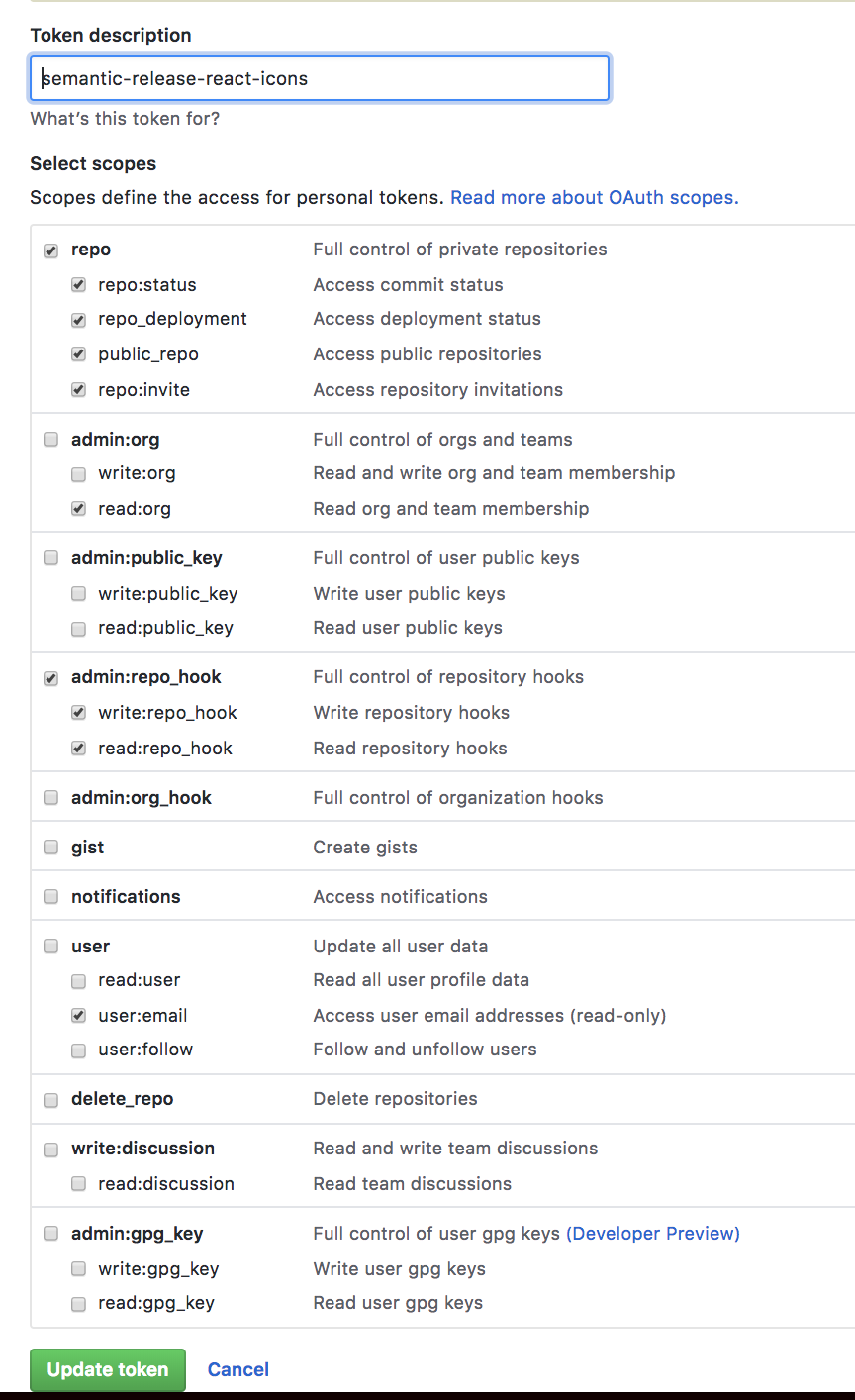
Creating the Github token
create a token