
@wolffo/three-fire
v1.4.0
Published
Modern TypeScript volumetric fire effect for Three.js and React Three Fiber with WebGPU support.

Maintainers
 wolffo
Readme
Three fire



Modern TypeScript volumetric fire effect for Three.js and React Three Fiber.
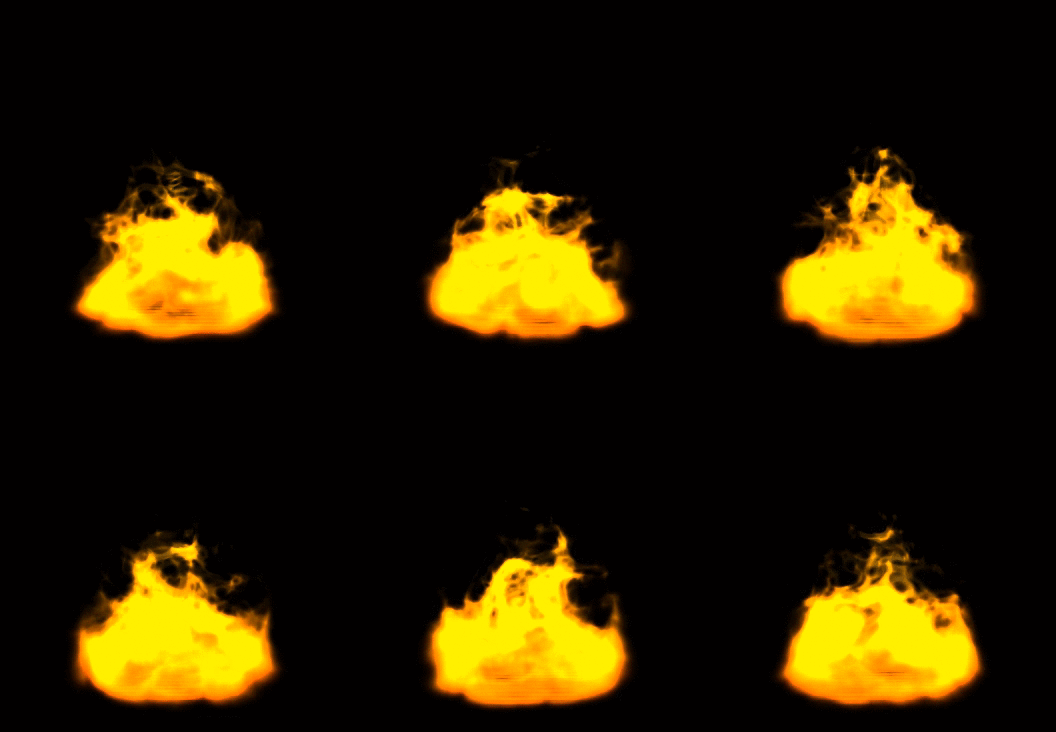
Features
- 🔥 Volumetric fire effect using ray marching
- 📦 TypeScript support with full type definitions
- ⚛️ React Three Fiber component
- 🎛️ Configurable parameters (iterations, octaves, noise scale, etc.)
- 🚀 Modern Three.js compatibility (r150+)
- 📱 Optimized for performance
- 🌐 WebGPU support via TSL (Three.js Shading Language)
Installation
npm install @wolffo/three-fireCompatibility
three is a required peer dependency. react and @react-three/fiber are
optional — install them only if you use the React entry points.
| Peer dependency | Supported range | Tested against |
|-----------------|-----------------|----------------|
| three | >= 0.168 (TSL/WebGPU paths need r168+) | r184 |
| react | >= 18 | 18 and 19 |
| @react-three/fiber | >= 8 | v8 and v9 |
Both React 18 / R3F v8 and React 19 / R3F v9 are verified in CI.
Entry Points Summary
This package provides separate entry points to optimize bundle size and avoid unnecessary dependencies:
WebGL (GLSL)
| Entry Point | Use Case | Dependencies |
|-------------|----------|--------------|
| @wolffo/three-fire/vanilla | Vanilla Three.js | Only Three.js |
| @wolffo/three-fire/react | React Three Fiber | React + Three.js |
| @wolffo/three-fire | Legacy/mixed usage | All dependencies |
WebGPU (TSL) - Requires Three.js r168+
| Entry Point | Use Case | Dependencies |
|-------------|----------|--------------|
| @wolffo/three-fire/tsl/vanilla | Vanilla Three.js + WebGPU | Three.js r168+ |
| @wolffo/three-fire/tsl/react | React Three Fiber + WebGPU | React + Three.js r168+ |
⚠️ Migration Notice: For better performance, migrate from the main entry point to specific entry points:
- Vanilla Three.js users → use
/vanillaor/tsl/vanilla(WebGPU) - React Three Fiber users → use
/reactor/tsl/react(WebGPU)
Usage
React Three Fiber (Recommended)
import { Canvas } from '@react-three/fiber'
import { Fire } from '@wolffo/three-fire/react'

function App() {
  return (
    <Canvas>
      <Fire
        texture="/fire-texture.png"
        color={0xff4400}
        scale={[2, 3, 2]}
        position={[0, 0, 0]}
      />
    </Canvas>
  )
}
With custom parameters
import { Fire, useFire } from '@wolffo/three-fire/react'

function CustomFire() {
  const fireRef = useFire()

  return (
    <Fire
      ref={fireRef.ref}
      texture="/fire-texture.png"
      color={0xff6600}
      magnitude={1.5}
      lacunarity={2.5}
      gain={0.7}
      iterations={25}
      octaves={4}
      onUpdate={(fire, time) => {
        // Custom update logic
        fire.fireColor.setHSL((time * 0.1) % 1, 1, 0.5)
      }}
    />
  )
}
Vanilla Three.js
import { FireMesh } from '@wolffo/three-fire/vanilla'
import { Scene, TextureLoader } from 'three'

const scene = new Scene()
const textureLoader = new TextureLoader()

// Load fire texture
const fireTexture = textureLoader.load('/fire-texture.png')

// Create fire effect
const fire = new FireMesh({
  fireTex: fireTexture,
  color: 0xff4400,
  magnitude: 1.3,
  iterations: 20,
  octaves: 3
})

scene.add(fire)

// Animation loop
function animate() {
  requestAnimationFrame(animate)

  fire.update(performance.now() / 1000)
  renderer.render(scene, camera)
}
animate()
WebGPU / TSL (Three.js Shading Language)
TSL provides WebGPU-compatible shaders using Perlin noise (via mx_noise_float). Requires Three.js r168+ and WebGPURenderer.
TSL Vanilla Three.js
import { FireMesh } from '@wolffo/three-fire/tsl/vanilla'
import { WebGPURenderer } from 'three/webgpu'
import { Scene, PerspectiveCamera, TextureLoader } from 'three'

// Create WebGPU renderer
const renderer = new WebGPURenderer({ antialias: true })
await renderer.init()

const scene = new Scene()
const camera = new PerspectiveCamera(75, window.innerWidth / window.innerHeight, 0.1, 100)

// Load texture and create fire
const textureLoader = new TextureLoader()
const fireTexture = await textureLoader.loadAsync('/fire-texture.png')

const fire = new FireMesh({
  fireTex: fireTexture,
  color: 0xff4400,
  magnitude: 1.3,
  lacunarity: 2.0,
  gain: 0.5,
})
fire.scale.set(2, 3, 2)
scene.add(fire)

// Animation loop
function animate() {
  requestAnimationFrame(animate)
  fire.update(performance.now() / 1000)
  renderer.render(scene, camera)
}
animate()
TSL React Three Fiber (Experimental)
⚠️ R3F doesn't natively support WebGPU's async initialization. This approach is experimental.
import { Canvas } from '@react-three/fiber'
import { Fire } from '@wolffo/three-fire/tsl/react'
import { WebGPURenderer } from 'three/webgpu'

function App() {
  return (
    <Canvas
      gl={(canvas) => {
        const renderer = new WebGPURenderer({ canvas: canvas as HTMLCanvasElement, antialias: true })
        renderer.init()
        return renderer as any
      }}
    >
      <Fire
        texture="/fire-texture.png"
        color="orange"
        magnitude={1.5}
        scale={[2, 3, 2]}
      />
    </Canvas>
  )
}
Legacy Usage (Backward Compatibility)
⚠️ Not recommended for new projects - use specific entry points above for better performance.
// Legacy import - includes all dependencies
import { FireMesh, Fire } from '@wolffo/three-fire'
API Reference
FireComponent Props
| Prop | Type | Default | Description |
|------|------|---------|-------------|
| texture | string \| Texture | - | Fire texture URL or Three.js Texture object |
| color | Color \| string \| number | 0xeeeeee | Fire color |
| iterations | number | 20 | Ray marching iterations (higher = better quality, lower performance) |
| octaves | number | 3 | Noise octaves for turbulence |
| noiseScale | [number, number, number, number] | [1, 2, 1, 0.3] | Noise scaling factors |
| magnitude | number | 1.3 | Fire shape intensity |
| lacunarity | number | 2.0 | Noise lacunarity |
| gain | number | 0.5 | Noise gain |
| autoUpdate | boolean | true | Auto-update time from useFrame |
| onUpdate | (fire, time) => void | - | Custom update callback |
FireMesh Class
class FireMesh extends Mesh {
  constructor(props: FireMeshProps)

  // Methods
  update(time?: number): void
  dispose(): void

  // Properties
  time: number
  fireColor: Color
  magnitude: number
  lacunarity: number
  gain: number
}
Lifecycle & disposal
The fire mesh allocates GPU resources (a geometry and a shader material). Call
dispose() to release them when you remove the fire from the scene:
const fire = new FireMesh({ fireTex: texture })
scene.add(fire)

// later
scene.remove(fire)
fire.dispose()
In React Three Fiber this is automatic — R3F calls dispose() when the
<Fire> component unmounts (and when it reconstructs the mesh after a prop
change). You don't need to do anything.
The texture you pass in (
fireTex/ thetextureprop) is not disposed — its lifecycle belongs to you, or to the R3F loader cache when you pass a URL.
Fire Texture
This package does not bundle a texture — you supply your own. It should be a grayscale gradient that defines the fire's density distribution (white = densest).

You can grab the reference texture above from the repository
(src/Fire-grayscale.png)
and drop it into your app's public assets, or author your own.
GLSL vs TSL
| Feature | GLSL (WebGL) | TSL (WebGPU) | |---------|--------------|--------------| | Renderer | WebGLRenderer | WebGPURenderer | | Three.js version | r150+ | r168+ | | Noise algorithm | Simplex noise | Perlin noise (mx_noise_float) | | Browser support | All modern browsers | Chrome 113+, Edge 113+, Safari 18+ | | Octaves | Configurable | Configurable |
When to use TSL:
- You're already using WebGPURenderer
- You're targeting modern browsers only
When to use GLSL:
- You need wide browser compatibility
- You're using WebGLRenderer
Performance Tips
- Lower
iterationsfor better performance (try 10-15 for mobile) - Reduce
octavesto 2 for simpler noise (works for both GLSL and TSL) - Use texture compression for the fire texture
- Consider using LOD (Level of Detail) for distant fires
SSR / Next.js
The library performs no DOM or window access at import time, so it is safe to
import in server-rendered setups. However, anything that renders inside an R3F
<Canvas> must run on the client. In the Next.js App Router, mark the wrapper
component (or the file that renders <Canvas>) with "use client":
'use client'

import { Canvas } from '@react-three/fiber'
import { Fire } from '@wolffo/three-fire/react'

export default function FireScene() {
  return (
    <Canvas>
      <Fire texture="/fire.png" color="orange" />
    </Canvas>
  )
}
The package ships ESM and CJS builds and is marked sideEffects: false, so
unused entry points tree-shake away.
Troubleshooting
The tag <fire> is unrecognized/ fire doesn't render — make sure you importFirefrom@wolffo/three-fire/react(or/tsl/react) and render it inside a<Canvas>. The R3F element is registered on first render of the component.- Nothing shows up — the fire is a translucent volume; confirm the
textureloaded (check the network tab) and that the camera is outside the fire's box. Try a brightcolorandmagnitudearound1.3. - WebGPU/TSL: blank canvas —
WebGPURenderermust finishawait renderer.init()before the first render. In R3F this is experimental; see the TSL example above. - Type errors on
three/tslimports — the TSL entry points need a recentthreeand matching@types/three(r168+, ideally r180+).
Development
# Install dependencies
npm install

# Build the package
npm run build

# Type checking
npm run typecheck

# Run tests
npm test

# Test in watch mode
npm run test:watch

# Visual test UI
npm run test:ui

# Coverage report
npm run test:coverage
Testing
- Unit tests for Fire class and FireShader
- Integration tests for React components
- Mock environment for Three.js and React Three Fiber
Test files are located in test/ and use Vitest with Testing Library.
Credits
Based on the original THREE.Fire by mattatz
- Real-Time procedural volumetric fire - http://dl.acm.org/citation.cfm?id=1230131
- webgl-noise - https://github.com/ashima/webgl-noise
- Three.js - https://threejs.org/
- Three.js Shading Language (TSL) - https://github.com/mrdoob/three.js/wiki/Three.js-Shading-Language
License
MIT