
@woojoo/pdf
v0.1.2
Published
NestJS PDF generation module using Handlebars and Puppeteer


Readme
@woojoo/pdf



NestJS 기반의 PDF 생성 모듈입니다. Handlebars 템플릿을 PDF로 변환할 수 있습니다.
Puppeteer와 Handlebars를 기반으로 하며, HTML 템플릿을 PDF 파일로 쉽게 변환할 수 있습니다.
주요 기능
- Handlebars 템플릿을 PDF로 변환
- CSS 스타일링 지원
- 페이지 크기 및 여백 설정
- 가로/세로 방향 설정
- 배경 이미지/색상 지원
- 파일 다운로드 또는 브라우저 미리보기
- UTF-8 파일명 지원
동작 프로세스
PDF 생성 프로세스는 다음과 같은 단계로 진행됩니다:
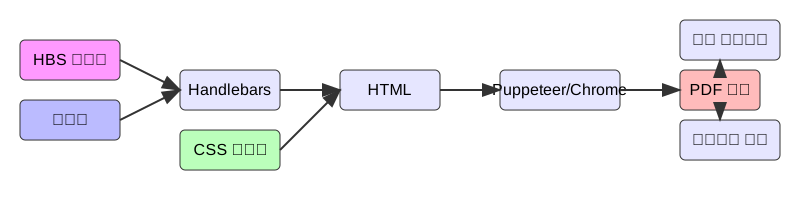
입력
- HBS 템플릿: Handlebars 문법으로 작성된 템플릿 파일
- 데이터: 템플릿에 주입될 JSON 데이터
- CSS 스타일: PDF 스타일링을 위한 CSS
처리
- Handlebars 엔진이 템플릿과 데이터를 결합하여 HTML 생성
- 생성된 HTML에 CSS 스타일 적용
- Puppeteer가 Chrome을 통해 HTML을 PDF로 변환
출력
- PDF 버퍼 생성
- 파일 다운로드 또는 브라우저에서 직접 보기 가능
설치
npm install @woojoo/pdf필수 요구사항
이 모듈은 Puppeteer를 사용하여 PDF를 생성하기 때문에 Chrome 브라우저가 필요합니다.
Chrome 설치 방법
1. Puppeteer를 통한 자동 설치 (권장)
# npm을 사용하는 경우
npx puppeteer browsers install chrome

# pnpm을 사용하는 경우
pnpm dlx puppeteer browsers install chrome

# yarn을 사용하는 경우
yarn dlx puppeteer browsers install chrome
2. 수동 설치
각 운영체제별 Chrome 설치 방법:
macOS:
# Homebrew를 통한 설치
brew install --cask google-chrome
Ubuntu/Debian:
# apt를 통한 설치
wget https://dl.google.com/linux/direct/google-chrome-stable_current_amd64.deb
sudo dpkg -i google-chrome-stable_current_amd64.deb
sudo apt-get install -f
CentOS/RHEL:
# yum을 통한 설치
sudo yum install chromium chromium-headless chromium-libs chromedriver
Windows:
- Chrome 공식 웹사이트에서 설치 파일 다운로드
- 다운로드한 설치 파일 실행
사용 방법
모듈 설정
import { Module } from '@nestjs/common';
import { PdfModule } from '@woojoo/pdf';

@Module({
  imports: [PdfModule],
})
export class AppModule {}
PDF 생성 예제
1. 기본 사용법
import { Injectable } from '@nestjs/common';
import { PdfService } from '@woojoo/pdf';

@Injectable()
export class SimpleService {
  constructor(private readonly pdfService: PdfService) {}

  async generateSimplePdf() {
    // 1. 가장 기본적인 사용
    return this.pdfService.hbsToPdf({
      template: '<h1>{{title}}</h1>',
      data: { title: '안녕하세요!' },
    });
  }
}
2. 템플릿 작성 방법
2.1 문자열로 직접 작성
const template = `
  <div>
    <h1>{{title}}</h1>
    <p>{{content}}</p>
  </div>
`;

await pdfService.hbsToPdf({ template, data });
2.2 파일에서 불러오기
import * as fs from 'fs/promises';
import * as path from 'path';

const template = await fs.readFile(
  path.join(__dirname, 'templates', 'document.hbs'),
  'utf-8'
);

await pdfService.hbsToPdf({ template, data });
3. 스타일 적용 방법
3.1 인라인 스타일
const template = `
  <div style="color: blue;">
    <h1>{{title}}</h1>
  </div>
`;
3.2 스타일 태그 사용
const template = `
  <style>
    h1 { color: blue; }
    .content { margin: 20px; }
  </style>
  <div class="content">
    <h1>{{title}}</h1>
  </div>
`;
3.3 CSS 파일의 스타일 적용
const styles = await fs.readFile(
  path.join(__dirname, 'styles', 'document.css'),
  'utf-8'
);

await pdfService.hbsToPdf({ template, styles, data });
4. 데이터 바인딩 예제
4.1 기본 데이터
const data = {
  title: '제목',
  content: '내용',
};
4.2 배열 데이터
const template = `
  <ul>
    {{#each items}}
      <li>{{name}}: {{price}}원</li>
    {{/each}}
  </ul>
`;

const data = {
  items: [
    { name: '상품 A', price: 1000 },
    { name: '상품 B', price: 2000 },
  ],
};
4.3 조건부 렌더링
const template = `
  {{#if isPaid}}
    <div class="paid">{{status}}</div>
  {{else}}
    <div class="unpaid">미결제</div>
  {{/if}}
`;

const data = {
  isPaid: true,
  status: '결제완료',
};
5. PDF 옵션 설정
5.1 페이지 크기
await pdfService.hbsToPdf({
  template,
  data,
  options: {
    format: 'A4',  // 'A3' | 'Letter' | 'Legal' | 'Tabloid'
  },
});
5.2 페이지 방향
await pdfService.hbsToPdf({
  template,
  data,
  options: {
    landscape: true,  // true: 가로, false: 세로
  },
});
5.3 여백 설정
await pdfService.hbsToPdf({
  template,
  data,
  options: {
    margin: {
      top: '20mm',
      right: '15mm',
      bottom: '20mm',
      left: '15mm',
    },
  },
});
6. 컨트롤러에서 PDF 파일 응답 보내기
import { Controller, Get, Res } from '@nestjs/common';
import { Response } from 'express';
import { PdfService } from '@woojoo/pdf';
import { SimpleService } from './simple.service';

@Controller('pdf')
export class PdfController {
  constructor(
    private readonly simpleService: SimpleService,
    private readonly pdfService: PdfService,
  ) {}

  @Get('download')
  async download(@Res() res: Response) {
    const buffer = await this.simpleService.generateSimplePdf();
    await this.pdfService.sendPdfResponse(res, '문서.pdf', buffer);
  }

  @Get('preview')
  async preview(@Res() res: Response) {
    const buffer = await this.simpleService.generateSimplePdf();
    await this.pdfService.sendPdfResponse(res, '문서.pdf', buffer, { inline: true });
  }
}
API 문서
PdfService
hbsToPdf(options: HbsToPdfOptions): Promise
Handlebars 템플릿을 PDF로 변환합니다.
매개변수:
options: HbsToPdfOptionstemplate: string- Handlebars 템플릿 문자열data?: Record<string, any>- 템플릿에 주입할 데이터options?: PdfOptions- PDF 생성 옵션styles?: string- CSS 스타일
반환값:
Promise<Buffer>- 생성된 PDF의 버퍼
sendPdfResponse(res: Response, filename: string, buffer: Buffer, options?: PdfResponseOptions): Promise
PDF 버퍼를 HTTP 응답으로 전송합니다.
매개변수:
res: Response- Express Response 객체filename: string- 다운로드될 파일 이름buffer: Buffer- PDF 버퍼options?: PdfResponseOptionsinline?: boolean- 브라우저에서 열기 여부 (기본값: false)charset?: string- 파일명 인코딩 (기본값: UTF-8)
인터페이스
interface PdfOptions {
  format?: 'A4' | 'A3' | 'Letter' | 'Legal' | 'Tabloid';
  landscape?: boolean;
  margin?: {
    top?: string;
    right?: string;
    bottom?: string;
    left?: string;
  };
  printBackground?: boolean;
  scale?: number;
  width?: string | number;
  height?: string | number;
}

interface HbsToPdfOptions {
  template: string;  // Handlebars 템플릿 문자열
  data?: Record<string, any>;  // 템플릿에 주입할 데이터
  options?: PdfOptions;  // PDF 생성 옵션
  styles?: string;  // CSS 스타일
}

interface PdfResponseOptions {
  inline?: boolean;  // true면 브라우저에서 열기, false면 다운로드
  charset?: string;  // 파일명 인코딩
}
라이선스
MIT