
@wowpic/xform
v1.0.0
Published
> 通过配置的方式生成表单方案
Downloads
41


Readme
XForm
通过配置的方式生成表单方案
🏃快速入门
安装
nenpm install @wowpic/xform-react使用
XForm通过配置Schema的形式来初始化表单,其中Schema是一份由JS对象组成的数组,数组中的每个成员都代表一个表单项的配置
import { XForm } from '@wowpic/xform-react';
import schema from './schema.js';
import 'antd/dist/antd.css';
import '@wowpic/xform-react/lib/xform.css';

export default function () {
    const formRef = useRef(null);

    const onSubmit = () => {
        formRef.current.submit().then(data => {
            const { valid, value } = data;
            console.log(valid, value);
        });
    };

    const onReset = () => {
        formRef.current.reset();
    };

    return (
        <>
            <XForm
                ref={formRef}
                schema={schema}
                labelCol={{ span: 6 }}
                wrapperCol={{ span: 12 }}
            />
            <div>
                <Button type="primary" onClick={onSubmit}>提交</Button>
                <Button onClick={onReset}>重置</Button>
            </div>
        </>
    );
};Schema例子如下:
export default [
    {
        key: 'input',
        type: 'Input',
        ui: {
            label: '输入框',
            required: true
        },
        props: {
            placeholder: '请输入'
        },
        rules: [
            {
                required: true,
                message: '输入内容不能为空'
            }
        ]
    }
];
🎬技术方案
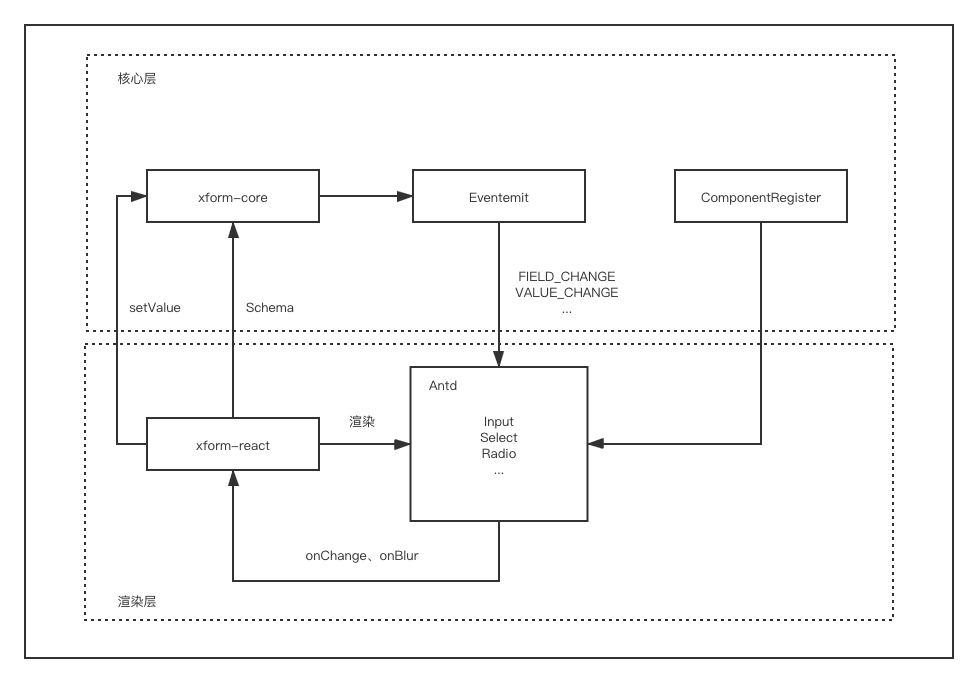
分为core(核心层)和react(渲染层),表单数据维护在核心层中,通过事件的方式传递状态对渲染层代码进行渲染
✨命令
调试:
npm run setup // lerna 进行关联,并安装 npm 包
npm run build // 初次构建
npm run watch // 监听文件变化自动构建
npm run dev // 启动测试环境
发布:
nenpm run publish // 必须要nenpm才能发布,具体原因我也不知单元测试:
npm run test文档:
npm run docs🏷工程目录
.
├── README.md // 开发文档
├── docs // 用户使用文档
├── examples // 本地调试案例
├── lerna.json
├── package.json
├── packages
│   ├── core // 核心层
│   │   ├── README.md
│   │   ├── package.json
│   │   ├── src
│   │   │   ├── __tests__ // 测试用例
│   │   │   ├── fetch.ts // 请求封装
│   │   │   ├── field.ts // 字段
│   │   │   ├── fieldGroup.ts // Object字段
│   │   │   ├── fieldList.ts // Array字段
│   │   │   ├── form.ts // 表单
│   │   │   ├── listenerManager.ts // 联动
│   │   │   ├── optionManager.ts // options
│   │   │   ├── utils.ts // 工具
│   │   │   └── validator.ts // 校验
│   │   └── tsconfig.json
│   ├── react // 渲染层
│   │   ├── README.md
│   │   ├── package.json
│   │   ├── src
│   │   │   ├── component.tsx
│   │   │   ├── components
│   │   │   │   ├── autoComplete.tsx
│   │   │   │   ├── cascader.tsx
│   │   │   │   ├── checkbox.tsx
│   │   │   │   ├── checkboxAll.tsx
│   │   │   │   ├── dateTimePicker.tsx
│   │   │   │   ├── index.ts
│   │   │   │   ├── input.tsx
│   │   │   │   ├── radio.tsx
│   │   │   │   ├── radioButton.tsx
│   │   │   │   ├── select.tsx
│   │   │   │   ├── switch.tsx
│   │   │   │   ├── textArea.tsx
│   │   │   │   ├── transfer.tsx
│   │   │   │   └── treeSelect.tsx
│   │   │   ├── field.tsx
│   │   │   ├── fieldGroup.tsx
│   │   │   ├── fieldList.tsx
│   │   │   ├── form.tsx
│   │   │   ├── index.less
│   │   │   ├── index.tsx
│   │   │   ├── switcher.tsx
│   │   │   ├── typings
│   │   │   │   └── module.d.ts
│   │   │   └── utils.ts
│   │   └── tsconfig.json
│   └── types // 类型定义
│       ├── package.json
│       ├── src
│       │   ├── field.ts
│       │   ├── form.ts
│       │   ├── index.ts
│       │   ├── listener.ts
│       │   ├── option.ts
│       │   ├── react.ts
│       │   └── validate.ts
│       └── tsconfig.json
├── scripts
│   └── webpack.config.js
└── tsconfig.json