@wutiange/log-listener-plugin
v2.0.3
Published
log-record 客户端对应的的插件 Log-record client corresponding plugin


Readme
Here's the English translation while maintaining the same format and keeping "Log Record" unchanged:
log-listener-plugin




中文 | English
To properly use the Log Record client for log collection and troubleshooting, you need to install this plugin in your project.
1. Installation
Install using npm
npm install @wutiange/log-listener-pluginInstall using yarn
yarn add @wutiange/log-listener-pluginSince the logging system uses HTTP, the project needs to be configured to support HTTP for proper operation.
2. Usage
Call the following code where you need to start recording logs.
2.1 Usage Based on Auto-Discovery
First install react-native-zeroconf, which is used to discover available logging systems in the local network.
yarn add react-native-zeroconf
# or
npm install react-native-zeroconf
For detailed installation steps, please visit: react-native-zeroconf. Don't ignore this line as there are necessary steps to follow. I've also copied these steps below to prevent oversight.
For Android please ensure your manifest is requesting all necessary permissions.
<uses-permission android:name="android.permission.ACCESS_NETWORK_STATE" />
<uses-permission android:name="android.permission.ACCESS_WIFI_STATE" />
<uses-permission android:name="android.permission.CHANGE_WIFI_MULTICAST_STATE" />
IOS 14 requires you to specify the services you want to scan for and a description for what you're using them.
In your info.plist add the following strings:
<key>NSBonjourServices</key>
	<array>
		<string>_http._tcp</string>
	</array>
<key>NSLocalNetworkUsageDescription</key>
<string>Access nearby Log Records to view logs</string>
Then find a suitable place in your project, typically in App.js, to make the call.
import logger from '@wutiange/log-listener-plugin';
// Start log recording
logger.config({isAuto: true});
2.2 Usage Based on Manual Configuration
import logger from '@wutiange/log-listener-plugin';
// Fill in the log server address. If you use auto-discovery, this step can be skipped
logger.config({isAuto: true, testUrl: 'http://127.0.0.1'});
2.3 Setting Basic Data
Set basic data, typically obtained from react-native-device-info. If you don't have specific requirements, you can skip this call as the basic data will be automatically retrieved from react-native-device-info if installed. This basic data is used for filtering and is not mandatory.
logger.config({
  baseData: {
    Brand: DeviceInfo.getBrand(),
    Model: DeviceInfo.getModel(),
    AppVersion: DeviceInfo.getVersion(),
    Carrier: DeviceInfo.getCarrierSync(),
    Manufacturer: DeviceInfo.getManufacturerSync(),
    SystemName: DeviceInfo.getSystemName(),
  }
});
2.4 Individual Recording and Stopping All Records
Try to avoid using the following APIs as they are unnecessary. This data will only be saved to the logging system you have open, so collect whatever is available to facilitate troubleshooting.
// Only capture logs
logger.startRecordLog();
// Only capture network logs
logger.startRecordNetwork();

// Stop log recording, will stop both logs and network
logger.unAuto();
2.5 Other Usage Instructions
If you want to remember the previously saved IP address even after killing the app, consider installing:
yarn add @react-native-async-storage/async-storageIf you have other storage installed locally, you can set it manually:
logger.config({
  storage: // Your storage or custom implementation, as long as it follows the getItem and setItem interface specifications
})
Now all configuration-related items are placed in config to simplify configuration. Each configuration item is optional:
type Options = {
  /**
   * storage is used to store the url of the configured logging system
   * @default @react-native-async-storage/async-storage
   */
  storage?: Storage
  /**
   * Set the upload log timeout in milliseconds
   * @default 3000
   */
  timeout?: number
  /**
   * Logging system url
   */
  testUrl?: string
  /**
   * Whether to automatically start log recording
   * @default false
   */
  isAuto?: boolean
  /**
   * Set basic data for the logging system, this data will be automatically added to each log
   */
  baseData?: Record<string, any>
}
This is the description of each config item.
3. Other Important Notes
- If you're using auto-discovery mode, ensure your phone and Log Record client are on the same local network.
- When configuring baseUrl, you must enter the address of Log Record. In other words, use the IP address of the computer where you opened the Log Record client. The app integrated with this plugin must be on the same local network as the Log Record client.
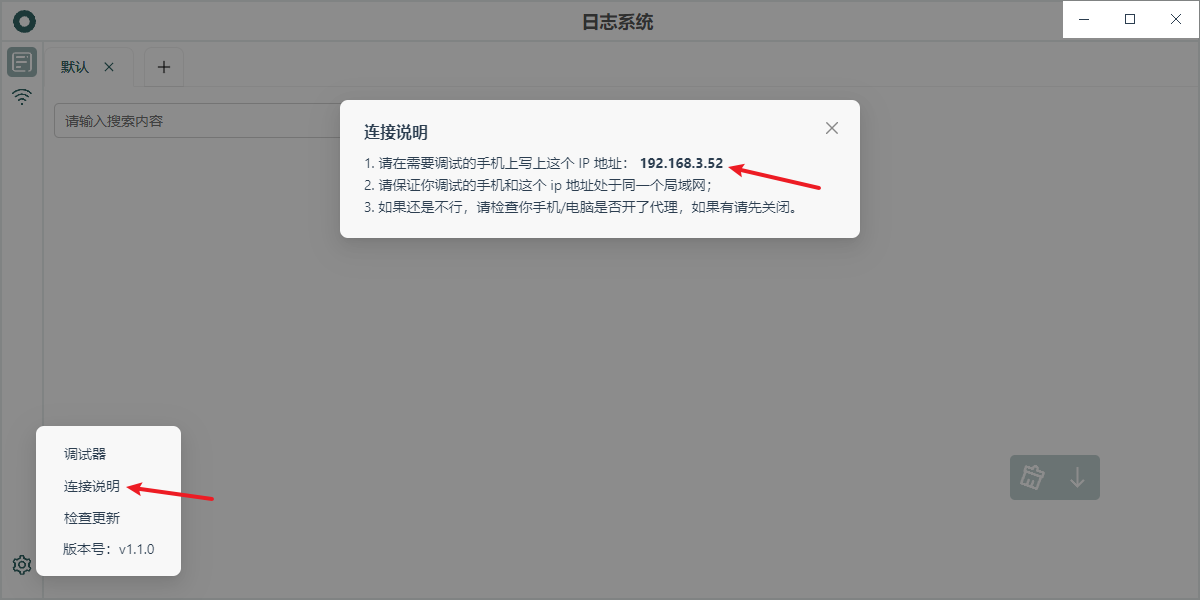
- If you don't know the logging system's IP, you can find it in the Log Record client under
Settings > Connection Instructions (requires version > 1.0.9), as shown in the image below: