
@xenea.io/dacs-sdk
v1.0.2
Published
Official Node.js SDK for DACS (Decentralized Autonomous Contents Storage) infrastructure.


Readme
@xenea.io/dacs-sdk
Official Node.js SDK for DACS (Decentralized Autonomous Contents Storage) infrastructure.
Security Note: Server-Side Only
This SDK is designed strictly for server-side (Node.js) environments.
DO NOT use this SDK directly in a frontend application (React, Vue, etc.). Doing so will expose your project's apiKey to the public, allowing anyone to upload files to your quota or impersonate your project.
Recommended Architecture for Web Apps
If you need to interact with DACS from a web frontend:
- Create a secure endpoint on your own backend.
- Authenticate your frontend users using your preferred auth system.
- Use this SDK strictly within your backend environment.
- Proxy requests from your frontend to your backend.
Installation
npm install @xenea.io/dacs-sdkInitialization
Initialize the DacsClient with your project credentials on your backend.
import { DacsClient } from "@xenea.io/dacs-sdk";

const client = new DacsClient({
  baseURL: "https://dacs-testnet.xenea.io",
  apiKey: process.env.DACS_API_KEY!,
});
High-Level Architecture (Hybrid Flow)
To protect your API Key while allowing direct browser-to-storage uploads, use the following Delegated Upload pattern:
- Frontend: Requests an upload plan from Your Backend.
- Your Backend: Uses the SDK (
initializeUpload) to get a Presigned URL and fields. - Your Backend: Returns the data to the Frontend.
- Frontend: Performs a
POSTdirectly to the storage. - DACS: Automatically detects completion and syncs to IPFS/Blockchain.
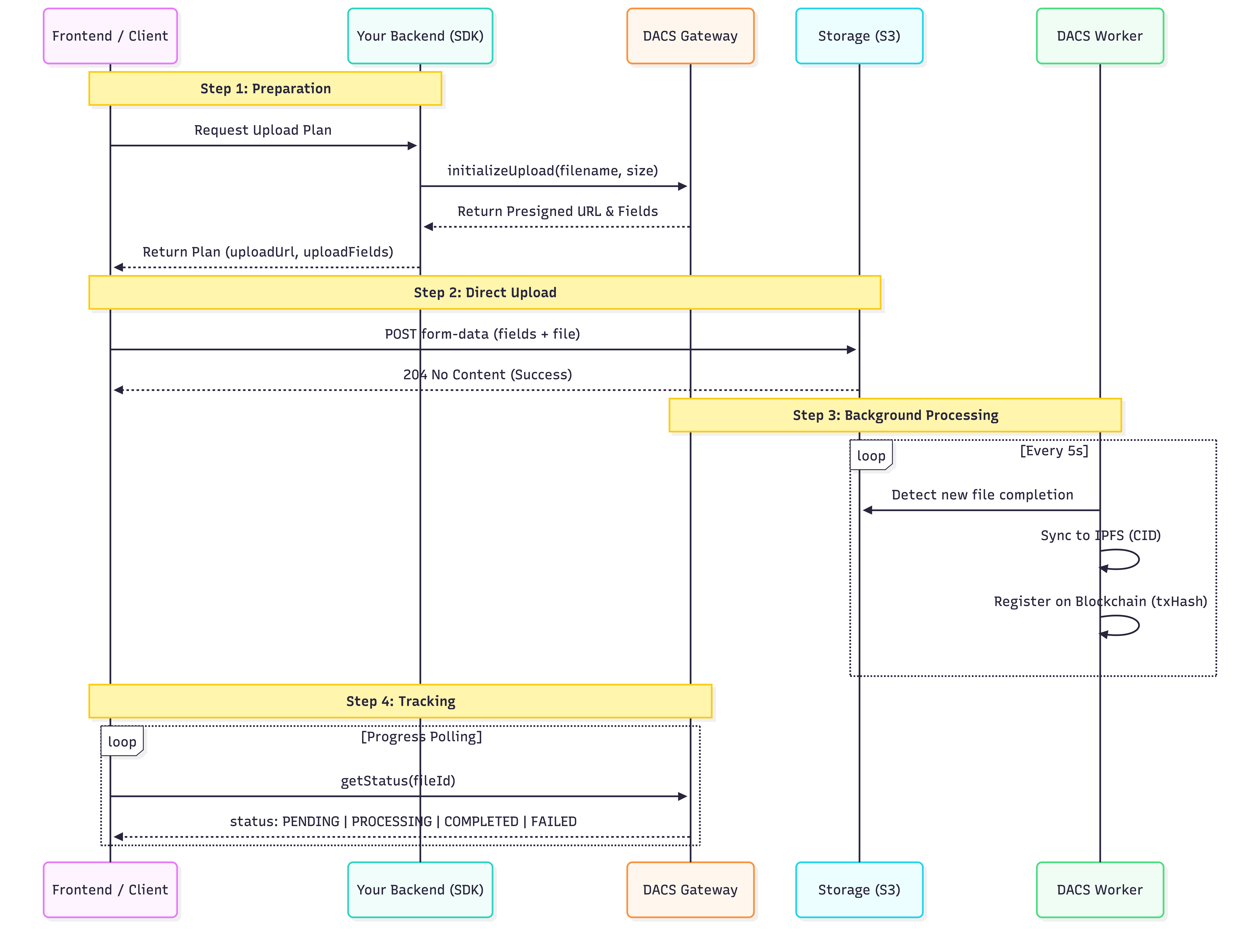
Core Features & Usage
1. Delegated Upload (Recommended for Web Apps)
Allows users to upload directly to storage without exposing your API Key on the frontend.
Step A: Your Backend (Node.js)
// Parameters:
// - filename (string): The name of the file to be stored
// - size (number): File size in bytes
// - options (object, optional):
//    - tags (string[]): Multiple tags or hierarchical paths (e.g. ["Work", "Project", "2024"])
const result = await client.files.initializeUpload("image.png", 10245, {
  tags: ["Images", "Project-X"],
});

/**
 * result: {
 *   fileId: string;       // Internal ID for tracking status
 *   uploadUrl: string;    // S3/Storage endpoint URL
 *   uploadFields: object; // Security fields (signatures, policies) required by Storage
 * }
 */
res.json(result);
Step B: Your Frontend (Browser)
The uploadFields must be appended to the form before the actual file.
const formData = new FormData();

// 1. Append all received security fields first
Object.entries(uploadFields).forEach(([key, value]) => {
  formData.append(key, value);
});

// 2. Append the actual file content last
formData.append("file", fileFromInput);

// 3. Send directly to storage
await fetch(uploadUrl, { method: "POST", body: formData });
2. Direct Upload
If the file is already on your server, upload it in one call.
import fs from "fs";

// Parameters:
// - buffer (Buffer): Binary data of the file
// - filename (string): Desired storage name
// - options (object, optional):
//    - tags (string[]): Multiple tags (e.g. ["Music", "Lofi"])
const buffer = fs.readFileSync("image.png");
const result = await client.files.upload(buffer, "image.png", {
  tags: ["Icons", "Solid"],
});

/**
 * result: {
 *   fileId: string;   // Unique ID to track status
 *   message: string;  // Status message
 * }
 */
3. Track File Status
Check processing status as the file is synced to the DACS network. You can track a file from the moment it is initialized until it is fully registered on-chain.
// Parameters:
// - fileId (string): The ID received from upload/initialization
const status = await client.files.getStatus("your-file-id");

/**
 * status: {
 *   fileId: string;
 *   filename: string;
 *   size: number;
 *   status: "PENDING" | "PROCESSING" | "COMPLETED" | "FAILED";
 *   dacsId?: string;      // Decentralized CID (Available when COMPLETED)
 *   txHash?: string;      // Blockchain Transaction Hash (Available when COMPLETED)
 *   createdAt: string;
 *   completedAt?: string;
 *   errorMessage?: string; // Reason if FAILED (e.g. "Upload timeout after 30 minutes")
 *   tags?: string[];
 * }
 */
File Status Lifecycle
PENDING (initialized, awaiting upload/detection)
     │
     ▼
PROCESSING (syncing to IPFS / registering on-chain)
     │                        │
     │                   [Upload Timeout]
     │                        │
     ▼                        ▼
COMPLETED (on-chain)     FAILED (check errorMessage)
| Status | Meaning |
| ------------ | ---------------------------------------------------- |
| PENDING | Upload session created OR file waiting for IPFS sync |
| PROCESSING | Actively syncing to IPFS / registering on blockchain |
| COMPLETED | Fully on-chain. dacsId and txHash are available |
| FAILED | Timed out or error. Check errorMessage for reason |
4. File Download
Fetch file content using either the internal fileId or the decentralized dacsId.
Option A: By File ID
// Parameters: fileId (string)
const buffer = await client.files.download({ fileId: "550e8400-..." });
Option B: By DACS ID (CID)
// Parameters: dacsId (string) - the CID starting with "Qm"
const buffer = await client.files.download({ dacsId: "Qm..." });
Saving to File (Node.js)
// Convert the resulting Buffer back to a physical file
import fs from "fs";
fs.writeFileSync("downloaded_file.png", buffer as Buffer);
5. Storage Quota
Monitor your project's storage usage.
const quota = await client.user.quota();

/**
 * quota: {
 *   used: number;      // Total bytes used
 *   limit: number;     // Max bytes allowed
 *   remaining: number; // Quota left
 *   unit: string;      // Measurement unit (e.g. "BYTES")
 *   fileCount: number; // Total number of uploaded files
 * }
 */
6. List Files
Retrieve paginated history of your uploaded files. You can filter by status to see different categories.
// Default: returns COMPLETED files
const response = await client.files.list({ page: 1, limit: 10 });

// Filter by PENDING (files still uploading to storage)
const pending = await client.files.list({ status: "PENDING" });

// Filter by FAILED (timed out or sync errors)
const failed = await client.files.list({ status: "FAILED" });

// Search by filename
const results = await client.files.list({ search: "image.png" });

/**
 * response: {
 *   data: FileStatusResponse[]; // Array of file objects (see Section 3 for fields)
 *   total: number;              // Total matching files
 *   page: number;
 *   limit: number;
 * }
 */
Note on FAILED status: A file is marked
FAILEDwhen:
- The upload to S3 was not detected within 30 minutes (upload timeout)
- An error occurred during IPFS sync or blockchain registration In both cases,
errorMessagewill explain the reason.
7. System Health
Check if DACS systems and Infrastructure are connected.
const health = await client.health();

/**
 * health: {
 *   status: "ok" | "degraded",
 *   service: "dacs-api-gateway",
 *   dacs: { connected: boolean },   // Storage & IPFS Status
 *   xenea: { connected: boolean },  // Blockchain Status
 *   timestamp: string;
 * }
 */
8. Tagging Rules
Tags are useful for content discovery and internal organization. When using tags, ensure they follow these rules:
- Format: Array of strings (e.g.
["Project", "2024"]). - Allowed Characters: Alphanumeric (
a-z,A-Z,0-9), dashes (-), underscores (_), dots (.), slashes (/), and spaces. - Normalization: Slashes are treated as hierarchical separators. Leading/trailing slashes are automatically removed.
Error Handling
All SDK methods throw DacsError on failure. Always wrap calls in try/catch.
import { DacsError } from "@xenea.io/dacs-sdk";

try {
  await client.files.upload(buffer, "image.png");
} catch (err) {
  if (err instanceof DacsError) {
    console.error(err.code); // e.g. "QUOTA_EXCEEDED"
    console.error(err.message);
  }
}
Common Error Codes
| Code | Description |
| ------------------ | ----------------------------------------- |
| UNAUTHORIZED | Invalid or missing API key |
| VALIDATION_ERROR | Invalid input (e.g. restricted tag chars) |
| QUOTA_EXCEEDED | Storage quota reached |
| FILE_TOO_LARGE | File exceeds maximum size |
| UPLOAD_FAILED | Internal upload error |
| NOT_FOUND | File record does not exist |
| TIMEOUT | Request timed out |
Network & Infrastructure
Contract Addresses
| Network | Contract | Address |
| ----------------------------- | ------------ | -------------------------------------------- |
| Xenea Testnet (Chain ID 1096) | DACSRegistry | 0x1EfF0CdbD0e58aBcE73e564010e4105a4e2F8DEa |
API Endpoints
| Environment | URL |
| ----------- | ------------------------------- |
| Testnet | https://dacs-testnet.xenea.io |
Configuration
| Property | Description | Default |
| --------- | --------------------- | ---------- |
| baseURL | The DACS API URL | (Required) |
| apiKey | Your project API Key | (Required) |
| timeout | Request timeout in ms | 30000 |