
@xenia-martech/sdk-js
v1.0.0
Published
Xenia Marketer SDK for web (pull) channels — declarative event tracking, webhook request/response with in-page actions (swap/hide/banner/popup/modal), and content personalization. Client and server builds.


Readme
@xenia-martech/sdk-js
The official Xenia Marketer SDK for web (pull) channels. Drop in one wrapper, annotate a few elements, and Xenia handles identity, attribution, event delivery, in-page personalization, and analytics for you — from any framework, or none.
Jump to a quick start: React · Vue / Angular / plain JS · No-build (<script> tag) · Server / Next.js / RSC
What the SDK actually does
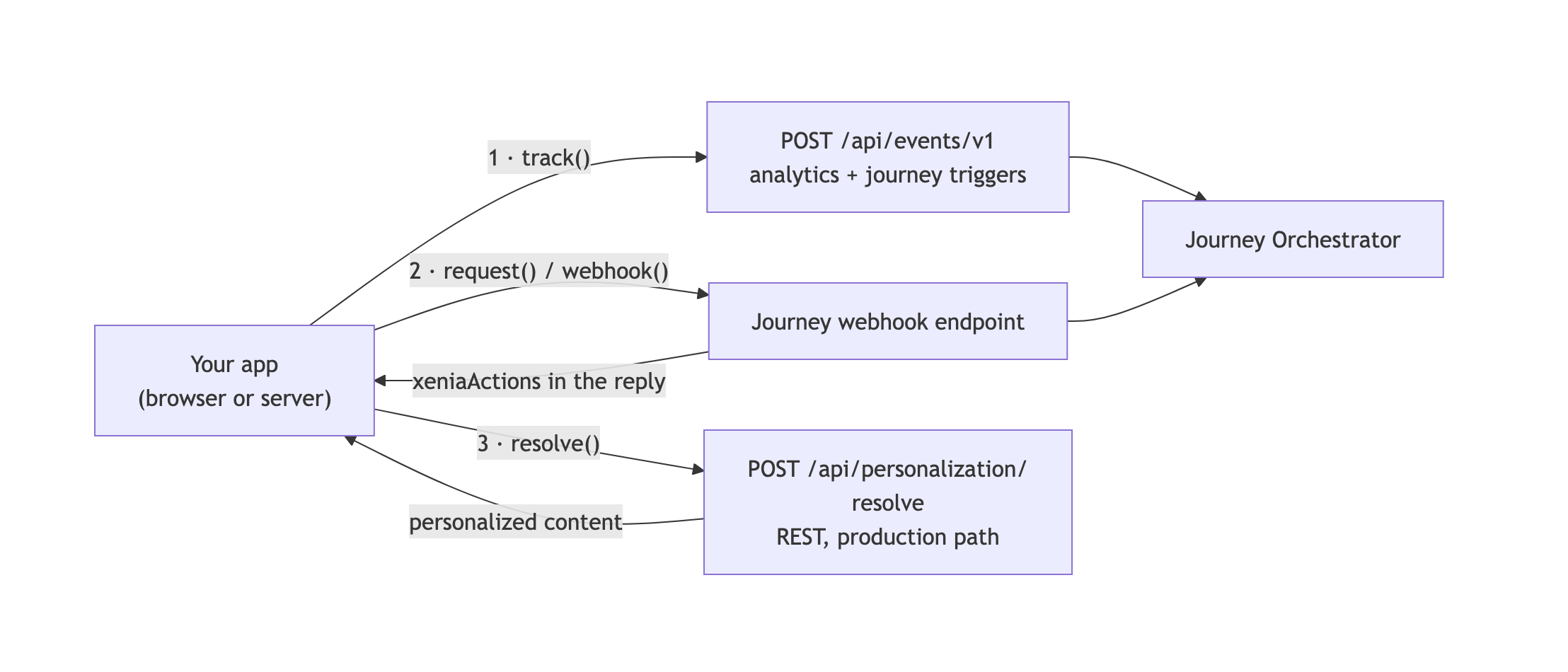
One client, four jobs. Everything below rides on the same identity/attribution state, so you never wire these together by hand:
| Feature | What it does | Call it with |
|---|---|---|
| Event tracking | Records an analytics event and/or advances a journey. Identity, UTM, page context, and journey attribution are attached automatically. | data-xenia attributes, track(), <XeniaTrack> |
| Webhook request → response | Fires a journey and gets its synchronous JSON response; the SDK saves it and can render the response's actions (swap, hide, banner, popup, modal, inline, redirect) into the page. | request(), useWebhook(), Xenia.request() |
| Content personalization | Fetches personalized content for a content key from Xenia's CMS, with a stable base fallback. Two paths: REST resolve() (recommended, production path) and webhook-backed usePersonalization() (flow use-case). | resolve(), usePersonalizationResolve(), usePersonalization() |
| Analytics & conversions | Batches canonical, consent-gated, DNT/GPC-aware analytics events (pageView, ctaClick, purchase, …); identify() binds a visitor to a known user. | track(name, props) (default) |
Ships client-native (/client), React (/client/react), server-native (/server), and no-build IIFE (/iife) builds — pick the one matching your stack below.
Table of contents
- Which quick start do I need?
- Installation
- Core concepts
- Quick start — React
- Quick start — Vue, Angular, or plain JS
- Quick start — no-build (IIFE)
- Quick start — server (SSR / RSC)
- Configuration
- Declarative tracking attributes
- Webhook actions
- Theming with CSS variables
- Personalization
- Analytics & conversions
- Recipes — end-to-end patterns
- API reference
- Resilience
- TypeScript
- Release channels
Which quick start do I need?
| Your stack | Import | Section |
|---|---|---|
| React (CSR or SSR-hydrated) | @xenia-martech/sdk-js/client/react | React |
| Vue, Angular, Svelte, or plain JS/TS | @xenia-martech/sdk-js/client | Vue, Angular, or plain JS |
| Static HTML / no bundler / a CMS template | <script src=".../xenia-sdk.iife.js"> | No-build (IIFE) |
| Next.js Server Components, server actions, or any Node backend | @xenia-martech/sdk-js/server | Server (SSR / RSC) |
| A mostly-server-rendered app that needs one interactive widget (e.g. a personalized offer popup) | /server for the page + /client/react mounted inside just that one component | RSC: a scoped client island |
| A backend job / cron / worker with no HTTP framework at all | createXeniaServer() from /server, called directly | Server (SSR / RSC) |
Not sure? Start with React if you have it — it's the highest-level surface and the fastest to wire up.
Installation
npm install @xenia-martech/sdk-js
# yarn add @xenia-martech/sdk-js
# pnpm add @xenia-martech/sdk-js
react and react-dom (≥18) are optional peer dependencies — required only for /client/react. The core, /client, and /server builds have no React dependency.
No package manager? Use the prebuilt <script> bundle
Building a plain HTML site (no npm, no bundler)? Skip the install and pull the prebuilt no-build IIFE bundle straight from a CDN — it's served automatically off the npm package once published, no separate hosting needed:
<!-- pin a version for production (recommended) -->
<script src="https://cdn.jsdelivr.net/npm/@xenia-martech/sdk-js@1/dist/xenia-sdk.iife.js"></script>
<!-- or, equivalently, via unpkg -->
<script src="https://unpkg.com/@xenia-martech/sdk-js@1/dist/xenia-sdk.iife.js"></script>- Drop the
@1(or any version) to always resolve the latest — fine for prototyping, not recommended for production (an unpinned CDN URL can silently pull in a future breaking release). - Prefer to self-host the file instead of a CDN?
npm pack @xenia-martech/sdk-jsdownloads the published tarball with no install needed — unpack it anddist/xenia-sdk.iife.jsis inside. - Either way, it's the exact same file as the Quick start — no-build (IIFE) section below — see there for
window.Xeniausage.
Entry points
| Import | Runtime | Use it for |
|---|---|---|
| @xenia-martech/sdk-js | isomorphic core | Low-level XeniaApi, shared types, parseActions, generateUlid. Rarely imported directly. |
| @xenia-martech/sdk-js/client | browser, framework-agnostic | createXeniaClient() — identity, auto-tracking, action rendering. No React. Works from Vue, Angular, Svelte, or plain JS. |
| @xenia-martech/sdk-js/client/react | browser + React | <XeniaProvider> + hooks (useTrack, usePersonalization, useWebhook, …), built on top of /client. |
| @xenia-martech/sdk-js/server | Node / SSR / RSC | Server-side events, webhooks, personalization, and token minting. Stateless — identity passed explicitly. |
| @xenia-martech/sdk-js/iife | <script> tag | Prebuilt window.Xenia for sites without a bundler. |
Core concepts
Identity — On first load the client resolves a stable device id (MediaDevices → browser fingerprint → cached in localStorage). You may attach a visitor id via identify(). UTM parameters are captured from the URL and persisted in sessionStorage so they survive navigation. A journey id is derived from utm_id (or set manually with setJourneyId). Every event and webhook call also carries the current page's url, path, and query automatically. All of this rides on every call — you never assemble it yourself.
Events — One track(eventName, props?, opts?) call, one endpoint (POST /api/events/v1). opts.trigger decides delivery: true sends immediately and matches/advances a journey (never sampled/shed; bypasses client consent/DNT gating); false (default) enqueues a batched, consent-gated analytics event. Pass opts.eventId (e.g. "ord-1001") as a stable dedup key to keep conversions idempotent — or let the SDK generate a ULID for you (generateUlid(), also exported for your own use).
Webhook request/response — An interactive round-trip (request() → the journey's webhook endpoint). The journey's Webhook Response node returns JSON; the SDK saves the whole response and, if it contains an xeniaActions array, applies those actions to the page.
Personalization — resolve(contentKey, { data, locale, merge }) / resolveBatch(items, …) call the REST /api/personalization/resolve(-batch) endpoint (the usePersonalizationResolve* hooks wrap them) — the recommended production path. Resolve requires the SDK Bearer token. The webhook-backed usePersonalization(triggerId, data) / usePersonalizationSlots(triggerId, slots, data) remain available alongside for the flow use-case.
Analytics — The same track() with the default trigger: false batches canonical events to POST /api/events/v1 — consent-gated (nothing sends until consent({ analytics: true })) and DNT/GPC-aware by default. Taxonomy names are camelCase (pageView, ctaClick, customEvent, …), matching the backend enum, but any string is accepted.
Quick start — React
Wrap your app once. Identity, device id, attribution, and data-xenia auto-tracking start automatically.
import { XeniaProvider } from "@xenia-martech/sdk-js/client/react";

export default function App() {
  return (
    <XeniaProvider tenantId="t1" environmentKey="prod">
      {/* Declarative auto-tracking: data-xenia="<eventId>&<click|view-port|page-load>" */}
      <button data-xenia="checkout&click">Checkout</button>
      <section data-xenia="hero&view-port">Hero</section>
      <div data-xenia="home&page-load" />
      <YourApp />
    </XeniaProvider>
  );
}
Imperative tracking, webhook actions, and personalization via hooks:
import { useTrack, useWebhook, usePersonalization } from "@xenia-martech/sdk-js/client/react";

function AddToCart({ id }: { id: string }) {
  const track = useTrack();
  return <button onClick={() => track("add_to_cart", { productId: id }, { trigger: true })}>Add</button>;
}

// Webhook request/response — the journey's Webhook Response body drives the UI.
function OfferButton() {
  const { send } = useWebhook("t1_prod_offer-webhook");
  // Any `xeniaActions` in the response are applied automatically (banner/swap/…).
  return <button onClick={() => send({ page: "pdp" })}>Show my offer</button>;
}

// Personalization — fires a webhook trigger, returns its body as data to render yourself.
function Hero({ base }: { base: { title: string } }) {
  const { data, isLoading } = usePersonalization("t1_prod_hero", { segment: "vip" });
  const hero = (data as { title?: string } | null) ?? base;
  return <h1>{isLoading ? base.title : hero.title}</h1>;
}
Or skip data- attributes and wrap an element declaratively — same effect, JSX-native:
import { XeniaTrack } from "@xenia-martech/sdk-js/client/react";

<XeniaTrack event="signup" on="click" as="button" props={{ placement: "footer" }}>
  Sign up
</XeniaTrack>;
Every hook and component in this section is listed in full in the API reference.
Quick start — Vue, Angular, or plain JS
@xenia-martech/sdk-js/client has no React dependency — it's the same client the React hooks are built on, usable directly from any framework (or none):
import { createXeniaClient } from "@xenia-martech/sdk-js/client";

const xenia = createXeniaClient({ tenantId: "t1", environmentKey: "prod" });
await xenia.init(); // resolves device id, starts data-xenia auto-tracking

xenia.track("add_to_cart", { productId: "p1" }, { trigger: true });

const { body, actions } = await xenia.request("t1_prod_offer-webhook", { page: "pdp" });
// `actions` (xeniaActions from the Webhook Response node) are applied to the DOM
// automatically unless you pass `{ apply: false }`; see swapContent/hideContent/showContent
// in the API reference to apply them yourself.
Call createXeniaClient() once (e.g. in a Vue plugin's install(), or an Angular service constructor) and share the instance — it holds identity/attribution state internally, same as <XeniaProvider> does for React.
// Vue plugin example
import type { App } from "vue";
import { createXeniaClient } from "@xenia-martech/sdk-js/client";

export const XeniaPlugin = {
  install(app: App) {
    const xenia = createXeniaClient({ tenantId: "t1", environmentKey: "prod" });
    void xenia.init();
    app.provide("xenia", xenia);
    app.config.globalProperties.$xenia = xenia;
  },
};
// Angular service example
import { Injectable, OnDestroy } from "@angular/core";
import { createXeniaClient, type XeniaClient } from "@xenia-martech/sdk-js/client";
@Injectable({ providedIn: "root" })
export class XeniaService implements OnDestroy {
readonly client: XeniaClient = createXeniaClient({
tenantId: "t1",
environmentKey: "prod",
});
constructor() {
void this.client.init();
}
ngOnDestroy() {
this.client.destroy();
}
}Quick start — no-build (IIFE)
One script tag, then annotate elements. Exposes a global window.Xenia. Grab the file via CDN or download — see No package manager? Use the prebuilt <script> bundle above — or serve it from your own host.
<script src="/js/xenia-sdk.iife.js"></script>
<script>
  Xenia.init({ tenantId: "t1", environmentKey: "prod" });
  Xenia.consent({ analytics: true, marketing: false, personalization: false }); // nothing analytics-only sends until this is called
  // Xenia.identify("visitor-123");
</script>

<button data-xenia="checkout&click">Checkout</button>
<section data-xenia="hero&view-port">Hero</section>
<div data-xenia="home&page-load"></div>

<script>
  // Events
  Xenia.track("cart_abandoned", { cartTotal: 59.99, currency: "USD" });

  // Webhook request/response — actions in the reply are applied to the page automatically
  Xenia.request("t1_prod_offer-webhook").then((r) => console.log(r.body));

  // Personalization — same REST resolve path the React/client hooks use.
  // Shape of `content` depends on what your content entries store; here it's a { html } field.
  Xenia.resolve("hero", { data: { segment: "vip" }, merge: true }).then((r) => {
    if (r.personalized && r.content) document.querySelector("#hero").innerHTML = r.content.html;
  });
</script>
window.Xenia exposes every top-level client capability: init, destroy, track, identify, setJourneyId, consent, request, getResponse, resolve, resolveBatch, swapContent, hideContent, showContent.
Quick start — server (SSR / RSC)
Serve tokens to the browser, and fire server-side events/webhooks/personalization statelessly — no ambient window, so identity and page context are passed explicitly instead of auto-collected.
1. Serve a short-lived token to the browser
// Token route the browser SDK calls (Next.js Route Handler example). Exchanges
// your long-lived SDK token for a fresh short-lived one on every call — the
// long-lived one stays here and never reaches the browser. That's the only
// credential this needs.
import { createTokenRoute } from "@xenia-martech/sdk-js/server";

export const GET = createTokenRoute({
  sdkToken: process.env.XENIA_SDK_TOKEN!,
  // baseUrl: process.env.XENIA_URL,      // only to override the default hosted engine
});
Not on a framework with route handlers? Call the same exchange yourself with refreshSdkToken() from any HTTP handler (Express, Fastify, a Lambda, …) — see the API reference.
2. Fire events, webhooks, and personalization from your backend
import { createXeniaServer } from "@xenia-martech/sdk-js/server";

const xenia = createXeniaServer({
  tenantId: "t1",
  environmentKey: "prod",
  token: process.env.XENIA_TOKEN,
  // baseUrl: process.env.XENIA_URL,      // only to override the default hosted engine
});

await xenia.track("purchase", {
  trigger: true,
  eventId: "ord-1001",                                    // stable dedup key → idempotent conversion
  identity: { userId: "c1", email: "[email protected]" }, // ≥1 anchor: userId/email/visitorId/phone
  properties: {
    customEventName: "purchase",
    orderId: "1001", orderValue: 120, currency: "USD",
    utm_id: "<from the journey link — deterministic attribution>",
  },
});

const res = await xenia.webhook(
  "t1_prod_offer-webhook",
  { source: "backend" },
  { context: { path: "/product/sea-salt-body-scrub" }, identity: { customerId: "c1" } },
);

const hero = await xenia.resolve("hero", { data: { segment: "vip" }, merge: true });opts.context/opts.identity pass whatever's known at the call site (path, query, url, referrer, UTM, deviceId, visitorId, customerId, email) — merged into the request body the same way the browser client's auto-attached fields do.
Warning — consent is per-call on the server.
createXeniaServer({ consent })is ignored — the server client has no ambient session to hold consent state in. Passconsenton everytrack()call, or wraptrackin your own helper that injects it for you (see the server actions recipe below). Without it, analytics events are silently consent-dropped (journey triggers still fire).
3. Attribute a server-side event to a browser-entered journey
A server-side conversion only attributes correctly if it carries the same visitor id the browser used. The browser SDK writes that id to a first-party xenia_vid cookie for exactly this reason:
import { createXeniaServer, getVisitorId } from "@xenia-martech/sdk-js/server";

const xenia = createXeniaServer({
  ...cfg,
  visitorId: getVisitorId(req.headers.get("cookie")) ?? undefined,
});
await xenia.track("purchase", { identity: { email }, properties: { /* … */ } }); // xeniaVisitorId attached for you
See Recipes below for the full pattern in an RSC app that has no browser SDK writing that cookie for you.
Configuration
Passed to XeniaProvider, createXeniaClient, createXeniaServer, or Xenia.init.
| Option | Type | Default | Notes |
|---|---|---|---|
| baseUrl | string | https://engine.xeniamartech.com/xenia | Xenia base URL. Override only for a self-hosted or non-default environment. |
| tenantId | string | — | Sent as X-Tenant-Id. |
| environmentKey | string | — | Sent as X-Environment. |
| token | string | — | SDK Bearer token, sent as Authorization: Bearer <token> on every request. Required for resolve()/resolveBatch(); needed for events/webhooks only when a trigger node has its own auth token. |
| getToken | () => Promise<string> \| string | — | Async token provider; cached until shortly before expiry. Overrides token. |
| visitorId | string | — | Seeds (browser) or supplies (server) the SDK-owned visitor anchor. Server-side, this is how you bind the client to a request — see Recipes. |
| visitorCookie | boolean \| VisitorCookieOptions | true | Browser only. Persists the visitor id to a first-party <prefix>_vid cookie (xenia_vid by default) so a same-origin server can read it via getVisitorId() and attribute a server-side event to a browser-entered journey. false disables it; an object tunes domain/sameSite/secure/maxAgeDays (defaults: Lax, 365 days). |
| prefix | string | "xenia" | Storage keys, the data-<prefix> attribute name, and the visitor/consent cookie names (<prefix>_vid, <prefix>_consent). If you change it, pass the same prefix to the server helpers — getVisitorId(header, prefix) — or the server looks for a cookie the browser never wrote. |
| timeout | number | 8000 | Per-request timeout (ms). |
| retry | { attempts?, baseDelayMs? } | {2, 300} | Retry policy; honors Retry-After. |
| headers | Record<string,string> | — | Extra headers on every request. |
| debug | boolean | false | Verbose console diagnostics. |
| consent | ConsentState | — | Initial consent flags. Browser only — the server client ignores this; pass consent per track() call instead. |
Client-only (createXeniaClient / XeniaProvider / Xenia.init):
| Option | Type | Default | Notes |
|---|---|---|---|
| autoTrack | boolean | true | Enable data-xenia auto-tracking. |
| throttleMs | number | 1000 | Throttle window for auto-tracked events. |
| viewport | { threshold?, rootMargin?, triggerOnce? } | {0.5, –, true} | view-port interaction options. |
| autoApplyActions | boolean | true | Apply xeniaActions from webhook responses automatically. |
| persistResponses | boolean | true | Persist saved webhook responses to localStorage. |
| respectDnt | boolean | true | Honor navigator.doNotTrack/globalPrivacyControl by no-op'ing analytics-only track() calls entirely (not even queued). Journey triggers always fire regardless. |
| messageTemplate | (ctx: MessageRenderContext) => string | — | Replace the built-in card markup (as an HTML string) for every banner/popup/modal/inline action that doesn't supply its own html. Applies system-wide. |
| messageComponent | (container: HTMLElement, ctx: MessageMountContext) => void \| (() => void) | — | Framework-native alternative to messageTemplate — mounts a real component (React, Vue, …) into container instead of an HTML string. Wins over messageTemplate when both are set. See Framework-native components. |
| messageStyles | string | — | Extra CSS appended to the message overlay's (shadow-scoped) stylesheet. |
XeniaProvider additionally accepts a client?: XeniaClient prop to reuse an already-created client instead of constructing one from props — useful for sharing one instance across React and non-React code, or mounting more than one provider against the same client (see RSC: a scoped client island).
Declarative tracking attributes
Add data-xenia="<eventId>&<interactionType>" to any element. The client picks it up automatically, including elements added to the DOM later.
| Interaction type | Fires when |
|---|---|
| click | The element (or a descendant) is clicked. |
| view-port | The element scrolls into view. |
| page-load | Immediately when the element is present. |
<button data-xenia="signup&click">Sign up</button>
<section data-xenia="pricing&view-port">Pricing</section>
<div data-xenia="landing&page-load"></div>
eventId must match the event configured on the journey's Event Trigger node. Every data-xenia fire is a journey trigger (trigger: true), sent immediately.
React alternative — no data- attributes, same effect: <XeniaTrack event="signup" on="click">Sign up</XeniaTrack> (see the React quick start and API reference).
Webhook actions
A Webhook Response node returns arbitrary JSON. To drive the UI, return an xeniaActions array — the SDK saves the whole response (readable via getResponse(triggerId) / useXeniaResponse) and applies the actions.
{
  "xeniaActions": [
    { "type": "swap", "target": "#hero", "html": "<b>Welcome back!</b>" },
    { "type": "hide", "target": ".guest-banner" },
    { "type": "banner", "message": "20% off today", "cta": { "label": "Shop", "url": "/sale" }, "dismissAfterMs": 8000, "position": "bottom" }
  ]
}
target is a CSS selector or a data-xenia-slot="…" id. Message actions (banner/popup/modal) render in an isolated shadow root so host-page styles never leak; inline renders into a page slot.
| Action | Fields | Effect |
|---|---|---|
| swap / setContent | target, html or text | Replace an element's content. |
| hide | target | Hide an element (reversible). |
| show | target | Un-hide an element. |
| banner / popup / modal | title?, message?, imageUrl?, html?, cta?, dismissAfterMs?, position? | Render a message overlay. |
| inline | target (required) + message fields | Render a message into a page slot. |
| redirect | url | Navigate the browser. |
cta is { label, url?, event? }. When a CTA with an event is clicked, the SDK fires that event via track().
position anchors the overlay: "top-left" | "top-right" | "bottom-left" | "bottom-right" for popup (corners), "top" | "bottom" for banner (edges). Ignored for modal (always centered) and inline (renders into your target, no floating position). Defaults per type: popup → bottom-right, banner → bottom.
Content personalization isn't one of these actions — it's a separate, explicit call. See Personalization below.
Custom markup for message actions
By default banner/popup/modal/inline actions render into a small built-in card using title/message/imageUrl/cta. Two ways to replace that design:
Per-action — set html on the action itself; it wins over title/message/imageUrl and is used verbatim:
{ "type": "banner", "html": "<div class=\"promo\">Custom!<button data-xenia-cta>Shop</button></div>" }System-wide — register a messageTemplate once when creating the client; it's used as the fallback for any message action that doesn't set its own html:
createXeniaClient({
  // ...
  messageTemplate: ({ action, variant, escapeHtml }) =>
    `<div class="my-${variant}">${escapeHtml(action.message ?? "")}</div>`,
  messageStyles: `.my-banner { background: #111; color: #fff; }`,
});
In either case, add data-xenia-close to an element to make it dismiss the message, and data-xenia-cta to an element to fire the action's cta.url/cta.event on click — the SDK looks for these attributes (or its own built-in .xenia-close/.xenia-cta classes) regardless of which template rendered the markup.
Framework-native components
messageTemplate builds an HTML string. If you'd rather render a real component — React, Vue, Svelte, anything — register messageComponent instead: the SDK hands it a live DOM node and mounts your component directly into it, no string templating involved. It takes priority over messageTemplate when both are set (a per-action html still wins over either).
createXeniaClient({
  // ...
  messageComponent: (container, ctx) => {
    // `ctx.action`/`ctx.variant` tell you what to render; call `ctx.close()` to dismiss and
    // `ctx.fireCta()` to fire the action's cta.event/url exactly like the built-in card does.
    const app = mountYourFramework(container, ctx); // e.g. Vue's createApp(...).mount(container)
    return () => app.unmount(); // called right before the message is removed
  },
});
React ships a ready-made adapter, reactMessageComponent(), so you can pass a plain component instead of a mount function:
import { XeniaProvider, reactMessageComponent, type XeniaMessageComponentProps } from "@xenia-martech/sdk-js/client/react";

function OfferCard({ action, close, fireCta }: XeniaMessageComponentProps) {
  return (
    <div className="offer-card">
      <p>{action.message}</p>
      {action.cta && <button onClick={fireCta}>{action.cta.label}</button>}
      <button onClick={close} aria-label="Close">×</button>
    </div>
  );
}

<XeniaProvider
  tenantId="t1" environmentKey="prod"
  messageComponent={reactMessageComponent(OfferCard)}
>
  <App />
</XeniaProvider>;
Your component owns 100% of the card's markup and styling (same as a per-action html override) — the SDK still owns placement, z-index, and (for modal) the backdrop, so --xenia-z-index/--xenia-popup-offset/--xenia-modal-backdrop/etc. from Theming with CSS variables still apply; the card-specific variables (--xenia-card-*, --xenia-title-*, --xenia-cta-*, …) don't, since there's no built-in card element to style.
Interactive widgets (spin-wheel)
An action can also carry widgetType: "spin-wheel" — a gamified outcome the server resolves (a discount code, a "try again"), rendered and submitted differently from a plain message action:
{
  "type": "popup",
  "widgetType": "spin-wheel",
  "segments": [
    { "id": "s1", "label": "10% off", "colorHex": "#7c3aed" },
    { "id": "s2", "label": "Try again", "colorHex": "#2563eb", "isLoss": true }
  ],
  "formSubmit": { "requiresResolve": true, "mode": "journey", "bindingRef": "wsb_abc123" },
  "spinnerHtml": "<div class=\"wheel-screen\">…</div>",
  "winHtml": "<div class=\"win-screen\">…</div>",
  "lossHtml": "<div class=\"loss-screen\">…</div>"
}
segments is label/color/isLoss only — the real prize weighting and any prize code are marketer-configured server-side on the webhook-response node and never reach the browser. formSubmit is likewise entirely server-driven: requiresResolve: true means the widget must call the server and get back a resolved segment before showing any outcome — there is never a client-guessed or optimistic result.
Authoring the three screens. spinnerHtml/winHtml/lossHtml are full marketer/AI-authored HTML, exactly like a popup's html override — there's no generated fallback design, so your markup is the widget. The SDK only needs a few data-xenia-* hooks inside it to wire behavior:
| Attribute | Goes in | Effect |
|---|---|---|
| data-xenia-wheel-slot | spinnerHtml | Where the SDK mounts its generated SVG wheel + pointer. |
| data-xenia-spin | spinnerHtml | Click starts the spin — calls submitWidgetForm(), waits for the server-resolved segment, then animates the wheel to land on it. |
| data-xenia-wheel-prize | winHtml / lossHtml (either or both) | Filled with the resolved segment's label once known. A losing segment still has a label (e.g. "Try again"), so this works on the loss screen too. |
| data-xenia-wheel-cta | winHtml / lossHtml | Click fires the action's cta.event/cta.url (same as a message action's CTA) before dismissing. |
| data-xenia-spin-again | winHtml / lossHtml | Optional "try again" button — swaps back to spinnerHtml and re-arms the spin button. Hidden automatically once the server reports no plays remain (alreadyPlayed). This never grants another spin by itself — the server's own play-limit/win-lock decides what the next data-xenia-spin click actually resolves to. |
| data-xenia-close, or any element whose class/id contains "close"/"backdrop" | any of the three | Dismisses the widget — the same close-affordance convention every custom-HTML surface in the SDK honors, so a design pasted from elsewhere (e.g. an inline onclick) still closes correctly. |
| data-xenia-field="<name>" / data-xenia-submit | spinnerHtml, or any widget's markup | The shared field-capture convention (see below) — wrap real inputs in a <form> for free Enter-to-submit, or mark a plain click trigger with data-xenia-submit. |
If a click on data-xenia-spin/data-xenia-submit fires before the widget has a configured formSubmit (the marketer hasn't wired the webhook-response node's Form-submission panel yet), the SDK shows an inert data-xenia-error message instead of silently doing nothing or reloading the page.
Replays. A visitor who already played sees the same resolved outcome again rather than a fresh roll — WidgetSubmitResponse.alreadyPlayed is true in that case, and the wheel skips its spin animation and jumps straight to the reveal (there's nothing new to animate toward).
The shared field/submit/success convention (collectFields/wireFormSubmit, also used by plain standard popups with a capturable form) applies inside widget HTML too:
- Mark real inputs
data-xenia-field="<name>"; the submit trigger isdata-xenia-submit(a<form>wrapper is optional — the SDK intercepts its nativesubmiteither way). - The submit control grows a small built-in spinner while the request is in flight (no markup needed for this).
- On success, if you authored a
<div data-xenia-success hidden>…</div>block anywhere in the HTML, it's revealed in place of the form for at leastformSubmit.successDisplayMs(default 900ms — long enough for a visitor to register it worked, since the real round-trip is often under 100ms) before the widget dismisses itself. No success block just means a plain wait-then-dismiss. - On error, the spinner clears, the control re-enables, and
data-xenia-errorshows a retry message.
Per-widget style overrides — style: { hideCloseButton?, hideOverlay? } — control the SDK's own chrome around the widget (not authored content). hideCloseButton isn't currently exposed in Content Studio's AI schema or read by any renderer yet; hideOverlay suppresses the dimmed backdrop, default shown.
See Theming with CSS variables for the wheel's own variables (--xenia-wheel-pointer-color, plus the shared --xenia-cta-* set for the Spin button).
Theming with CSS variables
The built-in message card is rendered in an isolated shadow root, but every visual value on it — colors, radii, shadows, spacing, typography — is exposed as a --xenia-* CSS custom property with a sensible default. Custom properties inherit through the shadow boundary automatically, so you theme it from your own site's CSS with no API calls:
:root {
  --xenia-card-bg: #111827;
  --xenia-card-color: #f9fafb;
  --xenia-cta-bg: #6366f1;
  --xenia-card-radius: 16px;
}
See CSS_VARIABLES.md for the full list of variables and their defaults, including popup/banner position offsets (works together with the action position field above). For structural changes beyond styling (or to extend rather than reskin the built-in card), use messageStyles/messageTemplate instead — see Custom markup for message actions above.
Personalization
There are two ways to personalize content. REST resolve (resolve() / usePersonalizationResolve()) is the recommended production path; the webhook-backed usePersonalization() (below) stays available for the flow use-case.
REST resolve (recommended)
resolve(contentKey, { data?, locale?, merge? }) calls POST /api/personalization/resolve and returns { personalized, baseEntryId, swaps, content?, bucket }. With merge: true the server splices and returns ready-to-render content; otherwise apply swaps yourself. resolveBatch(items, …) resolves up to 50 keys in one round-trip.
Each entry in swaps is { identifier, replacementEntryId, mode } — identifier addresses a node in the base entry's JSON, replacementEntryId is the CMS entry id to splice in, and mode ("section" | "items") controls whether the whole matched section is replaced by the replacement entry, or only the section's inner items are swapped while the section itself stays. "section" is the default. You only need to read these yourself when merge: false — with merge: true, the server has already applied them for you.
Not to be confused with the webhook-path
ContentSwap, whosemodeis"replace" | "merge". Different contract, different vocabulary — see Multi-slot personalization.
Auth: resolve requires the SDK Bearer token — the same token / getToken config as events (there is no separate personalization token). Events optionally send it (public otherwise); resolve requires it (401 without). Set it server-side; a browser without a token can still track() publicly but cannot resolve().
SDK-provided fields are attached automatically. Every resolve()/resolveBatch() call carries a fixed set of fields into data — path, query, deviceId, visitorId, customerId, email, url, referrer, utmSource, utmMedium, utmCampaign, utmContent, utmId — plus the reserved _xenia_vid key the backend reads for holdout/exposure bucketing. These are the same "SDK-provided fields" a Personalization Resolve journey trigger exposes natively to downstream nodes. None of them can be overridden per call — the SDK's own values always win, even if your data happens to use one of these names.
Browser: collected ambiently — page URL/path/query/referrer/UTMs come from
window/document;visitorId/deviceIdfromidentify()/the auto-resolved device id;customerId/emailfromidentify(visitorId, { customerId, email }). Nothing to configure.Server: there's no ambient
window/document, so bind the request once when you construct the per-request client and every call carries the fields automatically — no per-call wiring:import { createXeniaServer } from "@xenia-martech/sdk-js/server"; import { contextFromUrl } from "@xenia-martech/sdk-js"; const xenia = createXeniaServer({ tenantId, environmentKey, token, visitorId: getVisitorId(cookieHeader), // the browser's xenia_vid cookie context: contextFromUrl(currentUrl, referrer), // path / query / url / referrer / utm* }); await xenia.resolve("hero"); // ← fields already attachedcontextFromUrl(url, referrer?)derives the same fields the browser reads offwindow.location, so a rule can gate onquery.<name>orpathon a server-rendered page. In a framework where the render context can't see its own URL (e.g. a Next.js RSC), stamp the URL onto the request in middleware and read it back fromheaders()— see thenextjsexample.opts.context/opts.identityremain available per call, as an override on top of the ambient context or for values known only at that call site (e.g.identity: { customerId: "c1", email: "[email protected]" }).visitorId/_xenia_vidstill come fromconfig.visitorIdand win over a per-callidentity.visitorId. A client with neither bound behaves exactly as before.
import { usePersonalizationResolve } from "@xenia-martech/sdk-js/client/react";

function Hero({ base }: { base: HeroContent }) {
  const { data, isLoading } = usePersonalizationResolve("hero", { data: { segment: "vip" }, merge: true });
  const hero = (data?.content as HeroContent | null) ?? base;
  return <h1>{isLoading ? base.title : hero.title}</h1>;
}
Slot impression/click tracking. When you render a resolved slot, stamp it with the resolve metadata so the auto-tracker can fire viewport personalization_impression and personalization_click events (analytics-only, batched, consent-gated, as customEvent + properties.customEventName):
<div data-xenia-slot="offer-slot"
     data-xenia-content-key="offer.hero"
     data-xenia-content-entry-id="entry-99"
     data-xenia-base-entry-id="entry-1"
     data-xenia-personalized="true"> … </div>
The tracker reads data-xenia-content-key (required), data-xenia-content-entry-id, data-xenia-base-entry-id, and optional data-xenia-personalized. Server-side holdout exposure is recorded automatically by the resolve() call — the SDK does nothing for that.
Webhook-backed personalization
usePersonalization(triggerId, data?) is an explicit, standalone-looking call — but under the hood it's entirely webhook-based: it fires the given webhook trigger (same journey/webhook mechanism as useWebhook()) and hands you back the response body as data, re-firing whenever triggerId or data changes:
import { usePersonalization } from "@xenia-martech/sdk-js/client/react";

function Hero({ base }: { base: HeroContent }) {
  const { data, isLoading } = usePersonalization("t1_prod_hero-webhook", { segment: "vip" });
  const hero = (data as HeroContent | null) ?? base;
  return (
    <div>
      <span>{isLoading ? "personalizing…" : hero.badge}</span>
      <h1>{hero.title}</h1>
    </div>
  );
}
The journey's Webhook Response node returns whatever JSON shape you want rendered — there's no fixed "swap"/"content" envelope to conform to. A slow or unreachable Xenia surfaces via error, and data simply stays null so you render your own base/fallback content; nothing throws.
Renders base immediately (no blocking) and updates once the webhook responds.
Multi-slot personalization
usePersonalizationSlots(triggerId, slots, data?) resolves several named content slots from one webhook round-trip — useful when a single journey decision should personalize more than one thing on the page (e.g. a hero title and a badge and a price) without firing a separate trigger per slot:
import { usePersonalizationSlots } from "@xenia-martech/sdk-js/client/react";

function ProductPage({ product }: { product: Product }) {
  const { data, isLoading } = usePersonalizationSlots("t1_pdp-personalize", {
    hero: { title: product.name, badge: null },
    price: product.price,
  }, { productId: product.id });

  return (
    <div>
      <h1>{(data.hero as { title: string }).title}</h1>
      <span>{isLoading ? "…" : String(data.price)}</span>
    </div>
  );
}
The Webhook Response node's body carries a xeniaContentSwaps array — { identifier, replacement, mode? } per swap, where identifier is "<slotKey>" (whole-slot replace) or "<slotKey>.<dotted.path>" addressing a node inside that slot's JSON (object keys or array indices; mode: "merge" shallow-merges objects instead of replacing them wholesale). Swaps are spliced into your base slots recursively — a slot with no matching swap comes back unchanged, so this is always safe to render immediately.
Note:
xeniaContentSwapsis the SDK-side half of this contract. Confirm with whoever owns your Journey Orchestrator's Webhook Response node config that it emits this field in the shape above before relying on it in production — the SDK only splices what it's given.
spliceSlots(slots, swaps) and extractContentSwaps(body) (exported from every entry point) are the underlying pure functions, if you want to apply them outside a hook (e.g. server-side, or against a webhook response you fetched some other way).
Analytics & conversions
track(eventName, props?, opts?) with the default opts.trigger: false records a canonical analytics event — batched client-side and posted to the unified POST /api/events/v1. It records a fact for analytics/attribution/reporting and does not advance a journey. Set opts.trigger: true to also match/advance a journey from the same call.
import { useTrack } from "@xenia-martech/sdk-js/client/react";

function BuyButton({ productId }: { productId: string }) {
  const track = useTrack();
  return (
    <button onClick={() => track("ctaClick", { productId, label: "Buy now" })}>
      Buy now
    </button>
  );
}
Or imperatively against a vanilla/server-agnostic client: xenia.track("pageView", { referrer: document.referrer }).
- Batched, not per-call (analytics-only events): events queue in memory and flush together (default: every 20 events or 3s, whichever comes first), plus a best-effort flush on page hide/tab-close. This is deliberately lossy under a page unload race or a sustained backend outage — analytics is best-effort, not a guaranteed-delivery pipeline. Journey triggers (
trigger: true) are sent immediately instead. - Consent-gated by default: nothing is sent until
consent({ analytics: true })has been called (orconfig.consent.analytics: trueis set at construction) — matching the backend's default-deny posture. Events tracked before consent is granted are queued (capped, oldest dropped first), not lost outright, and flush automatically once consent flips true. Journey triggers bypass this gate (they must fire; the backend still consent-gates the analytics half). On the server, there's no ambient session to hold consent — see the server quick start's consent callout. - Do Not Track / GPC respected by default: an analytics-only
track()is a complete no-op (not even queued) whennavigator.doNotTrack/globalPrivacyControlis set, unless you passrespectDnt: false. Journey triggers are not gated by DNT. eventNameis an arbitrary string. A camelCase taxonomy (pageView,ctaClick,formSubmitted,journeyNodeEntered, …, pluscustomEvent) is offered as a typed autocomplete hint matching the backend's canonical enum; any other name records viacustomEvent+properties.customEventNameserver-side. Free-form journey keys (add_to_cart,purchase, …) stay as-is.opts.eventId— a stable dedup key (e.g."ord-<orderId>", or the output of the exportedgenerateUlid()). Passing it makes the analytics/conversion side idempotent (firing the same order twice yields one conversion); omit it and the SDK generates a ULID for you. The backend caps this at 26 characters and rejects the whole batch an over-length id rides in, so the SDK folds anything longer into a deterministic 26-char digest (toEventId(), also exported) — the same input always yields the same id, so idempotency is preserved.opts.identity— the analytics half needs at least one anchor:xeniaVisitorId, a client-owneduserId/email/phone, or autm_idinproperties. An event with none is dropped asmissing_identity(atrigger: truejourney still fires). Addemail/userIdonce you know the customer. UseuserIdfor a client-owned customer id — there is nocustomerIdfield.xeniaVisitorIdis SDK-owned and cannot be set per call. It is the anchor Xenia's own analytics/monitoring keys on, so the SDK controls it and a per-call value is ignored (theidentitytype omits it; a JS caller passing one is stripped at runtime). Where it comes from:- Browser: resolved automatically — the
identify()visitor id if set, else the auto-resolved device id — so anonymous events stay attributable. Seed the initial id withconfig.visitorIdif you have one; change it later withidentify(). The browser client also writes this id to a first-partyxenia_vidcookie (SameSite=Lax, 1-year; tune or disable viavisitorCookie) so your same-origin server can read it — this is what lets a server-side conversion attribute to a browser-entered journey (without it the browser and server would use different visitor ids and attribution would break). - Server: there is no ambient visitor, so bind it per request via
config.visitorId— read the browser's<prefix>_vidcookie withgetVisitorId(cookieHeader)(pass the prefix as a second argument if you set a custom one). Everytrack()on that client instance then carries it (see the full recipe below).
- Browser: resolved automatically — the
identify(visitorId)does two things: persists the visitor id locally (as before) and binds it to a known user server-side, in the background — listen for the"identify"client event to get the resolvedpersonIdonce that resolves.- The ingest response (
AnalyticsIngestResponse, returned byXeniaServer.track()) reportsaccepted/rejectedcounts plussampled/deduped/shed(events dropped by sampling, dedup, or load-shedding, distinct from an outright rejection) and, per event inresults[],accepted,rejectionReason(when rejected), andtriggered(whether it matched/advanced a journey).
Conversions
A purchase/conversion is just a track() whose effective name is a recognized conversion name (purchase, order_complete, …) — pass it as properties.customEventName (or the eventName). For it to record and attribute correctly, include:
- identity —
userId/email/xeniaVisitorIdso it credits the right customer; - order fields in
properties—orderValue(aliasesorder_value/orderTotal/value/amount),currency,orderId; utm_id— thecustomer_journey.uuidfrom the journey link the shopper clicked. This gives deterministic ("exact") attribution to that exact enrollment, ahead of last-touch guessing. On the browser the SDK captures it from the landing URL and forwards it intoproperties.utm_idautomatically; server-side pass it explicitly (no ambient URL);opts.eventId("ord-<orderId>") — so re-firing the same order de-dupes to one conversion;consent.analytics: true— the conversion projection is consent-gated; without analytics consent it isn't recorded.
Server-side, XeniaServer.track(eventName, opts) and XeniaServer.identify(body) are single-call equivalents (no batching queue — pass identity/context/consent explicitly, same as webhook()); track() returns the unified AnalyticsIngestResponse above. See the full checkout → conversion recipe below.
Recipes — end-to-end patterns
Real wiring for the situations that come up once you're past "hello world" — pulled from working reference implementations, not hypotheticals.
Server actions — cart abandonment, checkout conversion
A Next.js server-actions storefront, wiring add_to_cart to advance an abandoned-cart journey and purchase to record a conversion. The same shape applies to any backend framework.
// lib/xenia-server.ts
import { createXeniaServer } from "@xenia-martech/sdk-js/server";

// Server-side consent has no ambient session to persist to — createXeniaServer({ consent })
// is ignored — so wrap track() once to inject it on every call instead of repeating it.
const CONSENT = { analytics: true, marketing: true, personalization: true };

export async function xeniaServer(visitorId?: string) {
  return createXeniaServer({
    tenantId: process.env.XENIA_TENANT_ID!,
    environmentKey: process.env.XENIA_ENV_KEY!,
    token: process.env.XENIA_SDK_TOKEN,
    visitorId,
    // baseUrl: process.env.XENIA_URL,      // only to override the default hosted engine
  });
}

export async function trackServer(...args: Parameters<Awaited<ReturnType<typeof xeniaServer>>["track"]>) {
  const [event, opts] = args;
  const server = await xeniaServer();
  return server.track(event, { consent: CONSENT, ...(opts ?? {}) });
}
// actions.ts
"use server";
import { generateUlid } from "@xenia-martech/sdk-js";
import { trackServer } from "./lib/xenia-server";
export async function addToBag(product: { id: string; name: string; price: number }) {
// trigger: true — advances the abandoned-cart journey, not just an analytics record
await trackServer("add_to_cart", {
trigger: true,
identity: { userId: "c1" },
properties: { productId: product.id, name: product.name, price: product.price },
});
}
export async function placeOrder(input: { email: string; orderValue: number; currency: string }) {
const orderId = generateUlid();
await trackServer("purchase", {
trigger: true,
eventId: orderId, // idempotency key — resubmitting the same order de-dupes to one conversion
identity: { email: input.email },
properties: { customEventName: "purchase", orderId, orderValue: input.orderValue, currency: input.currency },
});
return { orderId };
}Wrap both calls in try/catch in production — server-side tracking should be best-effort; a Xenia outage shouldn't break checkout.
RSC: binding one visitor id across a session with no browser SDK
An almost-entirely-server-rendered app (React Server Components) has no browser SDK writing the xenia_vid cookie for you — so establish one yourself on first use and reuse it for every server call in the session, otherwise a subscribeNewsletter action and a later purchase action won't share a visitor id and can't attribute to the same journey.
// lib/visitor.ts
import "server-only";
import { cookies } from "next/headers";
import { generateUlid } from "@xenia-martech/sdk-js";
import { VISITOR_COOKIE } from "@xenia-martech/sdk-js/server";

export async function resolveVisitorId(): Promise<string> {
  const jar = await cookies();
  const existing = jar.get(VISITOR_COOKIE)?.value;
  if (existing) return existing;
  const id = generateUlid();
  try {
    // Setting a cookie is only allowed in a Server Action / Route Handler, not
    // during RSC render — best-effort: the next server action persists one.
    jar.set(VISITOR_COOKIE, id, { path: "/", maxAge: 60 * 60 * 24 * 365, sameSite: "lax" });
  } catch {
    /* RSC render can't set cookies */
  }
  return id;
}
Pass visitorId: await resolveVisitorId() into every createXeniaServer() call for the request.
RSC: a scoped client island
Most of the page is server-rendered and never needs /client/react at all — but one widget (say, a personalized offer popup) is genuinely interactive. Mount <XeniaProvider> locally inside that one "use client" component, not at the app root:
// components/welcome-offer.tsx
"use client";
import { XeniaProvider, useWebhook } from "@xenia-martech/sdk-js/client/react";

async function getToken() {
  const res = await fetch("/api/xenia-token");
  const { token } = await res.json();
  return token;
}

function OfferBanner({ triggerId }: { triggerId: string }) {
  const { send, isLoading } = useWebhook(triggerId);
  return (
    <button onClick={() => void send({ page: "storefront" })} disabled={isLoading}>
      {isLoading ? "Finding your offer…" : "Reveal my offer"}
    </button>
  );
}

export function WelcomeOffer({ triggerId }: { triggerId: string }) {
  return (
    <XeniaProvider tenantId="t1" environmentKey="prod" getToken={getToken}>
      <OfferBanner triggerId={triggerId} />
    </XeniaProvider>
  );
}
Drop <WelcomeOffer triggerId="…" /> into an otherwise-server-rendered page. Its getToken calls the same token route your server code mints tokens from.
Hydration tip: a hook like
useWebhookseeds itsresponsefrom a client-side cache that'snullduring SSR but can be non-null on the client's first render. If you branch rendering on that value, delay it behind auseEffect-setmountedflag so the server render and first client render agree.
Personalization with a base-content fallback chain
A common pattern for a page that must always render something, layered from most- to least-personalized:
async function resolveHero(xenia: XeniaClient, baseHero: HeroContent) {
  // 1. Try REST resolve — the production path.
  const resolved = await xenia.resolve("hero", { data: { segment }, merge: true }).catch(() => null);
  if (resolved?.personalized && resolved.content) return resolved.content as HeroContent;

  // 2. Fall back to a webhook trigger for journey-driven personalization.
  const { body } = await xenia.request("hero-webhook", { segment }, { apply: false }).catch(() => ({ body: null }));
  if (body) return body as HeroContent;

  // 3. Base content — always available, no network dependency.
  return baseHero;
}
Never block the page on this — render baseHero immediately and swap in the personalized version once it resolves (exactly what usePersonalizationResolve/usePersonalization do for you in React).
API reference
createXeniaClient(config) → XeniaClient:
init()/destroy()track(eventName, props?, opts?: TrackOptions)— unified event;opts.trigger(journey vs analytics-only),opts.eventId(dedup key),opts.identity/opts.contextoverrides (see Analytics)resolve(contentKey, opts?: ResolveOptions)→ResolveResult·resolveBatch(items, opts?)→ResolveBatchResult[]— REST personalization (requires the SDK token)identify(visitorId)·setJourneyId(id)·consent(state)request(triggerId, data?, { apply?, method? })→WebhookResponsesubmitWidgetForm(formSubmit, fields, opts?: { idempotencyKey?, apply? })→WidgetSubmitResponse— submits a widget's captured fields (spin-wheel resolve, or a plain custom-widget form submit); see Interactive widgetsgetResponse(key)→WebhookResponse | undefinedswapContent(target, {html?|text?})·hideContent(target)·showContent(target)·applyActions(actions)on(event, cb)—"event" | "response" | "actions" | "error" | "identify"- Public readonly properties:
api(the underlyingXeniaApi),identity(theIdentityinstance — e.g.xenia.identity.getDeviceId()),responses(theResponseStore— e.g.xenia.responses.get(key))
Standalone functions (usable without a client instance, e.g. to apply actions fetched some other way):
swapContent(target, {html?|text?})·hideContent(target)·showContent(target)·resolveTarget(target)— DOM helpers;targetis a CSS selector ordata-xenia-slotidparseDataAttribute(value)/readSlotMeta(el)— parse adata-xenia/slot attribute by handgenerateUlid()(re-exported from core),spliceSlots(slots, swaps),extractContentSwaps(body),parseActions(body)
Building blocks XeniaClient composes internally, exported for advanced use: Identity, AutoTracker (+ AutoTrackOptions, SlotMeta), ActionRenderer (+ CtaHandler), AnalyticsQueue (+ AnalyticsQueueOptions), TokenProvider.
<XeniaProvider config>— boots one client (or reuses one passed via theclientprop) and provides it via context.useXenia()— theXeniaClientinstance.XeniaContextis also exported directly if you need the raw context.useTrack()—(eventName, props?, opts?: TrackOptions) => void.usePersonalizationResolve(contentKey, { data?, locale?, merge? })—{ data, isLoading, error }(REST resolve; recommended).usePersonalizationResolveSlots(items, { data?, locale?, merge? })—{ data, isLoading, error }for a batch resolve.usePersonalization(triggerId, data?)—{ data, isLoading, error }(webhook-backed).usePersonalizationSlots(triggerId, slots, data?)—{ data, isLoading, error }for multiple named slots (webhook-backed; see Multi-slot personalization).useWebhook(triggerId)—{ send, response, isLoading, error }.useXeniaResponse(key)— the last savedWebhookResponsefor a key.<XeniaTrack event on? props? as?>— fire an event on click/viewport/mount withoutdata-attributes.<XeniaMessage actions={[…]} />— apply a set of actions on mount.reactMessageComponent(Component)→MessageComponentRenderer— adapts a React component (typedXeniaMessageComponentProps, i.e.MessageMountContext) into themessageComponentconfig shape. See Framework-native components.- Also re-exports everything from
/client(createXeniaClient,XeniaClient,spliceSlots,extractContentSwaps,parseActions, etc.) for convenience — one import, no second module to reach for.
createXeniaServer(config)→XeniaServerwithtrack(eventName, opts?: ServerTrackOptions),webhook(triggerId, data?, opts?: ServerWebhookOptions),resolve(contentKey, opts?),resolveBatch(items, opts?),identify(body).track()→AnalyticsIngestResponse— single-call unified event (no batching queue);opts.trigger,opts.eventId,opts.source(origin tag, default"xenia-server-sdk"),identity/context/properties/consent(see Analytics — consent is per-call here,createXeniaServer({ consent })is ignored).webhook()—opts.identity/opts.contextmerge in the same reserved fields (path,query,url,referrer, UTM,deviceId,visitorId, etc.) the browser client auto-attaches; there's no ambientwindowon the server, so pass them explicitly.resolve(contentKey, opts?)→ResolveResult·resolveBatch(items, opts?)→ResolveBatchResult[]— REST personalization (requires the SDK token).identify(body: IdentifyRequest)→IdentifyResponse— bind a visitor to a known user.refreshSdkToken(opts)→{ token, expiresAt? }— exchanges your long-lived SDK token for a short-lived one; call this directly if you're not on a framework with route handlers.createTokenRoute(config)→(request) => Promise<Response>— a ready-made handler wrappingrefreshSdkToken; mount at your token endpoint.parseCookies(header),getVisitorId(header, prefix?),getConsent(header, prefix?),visitorCookieName(prefix?),consentCookieName(prefix?).VISITOR_COOKIE("xenia_vid") /CONSENT_COOKIE("xenia_consent") are the DEFAULT-prefix names — with a customprefix, use the functions and pass the same prefix the browser client uses.
XeniaApi— low-level endpoint client (sendEvents,webhook,resolve,resolveBatch,identify,consent). App code normally goes through/clientor/serverinstead.parseActions(body),generateUlid(),toEventId(raw),MAX_EVENT_ID_LENGTH,spliceSlots(slots, swaps),extractContentSwaps(body),VISITOR_COOKIE,CONSENT_COOKIE.HttpClient,HttpError,buildUrl(base, path),isBrowser()— the underlying HTTP layer;isBrowser()is handy for guarding SSR-unsafe code in your own app.MemoryResponseStore,LocalStorageResponseStore(implementations of theResponseStoreinterface).- All types (
XeniaConfig,VisitorCookieOptions,XeniaEvent,TrackOptions,WebhookResponse,XeniaAction,MessagePosition,AnalyticsEventName,AnalyticsIngestResponse,AnalyticsContext,ResolveResult,ResolveBatchResult,PersonalizationSwap,ContentSwap,WidgetType,WidgetSegment,WidgetFormSubmit,WidgetStyle,WidgetPrize,WidgetSubmitResponse, …).
Resilience
Events, webhooks, and personalization never block your render. A usePersonalization() call that fails just surfaces via error and leaves data as null, same as a no-match — your own base/fallback content keeps rendering. Requests time out (default 8s) and retry transient failures with backoff, honoring Retry-After. Treat a slow or unreachable Xenia as "render the base and move on."
TypeScript
Fully typed. Import types from any entry point:
import type {
  XeniaConfig,
  XeniaEvent,
  TrackOptions,
  WebhookResponse,
  XeniaAction,
} from "@xenia-martech/sdk-js";
Release channels
Releases are automated per branch:
| Branch | Channel | Version example | Install |
|---|---|---|---|
| main / master | latest | 1.2.0 | npm i @xenia-martech/sdk-js |
| staging | rc | 1.2.0-rc.1 | npm i @xenia-martech/sdk-js@rc |
| development | dev | 1.2.0-dev.1 | npm i @xenia-martech/sdk-js@dev |
Use @latest in production; @rc and @dev are for previewing upcoming changes.
License
MIT © Xenia Martech