
@xmcp-dev/workos
v0.0.2
Published
WorkOS AuthKit integration for xmcp


Readme
@xmcp-dev/workos
WorkOS AuthKit integration for xmcp MCP servers. Enables OAuth 2.0 authentication for MCP clients using WorkOS Connect.
Installation
npm install @xmcp-dev/workos
# or
pnpm add @xmcp-dev/workos
WorkOS Connect Setup
Before using this plugin, you need to enable WorkOS Connect in your WorkOS Dashboard:
- Go to your WorkOS Dashboard
- Navigate to Connect → Configuration
- Enable MCP Auth settings:
- Client ID Metadata Document (CIMD) - Required for MCP clients to authenticate
- Dynamic Client Registration (DCR) - Optional, for backwards compatibility with older MCP clients
These settings allow MCP clients (like Claude Desktop, Cursor, MCPJam, etc.) to register themselves and authenticate users through AuthKit.
Usage
1. Configure the middleware
Create a middleware.ts file in your xmcp project:
import { workosProvider } from "@xmcp-dev/workos";

export default workosProvider({
  apiKey: process.env.WORKOS_API_KEY || "",
  clientId: process.env.WORKOS_CLIENT_ID || "",
  baseURL: process.env.BASE_URL || "http://127.0.0.1:3002",
  authkitDomain: process.env.WORKOS_AUTHKIT_DOMAIN || "",
  // Optional: Link to your API documentation
  docsURL: "https://yourserver.com/docs/mcp",
});
2. Environment Variables
WORKOS_API_KEY=sk_test_...
WORKOS_CLIENT_ID=client_...
WORKOS_AUTHKIT_DOMAIN=yourcompany.authkit.app
BASE_URL=http://127.0.0.1:3002
3. Access Session in Tools
import { getSession, getUser } from "@xmcp-dev/workos";

export default async function myTool() {
  // Get session data from JWT (fast, no API call)
  const session = getSession();
  console.log(session.userId);
  console.log(session.organizationId);
  console.log(session.role);
  console.log(session.permissions);

  // Get full user data from WorkOS API
  const user = await getUser();
  console.log(user.email);
  console.log(user.firstName);
  console.log(user.lastName);

  return `Hello ${user.firstName}! Your user ID is ${session.userId}`;
}
API Reference
workosProvider(config)
Creates the WorkOS middleware and router for xmcp.
Config:
apiKey- WorkOS API keyclientId- WorkOS Client IDbaseURL- Base URL of your MCP serverauthkitDomain- AuthKit domaindocsURL- (Optional) URL for your MCP server documentation
getSession()
Returns the current session from JWT claims. Throws if not authenticated.
Returns: Session
userId- WorkOS user IDsessionId- Session IDorganizationId- Organization ID (optional)role- User role (optional)permissions- Array of permissions (optional)expiresAt- Token expiration dateissuedAt- Token issued dateclaims- Raw JWT claims
getUser()
Fetches full user data from WorkOS API using the SDK.
Returns: WorkOS User object with email, name, profile picture, etc.
getClient()
Returns the initialized WorkOS SDK client for advanced use cases.
Using the WorkOS SDK
The getClient() function gives you access to the full WorkOS Node SDK, allowing you to leverage all WorkOS features in your MCP tools.
User Management
import { getSession, getClient } from "@xmcp-dev/workos";

export default async function myTool() {
  const session = getSession();
  const workos = getClient();

  // List organization memberships
  const memberships = await workos.userManagement.listOrganizationMemberships({
    userId: session.userId,
  });

  // Update user metadata
  await workos.userManagement.updateUser(session.userId, {
    firstName: "Updated Name",
  });

  return "Done!";
}
Organizations
const workos = getClient();
const session = getSession();

// Get organization details
if (session.organizationId) {
  const org = await workos.organizations.getOrganization(session.organizationId);
  console.log(org.name, org.domains);
}

// List all organizations
const orgs = await workos.organizations.listOrganizations();
Directory Sync (SCIM)
const workos = getClient();

// List directory users
const users = await workos.directorySync.listUsers({
  directory: "directory_xxx",
});

// List groups
const groups = await workos.directorySync.listGroups({
  directory: "directory_xxx",
});
Audit Logs
const workos = getClient();
const session = getSession();

// Create an audit log event
await workos.auditLogs.createEvent({
  organizationId: session.organizationId,
  event: {
    action: "document.viewed",
    actor: { id: session.userId, type: "user" },
    targets: [{ id: "doc_123", type: "document" }],
  },
});
SSO Connections
const workos = getClient();
const session = getSession();

// List SSO connections for an organization
const connections = await workos.sso.listConnections({
  organizationId: session.organizationId,
});
For the complete SDK documentation, see WorkOS Node SDK Docs.
OAuth Endpoints
The plugin automatically registers these endpoints:
GET /.well-known/oauth-protected-resource- Resource server metadataGET /.well-known/oauth-authorization-server- Authorization server metadata
How Authentication Works
Architecture Overview
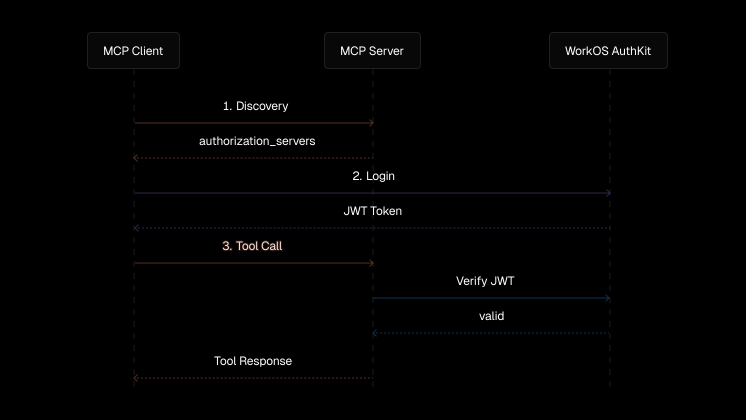
The Flow
- Discovery: MCP client calls your server's
/.well-known/oauth-protected-resourceto find the authorization server (AuthKit) - Authentication: MCP client redirects user to AuthKit for login
- Token Exchange: After login, AuthKit redirects back to the MCP client with tokens
- API Calls: MCP client calls your MCP server with the access token
Important: Your MCP server never handles OAuth callbacks. It only validates tokens.
CIMD Auto-Registration
With Client ID Metadata Document (CIMD) enabled, MCP clients automatically register with AuthKit:
- MCP clients publish metadata at
{client_url}/.well-known/oauth-client - AuthKit fetches this metadata during authentication
- No manual redirect URI configuration needed!
This means users can connect new MCP clients without any WorkOS Dashboard changes.
When to Manually Configure Redirect URIs
You only need to add redirect URIs in WorkOS Dashboard when:
| Scenario | Action | |----------|--------| | CIMD-enabled client (MCPJam, Cursor, etc.) | Auto | | OAuth error "redirect_uri not registered" | Add the URI from the error message | | Custom/legacy client without CIMD | Ask client developer for callback URL | | Your own app | Define your own callback route |
Finding the Redirect URI
If you need to manually register a client:
- Check the error message - OAuth errors usually include the redirect URI
- Check client documentation - Each client documents its callback URL
- Check server logs - Look for the
redirect_uriparameter in OAuth requests
Token Lifecycle
- Access tokens are short-lived
- MCP clients automatically refresh tokens using refresh tokens
- If you see "token_expired" errors, the client should handle refresh automatically
How It Works (Internal)
- MCP clients send requests with
Authorization: Bearer <token>header - The middleware verifies the JWT using WorkOS AuthKit's JWKS endpoint
- Valid sessions are stored in AsyncLocalStorage context
- Tools can access session data via
getSession() - Full user data can be fetched via
getUser()(uses WorkOS SDK)