
@xom9ik/logger
v0.7.8
Published
Color logger with scoped and enable/disable log levels


Readme
@xom9ik/logger
Logger with scopes
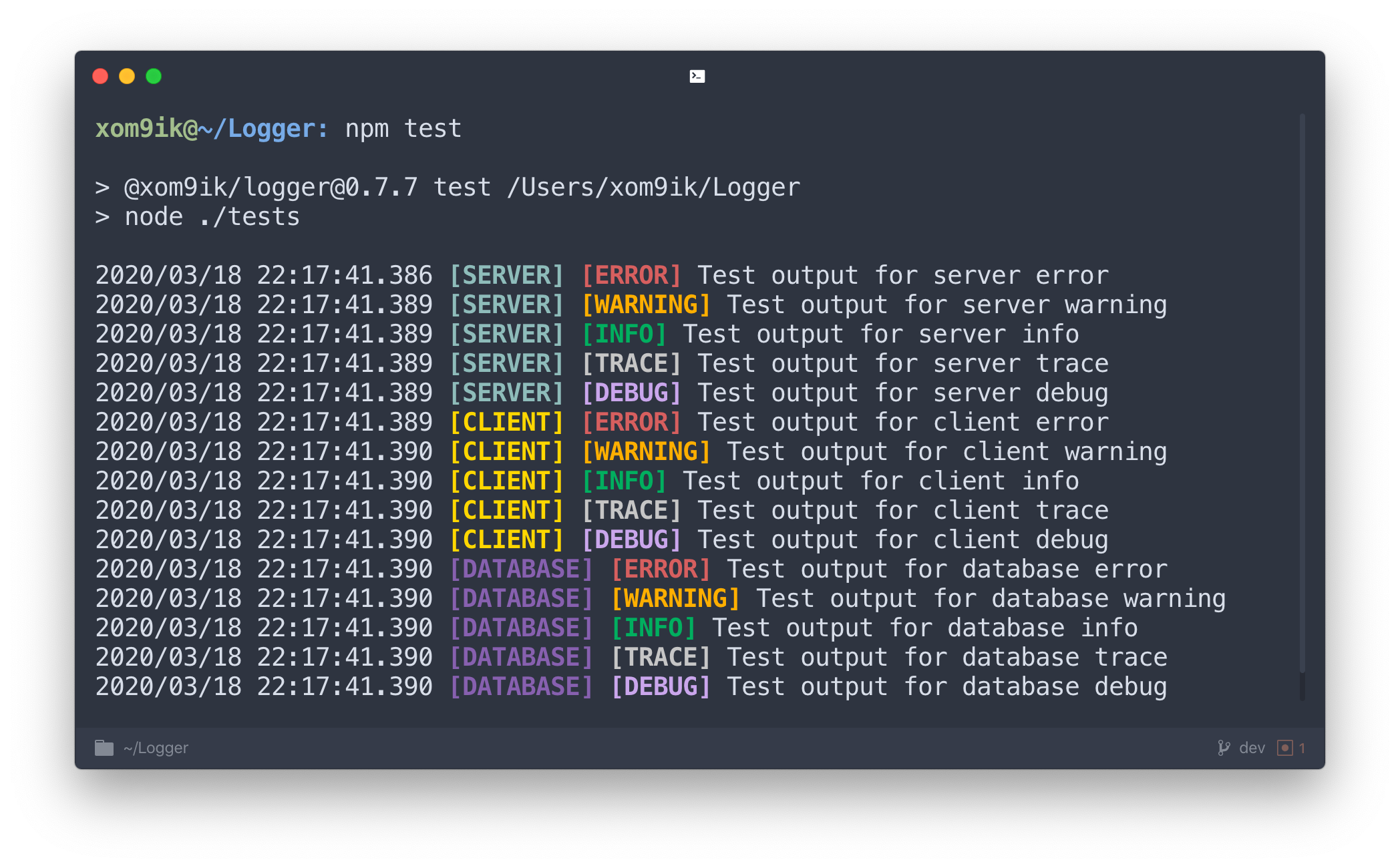
✨ Features
- 🧨 possibility of changing scopes;
- 💎 many palettes with amazing colors;
- 💣 fully customizable;
- 📎 simple API;
🧲 Install
📦 Via NPM
npm install @xom9ik/logger --save🧶 Via Yarn
yarn add @xom9ik/logger🔥 Usage
💪 Basic logger
const logger = require('@xom9ik/logger');

logger.server.info('Server has been started');
logger.database.trace('MongoDB connection established');
logger.client.error('Connection to wss://server.com/ refused');
logger.client.debug(`User data for ${id}:`, data);
⚙️ Custom logger
It is possible to set your scopes and levels, the choice of custom colors.
To do this, pass 3 optional parameters to the setup method. loggerConfig, activeLogs, options
const logger = require('@xom9ik/logger');

logger.setup(loggerConfig, [activeLogs, options]);
Setup params
loggerConfig
Represents an object, with fields, which is an object for representing a scope.
The field scope includes color and levels.
color - is the color for the scope.
levels - an object for representing levels, where the value is the color for the level.
activeLogs
Represents an object, with scope fields and an array for levels (if any). When configuring a logger without levels, the value true is used.
options
reverseOrder- Changes the output order for scope and level. The default isfalse.timestamp- Time display in the format1970/00/00 01:01:01.001. The default istrue.spaceSymbol- A symbol that separates scope and level. The default isspace.
💡 Info
Basic Scopes
serverclientdatabase
Basic Levels
errorwarninginfotracedebug
Basic Palettes
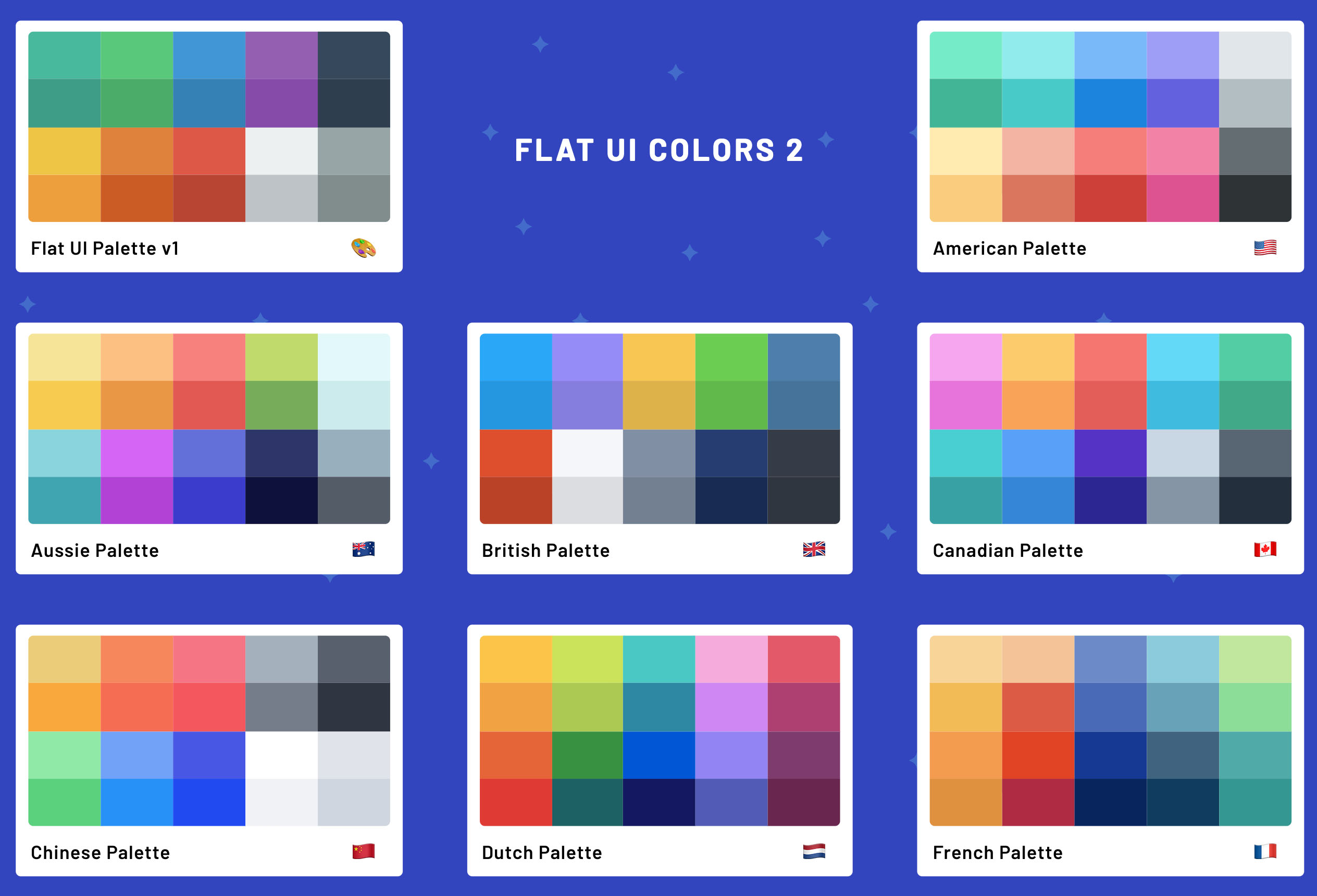
flatamericanaussiebritishcanadianchinesedutchfrenchgerman
To get an object with all the palettes, you can call the getPalettes method
🧭 Examples
loggerConfig
const loggerConfig = {
  server: {
    color: palettes.flat.turquoise,
  },
  mongodb: {
    color: palettes.flat.emerald,
    levels: {
      info: palettes.flat.peterRiver,
      warning: palettes.flat.amethyst,
      error: palettes.flat.wetAsphalt,
    },
  },
  grpc: {
    color: palettes.flat.greenSea,
    levels: {
      data: palettes.flat.nephritis,
      systemInfo: palettes.flat.belizeHole,
    },
  },
  beautifulScope: {
    color: palettes.flat.wisteria,
    levels: {
      yourCustomLogLevel: "#f7ea98",
      second: palettes.flat.mightBlue,
      third: "#9e4267",
      fourth: "#736408",
    },
  },
};
activeLogs
const activeLogs = {
    server: true,
    client: ['info', 'warning', 'error'],
    database: ['warning'],
    beautifulScope: ['yourCustomLogLevel', 'fourth'],
};
options
const options = {
    reverseOrder: false,
    timestamp: true,
    spaceSymbol: ' - ',
};
Output
logger.beautifulScope.yourCustomLogLevel('Please, output this log message');
// 1970/00/00 01:01:01.001 [BEAUTIFULSCOPE] - [YOURCUSTOMLOGLEVEL] Please, output this log message

logger.server('This scope has no levels');
// 1970/00/00 01:01:01.001 [SERVER] This scope has no levels

logger.beautifulScope.second('This level is not activated, messages will not be displayed');
Thanks to:
🌸 flatuicolors for inspirational colors; https://flatuicolors.com📦 package Chalk for the provided functionality; https://www.npmjs.com/package/chalk