
@xparse-kit/visualizer
v0.0.3
Published
SVG Mark components for XParse Kit
Downloads
230

Maintainers
 wangxuetong
Readme
@xparse-kit/visualizer
一个通用的结果回溯可视化组件,支持多页面图片渲染、图片缩放、旋转、标记框绘制、高亮和点击交互等功能,适用于文档解析、RAG分chunk等AI应用场景。
✨ 特性
- 🖼️ 多页面支持 - 支持渲染多个页面的文档图片
- 📦 标记框管理 - 支持在图片上绘制和管理标记框
- 🔍 缩放和旋转 - 支持图片的缩放、旋转等变换操作
- 🎨 主题定制 - 支持自定义标记框样式和主题
- ⚡ 性能优化 - 支持虚拟列表,优化大量页面的渲染性能
- 🔌 插件系统 - 支持通过插件扩展功能
- 📱 框架无关 - 纯 TypeScript 实现,可在任何框架中使用
- 🎯 类型安全 - 完整的 TypeScript 类型定义
📦 安装
npm install @xparse-kit/visualizer
# 或
pnpm add @xparse-kit/visualizer
# 或
yarn add @xparse-kit/visualizer
🚀 快速开始
基础使用
import { createSvgMark } from '@xparse-kit/visualizer';
import type { PageItem } from '@xparse-kit/visualizer';

// 准备页面数据
const pageList: PageItem[] = [
  {
    url: 'https://example.com/page1.jpg',
    width: 1225,
    height: 1718,
    angle: 0,
    blockList: [
      {
        id: 'block-1',
        page: 1,
        angle: 0,
        blockStyle: {
          fill: 'rgba(59, 130, 246, 0.15)',
          stroke: '#3b82f6',
          'stroke-width': 2.5,
        },
        text: '示例文本',
        position: [0.1, 0.1, 0.5, 0.1, 0.5, 0.3, 0.1, 0.3],
        type: 'Title',
        meta: { type: 'Title' },
        attrs: {},
      },
    ],
  },
];

// 创建实例
const instance = createSvgMark({
  container: '#app',
  pageList,
  showTypeTag: true,
});
HTML 结构
<div id="app">
  <div class="container"></div>
</div>
📚 文档
文档导航
- 核心类型定义 -
BlockItem、PageItem、SvgMarkOptions等 - 实例方法 - 缩放、旋转、页面导航、标记框管理等
- 数据格式 - 数据结构和坐标格式说明
- 核心功能 - 缩放旋转、页面导航、标记框管理等
- 集成到项目 - React、Vue、原生 JavaScript 集成示例
- 常见问题 - FAQ 和故障排除
🎯 核心功能
缩放和旋转
// 缩放
instance.scaleTo(1.5);  // 放大到 150%
instance.scaleTo(1);     // 恢复到 100%

// 旋转
instance.rotateTo(90);   // 旋转到 90 度
页面导航
// 跳转页面
instance.scrollToPage(2);

// 获取当前页面
const currentPage = instance.getCurrentPage();
标记框管理
// 添加标记框
const blockInstance = instance.addBlock(blockItem);

// 更新标记框
instance.updateBlock('#block-id', updatedBlock);

// 删除标记框
instance.removeBlock('#block-id');

// 高亮标记框
instance.setOptions({ activeBlockIds: ['block-1'] });
事件监听
const instance = createSvgMark({
  container: '#app',
  pageList,
  onBlockClick: (block) => {
    console.log('点击了标记框:', block.id);
  },
  onPageChange: (page) => {
    console.log('页面变化:', page);
  },
});
🏗️ 系统架构
核心模块架构图
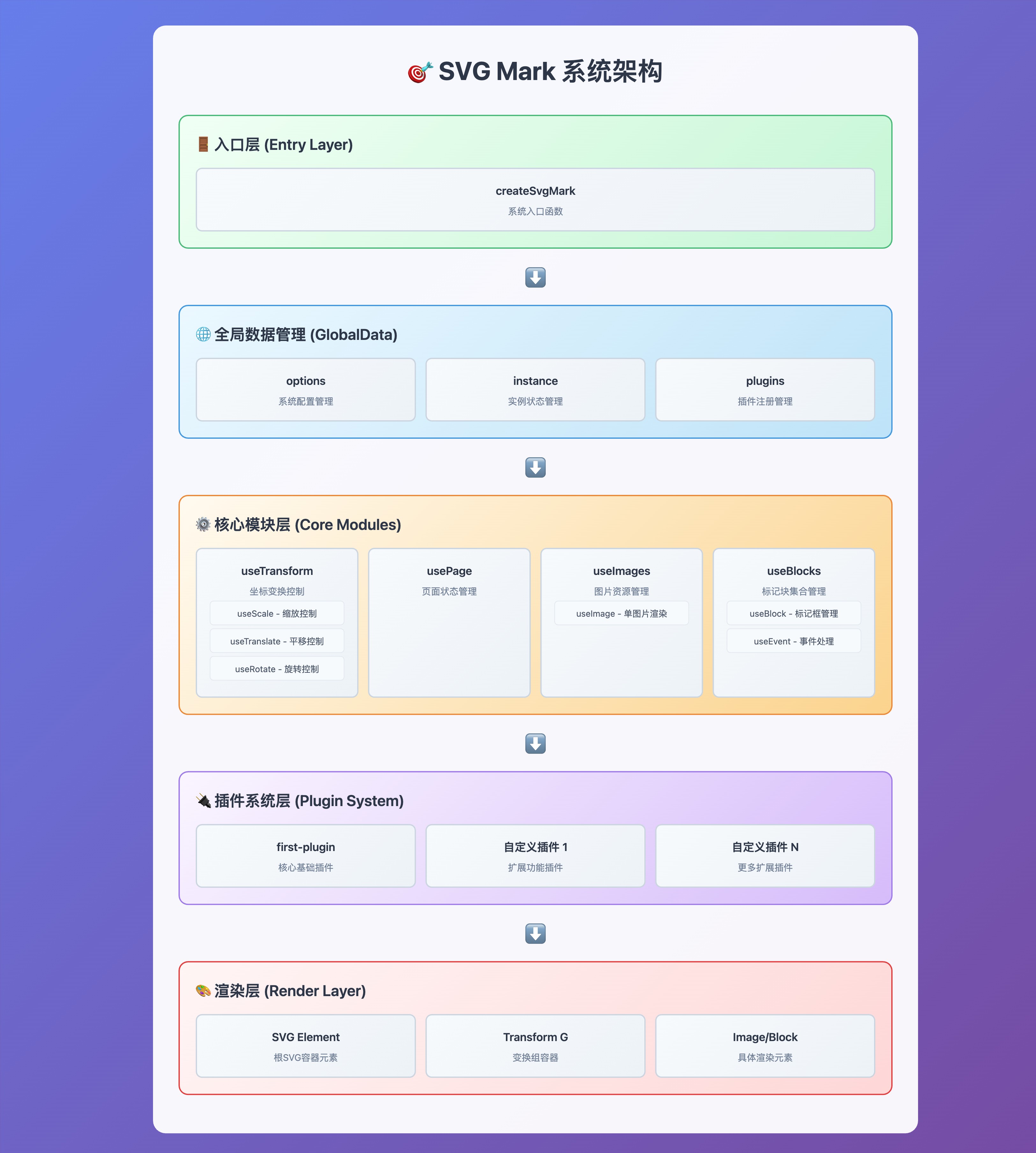
模块职责说明
核心入口
- createSvgMark: 主要入口函数,负责初始化整个系统,协调各个模块的工作
数据管理
- GlobalData: 全局数据对象,包含配置选项和实例引用,是各模块间数据共享的桥梁
核心功能模块
变换管理 (useTransform)
- 核心复合模块,统一管理所有变换操作
- 内部包含三个子模块:
- useScale: 处理缩放逻辑,包括缩放限制、性能优化
- useTranslate: 处理平移变换
- useRotate: 处理旋转变换
- 提供坐标系转换功能,实现图片坐标与SVG坐标的相互转换
- 负责变换矩阵的计算和应用
- 对外暴露统一的变换接口
页面管理 (usePage)
- 实现页面跳转和滚动功能
- 监听滚动事件,自动计算当前页面
- 提供页面导航API
图片管理 (useImages)
- 管理多页面图片的布局和渲染
- 计算图片在SVG中的位置和尺寸
- 处理图片列表的初始化和重新渲染
- 调用
useImage处理单个图片的渲染
标记块管理 (useBlocks)
- 管理标记块集合和相关功能
- 内部包含两个子模块:
- useBlock: 标记框的创建、更新和删除
- useEvent: 事件处理机制
插件系统
- 支持插件扩展机制
- 每个插件都有独立的生命周期(init/destroy)
- 可以注册自定义插件来扩展功能
渲染层
- 基于SVG的DOM结构
- 分层渲染:背景图片层、标记层、交互层
- 支持硬件加速的变换操作
💻 开发环境
安装依赖
pnpm install启动开发服务器
pnpm start构建
pnpm build类型检查
pnpm type-check测试
pnpm test贡献
欢迎贡献代码!在开始之前,请阅读 CONTRIBUTING.md 以了解贡献流程和指南。
许可证
本项目采用 CC-NC License。