
@xqa.io/xreport
v0.7.2
Published
XREPORT by XQA — All-in-One Enterprise Test Reporter for Playwright, WebdriverIO (WDIO), Jasmine, Cypress, Jest, Vitest & Mocha. Local audit evidence, quality gates, control tagging, flaky detection, run history, traces, AI + MCP. Zero Java. From xqa.io.

Maintainers
 ak3il
ak3ilKeywords
Readme
XREPORT by XQA — one local enterprise test reporter for every major JS test stack. Playwright, WebdriverIO (WDIO), Jasmine, Cypress, Jest, Vitest, and Mocha — same triage UI, audit evidence packs, quality gates, control tagging, flaky detection, run history, traces, and local-first AI. Pure Node.js. No upload token.
Practice automation at xqa.io/practice
Features
- Framework-agnostic — Playwright, Cypress, Jest, Vitest, Mocha, Jasmine, WebdriverIO
- Enterprise audit evidence — Evidence Pack zip + sha256 manifest, change-ticket provenance, control matrix
- Quality gates —
xreport gatewith finance presets, critical-risk limits, known-issues mute - Compact triage UI — Summary, Run History (diff), Case Triage side panel, full case pages
- Failures-first — flaky badges, new-fail filter, soft-assert multi-errors, attempt picker
- Power search —
s:failed·p:chromium·@smoke·control:·risk:·file:·error:·owner:·severity:·cluster:·regression - Suite Pulse — defect kinds, controls matrix, layers, AI Insights, error groups, slowest / by-file
- Media & traces — screenshots, videos, lightbox; Playwright trace viewer via
xreport open - History — local trends, optional ledger, retention policy (
enableHistory) - Privacy helpers — optional PHI/PII scrub on errors/logs/attachment names (helps keep sensitive data out of artifacts)
- AI (local-first) —
ai-context.md/jsonper run, Copy Prompt, optional OpenAI-compatible analyze, local MCP - CI maturity — gate presets, quarantine export, shard merge helpers, readiness checklist
- Exports — HTML, JSON, CSV, CTRF, evidence zip, optional PDF; WDIO worker auto-merge
- Context API —
attach/testContext(+ Cypresscy.xreportNote/cy.xreportMeta) - TypeScript & JavaScript — published types, zero Java, report ready when tests finish
Features Preview
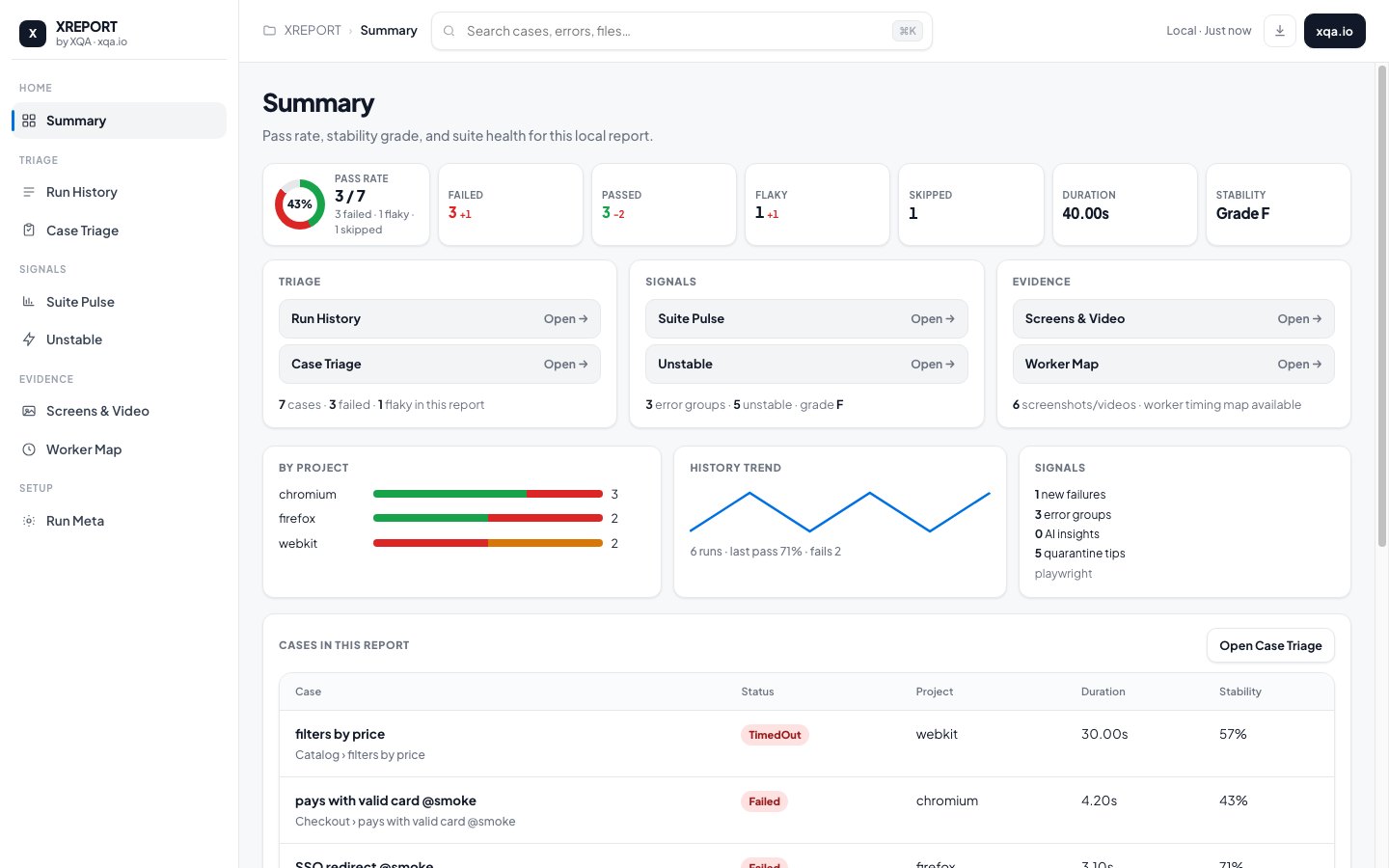
Summary — Pass-rate donut, compact KPIs, Triage / Signals / Evidence shortcuts, charts, and a clickable case list.
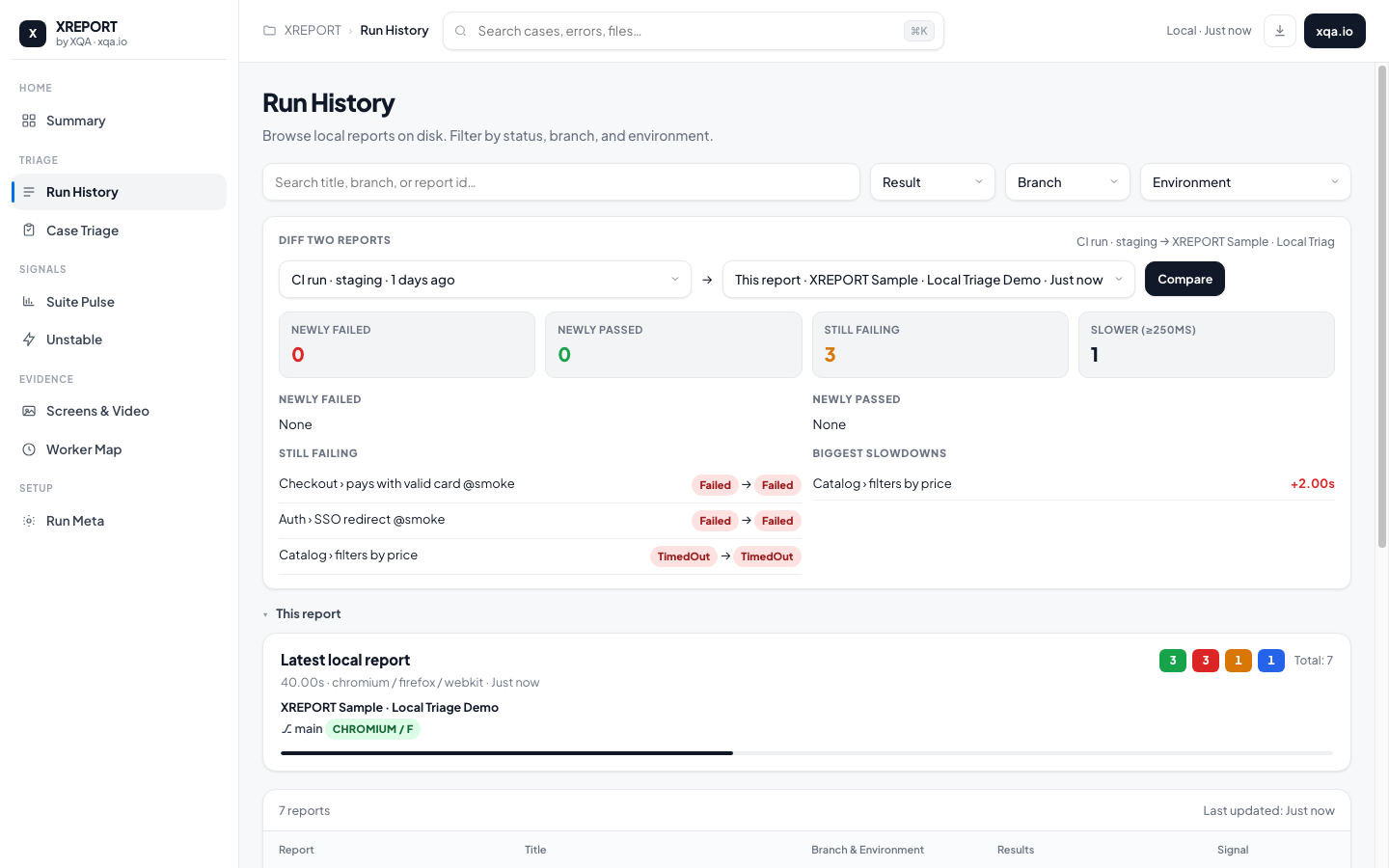
Run History — Local report history with status pills, diff-two-reports (newly failed / passed / still failing / slowdowns), branch & environment filters.
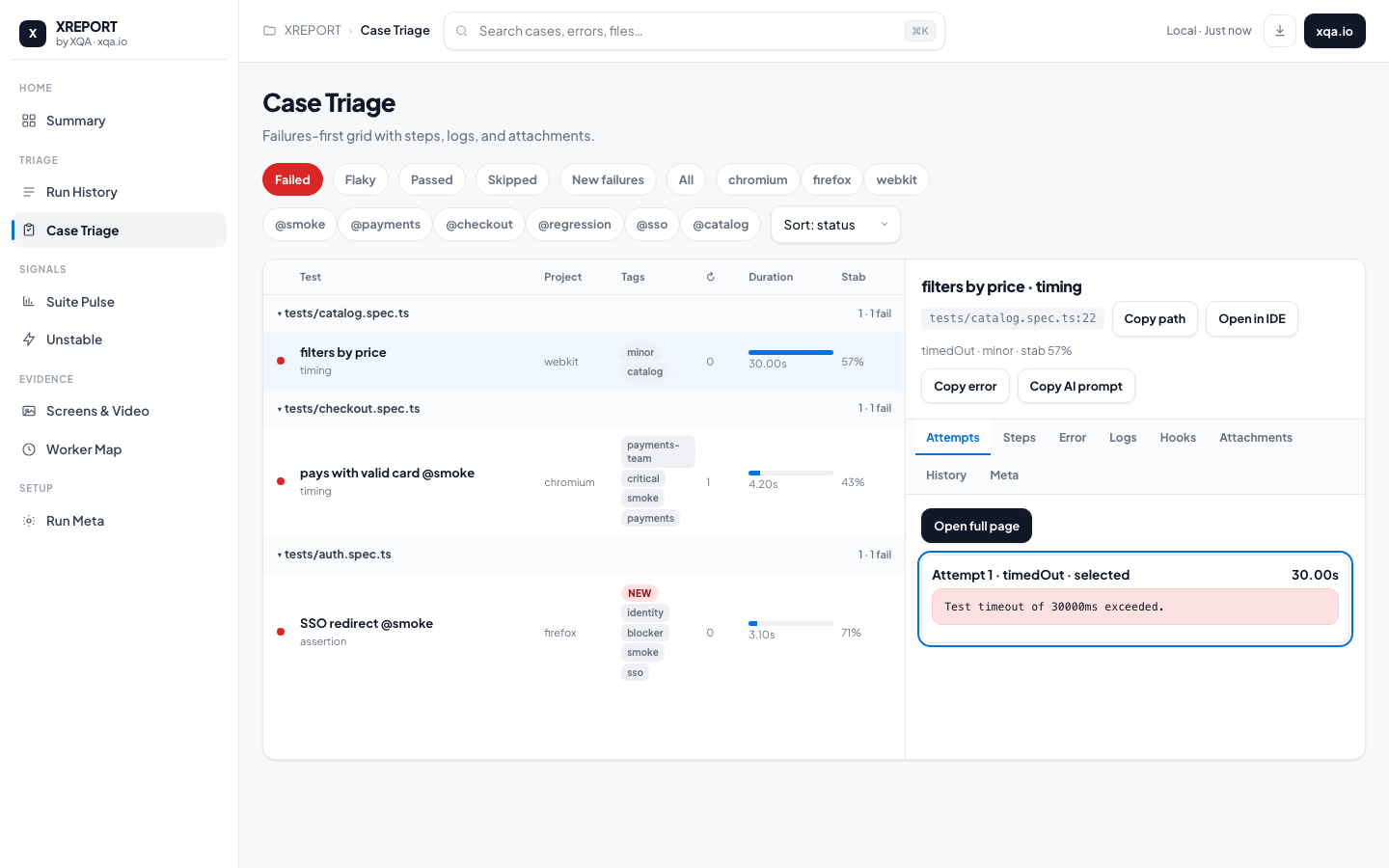
Case Triage — Failures-first grid with side panel (attempts, steps, errors, logs, attachments) plus Copy error / Copy AI prompt.
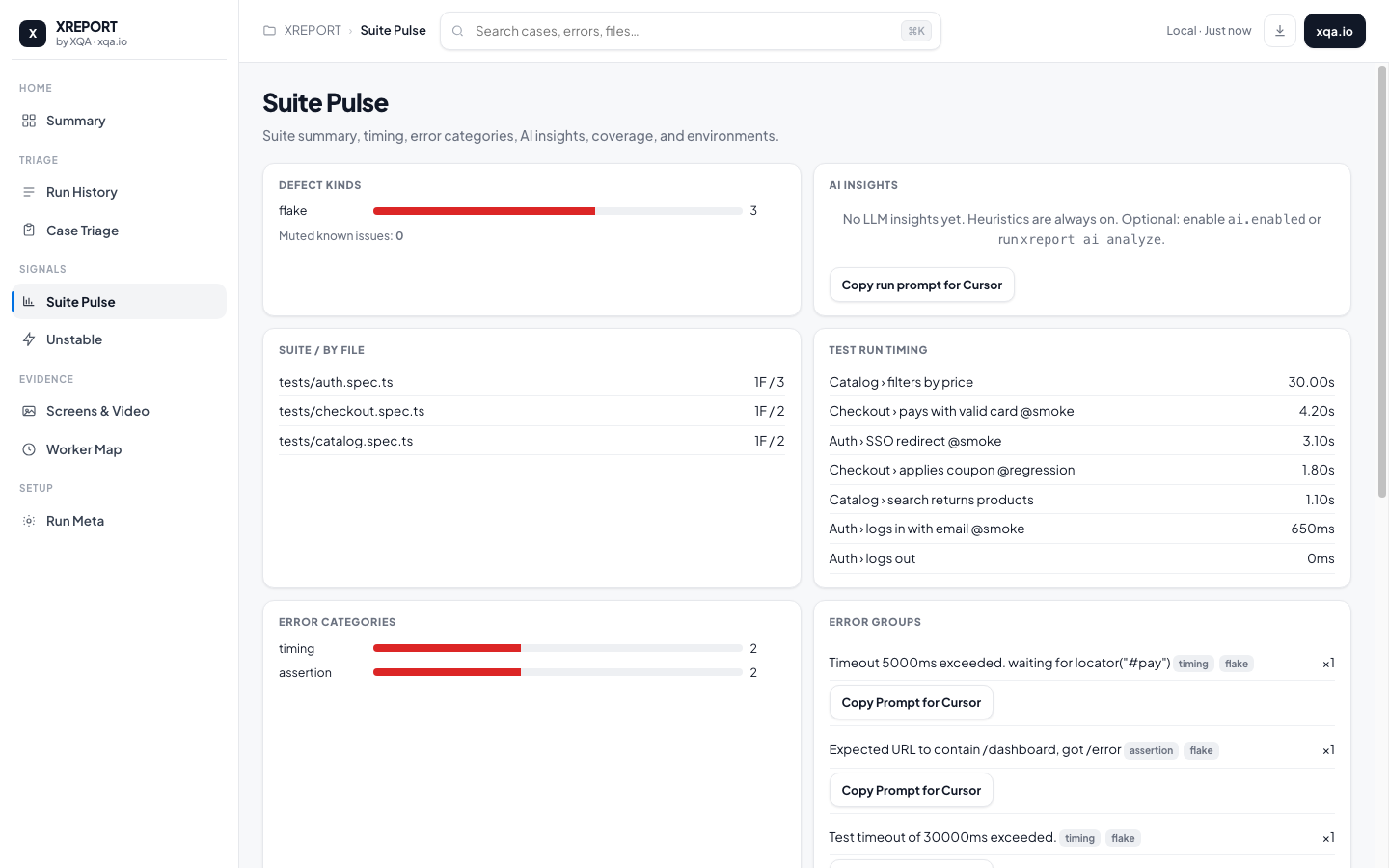
Suite Pulse — Defect kinds, AI Insights, suite-by-file, timing, error categories, and clickable error groups with Copy Prompt.
Preview the demo locally:
npm run sample
npx xreport open ./examples/sample-report
Enterprise
Local/self-hosted evidence tooling for finance, banking, and regulated CI — not a cloud TMS and not a compliance certification.
| Capability | How |
|------------|-----|
| Provenance | changeTicket / commit / pipeline / actor (CI env or XREPORT_CHANGE_TICKET) on Run Meta |
| Evidence Pack | npx xreport evidence ./xreport -o ./xreport-evidence.zip — HTML, JSON, CTRF, gate result, controls-matrix.csv, traceability.csv, evidence-manifest.json (sha256) |
| Gate presets | finance-pr · finance-release · nightly — ticket required, critical-risk limits, product defects |
| Control matrix | Tag @control:SOX-404-… / @risk:critical / @req:… / @layer:ui — Suite Pulse + CSV in pack |
| Privacy scrub | privacy: { scrubAttachments: true } — redact SSN/MRN/email/phone-like patterns before embed |
| Retention / ledger | historyOptions.retentionDays, minRetentionDays, optional ledger: true → append-only history-ledger.jsonl |
| Readiness | Config checklist (critical green, @dr / @reconcile / @readiness, evidence seal) on Summary / Run Meta |
# Finance PR gate (requires change ticket in env or report)
export XREPORT_CHANGE_TICKET=CHG-1234
npx xreport gate ./xreport --preset=finance-pr
npx xreport gate ./xreport --json   # CI-friendly JSON + exit code

# Release gate + auditor zip
npx xreport gate ./xreport --preset=finance-release
npx xreport evidence ./xreport -o ./audit/xreport-evidence.zip
Or enable pack generation in the reporter:
['@xqa.io/xreport/playwright', {
  evidencePack: true, // or { output: './xreport-evidence.zip' }
  privacy: { scrubAttachments: true },
  readiness: { requireCriticalGreen: true, requireTags: ['readiness', 'dr'] },
  qualityGate: { preset: 'finance-pr' },
  historyOptions: { retentionDays: 365, minRetentionDays: 90, ledger: true },
}]
Report UI
| Area | What you get | |------|----------------| | Summary | Pass-rate donut, compact KPIs, Triage/Signals/Evidence shortcuts, charts, case table | | Run History | Local history table, status pills, branch/env filters, diff two reports | | Report detail | Per-report filters (All / Failed / Passed / Flaky / Skipped) + clickable cases | | Case Triage | Failures-first grid + side panel (Attempts · Steps · Error · Logs · Hooks · Attachments · History · Meta) | | Case page | Overview · Errors · Steps (nested) · Hooks · Logs · History · Attachments · Meta | | Suite Pulse | Defect kinds, controls / layers, by-file, slowest, error categories, AI Insights, clickable error groups + Copy Prompt, coverage, tag health, quarantine tips | | Unstable | Stability % + failure category | | Screens & Video / Worker Map | Screenshots & videos · approximate worker lanes | | Run Meta | Environment, Provenance (ticket/commit/pipeline), Evidence seal, optional Readiness |
Triage & search
- Power search —
s:failed·p:chromium·@smoke·file:·error:·owner:·severity:·cluster:·regression·!negation - New failures chip — tests that failed this run but not in the previous history point
- Sticky Case Triage filters — status / project / tag / sort / query persist in
localStorage - Copy
file:line+ Open in IDE (vscode://file/...) - Retry attempt picker — Overview / Errors / Case Triage show status & errors per attempt
- Step category chips — focus nested steps by
test.step/pw:api/expect/ etc. - Soft asserts — multiple errors listed separately (
Errors · N) - Owner / severity / tags — chips in the grid; annotations on Meta
- Double-click Case Triage row (or Enter) → full case page; Esc goes back
Analytics & reliability
- Flaky badges when a test fails then passes on retry
- Per-test stability score and failure categories (timing / network / assertion / environment / other)
- Defect kinds (product / automation / environment / flake) + mute via
knownIssuesPath - Error clusters (similar signatures) — click in Suite Pulse to filter Case Triage
- Pass-rate trends, environment rates, quarantine tips +
xreport quarantine export - Quality gate —
xreport gatefor max failed / new / flaky thresholds in CI - Rerun helpers —
failed-tests.txt+ copyable CLI command - Shard / merge helpers — see
docs/sharding.md
Attachments & media
- Screenshots, videos, visual diff pairs, network/DOM previews, lightbox
- Failure evidence strip on Overview
- Embedded Playwright trace viewer when traces exist and you use
xreport open
Multi-framework & exports
- Reporters: Playwright, Cypress, Jest, Vitest, Mocha, Jasmine, WebdriverIO (WDIO workers auto-merge)
- Same HTML UI / triage / history / CTRF across adapters
- Exports: HTML, JSON, CSV, CTRF, optional PDF;
inlineAssets/--sharefor a single self-contained HTML file - Self-hosted history:
.xreport/history.json+ CLI - Branding + Context API (
attach/testContext) where the framework supports it - TypeScript-first published types
- Allure alternative / Mochawesome alternative — zero Java, report ready when tests finish
Adapter parity
One HTML report schema for every adapter. Enterprise tags (@control:…, @risk:…), Context API (attach / meta / steps), history IDs (title + file), flaky/attempts, and quality-gate fields are shared — not Playwright-only.
| Adapter | Entry | Steps | Media | Traces | Retries / attempts | Context API | Enterprise tags |
|---------|-------|:-----:|:-----:|:------:|:-------------------:|:-----------:|:---------------:|
| Playwright | @xqa.io/xreport/playwright | ✅ nested test.step | ✅ screenshots / video | ✅ via xreport open | ✅ | ✅ | ✅ title + annotations |
| Cypress | @xqa.io/xreport/cypress + /cypress/support | ✅ command-log | ✅ screenshots / video | — | ✅ attempts | ✅ | ✅ title scrape |
| Jest | @xqa.io/xreport/jest | attach.step | attach API | — | framework-limited | ✅ | ✅ title scrape |
| Vitest | @xqa.io/xreport/vitest | attach.step | attach API | — | retryCount → flaky on pass | ✅ | ✅ title scrape |
| Mocha | @xqa.io/xreport/mocha | attach.step | attach API | — | ✅ retries | ✅ | ✅ title scrape |
| Jasmine | @xqa.io/xreport/jasmine | attach.step | attach API | — | specs + expectations | ✅ | ✅ title scrape |
| WebdriverIO | @xqa.io/xreport/webdriverio | attach.step | attach + screenshots | — | worker auto-merge → one report | ✅ | ✅ title scrape |
Depth of native framework hooks still differs (Playwright richest for traces); triage UI, gates, history, known-issues, and exports work on the same xreport.json for all.
How to use (5 minutes)
npm i -D @xqa.io/xreport
# add reporter to playwright.config.ts (see Quick start)
npx playwright test
npx xreport open ./xreport- Install
@xqa.io/xreportin your test project. - Wire the reporter for your framework (Quick start — Playwright · Cypress · Jest · Vitest · Mocha · Jasmine · WebdriverIO).
- Run tests — HTML (+ optional CSV / CTRF) is written when the run finishes.
- Open the report with
npx xreport open ./xreport(recommended for traces & media). - Triage — Summary → Run History (diff) → Case Triage → full case page.
- Optional history —
enableHistory: true(defaultshistoryOptions.saveFullResults: trueso Run History diff and past cases work without extra flags).
Usage guide
Open & navigate the report
npx xreport open ./xreport --port 4173| Page | Typical job | |------|-------------| | Summary | Skim pass rate, open failed cases, copy rerun command | | Run History | Browse local reports, diff baseline → newer, open a report | | Case Triage | Filter/search failures, inspect side panel, open full case | | Suite Pulse | Click an error group → Case Triage filtered to that cluster | | Case page | Deep dive: errors per attempt, nested steps, hooks, attachments, meta |
Keyboard
| Shortcut | Action |
|----------|--------|
| / or ⌘K / Ctrl+K | Focus search |
| f | Jump to Case Triage + Failed filter |
| j / k or ↓ / ↑ | Move selection in Case Triage |
| Enter | Open selected case (full page) |
| Esc | Close lightbox, or leave case page |
| [ / ] | Previous / next case tab |
Power search examples
Type in the top search box (works on Case Triage / Screens & Video):
s:failed
s:flaky
p:chromium
@smoke
file:checkout
error:timeout
owner:payments-team
severity:critical
cluster:951fa440f6
regression
!@wip
s:failed owner:identity
Diff two local reports
Requires enableHistory: true. Per-test history is saved by default when history is on (saveFullResults); set historyOptions.saveFullResults: false only if you want summary-only records.
- Open Run History.
- In Diff two reports, pick baseline → newer (defaults: previous history → this report).
- Review KPIs: newly failed · newly passed · still failing · slower (≥250ms).
- Click a row to open that case when it exists in the current report.
Case Triage loop
- Filter Failed or New failures.
- Click a row → side panel loads Attempts / Error / Logs / Attachments.
- Switch attempt chips when retries exist.
- Open full page (button), or double-click /
Enter. - On the case page: Errors · Steps · Hooks · Meta; copy path / Open in IDE.
Case page tabs
| Tab | Contents |
|-----|----------|
| Overview | KPIs, attempt picker, attempt list, error preview, failure evidence |
| Errors | Soft-assert / multi-error list for the selected attempt |
| Steps | Nested test.step tree; category chips to focus test.step / expect / pw:api / etc. |
| Hooks | beforeEach / afterEach, etc. |
| Logs | stdout / stderr / log entries |
| History | Prior run status + duration (needs history) |
| Attachments | Screenshots, diffs, network, DOM, traces |
| Meta | Owner, severity, tags, labels, full annotations |
Quick start
Playwright
// playwright.config.ts
import { defineConfig } from '@playwright/test';

export default defineConfig({
  reporter: [
    ['list'],
    ['@xqa.io/xreport/playwright', {
      reportTitle: 'E2E · XREPORT',
      reportDir: './xreport',
      exportCSV: true,
      exportCtrf: true,
      enableHistory: true,
      historyOptions: { saveFullResults: true },
      branding: {
        projectName: 'XREPORT',
        companyName: 'XQA',
        website: 'https://xqa.io',
        accentColor: '#0071E3',
      },
    }],
  ],
  use: {
    screenshot: 'only-on-failure',
    video: 'retain-on-failure',
    trace: 'on-first-retry',
  },
});
npx playwright test
npx xreport open ./xreportIn your specs
Enrich Meta / Steps / Errors / Attachments with Playwright APIs XREPORT already maps:
import { test, expect } from '@playwright/test';

test('pays with valid card @smoke', {
  tag: ['@smoke', '@payments'],
  annotation: [
    { type: 'owner', description: 'payments-team' },
    { type: 'severity', description: 'critical' },
    { type: 'tag', description: 'checkout' },   // merges into tags[]
    { type: 'jira', description: 'PAY-1204' },  // Meta label
  ],
}, async ({ page }, testInfo) => {
  await test.step('Navigate to /checkout', async () => {
    await page.goto('/checkout');
  });

  await test.step('Fill shipping form', async () => {
    await test.step('Enter address', async () => {
      await page.fill('#street', '1 Market St');
    });
    await page.fill('#zip', '94105');
  });

  // Soft asserts → multiple Errors tab entries
  await expect.soft(page.locator('#pay')).toBeVisible();
  await expect.soft(page.locator('#confirm')).toBeVisible();

  await testInfo.attach('failure.png', {
    body: await page.screenshot(),
    contentType: 'image/png',
  });
});
Report search: owner:payments-team · severity:critical · @checkout.
Cypress
Recommended — plugin + support (screenshots, video, command Steps):
// cypress.config.ts
import { defineConfig } from 'cypress';
import { setupXReport } from '@xqa.io/xreport/cypress';

export default defineConfig({
  e2e: {
    setupNodeEvents(on, config) {
      setupXReport(on, config, {
        reportTitle: 'Cypress · XREPORT',
        reportDir: './xreport',
        exportCtrf: true,
        enableHistory: true,
        historyOptions: { saveFullResults: true },
      });
      return config;
    },
    screenshotOnRunFailure: true,
    video: true,
  },
});
// cypress/support/e2e.ts
import { registerXReportCypress } from '@xqa.io/xreport/cypress/support';
registerXReportCypress();// in a spec
cy.xreportMeta({ owner: 'identity', severity: 'critical' });
cy.xreportNote({ cartId: 'demo' }, 'cart');npx cypress run
npx xreport open ./xreportFull guide: examples/cypress/README.md
Optional Mocha-style reporter: reporter: '@xqa.io/xreport/cypress' + reporterOptions.
Jest
// jest.config.js
module.exports = {
  reporters: [
    'default',
    ['@xqa.io/xreport/jest', {
      reportTitle: 'Jest · XREPORT',
      reportDir: './xreport',
      exportCtrf: true,
      enableHistory: true,
      historyOptions: { saveFullResults: true },
    }],
  ],
};
npx jest
npx xreport open ./xreportGuide + sample: examples/jest/README.md
In specs, attach screenshots/files without Playwright:
const { attach } = require('@xqa.io/xreport/context');
attach.note({ type: 'json', title: 'payload', value: { ok: true } });
attach.file('./shots/fail.png', { type: 'screenshot', title: 'fail' });
// or: await attach.screenshot(fs.readFileSync('./shots/fail.png'), 'fail');
Vitest
// vitest.config.ts
import { defineConfig } from 'vitest/config';

export default defineConfig({
  test: {
    reporters: [
      'default',
      ['@xqa.io/xreport/vitest', {
        reportTitle: 'Vitest · XREPORT',
        reportDir: './xreport',
        exportCtrf: true,
        enableHistory: true,
        historyOptions: { saveFullResults: true },
      }],
    ],
  },
});
npx vitest run
npx xreport open ./xreportGuide + sample: examples/vitest/README.md
Mocha
{
  "reporter": "@xqa.io/xreport/mocha",
  "reporterOptions": {
    "reportTitle": "API Tests",
    "exportCSV": true,
    "autoOpen": true,
    "enableHistory": true
  }
}
const { attach } = require('@xqa.io/xreport/context');
it('adds context', function () {
attach(this, { type: 'json', title: 'Payload', value: { ok: true } });
});Jasmine
const Jasmine = require('jasmine');
const XReportJasmine = require('@xqa.io/xreport/jasmine');

const jasmine = new Jasmine();
jasmine.loadConfigFile('spec/support/jasmine.json');
jasmine.addReporter(new XReportJasmine({
  reportTitle: 'Jasmine · XREPORT',
  enableHistory: true,
  branding: { projectName: 'XQA', website: 'https://xqa.io' },
}));
jasmine.execute();
WebdriverIO
exports.config = {
  reporters: [
    'spec',
    ['@xqa.io/xreport/webdriverio', {
      reportTitle: 'WDIO · XREPORT',
      reportDir: './xreport',
      exportCtrf: true,
      enableHistory: true,
    }],
  ],
};
Workers merge automatically into one report. When shards/workers were merged, Run Meta shows a shard-merge note.
Context API
Works with Mocha/Jasmine (this), plus Jest/Vitest keyed helpers:
const { attach } = require('@xqa.io/xreport/context');

// Mocha / Jasmine
attach(this, 'Plain note');
attach(this, { type: 'json', title: 'Response', value: { status: 200 } });
await attach.screenshot(this, './shot.png', 'Checkout');
await attach.video(this, './run.webm', 'Session');

// Jest / Vitest (current test via expect.getState)
attach.note({ type: 'json', title: 'payload', value: { ok: true } });
attach.meta({ owner: 'payments', severity: 'critical', labels: { jira: 'PAY-1' } });

// Explicit key (any adapter)
attach.to('Checkout › pays with card', { type: 'text', title: 'hint', value: '…' });
Cypress (after registerXReportCypress()): cy.xreportNote(…) · cy.xreportMeta(…).
Alias: testContext (compatible naming).
CLI
npx xreport generate ./xreport/xreport.json -o ./xreport
npx xreport open ./xreport --port 4173
npx xreport merge ./xreport/.partials -o ./xreport
npx xreport view

# History & flake triage
npx xreport history list 20
npx xreport history stats
npx xreport history trends 30
npx xreport history flakes
npx xreport history failed-rerun ./xreport/xreport.json
npx xreport history delete --days=60
npx xreport history cleanup --max=50
npx xreport history export backup.json
npx xreport history import backup.json

# AI (local-first — no cloud account required)
npx xreport ai context ./xreport
npx xreport ai analyze ./xreport   # needs XREPORT_AI_BASE_URL / optional API key
npx xreport mcp                    # or: npx xreport-mcp
npx xreport gate ./xreport --max-failed=0 --max-new=0
npx xreport gate ./xreport --preset=finance-pr --require-change-ticket
npx xreport gate ./xreport --json   # machine-readable for CI annotations / Job Summary
npx xreport evidence ./xreport -o ./xreport-evidence.zip
npx xreport quarantine export ./xreport
CI recipes (CTRF → GitHub summary / PR / Slack), official Action, sharding merge, known-issues, and agent MCP: see docs/ci/README.md, docs/ci/action.md, docs/ci/github-actions.example.yml, docs/sharding.md, docs/agents-mcp.md.
AI (local-first)
XREPORT ships agent fuel next to every report — no upload, no required API key.
Context pack (always on)
After each run (unless ai.writeContextPack: false):
xreport/ai-context.md— paste into your coding agentxreport/ai-context.json— structured clusters, failures, flake tips
CLI: npx xreport ai context ./xreport
In the HTML report: Copy agent prompt on the case / Case Triage panel, and Copy Prompt for agent on Suite Pulse error groups.
Optional LLM insights
OpenAI-compatible providers (OpenAI, Azure, OpenRouter, Ollama):
['@xqa.io/xreport/playwright', {
  ai: {
    enabled: true,
    provider: 'openai-compatible',
    baseUrl: process.env.XREPORT_AI_BASE_URL || 'http://127.0.0.1:11434/v1',
    apiKey: process.env.XREPORT_AI_API_KEY, // optional for local Ollama
    model: process.env.XREPORT_AI_MODEL || 'llama3.2',
    budget: { maxFailures: 15, maxTokens: 8000 },
  },
}]
Or after a run: XREPORT_AI_BASE_URL=http://127.0.0.1:11434/v1 npx xreport ai analyze ./xreport
Insights appear under Suite Pulse → AI Insights and are cached by error signature (ai-insight-cache.json).
Local MCP for agents
{
  "mcpServers": {
    "xreport": {
      "command": "npx",
      "args": ["-y", "@xqa.io/xreport-mcp"],
      "env": {
        "XREPORT_DIR": "/absolute/path/to/your/xreport"
      }
    }
  }
}
Or use the bin from this package: npx xreport-mcp / npx xreport mcp.
Heuristic triage (clusters, defect kind: product / automation / environment / flake) stays free and always on. LLM is an optional enhancement — we explain and prioritize; we do not claim to auto-fix tests.
Configuration
{
  reportDir: './xreport',
  reportTitle: 'XREPORT',
  reportFilename: 'index',        // placeholders: [datetime] [date] [time] [status]
  autoOpen: true,
  exportCSV: false,
  exportPDF: false,               // needs playwright or puppeteer
  exportCtrf: true,
  enableHistory: false,
  inlineAssets: false,            // true / CLI --share → embed media (Share file badge)
  historyOptions: {
    dbPath: './.xreport/history.json',
    maxRecords: 100,
    retentionDays: 30,
    autoCleanup: true,
    saveFullResults: true,        // default true when enableHistory is on; compare + History tabs
  },
  ai: {
    enabled: false,               // optional OpenAI-compatible analyze
    writeContextPack: true,       // ai-context.md + .json (default true)
    provider: 'openai-compatible',
    baseUrl: process.env.XREPORT_AI_BASE_URL,
    apiKey: process.env.XREPORT_AI_API_KEY,
    model: 'gpt-4.1-mini',
    budget: { maxFailures: 15, maxTokens: 8000 },
  },
  knownIssuesPath: './.xreport/known-issues.json', // mute expected failures
  qualityGate: { preset: 'finance-pr' }, // or { maxFailed: 0, maxNewFailures: 0 }
  evidencePack: false,                // true → zip + manifest after generate
  privacy: { scrubAttachments: false },
  readiness: { requireCriticalGreen: true, requireTags: ['readiness'] },
  branding: {
    projectName: 'XREPORT',
    companyName: 'XQA',
    accentColor: '#0071E3',
    website: 'https://xqa.io',
  },
}
Recommended production settings
['@xqa.io/xreport/playwright', {
  reportDir: './xreport',
  exportCtrf: true,              // CI / PR comment ecosystems
  enableHistory: true,
  historyOptions: {
    saveFullResults: true,       // compare + history tabs
    maxRecords: 50,
    retentionDays: 30,
  },
  branding: {
    projectName: 'My Product',
    companyName: 'My Team',
    website: 'https://example.com',
    accentColor: '#0071E3',
  },
}]
Why teams choose XREPORT
| Pain | XREPORT |
|------|---------|
| Java-based reporters / JAVA_HOME | Pure Node.js |
| Two-step generate after tests | Report ready when tests finish |
| WDIO parallel → many partials | Auto-merge |
| Flaky tests look green after retry | Flaky badge, stability score, category |
| Hard Slack / PR share | CTRF JSON + HTML artifact |
| Sparse demo UIs | Summary + triage workstation |
| Need spreadsheets / PDF | CSV + optional PDF |
| Cloud-only analytics | Self-hosted local HTML + history |
| AI tied to a SaaS account | Local context pack + optional LLM + MCP |
Capability snapshot
| Capability | XREPORT | Typical Java reporters | Built-in Playwright HTML | |------------|:-------:|:----------------------:|:------------------------:| | Playwright | ✅ | ✅ | ✅ | | Cypress | ✅ | ✅ | ❌ | | Jest | ✅ | ✅ | ❌ | | Vitest | ✅ | limited | ❌ | | Mocha / Jasmine / WDIO | ✅ | ✅ | ❌ | | No Java / local HTML | ✅ | ❌ | ✅ | | Summary + run history + diff | ✅ | limited | ❌ | | Flaky stability + categories | ✅ | limited | ❌ | | Filterable explorer + chips | ✅ | ✅ | ✅ | | Embedded trace viewer (PW) | ✅ | ✅ | ✅ | | CTRF export | ✅ | ❌ | ❌ |
Output
xreport/
├── index.html
├── xreport.json
├── ai-context.md        # agent prompt (local-first AI)
├── ai-context.json
├── ctrf-report.json
├── failed-tests.txt     # when failures exist
├── xreport.csv          # optional
├── trace-viewer/        # when Playwright is installed + traces present
└── media/
History (when enabled): .xreport/history.json
About XQA
XQA — free automation practice platform (40+ scenarios for Selenium, Cypress, Playwright, WebdriverIO).
- Practice: https://xqa.io/practice
- GitHub: https://github.com/ak3ilb/xqa-xreport
git clone [email protected]:ak3ilb/xqa-xreport.git
cd xqa-xreport && npm install && npm run build
npm run sample
npx xreport open ./examples/sample-report

# Adapter smoke (Jest / Vitest / Cypress reporters without installing those frameworks)
npm run smoke:reporters
Sample guides
| Framework | Guide |
|-----------|--------|
| Playwright demo report | npm run sample → examples/sample-report |
| Cypress | examples/cypress/README.md |
| Jest | examples/jest/README.md |
| Vitest | examples/vitest/README.md |
License
MIT © XQA
npm i -D @xqa.io/xreport