
@xzzpig/pi-starline
v0.3.0
Published
A Starship-inspired statusline and Opencode-style TUI for Pi.

Maintainers
 xzzpig
Readme
Starline
A Starship-inspired statusline, Opencode-style editor chrome, and fullscreen mouse control for Pi.
Starline is a fork of pi-zentui by Luka, renamed and released on its own. It has diverged well past upstream and adds a pill footer style, a colour palette with
$refexpansion,model/thinkingfooter segments, a git host icon, per-segment display options, configurable editor cursor styles, and mouse selection and copying.
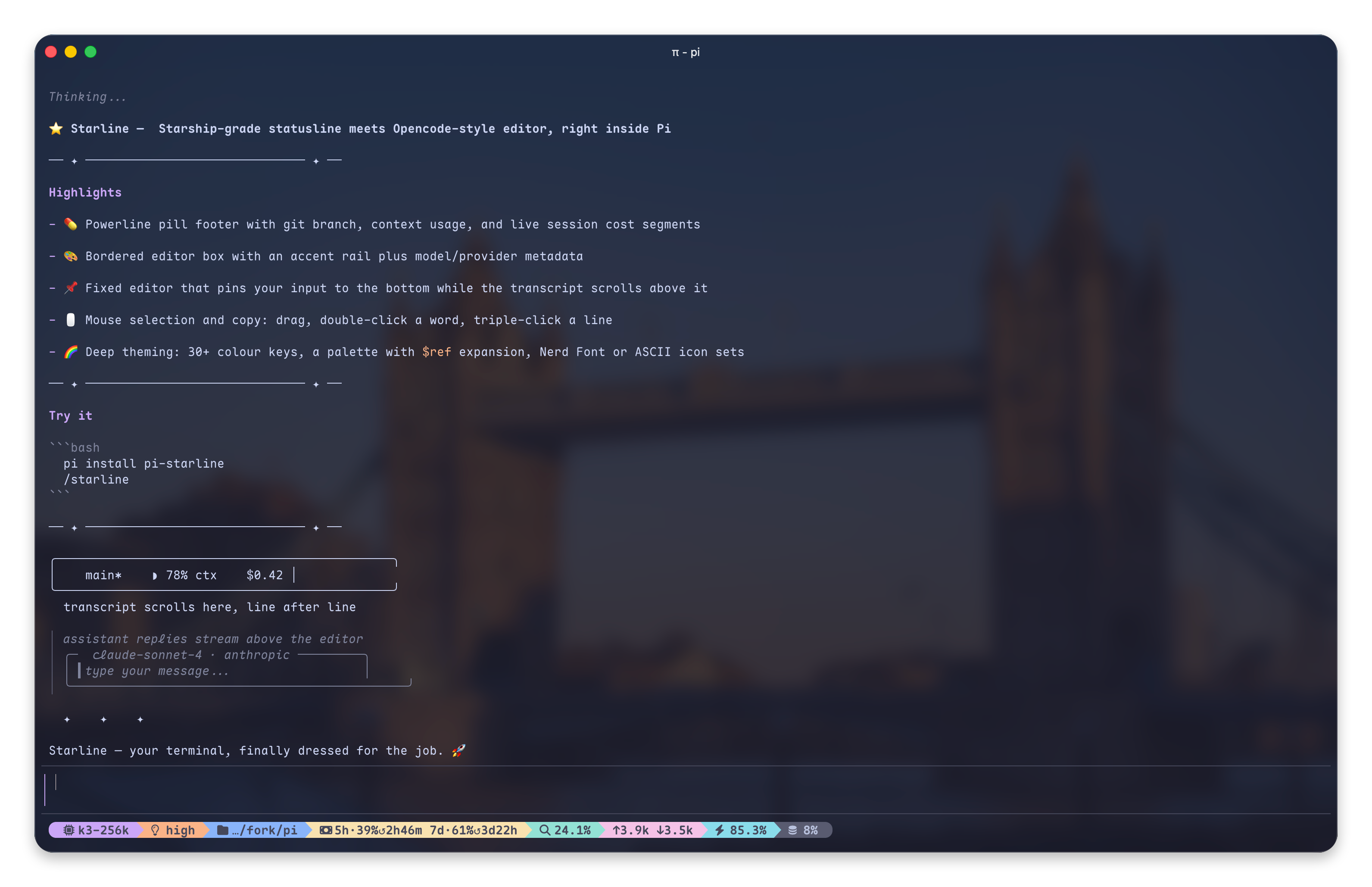
Screenshots
What is this?
Starline makes Pi's fullscreen mode feel like a finished terminal app — three pieces of one product, not a theme:
- See the state — a Starship-inspired statusline and pill footer: current directory, git branch and status, runtime/version detection, context usage and token counts in a compact, icon-rich format
- Type comfortably — Opencode-style editor chrome: a clean bordered input box with accent rail and copy-friendly mode, model and provider inside the frame, paste collapse, and a
ctrl+ghint pointing at your$EDITORwhen a draft outgrows the box - Drive with the mouse — fullscreen mouse control: select and copy anywhere, click a tool box to expand just it, click to move the caret, wheel to scroll the draft — see Mouse
Features
Footer (Starship-inspired)
dirname— current directory (basenameby default; optionalfullpath with directory depth viapathDisplay)on branch— git branch with icon[!?↑]— git status indicators (modified, untracked, ahead/behind, stashed, etc.)via v5.5.0— runtime detection with version and Starship-style Nerd Font runtime/language modules- Optional segments (off by default): session name,
user@host, current time, OS icon, session duration, and the project package version (e.g.package.json→0.6.0) — distinct from the runtime segment, which shows the installed toolchain - Right side shows context usage, token counts, and cost
- Built-in footer segments can be shown or hidden individually from
/starline - Fully custom Starship-style layout via a
footerFormattemplate string — see Footer Format Template - Third-party Pi extension statuses from
ctx.ui.setStatus()can be shown on the left, middle, or right side, or hidden per status key from/starline
Editor (Opencode-inspired)
- Bordered input box with configurable accent rail and border colors
- Model name and provider displayed inside the editor frame
- Configurable model, provider, and thinking-level indicator colors
- Prompt-box-style user messages matching the Starline input chrome
- Copy-friendly mode hides editor and previous-message rail glyphs so terminal selection copies less chrome
Mouse (fullscreen control)
The second half of the product: the statusline tells you where you are, the
mouse lets you act on what you see. Starline drives Pi 0.84's own renderer
(tuiMode: "fullscreen") through the @xzzpig/pi-mouse-events
extension, which owns the renderer prototype and dispatches mouse events to
components — the extension API stops at high-level hooks, and the selection
hint, click-to-expand and clean-copy all need to reach into the renderer
itself. Install it alongside Starline; without it Starline's mouse features
are simply off (everything else keeps working).
- Select and copy anywhere. Drag to select in the transcript or the input box; double-click a word (paths and kebab-case stay whole), triple-click a line. Releasing copies — or set Pi's
fullscreenCopyOnSelect: falseand the selection stays highlighted, waiting for the copy key (Pi #7720, shipped in Pi 0.84.4). - Clean copies. Transcript selections drop Starline's rails, rule rows and pi-toolbox frame borders before they reach the clipboard; editor selections copy the draft's text, not the painted rows.
- Selection hint. A selection that is not auto-copying shows exactly how many characters the copy key (
ctrl+xby default, whateverapp.message.copyis bound to) will copy, and a selection inside the editor names your editor —ctrl+g to edit in nvim. - Click to expand one component. A plain click anywhere on a tool box — title, output, hint row, borders — toggles just that box (MCP boxes included); bash boxes, skill blocks, branch summaries, compaction summaries and custom entries count too. The direction comes from the hint row when one is on screen and from the component's own state otherwise, so a box with no hint left once expanded still closes on a click. Only a plain click toggles: dragging across a box still selects and copies, a double-click still word-selects, and a click on a link still opens it.
- Click to move the caret in the input box; backspace/delete remove a selected range; the wheel scrolls the draft over the input box, and a draft taller than the box keeps the
ctrl+gexternal-editor hint on screen.
0.2.x's fixedEditor config block was renamed to mouse (migrated
automatically, see the changelog); the fixed editor itself is
gone, superseded by Pi's fullscreen mode.
Git Status Icons
| Icon | Meaning |
| ---- | ---------- |
| ! | Modified |
| ? | Untracked |
| + | Staged |
| ✘ | Deleted |
| » | Renamed |
| = | Conflicted |
| $ | Stashed |
| ↑ | Ahead |
| ↓ | Behind |
| ⇕ | Diverged |
Runtime Detection
Detects Starship Nerd Font runtime/language modules, uses the Starship Nerd Font symbols, and keeps Starship-style defaults such as bold green for Node.js. By default Starline maps those styles through your active Pi theme; switch the Starship/footer color source to terminal in /starline if you want your terminal colorscheme to supply the exact ANSI colors.
| Runtime/language | Detection examples |
| ---------------- | ------------------------------------------------------------- |
| Buf | buf.yaml, buf.gen.yaml, buf.work.yaml |
| Bun | bun.lock, bun.lockb |
| C | .c, .h files |
| C++ | .cpp, .cc, .cxx, .hpp files |
| CMake | CMakeLists.txt, CMakeCache.txt |
| COBOL | .cbl, .cob files |
| Conda | CONDA_DEFAULT_ENV environment |
| Crystal | .cr files, shard.yml |
| Dart | .dart files, pubspec.yaml, .dart_tool/ |
| Deno | deno.json, deno.jsonc, deno.lock |
| .NET | .csproj, .fsproj, global.json, Directory.Build.* |
| Elixir | mix.exs |
| Elm | .elm files, elm.json, elm-stuff/ |
| Erlang | rebar.config, erlang.mk |
| Fennel | .fnl files |
| Fortran | .f, .f90, .f95, .f03, .f08, .f18, fpm.toml |
| Gleam | .gleam files, gleam.toml |
| Go | go.mod |
| Gradle | build.gradle, build.gradle.kts, gradle/ |
| Guix shell | GUIX_ENVIRONMENT environment |
| Haskell | .hs, .cabal, stack.yaml, cabal.project |
| Haxe | .hx, .hxml, haxelib.json, .haxerc |
| Helm | helmfile.yaml, Chart.yaml |
| Java | .java-version |
| Julia | .jl files, Project.toml, Manifest.toml |
| Kotlin | .kt, .kts files |
| Lua | .lua files, stylua.toml, .luarc.json, lua/ dir |
| Maven | pom.xml |
| Meson | MESON_DEVENV=1 and MESON_PROJECT_NAME environment |
| Mojo | .mojo files |
| Nim | .nim, .nims, .nimble, nim.cfg |
| Nix shell | IN_NIX_SHELL=pure or IN_NIX_SHELL=impure environment |
| Node.js | package.json, .nvmrc, .node-version |
| OCaml | .opam, .ml, .mli, dune, _opam/, esy.lock/ |
| Odin | .odin files |
| OPA/Rego | .rego files |
| Perl | .pl, .pm, Makefile.PL, cpanfile, META.* |
| PHP | composer.json |
| Pixi | pixi.toml, pixi.lock, PIXI_ENVIRONMENT_NAME environment |
| Pulumi | Pulumi.yaml, Pulumi.yml |
| PureScript | .purs files, spago.dhall, spago.yaml, spago.lock |
| Python | pyproject.toml, requirements.txt, setup.py, Pipfile |
| R | .R, .Rmd, .Rproj, DESCRIPTION, .Rproj.user/ |
| Raku | .raku, .rakumod, .p6, .pm6, META6.json |
| Red | .red, .reds files |
| Ruby | Gemfile, .ruby-version |
| Rust | Cargo.toml |
| Scala | .scala, .sbt, build.sbt, .metals/ |
| Solidity | .sol files |
| Spack | SPACK_ENV environment |
| Swift | .swift files, Package.swift |
| Terraform | .tf, .tfplan, .tfstate, .terraform/ |
| Typst | .typ files, template.typ |
| Vagrant | Vagrantfile |
| V | .v files, v.mod, vpkg.json |
| Xmake | xmake.lua |
| Zig | .zig files, build.zig |
Install
Starline drives Pi 0.84's alternate-screen renderer, so it needs Pi ≥ 0.84.4. If you are on a distribution that bundles an older Pi, upgrade it or wait for it to catch up.
# From npm (local fork @xzzpig/pi-starline)
pi install npm:@xzzpig/pi-starline

# From upstream git
pi install git:github.com/Andy8647/pi-starline
Coming from pi-zentui? Run mv ~/.pi/agent/zentui.json ~/.pi/agent/starline.json to carry your config over — Starline does not read the old file automatically. Inside it, rename any colorMode: "zentui" value to colorMode: "themed".
What changed in each version, and what you need to do about it: Changelog.
Config
Settings live in ~/.pi/agent/starline.json. The file is optional — anything missing falls back to a default, and unknown keys are ignored at runtime.
{
	"footerStyle": "pill",
	"colors": { "gitBranch": "bold purple" },
	"mouse": { "clickToExpandTools": false }
}
/starline opens an interactive menu for the settings worth changing day to day: colour sources, feature toggles, which built-in segments show, and where third-party extension statuses go. Tab and Shift+Tab move between its five sections.
Full configuration reference → — every option with its default: the pill footer, the colour palette and its $name references, footer format templates, per-segment display options, icon overrides, and editor styling.
Requirements
Development
npm install
npm run verify
npm run fmt
npm run pack:check
Test in Pi
The project keeps Pi core packages as peer dependencies for runtime and dev dependencies for
typechecking. To avoid accidentally running the local node_modules/.bin/pi shim, the dev scripts use
the globally installed Pi binary by default:
npm run pi:dev
npm run pi:install-local
Override the binary if your Pi install is somewhere else:
PI_BIN=/path/to/pi npm run pi:devCredits
Forked from pi-zentui by Luka, whose work is the foundation of this project.
Inspired by:
- Starship — the minimal, blazing-fast, and infinitely customizable prompt
- Opencode — terminal-based AI coding assistant
License
MIT