
@yc-next/cli
v0.2.0
Published
Deploy a Next.js 16 app to Yandex Cloud Functions: a build adapter, a self-contained runtime, and a CLI to push everything live.

Maintainers
 chezzyderp
Readme
@yc-next/cli


Next.js → Yandex Cloud Functions in one command.
Run a Next.js 16 app on Yandex Cloud Functions — production-ready. The package plugs into Next.js's experimental Deployment Adapter API, packages a self-contained bundle, and ships a CLI (yc-next) that creates the Cloud Function, sets up an API Gateway, marks it publicly invokable, and tears everything down again on demand.
npx next build
npx yc-next deploy
# › example-app → function example-app
#   uploading 15.68 MB → s3://yc-functions
# › API Gateway example-app-gw
# ✓ Deployment complete
# URL: https://d5dflufgm348hnrpnril.y3q8o1jq.apigw.yandexcloud.net
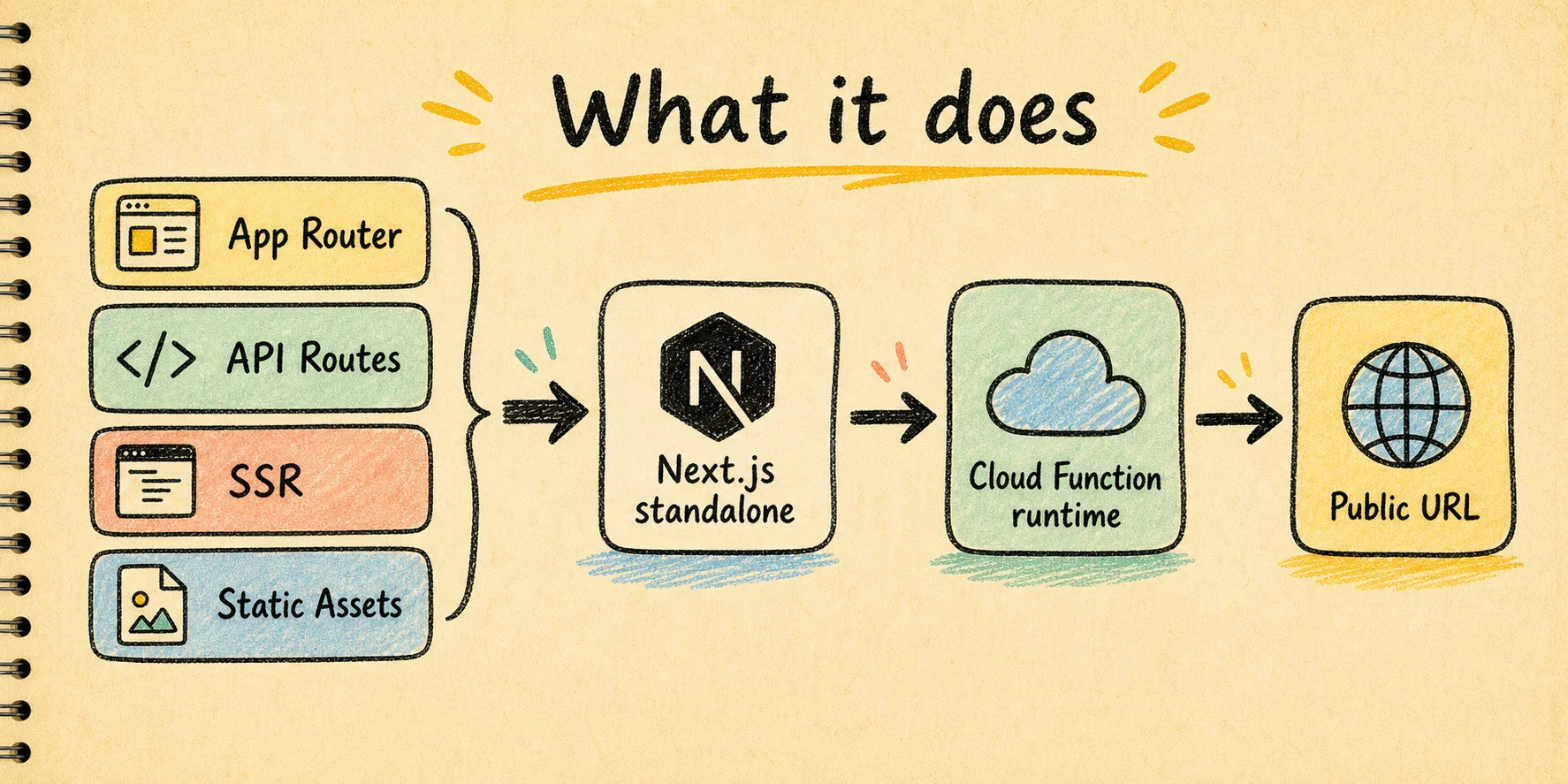
The same single command takes a real Next.js app — App Router routes, API routes, server-rendered pages, middleware, and static assets — and ships it behind one Cloud Function URL, with no separate hosting tier and no manual yc serverless choreography.
Status
The adapter and CLI run live against Node 16 builds on nodejs22 Cloud Functions today. What works end-to-end:
- App Router / Pages Router routes
- API routes (
/api/*) - Server-rendered pages (RSC + streaming)
- Middleware
/_next/static/*andpublic/*served from the bundle- Path-based routing through a generated API Gateway
What's on the roadmap:
- Per-route bundle trimming via
.nft.json(multi-mode currently duplicates the standalone) - Image Optimization (
next/image) endpoint - Custom domain attachment via Cert Manager
- ISR / on-demand revalidation
- GitHub Action wrapper
Quickstart
Five steps from zero to a public URL.
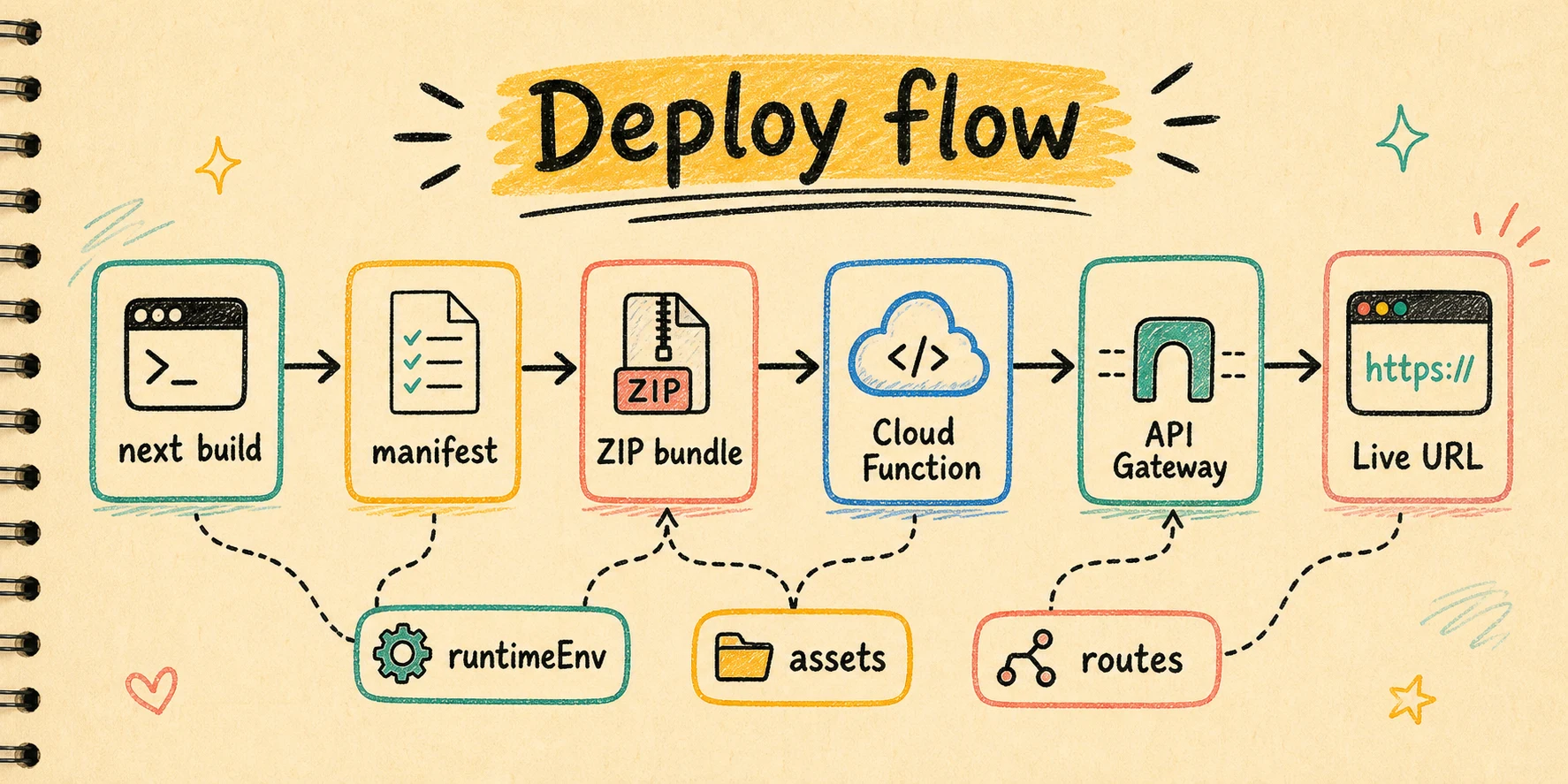
At a glance, the deploy path looks like this:
1. Prerequisites
- Node.js 20+ locally and a Next.js 16 project.
- Yandex Cloud CLI (install) — run
yc initonce to log in. After thatyc config get folder-idreturns your default folder. - Object Storage HMAC keys for the service account that will host the deploy bucket. Bundles larger than ~3.5 MB (i.e. anything real-world) cannot be uploaded inline by
yc serverless function version createand have to go through S3-compatible Object Storage. Create the service account in the YC console, grant it thestorage.editorrole, and generate static keys.
2. Install
npm install @yc-next/cli --save-dev3. Wire up the adapter
Create yc-adapter.config.mjs next to next.config.ts:
// yc-adapter.config.mjs
import yandexCloudAdapter from "@yc-next/cli";

export default yandexCloudAdapter({
  functionName: "my-next-app",
});
Reference it from next.config.ts:
import { createRequire } from "node:module";
import path from "node:path";
import type { NextConfig } from "next";

const require = createRequire(import.meta.url);

const nextConfig: NextConfig = {
  output: "standalone",
  outputFileTracingRoot: path.resolve(__dirname),
  experimental: {
    adapterPath: require.resolve("./yc-adapter.config.mjs"),
  },
};

export default nextConfig;
outputFileTracingRootis recommended explicitly — without it Next.js's lockfile-based heuristic can pick a parent directory and pollute the workspace'spackage.jsonduringnext build.
4. Configure secrets
Copy .env.example from this repo (or write your own) and fill in:
YC_FOLDER_ID=...
YC_STORAGE_ACCESS_KEY=...
YC_STORAGE_SECRET_KEY=...
YC_FOLDER_ID defaults to yc config get folder-id when unset; the storage keys are required only when bundles cross the inline-upload threshold.
5. Build and deploy
npx next build
npx yc-next deploy
The build writes .next/yc/manifest.json with the bundles. deploy pushes them up, wires an API Gateway, marks the function publicly invokable, and prints the URL on the last line.
If your app needs runtime env vars inside the deployed function, either declare them in the adapter:
export default yandexCloudAdapter({
  functionName: "my-next-app",
  runtimeEnv: ["DATABASE_URL", "INTERNAL_API_URL"],
});
or pass them directly at deploy time:
npx yc-next deploy --env DEMO_MESSAGE=hello
npx yc-next deploy --env-file .env.production
To take it back down:
npx yc-next destroy --yesThis reads .next/yc/state.json (written by deploy) and deletes every Cloud Function, API Gateway, and uploaded ZIP it touched.
CLI reference
yc-next deploy [options]    Build a deployment from .next/yc/manifest.json
yc-next destroy [options]   Tear down resources recorded in .next/yc/state.json
yc-next help [command]      Show usage for a specific command
yc-next deploy
| Flag | Default | Description |
| ---- | ------- | ----------- |
| --manifest <path> | .next/yc/manifest.json | Path to the manifest emitted by next build. |
| --memory <size> | 1024m | Per-function memory. |
| --timeout <duration> | 30s | Function execution timeout. |
| --runtime <name> | nodejs22 | YC runtime. Currently the only Node runtime available. |
| --entrypoint <name> | index.handler | Handler entrypoint inside the ZIP. |
| --prefix <name> | next | Function-name prefix for bundles without a preset name. |
| --bucket <name> | <functionName>-deploys | Object Storage bucket for ZIP uploads. |
| --gateway-name <name> | derived from manifest | Override API Gateway name. |
| --env <pair> | repeatable | Runtime env var in KEY=VALUE form, shipped to every created function version. |
| --env-file <path> | unset | Load runtime env vars from a dotenv-style file. |
| --no-gateway | gateway on | Skip API Gateway setup (handy if you front the function with something else). |
| --no-public | public on | Skip allow-unauthenticated-invoke; the URL will need an IAM token. |
| --force-object-storage | off | Always upload via Object Storage, even for tiny ZIPs. |
yc-next destroy
| Flag | Default | Description |
| ---- | ------- | ----------- |
| --manifest-dir <path> | .next/yc | Where state.json lives. |
| --yes | dry-run | Required to actually delete. Without it the command only prints the plan and exits with code 2. |
Environment variables
The CLI reads .env automatically.
YC_FOLDER_ID(required ifyc config get folder-idreturns nothing)YC_CLOUD_ID(optional, only for accounts spanning multiple clouds)YC_SERVICE_ACCOUNT_ID(optional, attached to the function version)YC_STORAGE_ACCESS_KEY/YC_STORAGE_SECRET_KEY(required for >3.5 MB bundles)YC_STORAGE_BUCKET(alternative to--bucket)YC_STORAGE_REGION,YC_STORAGE_ENDPOINT(only if you point at a non-default endpoint)YC_FUNCTION_PREFIX(alternative to--prefix)
Runtime env for the deployed app is separate from the CLI's own .env. Use one of these inputs:
runtimeEnvinyc-adapter.config.*for app env keys that should always be passed through from localprocess.env--env-filefor a deploy-time dotenv file--envfor one-off overrides
Precedence is:
--env-file--env- adapter
runtimeEnvkeys from localprocess.env
Adapter options
yandexCloudAdapter({
  oneFunction: true,        // emit one ZIP for the whole app (default)
  functionName: "my-app",   // YC function name (also used as gateway prefix)
  outputDir: ".next/yc",    // where bundles + manifest land
  includeStaticAssets: true, // bundle .next/static + public into the ZIP
  runtimeEnv: []             // pass selected local env vars into the function
});
oneFunction: true | false
| Mode | Description |
| ---- | ----------- |
| true (default) | One ZIP serves the whole app behind a single Cloud Function. The most efficient option today. |
| false | Emits one ZIP per detected route. Each ZIP currently duplicates the full standalone, so total upload size scales linearly with route count — only useful when YC settings (memory, timeout, concurrency) need to differ per endpoint. The API Gateway dispatches each path to its own function. |
In multi-mode, code-level isolation between routes is not enforced inside the function — every bundle still boots the full Next.js server and is technically capable of handling any route. The actual routing happens at the API Gateway layer. Per-route trimming via .nft.json is on the roadmap.
includeStaticAssets: true | false
By default the adapter bundles both .next/static/* and public/* into the ZIP, and the runtime serves them itself before Next.js sees the request. That makes a fresh deploy genuinely self-contained: HTML, RSC payloads, fonts, images and /favicon.ico all work without any extra infrastructure.
Set to false if you upload assets to a CDN (or a separate Object Storage bucket with public read) and set assetPrefix in next.config:
const nextConfig: NextConfig = {
  output: "standalone",
  assetPrefix: process.env.ASSET_PREFIX, // e.g. "https://cdn.example.com"
};
You then need to:
- Upload
.next/static/**andpublic/**to the CDN, preserving paths (<cdn>/_next/static/...and<cdn>/<file>). - Re-run the build before redeploy so the inlined HTML references the new prefix.
/_next/static/* filenames carry a content hash, so they can be served with Cache-Control: public, max-age=31536000, immutable. public/* filenames are user-supplied and should use a short cache-control unless you fingerprint them yourself.
runtimeEnv: string[]
Use runtimeEnv when the deployed function should always receive a known set of env vars from the machine running yc-next deploy.
export default yandexCloudAdapter({
  functionName: "my-app",
  runtimeEnv: ["DATABASE_URL", "UPSTASH_REDIS_REST_URL"],
});
At build time the adapter records those keys into .next/yc/manifest.json. At deploy time the CLI reads the current local process.env values for those keys and adds them to yc serverless function version create --environment ....
If a declared key is missing locally, deployment continues and logs a warning.
Production patterns
- Keep secrets out of git. Store long-lived app secrets in a local
.envor CI secret store, not inyc-adapter.config.*. - Use
runtimeEnvfor app-level keys that should almost always exist in production, such asDATABASE_URL. - Use
--env-filewhen you want a deploy-specific env bundle, for example.env.production. - Use
--envfor one-off overrides and quick smoke checks. - Adapter-declared
runtimeEnvwins on conflicts. That makes code configuration the source of truth for required pass-through keys. - For databases, remember this is serverless: keep connection counts low, prefer pooling where available, and avoid examples that open a large number of concurrent direct Postgres connections.
- See
examples/with-databasefor a minimal Prisma + PostgreSQL setup.
How it works
modifyConfigforcesoutput: "standalone"so Next.js emits a self-contained build.- After the build the adapter reads
.next/servermanifests to enumerate App Router routes, API routes, SSR pages, and middleware (recorded intomanifest.jsonfor the CLI to use). - For every bundle it copies
.next/standalone/**and the manifestsNextNodeServerneeds at runtime (required-server-files.json,BUILD_ID,routes-manifest.json, ...). It also overrides.next/package.jsonwith{"type":"commonjs"}so webpack-bundled routes don't get loaded as ESM. - The generated
index.jsis a thin shim that callsruntime/next-server.js#createHandler({ appDir }). That helper bootsNextNodeServeronce per cold start, then dispatches each YC HTTP event throughgetRequestHandler()via a NodeIncomingMessage/ServerResponseshim. Static assets are served from disk before the request hits Next.js. - Bundles are zipped deterministically and listed in
.next/yc/manifest.jsonforyc-next deployto consume.
Limits and gotchas
- YC function ZIP limits: 100 MB compressed, 256 MB unzipped. The example app comes in around 16 MB; substantial dependency trees can push close to the cap. Watch the bundle size.
- Cold starts: booting
NextNodeServeradds ~1-3 s on top of YC's normal cold start. Increase--memory(more memory = faster CPU on YC) or setconcurrencyhigher to keep instances warm. - Runtime: YC currently only exposes
nodejs22. Older Node versions are not selectable. - Path routing: Cloud Functions' bare invoke URL (
functions.yandexcloud.net/<id>) does not pass paths to the function — it's reserved for routing-by-id. You need an API Gateway in front. The CLI sets one up automatically. outputFileTracingRoot: when you have multiple lockfiles in your repo tree (monorepos, sibling packages), Next.js's heuristic may pick a parent directory as the workspace root and copy that parent'spackage.jsoninto your build. Always setoutputFileTracingRoot: path.resolve(__dirname)innext.configto pin it.- HMAC keys ≠ user account: HMAC keys are bound to a service account, and YC respects the SA's bucket ACL. If the SA can't see the bucket,
PutObjectfails withAccessDenied. Either pre-create a bucket the SA owns or use--bucketto point at one it can write to. - Image optimization:
next/imageruns server-side via Sharp by default. The adapter ships Sharp from the standalone, but production tuning (cache headers, concurrent invocations) hasn't been validated. If you need it now, treat it as experimental.