
@yeefeiooi/htmldrop
v1.15.0
Published
Publish HTML files and get shareable links via Surge.sh

Maintainers
 yeefeiooi
Readme
htmldrop
Publish HTML files as shareable links — and optionally collect inline feedback on them and synthesize it with AI.
htmldrop has three modes:
- Simple share — publish any HTML file and get a public (or password-protected) link, hosted free on Surge.sh.
- Collaborative feedback + converge — publish with an embedded annotation widget so reviewers can highlight text and comment (no account needed), then pull that feedback and let an LLM synthesize an improved version.
- Edit mode — a local, real-time loop to refine a page with your AI agent before you publish it. No hosting, no link; it runs entirely on
127.0.0.1.
npm install -g @yeefeiooi/htmldrop(The installed command is htmldrop. Requires Node.js ≥ 18.)
Hand a doc off to a teammate — no git needed
Publish a doc with feedback, and a teammate can pull the source, add to it, and publish back to the same link — the review thread stays intact.
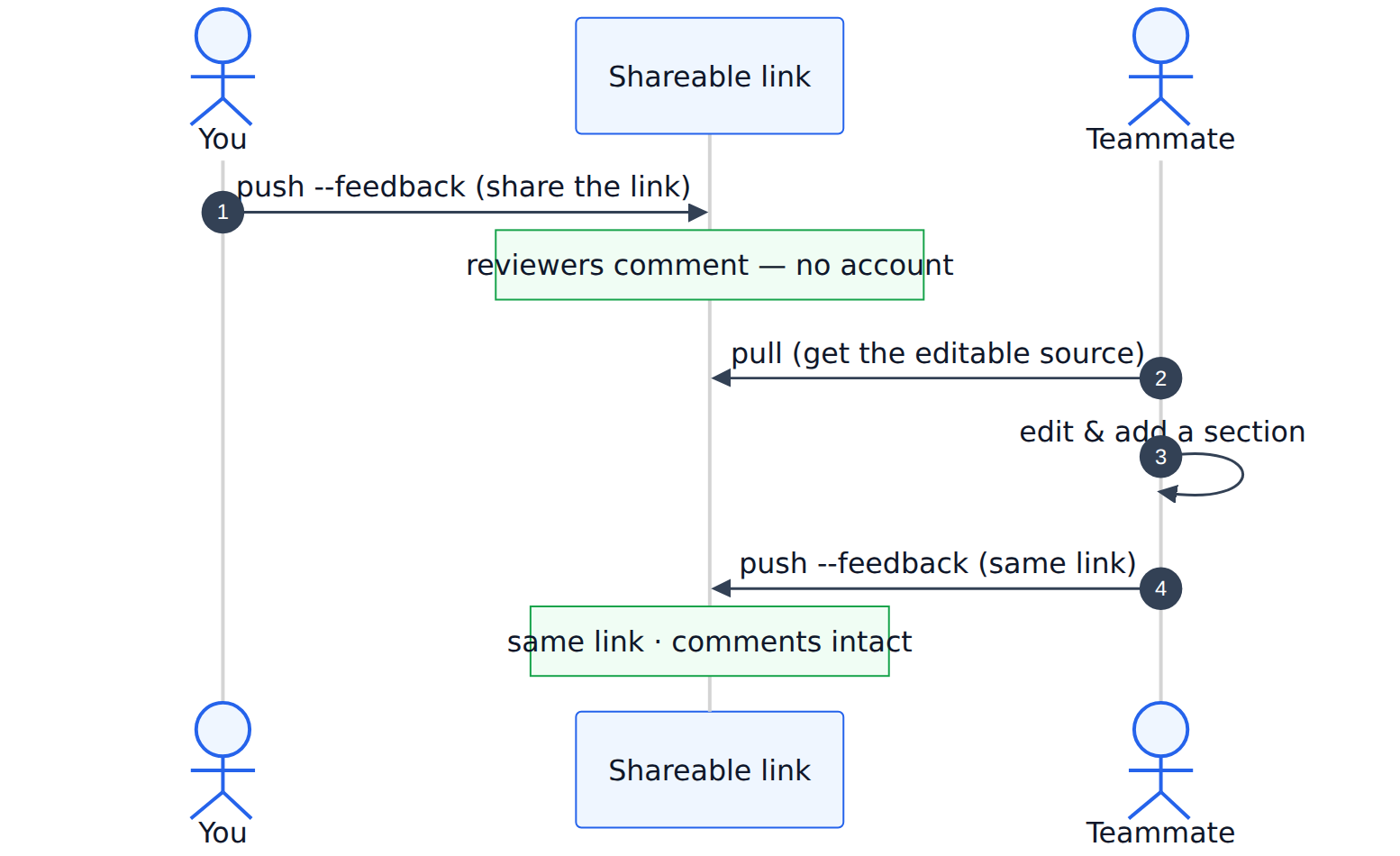
Click the diagram for the interactive release note.
Table of contents
- No account needed
- OpenAI Build Week: Codex + GPT-5.6
- Release notes
- Setup
- Command reference
- Example walkthroughs
- The agent loop
- Edit mode (local, pre-publish)
- Multi-provider AI (Anthropic / OpenAI / Gemini)
- Architecture
- Security model
- Need recoverable or managed access?
- Self-hosting the feedback backend
- Config
No account needed
There's no htmldrop signup, login, or hosted dashboard — the CLI is the whole product. Going from zero to a shareable link is only:
npm install -g @yeefeiooi/htmldrophtmldrop init— logs into Surge (a free third-party static host; the only account involved, and it isn't ours) and picks your subdomain.htmldrop auth setup— generates a local random author key on your machine (no email, no verification, no server call). Only needed for the feedback/converge features.
Then htmldrop push file.html --feedback and share the link. By default, comments are stored on our free shared Worker (auto-expiring after 90 days). If you'd rather they live on infrastructure you control, self-host the Worker — still no signup, just one env var (HTMLDROP_WORKER_URL).
Two more things are optional and bring-your-own — htmldrop stores neither:
- AI key — only for
converge/ AI insights; billed by your own provider, used for a single request. See Multi-provider AI. - Doc password — only for private shares; used to encrypt in memory, then discarded. See Security model.
OpenAI Build Week: Codex + GPT-5.6
Prior work versus Build Week work
htmldrop is not new. The first commit is 14 May 2026 and the first npm release was 23 May, both well before the Submission Period opened on 13 July. Judging covers only what was added during the window, so here is the line.
Before the window: publish an HTML file to a link, client-side encryption, the
annotation widget, the feedback store, converge, and Converge Studio.
During the window (13 July onward, 21 commits, about 5,000 insertions across 51 files, three releases):
- v1.10.0 agent guardrails:
htmldrop playbook,htmldrop designand its design contract, the layout-overlap audit, the edit session registry, plushtmldrop pulland shared team identity so a document can be handed to a teammate without git. - v1.11.0 bulk delete with an interactive picker, and gallery and list activity metrics.
- v1.12.0
--generate-password, and the security model rewritten as an explicit zero-knowledge guarantee. - The OpenAI converge path moved from Chat Completions to the Responses API
with
gpt-5.6-lunaandstore: false. - The browser recording harness in
scripts/demo/, which drives the walkthrough as one continuous take and derives its timings from the encoded MP4 rather than from planned waits.
Evidence: dated commit history in this repo, the three release tags, and Codex
session 019f77c6-2406-7af0-93d4-bf5a7dc0c636.
Try it without installing anything
A live document is already published, with a real review thread on it:
- Document: https://yooi.surge.sh/decision-brief.html
- Password:
fern-ocean-10
Open it, enter the password, and the page decrypts in your browser. Select any sentence and the comment box appears, so you can leave an anchored comment the way a reviewer would. Use the box toggle in the panel and you can comment on the diagram itself. Nothing is installed and no account is created.
That page is the output of the loop below: an agent authored the HTML, htmldrop
published it and anchored the feedback, and converge folded the settled comments
back in through GPT-5.6.
Who does what
htmldrop does not generate designs or diagrams. The division is deliberate and it is the main design decision in the project:
| Step | Who does it |
|---|---|
| Author the HTML, including the Mermaid diagrams | the coding agent, working against htmldrop design |
| Print the design contract, host, encrypt, anchor comments | htmldrop |
| Read the thread and propose a revised HTML file | GPT-5.6 via htmldrop converge |
| Accept, reject, or publish the revision | the human owner |
converge proposes. It never publishes and it never decides. Feedback with an
obvious fix gets folded in; a genuine product trade-off is left alone for the owner
to settle.
How GPT-5.6 is called
htmldrop converge posts to the OpenAI Responses API at
https://api.openai.com/v1/responses, defaulting to gpt-5.6-luna, with no SDK
(src/feedback/llm.js). Three choices worth calling out:
store: falseon every request. The document plus its review thread is the complete input, so there is no reason for a user's private document to be retained server side.gpt-5.6-lunaas the default rather than a larger model. Convergence is a bounded, repeatable text-editing task, so the cheap default is the honest one.--modeltakes any GPT-5.6 model when a document needs more.- Each comment is flattened into an anchored line before it reaches the model
(
src/feedback/converge.js), carrying the selected text, or the captured text and CSS selector for an area box. That is what lets a comment drawn on top of a diagram be acted on rather than guessed at.
Scope note: this is the CLI path. The Cloudflare Worker and Converge Studio still use Chat Completions with the previous default model, so the migration covers the command below, not the dashboard.
Key decisions, and why they went the way they did
The interesting parts of this project are the constraints it accepted, not the features it shipped.
converge proposes, it never decides. The easy version of this product applies
every comment and publishes. That version is worse, because the comments worth
having are the ones reviewers disagree about. The system prompt asks the model to
take the stronger argument when reviewers conflict, and to leave a genuine product
trade-off alone rather than resolve it. In the recorded run it applied a
measurable baseline and inverted a rollout order, and left the one trade-off
nobody had evidence for untouched. converge also never publishes: it writes
<name>.converged.html next to the original and stops, so a human reads the
result before anyone else sees it.
The anchor matters more than the model. Most of the work that makes
convergence look intelligent happens before the request is built.
src/feedback/converge.js flattens every comment into a labelled anchor line, and
that rendering has five branches: a selected text range, a page-level comment, an
area box with the text captured underneath it, an area box with only a CSS
selector, and an area box with neither. The last branch is honest about its own
limits and tells the model to infer the target from the comment wording. This is
why a comment drawn as a box over a diagram can be acted on: the model receives
the text sitting under that box plus the element it belongs to, rather than a
coordinate it cannot interpret.
No SDKs. Every provider is a raw fetch against its HTTP API. The install
stays at three runtime dependencies, swapping a provider is one function, and
nothing breaks when a vendor ships a major SDK version. The cost is writing the
response parsing by hand, which is why the OpenAI reader takes output_text when
it is present and otherwise walks output[] for message items and pulls the
output_text parts out of their content arrays.
gpt-5.6-luna as the default rather than the flagship. Convergence is a
bounded, repeatable text-editing task with the whole document in the input. The
cheap default is the honest one, and --model takes any GPT-5.6 model when a
document needs more.
store: false on every request. The document plus its review thread is the
complete input, so there is no reason for a user's private document to be retained
server side. This sits alongside the same decision made in the crypto: the
password is used to encrypt in memory and then dropped, so it exists in no config
file, on no host, and in no database.
Where Codex accelerated the work
Codex session 019f77c6-2406-7af0-93d4-bf5a7dc0c636 covers the core build. The
places it changed the shape of the work, rather than just typing faster:
Edit mode, the largest piece. A loopback HTTP server, an SSE channel, a file
watcher, a session store keyed by file path, and a request protocol an agent can
sit inside: edit poll blocks until the author says something, edit reply posts
back after the agent has acted, and edit ask pushes a question with clickable
options into the page and waits for the answer on the next poll. Designing a
protocol for an agent to be a participant rather than a caller took several
iterations that would each have been an afternoon by hand.
A browser that reports its own layout defects. The injected runtime audits the
live render for clipped text, overlapping text, and elements overflowing their
container, then posts each finding back with a severity, a CSS selector, and the
offending text, so edit poll surfaces them to the agent as
[ERROR] [HIGH] overlapping-text. The agent that authored the page gets told, in
its own terms, exactly where the page it just wrote is broken. Closing that loop
is the difference between an agent that generates HTML and one that can tell
whether the HTML worked.
The Responses API migration. Endpoint, request shape, and response parsing all changed at once, including the fallback walk described above.
Finding bugs by reading output rather than trusting it. Driving a full review
thread in a browser and then reading the generated HTML is how the fence-stripping
fix in converge.js was found: models wrap a document in a code fence even when
the instruction says not to. That defect is invisible if you only check that the
call succeeded.
The crypto v2 envelope. The CLI encrypts with node:crypto and the browser
decrypts with WebCrypto, so the two have to stay byte compatible or a published
document is simply unreadable. A later change had to derive a feedback access
token from the same password without breaking documents already published. One
PBKDF2 pass produces 64 bytes, and because PBKDF2 emits output block by block, the
first 32 are identical to a plain 32-byte derivation, so older documents still
decrypt with the same key.
The recording harness in scripts/demo/, which drives the
walkthrough as one continuous browser take and derives every narration timestamp
from the encoded MP4 rather than from planned waits. The first cut derived them
from intent and the narration drifted out of sync with the picture.
What GPT-5.6 produced that is checkable
Both artifacts are committed, so the input and the output can be read without running anything:
docs/demo/openai-build-week-collaboration.feedback.jsonis a real review thread.docs/demo/decision-brief.converged.htmlis whatgpt-5.6-lunareturned for the recorded run. Diff it againstdocs/demo/decision-brief.htmland the changes are legible one by one: a vague success metric became a baseline of eighteen clarification loops a week cut by half, a rollout order inverted because a reviewer argued for it, a vague "a human owner" was narrowed to "the document owner" after a reviewer asked who exactly, and one node inside a Mermaid diagram was reworded because a reviewer drew a box over the picture and commented on it. The open trade-off is untouched.
Reproduce a convergence with a key that stays in your local environment:
git clone https://github.com/ooiyeefei/htmldrop && cd htmldrop && npm install
OPENAI_API_KEY=... node bin/htmldrop.js converge docs/demo/openai-build-week-collaboration.html \
  --provider openai --model gpt-5.6-luna
Add --dry-run to print the exact prompt and skip the API call entirely. The saved
review thread is committed at
docs/demo/openai-build-week-collaboration.feedback.json,
so you can read an input and its output without running anything.
Supported platforms
htmldrop is a Node.js CLI with no native dependencies and runs anywhere Node 18 or newer runs. Developed and verified on macOS and Linux. Windows works under WSL; native Windows shells are untested. Published documents open in any modern browser, since the password gate uses built-in WebCrypto.
Release notes
Each release ships a short, visual release note — published with htmldrop itself, so you can read it as a live page:
- v1.10.0 — playbooks, a one-command design starter kit, smarter edit-mode guidance, and
htmldrop pull+ shared team identity (hand a doc off to a teammate, no git). → Read the release note
Setup
# 1. Install the CLI
npm install -g @yeefeiooi/htmldrop

# 2. One-time: log in to Surge and pick a subdomain (for simple share)
htmldrop init

# 3. One-time: generate an author key (only needed for feedback/converge)
htmldrop auth setup
init runs surge login and saves your subdomain to ~/.htmldrop/config.json.
auth setup generates an author API key (also stored there) that identifies you as the document owner when pulling, clearing, or converging feedback.
For AI converge you also need an LLM API key in your environment — see Multi-provider AI.
Command reference
| Command | What it does |
|---|---|
| htmldrop init | One-time setup: Surge login + subdomain |
| htmldrop auth setup [--force] | Generate the author API key (--force regenerates) |
| htmldrop push <file> | Publish a file. Flags: --password <p>, --noindex, --open |
| htmldrop push <file> --feedback | Publish with the annotation widget. --new-doc forces a fresh link. Combine with --password for a feedback-enabled private doc |
| htmldrop list | List published files with their URLs |
| htmldrop open <file> | Open a published file in the browser |
| htmldrop delete <files...> | Remove one or more files and redeploy once |
| htmldrop pull <url> [--password <p>] [--output <f>] | Reconstruct clean, editable source from a published doc and re-link it to the same doc/link — the basis of the no-git collaborative loop |
| htmldrop playbook [id] [--json] | Per-shape authoring guidance (diagram, comparison, input, plan, table, slides, explainer). No id lists all + the MUST-router rule |
| htmldrop design [--json] | Print the design contract: source-priority rule, pinned+SRI CDN snippets, layout-safety CSS, theme-aware Mermaid re-render |
| htmldrop feedback pull <file> [--json] [--save] | Retrieve feedback for your own file. --save writes it to <file>.feedback.json in your repo (owned + versioned) |
| htmldrop feedback read <docId\|url> [--json] | Read feedback for any doc by id or link — no ownership, no manifest (for teammates/agents) |
| htmldrop feedback list | List which files have feedback enabled |
| htmldrop feedback add [file] --text <t> | Post a comment. Use --doc-id <id\|url> to comment on a doc you didn't publish. --name <n>, --on <anchor>, --parent-id <id> |
| htmldrop feedback clear <file> | Delete all feedback (owner only) |
| htmldrop fetch <url> [--password <p>] [--out <f>] | Fetch a published doc, decrypting password-protected pages — lets an agent read the content |
| htmldrop converge <file> | Synthesize feedback → improved HTML (owner). --dry-run, --provider, --model, --api-key |
| htmldrop studio | Open the Converge Studio dashboard locally. --port <n>, --no-browser |
| htmldrop edit start <file> | Edit mode — serve the file locally and iterate with your agent in real time before publishing. --with-feedback loads the published doc's reviewer comments; --no-open skips the browser |
| htmldrop edit poll <file> [--json] | The agent listens — blocks until you leave a comment (or answer a question), then returns it with the page's comments and layout warnings as context |
| htmldrop edit reply <file> --text <t> | The agent replies into the conversation after editing the file |
| htmldrop edit ask <file> --text <q> [--options "A\|B\|C"] | Ask the author a question in the browser; their answer returns on the next poll as {choice, text} |
| htmldrop edit layout <file> [--json] | Report layout issues (overflow, clipped/overlapping text) in the rendered page |
| htmldrop edit ls [--json] | List all local edit sessions and which have unaddressed input (for agents at session start) |
| htmldrop edit end <file> · htmldrop edit stop | End a session · shut the local edit server down |
| htmldrop identity export [--json] · htmldrop identity import <blob> [--force] | Export/import a shareable team identity (subdomain + author key). Use a dedicated team account only |
File arguments accept an absolute path, a relative path, or the bare filename — they all resolve to the same published file. Commands that act on your own doc (pull, clear, converge) use the local manifest + author key; the teammate-facing commands (read, add --doc-id, fetch) work from just a link.
Example walkthroughs
Each example is a self-contained sequence of steps you can copy.
Example A — Share a report publicly
htmldrop push report.html
# → Published: https://your-subdomain.surge.sh/report.html
Add --noindex to block search engines/AI crawlers, or --open to open it after deploy.
Example B — Share something privately (password)
htmldrop push private-spec.html --password coral-sunset-42
# → Published (AES-256-GCM encrypted). Share BOTH the URL and the password.
The content is encrypted client-side before upload; viewers must enter the password to decrypt it in their browser. htmldrop never stores the password — not on disk, not on any server — it's held in memory just long enough to encrypt, then discarded. That's the guarantee no breach of Surge or our infrastructure can expose your doc; the direct consequence is that a forgotten password can't be recovered, so save it the moment you create it. Easiest path: let htmldrop make one and copy it into your manager:
htmldrop push private-spec.html --password --generate-password # prints a memorable pw onceOr pipe it straight from your password manager so it never hits shell history:
htmldrop push private-spec.html --password "$(op read op://vault/item/password)"   # 1Password
htmldrop push private-spec.html --password "$(bw get password <id>)"               # Bitwarden
htmldrop push private-spec.html --password "$(pass show <name>)"                   # pass
Lost the password? Re-push the file with a new one. See Security model and Need recoverable or managed access?.
Example C — Collaborative review, end to end
This is the full feedback → converge loop, broken into steps.
C1. Publish with feedback enabled
htmldrop push spec.html --feedback
# → Feedback URL: https://htmldrop-feedback.htmldrop.workers.dev/doc/<uuid>
That single URL is for everyone — reviewers and you.
C2. Reviewers comment (in the browser)
Share the Feedback URL. A reviewer opens it, selects text, clicks the “+ Comment” tooltip, and leaves a comment anchored to that text — no account, no login. They can also: drag a box over an area (the ▢ toggle in the panel) to comment on a region — images, layouts, anything that isn't a clean text run; leave page-level comments; and reply to others. New comments appear via the panel’s refresh button.
C3. Read the feedback from the CLI
htmldrop feedback pull spec.html
# Lists every comment with author, anchor text, and timestamp.
htmldrop feedback pull spec.html --json   # machine-readable
C4. Add an evidence-backed comment (optional)
You — or an AI agent acting for you — can add a comment, optionally anchored to specific text:
htmldrop feedback add spec.html \
  --text "Benchmarks show PostgreSQL ~3x the write throughput here." \
  --name "AI Research" \
  --on "PostgreSQL"
C5. Converge the feedback into an improved version
# Preview the prompt without calling the model:
htmldrop converge spec.html --dry-run

# Real run (needs an LLM API key — see Multi-provider AI):
export ANTHROPIC_API_KEY=sk-ant-...
htmldrop converge spec.html
# → Writes spec.converged.html incorporating the feedback.
C6. Re-publish to the same link
htmldrop push spec.converged.html --feedback # or re-push spec.html after editingRe-pushing a file that already has feedback reuses the same docId, so the link stays stable and existing comments stay attached. Use --new-doc only when you want a clean slate.
Example D — Review feedback in a visual dashboard
htmldrop studioOpens Converge Studio locally: the document on the left, comments grouped into segments on the right, with debate detection and per-segment AI insights/converge actions.
The agent loop
htmldrop is designed so an AI coding agent (e.g. Claude Code) can drive the whole review cycle on your behalf:
Agent generates a doc  →  htmldrop push spec.html --feedback  →  shares the link
                                          │
                       reviewers comment on the link
                                          │
Agent: htmldrop feedback pull spec.html   →  reads the feedback
Agent: htmldrop feedback add … --on "…"   →  injects researched, anchored context
Agent: htmldrop converge spec.html        →  synthesizes an improved version
Agent: htmldrop push spec.html --feedback →  updates the SAME link, comments intact
Because re-push keeps the same URL, the document can iterate in place while reviewers keep using the link they already have.
Edit mode (local, pre-publish)
push --feedback is for asynchronous review — you ship a link and reviewers comment over time. Edit mode is the opposite: a local, real-time loop where you sit with your agent and refine the page first. Nothing is published; it runs entirely on 127.0.0.1.
htmldrop edit start report.html                  # serve locally + open the browser
htmldrop edit start report.html --with-feedback  # …and load the published doc's reviewer comments
One surface. The page shows your document with the annotation widget plus a small control bar. Select text (the comment box auto-opens) or drag an area to comment; ⌘⏎ / Ctrl+Enter sends. A page-level comment is a message to the agent; a threaded reply is the agent's answer. The page live-reloads as the agent edits, with comments re-anchored.
Live ⇄ Async. The control bar toggles the mode:
- Live — an agent poll is attached; your comments reach it in real time.
- Async — comments are collected for a later pull; nothing is sent until you click Send N to agent.
The agent's side of the loop:
You (browser): comment "tighten the intro" on the highlighted line
Agent:  htmldrop edit poll report.html --json     # blocks until your comment arrives
Agent:  …edits report.html…
Agent:  htmldrop edit reply report.html --text "done — tied it to a number"
→ page live-reloads · the reply shows in the control bar · repeat
The agent can also ask you a question mid-loop — htmldrop edit ask report.html --text "iOS-first or Android-first?" --options "iOS|Android|Both" pops a card in the browser; your click/answer returns on its next poll.
- Author-facing & separate. Sessions live under
~/.htmldrop/edit/, keyed by file path — never mixed into a published thread. Edit mode is for you to firm the doc up with an agent; when ready,htmldrop push --feedbackshares it for external review as usual. - Reliable. A stable local port keeps an open tab alive across restarts; a failed save shows a retry toast (and keeps your text) rather than losing it; sessions persist on disk.
The local server binds loopback only, rejects non-loopback Host/Origin (guarding against DNS-rebinding and CSRF from other sites you have open), serves only .html/.htm, and self-shuts after 30 minutes idle.
Teammates & roles
htmldrop has two implicit roles, enforced by the architecture rather than an account system:
| Role | Who | Can do | How |
|---|---|---|---|
| Reviewer | anyone with the link (your teammate, or their agent) | read the doc, read comments, add comments & replies | public Worker endpoints — no key needed |
| Owner | whoever holds the author key that registered the doc | everything above + converge, feedback clear | author key in ~/.htmldrop/config.json |
A teammate (or their Claude Code / Codex session) reviews without owning anything. You share the link — and the password if the doc is encrypted. They:
# Read the document (decrypts a password-protected page so the agent can analyze it)
htmldrop fetch https://you.surge.sh/spec.html --password coral-sunset-42

# Read all reviewer comments — by link or docId, no ownership
htmldrop feedback read https://htmldrop-feedback.htmldrop.workers.dev/doc/<id>

# Add their own comment, optionally anchored to text
htmldrop feedback add --doc-id <id|url> --text "Consider X here" --on "the exact phrase" --name "Alex"
It’s symmetric: when your teammate publishes their doc, they’re the owner and you’re the reviewer.
Only the owner converges. converge and clear require the author key, so synthesizing/rewriting a doc stays with whoever published it — teammates contribute feedback, the owner decides when to converge. This is the role boundary you want today, with no extra setup.
Do you need auth.md for a teammate's agent to access a doc?
No — and it isn't needed today. A teammate's Claude/Codex session already accesses a doc with just the link (and the password, for private docs): fetch --password decrypts the content, feedback read / feedback add --doc-id handle comments. The password is the access mechanism; no login/identity standard is required.
What auth.md is — and is NOT. auth.md is a standard a service adopts (like "Sign in with Google" / OIDC), so both sides must speak it. It is not a password manager, a form-filler, or a way to log into arbitrary existing username/password websites. Our own password gate (client-side AES) is unrelated to auth.md. The spec defines two flows:
- Agent-verified (ID-JAG) — an agent provider (Anthropic/OpenAI/…) signs an assertion vouching "my agent acts for verified-user Jane." LLM/agent-specific. We expose the service side (
/.well-known/oauth-authorization-server,/agent/auth), but no provider mints ID-JAGs for arbitrary services yet, so it isn't usable end-to-end. - User-claimed (OTP) — a human proves identity via a one-time email/SMS code. Passwordless login for humans; htmldrop does not implement this today.
When you'd actually adopt more of auth.md: only when you want identity-based access (allowlist [email protected], revoke per person, audit who opened it) instead of a shared password — i.e., real multi-user roles. For a trusted team sharing a link + password out-of-band, the current model is sufficient and requires no auth.md adoption. Identity-based content access also implies the server can decrypt your doc (see the Security model note) — a deliberate trade-off, not a free upgrade.
Multi-provider AI
The AI key is optional — and bring-your-own
You only need an LLM API key for the AI features (
htmldrop convergeand the dashboard’s AI insights). Everything else works without one.| Without an AI key | With an AI key | |---|---| | Publish, password-protect,
list,delete; enable--feedback; collect,pull,list,add, reply to, andclearcomments; view everything in Converge Studio | All of the above plusconverge(AI synthesis into an improved doc) and per-segment AI research insights |If you don’t set a key, the AI commands simply tell you one is required and stop — nothing else is affected. If you do set one, it unlocks converge + insights.
- Your key, your cost. It’s bring-your-own-key: you pay your provider (Anthropic / OpenAI / Gemini) directly at their published rates. htmldrop adds no markup and ships no key of its own.
- We never store your key. The CLI reads it from your terminal environment (or
--api-key) for that single run only. The browser dashboard holds it in session memory and wipes it when you close the tab. The Worker uses it for one request and forgets it — it is never written to disk or KV.- Handle it securely — it lives in your terminal. Keep it in an environment variable, don’t commit it to git, don’t paste it into shared logs or chats, and rotate it at your provider if it’s ever exposed.
converge and the dashboard’s AI insights work with Anthropic, OpenAI, or Gemini. The provider is auto-detected from your API key’s prefix, and you can override it.
Key resolution (CLI): --api-key, else LLM_API_KEY, ANTHROPIC_API_KEY, OPENAI_API_KEY, or GEMINI_API_KEY.
Auto-detection by prefix:
| Prefix | Provider |
|---|---|
| sk-ant-… | Anthropic |
| sk-… | OpenAI |
| AIza… | Gemini |
Default models (override with --model or the dashboard’s model field):
| Provider | Default model | Approx. cost (in / out per 1M) |
|---|---|---|
| Anthropic | claude-sonnet-4-6 | ~$3 / ~$15 |
| OpenAI | gpt-5.6-luna (CLI) · gpt-5.4-mini (Worker/Studio) | See OpenAI pricing |
| Gemini | gemini-3.1-flash-lite | $0.25 / $1.50 |
# Auto-detected from the key:
ANTHROPIC_API_KEY=sk-ant-... htmldrop converge spec.html

# Explicit override (e.g. flagship OpenAI for top quality):
htmldrop converge spec.html --provider openai --model gpt-5.6-luna --api-key sk-...
No SDKs are required — htmldrop calls each provider’s HTTP API directly.
The OpenAI path uses the Responses API with store: false. See
OpenAI Build Week: Codex + GPT-5.6 for how
that path is wired and how to reproduce a run.
Architecture
Simple share → files are staged in ~/.htmldrop/site/, an index gallery is generated, and the whole directory is deployed to your Surge subdomain.
Feedback → a Cloudflare Worker (htmldrop-feedback.htmldrop.workers.dev) stores comments in KV and serves the document at one URL:
GET /doc/:docId— serves your HTML with the annotation widget injected (same URL for reviewers and author)POST /api/feedback/:docId— anonymous comment submission (rate-limited per IP + per doc)GET /api/feedback/:docId— public read (with?since=for incremental fetch)POST /api/feedback/:docId/:commentId/reply— threaded repliesPOST/GET /api/insights/:docId,POST /api/converge/:docId— AI insights/synthesis (bring-your-own-key).well-known/oauth-authorization-server+/agent/auth— auth.md discovery + agent registration, so future cloud-hosted agents can authenticate via ID-JAG (the local author key continues to work today)
Documents and feedback auto-expire after 90 days of inactivity.
Security model
- No reviewer accounts. Reviewers comment anonymously; abuse is bounded by per-IP and per-doc rate limits.
- Author key lives only in
~/.htmldrop/config.jsonon your machine. - LLM API key (bring-your-own): in the dashboard it’s held in
sessionStorageand cleared when you close the browser — never persisted to disk or stored on the server. The Worker uses it for the single request and forgets it. - Password-protected shares use AES-256-GCM, with the key derived from your password via PBKDF2 (SHA-256, 600k iterations) and a random salt/IV — authenticated encryption, computed client-side (the browser decrypts with built-in WebCrypto; the password is never sent to a server). Only the encrypted blob is uploaded (to Surge), so the plaintext never reaches Surge or the Worker.
- Zero-knowledge by guarantee: your password is stored nowhere. htmldrop never writes it to disk, to
~/.htmldrop/config.json(which holds onlysubdomain,email,authorKey), or to any server — not ours, not Surge's. It's held in memory just long enough to encrypt the file at push time, then discarded. This is a deliberate guarantee, not a missing feature: it's the reason a breach of Surge, our Worker, or your local~/.htmldropconfig can never expose a private doc — there is no password there to find. The direct consequence is that a forgotten password can't be recovered, because there's nothing to recover it from; re-push the file with a new one. That trade-off is the security property, so the workflow below is how you never pay it. - Never lose a password — save it at the moment you create it. Because it's unrecoverable, treat creation as the moment to store it:
- Generate one —
htmldrop push file.html --password --generate-passwordprints a memorable password (two words + a number) once; copy it straight into your manager. - Pipe it from your password manager so it never touches your shell history:
htmldrop push file.html --password "$(op read op://vault/item/password)"   # 1Password CLI
htmldrop push file.html --password "$(bw get password <id>)"               # Bitwarden
htmldrop push file.html --password "$(pass show <name>)"                   # pass
- Generate one —
- Keep the password out of shell history: use a bare
--passwordflag to read from theHTMLDROP_PASSWORDenv var, or be prompted with hidden input — instead of--password <pw>on the command line. Applies to bothpushandfetch. - Caveat — comments are not encrypted. A password protects the document content (on Surge), but comments are stored in plaintext on the Worker and readable by anyone who has the docId. For a private doc, comment confidentiality rests on the unguessable link, not the password.
Need recoverable or managed access?
htmldrop's zero-knowledge guarantee answers "can a breach leak my private doc?" — and the answer is final: the password is never stored, so it can't be stolen. The flip side is that a forgotten password can't be recovered. If you lose the password to your own doc, the fix is simple: re-push with a new one and re-share it.
A different need — "the organization can always regain access, and we can revoke a specific person" — is not something stored passwords would solve. Storing passwords to enable recovery would break the zero-knowledge guarantee for every doc, and still wouldn't give per-person control. The right answer for that need is identity / role-based access: access granted by who you are (an account, an email allowlist, a role), re-grantable by an owner and revocable per person, without anyone sharing a secret.
That is a deliberate future direction, not implemented today. The path is sketched in docs/plans/2026-05-25-password-capability-design.md (the password-as-capability model the Worker already speaks) and points toward capability/role-based access. Note the trade-off it implies: identity-based content access means the server can decrypt your doc on demand — which is exactly why it's a separate tier, not a free upgrade to the zero-knowledge model.
Which do you need today?
- A trusted team sharing one link + password out of band (a password manager, Slack, email) — today's model is sufficient and keeps the guarantee.
- Per-person control ("only Jane can open it; remove Alex when they leave") and org-level recoverability — that's identity-based access, a future tier. For now, rotate the password (re-push) when the team changes.
Where your data lives (and how to own it)
Two pieces: Surge hosts your HTML (stores nothing); a Cloudflare Worker + KV stores the comments (the only part that needs a server — a static page can't accept writes). You choose whose Worker.
Free tier — our shared Worker
- Zero setup —
htmldrop push --feedbackjust works. - Comments live in our Cloudflare Worker KV. Honestly: we can technically read them — but the code is open-source, we never use your data, comments auto-expire after 90 days, and you can wipe them anytime with
htmldrop feedback clear. - Not zero-knowledge. For that, self-host ↓.
FREE (shared):
  you ─push────────► Surge            (your HTML)
  reviewer ─comment─► OUR Worker + KV  (auto-expires 90d · clearable)
  you ─feedback pull --save─► comments.json in YOUR repo
Own-your-data tier — self-host the Worker
- Deploy the Worker to your own free Cloudflare account → comments never touch our infrastructure. We genuinely see nothing.
- Setup (one time):
cd worker npx wrangler kv namespace create FEEDBACK npx wrangler kv namespace create RATE_LIMITS npx wrangler kv namespace create AUTHORS # paste the printed IDs into wrangler.toml, then: npx wrangler deploy - Point the CLI at it (set once — applies to push, feedback, converge, studio):
Published docs' widgets then talk to your Worker.export HTMLDROP_WORKER_URL=https://your-worker.your-subdomain.workers.dev
OWN-YOUR-DATA (self-host):
  you ─push────────► Surge             (your HTML)
  reviewer ─comment─► YOUR Worker + KV  (your account — we never see it)
  you ─feedback pull --save─► comments.json in YOUR repo
Comments in your repo (either tier)
htmldrop feedback pull <file> --savewrites comments to<file>.feedback.jsonin your repo — owned, versioned, private. The Worker is just the live inbox; your repo is the system of record.- Reviewers never need repo access — you pull + commit. (A teammate with no push rights still comments fine in the browser; you sync it into the repo.)
Config
Stored at ~/.htmldrop/config.json:
{
  "subdomain": "your-subdomain",
  "email": "[email protected]",
  "authorKey": "…"
}
License
MIT