
@yourgpt/widget-web-sdk
v0.0.7
Published
Official YourGPT SDK for JavaScript/TypeScript and React applications

Maintainers
 yourgpt
Readme
YourGPT SDK




Official YourGPT SDK for JavaScript/TypeScript and React applications. Integrate YourGPT's powerful chatbot widget into your web applications with modern, type-safe APIs.
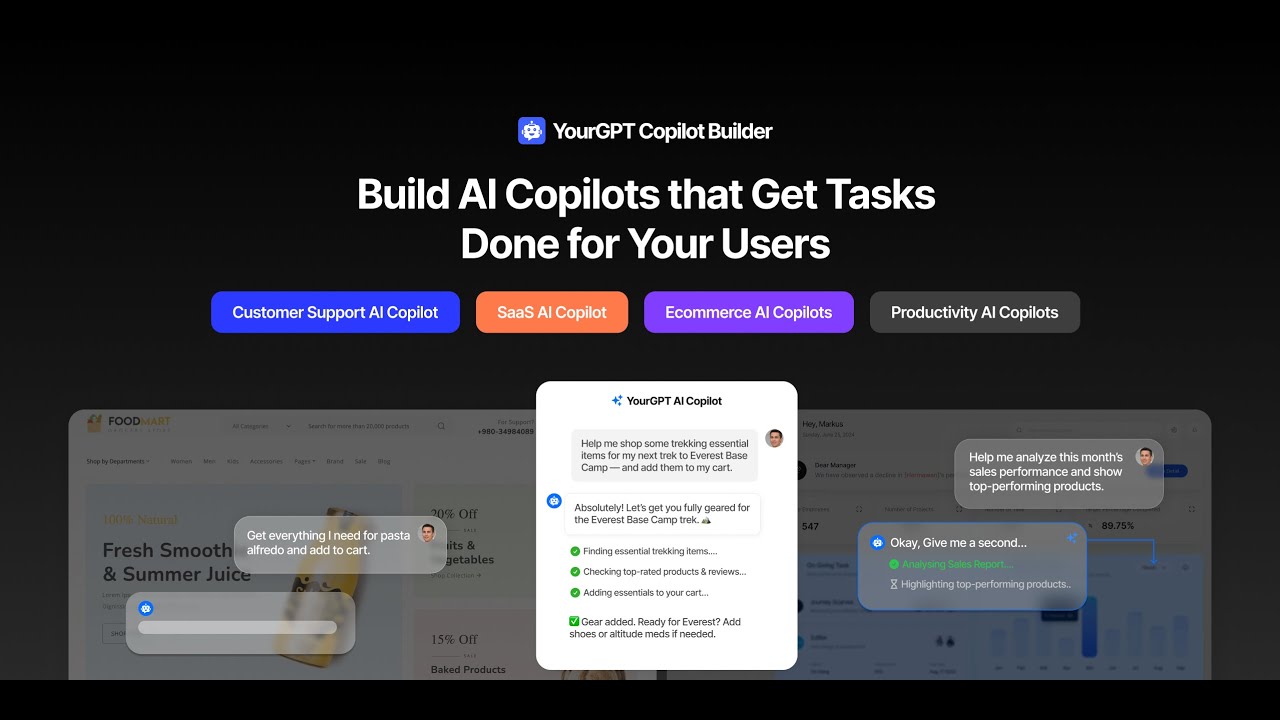
Watch this video on YouTube
🚀 Features
- 🔄 Dual Package: Both vanilla JS/TS (
@yourgpt/widget-web-sdk) and React-specific (@yourgpt/widget-web-sdk/react) implementations - 📦 Tree-shakable: Import only what you need for optimal bundle size
- 💪 TypeScript: Full type safety, IntelliSense support, and comprehensive type definitions
- 🎣 React Hooks: Modern React integration with
useYourGPTChatbot()anduseAIActions() - 🎮 AI Actions: Register custom AI-powered actions with confirmation dialogs
- 🎯 Event System: Comprehensive event handling for real-time updates
- 🔧 Configurable: Flexible configuration with SSR support
- 📱 Cross-platform: Works in all modern browsers and frameworks
- 🧪 Well-tested: Comprehensive test suite with 90%+ coverage
- 📚 Documented: Complete documentation with examples
📦 Installation
npm install @yourgpt/widget-web-sdk⚡ Quick Start
Vanilla JavaScript/TypeScript Setup
import { YourGPT } from "@yourgpt/widget-web-sdk";

// Initialize the SDK
await YourGPT.init({
  widgetId: "your-widget-id",
});

// Get the SDK instance
const sdk = YourGPT.getInstance();

// Control the widget
sdk.open();
sdk.sendMessage("Hello!");

// Listen for events
sdk.onMessageReceived((data) => {
  console.log("Message received:", data);
});
React Setup
import { YourGPT, useYourGPTChatbot, useAIActions } from "@yourgpt/widget-web-sdk/react";

// Initialize in your main app file (main.tsx or App.tsx)
YourGPT.init({
  widgetId: "your-widget-id",
});

// Use in components
function ChatButton() {
  const chatbot = useYourGPTChatbot();
  const aiActions = useAIActions();

  // Register AI actions
  useEffect(() => {
    aiActions.registerAction("get_location", async (data, helpers) => {
      const confirmed = await helpers.confirm({
        title: "Location Access",
        description: "Allow location access?",
      });

      if (confirmed) {
        // Get location and respond
        helpers.respond("Location: 40.7128, -74.0060");
      }
    });
  }, [aiActions]);

  return (
    <div>
      <button onClick={chatbot.open}>Open Chat</button>
      <p>Status: {chatbot.isConnected ? "Connected" : "Disconnected"}</p>
    </div>
  );
}
📖 Complete Documentation
🤖 AI Actions System
Register custom AI-powered actions that your chatbot can trigger:
// Register an AI action with confirmation dialog
sdk.registerAIAction("delete_file", async (data, helpers) => {
  const { filename } = JSON.parse(data.action[0].function.arguments);

  // Show confirmation dialog to user
  const confirmed = await helpers.confirm({
    title: "Delete File",
    description: `Are you sure you want to delete "${filename}"?`,
    acceptLabel: "Delete",
    rejectLabel: "Cancel",
  });

  if (confirmed) {
    try {
      await deleteFile(filename);
      helpers.respond(`File "${filename}" deleted successfully`);
    } catch (error) {
      helpers.respond(`Error deleting file: ${error.message}`);
    }
  } else {
    helpers.respond("File deletion cancelled");
  }
});

// Register system information action
sdk.registerAIAction("get_system_info", async (data, helpers) => {
  const systemInfo = {
    userAgent: navigator.userAgent,
    language: navigator.language,
    platform: navigator.platform,
    url: window.location.href,
    timestamp: new Date().toISOString(),
  };

  helpers.respond(`System Info:\n${JSON.stringify(systemInfo, null, 2)}`);
});

// Unregister when no longer needed
sdk.unregisterAIAction("delete_file");
🪝 Hooks
useAIActions() - AI Actions Management
function AIActionsComponent() {
  const aiActions = useAIActions();

  useEffect(() => {
    // Register multiple actions at once
    aiActions.registerActions({
      get_time: async (data, helpers) => {
        helpers.respond(`Current time: ${new Date().toLocaleString()}`);
      },
      get_page_url: async (data, helpers) => {
        helpers.respond(`Current URL: ${window.location.href}`);
      },
      take_screenshot: async (data, helpers) => {
        const confirmed = await helpers.confirm({
          title: "Screenshot",
          description: "Take a screenshot of the current page?",
        });

        if (confirmed) {
          // Screenshot logic using html2canvas or similar
          helpers.respond("Screenshot taken successfully");
        }
      },
    });

    // Cleanup on unmount
    return () => {
      aiActions.unregisterAction("get_time");
      aiActions.unregisterAction("get_page_url");
      aiActions.unregisterAction("take_screenshot");
    };
  }, [aiActions]);

  return (
    <div>
      <h3>Registered AI Actions</h3>
      <p>Count: {aiActions.registeredActions.length}</p>
      <ul>
        {aiActions.registeredActions.map((action) => (
          <li key={action}>{action}</li>
        ))}
      </ul>
    </div>
  );
}
Components
YourGPTProvider - Wrapper
// app/layout.tsx
import { Provider } from "./provider";

export default function RootLayout({ children }: { children: React.ReactNode }) {
  return (
    <html lang="en">
      <body className={`${geistSans.variable} ${geistMono.variable} antialiased`}>
        <Provider>{children}</Provider>
      </body>
    </html>
  );
}

// app/provider.tsx

import { YourGPTProvider } from "@yourgpt/widget-web-sdk/react";

export function Provider({ children }: { children: React.ReactNode }) {
  return (
    <YourGPTProvider
      config={{
        widgetId: "your-widget-id",
        mode: "embedded",
      }}
      onError={(error) => {
        console.error("Widget Error:", error);
      }}
    >
      {children}
    </YourGPTProvider>
  );
}
Custom Confirmation Dialogs
// Advanced AI action with custom confirmation
aiActions.registerAction("delete_user_data", async (data, helpers) => {
  const { userId, dataType } = JSON.parse(data.action[0].function.arguments);

  const confirmed = await helpers.confirm({
    title: "⚠️ Delete User Data",
    description: `This will permanently delete all ${dataType} data for user ${userId}. This action cannot be undone.`,
    acceptLabel: "Delete Permanently",
    rejectLabel: "Keep Data",
  });

  if (confirmed) {
    try {
      await deleteUserData(userId, dataType);
      helpers.respond(`✅ ${dataType} data deleted for user ${userId}`);
    } catch (error) {
      helpers.respond(`❌ Failed to delete data: ${error.message}`);
    }
  } else {
    helpers.respond("Data deletion cancelled - no changes made");
  }
});
🏗️ Project Structure
@yourgpt/widget-web-sdk/
├── 📁 src/
│   ├── 📁 core/              # Core SDK (vanilla JS/TS)
│   │   └── YourGPT.ts        # Main SDK implementation
│   ├── 📁 react/             # React-specific code
│   │   ├── 📁 hooks/         # React hooks
│   │   │   ├── useYourGPT.ts
│   │   │   ├── useYourGPTChatbot.ts
│   │   │   └── useAIActions.ts
│   │   ├── 📁 components/    # React components
│   │   │   ├── YourGPTProvider.tsx
│   │   │   └── YourGPTWidget.tsx
│   │   │   └── index.ts          # React exports
│   ├── 📁 types/             # TypeScript definitions
│   ├── 📁 utils/             # Utility functions
│   └── index.ts              # Main exports
├── 📁 tests/                 # Test suite
├── 📁 docs/                  # Documentation
└── 📄 README.md              # This file
Next Steps
Here is the setup guide for YourGPT dashboard.
Integration with YourGPT Dashboard
Create custom AI actions in YourGPT dashboard
https://github.com/user-attachments/assets/733e6cee-6124-46f1-8f85-4f616b9cc945
Choose your best suited model for your application
Choose the best model from a wide variety of models
🧪 Testing
Run the test suite:
npm test                # Run all tests
npm run test:watch      # Run tests in watch mode
npm run test:coverage   # Run tests with coverage report
The SDK includes comprehensive tests for:
- Core SDK functionality
- React hooks integration
- AI Actions system
- Error handling
- TypeScript type checking
🔨 Development
Setup
git clone https://github.com/YourGPT/web-sdk
cd web-sdk
npm install
npm run build
Available Scripts
npm run build          # Build both core and React packages
npm run build:core     # Build core SDK only
npm run build:react    # Build React package only
npm run dev            # Development mode with watch
npm run dev:examples   # Build and serve examples
npm run serve          # Serve examples on port 3000
npm run type-check     # TypeScript type checking
npm run lint           # ESLint code linting
npm run lint:fix       # Fix ESLint issues
npm test               # Run test suite
npm run clean          # Clean build artifacts
Build Output
dist/
├── index.js          # CommonJS build
├── index.mjs         # ES modules build
├── index.d.ts        # TypeScript definitions
└── react/
    ├── index.js      # React CommonJS build
    ├── index.mjs     # React ES modules build
    └── index.d.ts    # React TypeScript definitions
📋 API Reference
Core SDK Class
YourGPTSDK: Main SDK class
React Hook
useAIActions(): AI actions management
Types
import type {
  YourGPTConfig, // Configuration interface
  WidgetState, // Widget state interface
  MessageData, // Message data structure
  EscalationData, // Human escalation data
  AIActionData, // AI action payload
  AIActionHelpers, // AI action helper functions
  ChatbotAPI, // Complete chatbot API
  AIActionsAPI, // AI actions API
} from "@yourgpt/widget-web-sdk";
Utilities
import {
  isBrowser, // Check if in browser environment
  isDevelopment, // Check if in development mode
  validateWidgetId, // Validate widget ID format
  validateUrl, // Validate URL format
  debounce, // Debounce function calls
  throttle, // Throttle function calls
  withRetry, // Retry failed operations
  EventEmitter, // Custom event emitter
} from "@yourgpt/widget-web-sdk";
🌐 Browser Support
- Chrome: 80+
- Firefox: 75+
- Safari: 13+
- Edge: 80+
- IE: Not supported
📱 Framework Compatibility
- ✅ React: 16.8+ (hooks support required)
- ✅ Next.js: 12+ (with SSR support)
- ✅ Vite: All versions
- ✅ Create React App: All versions
- ✅ Vanilla JS/TS: All modern environments
- ✅ Vue.js: Via vanilla SDK
- ✅ Angular: Via vanilla SDK
- ✅ Svelte: Via vanilla SDK
🔄 Migration Guide
From Script-based Integration
Before (Old Script Integration):
<script src="/script.js" id="yourgpt-chatbot" widget="your-widget-id"></script>
<script>
  window.$yourgptChatbot.execute("widget:open");
  window.$yourgptChatbot.on("message:received", handleMessage);
</script>
After (New SDK Integration):
import { YourGPT } from "@yourgpt/widget-web-sdk";

await YourGPT.init({ widgetId: "your-widget-id" });
const sdk = YourGPT.getInstance();

sdk.open();
sdk.onMessageReceived(handleMessage);
From React Class Components to Hooks
Before:
class ChatComponent extends React.Component {
  componentDidMount() {
    window.$yourgptChatbot.execute("widget:open");
  }

  render() {
    return <div>Chat Component</div>;
  }
}
After:
function ChatComponent() {
  const chatbot = useYourGPTChatbot();

  useEffect(() => {
    chatbot.open();
  }, [chatbot]);

  return <div>Chat Component</div>;
}
❓ FAQ
Q: Can I use this SDK with Next.js?
A: Yes! The SDK fully supports SSR. Use the isBrowser() utility to check environment.
Q: How do I handle widget initialization errors?
A: Use try/catch with YourGPTError for specific error handling.
Q: Can I customize the confirmation dialogs?
A: Yes! Use the helpers.confirm() method in AI actions with custom options.
Q: Is the SDK tree-shakable?
A: Yes! Import only what you need: import { YourGPT } from '@yourgpt/widget-web-sdk'
Q: How do I register multiple AI actions at once?
A: Use aiActions.registerActions() with an object of action handlers.
🤝 Contributing
We welcome contributions! Please see our Contributing Guide for details.
Development Setup
- Fork the repository
- Clone your fork:
git clone https://github.com/your-username/sdk.git - Install dependencies:
npm install - Create a feature branch:
git checkout -b feature/your-feature - Make your changes and add tests
- Run tests:
npm test - Submit a pull request
Code Standards
- TypeScript: Strict typing required
- ESLint: All rules must pass
- Testing: New features require tests
- Documentation: Public APIs must be documented
📄 License
MIT License - see LICENSE file for details.
🆘 Support
- 📧 Email: [email protected]
- 🐛 Issues: GitHub Issues
- 📖 Documentation: docs.yourgpt.ai
- 💬 Discord: Join our community
🔗 Links
- Website: YourGPT
- GitHub: YourGPT/web-sdk
- NPM Package: @yourgpt/widget-web-sdk
- Documentation: docs.yourgpt.ai/sdk
- Twitter/X: YourGPT AI
Made with ❤️ by the YourGPT Team