
@yunzhanghu/sdk-nodejs
v1.0.30
Published
云账户 SDK for Node.js


Keywords
Readme
云账户 SDK for Node.js
欢迎使用云账户 SDK for Node.js。
云账户是一家专注为平台企业和新就业形态劳动者提供高质量灵活就业服务的新时代企业。云账户 SDK 对云账户综合服务平台 API 接口进行封装,帮助您快速接入到云账户综合服务平台。云账户 SDK for Node.js 为您提供签约、支付、回调、数据查询等功能,帮助您完成与云账户综合服务平台的接口对接及业务开发。
如果您在使用过程中遇到任何问题,请在当前 GitHub 提交 Issues,或发送邮件至技术支持组 [email protected]。
环境要求
云账户 SDK for Node.js 支持 Node.js 12.0.0 及以上版本。
配置密钥
1、获取配置
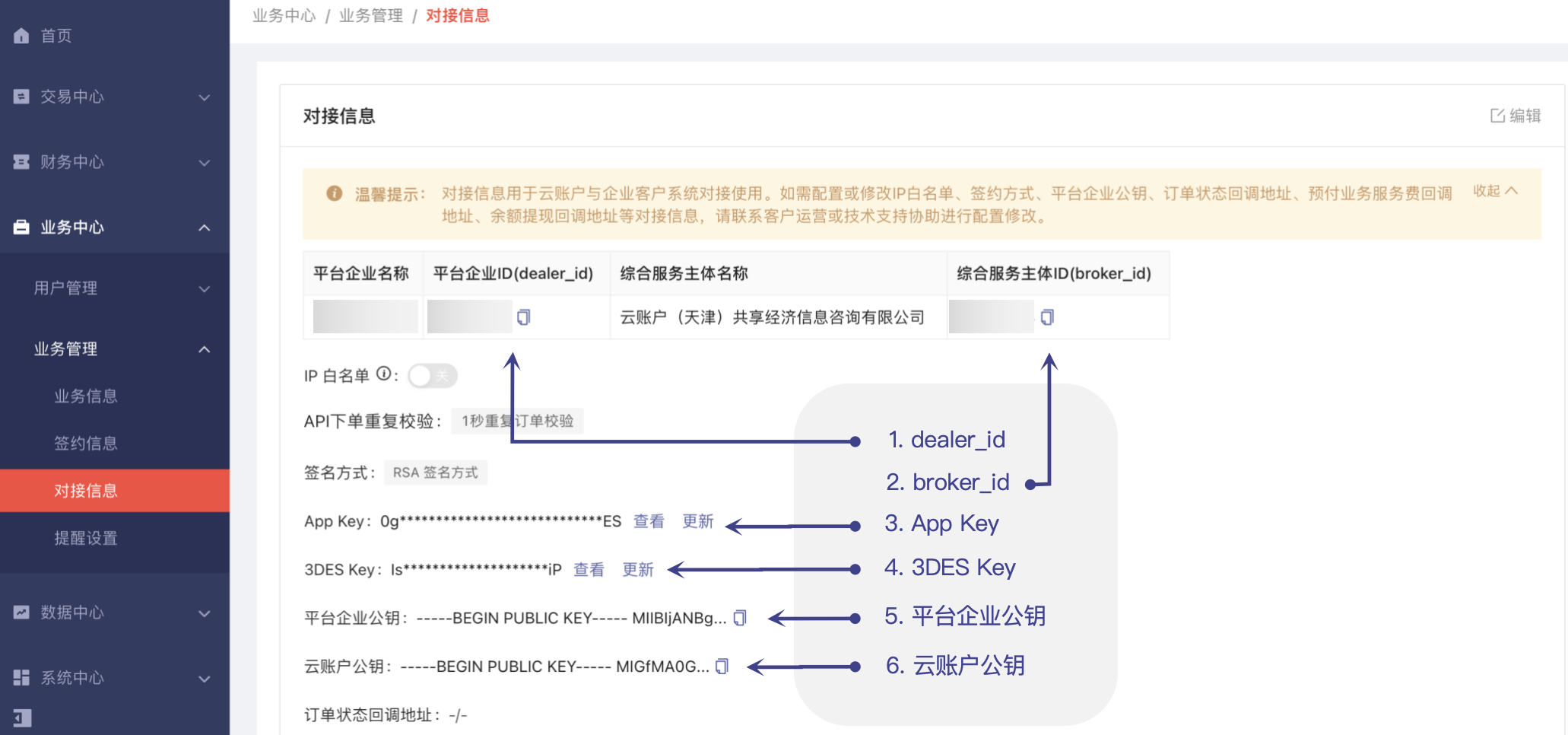
使用云账户 SDK for Node.js 前,您需先获取 dealer_id、broker_id、3DES Key、App Key、云账户公钥。
获取方式:使用开户邮件中的账号登录【云账户综合服务平台】,选择“业务中心 > 业务管理 > 对接信息”,查看并获取以上配置信息。
2、生成密钥
- 方式一:使用 OpenSSL 生成 RSA 公私钥
① ⽣成私钥 private_key.pem

OpenSSL-> genrsa -out private_key.pem 2048   // 建议密钥⻓度⾄少为 2048 位

OpenSSL-> pkcs8 -topk8 -inform PEM -in private_key.pem -outform PEM -nocrypt -out private_key_pkcs8.pem    // 将私钥转为 PKCS8 格式

② ⽣成公钥 pubkey.pem

OpenSSL-> rsa -in private_key.pem -pubout -out pubkey.pem- 方式二:使用工具生成
登录【云账户开放平台】,选择“开发工具下载 > 开发助手 > 工具下载”,下载安装“云账户开放平台开发助手”。
3、配置密钥
登录【云账户综合服务平台】,选择“业务中心 > 业务管理 > 对接信息”,单击页面右上角的“编辑”,配置平台企业公钥。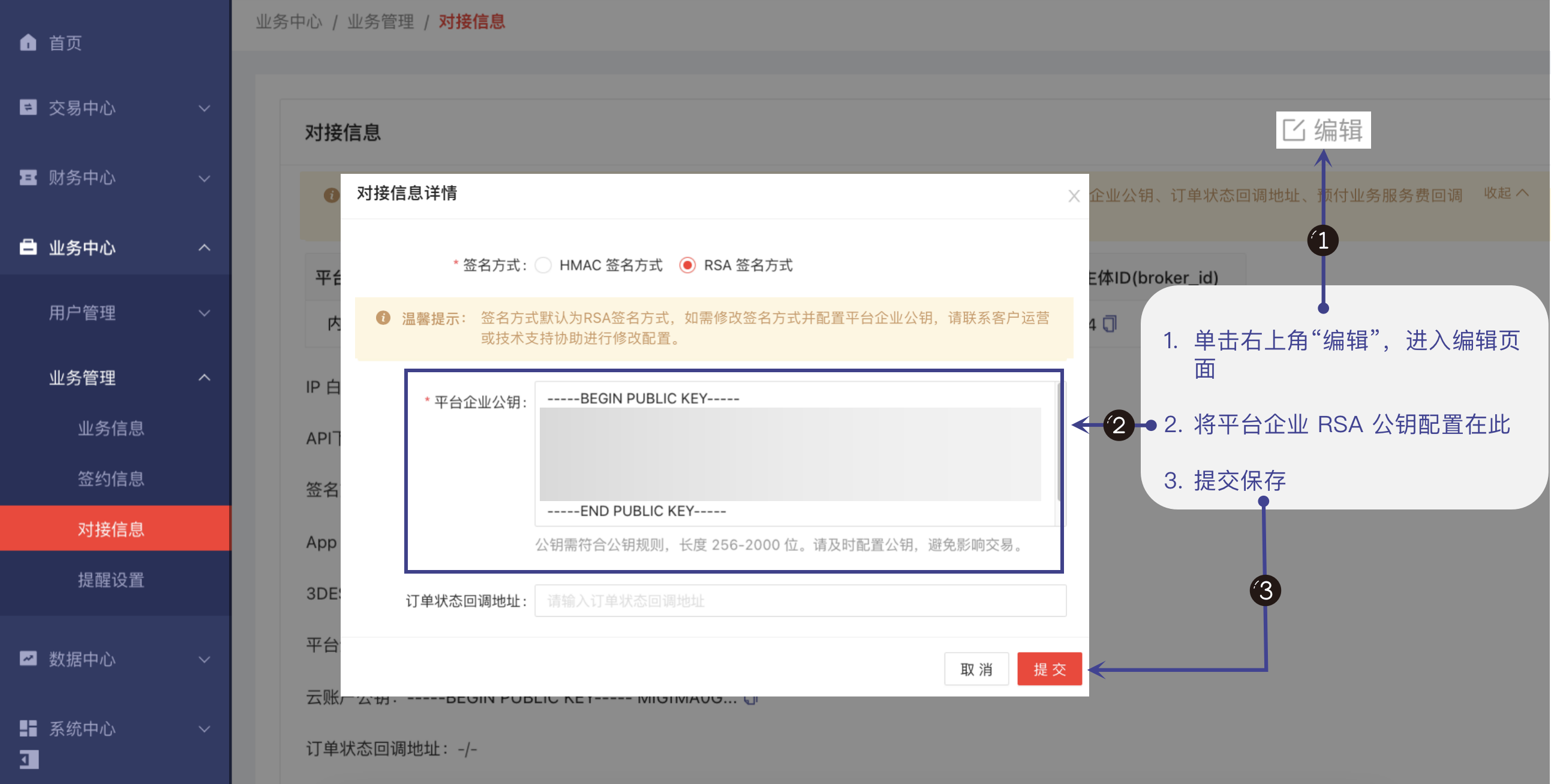
安装云账户 SDK for Node.js
通过 NPM 安装
推荐通过 Node.js 的包管理工具 NPM 获取并安装云账户 SDK for Node.js。NPM 详细介绍请参考 NPM 官网 。
执行以下安装命令安装云账户 SDK for Node.js:
npm install @yunzhanghu/sdk-nodejs --save
在您的代码中引用对应模块代码,具体引用方式可参考下文示例。
通过源码包安装
- 前往 Github 仓库 下载源码压缩包;
- 解压源码包到您项目的合适位置;
- 在您的代码中引用对应模块代码,具体引用方式可参考下文示例。
快速使用
示例功能列表
示例
const yunzhanghu = require('@yunzhanghu/sdk-nodejs')

// 实例化要请求的 client 对象(以 InvoiceClient 为例)
const client = new yunzhanghu.InvoiceClient({
  // 为了保护密钥安全,建议将密钥配置到环境变量中或配置文件中。
  // 请勿在代码中使用硬编码密钥,可能导致密钥暴露,存在安全隐患。

  // 平台企业 ID,登录云账户综合服务平台,选择“业务中心 > 业务管理 > 对接信息”获取
  dealer_id: process.env.DEALER_ID,
  // 综合服务主体 ID,登录云账户综合服务平台,选择“业务中心 > 业务管理 > 对接信息”获取
  broker_id: process.env.BROKER_ID,
  // 平台企业 App Key,登录云账户综合服务平台,选择“业务中心 > 业务管理 > 对接信息”获取
  app_key: process.env.APP_KEY,
  // 平台企业 3DES Key,登录云账户综合服务平台,选择“业务中心 > 业务管理 > 对接信息”获取
  des3_key: process.env.DES3_KEY,
  // 平台企业私钥,自行生成 RSA 公私钥,私钥请妥善保存,谨防泄露。平台企业公钥请登录云账户综合服务平台配置,选择“业务中心 > 业务管理 > 对接信息”,单击页面右上角的“编辑”,完成平台企业公钥配置
  private_key: process.env.PRIVATE_KEY,
  // 云账户公钥,登录云账户综合服务平台,选择“业务中心 > 业务管理 > 对接信息”获取
  yzh_public_key: process.env.YZH_PUBLIC_KEY,
  // 签名方式,登录云账户综合服务平台,选择“业务中心 > 业务管理 > 对接信息”获取
  // 签名方式为 RSA,参数固定为:rsa
  sign_type: process.env.SIGN_TYPE,
})

// 通过 client 对象调用想要访问的接口(Action),需要传入请求对象(Params)以及响应回调函数
// 即:client.Action(Params)..then((data) => { console.log('data', data)}).catch((err) => {console.error('error', err)})
// 如:GetInvoiceAmount 查询可开具发票额度和发票开具信息
client
  .GetInvoiceAmount({

    /**
      * @param {string} request_id:请求 ID,请求的唯一标识
      * 建议平台企业自定义 request_id,并记录在日志中,便于问题发现及排查
      * 如未自定义 request_id,将使用 SDK 中的 UUID 方法自动生成。注意:UUID 方法生成的 request_id 不能保证全局唯一,推荐自定义 request_id
      */
    request_id: 'requestIdExample123456789',
    dealer_id: process.env.DEALER_ID,
    broker_id: process.env.BROKER_ID,
  })
  .then((data) => {
    if (data.code === '0000') {
      // 操作成功
      console.log('操作成功 ', data.data)
    } else {
      // 失败返回
      console.log('失败返回 ', 'code:' + data.code + ' message:' + data.message + ' request_id:' + data.request_id)
    }
  })
  .catch((err) => {
    // 发生异常
    console.log(err.toString())
  })