
@yurikilian/lex4
v1.13.3
Published
A paginated document editor — reusable React library built on Meta Lexical

Maintainers
 yurikilian
Readme
Lex4
A paginated A4 document editor for React
Meta Lexical × A4 page rules


Live Demo · npm Package · Report Bug
A paginated document editor built as a reusable React library on top of Meta Lexical. Every page is a true discrete A4 page — no fake pages, no CSS hacks, no single-editor visual tricks.
✨ Features
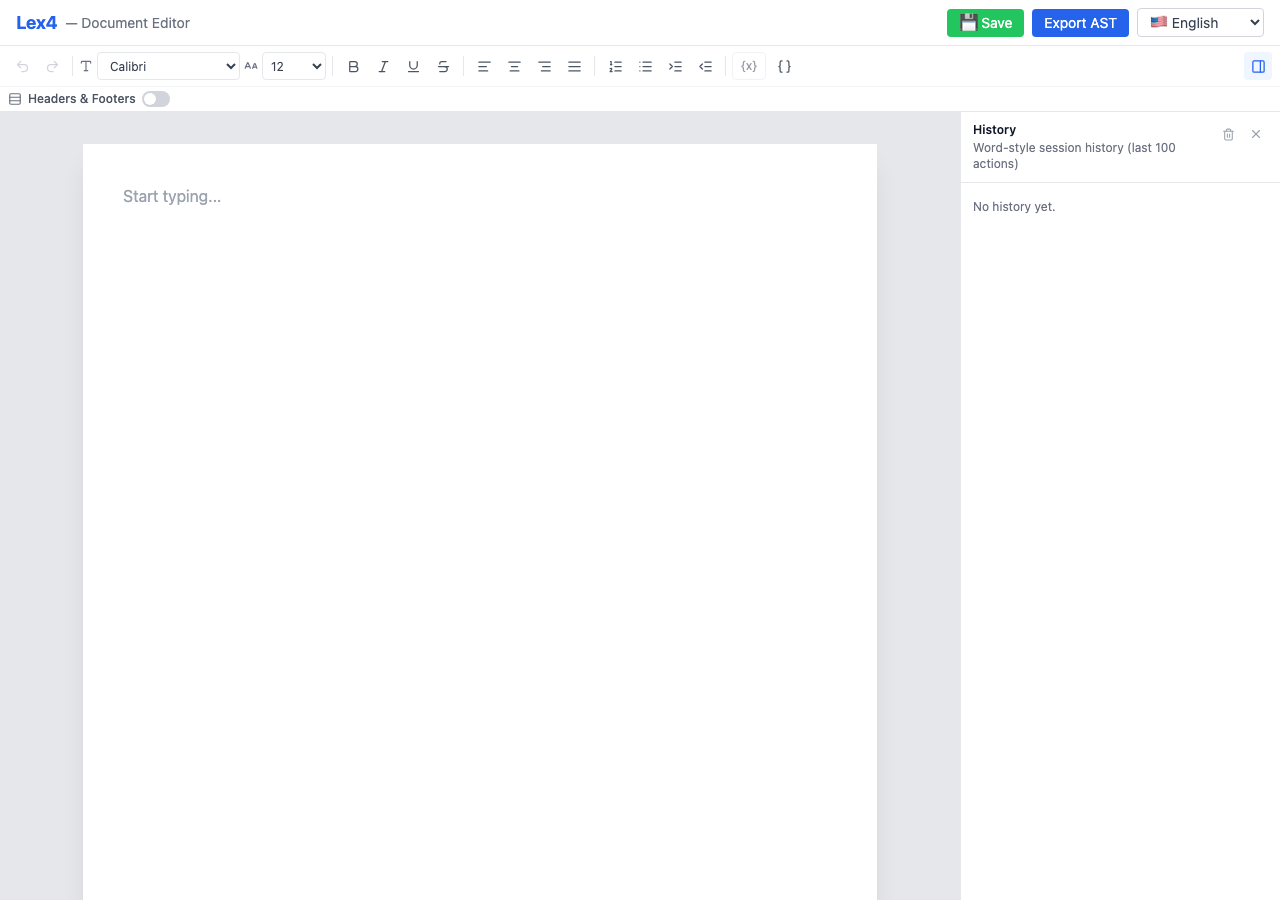
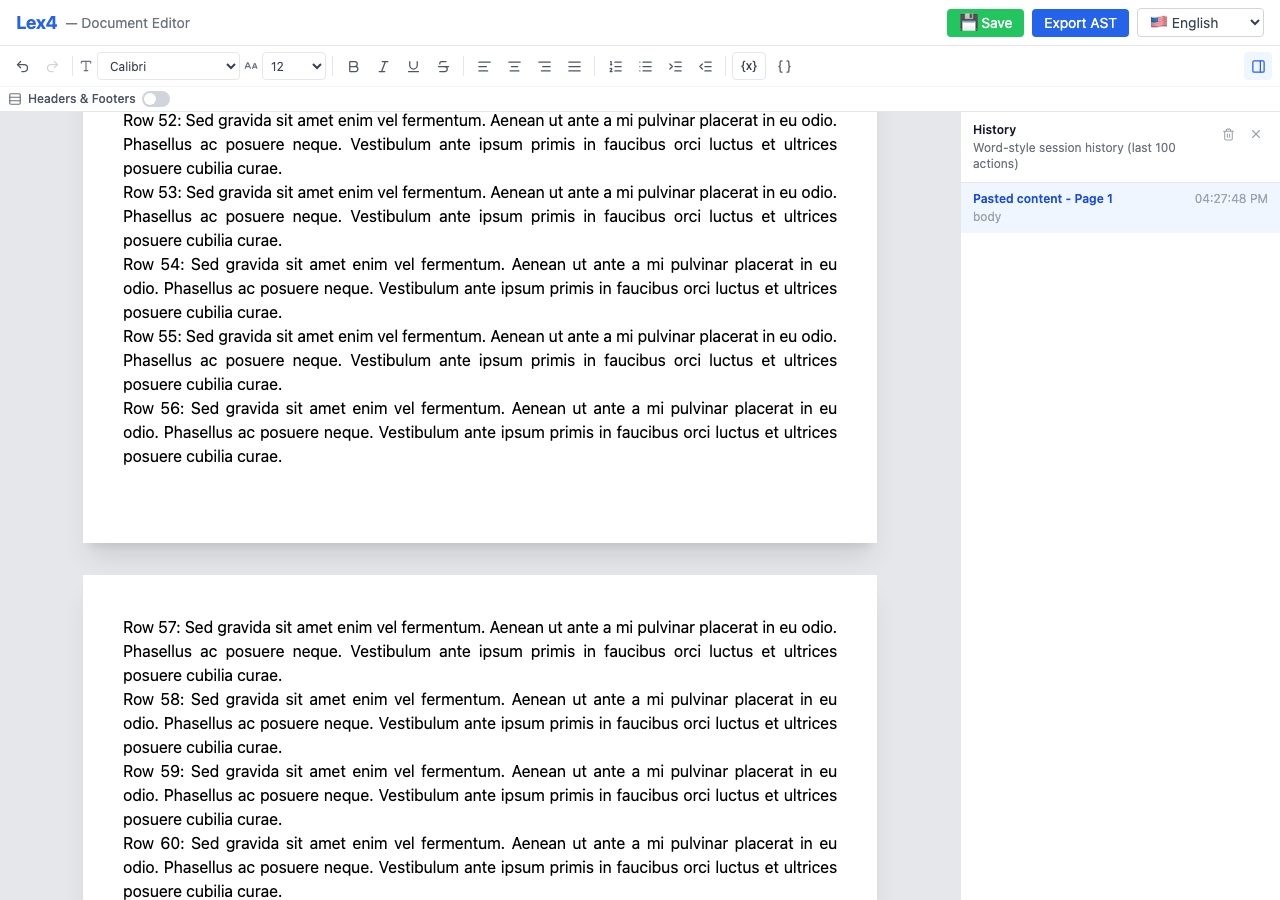
- True A4 pagination — every page is exactly 794 × 1123 CSS pixels (210 mm × 297 mm at 96 DPI)
- Automatic content flow — overflow splits at block boundaries with mid-block splitting for oversized paragraphs and lists
- Rich text formatting — bold, italic, underline, strikethrough, alignment, lists, indentation
- Selection-aware formatting — toolbar pressed state follows the caret, partial same-line block restyling is preserved, and selected variable chips can be promoted to headings
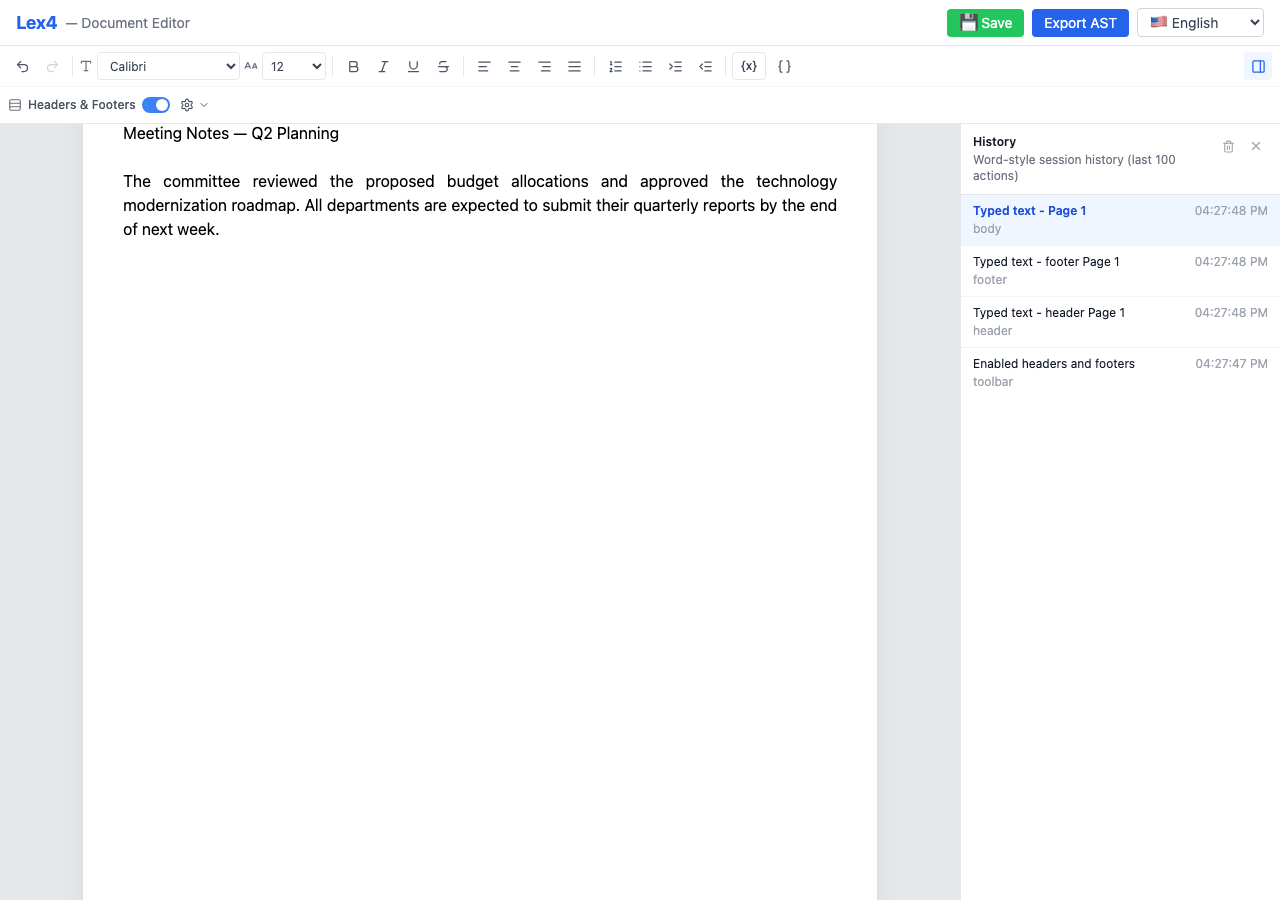
- Headers & footers — global toggle with per-page editable regions and page counters
- Multiple font families — Inter, Arial, Times New Roman, Courier New, Georgia, Verdana and more
- Font size control — per-selection font size with AST-level preservation
- Session history sidebar — Word-style action timeline with full undo/redo
- Extension architecture — opt-in features via composable extensions (
astExtension,variablesExtension) - Document AST export — clean, versioned, Lexical-independent AST for backend DOCX/PDF rendering
- Variables & placeholders — insert dynamic tokens like
{{customer.name}}with metadata export - i18n support — all UI strings externalized; override any subset for localization
- Read-only mode — disable editing while keeping the document viewable
- Native light, dark, and system themes — matte editor chrome with print-faithful white document pages
- Zero config — drop in the component and start editing
📸 Screenshots

📦 Installation
npm install @yurikilian/lex4
# or
pnpm add @yurikilian/lex4
# or
yarn add @yurikilian/lex4
Peer Dependencies
The library requires React 18+ as a peer dependency. Lexical packages are bundled.
npm install react react-dom🚀 Quick Start
import { Lex4Editor } from '@yurikilian/lex4';
import '@yurikilian/lex4/style.css';

function App() {
  return (
    <Lex4Editor
      onDocumentChange={(doc) => console.log(doc)}
    />
  );
}
With Extensions
Extensions add opt-in capabilities. The two built-in extensions are astExtension (document AST export) and variablesExtension (dynamic variable placeholders):
import { useRef, useMemo } from 'react';
import {
  Lex4Editor,
  Lex4EditorHandle,
  astExtension,
  variablesExtension,
  VariableDefinition,
} from '@yurikilian/lex4';
import '@yurikilian/lex4/style.css';

const variables: VariableDefinition[] = [
  { key: 'customer.name', label: 'Customer Name', group: 'Customer', valueType: 'string' },
  { key: 'proposal.date', label: 'Proposal Date', group: 'Proposal', valueType: 'date' },
];

function App() {
  const editorRef = useRef<Lex4EditorHandle>(null);

  const extensions = useMemo(() => [
    astExtension(),
    variablesExtension(variables),
  ], []);

  const handleSave = () => {
    const ast = editorRef.current?.getDocumentAst();
    console.log(JSON.stringify(ast, null, 2));
  };

  return (
    <>
      <Lex4Editor
        ref={editorRef}
        extensions={extensions}
        onDocumentChange={(doc) => console.log(doc)}
      />
      <button onClick={handleSave}>Export AST</button>
    </>
  );
}
Read-Only Viewer
<Lex4Editor
  initialDocument={savedDocument}
  readOnly={true}
/>
Dark Mode
Lex4 themes its application chrome while keeping the A4 sheet white, so the on-screen document remains faithful to print and export output.
<Lex4Editor theme="dark" />
<Lex4Editor theme="system" />
The theme prop accepts light, dark, or system and defaults to light for backwards compatibility. Every palette value is exposed as a CSS custom property on .lex4-editor; consuming applications can override individual tokens without leaking Lex4 defaults into their global :root theme.
📖 API Reference
<Lex4Editor /> Component
The main editor component. Drop it into any React application.
| Prop | Type | Default | Description |
|------|------|---------|-------------|
| initialDocument | Lex4Document | Empty document | Pre-populate the editor with saved content |
| onDocumentChange | (doc: Lex4Document) => void | — | Called on every document mutation |
| headerFooterEnabled | boolean | false | Initial header/footer toggle state |
| onHeaderFooterToggle | (enabled: boolean) => void | — | Called when the user toggles headers/footers |
| readOnly | boolean | false | Disable editing (view-only mode) |
| theme | "light" \| "dark" \| "system" | "light" | Theme the editor chrome; the A4 page remains print-white |
| extensions | Lex4Extension[] | [] | Extensions to load (e.g., astExtension(), variablesExtension(defs)) |
| translations | DeepPartial<Lex4Translations> | English | Partial i18n overrides, deep-merged with defaults |
| toolbar | Lex4ToolbarConfig | All controls visible with labels | Controls visibility and labels for built-in toolbar actions such as history, variables, and header/footer |
| onSave | (payload: { document, ast, json }) => void | — | Called when the host app triggers a save (includes full Lex4Document) |
| captureHistoryShortcutsOnWindow | boolean | true | Capture ⌘Z/⌘⇧Z at the window level |
| className | string | — | Additional CSS class for the editor root |
Lex4EditorHandle
The editor ref exposes built-in chrome controls, and extensions can add more methods on top.
| Method | Signature | Description |
|--------|-----------|-------------|
| setHistorySidebarOpen(open) | (open: boolean) => void | Opens or closes the history sidebar programmatically |
| toggleHistorySidebar() | () => void | Toggles the history sidebar |
| insertDocumentContent(document) | (document: Lex4Document) => boolean | Inserts the body content of another saved Lex4 document at the current cursor position |
Extensions
Extensions are opt-in feature modules that add capabilities to the editor without coupling.
astExtension()
Adds document AST export. Contributes imperative handle methods:
| Method | Signature | Description |
|--------|-----------|-------------|
| getDocumentAst() | () => DocumentAst | Returns the document as a clean, typed AST |
| getDocumentJson() | () => string | Returns the AST serialized as formatted JSON |
| buildSavePayload(opts?) | (opts?) => SaveDocumentRequest | Wraps the AST into a REST-ready payload |
const extensions = [astExtension()];
// then via ref:
const ast = editorRef.current?.getDocumentAst();
variablesExtension(definitions)
Adds variable placeholders — dynamic tokens rendered as non-editable chips in the editor and preserved as structured nodes in the exported AST.
| Method | Signature | Description |
|--------|-----------|-------------|
| insertVariable(key) | (key: string) => void | Inserts a variable at the current cursor position |
| refreshVariables(defs) | (defs: VariableDefinition[]) => void | Updates the available variable definitions |
| setVariablePanelOpen(open) | (open: boolean) => void | Opens or closes the variable side panel programmatically |
| toggleVariablePanel() | () => void | Toggles the variable side panel |
Also adds:
- Toolbar button — variable picker dropdown for inserting variables inline
- Host-controlled side panel — opens a searchable variable panel on the right, which can also be controlled from app chrome via the handle methods above
- Variable node — custom Lexical node rendered as a non-editable chip
- Atomic keyboard navigation — arrow keys select a chip as one stop, highlight it, and always expose a writable caret position on either side
- Optional segments — a selected variable or text range can be toggled as conditional content; boundary navigation exits cleanly without trapping the caret
- Selection formatting — selected chips participate in toolbar inline/block formatting and keep heading/paragraph styling in sync with export
const variables: VariableDefinition[] = [
  { key: 'customer.name', label: 'Customer Name', group: 'Customer', valueType: 'string' },
  { key: 'proposal.date', label: 'Proposal Date', group: 'Proposal', valueType: 'date' },
];

const extensions = [variablesExtension(variables)];
In the exported AST, variables appear as { type: "variable", key: "customer.name" } nodes within block content, and their definitions appear under metadata.variables.
Types
import type { SerializedEditorState } from 'lexical';

type PageCounterMode = 'none' | 'header' | 'footer' | 'both';

/** Top-level document state — serialize this to persist documents */
interface Lex4Document {
  pages: PageState[];
  headerFooterEnabled: boolean;
  pageCounterMode: PageCounterMode;
  defaultHeaderState: SerializedEditorState | null;
  defaultFooterState: SerializedEditorState | null;
  defaultHeaderHeight: number;
  defaultFooterHeight: number;
}

/** State for a single page */
interface PageState {
  id: string;
  bodyState: SerializedEditorState | null;
  headerState: SerializedEditorState | null;
  footerState: SerializedEditorState | null;
  headerHeight: number;
  footerHeight: number;
  bodySyncVersion: number;
  headerSyncVersion: number;
  footerSyncVersion: number;
}
Helper Functions
| Function | Signature | Description |
|----------|-----------|-------------|
| createEmptyDocument() | () => Lex4Document | Creates a blank document with one empty A4 page |
| createEmptyPage() | (id?: string) => PageState | Creates a single empty page |
Constants
| Constant | Value | Description |
|----------|-------|-------------|
| A4_WIDTH_PX | 794 | A4 width in CSS pixels at 96 DPI |
| A4_HEIGHT_PX | 1123 | A4 height in CSS pixels at 96 DPI |
| A4_WIDTH_MM | 210 | A4 width in millimeters |
| A4_HEIGHT_MM | 297 | A4 height in millimeters |
| MAX_HEADER_HEIGHT_PX | 225 | Maximum header height (20% of page) |
| MAX_FOOTER_HEIGHT_PX | 225 | Maximum footer height (20% of page) |
Hooks
These hooks are exported for advanced use cases where you need to build custom page layouts:
| Hook | Description |
|------|-------------|
| usePagination | Core pagination logic — overflow/underflow detection and page management |
| useOverflowDetection | Monitors content height and triggers reflow when content exceeds the page body |
| useHeaderFooter | Header/footer state management and chrome template application |
🌐 i18n (Internationalization)
All UI strings are externalized and can be overridden via the translations prop. No external i18n library is forced on consumers.
Basic Override
<Lex4Editor
  translations={{
    toolbar: { undo: 'Desfazer', redo: 'Refazer', bold: 'Negrito (Ctrl+B)' },
    header: { placeholder: 'Cabeçalho' },
    footer: { placeholder: 'Rodapé' },
  }}
/>
Bridge with i18next
If your app already uses i18next, bridge it:
import { useTranslation } from 'react-i18next';

function App() {
  const { t } = useTranslation();

  return (
    <Lex4Editor
      translations={{
        toolbar: {
          undo: t('editor.undo'),
          redo: t('editor.redo'),
          bold: t('editor.bold'),
        },
      }}
    />
  );
}
Available String Keys
| Section | Keys | Examples |
|---------|------|---------|
| toolbar | editing, block type, history | undo, paragraph, heading6, history, openHistory |
| history | labels and action descriptions | title, empty, actions.blockTypeChanged, actions.insertedDocumentContent |
| variables | panel and creation flows | title, available, searchPlaceholder, openPanel, createVariableTitle |
| header / footer | 1 each | placeholder |
| sidebar | 1 | close |
Dynamic strings use {{key}} interpolation: "Font changed to {{value}}".
Import DEFAULT_TRANSLATIONS and Lex4Translations to see the full shape:
import { DEFAULT_TRANSLATIONS } from '@yurikilian/lex4';
import type { Lex4Translations } from '@yurikilian/lex4';
🎨 Theming & Customization
All styling uses CSS custom properties (design tokens) and semantic .lex4-* classes — no Tailwind utilities in the production output. This makes style.css safe to import alongside any CSS framework.
Design Tokens
Override tokens on .lex4-editor to theme the entire editor without !important:
.lex4-editor {
  /* Brand / accent */
  --lex4-color-primary: #10b981;         /* emerald instead of blue */
  --lex4-color-primary-light: #ecfdf5;
  --lex4-color-primary-text: #047857;

  /* Surfaces & text */
  --lex4-color-bg: #ffffff;
  --lex4-color-bg-canvas: #f8fafc;       /* lighter canvas */
  --lex4-color-text: #111827;
  --lex4-color-text-secondary: #6b7280;

  /* Dimensions */
  --lex4-sidebar-width: 280px;           /* narrower sidebar */
  --lex4-font-family: 'Times New Roman', serif;
}
See the full list of tokens in packages/editor/src/styles.css.
Stable CSS Selectors
Every UI region has a semantic class you can target:
| Region | Selector |
|--------|----------|
| Root | .lex4-editor |
| Toolbar | .lex4-toolbar |
| Toolbar button | .lex4-toolbar-btn |
| Toolbar select | .lex4-toolbar-select |
| Document canvas | .lex4-canvas |
| Page | .lex4-page |
| Page body | .lex4-page-body |
| Page header | .lex4-page-header |
| Page footer | .lex4-page-footer |
| Sidebar | .lex4-sidebar |
| History entry | .lex4-history-entry-row |
| Variable chip | .lex4-variable-chip |
| Variable picker | .lex4-variable-picker |
Extension-Level Theming
Extensions can contribute CSS variables and a root class name:
const darkModeExtension: Lex4Extension = {
  name: 'dark-mode',
  cssVariables: {
    '--lex4-color-bg': '#1a1a2e',
    '--lex4-color-text': '#e0e0e0',
    '--lex4-color-bg-canvas': '#16213e',
  },
  rootClassName: 'lex4-dark',
};
📝 Document AST
The AST is a clean, versioned, Lexical-independent structure designed for backend consumption (e.g., DOCX/PDF generation). It preserves semantic structure, formatting marks, font choices, header/footer layout, A4 page metadata, and variable references.
Requires
astExtension()— the AST export is opt-in via the extension system.
// Export via imperative ref
const ast = editorRef.current?.getDocumentAst();

// Or build a REST payload
const payload = editorRef.current?.buildSavePayload({
  exportTarget: 'pdf',
  documentId: 'doc-123',
});

await fetch('/api/documents/export', {
  method: 'POST',
  headers: { 'Content-Type': 'application/json' },
  body: JSON.stringify(payload),
});
AST Shape (top-level)
interface DocumentAst {
  version: '1.0.0';
  page: {
    format: 'A4';
    widthMm: 210;
    heightMm: 297;
    margins: { topMm, rightMm, bottomMm, leftMm };
  };
  headerFooter: {
    enabled: boolean;
    pageCounterMode: 'none' | 'header' | 'footer' | 'both';
    defaultHeader: ContentAst | null;
    defaultFooter: ContentAst | null;
  };
  pages: PageAst[];
  metadata: {
    variables: Record<string, VariableDefinitionAst>;
  };
}
REST Payload
interface SaveDocumentRequest {
  document: DocumentAst;
  exportTarget?: 'pdf' | 'docx';
  documentId?: string;
  metadata?: Record<string, string>;
}
🏗️ Architecture
Multi-Editor Discrete Page Model
Unlike most web-based "paginated" editors that use a single editor with CSS visual breaks, Lex4 uses a true multi-editor architecture where each page body is an independent Lexical editor instance coordinated by a unified document state:
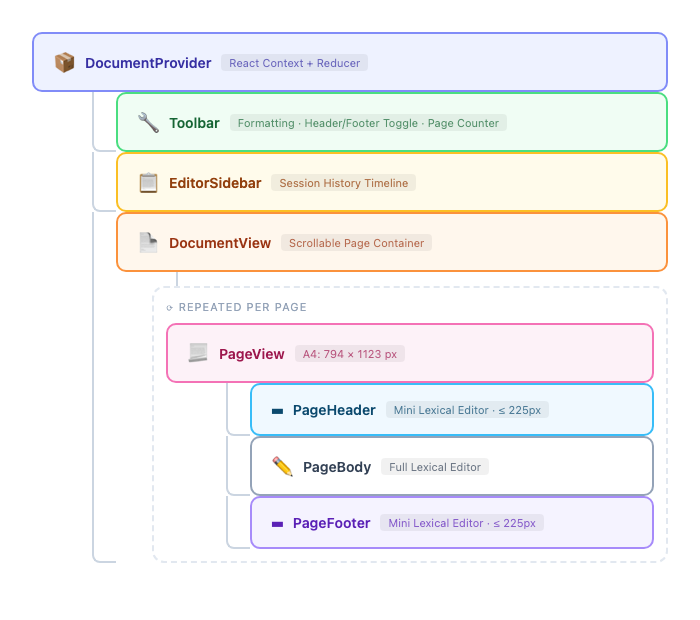
Content Flow Engine
The pagination engine is built as pure functions that transform page state arrays:
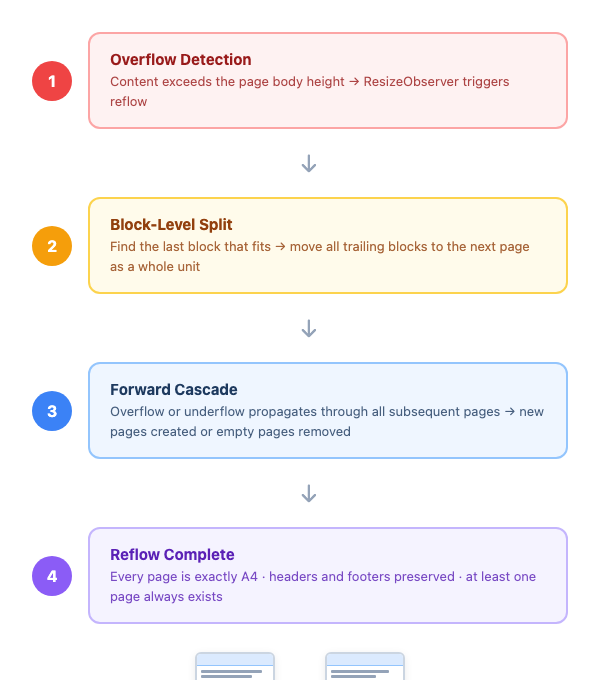
Extension Architecture
Features are added via composable extensions that can contribute nodes, plugins, toolbar items, side panels, context providers, and imperative handle methods:
interface Lex4Extension {
  name: string;
  nodes?: Klass<LexicalNode>[];        // custom Lexical nodes
  bodyPlugins?: React.ComponentType[];  // plugins per page editor
  toolbarItems?: React.ComponentType[]; // toolbar UI additions
  sidePanel?: React.ComponentType;      // right-side panel
  provider?: React.ComponentType<...>;  // context provider wrapper
  themeOverrides?: Partial<EditorThemeClasses>;
  cssVariables?: Record<string, string>;  // CSS custom property overrides
  rootClassName?: string;                 // extra class on editor root
  handleMethods?: (ctx) => Record<string, Function>;
}
Key Invariants
- Every page is exactly A4 (794 × 1123 px at 96 DPI) — no dynamic heights
- Header and footer regions never overlap body content
- Overflow always creates full A4 pages, never partial pages
- At least one page always exists — the document is never empty
- Oversized blocks are automatically split across pages (mid-block splitting)
📁 Project Structure
lex4/
├── packages/
│   └── editor/               # @yurikilian/lex4 — the publishable library
│       ├── src/
│       │   ├── ast/          # AST types, serializers, block/inline mappers, payload builder
│       │   ├── components/   # React components (Lex4Editor, PageView, Toolbar, etc.)
│       │   ├── constants/    # A4 dimensions, layout math
│       │   ├── context/      # DocumentProvider, document reducer, actions
│       │   ├── engine/       # Pagination logic — pure functions (reflow, overflow, paginate)
│       │   ├── extensions/   # Extension system, astExtension, variablesExtension
│       │   ├── hooks/        # usePagination, useOverflowDetection, useHeaderFooter
│       │   ├── i18n/         # Translations types, defaults, context provider
│       │   ├── lexical/      # Editor config, plugins (paste, history), custom commands
│       │   ├── types/        # TypeScript interfaces (Lex4Document, PageState, etc.)
│       │   ├── utils/        # Editor state manipulation helpers
│       │   └── variables/    # VariableNode, VariablePlugin, VariableProvider
│       └── dist/             # Built output (ESM + CJS + types + CSS)
├── demo/                     # Demo app (deployed to GitHub Pages)
├── e2e/                      # Playwright end-to-end tests
├── .github/workflows/        # CI, npm publish, GitHub Pages deployment
└── docs/screenshots/         # Screenshots for README
🛠️ Development
Prerequisites
- Node.js ≥ 20.19
- pnpm ≥ 9
Setup
# Clone the repo
git clone https://github.com/yurikilian/lex4.git
cd lex4

# Install dependencies
pnpm install

# Build the library
pnpm build

# Start the demo app at http://localhost:3000
pnpm dev
Commands
| Command | Description |
|---------|-------------|
| pnpm dev | Start the demo app dev server |
| pnpm build | Build the @yurikilian/lex4 library |
| pnpm test | Run unit tests (Vitest) |
| pnpm test:e2e | Run E2E tests (Playwright) |
| pnpm lint | Type-check all packages |
Running E2E Tests
# Install Playwright browsers (first time only)
pnpm --filter e2e exec playwright install chromium

# Run all E2E tests
pnpm test:e2e

# Run with headed browser
pnpm --filter e2e test:headed

# Run with Playwright UI
pnpm --filter e2e test:ui
Test Suite
| Category | Framework | Count | Description | |----------|-----------|-------|-------------| | Unit | Vitest | 221 | Engine logic, reducers, AST serializers, i18n, variable nodes | | E2E | Playwright | 129 | Full user flows — typing, formatting, pagination, header/footer, variables, theme, i18n |
🔧 Build & Bundle
The library is built with Vite in library mode, producing:
| Output | Path | Description |
|--------|------|-------------|
| ESM | dist/lex4-editor.js | ES module for modern bundlers |
| CJS | dist/lex4-editor.cjs | CommonJS for Node.js / legacy bundlers |
| Types | dist/index.d.ts | Full TypeScript declarations |
| CSS | dist/style.css | Pure CSS with design tokens (no Tailwind) |
| Source maps | dist/*.map | Debugging support |
React and ReactDOM are externalized — they are not bundled and must be provided by the consuming application. Lexical packages are bundled as direct dependencies.
🚢 Publishing to npm
Releases are automated via GitHub Actions. To publish a new version:
- Update the version in
packages/editor/package.json - Commit and push to
main - Create a GitHub Release with a tag matching the version (e.g.
v0.2.0) - The publish workflow runs CI, then publishes to npm with provenance
Note: You need to add an
NPM_TOKENsecret to the repository settings.
🌐 Demo Deployment
The demo app is automatically deployed to GitHub Pages on every push to main:
🔗 https://yurikilian.github.io/lex4/
To deploy manually, trigger the workflow from the Actions tab.
🧩 Tech Stack
| Technology | Role | |------------|------| | TypeScript | Static typing | | React 18 | UI framework | | Meta Lexical | Rich text editing engine | | Vite | Library build (ESM + CJS) and dev server | | Tailwind CSS | Dev-only utility reference (not in production output) | | Vitest | Unit testing | | Playwright | End-to-end testing | | pnpm | Package manager (monorepo workspaces) | | GitHub Actions | CI/CD, npm publish, Pages deployment |
⚠️ Known Limitations
| Limitation | Details |
|------------|---------|
| Heuristic initial pagination | Block heights are estimated at 24px per line until the first render. ResizeObserver corrects this on mount. |
| No collaborative editing | The document model is designed for single-user editing. Real-time collaboration (e.g. CRDT/OT) is out of scope. |
| No table support | Tables are not supported as block types. |
🤝 Contributing
Contributions are welcome! Please:
- Fork the repository
- Create a feature branch (
git checkout -b feat/my-feature) - Commit your changes with clear messages
- Push to your fork and open a Pull Request
Please ensure pnpm lint && pnpm build && pnpm test pass before submitting.