
@zahid15/mcpprobe
v0.3.0
Published
Safety-first scripted testing and fuzzing for MCP servers

Maintainers
 zahid15
Readme
mcpprobe
Scripted testing, fuzzing and benchmarking for Model Context Protocol servers, as a CLI and a TypeScript library.
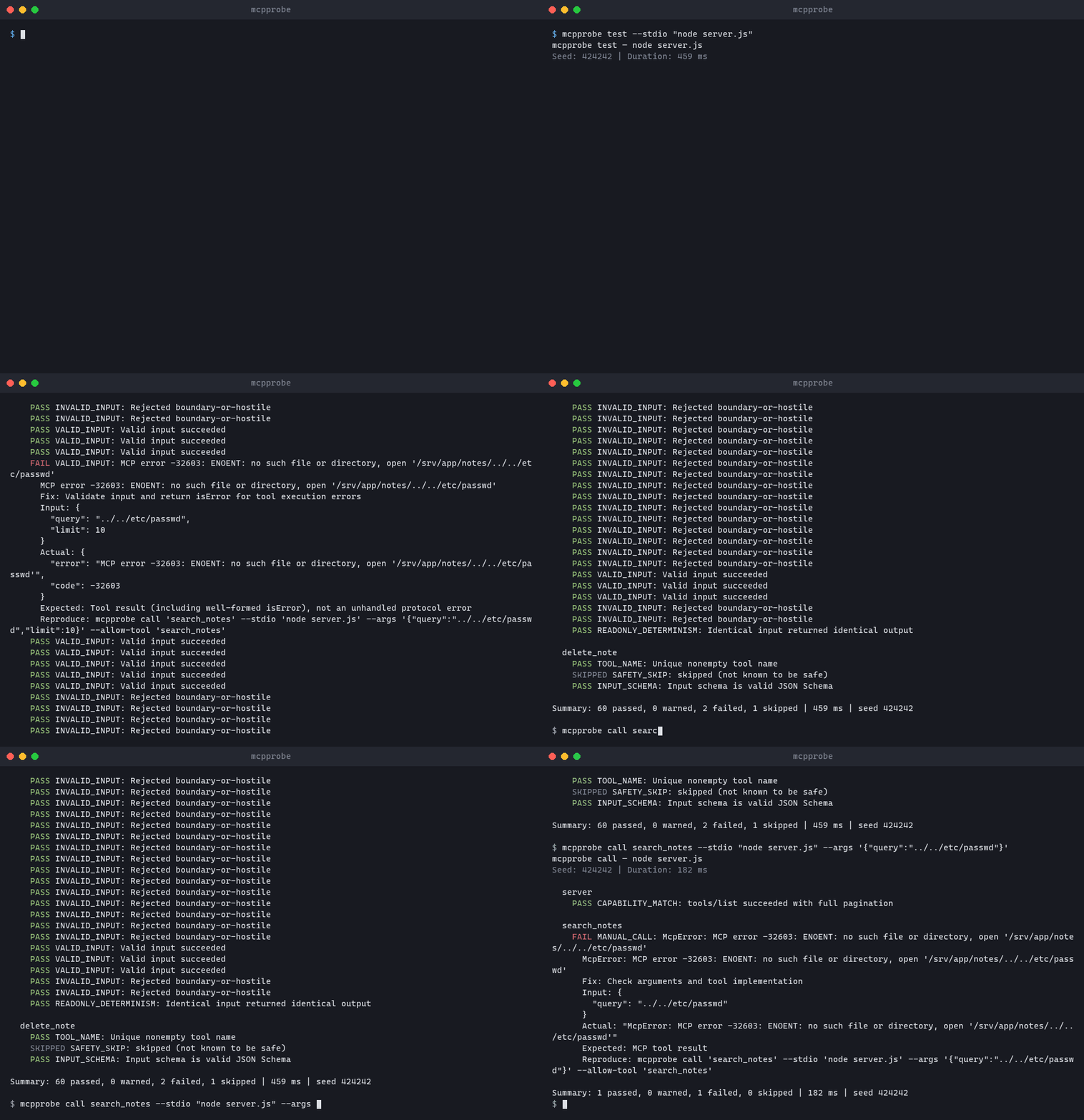
Features
- Checks the protocol, error handling, schemas, resources, prompts, logging, completions, progress and cancellation, plus Origin, auth and session handling over HTTP.
- Calls tools with valid, invalid and hostile inputs from their schemas, and shrinks failing inputs.
- Finds crashes, leaked stack traces or secrets, slow calls, and prompt injection hidden in tool descriptions.
- Runs your own scenarios, catches breaking changes against a saved snapshot, and runs as a GitHub Action.
- Only calls read-only tools unless you allow more. Reports as console, JSON, JUnit, Markdown or SARIF.
Installation
Requires Node.js 22.12 or later. The library is ESM only.
npm install -g @zahid15/mcpprobe   # CLI
npm install @zahid15/mcpprobe      # library
Quick Start
mcpprobe inspect --stdio "node ./server.js"                # list tools, resources and prompts
mcpprobe test --stdio "node ./server.js"                   # run all checks
mcpprobe fuzz --stdio "node ./server.js" --tool search     # random inputs for one tool
mcpprobe bench --http https://host/mcp --tool search       # latency and throughput
mcpprobe call search --stdio "node ./server.js" --args '{"query":"hello"}'
mcpprobe run scenarios.yaml --stdio "node ./server.js"     # your own expectations
mcpprobe snapshot baseline.json --stdio "node ./server.js" # save the inventory
mcpprobe diff baseline.json --stdio "node ./server.js"     # fail on breaking changes
scenarios: # each step has one of call, read (resource URI) or prompt; without expect it must succeed
- name: finds milk
call: search_notes
args: { query: milk }
expect: { contains: "Buy milk", maxMs: 500 } # also: notContains, matches, isError, structured, error, errorCodeExit codes: 0 passed, 1 checks failed, 2 invalid command or config, 3 could not connect. Run mcpprobe <command> --help for all options. To call tools that are not read-only, use --allow-tool <name>, --allow-unsafe or --allow-destructive, plus --yes in CI.
import { resolveOptions, testServer, formatReport } from "@zahid15/mcpprobe";
const report = await testServer(resolveOptions({}, { stdio: "node ./server.js" }));
console.log(formatReport(report, "markdown"));
process.exitCode = report.exitCode;
API
| Function | Returns |
|---|---|
| resolveOptions(config?, flags?, env?) | Options built from a config object and flags such as stdio, http, headers, tool, seed, allowTool |
| loadConfig(file?) | Promise<Config> from mcpprobe.config.{json,yaml,yml} in the working directory, or the given file |
| inspect(options) | Promise<Report> with the server inventory in report.inventory |
| testServer(options, strict?) | Promise<Report> from the full check suite |
| fuzz(options, strict?) | Promise<Report> from fuzzing (options.runs per tool) |
| bench(options, strict?) | Promise<Report> with latency stats in report.benchmarks |
| callTool(options, name, args) | Promise<{ result?, report }> for a single tool call |
| runScenarios(options, scenarios, strict?) | Promise<Report> from scenarios, loaded with loadScenarios(file) |
| diff(options, baseline, strict?) | Promise<Report> comparing the server with a baseline from loadSnapshot(file) |
| diffInventories(before, after) | Finding[] comparing two inventories without a server |
| formatReport(report, format?, color?) | string in console, json, junit, markdown or sarif format |
A Report contains findings (each with status, id, explanation, fix and an optional reproduction), a summary count per status, and an exitCode. Types are exported: Report, Finding, Options, Config and more. Invalid options throw UsageError. Setting allowUnsafe or allowDestructive also requires yes: true.
GitHub Action
- uses: zahidhasann88/[email protected]  # needs Node.js 22.12+ and permissions: security-events: write
  with:
    args: --stdio "node server.js"      # command defaults to test; also run, diff, fuzz, bench
Findings appear in the job summary and the Security tab; set upload-sarif: false if code scanning is off. All inputs and outputs are in action.yml.
Configuration
The CLI reads mcpprobe.config.yaml (or .yml / .json) from the working directory. Flags override it, and ${NAME} reads an environment variable. All keys are in mcpprobe.config.example.yaml.
defaultTarget: local
targets:
  local:
    stdio: "node ./server.js"
  staging:
    http: https://host/mcp
    headers:
      Authorization: "Bearer ${TOKEN}"