
@zigbang/storybook-addon-react-grab
v0.1.3
Published
Storybook addon: grab story elements into your clipboard for AI agents, enriched with story context.
Downloads
226

Maintainers
 zigbang
Readme
@zigbang/storybook-addon-react-grab


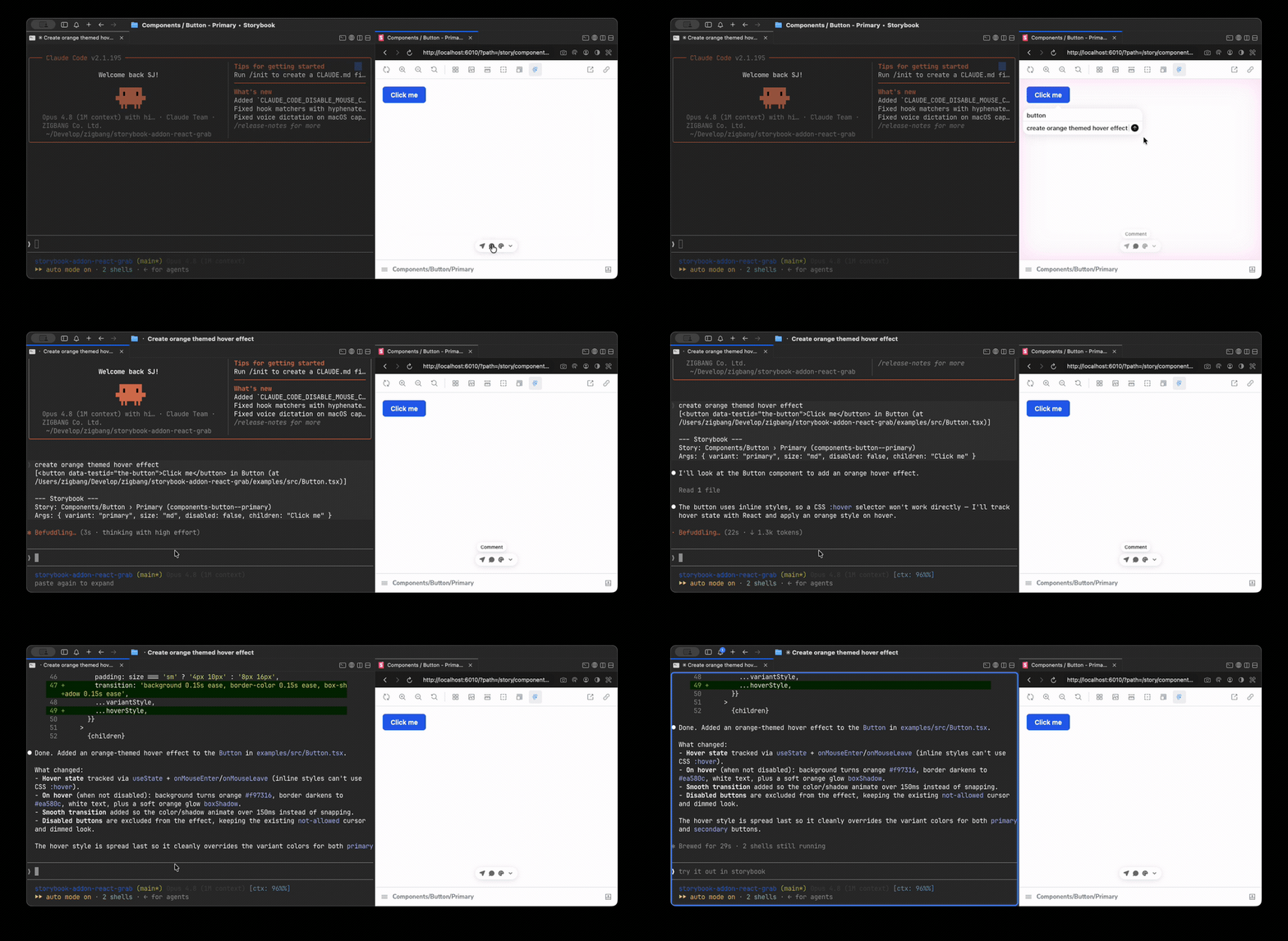
Brings react-grab into Storybook so that hovering a story element and pressing ⌘C (or Ctrl+C on Windows/Linux) copies element context enriched with the current story's identity and args — giving AI agents a precise, actionable description of exactly which component variant you are looking at.
▶ Live demo — try grabbing an element in the example Storybook.
What gets copied
react-grab produces its own base context line; this addon appends a Storybook block:
[<button> in Button (at src/Button.tsx:12:5)]

--- Storybook ---
Story: Components/Button › Primary (components-button--primary)
Args: { variant: "primary", size: "md" }
The first line is react-grab's own output. Everything from --- Storybook --- down is added by this addon.
Requirements
- Storybook 9 or newer (peer range
>=9; verified on 9 and 10) react-grabas a peer dependency
Install
Install the addon and react-grab alongside it — react-grab is a peer dependency and is
not bundled, so it won't be there unless your project already depends on it:
pnpm add -D @zigbang/storybook-addon-react-grab react-grabThen add the addon to .storybook/main.ts:
// .storybook/main.ts
export default {
  addons: [
    '@zigbang/storybook-addon-react-grab',
    // ...other addons
  ],
};
Toolbar toggle
A react-grab logo button appears in the Storybook toolbar. It is a master on/off for react-grab in the preview: when off, grabbing is disabled (no hover/⌘C interception) and react-grab's own bottom toolbar is hidden; when on, both are active. The icon follows the toolbar's foreground color, so it adapts to light/dark themes.
Options
Configure via the reactGrab parameter on a story or in preview.ts:
// .storybook/preview.ts
export default {
  parameters: {
    reactGrab: {
      includeArgs: true,    // default: true — append current story args to the block
      maxDepth: 3,          // default: 3  — depth when serializing nested arg objects
      maxStringLength: 80,  // default: 80 — truncate long string arg values
      maxArrayItems: 10,    // default: 10 — cap items shown for array args
    },
  },
};
| Option | Type | Default | Description |
|---|---|---|---|
| includeArgs | boolean | true | Append the current story's args to the Storybook block |
| maxDepth | number | 3 | Depth limit when serializing nested arg objects |
| maxStringLength | number | 80 | Length limit for serialized string values (longer values are shortened) |
| maxArrayItems | number | 10 | Max items shown for array args |
| includeUsage | — | — | Reserved for v1.1 — not implemented in v1 |
On/off is controlled by the toolbar toggle (above), not a parameter. These options only shape the appended Storybook block and how story args are serialized.
Roadmap (v1.1)
- CSF story source snippet in the copied payload
- Usage JSX reconstruction (the
includeUsageoption)
Docs (MDX) pages with multiple stories are supported: each grabbed element resolves to its
own canvas's story via the nearest data-sb-story-id ancestor.
License
MIT © 2026 Zigbang