
@zish/agent-desk
v0.1.2
Published
Self-hostable control plane for Claude Code agents — install with `npm i -g @zish/agent-desk` then run `agdesk setup`

Maintainers
 zish
zishReadme
AgentDesk
The self-hosted mission control for Claude Code agents. A dashboard, orchestrator, and multi-session runtime for building, deploying, and managing autonomous AI agents — with kanban task boards, per-agent chat, a project file explorer, a built-in stealth browser, and BYO LLM providers. All running on your own machine.
npm i -g @zish/agent-desk && agdesk setup
agdesk start
# open http://localhost:3737
What is AgentDesk?
AgentDesk turns your machine (laptop, VPS, home server) into a private control plane where humans and AI agents collaborate on real work. It's not just a chat wrapper — it's a full workspace:
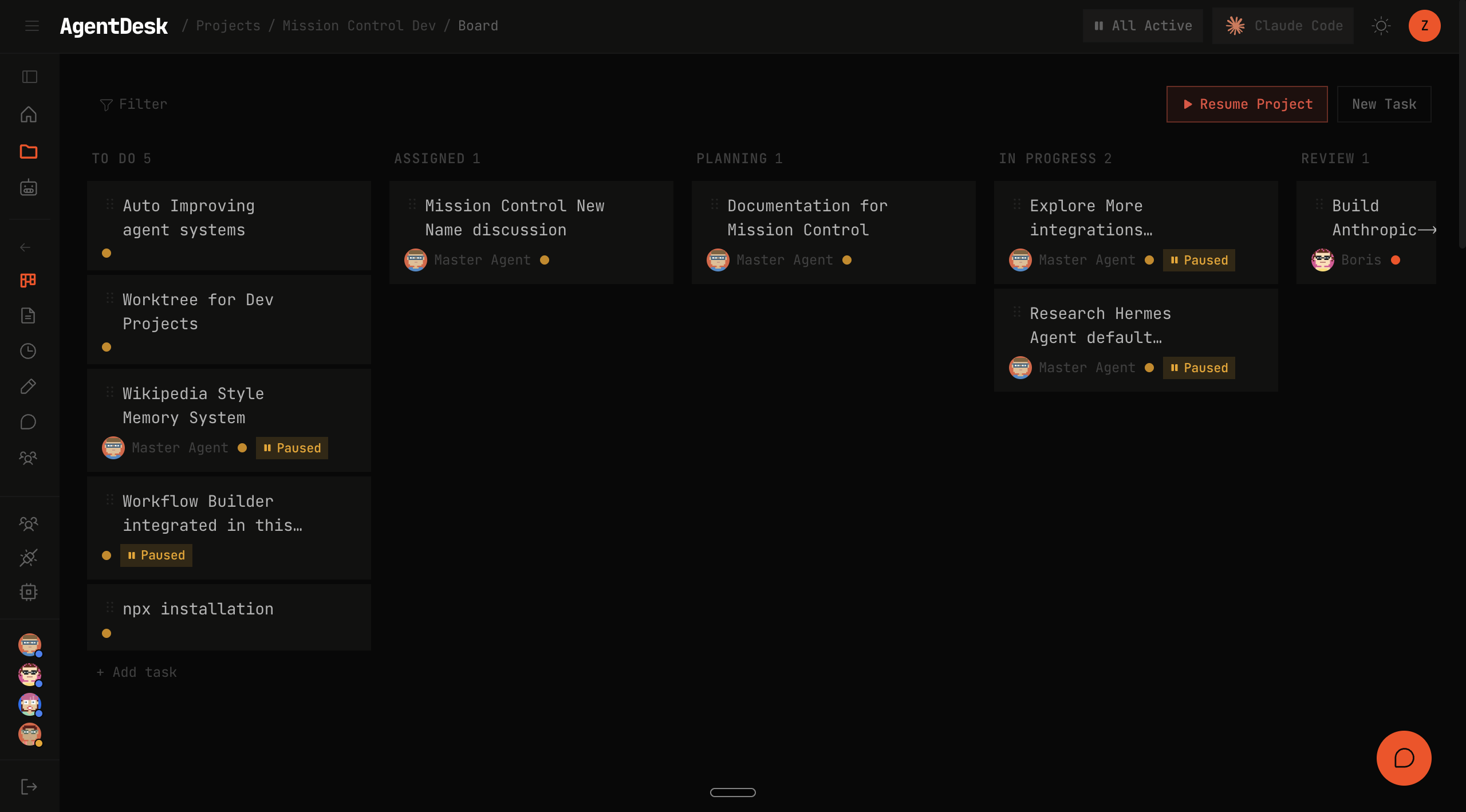
- Project-scoped kanban board. Every unit of work lives as a task on a board. Humans and agents create tasks, assign them, comment, @mention each other, and move cards through
todo → planning → in-progress → review → done. Tasks carry priority, tags, subtasks, and a full comment thread. - Multi-user, multi-agent by design. Invite teammates with their own logins. Spin up any number of agents, each with their own identity (name, avatar, role), LLM provider/model, skills, and persistent memory. Agents can assign tasks to other agents; humans step in at any point.
- Powerful embedded browser. A managed Camoufox daemon (stealth Firefox with fingerprint spoofing) lets agents read the live web — product pages, search results, competitor docs, dashboards — without tripping bot detection. REST-shaped API:
/tabs,/navigate,/snapshot,/click,/fill,/eval,/screenshot. Falls back to Chrome DevTools MCP for authenticated sessions (Gmail, LinkedIn). - Fully optimized agent trigger system. A single in-memory dispatcher watches the board and wakes the right agent at the right time. Adaptive polling (15 s → 45 s → 90 s as the system goes quiet), per-agent post-run cooldown, LRU fairness, escalating error backoff, hard per-turn timeout. No cron fan-out, no heartbeat-per-agent, no runaway loops.
- Project-scoped file workspace with built-in viewer + editor. Every project is a real directory on disk (
~/.agent-desk/projects/<name>/) — version-controllable, inspectable, SSH-friendly. The dashboard includes a live file explorer, a syntax-highlighted viewer, and an inline editor so you can watch or course-correct an agent's work without leaving the tab. - Multi-session chat per agent, token-optimized. Every agent has a persistent main chat plus unlimited isolated side-sessions for one-off questions. Side-sessions don't bloat the main context — critical when running agents 24/7 on paid providers.
- BYO LLM provider. Claude Code is the agent runtime; the backing model is your choice — Anthropic direct, z.ai, OpenRouter, MiniMax, OpenAI, or any OpenAI-compatible endpoint. Swappable per-agent, per-task, no restart.
- Integrations with the tools your team uses. Telegram and Notion live today. Gmail, Drive, Docs, Sheets, Slack, GitHub, Linear, Jira, Zapier, WhatsApp, and ~25 more on the public roadmap at Settings → Integrations.
Everything runs on your machine — Next.js + SQLite, local-first, no telemetry, credentials encrypted at rest with AES-256-GCM. Open source under Apache 2.0.
Features
🧠 Multi-agent runtime for Claude Code
Spin up as many agents as you like. Each has its own identity (name, avatar, role), its own LLM provider/model pinning, and its own memory — so you can point a code-review agent at Sonnet, a research agent at z.ai GLM, and a triage agent at a cheap OpenAI model, without juggling API keys or contexts.
📋 Kanban board for task management
Projects → tasks → subtasks, with statuses (todo → assigned → planning → in-progress → review → done), priority levels, tags, comments, and @mentions. Assign a task to an agent and the built-in dispatcher wakes it up, injects the task context into its Claude Code session, and lets it work autonomously until it hits review. No prompt-engineering required.
💬 Multi-session chat, optimized for token economy
Every agent has a main session (persistent memory + skills) and unlimited isolated side-sessions for specific tasks. Side-sessions don't bloat the main context — a key cost-saver when running agents 24/7. The chat UI streams responses via WebSockets, shows tool calls inline, and lets you resume any prior session.
📁 Project file explorer
Each agent works inside ~/.agent-desk/projects/<project>/ — a real directory you can see, edit, and version-control. The dashboard has a live file explorer with syntax-highlighted viewing, so you can watch an agent's work as it happens without SSH-ing into anything.
🦊 Built-in stealth browser (Camoufox)
Agents can browse the live web through an embedded Camoufox daemon (a fingerprint-spoofing Firefox) so they can scrape product pages, search results, documentation, and news without tripping bot detection. Exposes a simple REST API: /tabs, /navigate, /snapshot, /click, /fill, /eval, /screenshot. Falls back to Chrome DevTools MCP for authenticated sessions (Gmail, LinkedIn, etc.) when you need your real logged-in browser.
🔌 Integrations
Plug agents into the tools your team already uses:
- Telegram — get notified when an agent finishes a task or needs review; reply from your phone to send messages back into the agent's chat
- Notion — read/write pages and databases via the official Notion MCP
- Coming soon — Gmail, Google Drive, Google Docs, Google Sheets, Slack, GitHub, Linear, Jira, Zapier, WhatsApp, and ~25 more (see
/settings/integrationsin the dashboard for the full roadmap)
🔁 Provider-agnostic LLM routing
Every agent can be pinned to a different provider. Currently supported:
| Preset | Default model |
|---|---|
| anthropic-subscription (Claude Pro OAuth token) | claude-opus-4-6 |
| anthropic-api-key | claude-opus-4-6 |
| z-ai (Coding Plan or pay-per-use) | glm-5.1 |
| openrouter | anthropic/claude-sonnet-4.6 |
| minimax | MiniMax-M2.7 |
| openai | gpt-5.4 |
| custom | any OpenAI-compatible endpoint |
Swap providers any time from Settings → Providers in the dashboard — no restart required.
🤖 Proactive dispatcher
An adaptive-rate loop picks up work automatically: if an agent has new tasks, fresh @mentions, or review comments, the dispatcher wakes it, runs one turn, and backs off when the board is quiet. Tick rate self-tunes (15 s → 45 s → 90 s) based on activity so idle systems don't burn cycles.
🔒 Local-first, self-hosted
All state lives in ~/.agent-desk/ on your machine. Credentials encrypted at rest with AES-256-GCM. SQLite-backed. No telemetry, no cloud dependency. Expose to the internet behind your own reverse proxy (nginx / caddy / Cloudflare Tunnel) if you want multi-device access.
Install
Requires Node ≥ 20.
npm i -g @zish/agent-desk   # install the CLI + server
agdesk setup                # interactive wizard: pick provider, paste API key, set model
agdesk start                # launch the daemon in the background
Dashboard: http://localhost:3737 — create your admin account at /setup on first visit.
Non-interactive install (CI / scripts / containers)
npm i -g @zish/agent-desk
agdesk setup --yes \
  --preset z-ai \
  --credential $AGDESK_PROVIDER_KEY
agdesk start
Supported --preset values: anthropic-subscription, anthropic-api-key, z-ai, openrouter, minimax, openai, custom (also takes --base-url).
CLI reference
agdesk setup                 Run the first-time (or refresh) setup wizard
agdesk start                 Start the daemon in the background
agdesk stop                  Stop the running daemon (SIGTERM + grace)
agdesk restart               Stop + start
agdesk status                PID, uptime, port, log-file size
agdesk logs                  Print the last 200 log lines
agdesk logs -f               Tail the live log
agdesk uninstall             Stop daemon (use --wipe to also delete the data dir)

agdesk --home <path>         Override AGDESK_HOME (default: ~/.agent-desk)
agdesk --version
Data layout
All state lives under $AGDESK_HOME (default ~/.agent-desk/):
~/.agent-desk/
├── .env              # AGDESK_SECRET_KEY, AGDESK_INTERNAL_TOKEN (auto-generated)
├── config.json       # server host/port, projects dir, dispatcher timing
├── data.db           # SQLite — providers, agents, tasks, projects, sessions
├── projects/         # per-project working copies (git repos, artefacts)
├── avatars/          # cached pixel-art agent avatars (SVG)
├── logs/agdesk.log   # daemon stdout + stderr
└── agdesk.pid        # running daemon's PID
Configuration
~/.agent-desk/config.json (written by agdesk setup, edit freely):
{
  "server":     { "host": "127.0.0.1", "port": 3737, "allowedHosts": [] },
  "paths":      { "projectsDir": "~/.agent-desk/projects" },
  "dispatcher": { "tickActiveMs": 15000, "tickCoolingMs": 45000, "tickIdleMs": 90000,
                  "perTurnHardTimeoutMs": 600000, "postRunCooldownMs": 60000 },
  "websocket":  { "keepAlivePingMs": 30000 }
}
Secrets only live in ~/.agent-desk/.env:
| Variable | Required | Description |
|---|---|---|
| AGDESK_SECRET_KEY | Yes | Encryption key for provider credentials at rest (AES-256-GCM). Auto-generated. |
| AGDESK_INTERNAL_TOKEN | Yes | Shared secret for ad-* skill scripts to authenticate with the server. Auto-generated. |
Any config.json value can be overridden via env var at start time (e.g. AGDESK_PORT=8080 agdesk start). See src/lib/config.ts for the full override list.
Exposing publicly (custom domain)
Put a reverse proxy (nginx / caddy / Cloudflare Tunnel) in front of 127.0.0.1:3737 and add your domain to config.json:
{
  "server": {
    "host": "127.0.0.1",
    "port": 3737,
    "allowedHosts": ["agent.example.com"]
  }
}
If the reverse proxy runs on a different host, change server.host to 0.0.0.0 instead. AgentDesk's built-in login gates the UI — basic-auth at the proxy is optional.
Agent CLI scripts (ad-*)
Every agent ships with the agent-desk skill — a set of ad-* bash commands agents use to read the board and post updates:
ad-projects                  List projects
ad-tasks <projectId>         Tasks in a project
ad-task <taskId>             Task detail + comments
ad-mentions <agentId>        New @-mentions
ad-comment <taskId> <text>   Post a comment
ad-status <taskId> <status>  Change task status
ad-my-work <agentId>         Your assigned queue
ad-assign <taskId> <agentId> Assign a task to an agent
ad-pause task <taskId> ...   Pause a task until human unpauses
...
The skill is installed once, globally, at ~/.claude/skills/agent-desk/ — every subagent definition pins skills: 'agent-desk' in its frontmatter so the SDK auto-loads it.
Claude Code CLI (optional)
AgentDesk's runtime uses the Claude Agent SDK, which bundles its own Claude Code binary — the standalone claude CLI is not required for normal use.
Install it separately (npm i -g @anthropic-ai/claude-code) only if you want:
- To mint an OAuth token for the Anthropic-subscription preset (
claude setup-token) - Interactive
claudeuse outside AgentDesk
Update
npm i -g @zish/agent-desk@latest
agdesk restart
Uninstall
agdesk stop
npm uninstall -g @zish/agent-desk
rm -rf ~/.agent-desk            # data + config — DESTRUCTIVE
Architecture
Short version:
- Next.js 15 + React 19 dashboard (app router, custom
server.tswrapping ws + chokidar + Anthropic→OpenAI proxy) - SQLite + Drizzle ORM for persistence
- @anthropic-ai/claude-agent-sdk spawning Claude Code as a child process per turn
- Pluggable LLM routing:
anthropic-native(direct),anthropic-compat(z.ai / OpenRouter / MiniMax — Anthropic wire format with a different base URL), oropenai-compat(translated via our local proxy using HMAC-signed routing tokens) - Camoufox daemon (Firefox + fingerprint spoofing, process-managed by AgentDesk) for live web browsing
- Dispatcher — single in-memory global loop that polls the DB for eligible work and fires one turn at a time
Deep dive: docs/claude-code/PLAN.md.
Development
Running AgentDesk from a git clone (not the npm install) — for contributing, local changes, or poking at internals.
Quick start
git clone https://github.com/zishansami102/agent-desk.git
cd agent-desk
./scripts/install.sh                # first-time setup: deps + build + Claude Code wiring + master-agent seed
npm run dev                         # day-to-day: HMR on port 3838
# open http://localhost:3838
Requires Node.js ≥ 20.
scripts/install.sh is the authoritative first-time setup. In dev mode it:
- Runs
npm install. - Generates
.envwith freshAGDESK_INTERNAL_TOKEN+AGDESK_SECRET_KEY. - Writes
agent-desk.jsonmatching the committed one (host0.0.0.0, port 3838). - Runs
npx next buildonce (so a prod start is possible without re-building). - Wires Claude Code if detected: mints a long-lived OAuth token, installs the
~/.claude/skills/agent-desk/skill, and seeds~/.claude/agents/master-agent.mdso the dashboard has an orchestrator to chat with.
If you skip the installer and run npm install + npm run dev directly, the dashboard boots but the agents list will be empty — the Master Agent's .md identity file is what makes it visible (src/lib/adapters/claudecode.ts:123).
After the first run:
- Iterate with
npm run dev(Next.js dev + HMR). - Or re-build for prod-shape:
npm run build && npm start.
You'll land on /login — create the first account and you're in.
Dev mode vs installed mode
The same codebase runs in two modes, switched by the AGDESK_HOME env var:
| | Dev mode (unset) | Installed mode (set) |
|---|---|---|
| Config file | ./agent-desk.json | $AGDESK_HOME/config.json |
| Secrets | ./.env | $AGDESK_HOME/.env |
| Database | ./agent-desk.db | $AGDESK_HOME/data.db |
| Projects dir | ./projects/ | $AGDESK_HOME/projects/ |
npm run dev / npm start always run in dev mode. The agdesk CLI sets AGDESK_HOME=~/.agent-desk before forking the daemon — that's installed mode.
Changing the port or host
Non-secret settings live in agent-desk.json at the repo root. The committed file pins dev mode to port 3838 so a repo clone never clashes with an agdesk-installed instance on the same machine (which defaults to 3737). scripts/install.sh writes the same 3838 on first run; pass --port 4040 to override. Edit the JSON to change:
{
  "server": {
    "host": "0.0.0.0",
    "port": 4040
  }
}
Env-var overrides also work: AGDESK_PORT=4040 AGDESK_HOST=0.0.0.0 npm run dev.
Priority: agent-desk.json → env vars → code defaults (0.0.0.0:3737).
agent-desk.json is dev-only — it's not in the files allowlist in package.json, so it doesn't ship in the npm tarball. Installed mode reads $AGDESK_HOME/config.json (written by agdesk setup, default port 3737) and never sees this file.
Production mode (from source)
npm run dev uses Next.js HMR, which auto-refreshes the dashboard on every source change. To run a prod-shaped build from the same clone:
npm run build     # next build + tsc for the CLI
npm start         # sets NODE_ENV=production, serves the .next/ build
After any source change in prod mode, re-run npm run build && npm start.
Troubleshooting
Could not find a production build in the '.next' directory—NODE_ENV=productionis set but there's no build. Eithernpm run buildfirst, or removeNODE_ENVfrom.envand usenpm run dev.- Dashboard auto-refreshes every few seconds — that's Next's HMR in dev mode. Expected. Use
npm startif you want it to stop. - Port 3737 already in use — set
server.portinagent-desk.json, orAGDESK_PORT=… npm run dev. tailscale ENOENTin logs — benign; only affects public-IP resolution for the OpenClaw chat gateway.Claude Code home directory not found at /root/.claude— default platform isclaude-code; install it (https://claude.com/code, thenclaude+/login) if you want to run agents. The dashboard still boots without it.
Checks before PR
npm run lint                              # eslint
npx tsc --noEmit                          # server type-check
npx tsc -p tsconfig.cli.json --noEmit     # CLI type-check
npm pack                                  # sanity-check the tarball still builds
Testing the installed path locally
If you want to exercise the same install flow users get from npm:
npm pack                                                    # builds .next/ + dist/ + tarball
docker run -it --rm -p 3737:3737 \
  -v $PWD/zish-agent-desk-*.tgz:/tmp/agdesk.tgz:ro \
  node:20-bookworm bash
# inside:
npm i -g /tmp/agdesk.tgz && agdesk setup && agdesk start
Contributing
Contributions are welcome — bug reports, features, docs, or just raising a question in an issue all help.
Reporting bugs or requesting features
Open a GitHub Issue at https://github.com/zishansami102/agent-desk/issues with:
- A short title describing the problem
- Steps to reproduce (or the use-case for a feature)
- Your Node version (
node --version) and OS - Relevant log output (
agdesk logs -for the failing CLI output)
Submitting a pull request
- Fork the repo and create a branch off
main(e.g.feat/your-featureorfix/short-description). - Run
npm installandnpm run devto verify your setup locally. - Keep changes focused — one PR per logical change.
- Run the relevant checks before pushing:
npm run lint # eslint npx tsc --noEmit # type-check the server npx tsc -p tsconfig.cli.json --noEmit # type-check the CLI npm pack # sanity-check the tarball still builds - Open a PR against
mainand describe what you changed and why.
Building a new integration
Integrations live under skills/agent-desk/ and are surfaced on the Settings → Integrations page. See the existing ad-notion-* and ad-telegram-* skills for the pattern — each integration is a small bash wrapper + a server-side MCP/API bridge.
Code of conduct
Be kind, be useful. No spam, no hostile behavior.
Support
- Issues — https://github.com/zishansami102/agent-desk/issues
- Discussions — https://github.com/zishansami102/agent-desk/discussions
- Email — [email protected]
License
Licensed under the Apache License, Version 2.0 — see LICENSE for the full text. You may freely use, modify, and distribute AgentDesk in commercial or non-commercial projects, subject to the attribution and notice requirements in the license.
Keywords
For search engines: claude code, claude code dashboard, claude code orchestrator, claude code agents, claude code multi-agent, claude code kanban, claude code task management, self-hosted AI agents, self-hosted agent platform, MissionControl for AI, autonomous coding agents, AI agent runtime, agent-desk, openclaw alternative, claude code CLI, Claude Agent SDK, stealth browser for agents, Camoufox, agent file explorer, Anthropic, z.ai, OpenRouter.