
@ziweiwu/agent-commander
v0.17.0
Published
See every Claude Code and Kiro CLI agent on your machine at a glance — status, folder, progress — and drop into any one of them from the browser.

Maintainers
 ziweiwu
Readme
agent-commander


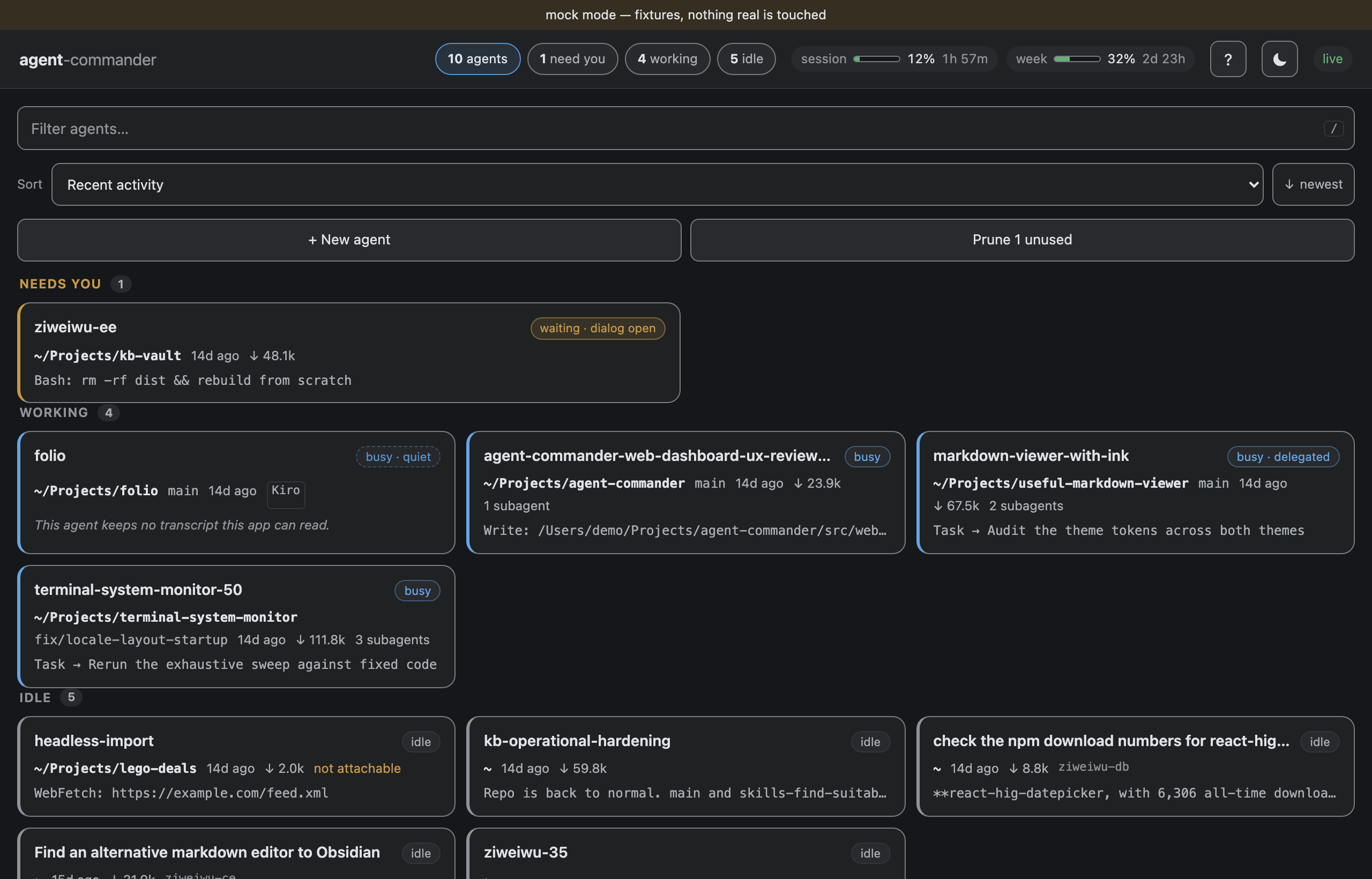
A local web dashboard over every Claude Code session on your machine: which one needs you, what each is doing, and a way to answer it, from a laptop or from a phone.
What it does
- One list of every agent, grouped Needs you → Working → Idle, with the folder, branch, current activity and delegates on each card. A status rail down the left says which is which in one column of shapes — a raised hand for an agent waiting on you, a turning arc for one working, a ring for idle, a struck ring for a session whose terminal has gone. Beside it, whether this app can still reach that terminal is its own mark, because "what it is doing" and "can I drive it" are different questions.
- Answer a blocked agent from the Chat tab. The options are read from the agent's own transcript, so every button is a choice the agent actually named — including the ones that take several answers, where each press ticks a row. When an agent is waiting on something it did not write down — a trust prompt, a model picker — the card says so plainly and hands you its live terminal and the keys instead of pretending to know the question.
- A faithful terminal capture. The Attach tab shows the real tmux pane and never resizes it: it is a capture, not a second terminal. Earlier output reads back through its scrollback a page at a time, including for a pane whose process has exited. Under it is a line to paste into, because a capture is not something a phone can paste into — the paste is your OS's, so a script keeps its newlines. Two verbs, so the choice is yours rather than a setting's: Send puts it at the prompt so you can see what landed, and Run puts it there and runs it.
- Plain terminals, not only agents. + New agent offers a Terminal as well: a tmux session running your own shell in a folder you pick. It gets an Attach tab and none of the controls that type Claude Code's slash commands at whatever is in the pane.
- What a busy agent is running, read from the process table: the tool process under it and how long it has been going. It is the only account of the work an agent that keeps no transcript can give.
- Steer a running session: message it, switch model or permission mode, set a goal, compact or clear its context, or close it.
- Notifications when an agent starts waiting on you, off by default.
- Works on a phone over Tailscale, and keeps working when the network does not: a sleeping phone's socket is noticed and replaced rather than left looking live, and the conversation says it is loading rather than claiming the agent has said nothing. The on-screen keyboard takes the keys and nothing else: the message box, the last message and any error stay above it.
- Eight colour schemes, light and dark, every one audited for contrast, in English and 简体中文.
Install
npm install -g @ziweiwu/agent-commander
agent-commander                      # serves http://127.0.0.1:4317
Or npx @ziweiwu/agent-commander. The package ships prebuilt binaries for
macOS (arm64, x64) and Linux (x64, arm64); nothing compiles at install time.
Windows is not supported, because the terminal view is tmux.
Your agents must run inside tmux. The terminal view is a capture of the agent's tmux pane, and every message, answer and keystroke you send goes into that pane. So start each agent in a tmux session:
tmux new -s work
claude
An agent started outside tmux still appears in the list with its status, and its Chat tab still shows the conversation, because that is read from the transcript file rather than from the terminal. It is read-only, though: there is no Attach tab, and the message box, the quick replies and the answer card are disabled, since all three deliver by typing into the pane. Agents started from the + New agent button are put in tmux for you.
From a clone, npm install && npm start. On macOS, npm run app:install
puts a launcher in ~/Applications.
From a phone
agent-commander --token auto --print-url   # prints the link, token and all
tailscale serve --bg 4317
Open the printed link on the phone once. The token becomes a cookie and the
plain address works from then on. The token is required: tailscale serve
hands every peer on your tailnet the same name, so the name alone cannot tell
your phone from anything else.
To be told when an agent starts needing you while the phone is in your pocket, give the server somewhere to push — an ntfy topic or a Telegram bot — and its own address on the phone, so the push opens the card:
agent-commander --token auto \
  --notify https://ntfy.sh/your-private-topic \
  --notify-link https://your-mac.tail1234.ts.net
For Telegram use --notify telegram:<chat_id> with the bot token in
AGENT_COMMANDER_TELEGRAM_TOKEN or ~/.claude/agent-commander/telegram-token.
A push fires only when an agent becomes blocked while no browser tab is on
screen — the open tab is the notification otherwise — and only ever goes out;
nothing is answered from the lock screen.
Use
- Open http://127.0.0.1:4317. Agents that need you are at the top.
- Tap a card. Chat shows the conversation, with an answer card when the agent is blocked. Attach shows the terminal.
- Tables and links in a reply are rendered as such — a link is tappable wherever it appears, including in a tool call's argument.
- The ⋯ beside Send holds everything that is not typing: common replies, what Send does to a working agent, permission mode, model, goal, compact and clear. It is a menu so the conversation keeps the room.
- Press
/to filter,↑↓to move,Enterto open,Escto close.
Start a new agent — or a plain terminal — with + New agent, and prune sessions you opened and never used with Prune. Terminals are kept out of the fleet at rest; the terminals chip in the header admits them.
Safety
- It never resizes a real pane. The terminal is captured and replayed, not
attached; your
tmuxlayout is untouched. - Nothing reaches an agent without a click. No retries, no replays, and every destructive key asks first.
- It stops offering when it cannot deliver. A session whose terminal has gone is marked as unreachable on its card, and both the message box and the terminal's own line refuse rather than accepting something that would go nowhere.
- Loopback by default. Binding anything else requires a token, and the server answers only same-origin requests, so a page in another tab cannot drive your agents.
More
- Handbook — every feature, option and gate, at length.
- ARCHITECTURE.md — how it is built and where it is fragile.
- INVARIANTS.md and SPEC.md — what must always hold, and what it is supposed to do.
- CONTRIBUTING.md — how to work on it.
MIT licensed.