
@zktx.io/ptb-builder
v0.5.0
Published
Sui programmable transaction blocks builder
Downloads
206

Maintainers
 daoauth
Readme
Programmable Transaction Blocks Builder (PTB Builder)
PTB Builder is a graphical toolkit for authoring, inspecting, and rendering Programmable Transaction Blocks (PTBs) on the Sui blockchain. It provides an intuitive drag-and-drop interface, code rendering, and host integration points. The host application remains responsible for wallet connection, signing, simulation, and execution.
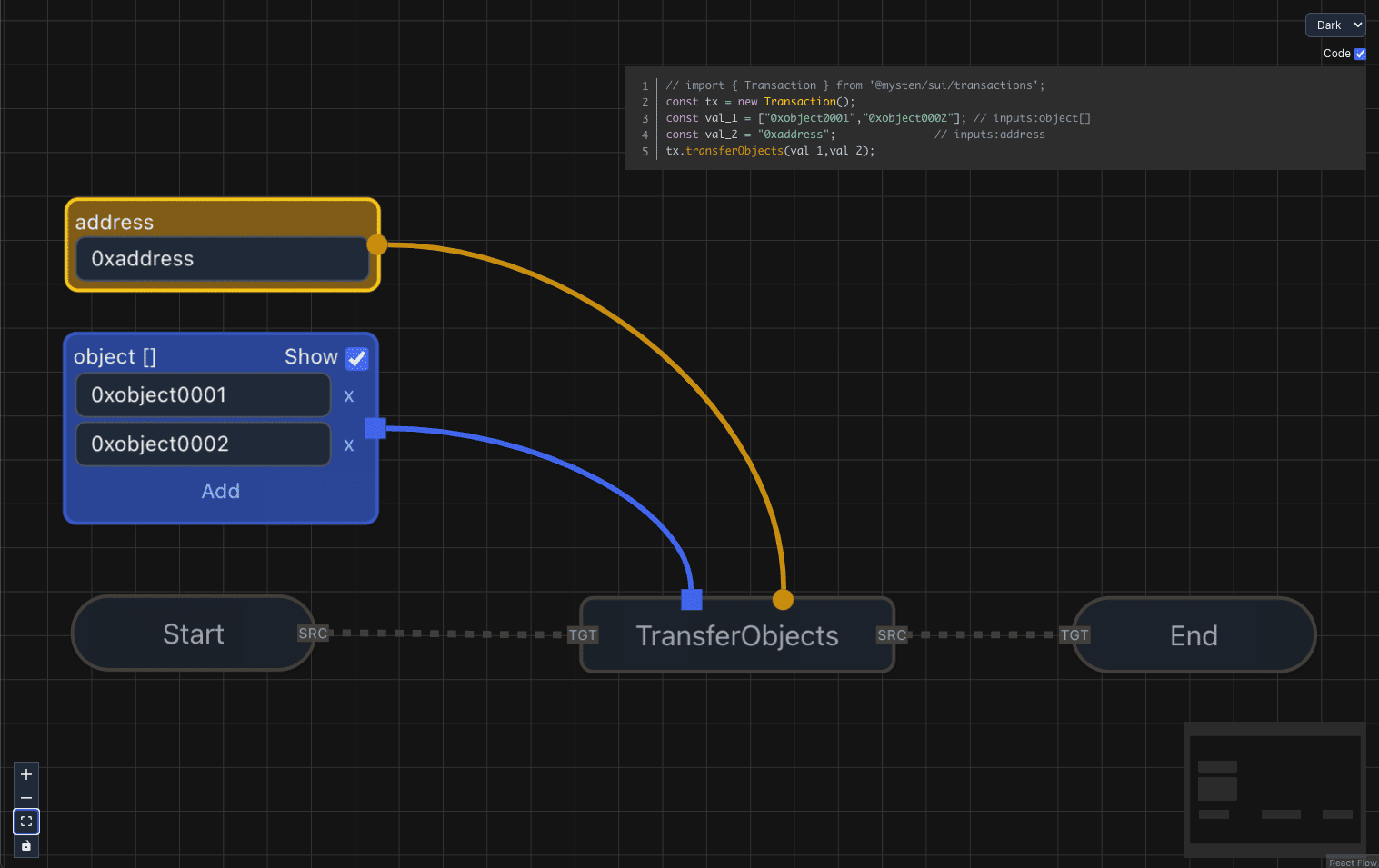
Demo
Architecture Boundary
@zktx.io/ptb-builder depends on @zktx.io/ptb-model so the builder can adopt
the model package as its canonical PTB data boundary. Model package APIs are the
boundary for PTB data validation, raw PTB conversion, Mermaid rendering, and
TypeScript SDK code string rendering. The builder package owns React UI state,
React Flow integration, document/provider lifecycle, SDK Core read helpers,
object authoring policy, and the runtime adapter that turns a validated
TransactionIR into a host-owned Sui Transaction.
Import the model package through @zktx.io/ptb-model only. Package-internal
model imports, model dist imports, and relative imports across package
boundaries are intentionally blocked for builder source.
The builder runtime accepts ptb_4 documents. Convert unsupported document
shapes outside this package before calling builder/model APIs.
Features
1. Transaction Construction and Review
- Visual Editor: Construct PTBs via a drag‑and‑drop UI (React Flow-based).
- Code Rendering: Render TypeScript for the Sui TS SDK.
- Host Review Hooks: Let the host application provide simulation or execution adapters when needed.
2. Host-Controlled Execution
- Accessible: Users can create PTB structures without writing code.
- Authority Stays Outside: Wallet connection, signing, simulation, and execution stay in the host app.
- Real‑Time Feedback: Errors/warnings surface instantly during graph construction.
3. Save and Share
- Graph Persistence: Save PTB graphs locally and reload them later.
- Portable Documents: Share saved
.ptbdocuments with other PTB Builder users. - Optional Export: Expose an Export .ptb button from the UI (hidden by default).
4. Structure Visualization and Debugging
- Loaded Transaction Structure View: Visualize supported loaded PTB command and input structure as readable graphs.
- Debugging Tools: Inspect graph wiring, inputs, outputs, and validation feedback while editing.
5. On‑Chain Transaction Loading
- Load from Digest: Import an on‑chain transaction by digest and visualize its structure.
6. Use On‑Chain Assets as Objects
- Asset Browser: Browse objects owned by the
addressprop when a host wallet/address is connected (coins, Move objects, modules, etc.). - Object Metadata Loading: Insert owned assets as Object nodes with object id and type metadata. Runtime construction uses the pinned SDK helper surface, such as
tx.object(id), for unresolved object ids. - Resolved Ref Preservation: When a decoded raw or on-chain PTB already contains resolved object references, PTB Builder preserves those references for inspection and round-trip fidelity instead of asking the user to recreate them.
7. Themes
- Initial Theme Selection:
dark,light,cobalt2,tokyo-night,cream,mint-breeze. - Switch Anytime: Change themes dynamically from the workspace.
Supported Commands
The following command nodes are available from the builder context menu:
- SplitCoins — split a coin object into multiple parts.
- MergeCoins — merge multiple coins into one.
- TransferObjects — transfer owned objects to a recipient.
- MakeMoveVec — build a Move vector from typed elements. Set the Move type on the node before connecting element inputs.
- MoveCall — call a Move function by loading the package module/function index from the configured SDK Core client, then choosing a module and function from the discovered package. The builder fetches the selected function signature when it is needed to materialize value and type handles. Generic Move type arguments are authored with dedicated Type Argument nodes connected to the MoveCall type handles.
Loaded PTBs may also render Publish and Upgrade command nodes for inspection. PTB Builder does not expose context-menu authoring for those commands because editing module bytes, dependencies, and package upgrade data requires the Move toolchain and remains outside the builder UI boundary.
The package does not expose a public command registry extension API.
Supported Inputs
Input authoring support:
- Scalars: numbers, booleans, addresses, strings ✅
- Objects: direct ownership/transfer supported ✅ (includes
Coin<T>)- Objects can be selected from your owned assets via the Assets modal when
addressis provided. - Manual object authoring should use the object node lookup before runtime building so the graph carries SDK-reported object id and type tag.
- Object nodes do not expose raw usage choices. Move function signatures determine argument expectations, and unresolved object ids are handed to the SDK runtime with
tx.object(id).
- Objects can be selected from your owned assets via the Assets modal when
- Vectors: scalars only ✅ (❌ objects, including coins, are not supported in vectors)
- Options: available for scalars ✅ (❌ not supported for objects)
Quick Start
Install the builder package plus its peer dependencies in your React app:
npm install @zktx.io/ptb-builder @mysten/sui @xyflow/react elkjs lucide-react re-resizable react react-domThis package is developed and tested against the exact pinned
@mysten/[email protected] SDK version used by the repository. Use that SDK version
unless a later PTB Builder release states a different compatibility range.
For authoring, inspection, and TypeScript SDK code preview, the smallest useful
setup is the component, CSS, a starting chain, and a sized container. Passing
initialChain creates a fresh editable PTB document on mount. It is intentionally
an initializer, not a network controller; use loadFromDoc() when your app needs
to replace the active document.
import { PTBBuilder } from '@zktx.io/ptb-builder';

import '@zktx.io/ptb-builder/index.css';
import '@zktx.io/ptb-builder/styles/themes-all.css';

export function App() {
  return (
    <PTBBuilder
      initialChain="sui:testnet"
      style={{ width: '100vw', height: '100vh' }}
    />
  );
}
That minimal setup does not connect a wallet and does not execute or simulate transactions. It can still author PTB graphs, render code, export documents when enabled, and use the package default SDK Core client for read/load helpers.
Add host integration only for the capabilities your app owns. The next example
assumes your app already wraps this component in the dapp-kit provider setup
shown by the local packages/example app.
import {
  useCurrentAccount,
  useCurrentNetwork,
  useDAppKit,
} from '@mysten/dapp-kit-react';
import type { Transaction } from '@mysten/sui/transactions';
import { PTBBuilder, type Chain } from '@zktx.io/ptb-builder';

function chainToNetwork(chain: Chain) {
  const match = chain.match(/^sui:(mainnet|testnet|devnet)$/);
  if (!match) throw new Error(`Unsupported chain: ${chain}`);
  return match[1] as 'mainnet' | 'testnet' | 'devnet';
}

export function BuilderWithHostAdapters() {
  const account = useCurrentAccount();
  const network = useCurrentNetwork() ?? 'testnet';
  const dAppKit = useDAppKit();

  const createClient = (chain: Chain) =>
    dAppKit.getClient(chainToNetwork(chain));

  const simulateTx = async (chain: Chain, transaction?: Transaction) => {
    if (!transaction) return { error: 'No transaction to simulate' };
    const client = createClient(chain);
    const bytes = await transaction.build({ client });
    const result = await client.core.simulateTransaction({
      transaction: bytes,
      include: { effects: true },
    });
    const simulated =
      result.$kind === 'Transaction'
        ? result.Transaction
        : result.FailedTransaction;
    const error =
      simulated.status.error?.message || simulated.status.error?.$kind;
    return { success: simulated.status.success, error };
  };

  const executeTx = async (chain: Chain, transaction?: Transaction) => {
    if (!account) return { error: 'Wallet not connected' };
    if (!transaction) return { error: 'No transaction to execute' };
    if (network !== chainToNetwork(chain)) {
      return {
        error: `Switch to ${chainToNetwork(chain)} before executing this PTB`,
      };
    }
    const result = await dAppKit.signAndExecuteTransaction({ transaction });
    if (result.$kind === 'FailedTransaction') {
      const statusError = result.FailedTransaction.status.error;
      return {
        digest: result.FailedTransaction.digest,
        error:
          statusError?.message ||
          statusError?.$kind ||
          'Transaction execution failed',
      };
    }
    return { digest: result.Transaction.digest };
  };

  return (
    <PTBBuilder
      initialChain={`sui:${network}` as Chain}
      style={{ width: '100vw', height: '100vh' }}
      createClient={createClient}
      simulateTx={simulateTx}
      executeTx={executeTx}
      address={account?.address}
      showExportButton
    />
  );
}
The local packages/example app shows a complete dapp-kit host with network
selection, undo/redo, document drop, on-chain transaction loading, and toast
integration. loadFromDoc() accepts ptb_4 documents with explicit chain
and view fields only. Convert unsupported document shapes outside this
package.
SDK Core client boundary
createPtbCoreClient() and createPtbCoreClientForNetwork() return SDK Core
clients for read/load paths. The exported PtbCoreClient type is an alias of
the pinned @mysten/[email protected] ClientWithCoreApi type, not a separate stable
client abstraction owned by PTB Builder. Host applications may provide their own
ClientWithCoreApi-compatible client through createClient, but SDK Core type
changes are part of the Sui SDK boundary and should be reviewed when upgrading
@mysten/sui.
Public API (Provider + Hook)
Supported public imports are the package root (@zktx.io/ptb-builder) and the
CSS subpaths declared in package.json exports. Files emitted under
dist/types/ are build artifacts for those exports, not separate compatibility
entry points. Helpers that are not re-exported from the package root are internal
implementation details.
Provider (component)
import '@zktx.io/ptb-builder/index.css';
import '@zktx.io/ptb-builder/styles/themes-all.css';
// Or import a specific theme only: import '@zktx.io/ptb-builder/styles/theme-light.css';

import { PTBBuilder } from '@zktx.io/ptb-builder';

<PTBBuilder
  theme="dark" // initial theme (dark | light | cobalt2 | tokyo-night | cream | mint-breeze); defaults to "dark"
  initialChain="sui:testnet" // optional: start with a fresh editable PTB for this chain
  address={connectedAddress} // optional runtime sender and Assets modal owner; short or canonical form
  gasBudget={500_000_000} // optional runtime gas budget; number, bigint, or u64 string
  executeTx={execAdapter} // host-provided execution adapter
  createClient={clientFactory} // host-provided SDK Core client factory for reads/loads
  onDocChange={saveDoc} // PTBDoc autosave callback (debounced)
  showExportButton // optional: show Export .ptb button (default: hidden)
>
  {/* your app here */}
</PTBBuilder>;
Hook (public)
import { usePTB } from '@zktx.io/ptb-builder';

const {
  captureCurrentDocResult,
  exportDoc,
  exportDocResult,
  loadFromDoc,
  loadFromOnChainTx,
  undo,
  redo,
  canUndo,
  canRedo,
  setTheme,
} = usePTB();

// Export the active PTB document with structured error information
const exportResult = exportDocResult({ sender: connectedAddress });
if (!exportResult.ok) {
  console.warn(exportResult.error);
}

// Compatibility wrapper: returns undefined on failure
const doc = exportDoc({ sender: connectedAddress });

// Load document from memory or disk
if (doc) {
  const loadResult = loadFromDoc(doc);
  if (!loadResult.ok) {
    console.warn(loadResult.error);
  }
}

// Undo/redo is owned by the builder editor session state. It includes the live
// graph, chain, sender, modules, and objects, even when the current graph cannot
// be exported as a valid PTBDoc yet.
if (canUndo) undo();
if (canRedo) redo();

// Capture is side-effect-free; exportDocResult still reports UI export errors.
const current = captureCurrentDocResult();
if (current.ok) {
  console.log(current.doc);
}

// Load graph from on-chain transaction digest. Pure raw inputs that can be
// decoded losslessly are materialized for display, using fetched Move function
// signatures when the consumer type needs them.
const chainLoadResult = await loadFromOnChainTx('sui:testnet', '0x1234…');
if (!chainLoadResult.ok) {
  console.warn(chainLoadResult.error);
}

// Load an on-chain transaction as an editable template instead of a read-only viewer.
const editableLoadResult = await loadFromOnChainTx('sui:testnet', '0x1234…', {
  mode: 'editable',
});
if (!editableLoadResult.ok) {
  console.warn(editableLoadResult.error);
}

// Switch theme at runtime
setTheme('tokyo-night');
Styling & Theme imports
@zktx.io/ptb-builder/index.csscontains the structural styles for nodes, edges, and the builder chrome. It should be imported exactly once in your host app (or exposed by your bundler) regardless of the theme you choose.@zktx.io/ptb-builder/styles/themes-all.cssis a self-contained bundle of every theme token file so you can switch themes at runtime withsetTheme. Importing it includes all shipped themes; the package build emits it at roughly 43 kB before gzip.- To minimize CSS for static deployments, import only the theme(s) you actually ship, e.g.
import '@zktx.io/ptb-builder/styles/theme-dark.css';. Picking a single one keeps the bundle lean while still allowing dynamic switching between the themes you explicitly include. - Do not import
themes-all.csstogether with individualtheme-*.cssfiles. Choose the aggregate file for runtime theme switching, or choose individual theme files for a smaller static bundle. - When you only ship a single theme file, pass the matching
themevalue (e.g.,theme="light") and setshowThemeSelector={false}so the UI doesn’t expose choices that aren’t bundled.
Autosave, undo/redo & onDocChange
- PTB Builder batches graph/content
onDocChangeemissions briefly and debounces viewport-only changes by 250 ms so autosave targets are not overwhelmed while the user edits or pans the canvas. loadFromDoc(doc)imports a document as a new editable baseline and applies the document's saved viewport.loadFromDoc(chain)creates a fresh editable document for that chain and applies the default viewport. These transitions do not infer the saved baseline from a post-load viewport fit.undo()andredo()use builder-owned editor session history, notonDocChange. The history source of truth is the editor state (graph,chain,sender,modules, andobjects) and excludes viewport-only changes. When the restored state can be serialized as aPTBDoc, the builder immediately attempts anonDocChangeemission for autosave; invalid-but-editable graphs still restore and remain undoable while autosave/export reports document diagnostics.loadFromOnChainTx(..., { mode: 'editable' })computes the generated transaction layout from a fixed transaction-load target, not from the previously visible viewport, before applying provider state. It then emits that laid-out graph with the default editable viewport as the editable baseline. The default read-onlyloadFromOnChainTxpath does not emitonDocChange, because read-only transaction inspection is not an editable document autosave event.captureCurrentDocResult()captures the live React Flow graph and viewport without setting UI error state or showing a toast. Use it for explicit document export or custom host flows, not as the source of builder undo/redo.- The
addressprop is the runtime envelope sender and Assets-modal owner address. It does not becomePTBDoc.sender; imported document senders are preserved, and export helpers use an explicitsenderoption when the host wants a saved document sender. - When integrating your own autosave pipeline, expect
onDocChangeto fire often during graph edits but only after the debounce window for viewport-only motions.
Props Reference (<PTBBuilder />)
| Prop | Type | Default | Description |
| ------------------- | ------------------------------------------------------------------------------------- | -------- | ---------------------------------------------------------------------------------------------------------------------------------------------------------------------------------------------------------------------- |
| theme | Theme (dark | light | cobalt2 | tokyo-night | cream | mint-breeze) | "dark" | Initial UI theme. |
| initialChain | Chain | – | Optional chain used to create a fresh editable PTB on mount. Later document changes should use loadFromDoc(). |
| className | string | – | Optional class for a host-controlled container around the builder. |
| style | React.CSSProperties | – | Optional style for the same container; useful for setting width/height directly on <PTBBuilder />. |
| showThemeSelector | boolean | true | Renders the theme dropdown in the CodePip panel. |
| address | string | – | Optional runtime envelope sender and owner address for the Assets modal. Short or canonical Sui address forms are accepted and normalized before runtime helpers use them. It is not substituted into graph arguments. |
| gasBudget | number \| bigint \| string | – | Optional runtime envelope gas budget. String values must be unsigned u64 strings. |
| executeTx | (chain: Chain, tx?: Transaction) => Promise<{ digest?: string; error?: string }> | – | Host-provided execution adapter. |
| simulateTx | (chain: Chain, tx?: Transaction) => Promise<{ success?: boolean; error?: string }> | – | Optional host-provided simulation adapter; required only when the Dry run action is used. |
| createClient | (chain: Chain) => ClientWithCoreApi | gRPC | Optional host-provided SDK Core client factory for read/load paths. |
| toast | ToastAdapter | console | Custom toast adapter used by the provider. |
| onDocChange | (doc: PTBDoc) => void | – | Autosave callback (debounced). |
| showExportButton | boolean | false | If true, shows Export .ptb button in the CodePip panel. |
| children | React.ReactNode | – | Children rendered inside the Provider. |
Document Format
PTB Builder persists graphs as PTBDoc objects containing:
- version — documents use
ptb_4 - graph — nodes and edges of the PTB
- modules — embedded Move function signature metadata for MoveCall functions whose signatures were fetched while authoring or inspecting. Function entries retain both the resolved PTB port types and the SDK Core open signatures needed to recompute generic MoveCall ports after reload. Package module/function indexes are runtime discovery data and are not stored in the document.
- objects — embedded object metadata for display and type lookup. Runtime object arguments must come from graph raw input data such as SDK-reported object id, version, and digest; metadata embeds are not a source of signing authority.
- chain — target Sui network (e.g.,
sui:testnet) - view — saved editor viewport
{ x, y, zoom }
This enables saving, sharing, and reloading graphs consistently across environments.
Notes on Network Sync
- Use
useCurrentNetwork()anduseDAppKit().switchNetwork()from@mysten/dapp-kit-reactto read/change the active Sui network. - Keep PTB
doc.chainin the formsui:<network>, e.g.,sui:testnet. - On file drop, prefer validating with
/^sui:(mainnet|testnet|devnet)$/before switching the network.