
@zoompinch/elements
v0.0.41
Published
Custom elements wrapper ZoomPinch - reactive pinch & zoom component

Maintainers
 mauriceconrad
Readme
@zoompinch/elements
Web Components (Custom Elements) for @zoompinch/core - Apply a pinch-and-zoom experience that’s feels native and communicates the transform reactively and lets you project any layer on top of the transformed canvas.
Play with the demo: https://zoompinch.pages.dev
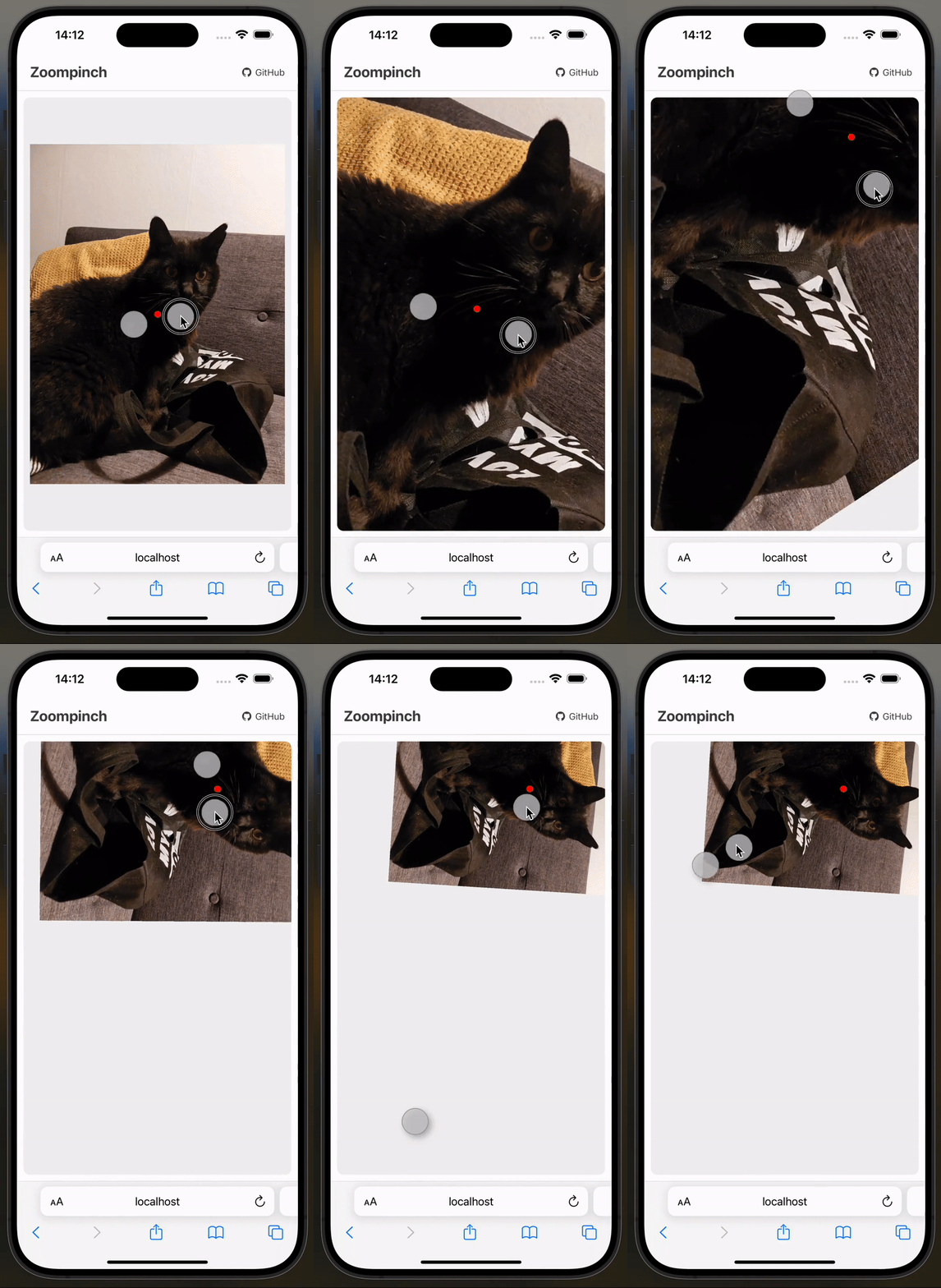
Mathematical correct pinch on touch
Unlike other libraries, Zoompinch does not just uses the center point between two fingers as projection center. The fingers get correctly projected on the virtual canvas. This makes pinching on touch devices feel native-like.
Touch, Wheelm, Mouse and Trackpad Gestures!
Adside of touch, mouse and wheel events, gesture events (Safari Desktop) are supported as well! Try it out on the demo
Installation
npm install @zoompinch/elementsComplete Example
<!DOCTYPE html>
<html>
<head>
  <script type="module">
    import '@zoompinch/elements';
  </script>
  <style>
    zoom-pinch {
      display: block;
      width: 800px;
      height: 600px;
      border: 1px solid #ddd;
    }
  </style>
</head>
<body>
  <zoom-pinch
    id="zoomPinch"
    translate-x="0"
    translate-y="0"
    scale="1"
    rotate="0"
    min-scale="0.5"
    max-scale="4"
    offset-top="0"
    offset-right="0"
    offset-bottom="0"
    offset-left="0"
    clamp-bounds="false"
    rotation="true"
    zoom-speed="1"
    translate-speed="1"
    zoom-speed-apple-trackpad="1"
    translate-speed-apple-trackpad="1"
  >
    <img width="1536" height="2048" src="https://imagedelivery.net/mudX-CmAqIANL8bxoNCToA/489df5b2-38ce-46e7-32e0-d50170e8d800/public" />

    <svg slot="matrix" width="100%" height="100%">
      <!-- Matrix overlay content -->
      <circle id="centerMarker" r="8" fill="red" />
    </svg>
  </zoom-pinch>

  <script type="module">
    const zoomPinch = document.getElementById('zoomPinch');

    // Listen for updates
    zoomPinch.addEventListener('update', () => {
      console.log('Transform:', {
        translateX: zoomPinch.getAttribute('translate-x'),
        translateY: zoomPinch.getAttribute('translate-y'),
        scale: zoomPinch.getAttribute('scale'),
        rotate: zoomPinch.getAttribute('rotate')
      });

      // Update matrix overlay
      updateMatrix();
    });

    // Center on load
    zoomPinch.addEventListener('init', () => {
      zoomPinch.applyTransform(1, [0.5, 0.5], [0.5, 0.5]);
    });

    // Handle clicks
    zoomPinch.addEventListener('click', (e) => {
      const [x, y] = zoomPinch.normalizeClientCoords(e.clientX, e.clientY);
      console.log('Canvas position:', x, y);
    });

    function updateMatrix() {
      const centerMarker = document.getElementById('centerMarker');
      const [cx, cy] = zoomPinch.composePoint(
        zoomPinch.canvasWidth / 2,
        zoomPinch.canvasHeight / 2
      );
      centerMarker.setAttribute('cx', cx);
      centerMarker.setAttribute('cy', cy);
    }
  </script>
</body>
</html>
API Reference
Attributes
| Attribute | Type | Default | Description |
|-----------|------|---------|-------------|
| translate-x | number | 0 | X translation in pixels |
| translate-y | number | 0 | Y translation in pixels |
| scale | number | 1 | Current scale factor |
| rotate | number | 0 | Rotation in radians |
| min-scale | number | 0.1 | Minimum scale (user gestures only) |
| max-scale | number | 10 | Maximum scale (user gestures only) |
| offset-top | number | 100 | Top padding in pixels |
| offset-right | number | 0 | Right padding in pixels |
| offset-bottom | number | 0 | Bottom padding in pixels |
| offset-left | number | 0 | Left padding in pixels |
| clamp-bounds | "true" | "false" | "false" | Clamp panning within bounds (user gestures only) |
| rotation | "true" | "false" | "true" | Enable rotation gestures |
Note: min-scale, max-scale, rotation, and clamp-bounds only apply during user interaction. Programmatic changes via methods are unrestricted.
Events
| Event | Description |
|-------|-------------|
| update | Fired when transform changes (attributes are updated) |
| init | Fired when the engine is ready |
zoomPinch.addEventListener('update', () => {
  const translateX = zoomPinch.getAttribute('translate-x');
  const translateY = zoomPinch.getAttribute('translate-y');
  const scale = zoomPinch.getAttribute('scale');
  const rotate = zoomPinch.getAttribute('rotate');
});
Methods
Access methods directly on the element:
const zoomPinch = document.querySelector('zoom-pinch');

// Call methods
zoomPinch.applyTransform(scale, wrapperCoords, canvasCoords);
zoomPinch.normalizeClientCoords(clientX, clientY);
zoomPinch.composePoint(x, y);

// Access properties
zoomPinch.canvasWidth;
zoomPinch.canvasHeight;
applyTransform(scale, wrapperCoords, canvasCoords)
Apply transform by anchoring a canvas point to a wrapper point.
Parameters:
scale: number- Target scalewrapperCoords: [number, number]- Wrapper position (0-1, 0.5 = center)canvasCoords: [number, number]- Canvas position (0-1, 0.5 = center)
Examples:
// Center canvas at scale 1
zoomPinch.applyTransform(1, [0.5, 0.5], [0.5, 0.5]);

// Zoom to 2x, keep centered
zoomPinch.applyTransform(2, [0.5, 0.5], [0.5, 0.5]);

// Anchor canvas top-left to wrapper center
zoomPinch.applyTransform(1.5, [0.5, 0.5], [0, 0]);
normalizeClientCoords(clientX, clientY)
Convert global client coordinates to canvas coordinates.
Parameters:
clientX: number- Global X from eventclientY: number- Global Y from event
Returns: [number, number] - Canvas coordinates in pixels
Example:
zoomPinch.addEventListener('click', (e) => {
  const [x, y] = zoomPinch.normalizeClientCoords(e.clientX, e.clientY);
  console.log('Canvas position:', x, y);
});
composePoint(x, y)
Convert canvas coordinates to wrapper coordinates (accounts for transform).
Parameters:
x: number- Canvas X in pixelsy: number- Canvas Y in pixels
Returns: [number, number] - Wrapper coordinates in pixels
Example:
// Get wrapper position for canvas center
const [wrapperX, wrapperY] = zoomPinch.composePoint(
  zoomPinch.canvasWidth / 2,
  zoomPinch.canvasHeight / 2
);
Properties
Access current canvas dimensions:
const width = zoomPinch.canvasWidth;   // number
const height = zoomPinch.canvasHeight; // number
Matrix Slot
Use slot="matrix" for overlay elements that follow the canvas transform.
Note: Matrix elements must be updated manually on the update event.
Example:
<zoom-pinch id="zoomPinch">
  <img width="1920" height="1080" src="image.jpg" />

  <svg slot="matrix" width="100%" height="100%">
    <circle id="marker" r="8" fill="red" />
  </svg>
</zoom-pinch>

<script>
  const zoomPinch = document.getElementById('zoomPinch');
  const marker = document.getElementById('marker');

  zoomPinch.addEventListener('update', () => {
    const [cx, cy] = zoomPinch.composePoint(
      zoomPinch.canvasWidth / 2,
      zoomPinch.canvasHeight / 2
    );
    marker.setAttribute('cx', cx);
    marker.setAttribute('cy', cy);
  });
</script>
Coordinate Systems
1. Canvas Coordinates (Absolute)
Absolute pixels within canvas content.
- Origin:
(0, 0)at top-left - Range:
0tocanvasWidth,0tocanvasHeight
const [canvasX, canvasY] = zoomPinch.normalizeClientCoords(event.clientX, event.clientY);2. Wrapper Coordinates (Absolute)
Absolute pixels within viewport/wrapper.
- Origin:
(0, 0)at top-left (accounting for offset) - Range:
0towrapperWidth,0towrapperHeight
const [wrapperX, wrapperY] = zoomPinch.composePoint(canvasX, canvasY);3. Relative Coordinates (0-1)
Normalized coordinates for applyTransform.
- Range:
0.0to1.0 0.5= center,1.0= bottom-right
[0, 0]       // top-left
[0.5, 0.5]   // center
[1, 1]       // bottom-right
Conversion Flow:
Client Coords → normalizeClientCoords() → Canvas Coords → composePoint() → Wrapper CoordsBest Practices
Always specify image dimensions to avoid layout shifts:
<img width="1920" height="1080" src="image.jpg" />Center content on init:
zoomPinch.addEventListener('init', () => {
  zoomPinch.applyTransform(1, [0.5, 0.5], [0.5, 0.5]);
});
Prevent image drag:
<img src="image.jpg" draggable="false" style="user-select: none;" />Update matrix overlays on transform change:
zoomPinch.addEventListener('update', updateMatrix);
Styling
The element uses Shadow DOM. Style the host:
zoom-pinch {
  display: block;
  width: 800px;
  height: 600px;
  border: 1px solid #ccc;
}
Internal structure (Shadow DOM):
:host              /* Container */
.content           /* Wrapper */
.canvas            /* Canvas wrapper */
.matrix            /* Matrix overlay */
Browser Support
- ✅ Chrome/Edge (latest)
- ✅ Firefox (latest)
- ✅ Safari (latest, including iOS)
- ✅ Mobile browsers (iOS Safari, Chrome Mobile)
License
MIT
Related
- @zoompinch/core - Core engine
- @zoompinch/vue - Vue 3
- @zoompinch/react - React
Built with ❤️ by Elya Maurice Conrad