
@zukall/yap
v0.3.0
Published
YAP (Your Addressing Protocol): coordinate addresses from custom origins or optional bounty grids, with shared geographic utilities.

Maintainers
 zukall
Readme
YAP — Your Addressing Protocol
Created by Lesly Revenge.
@zukall/yap generates coordinate addresses from an origin you define.
Supply the origin's GPS coordinates or an optional named bounty grid,
YOU (Your Origin Unit) name or code,
and the GPS point to address. Choose the distance represented by each address
unit: 0.01 meter, 1 meter, 100 meters, or another positive size.
Use YAP for military bases, university campuses, theme parks, refugee tent cities, and boat race courses. Each site can establish its own origin and recognizable addresses. Generation works offline and needs no geocoding API.
YAP contains the shared projection, address encoding, geographic distance,
route optimization, and directions code used by @zukall/zap. ZAP loads its
country/province grids from @zukall/yap-bounties and adds country-specific
address labels.
CAP, ZAP, and YAP: understand the protocols
CAP (Conventional Addressing Protocol) is the name used here for the familiar street and postal address: a house or building number, street name, unit, city, postal code, and country, as applicable. Its numbering and format follow local conventions.
| Protocol | How the address is defined | | --- | --- | | CAP — Conventional Addressing Protocol | Locally assigned names, numbers, and postal components identify a place. | | ZAP — Zukall Addressing Protocol | GPS coordinates are measured from the fixed center of a configured country/province grid, using 100-meter blocks and 1-meter detail. | | YAP — Your Addressing Protocol | GPS coordinates are measured from your chosen origin, identified by a required YOU (Your Origin Unit) name or code. You choose the unit size, such as 0.01 meter, 1 meter, or 100 meters; each block contains 100 units. |
A place can keep its CAP address alongside its ZAP and YAP addresses. Its ZAP
address uses the configured country/province origin; its YAP address can use a
main gate, cage corner, campus landmark, or capital reference point as zero.
Different YAP schemes can give the same place different addresses because
their origins, YOU labels, or unit sizes differ. The ZAP and YAP
suffixes identify the protocol used by each readable coordinate address.
See YAP in use: choose the origin
The origin does not have to be at the center of the area. A gate, cage corner, survey marker, or point in a capital city can become zero. All addresses in that YAP scheme use the same origin, YOU, and unit size.
ZAP takes its origin from the center of a configured country/province rectangle. YAP accepts the caller's chosen GPS origin directly. When you supply a bounty instead, YAP calculates the center of its four-corner rectangle.
The examples below are computed by the actual package from the GPS inputs in examples/locations.json. The park and laboratory are fictional; the Haiti example illustrates a possible capital-origin scheme.
Theme park: the main gate is zero
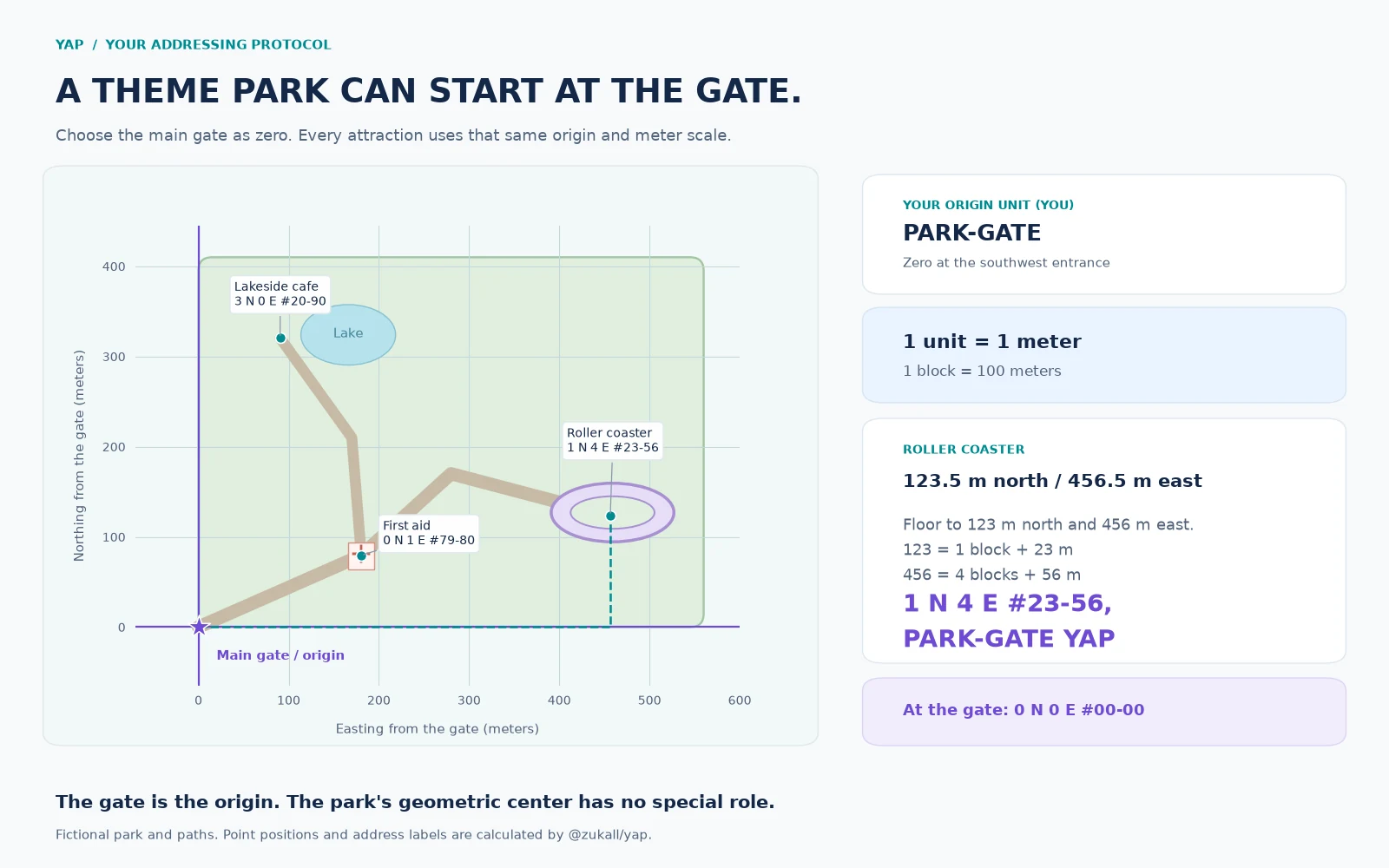
A park operator chooses its main gate as PARK-GATE, with 1-meter units
and 100-meter blocks. The gate is at the edge of the park; the park's
geometric center has no special role. Staff and visitors can describe every
attraction relative to the same recognizable entrance.
| Point | Projected meters north / east from the gate | YAP address |
| --- | --- | --- |
| Main gate | 0 / 0 | 0 N 0 E #00-00, PARK-GATE YAP |
| Roller coaster | 123.5 / 456.5 | 1 N 4 E #23-56, PARK-GATE YAP |
| First aid | 79.5 / 180.5 | 0 N 1 E #79-80, PARK-GATE YAP |
| Lakeside cafe | 320.5 / 90.5 | 3 N 0 E #20-90, PARK-GATE YAP |
import { createYap } from "@zukall/yap";

const park = createYap({
  you: "PARK-GATE",
  origin: { latitude: 0.3476, longitude: 32.5825 },
  unitSizeMeters: 1,
});
const coaster = park.generateAddress({
  latitude: 0.3487106597559301,
  longitude: 32.58660547349577,
});
console.log(coaster.address); // 1 N 4 E #23-56, PARK-GATE YAP
The coaster's address encodes 123 whole meters north and 456 east:
1 × 100 + 23 and 4 × 100 + 56. The drawn paths are illustrative; roads
and paths do not rotate the address axes. Use saved GPS for navigation.
Mouse laboratory: a cage corner is zero
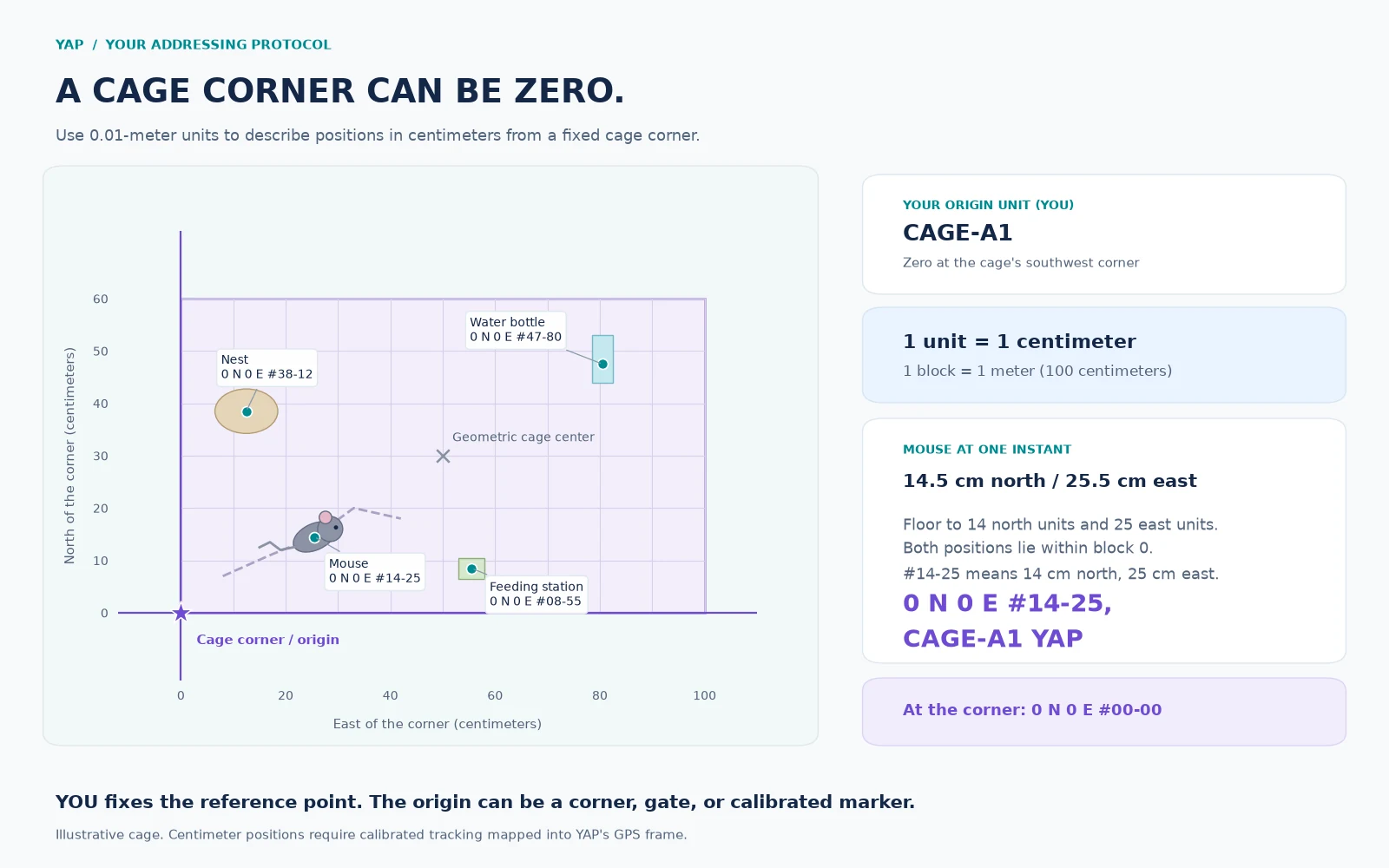
A researcher chooses the southwest corner of a 1-meter by 0.6-meter cage
as CAGE-A1. With unitSizeMeters: 0.01, each address unit represents
1 centimeter and each 100-unit block represents 1 meter. The cage's
geometric center is shown as a reference; the corner is the selected origin.
| Point | Projected centimeters north / east from the corner | YAP address |
| --- | --- | --- |
| Cage origin | 0 / 0 | 0 N 0 E #00-00, CAGE-A1 YAP |
| Mouse at one instant | 14.5 / 25.5 | 0 N 0 E #14-25, CAGE-A1 YAP |
| Water bottle | 47.5 / 80.5 | 0 N 0 E #47-80, CAGE-A1 YAP |
| Nest | 38.5 / 12.5 | 0 N 0 E #38-12, CAGE-A1 YAP |
| Feeding station | 8.5 / 55.5 | 0 N 0 E #08-55, CAGE-A1 YAP |
import { createYap } from "@zukall/yap";

const cage = createYap({
  you: "CAGE-A1",
  origin: { latitude: 0.3476, longitude: 32.5825 },
  unitSizeMeters: 0.01,
});
const mouse = cage.generateAddress({
  latitude: 0.3476013040145271,
  longitude: 32.58250229330913,
});
console.log(mouse.address); // 0 N 0 E #14-25, CAGE-A1 YAP
The mouse's two block numbers are zero because both displacements are below
1 meter. The suffix #14-25 encodes 14 whole centimeters north and
25 east. As the mouse moves, generate a new record for its measured
position and keep the observation time separately.
These GPS inputs are constructed from illustrative local measurements. A real laboratory needs calibrated tracking and must map its measured positions into the WGS84 GPS frame accepted by YAP. Selecting 0.01-meter units does not give ordinary indoor GPS centimeter accuracy.
Haiti: a capital-based origin in Port-au-Prince
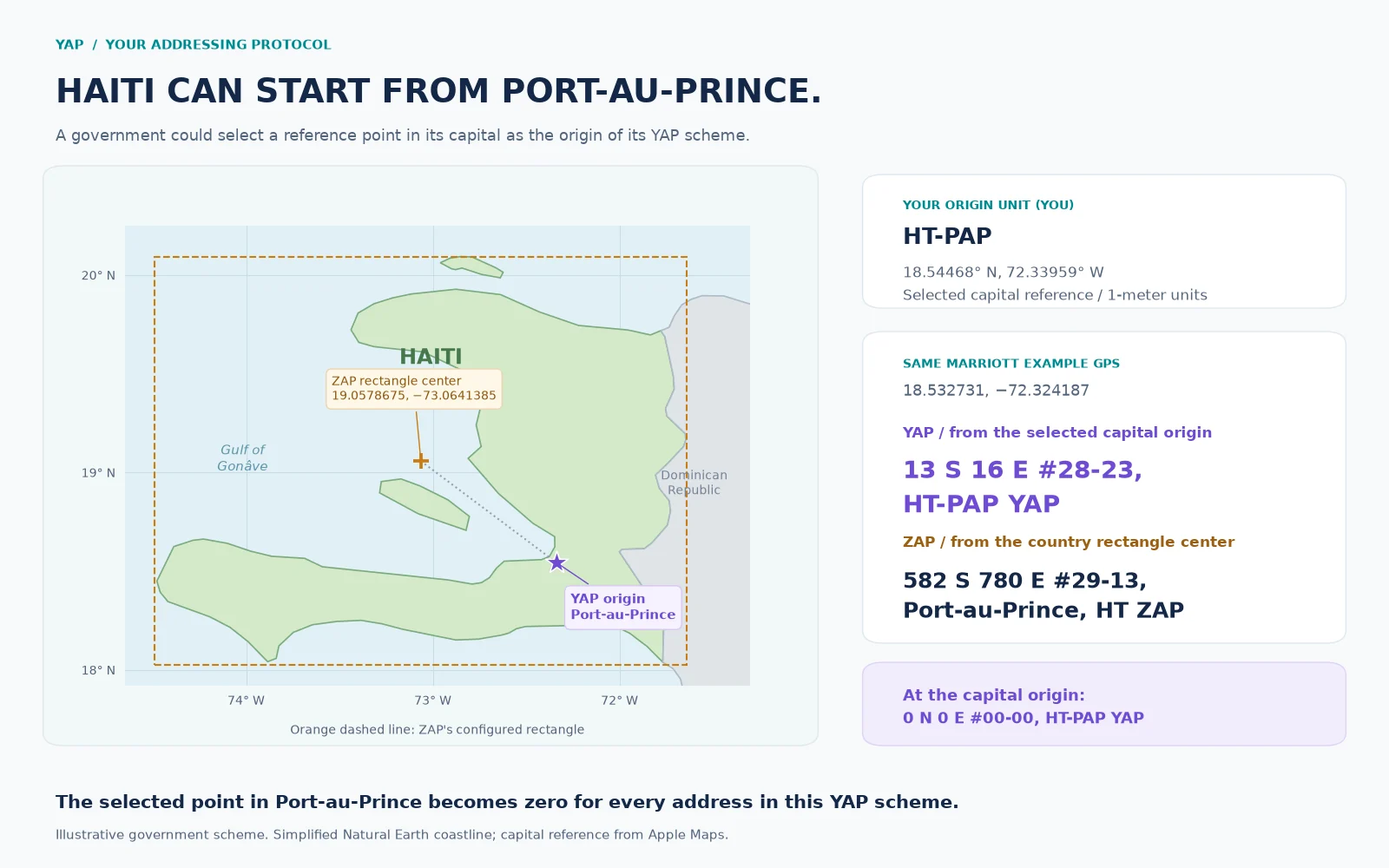
A government that wants addresses measured from its capital could choose a
fixed reference point in central Port-au-Prince, assign the YOU HT-PAP,
and use 1-meter units. For this illustration, the origin is 18.54468° N,
72.33959° W, the city reference point listed by
Apple Maps for Port-au-Prince.
This is an example origin choice, rather than an officially adopted scheme
or a calculation of the city's geometric center.
ZAP's configured Haiti rectangle has its center at 19.0578675° N, 73.0641385° W, in the Gulf of Gonâve. In the illustrated YAP scheme, the chosen point in Port-au-Prince becomes zero. Every YAP address is measured from that capital reference point.
| Same GPS point | YAP from the selected capital origin | ZAP from the configured rectangle center |
| --- | --- | --- |
| Capital origin: (18.54468, -72.33959) | 0 N 0 E #00-00, HT-PAP YAP | 569 S 763 E #07-83, Port-au-Prince, HT ZAP |
| Marriott example: (18.532731, -72.324187) | 13 S 16 E #28-23, HT-PAP YAP | 582 S 780 E #29-13, Port-au-Prince, HT ZAP |
import { createYap } from "@zukall/yap";
import { generateAddress as generateZapAddress } from "@zukall/zap";

const haiti = createYap({
  you: "HT-PAP",
  origin: { latitude: 18.54468, longitude: -72.33959 },
  unitSizeMeters: 1,
});
const destination = { latitude: 18.532731, longitude: -72.324187 };

console.log(haiti.generateAddress(destination).address);
// 13 S 16 E #28-23, HT-PAP YAP
console.log(generateZapAddress({
  countryCode: "HT", city: "Port-au-Prince", ...destination,
}).address);
// 582 S 780 E #29-13, Port-au-Prince, HT ZAP
From the selected capital origin, this sample projects to approximately
1,328.60 meters south and 1,623.92 east. Flooring those magnitudes gives
13 × 100 + 28 = 1,328 meters south and 16 × 100 + 23 = 1,623 east.
The GPS destination is identical in both cases; the chosen origin changes
the coordinate address. The Marriott sample is the same GPS point used in
ZAP's README, and is not independently verified as an entrance.
The map uses a simplified Natural Earth coastline. See
THIRD-PARTY-NOTICES.md for the pinned data source.
Each README illustration is under 100 KB. Full PNGs and editable SVGs are
kept in the source project's asset folder; the npm package ships WebP versions.
Run npm run examples to verify and print all 11 worked YAP addresses.
Define your origin once
import { createYap } from "@zukall/yap";

const campus = createYap({
  you: "CAMPUS-A",
  origin: { latitude: 0, longitude: 0 },
  unitSizeMeters: 1,
  originVersion: "1",
});

const address = campus.generateAddress({ latitude: 0, longitude: 0 });
console.log(address.address); // 0 N 0 E #00-00, CAMPUS-A YAP
console.log(address.yapId); // 00.000000.00.000000
console.log(address.unitSizeMeters); // 1
you is required. It names your origin unit, for example CAMPUS-A, BASE-1,
PARK-WEST, TENT-CITY-A, or RACE-START. It is trimmed, whitespace is
normalized, and its display spelling is retained. Define the origin at a
known reference point such as a main gate or race starting point.
createYap snapshots and freezes that definition for repeated use.
You can also generate one address directly:
import { generateAddress } from "@zukall/yap";

const address = generateAddress({
  you: "CAMPUS-A",
  origin: { latitude: 0.3476, longitude: 32.5825 },
  unitSizeMeters: 0.01,
  latitude: 0.3486,
  longitude: 32.5835,
});
Use a bounty instead of origin coordinates
A bounty is a named grid with a version and four WGS84 corners, ordered top-left, top-right, bottom-right, bottom-left. YAP uses the rectangle's center as its origin and accepts target coordinates inside that rectangle, including its edges. Rectangles crossing the date line are supported.
Install the shared collection when you want to use its existing grids:
npm install @zukall/yap @zukall/yap-bountiesimport { createYap, generateAddress } from "@zukall/yap";
import { getBounties } from "@zukall/yap-bounties";
const bounties = getBounties("zap");
const uganda = bounties.UG;
if (!uganda?.corners) throw new Error("Select a bounty with four corners.");
const local = createYap({
you: "UG-CAMPUS",
bounty: uganda,
unitSizeMeters: 1,
});
const result = local.generateAddress({ latitude: 0.3476, longitude: 32.5825 });
console.log(result.address);
console.log(result.bounty.name, result.bounty.version, result.bounty.corners);
// The direct API accepts the same bounty.
const direct = generateAddress({
you: "UG-CAMPUS",
bounty: uganda,
latitude: 0.3476,
longitude: 32.5825,
});For a country with province grids, select a province, for example
bounties.US.provinces.FL, instead of passing the country container.
Provide either origin or bounty. you remains required, and originVersion
defaults to the bounty's version. Each result retains a frozen copy of the
bounty, and its gridId includes the name, version, and all four corners.
You can also pass your own { name, version, corners } object. Installing
@zukall/yap-bounties is optional: YAP has no runtime dependencies, and explicit
origin coordinates work on their own. ZAP installs and uses the shared bounty
collection automatically.
Choose the size of an address unit
| unitSizeMeters | Detail represented by one unit | Size of a 100-unit block |
| --- | --- | --- |
| 0.01 | 1 centimeter | 1 meter |
| 1 (default) | 1 meter | 100 meters |
| 100 | 100 meters | 10,000 meters |
This setting controls address spacing, rather than imposing an outer radius around the origin. Finer encoding does not improve the accuracy of input GPS. The original GPS point and unrounded projected offsets are always retained.
For a point 123.456 projected meters north and 456.789 projected meters west of the same origin:
| Unit size | Address |
| --- | --- |
| 0.01 meter | 123 N 456 W #45-78, CAMPUS-A YAP |
| 1 meter | 1 N 4 W #23-56, CAMPUS-A YAP |
| 100 meters | 0 N 0 W #01-04, CAMPUS-A YAP |
Each block contains 100 address units. The suffix contains two two-digit
remainders, north/south first. In the 1-meter example, 1 × 100 + 23 means
123 whole meters north; 4 × 100 + 56 means 456 whole meters west. With
0.01-meter units, the same calculation gives 12,345 centimeters north and
45,678 centimeters west. Magnitudes are floored, and directions retain their
sign even for displacements smaller than one unit. Exact zero uses N/E.
Save the result and its origin
The result provides address, yapId, you, origin, originVersion,
coordinates, numeric blocks/directions/remainders, coordinateSuffix,
unitSizeMeters, blockSizeMeters, detailSizeMeters, northingMeters,
eastingMeters, encoding, gridId, protocol, and protocolVersion.
When configured with a bounty, both the protocol instance and its generated
results also include the immutable bounty definition.
yapId contains the original latitude and longitude, in that order. Each
integer part has at least two digits, each fraction has at least six digits,
and a dot separates the two decimal coordinates. Negative coordinates keep
their minus sign. Finer input is retained without rounding:
| Original coordinates (latitude, longitude) | yapId |
| --- | --- |
| (-0.039485, 4.00483) | -00.039485.04.004830 |
| (0.3476, 32.5825) | 00.347600.32.582500 |
| (18.532731, -72.324187) | 18.532731.-72.324187 |
| (0.00000001, 0.00000002) | 00.00000001.00.00000002 |
The same coordinate pair has the same ID across origins, YOU labels, unit
sizes, and ZAP/YAP. Different points can have identical readable addresses
but different IDs. gridId identifies the origin, origin version, projection,
and encoding. Save the complete result to retain that address context.
import { formatCoordinateId, parseCoordinateId } from "@zukall/yap";

const id = formatCoordinateId({ latitude: -0.039485, longitude: 4.00483 });
console.log(id); // -00.039485.04.004830
console.log(parseCoordinateId(id)); // { latitude: -0.039485, longitude: 4.00483 }
parseCoordinateId recovers the coordinate pair, without its origin, YOU,
unit size, or measurement accuracy. It accepts canonical coordinate IDs and
rejects the older quadrant-based IDs. Negative zero is normalized to zero.
Upgrade from YAP 0.1.x: yapId now identifies the coordinate pair instead
of the encoded address. Derive new IDs from saved coordinates using
formatCoordinateId, and preserve old lookup aliases while migrating your
records. Readable YAP addresses, grid identities, and protocol version 1
retain their existing meanings.
Names are caller-owned; YAP does not register or enforce their uniqueness. Multiple GPS points or units can share a whole-unit address. Use your own record IDs when needed. When an origin or scale changes, keep the previous definition and saved results alongside newly issued addresses.
Phone GPS: preserve precision and report accuracy
IDs display at least six decimal places and preserve any finer input. This formatting supplies coordinate precision; trailing zeros cannot improve a measurement. Ordinary phone readings are accepted, and YAP imposes no one-meter accuracy cutoff. Missing accuracy is unknown, not assumed to be one meter.
Pass optional accuracyMeters when your GPS or survey source reports it. The
value is retained in result.coordinates.accuracyMeters, without affecting
the ID or address. It must be finite and nonnegative. The browser's
coords.accuracy is a reported horizontal uncertainty in meters at a 95%
confidence level; see the W3C Geolocation specification.
navigator.geolocation.getCurrentPosition(({ coords }) => {
  const result = campus.generateAddress({
    latitude: coords.latitude,
    longitude: coords.longitude,
    accuracyMeters: coords.accuracy,
  });
  console.log(result.yapId, result.coordinates.accuracyMeters);
}, console.error, { enableHighAccuracy: true, maximumAge: 0, timeout: 15000 });
High-accuracy mode requests a better fix; it cannot guarantee one-meter accuracy. An application can display the reported uncertainty, offer another reading, and save the best available location without blocking the user. A newly measured coordinate pair can produce a new ID, so retain the chosen coordinates when saving an address for later use.
Distance, routes, and directions
import { getDistance, optimizeRoute, getDirectionsUrl } from "@zukall/yap";

const start = campus.generateAddress({ latitude: 0, longitude: 0 });
const pickup = campus.generateAddress({ latitude: 0, longitude: 0.001 });
const finish = campus.generateAddress({ latitude: 0, longitude: 0.002 });

console.log(getDistance(start, pickup).meters); // About 111.2
const route = optimizeRoute([start, finish, pickup]);
console.log(route.originalIndices); // [0, 2, 1]
console.log(getDirectionsUrl(pickup));
Distance defaults to Haversine using saved original GPS. Projected distance
requires saved records with the exact same gridId. Routes describe straight
line itineraries, or use a supplied distance matrix. They support fixed start
and end points, round trips, duplicate stops, and explicit saved-record
lookups. Up to 12 stops use an exact solver; larger lists use a deterministic
nearest-neighbor and 2-opt heuristic, with a 1,000-stop limit.
ID strings require your saved-record resolver:
const records = new Map([start, pickup].map(record => [record.yapId, record]));
const resolveAddress = async id => {
  const record = records.get(id);
  if (!record) throw new Error(`Unknown YAP address: ${id}`);
  return record;
};
const distance = await getDistance(start.yapId, pickup.yapId, { resolveAddress });
Install and module formats
npm install @zukall/yapESM, CommonJS, and TypeScript declarations are included. CommonJS uses
const { createYap } = require("@zukall/yap"). Node 20 or newer is supported;
runtime code also works in browser bundles and has no runtime dependencies.
Public API
| Export | Purpose |
| --- | --- |
| createYap(definition) | Define an explicit origin or a bounty, required YOU, and unit size for repeated generation. |
| generateAddress(input) | Generate an address with an origin or bounty, YOU, and target GPS. |
| getDistance(a, b, options?) | Calculate geographic or same-origin projected distance. |
| optimizeRoute(stops, options?) | Optimize a straight line or supplied distance-matrix itinerary. |
| formatCoordinateId(coordinates) / parseCoordinateId(id) | Encode the original coordinate pair without rounding, or recover it from a canonical ID. |
| getDirectionsUrl(savedRecord) | Build map directions from saved original GPS. |
| YAP_PROTOCOL / ROUTE_OPTIMIZATION | Read default protocol constants and optimization limits. |
| yap | Access the same functions through a named namespace. |
| @zukall/yap/core | Projection, rectangle geometry, encoding, and formatting primitives for adapters such as ZAP. |
Develop and verify
npm install
npm run check
npm run pack:check
pack:check verifies an actual installed tarball in ESM, CommonJS, and
TypeScript, then saves it under .artifacts. Package version is 0.2.0;
addressing protocol version is 1. See PROTOCOL.md for the rules.