
@zukall/zap
v0.9.2
Published
ZAP (Zukall Addressing Protocol): a physical address maker that turns GPS coordinates into consistent location addresses, with reverse lookup, distance, and route planning.

Maintainers
 zukall
Readme
ZAP — Zukall Addressing Protocol
A physical address maker for any location. Use ZAP as a physical address creator and address builder: turn GPS coordinates into a consistent, human-readable location address for homes, businesses, buildings, entrances, and delivery points, including places without street names or house numbers.
Created by Lesly Revenge.
@zukall/zap generates addresses directly from latitude and longitude using
fixed country/province grids from @zukall/yap-bounties. Each generated address also provides a zapId:
a reference containing the original latitude and longitude, for applications
to save and look up like a place_id.
Country, province/state, and city are optional inputs. Use generateAddresses
to get all applicable grid addresses from GPS alone, or supply codes to narrow
the results. Use generateAddress when a single grid is selected or matched.
ZAP uses @rapideditor/country-coder
to look up the GPS point's country or territory offline. Results include
countryVerified and, when a country is found, detectedCountryCode. Matching
country addresses appear first; other applicable grid addresses remain in the array.
Use reverseZap() or reverseAddress() to find latitude and longitude from a
readable ZAP address. Both names return the center of its one-meter address cell.
Addresses with full place names
Set addressFormat: "names" to use the complete country and configured
province/state names. Supply a city label and, for a country-wide grid, an
optional province/region label:
import { generateAddress } from "@zukall/zap";

const result = generateAddress({
  latitude: 0.3476,
  longitude: 32.5825,
  countryCode: "UG",
  city: "Kampala",
  province: "Central Region",
  street: "Eden Close", // street name returned by your CAP/address provider
  includeStreetName: true,
  addressFormat: "names",
});
console.log(result.address);
// 1139 S 339 E #33-19 Eden Close, Kampala, Central Region, Uganda ZAP
console.log(result.codeAddress);
// 1139 S 339 E #33-19 Eden Close, Kampala, UG ZAP
Results also include countryName and, when available, provinceName.
The default "codes" format retains the existing address text. Both formats
can be passed to reverseZap and sanitizeZapAddress.
City and region labels are display metadata and do not change the grid,
coordinates, or zapId. The package uses its configured province name for a
province grid. Country-wide grids can accept province from your own saved
data or a separate place lookup. The package does not perform network
geocoding to discover city, region, or street labels. Set includeStreetName: true
to add the supplied street label to the address. With the default false, the
street remains separate metadata. When street is empty or omitted, enabling
the option leaves the formatted address unchanged. Pass only the street name;
house numbers and other CAP components belong in the conventional address.
Give real places a recognizable address, without waiting for street names or house numbers.
ZAP is inspired by the international metric system and its use of meters. We use a shared system to make measurements recognizable across languages and countries. Addresses can follow the same idea: a consistent format, with numbers and directions that describe a place's position in meters from a fixed grid center.
Streets can carry freely chosen names as a gesture of appreciation or a thank you to people and companies. Those names can remain part of a place's identity alongside an easily recognizable address. ZAP gives the address a predictable structure, so understanding its position does not depend on knowing the story behind a street name.
Imagine building a courier application that serves Uganda, Haiti, Florida in the United States, and Germany. Your couriers and remote dispatchers need to recognize addresses quickly, even when those places use different languages, street names, and numbering systems.
With ZAP, they learn one address format and use it across the configured countries and states. A home, business, rural entrance, or pickup point can have an address based on its GPS location. A dispatcher can read the same address structure in each market. Your application can show a courier where a destination lies relative to their current location in the same grid, then open map directions using the destination’s saved GPS point.
Once you have the GPS coordinates, you can generate the address offline, without a geocoding service, API key, or per-address fee. ZAP works alongside existing street addresses and also gives you a location address where street names or house numbers are missing.
CAP, ZAP, and YAP: understand the protocols
CAP (Conventional Addressing Protocol) is the name used here for the familiar street and postal address: a house or building number, street name, unit, city, postal code, and country, as applicable. Its numbering and format follow local conventions.
| Protocol | How the address is defined | | --- | --- | | CAP — Conventional Addressing Protocol | Locally assigned names, numbers, and postal components identify a place. | | ZAP — Zukall Addressing Protocol | GPS coordinates are measured from the fixed center of a configured country/province grid, using 100-meter blocks and 1-meter detail. | | YAP — Your Addressing Protocol | GPS coordinates are measured from your chosen origin, identified by a required YOU (Your Origin Unit) name or code. You choose the unit size, such as 0.01 meter, 1 meter, or 100 meters; each block contains 100 units. |
A place can keep its CAP address alongside its ZAP and YAP addresses. Its ZAP
address uses the configured country/province origin; its YAP address can use a
main gate, cage corner, campus landmark, or capital reference point as zero.
Different YAP schemes can give the same place different addresses because
their origins, YOU labels, or unit sizes differ. The ZAP and YAP
suffixes identify the protocol used by each readable coordinate address.
Find your destination from the address
Imagine you are at Lubiri Palace and want to reach the police station shown below. Both cards show a CAP address and a ZAP address for the same place.

With CAP, an unfamiliar visitor may need to ask where Lubiri Palace or Junju Road is, recognize a landmark, or look up the address on a map. The names identify the destination, but do not directly tell you its direction or distance from where you are.
With ZAP, once you know your current ZAP address, you can compare it with the destination's address in the same grid. You do not need to recognize either place name to understand their relative positions:
Lubiri Palace:  1193 S 322 E #91-62, Kampala, UG ZAP
Police Station: 1187 S 293 E #23-99, Kampala, UG ZAP
Read the complete 100-meter blocks first: 1193 S becomes 1187 S, so the
destination is six blocks north, or about 600 meters north. It is
closer to the origin on the south axis. 322 E becomes 293 E, so it is
29 blocks west, or about 2,900 meters west. Both places are still south
and east of the origin; the letters describe their positions from that origin.
Include the # detail from both addresses to refine that comparison:
- North:
(1193 × 100 + 91) − (1187 × 100 + 23) = 668 meters. - West:
(322 × 100 + 62) − (293 × 100 + 99) = 2,863 meters.
The police station is therefore 668 projected meters north and 2,863 projected
meters west of Lubiri Palace. Its #23-99 detail identifies another 23 meters
south and 99 meters east within the destination's 100 × 100-meter block,
giving a one-meter address cell. This is a square block, rather than a 100-meter
radius around a landmark.
ZAP makes the destination's relative position readable from the addresses themselves. Follow accessible streets or paths, and use the saved entrance GPS point for map directions; these grid differences describe position, while the actual route follows the available roads.
See how ZAP works: Haiti’s grid
ZAP starts with a configured rectangle around a country. Where a country uses province or state grids, it uses the selected province’s rectangle instead—for example, Florida’s grid within the United States.
Each rectangle has a fixed center and two axes: north/south and east/west. Think of laying a grid of 100 × 100-meter square blocks across the area. The main address numbers count complete blocks from the center, and the direction letters tell you which side of the center the location is on.
A suffix such as #23-43 adds the position within that block: 23 whole meters
along the address’s north/south direction and 43 along its east/west direction.
That gives a home, entrance, or pickup point a location code with whole-meter
detail. Keep apartment and unit numbers alongside the code as separate details.
The Haiti illustrations below show the same fixed grid in use. Each address comes from its own GPS point. Roads can run straight, diagonally, or curve; the grid’s center and axes stay fixed.
Whole-country grid and fixed center

The Haiti grid has one fixed center: 19.0578675° N, 73.0641385° W. It is the center of the configured rectangle, in the Gulf of Gonâve, rather than the capital or a street junction. Every Haiti address uses that same origin. North/south and east/west offsets start there and increase away from it.
| Configured rectangle edge | GPS limit | | --- | --- | | North | 20.089789° N | | South | 18.025946° N | | West | 74.489167° W | | East | 71.639110° W |
The whole-country overview is schematic and not to scale. Its grid lines make the fixed axes visible; the calculation panel explains 100-meter blocks and the two whole-meter remainders. The coastline is illustrative. The configured rectangle includes sea and is not an administrative boundary.
For the Marriott example, GPS (18.532731, -72.324187) projects to −58,229.5607 meters northing and +78,013.0303 meters easting. Flooring their absolute values gives 58,229 whole meters south and 78,013 east: 582 S 780 E #29-13, Port-au-Prince, HT ZAP. The suffix records another 29 whole meters south and 13 east after the complete blocks. Use the saved GPS point for navigation.
Current suffix notation is #42-68. The north–south and east–west images use
the compact notation #4268 for the same two remainders: 42 south and 68 east.
The examples and captions below use the current dashed format.
North–south: easting stays fixed
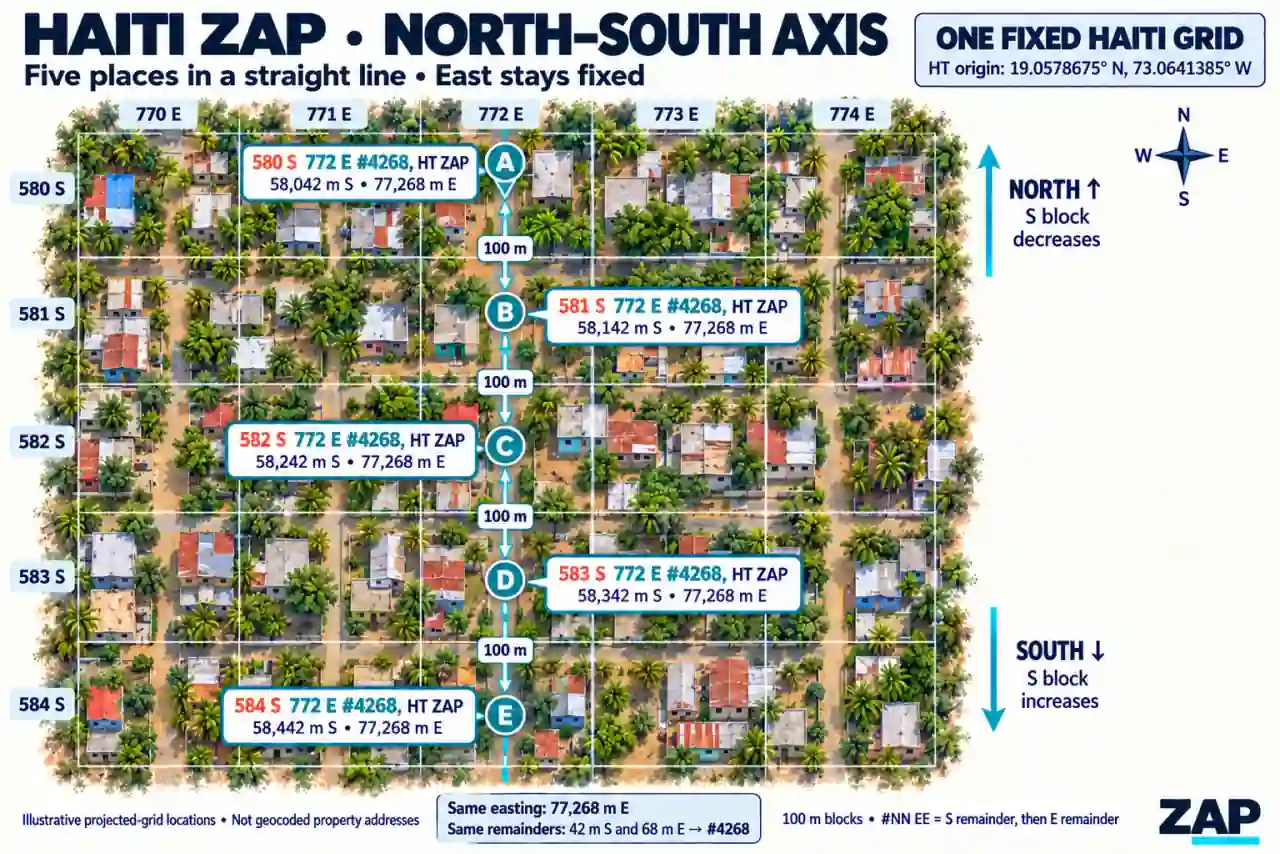
Point A: 580 S 772 E #42-68, HT ZAP
Point B: 581 S 772 E #42-68, HT ZAP
Point C: 582 S 772 E #42-68, HT ZAP
From A to B, the location moves 100 projected meters south: the south block increases from 580 to 581, while the east block and both remainders stay fixed. Moving north on this side of the origin decreases the south block.
East–west: northing stays fixed
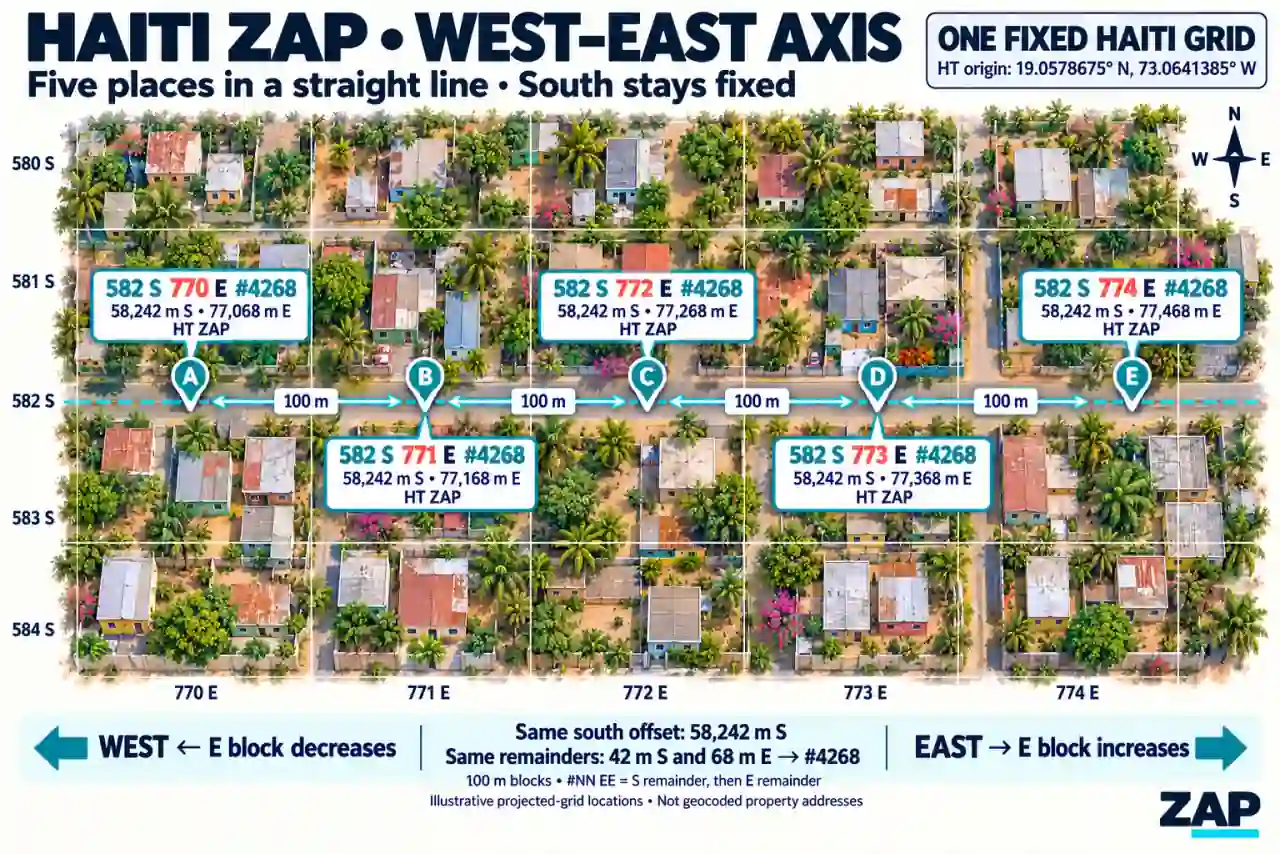
Point A: 582 S 770 E #42-68, HT ZAP
Point B: 582 S 771 E #42-68, HT ZAP
Point C: 582 S 772 E #42-68, HT ZAP
From A to B, the location moves 100 projected meters east: the east block increases from 770 to 771, while the south block and both remainders stay fixed. Moving west on this side of the origin decreases the east block.
Diagonal streets: both axes can change
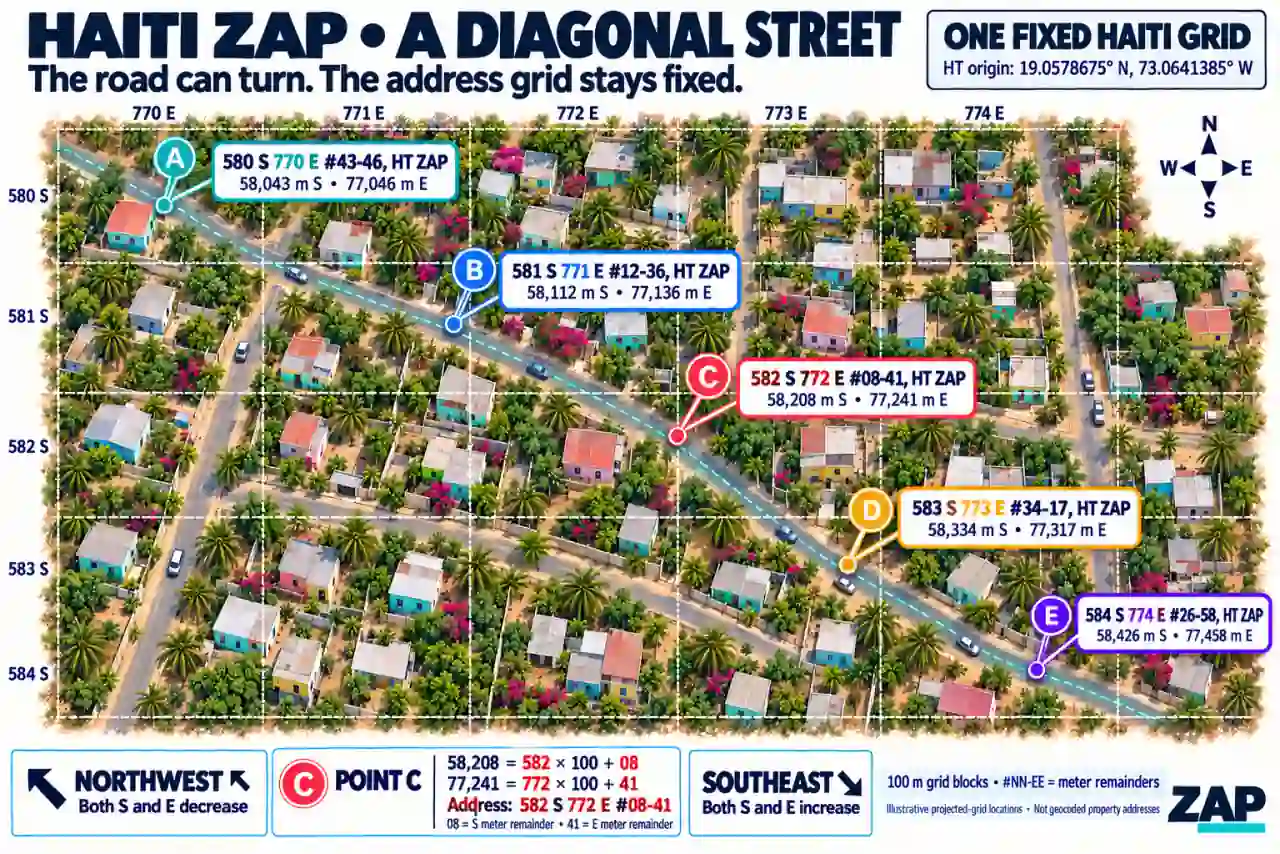
Point A: 580 S 770 E #43-46, HT ZAP
Point B: 581 S 771 E #12-36, HT ZAP
Point C: 582 S 772 E #08-41, HT ZAP
Both axes and their remainders can change along a diagonal or curved street.
For point C, the whole-meter magnitudes are 582 × 100 + 08 = 58,208 south
and 772 × 100 + 41 = 77,241 east. The #08-41 suffix keeps its leading zero.
The images are illustrative grid examples. To reach a real place, use its saved GPS entrance point for road directions; the grid comparison describes relative position rather than a route through buildings or other obstacles. The same encoding applies to the other configured countries and provinces.
The README uses five compressed WebP illustrations, each below 100 KB. Original PNGs remain in the source project; only the smaller WebP versions are included in the npm package. The compressed package stays below 500 KB, including all five illustrations and the compact country-region lookup. Country-coder's border dataset and its dependencies are installed separately and add to the total installation size.
1194 S 382 E #16-20, Kampala, UG ZAP
2106 S 3614 E #22-64, Miami, FL US ZAP
580 S 770 E #43-46, HT ZAP
These illustrate the display format. Actual numbers depend on the original GPS point and selected grid; a city label never changes the origin or verifies administrative membership.
Why use ZAP?
Different countries. Different street addresses. One consistent location format.
A well-defined address identifies a destination, but it does not automatically tell an unfamiliar person how to reach it. Immokalee, Florida, has formally assigned addresses, yet a newcomer may still need a map, street signs, or knowledge of the road layout.
ZAP gives your application a consistent way to address locations directly from GPS coordinates. It works alongside CAP addresses and can provide a location address where street names or building numbers are missing.
Addresses without waiting for an address authority
ZAP derives its location code from coordinates and a fixed grid. A country does not need an address authority, a complete street-address registry, named roads, or assigned building numbers for applications to generate ZAP addresses within that grid. A home, business, rural property entrance, or pickup point can receive a coordinate address as soon as its GPS location is available.
The same method can be applied in any country with a configured grid. This release includes 239 country/territory configurations, with country-wide grids or explicitly selected province/state grids. Coverage follows those configurations; adding an unconfigured country requires a versioned grid definition. The address structure stays consistent across them.
Haiti is the illustrated example above. Its HT configuration provides one
fixed country grid, so a place can be addressed even when its street name,
building number, or formal address record is unavailable. This shows independence
from official address assignment; the method also works alongside existing
Haitian street addresses, such as the hotel example in the table.
A visitor or delivery driver can use a ZAP-aware application to view their current location and destination in the same grid. Comparing their blocks, directions, and remainders helps them understand the destination's relative position. Saved GPS coordinates connect that destination to road directions.
Different CAP addresses, the same ZAP structure
| Location | CAP | ZAP address |
| --- | --- | --- |
| Miami, USA — City Hall | 3500 Pan American Drive, Miami, FL 33133, USA. (25.7276845, -80.2337652) | 2220 S 3602 E #92-35, Miami, FL US ZAP |
| Beijing, China — Sofitel Beijing Central | No. 2 Jianguomen South Avenue, Chaoyang District, Beijing 100022, China. (39.906274, 116.436733) | 375 S 15 W #62-74, Beijing, BJ CN ZAP |
| Abidjan, Côte d’Ivoire — Sofitel Hotel Ivoire | Boulevard Hassan II, Cocody, 08 BP 01 Abidjan, Côte d’Ivoire. (5.326842, -4.005485) | 2452 S 1724 E #88-29, Abidjan, CI ZAP |
| Port-au-Prince, Haiti — Marriott Hotel | 147 Avenue Jean Paul II, Turgeau, Port-au-Prince, HT 6113, Haiti. (18.532731, -72.324187) | 582 S 780 E #29-13, Port-au-Prince, HT ZAP |
| Berlin, Germany — Brandenburg Gate | Pariser Platz 5, 10117 Berlin, Germany. (52.5162, 13.3780) | 1538 N 1989 E #91-52, Berlin, DE ZAP |
Coordinates are (latitude, longitude), in decimal degrees. Each displayed GPS point reproduces the adjacent ZAP address using package version 0.2.0. They demonstrate the format; the points are not independently verified entrances.
Map/GPS references: Miami City Hall, Sofitel Beijing Central, Sofitel Hotel Ivoire, Marriott Port-au-Prince, and Brandenburg Gate visitor information.
CAP street names, languages, address order, and postal components vary. ZAP uses the same generation function and encoding structure across its configured grids.
Understand the address
In 582 S 780 E #29-13, Port-au-Prince, HT ZAP:
- 582 S: 582 complete 100-meter blocks south of the selected grid origin.
- 780 E: 780 complete 100-meter blocks east of that origin.
- #29-13: another 29 whole projected meters south and 13 east within those blocks.
- HT: Haiti’s country code.
The directions refer to the grid’s fixed origin. The suffix describes coordinate detail, rather than a sequential house number.
Why developers choose ZAP
- Generate addresses from GPS, including locations without useful street addresses.
- Use one format across configured countries and provinces.
- Generate offline, without a geocoding API or API key once coordinates are available.
- Get repeatable results from the same coordinates, grid, and protocol version.
- Keep local context, displaying street addresses, landmarks, and unit details alongside ZAP.
Identifying a destination and reaching it
ZAP works with straight, diagonal, and curved streets. Its grid stays fixed; both coordinate numbers can change along a diagonal road.
For navigation, use the original saved GPS coordinates—preferably the entrance point—to open road directions. Keep helpful street names and landmarks visible.
ZAP complements CAP addresses. Whole-meter encoding does not guarantee one-meter GPS accuracy, and a location code does not automatically identify a unique household or apartment.
Shared engine: YAP
ZAP uses @zukall/yap (Your Addressing Protocol) for projection, address
encoding and formatting, geographic distance, route optimization, and map
directions. ZAP loads its country/province grids and snapshot metadata from the
published @zukall/yap-bounties dependency, and supplies labels and the
legacy address adapter. Both packages use the same coordinate-ID
format. Readable addresses, grid identities, and legacy rules retain their
existing behavior.
For a custom site origin, use YAP directly:
import { createYap } from "@zukall/yap";

const campus = createYap({
  you: "CAMPUS-A", // Your Origin Unit: required name or code
  origin: { latitude: 0.3476, longitude: 32.5825 },
  unitSizeMeters: 0.01, // Also supports 1 meter, 100 meters, and other positive sizes
});
const localAddress = campus.generateAddress({ latitude: 0.3486, longitude: 32.5835 });
console.log(localAddress.address);
YAP suits military bases, universities, theme parks, refugee tent cities, and boat race courses where the caller defines the origin and address unit size. ZAP continues to use its fixed 100-meter blocks and 1-meter detail. Installing ZAP from npm also installs its YAP and YAP Bounties dependencies.
Shared bounty grids
ZAP calls getBounties("zap") internally. Country and province definitions
live in @zukall/yap-bounties; ZAP does not keep a second copy. The dependency
is pinned to 1.0.0 to preserve the grid corners and snapshot versions used
by existing addresses.
import { getBounties } from "@zukall/yap-bounties";

const bounties = getBounties("zap");
console.log(bounties.UG.name, bounties.UG.version, bounties.UG.corners);
A bounty contains a name, a version, and four corners. For a country that uses
province grids, select one of its provinces entries. YAP can optionally use
the same selected bounty in createYap({ you: "MY-SITE", bounty }) or
generateAddress({ you: "MY-SITE", bounty, latitude, longitude }).
The existing @zukall/zap/data export forwards the shared snapshot and its
metadata for compatibility. ZAP's country lookup and verified-country ranking
remain separate from these address-grid definitions.
Installation and source verification
Install from npm; YAP and YAP Bounties are included as dependencies:
npm install @zukall/zapBuild and verify the source:
cd /absolute/path/to/your-address-protocol
npm ci
npm run pack:check
cd ../zukall-address-protocol
npm ci
npm run check
npm run pack:check
Node.js 20 or newer is required for development and Node consumers. Browser
bundlers can use the same generator; runtime code has no Node-specific APIs.
ESM, CommonJS and TypeScript declarations are included. pack:check installs
the ZAP tarball into a temporary consumer and verifies both module formats,
their shared dependencies, and types. YAP and YAP Bounties are resolved from
their published npm versions.
GPS-only addresses: optional country, province/state, and city
import { generateAddresses } from "@zukall/zap";

const addresses = generateAddresses({
  latitude: 1.9228707,
  longitude: 29.9771748,
});

console.log(addresses.map(result => result.address));
// [
//   "326 N 3547 E #19-34, OR CD ZAP",
//   "613 N 2556 W #66-40, UG ZAP"
// ]
console.log(addresses.map(result => result.zapId));
// ["01.9228707.29.9771748", "01.9228707.29.9771748"]
console.log(addresses.map(result => ({
  countryCode: result.countryCode,
  countryVerified: result.countryVerified,
  detectedCountryCode: result.detectedCountryCode,
})));
// [
//   { countryCode: "CD", countryVerified: true, detectedCountryCode: "CD" },
//   { countryCode: "UG", countryVerified: false, detectedCountryCode: "CD" }
// ]
These are alternative Congo and Uganda grid addresses for the same GPS point.
OR identifies Congo's configured Orientale grid in the frozen snapshot; it is
not a claim about today's administrative divisions. The two addresses have
different origins and gridId values, while their coordinate-based zapId is
identical. Save each complete result and use your own record IDs when needed.
generateAddresses always returns an array. It returns every matching grid,
including when more than two match, and returns [] when none match. A supplied
countryCode filters the countries; a supplied provinceCode filters the
provinces/states. Omitted, empty, and whitespace-only codes mean no selection.
Invalid supplied codes and malformed inputs still fail explicitly. city is
an optional display label; it is never guessed from the GPS point.
const ugandaOnly = generateAddresses({
  latitude: 1.9228707, longitude: 29.9771748,
  countryCode: "UG",
});
// One result: 613 N 2556 W #66-40, UG ZAP

const miami = generateAddresses({
  latitude: 25.7276845, longitude: -80.2337652,
});
// One result with countryCode "US" and provinceCode "FL"; no city label.
Country verification and result order
countryVerified: true means the address's countryCode matches the country or
territory returned by the pinned @rapideditor/[email protected] lookup for the
original GPS point. countryVerified: false marks a possible grid address whose
country was not matched by that lookup. detectedCountryCode records the lookup
result on every candidate and address; it is omitted when no country is found.
Verified-country results come first. Within each group, results are sorted by country and province code. Every matching grid remains available, including when more than two grids overlap. For example, this point's lookup returns Uganda, which moves ahead of Congo's overlapping grid:
const ranked = generateAddresses({ latitude: 0.3476, longitude: 30.5 });
console.log(ranked.map(result => [result.countryCode, result.countryVerified]));
// [["UG", true], ["CD", false]]
The lookup supports separately coded territories, such as Puerto Rico (PR) and
the Isle of Man (IM). It uses [longitude, latitude] internally; ZAP's inputs
remain named latitude and longitude. Both representations of the date line
are treated alike for country lookup, while saved coordinates remain unchanged.
If no country is found, ZAP keeps all applicable grid addresses with
countryVerified: false. An explicit countryCode still filters the grid
choices; it does not make a conflicting country verified. Country verification
does not verify the province or city, and does not certify GPS accuracy. The
library uses simplified borders and may be imprecise near complex, disputed,
or maritime boundaries. Read its documented limitations.
Automatic grid lookup continues to check separate Natural Earth component bounds for mainland areas, islands, and detached regions, plus the detected country when configured. It then checks applicable country-wide or province grid rectangles. Matching grid coverage alone does not establish administrative membership. All lookup runs locally, with no geocoding API or API key. Explicit choices retain their original corners, origins, versions, and address encoding.
Generate one address or show a selection
generateAddress retains its single-result contract. You can omit the country
and province when exactly one grid matches:
import { generateAddress, getAddressCandidates, AddressSelectionError } from "@zukall/zap";

const kampala = generateAddress({ latitude: 0.3476, longitude: 32.5825 });
console.log(kampala.address); // 1139 S 339 E #33-19, UG ZAP

console.log(getAddressCandidates({ latitude: 1.9228707, longitude: 29.9771748 }));
// Candidates include countryCode, countryName, optional provinceCode, gridName,
// countryVersion, gridVersion, countryVerified and optional detectedCountryCode.
// Verified-country candidates come first, then country/province code order.

try {
  generateAddress({ latitude: 1.9228707, longitude: 29.9771748 });
} catch (error) {
  if (!(error instanceof AddressSelectionError)) throw error;
  console.log(error.code); // MULTIPLE_MATCHES
  console.log(error.candidates); // Let the application show a grid selection.
}
The error code is MULTIPLE_MATCHES for ambiguous single-address requests, or
NO_MATCH when automatic lookup finds no grid. Use generateAddresses to get
all addresses without requiring a choice, or supply a country/province to
choose a grid. Legacy protocol-1 generation still requires explicit grid codes.
Quick start: ESM
import { generateAddress } from "@zukall/zap";

const result = generateAddress({
  countryCode: "UG",
  city: "Kampala",
  latitude: 0.3476,
  longitude: 32.5825,
});

console.log(result.address); // 1139 S 339 E #33-19, Kampala, UG ZAP
console.log(result.zapId); // 00.347600.32.582500
console.log(result.protocolVersion); // 2 (string)
console.log(result.northSouthBlock); // 1139
console.log(result.eastWestBlock); // 339
console.log(result.northSouthRemainder); // 33
console.log(result.eastWestRemainder); // 19
console.log(result.coordinateSuffix); // #33-19
The complete result is:
{
  "protocol": "ZAP",
  "protocolVersion": "2",
  "address": "1139 S 339 E #33-19, Kampala, UG ZAP",
  "zapId": "00.347600.32.582500",
  "countryCode": "UG",
  "countryVerified": true,
  "detectedCountryCode": "UG",
  "gridName": "Uganda",
  "countryVersion": "ne-admin0-239eec57ac17-v1",
  "gridVersion": "ne-admin0-239eec57ac17-v1",
  "coordinates": {
    "latitude": 0.3476,
    "longitude": 32.5825
  },
  "center": {
    "latitude": 1.372243,
    "longitude": 32.277466499999946
  },
  "widthMeters": 606730,
  "heightMeters": 633245,
  "northingMeters": -113933.63641380174,
  "eastingMeters": 33919.40824532269,
  "city": "Kampala",
  "northSouthBlock": 1139,
  "eastWestBlock": 339,
  "northSouthDirection": "S",
  "eastWestDirection": "E",
  "northSouthRemainder": 33,
  "eastWestRemainder": 19,
  "coordinateSuffix": "#33-19",
  "blockSizeMeters": 100,
  "detailSizeMeters": 1,
  "encoding": "blocks-100m-detail-1m-floor-absolute-dashed-suffix-2x2-v1",
  "gridId": "ZAP:2:UG:ne-admin0-239eec57ac17-v1:ne-admin0-239eec57ac17-v1:AEQD-SPHERE-v1:6371008.8:1.372243:32.277466499999946:blocks-100m-detail-1m-floor-absolute-dashed-suffix-2x2-v1"
}
coordinates retains the original GPS point. northingMeters and eastingMeters
are signed, unrounded projected offsets. Remainders are numbers for application
use; coordinateSuffix and address always format them with two digits.
widthMeters and heightMeters are approximate rectangle dimensions rounded to
whole meters.
You may also pass an optional street label. It is returned as separate metadata
and enters the formatted address only when includeStreetName is true. City and
street labels are trimmed, whitespace is normalized, and blank labels are omitted.
The option does not geocode street names; supply a street name from your CAP or
address provider. A leading house number is stripped from the street label when
it is included in the ZAP text.
CommonJS and selected provinces
const { generateAddress, ZAP_PROTOCOL } = require("@zukall/zap");

const result = generateAddress({
  countryCode: "US",
  provinceCode: "FL",
  city: "Miami",
  latitude: 25.7617,
  longitude: -80.1918,
});

console.log(ZAP_PROTOCOL.name); // Zukall Addressing Protocol
console.log(result.address); // 2181 S 3643 E #89-31, Miami, FL US ZAP
Country/province inputs are optional. Province-based countries resolve matching
province grids automatically when no province is supplied. Country-wide grids
reject a supplied province code. Use generateAddresses for multiple matches,
or choose a grid before requesting one result from generateAddress.
Existing corners, origins, snapshot versions and overlapping rectangles are
unchanged. Rectangle containment does not establish actual administrative
membership. City and street labels do not determine the selected grid.
TypeScript and the named namespace
import {
  generateAddress,
  zap,
  type AddressInput,
  type AddressResult,
} from "@zukall/zap";

const input: AddressInput = {
  countryCode: "US",
  provinceCode: "AK",
  latitude: 61.2181,
  longitude: -149.9003,
};

const result: AddressResult = generateAddress(input);
console.log(result.address); // 214 N 4726 E #44-94, AK US ZAP
console.log(zap.generateAddress(input).address); // Same address
console.log(zap.protocol.version); // 2
Public types include AddressInput, AddressResult, AddressEncoding,
LegacyAddressInput, LegacyAddressResult, GridInput, Coordinates, Corners,
Country, Province, ProvinceCountry, CountryOption, and ProvinceOption.
ESM and CommonJS consumers receive matching declarations.
Display formatting and the encoding
The format is:
{northSouthBlock} {N|S} {eastWestBlock} {E|W} #{northSouthRemainder}-{eastWestRemainder}, {city}, {provinceCode} {countryCode} ZAPMissing city/province components are omitted cleanly. The final province,
country and ZAP labels are separated by spaces:
const withoutCity = generateAddress({
  countryCode: "UG", latitude: 0.3476, longitude: 32.5825,
});
console.log(withoutCity.address); // 1139 S 339 E #33-19, UG ZAP

const withoutCityInProvince = generateAddress({
  countryCode: "US", provinceCode: "CA", latitude: 34.0522, longitude: -118.2437,
});
console.log(withoutCityInProvince.address); // 3568 S 940 E #20-58, CA US ZAP
For each signed projected axis:
- Choose direction from its sign: negative northing is S, negative easting is W.
- Take
wholeMeters = Math.floor(Math.abs(offset)). - Calculate
block = Math.floor(wholeMeters / 100). - Calculate
remainder = wholeMeters % 100. - Pad both remainders to two digits and join north/south first:
#03-06.
Northing -119416.594 and easting 38220.747 produce
1194 S 382 E #16-20. Magnitude 99.999 remains block 0, remainder 99;
magnitude 100 becomes block 1, remainder 00. Exact zero and negative zero use
N/E, but -0.3 meters keeps S/W even though its whole-meter magnitude is zero.
Blocks may have any number of digits. Neither nearest-meter rounding nor old
5-meter snapping is applied.
The spherical azimuthal equidistant projection and Earth radius 6,371,008.8 meters are unchanged. The grid axes remain fixed. A diagonal or curved street can change both blocks; each address is independently derived from its GPS point. Roads do not rotate the grid or introduce sequential house numbers. Moving 100 projected meters away from the origin along one axis increments that block while preserving the other axis and both remainders.
Zap ID: the original coordinates
generateAddress returns the readable address and the coordinate-based
zapId. The ID contains latitude first, longitude second. Each integer
part has at least two digits, each fraction has at least six digits, and a dot
separates the two decimal coordinates. Negative coordinates retain their
minus sign; finer input is preserved without rounding.
| Original coordinates (latitude, longitude) | zapId |
| --- | --- |
| (0.3476, 32.5825) | 00.347600.32.582500 |
| (25.7617, -80.1918) | 25.761700.-80.191800 |
| (18.532731, -72.324187) | 18.532731.-72.324187 |
The shared formatter also supports the example (-0.039485, 4.00483):
import { formatCoordinateId, parseCoordinateId } from "@zukall/zap";

const id = formatCoordinateId({ latitude: -0.039485, longitude: 4.00483 });
console.log(id); // -00.039485.04.004830
console.log(parseCoordinateId(id)); // { latitude: -0.039485, longitude: 4.00483 }
The formatter accepts valid coordinate pairs independently of ZAP's grid
selection. Address generation still requires a configured country/province
grid containing the point. parseCoordinateId accepts canonical coordinate
IDs and rejects the older quadrant-based IDs. Negative zero is normalized
to zero.
City, province, country, and street labels do not enter zapId. The same
coordinate pair receives the same ID across ZAP and YAP, even if its readable
address or selected origin differs. Two points in one whole-meter address
cell retain distinct IDs when their coordinates differ. Multiple apartments
or records can share the same coordinate pair; keep your own record IDs and
save gridId and the complete address result for context.
Upgrade from ZAP 0.4.x: derive new zapId values from saved coordinates
using formatCoordinateId. Preserve old lookup aliases while migrating your
records. Readable ZAP addresses, grid identities, protocol version 2, and
explicit legacy generation retain their existing meanings.
Normalize and detect ZAP addresses
sanitizeZapAddress(address) returns a canonical ZAP string. It accepts common
typing variations such as lower-case direction letters, extra spaces or commas,
an omitted ZAP suffix, dash variants, and stray text after the two-digit
suffix. isItZap(value) recognizes a valid position with a country code even
when the ZAP suffix is missing. If the explicit ZAP marker is present, it
also recognizes an otherwise valid position with missing country metadata so
reverse lookup can return a useful error.
import { isItZap, sanitizeZapAddress } from "@zukall/zap";

const input = "1002 s 144 e # 88 - 47, UG, ZAP";
if (isItZap(input)) {
  console.log(sanitizeZapAddress(input)); // 1002 S 144 E #88-47, UG ZAP
}
The sanitizer keeps a city label when it is comma-separated, and normalizes province/country codes. Reverse lookup still validates that the selected country, province, and grid cell are configured.
Reverse a ZAP address to latitude and longitude
import { reverseZap, reverseAddress } from "@zukall/zap";

const coordinates = reverseZap("1193 S 381 E #98-07, Kampala, UG ZAP");
console.log(coordinates.latitude.toFixed(9));  // 0.298449832
console.log(coordinates.longitude.toFixed(9)); // 32.620159596

// Both names return the same { latitude, longitude } object shape.
console.log(reverseAddress("ZAP Address: 1193 S 381 E #98-07, Kampala, UG ZAP"));
reverseZap(address) and reverseAddress(address) are equivalent. They return
Coordinates directly, so the result can be passed to getDistance or other
latitude/longitude tools. Wrap it as { coordinates } for getDirectionsUrl.
The same functions are
available as zap.reverseZap and zap.reverseAddress.
The function first sanitizes the input, then reads the final country/province
codes to select the bundled grid origin, decodes the signed blocks and one-meter
suffix, and applies the inverse spherical AEQD projection. City labels are ignored
for the coordinate calculation, including labels with commas. Province-based
addresses must include their province/state code, such as FL US ZAP.
A readable address has discarded the original sub-meter position. The returned
point is the center of its one-meter projected cell, with each signed axis
half a meter beyond the encoded whole-meter magnitude. It is an estimate of the
original location and does not report sensor accuracy. For the original
coordinate values, use parseCoordinateId(zapId) or the saved record's
coordinates.
Cells at inclusive grid edges can have centers just outside the rectangle; valid edge cells still decode to those centers. Malformed or legacy protocol-1 address text, unknown country/province codes, unsafe numeric offsets, and cells outside the selected grid are rejected. Reverse lookup uses the bundled frozen grid snapshot and makes no network requests.
const point = reverseZap("1193 S 381 E #98-07, Kampala, UG ZAP");
const directionsUrl = getDirectionsUrl({ coordinates: point }); // Estimated cell-center directions.

const estimatedDistance = getDistance(
  "1193 S 381 E #98-07, Kampala, UG ZAP",
  "1139 S 339 E #33-19, Kampala, UG ZAP",
  { resolveAddress: address => ({ coordinates: reverseZap(address) }) },
);
// The same record-wrapping resolver works for optimizeRoute.
Phone GPS: preserve precision and report accuracy
IDs display at least six decimal places and retain any finer supplied coordinates. Padding a number with zeros does not improve the accuracy of a measurement. Ordinary phone readings are accepted without a strict one-meter cutoff. Missing accuracy is unknown, not assumed to be one meter.
Pass optional accuracyMeters from your GPS or survey source. It is saved in
result.coordinates.accuracyMeters, without changing the ID or address.
The value must be finite and nonnegative. The browser's coords.accuracy
reports horizontal uncertainty in meters at a 95% confidence level; see the
W3C Geolocation specification.
navigator.geolocation.getCurrentPosition(({ coords }) => {
  const result = generateAddress({
    countryCode: "UG", // Select the configured grid for the actual location.
    latitude: coords.latitude,
    longitude: coords.longitude,
    accuracyMeters: coords.accuracy,
  });
  console.log(result.zapId, result.coordinates.accuracyMeters);
}, console.error, { enableHighAccuracy: true, maximumAge: 0, timeout: 15000 });
High-accuracy mode requests a better fix; it cannot guarantee one-meter accuracy. Applications can display the reported uncertainty, offer another reading, and save the best available position without blocking the user. A newly measured coordinate pair can produce a new ID, so retain the chosen coordinates when saving a place's address.
Country and province selectors
import { getCountries, getCountry, getProvinces } from "@zukall/zap";

console.log(getCountries().length); // 239
console.log(getCountries().find(item => item.code === "US"));
// { code: "US", name: "United States", requiresProvince: true }
console.log(getProvinces("US").length); // 51
console.log(getProvinces("US").find(item => item.code === "FL"));
// { code: "FL", name: "Florida" }
console.log(getProvinces("UG")); // []
console.log(getCountry("UG").name); // Uganda
Options are sorted by name, and each call returns a fresh array. Country/province
codes are trimmed and uppercased. Keep province codes as strings, preserving
leading zeros and source-specific codes returned by getProvinces.
These 22 countries use configured province grids:
DZ CD SD LY TD NE AO ML ZA ET MR RU CA US CN BR AU IN AR KZ SA IDThey contain 530 province grids. The remaining 217 country/territory entries use
country-wide grids. requiresProvince: true describes the grid structure;
the province input can still be omitted for automatic lookup. Matching grids
are address options, rather than verified administrative membership.
Save the full record and keep unit details separate
import { generateAddress } from "@zukall/zap";

const result = generateAddress({
  countryCode: "UG", city: "Kampala", latitude: 0.3476, longitude: 32.5825,
});

const record = {
  ...result, // Address, zapId, blocks, original GPS, versions, center, encoding, gridId
  street: "Example Road",
  apartment: "12B",
  floor: "3",
  unit: "Office 4",
};
const saved = JSON.parse(JSON.stringify(record));
console.log(saved.address); // 1139 S 339 E #33-19, Kampala, UG ZAP
console.log(saved.zapId); // 00.347600.32.582500
console.log(saved.unit); // Office 4 (separate from #33-19)
Persist the original address text, zapId, and complete result, especially coordinates,
protocolVersion, countryVersion, gridVersion, and gridId. Treat gridId as
opaque. Cell identity uses that ID with the structured blocks, directions and
remainders; city/street/unit labels are independent display metadata. The package
leaves stored records unchanged. Reverse lookup returns an estimated cell center;
original coordinates and coordinate-based IDs preserve the original point.
Open directions from saved GPS
import { getDirectionsUrl } from "@zukall/zap";

// Use the stored record, including when it contains a protocol-1 address.
const url = getDirectionsUrl(saved);
console.log(url);
// https://www.google.com/maps/dir/?api=1&destination=0.3476%2C32.5825

// In a browser, open this from the user's Directions button:
window.open(url, "_blank", "noopener,noreferrer");
The optional helper builds a Google Maps directions URL
from the original coordinates. It performs no API request and does not need an
API key. You can also pass saved.coordinates to your own map provider. Never
use the formatted ZAP string, grid center, city name, or coordinate suffix as the
routing destination.
Measure distance between locations
ZAP’s strongest advantage here is making distance understandable to people; software can handle either easily. Within one grid, a difference of three blocks along an axis represents 300 projected meters. That is easier for a person to read than comparing decimal GPS coordinates. Software can calculate distance from either representation.
Use complete saved records whenever available. getDistance defaults to the
original GPS coordinates, including when the records come from different
countries, states, or protocol versions:
import { generateAddress, getDistance } from "@zukall/zap";

const depot = generateAddress({
  countryCode: "UG", city: "Kampala", latitude: 0.3476, longitude: 32.5825,
});
const pickup = generateAddress({
  countryCode: "UG", city: "Kampala", latitude: 0.3486, longitude: 32.5825,
});

const distance = getDistance(depot, pickup);
console.log(distance.method); // haversine
console.log(distance.meters.toFixed(1)); // 111.2
console.log(distance.kilometers.toFixed(4)); // 0.1112

// Latitude/longitude objects also work.
getDistance(depot.coordinates, pickup.coordinates);

// Optional distance in the saved grid's projected plane.
const gridDistance = getDistance(depot, pickup, { method: "projected" });
console.log(gridDistance.method); // projected
console.log(gridDistance.gridId === depot.gridId); // true
Haversine measures the geographic great-circle distance on a sphere, using the same 6,371,008.8-meter Earth radius as the address projection. Values retain number precision; rounding above is only for display. It does not measure road length, altitude, or terrain.
Projected mode uses Math.hypot() on the stored northing/easting differences.
Both records must have exactly the same gridId and finite offsets. A
different country, province, snapshot, or encoding ID is rejected. This mode
does not regenerate addresses or reproject older records; protocol-1 offsets
can retain their original snapping. Projected-plane distances can differ from
geographic distances away from the grid origin. Neither mode parses the address
text, subtracts unit numbers, or treats the suffix as a house number.
Optimize randomly entered stops
optimizeRoute returns an optimized straight-line itinerary. It chooses an
order that reduces the sum of distances between consecutive stops. Your
application can use that order to plan visits, then open map directions from
each stop's saved GPS point. It does not provide driving directions or guarantee
the shortest journey along roads.
This example uses illustrative GPS points along a meridian, entered out of order:
import { generateAddress, optimizeRoute } from "@zukall/zap";

const stop = (id, latitude) => ({
  id,
  ...generateAddress({
    countryCode: "UG", city: "Kampala", latitude, longitude: 32.5825,
  }),
});
const stops = [
  stop("depot", 0.3476),
  stop("C", 0.3506),
  stop("A", 0.3486),
  stop("B", 0.3496),
];

const itinerary = optimizeRoute(stops);
console.log(itinerary.description); // optimized straight-line itinerary
console.log(itinerary.orderedStops.map(stop => stop.id)); // ["depot", "A", "B", "C"]
console.log(itinerary.originalIndices); // [0, 2, 3, 1]
console.log(itinerary.totalMeters.toFixed(1)); // 333.6
console.log(itinerary.originalTotalMeters.toFixed(1)); // 667.2
console.log(itinerary.optimization); // exact
console.log(itinerary.algorithm); // held-karp
console.log(itinerary.method); // haversine

for (const leg of itinerary.legs) {
  console.log(stops[leg.fromIndex].id, stops[leg.toIndex].id, leg.meters);
}

// Select endpoints by their ORIGINAL input indices.
const fixedEndpoints = optimizeRoute(stops, { startIndex: 2, endIndex: 1 });
// Starts at A (input 2), finishes at C (input 1), and includes every other stop.

const roundTrip = optimizeRoute(stops, { returnToStart: true });
console.log(roundTrip.legs.at(-1).isReturn); // true
// orderedStops still includes the depot only once; legs include the return to it.
| Option | Behavior |
| --- | --- |
| startIndex | Fixed start selected from the supplied stops; defaults to input index 0. |
| endIndex | Optional fixed final stop, selected by original index. |
| returnToStart | Adds a closing leg to the start; defaults to false and cannot be combined with endIndex. |
| method | "haversine" by default, or "projected" when every saved record has the identical grid ID. |
| resolveAddress | Caller-owned lookup for address strings; supplying it makes the call return a Promise. |
| distanceMatrix | Optional meter costs indexed by original stop indices; cannot be combined with method. |
Endpoints must be supplied stops. If a depot is outside your delivery list,
include it in points and select its index. An open itinerary with multiple
stops cannot have the same start and end; choose returnToStart for that case.
The result contains the original objects or strings in orderedStops, their
originalIndices, resolvedPoints in the same order, and legs with
fromIndex, toIndex, meters, kilometers, method, and isReturn. Totals are
available as totalMeters and totalKilometers. Inputs and saved addresses are
not modified. Duplicate coordinates and duplicate references remain separate
stops and retain their own indices.
Exact and approximate optimization
- Up to 12 stops: Held–Karp subset dynamic programming finds an exact minimum for the selected distance costs and endpoint constraints.
- 13–1000 stops: Deterministic nearest neighbor followed by 2-opt returns an approximate order. Both the nearest-neighbor order and the original feasible order are improved, with at most 100 2-opt passes per seed. Fixed endpoints remain fixed. Results are never longer than the original feasible order.
optimization reports "exact" or "approximate"; algorithm names the
algorithm, and exactCutoff is 12. Equal-cost choices use original input
indices deterministically. ROUTE_OPTIMIZATION exports the frozen work limits.
The original feasible order moves the selected start first and end last, keeping
the other stops in their entered order; its cost is originalTotalMeters.
Empty lists and single stops return an exact zero-distance itinerary with no legs, even for a round trip. Explicit endpoint indices must still be valid. Invalid coordinates, sparse arrays, contradictory endpoints, and lists above 1000 stops are rejected. Optimizing many stops uses a quadratic distance matrix; approximate results are not a guarantee of the best possible order.
Address strings and Zap IDs in distance and routes
The formatted ZAP address can be decoded to an estimated one-meter cell center
with reverseZap or reverseAddress. Original GPS values can be recovered from
a coordinate-based Zap ID with parseCoordinateId, or from a saved record.
String inputs to distance and route helpers still require an explicit resolver.
For estimated cell centers, use address => ({ coordinates: reverseZap(address) }).
The examples below retrieve the corresponding saved
record; a resolver may return it directly or use an
asynchronous database lookup:
const savedByAddress = new Map(stops.map(record => [record.address, record]));
const resolveAddress = async (address, originalIndex) => {
  const record = savedByAddress.get(address);
  if (!record) throw new Error(`No saved GPS record for input ${originalIndex}`);
  return record;
};

const textStops = stops.map(record => record.address);
const itineraryFromText = await optimizeRoute(textStops, { resolveAddress });
const distanceFromText = await getDistance(textStops[0], textStops[1], { resolveAddress });
The same resolver option accepts zapId strings when your lookup uses that key:
const savedByZapId = new Map(stops.map(record => [record.zapId, record]));
const resolveZapId = async zapId => {
  const record = savedByZapId.get(zapId);
  if (!record) throw new Error(`Unknown Zap ID: ${zapId}`);
  return record;
};
const zapIds = stops.map(record => record.zapId);
const itineraryFromIds = await optimizeRoute(zapIds, { resolveAddress: resolveZapId });
const distanceFromIds = await getDistance(zapIds[0], zapIds[1], { resolveAddress: resolveZapId });
Resolvers receive each string and its original input index (0/1 for
getDistance), once per string occurrence. The original strings remain in
orderedStops; retrieved records are in resolvedPoints. A resolver must return
a coordinate pair or saved record with valid coordinates; missing records and lookup failures
reject the Promise. Direct GPS/record calls without a resolver stay synchronous.
Use full records and your own stop IDs when addresses are shared by different
units or records; an address string alone does not identify a unique household.
Supplying distance costs from another provider
The optimizer consumes a distance matrix internally. Your application can supply one from a future road-distance provider without changing stop identities:
const matrix = [
  [0, 400, 100],
  [350, 0, 200],
  [120, 220, 0],
];
const suppliedCosts = optimizeRoute(stops.slice(0, 3), { distanceMatrix: matrix });
console.log(suppliedCosts.method); // distance-matrix
console.log(suppliedCosts.description); // optimized distance-matrix itinerary
Rows/columns follow original input order, entries are nonnegative finite meters, and the diagonal must be zero. Matrices may be asymmetric; both algorithms account for the full cost of reversing directed legs. Values must leave room for finite route totals. The package does not fetch provider data. Results are labeled separately when caller-supplied costs are used. The function still returns a stop order, not driving instructions or a vehicle scheduling plan.
Upgrade from protocol 1 without changing issued addresses
Package 0.2.0 introduces protocol 2. generateAddress no longer accepts
gridSizeMeters; remove that option when intentionally issuing a new protocol-2
address. Passing it is rejected in TypeScript and at runtime, including when a
JavaScript caller passes undefined.
Previously issued records retain their original address, GPS point,
protocolVersion: "1", grid interval and original gridId. Continue displaying
those saved values. Do not regenerate or overwrite them merely on package upgrade.
To explicitly reproduce a version-1 address, use its original GPS and interval:
import {
  generateLegacyAddress,
  type LegacyAddressInput,
  type LegacyAddressResult,
} from "@zukall/zap";

const legacyInput: LegacyAddressInput = {
  countryCode: "UG",
  latitude: 0.3476,
  longitude: 32.5825,
  gridSizeMeters: 5,
};
const original: LegacyAddressResult = generateLegacyAddress(legacyInput);
console.log(original.address); // 113935 S 33920 E, UG, ZAP
console.log(original.protocolVersion); // 1
console.log(original.gridSizeMeters); // 5
generateLegacyAddress retains the original result schema, nearest-interval
snapping and grid identity. Its default is 5 meters; supported original intervals
are integers 1–1000. LEGACY_ZAP_PROTOCOL exposes the frozen version-1 rules.
See PROTOCOL-V1.md.
If a user requests a new protocol-2 address for a saved location, explicitly select its original country/province and GPS coordinates, omit the legacy grid option, generate a new record, and retain the old record as history. Changing the text of an old record without changing its protocol metadata is incorrect.
Handle invalid input
function tryAddress(input) {
  try {
    return { ok: true, result: generateAddress(input) };
  } catch (error) {
    return { ok: false, error: error instanceof Error ? error.message : String(error) };
  }
}

console.log(tryAddress({ countryCode: "US", latitude: 39, longitude: -119.5 }));
// { ok: false, error: "Multiple ZAP grids match these coordinates. Use generateAddresses to get all addresses, or select countryCode and provinceCode." }
Validation rejects missing/non-string codes, unknown countries/provinces,
non-numeric or non-finite coordinates, latitude outside ±90, longitude outside
±180, coordinates outside the selected inclusive rectangle, non-string cities,
non-string street labels, and the obsolete gridSizeMeters option. Numeric strings must be converted before
calling. Empty city labels are omitted. Zero coordinates, date-line rectangles,
and Antarctica's full 360-degree rectangle remain supported.
Inspect immutable source data
import {
  countries, provinceCountries, provinceGrids,
  provinceCounts, provinceDataNotes, additionalSourceAreas,
} from "@zukall/zap/data";

console.log(countries.UG.corners); // Original four country corners
console.log(provinceCounts.US); // 51
console.log(provinceCounts.DZ); // 48 in this frozen snapshot
console.log(provinceDataNotes.DZ); // Historical coverage notes
console.log(provinceCountries.US.province.CA.name); // California
console.log(provinceGrids.US.provinces.CA.name); // California
console.log(Object.keys(additionalSourceAreas).length); // 13
These exports forward the unchanged Natural Earth snapshot from
@zukall/yap-bounties, with historical divisions,
source-specific keys, and some territorial groupings. It supplies fixed grid
origins rather than a current postal/administrative directory. The 13 additional
source areas remain outside address generation. Bounds and versions are frozen at
runtime; future changes require new snapshots and preservation of older versions.
See THIRD-PARTY-NOTICES.md and PROTOCOL.md.
Public API
| Export | Purpose |
| --- | --- |
| generateAddress(input) | Generate a protocol-2 address and coordinate-based zapId, with fixed 100-meter blocks and 1-meter detail. |
| generateAddresses(input) | Get every matching grid address from GPS, placing verified-country results first; country, province/state, and city inputs are optional. |
| reverseAddress(address) / reverseZap(address) | Decode a protocol-2 readable address to its estimated one-meter cell center as { latitude, longitude }. |
| getAddressCandidates(input) | List matching grids with country verification and the same ranking, without generating addresses. |
| AddressSelectionError | Inspect NO_MATCH / MULTIPLE_MATCHES and candidates for a single-address request. |
| formatCoordinateId(coordinates) / parseCoordinateId(id) | Encode the original coordinate pair without rounding, or recover it from a canonical ID. |
| generateLegacyAddress(input) | Explicitly reproduce the original protocol-1 address and grid ID. |
| getDirectionsUrl(savedRecord) | Build directions using original saved GPS coordinates, for either version. |
| getDistance(pointA, pointB, options?) | Haversine meters/kilometers from GPS, or projected distance within one exact grid ID. |
| optimizeRoute(points, options?) | Exact or approximate stop order, original indices, legs and totals for an optimized straight-line itinerary. |
| ROUTE_OPTIMIZATION | Inspect the 12-stop exact cutoff, 1000-stop limit and 100-pass heuristic work bound. |
| getCountries() / getCountry(code) | Select or inspect immutable country configurations. |
| getProvinces(code) | List configured provinces; country-wide grids return []. |
| ZAP_PROTOCOL / LEGACY_ZAP_PROTOCOL | Read current or original protocol constants. |
| zap | Access the same functions through a named namespace. |
| @zukall/zap/data | Inspect frozen snapshots, counts, notes and additional source areas. |
Tests, packaging, and publication
npm run typecheck
npm test
npm run pack:check
Tests cover the requested formats, all directions, zero and sub-meter negatives, 99/100-meter boundaries, two-digit suffixes, country/province selection, unchanged grid identity components, date-line rectangles, diagonal sequences, 100-meter axis movements, old-address compatibility, saved GPS directions, and all centers and corners of 747 configured grids. Distance/itinerary tests check known distances, mixed grids, endpoints, return legs, duplicate identities, explicit resolvers, and exact solutions against an independent exhaustive search. Heuristics are checked against the original feasible order, including directed matrices. Package verification checks ESM/CommonJS runtime exports and compiles both TypeScript consumer formats, including optional inputs, candidate lists, and the removed-option error. Automatic lookup tests cover the Uganda/Congo example, unique country/state matches, distant region exclusions, overlapping choices, and all 239 country lookup entries. Country verification tests cover verified-first ordering, retained alternatives, explicit mismatches, unknown countries, territory codes, unchanged IDs and GPS, and equivalent date-line representations. Packed consumer checks verify the country-coder dependency, both module formats, and verification field types. Reverse tests cover the supplied Kampala example, all directions and meter/block transitions, city/prefix normalization, malformed inputs, exact ID recovery versus estimated text recovery, and all 3,735 grid-center/corner fixtures. Packed consumers verify both reverse names, namespaces, resolvers, and TypeScript signatures. The offline consumer install reuses npm's dependency cache populated by installation.
npm pack also runs the checks through prepack. Publishing is a separate action:
npm login
npm run pack:check
npm publish ./.artifacts/zukall-zap-0.9.0.tgz --access public
Publish @zukall/[email protected] and @zukall/[email protected] before this ZAP
release so registry installs can resolve its dependencies. An npm account with
permission to publish @zukall/zap is required. Building and packing do not
publish the package. Package version is 0.9.0; current protocol
version is 2, while preserved legacy results remain version 1.
License
Code: MIT. Natural Earth data: public domain, documented in THIRD-PARTY-NOTICES.md.