
abyssal
v0.1.1
Published
A discord.js framework, serving the purpose of, making your discord bot modular in nature.


Readme
Abyssal is a tiny Discord.js framework, whose goal is to make your bot modular & elegant in nature. Abyssal divides a typical bot's functionality into simple flexible classes, which can be extended to add or change existing functionality. These classes come together to create a working Discord bot.
The main feature Abyssal provides is the ability for it to resume the execution of a command, in case of an interruption (restart). Abyssal will continue the execution of the command, after the restart, from where it left off.
Table of Contents
Installation
Node.js 12.0.0 or newer is required, for Discord.js to run properly.
Simply run the following command to install Abyssal - npm install discord.js abyssal
Discord.jsis a peer dependency, of Abyssal, which is required for Abyssal to run, so it is also installed in the above command.
Example Usage
import * as Abyssal from 'abyssal';

const Ping = new Abyssal.Trigger('ping');
const client = new Abyssal.Client(new Abyssal.Database());

Ping.condition(async util => {
	if (util.event !== 'message') return false;
	const { args: [message] } = util;
	return !message.author.bot && message.content === 'ping';
});

Ping.action(async util => {
	const { args: [message] } = util;
	message.channel.send('Pong!');
});

client.addTrigger(Ping);
client.login('secret token');
Documentation
Database - new Database()
This class abstracts the interaction between the bot & the database down to 6 simple methods. By default, the class stores data in memory, however this can be changed by extending the class.
Data
The database, in the abstraction, comprises of Data objects. The Data object is defined by the following interface.
interface Data {
	[key: string]: any;
}
Queries
Queries return one or more Data objects which match the Query object provided. The Query object is defined by the following interface.
interface Query {
	[key: string]: any;
}
A Data object matches a Query object if all the values of all the properties in the Query object match the values of the corresponding properties in the Data object. The following function implements this condition.
function matchQuery(query: Query, document: Document): boolean {
	const keys = Object.keys(query);
	for (const key of keys) if (document[key] !== query[key]) return false;
	return true;
}
Interface
interface Database {
	initialize: () => Promise<void>;
	find: (query: Query) => Promise<Data[]>;
	findOne: (query: Query) => Promise<Data | undefined>;
	upsert: (query: Query, document: Document) => Promise<void>;
	insert: (document: Document) => Promise<void>;
	delete: (query: Query) => Promise<void>;
}
Functionality
| Property | Function |
| :----------: | :----------------------------------------------------------- |
| initialize | Runs any code which is required to make the methods functional. This method is always called before the Client logs in. |
| find | Returns an array of Data objects which match the provided Query object, from the database. |
| findOne | Returns one Data object which matches the provided Query object, from the database. |
| upsert | Replaces all the Data objects, in the database, which match the provided Query object with the Data object provided. If there were no replacements, the provided Data object is inserted into the database. |
| insert | Inserts the provided Data object into the database. |
| delete | Deletes all the Data objects, in the database, which match the provided Query object. |
Trigger - new Trigger(id: TriggerID)
Triggers execute code whenever some event is emitted in the Client if a condition is met.
Interface
type TriggerID = string;
type HandlerID = string;
type Event = string | symbol;
type HandlerEvents = Event[];
type Action = (util: Util) => Promise<void>;
type Condition = (util: Util) => Promise<boolean>;
type HandlerMethod = (util: Util) => Promise<void>;

interface Handler {
	id: HandlerID;
	events: HandlerEvents;
	method: HandlerMethod;
}

interface Trigger extends EventEmitter {
	id: TriggerID;
	execute: Action;
	handlers: Handler[];
	validate: Condition;
	action: (method: Action) => void;
	condition: (method: Condition) => void;
	execHandler: (id: HandlerID, util: Util) => Promise<void>;
	handler: (id: HandlerID, events: HandlerEvents, method: HandlerMethod) => void;
}
Functionality
| Property | Function |
| :-----------: | :----------------------------------------------------------- |
| id | A string which uniquely identifies each Trigger. |
| handlers | All the handlers of the Trigger. |
| execute | Calls the action of the Trigger. Called if Trigger#validate returns true when an event is emitted. |
| validate | Calls the condition of the Trigger. Decides whether or not to execute the action of the Trigger when an event is emitted. Called when any event is emitted. |
| action | Sets the action of the Trigger. (async () => undefined by default) |
| condition | Sets the condition of the Trigger. (async () => true by default) |
| handler | Adds a handler to the Trigger. (It is not active by default) |
| execHandler | Finds a listener with the provided id & calls it with the util instance provided. Throws an error is a listener with the provided id is not found. |
Example Usage
Example 1 - Ping
A Trigger which responds to "ping" with "Pong!".
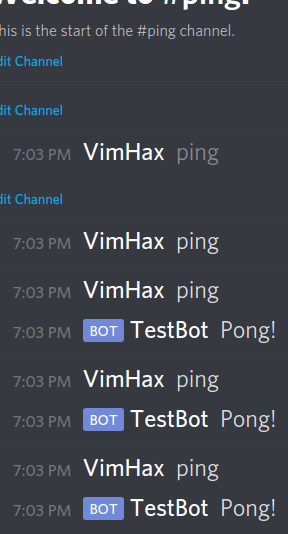
import * as Abyssal from 'abyssal';

// Create a new trigger, whose id is 'ping'
const Ping = new Abyssal.Trigger('ping');

/* Set the trigger's condition */
Ping.condition(async util => {
    // If the event is not a message event, return false
	if (util.event !== 'message') return false;
	const { args: [message] } = util;
    // Return whether or not the author is a bot & the
    // content is equal to 'ping'
	return !message.author.bot && message.content === 'ping';
});

/* Set the trigger's action */
// If the action is executed, that means the condition
// returned true, meaning the event emitted must be 'message'
// and the author is not a bot & the content is 'ping'
// because those conditions have to be met, by the
// event emitted, for the trigger's condition to return
// true
Ping.action(async util => {
	const { args: [message] } = util;
	message.channel.send('Pong!'); // Send response
});

export default Ping;
Example 2 - Join & Leave Messages
A Trigger which sends join & leave messages to a channel.
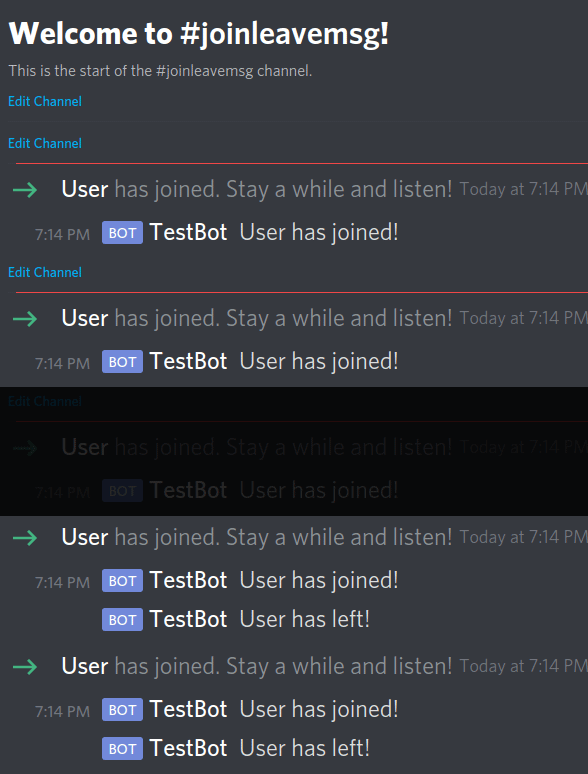
import * as Abyssal from 'abyssal';
import DiscordJS from 'discord.js';

const JoinLeaveMsg = new Abyssal.Trigger('joinleavemsg');

/* The trigger's condition isn't set */
// Meaning the trigger's action will be executed on all event emissions
// because the default condition always returns true

/* Set the trigger's action */
JoinLeaveMsg.action(async util => {
	const { args: [member] } = util;
    // If the event emitted is 'guildMemberAdd'
	if (util.event === 'guildMemberAdd') {
        // Get the channel
		const channel = util.client.channels.cache.get(CHANNEL_ID);
		if (channel) { // If the channel exists
            // Send message
            (channel as DiscordJS.TextChannel).send(`${member.displayName} has joined!`);
        }
    // If the event emitted is 'guildMemberRemove'
	} else if (util.event === 'guildMemberRemove') {
        // Get the channel
		const channel = util.client.channels.cache.get(CHANNEL_ID);
		if (channel) { // If the channel exists
            // Send message
            (channel as DiscordJS.TextChannel).send(`${member.displayName} has left!`);
        }
	}
});

export default JoinLeaveMsg;
Example 3 - Add
A Trigger which adds 2 given numbers.
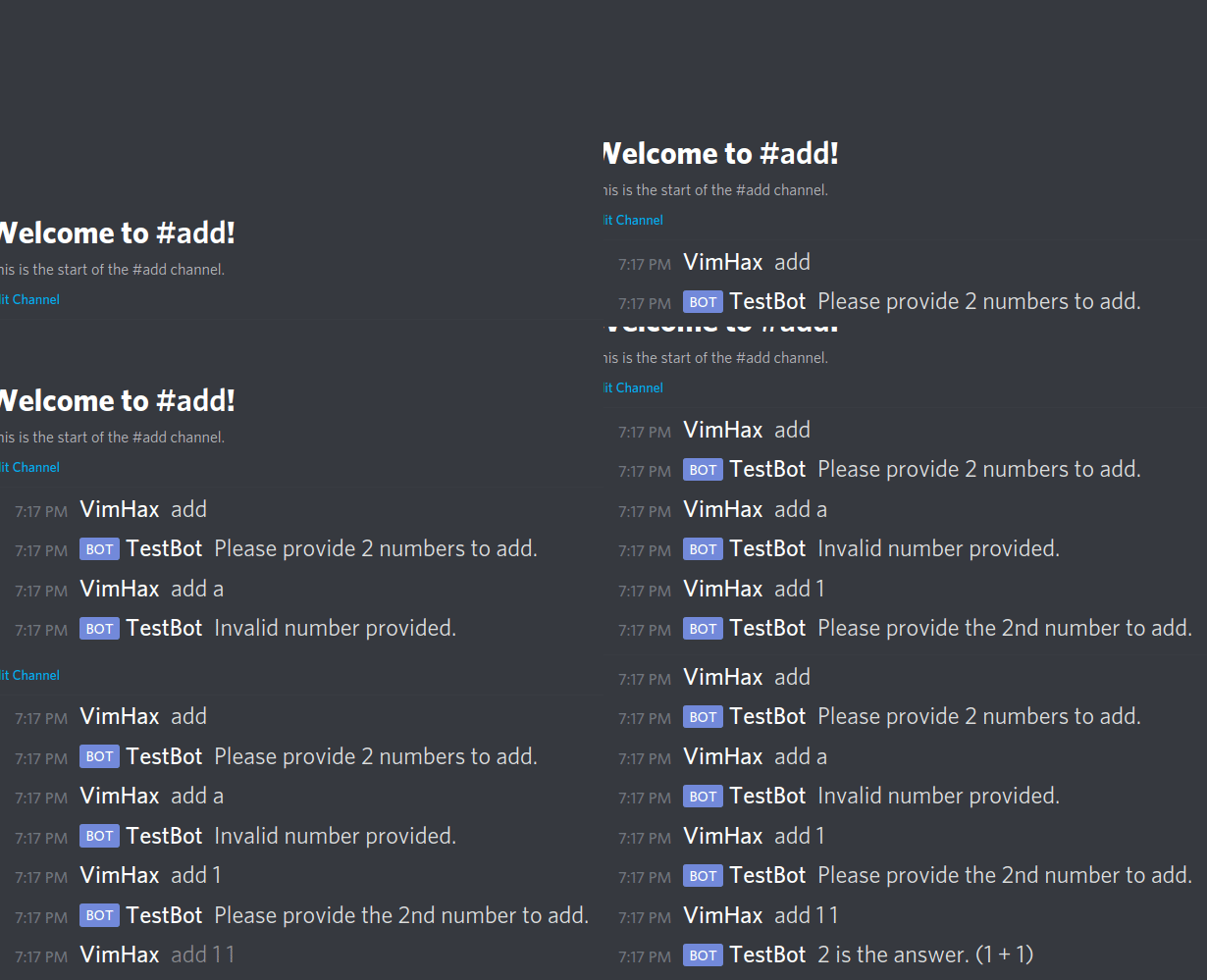
import * as Abyssal from 'abyssal';

const Add = new Abyssal.Trigger('add');

/* Set the trigger's condition */
Add.condition(async util => {
	// If the event is not a message event, return false
	if (util.event !== 'message') return false;
	const { args: [message] } = util;
    // Return whether or not the author is a bot & the
    // content starts with 'add'
	return !message.author.bot && message.content.startsWith('add');
});

/* Set the trigger's action */
Add.action(async util => {
	const { args: [message] } = util;
    // Split the content by ' '
	const args: string[] = message.content.slice(3).split(' ');
    // Remove the first element of the array (which will always be 'add')
	args.shift();
    // If the array is empty
	if (args.length === 0) {
        // Send message
		return message.channel.send('Please provide 2 numbers to add.');
    // If all the elements, in the array, aren't numbers
	} else if (args.find(arg => isNaN(parseInt(arg, 10)))) {
        // Send message
		return message.channel.send('Invalid number provided.');
    // If the array doesn't have 2 elements
	} else if (args.length !== 2) {
        // Send message
		return message.channel.send('Please provide the 2nd number to add.');
	}
    // Map all strings to numbers
	const numbers = args.map(arg => parseInt(arg, 10));
    // Total the elements
	const answer = numbers.reduce((acc, curr) => acc + curr);
    // Send message
	message.channel.send(`${answer} is the answer. (${numbers[0]} + ${numbers[1]})`);
});

export default Add;
Util - new Util(config: UtilConfig)
Util instances mainly expose methods, to the Trigger, which manipulate it's State & Listeners.
Session
Sessions, which are in the format of ${TriggerID}-someuniquestring, generated using Uniqid, uniquely identify every instance of a Trigger executed or executing. One is created for each Trigger on every event emission.
State
State is a Data object, binded to each instance, stored in the database which you can store data to, which you may want to access later in the same instance. The Data object, storing the State, is defined by the following interface.
interface State {
	type: 'state';
	session: string;
	[key: string]: any;
}
Util instances keep a, possibly outdated, copy of the actual State locally, under Util#state. Thus, editing the local State doesn't affect the actual State & vice versa. The actual State isn't copied to Util#state by default.
Listeners & Handlers
Listeners are Data objects, stored in the database, which contain information about the Session & the ID of the Handler they are attached to. They make it so the Handler, which the stored HandlerID belongs to, executes every time any event, in the Handler's HandlerEvents, emits. The Data object, storing a Listener, is defined by the following interface.
interface Listener {
	type: 'listener';
	session: string;
	handler: string;
}
Util instances also keep a local copy of all the listeners, attached to the current instance, under Util#listeners.
Interface
type Args = any[];
type Event = string | symbol;

interface Util {
	args: Args;
    	event: Event;
   	state: State;
   	client: Client;
	session: string;
	database: Database;
    	listeners: Listener[];
    	loadState: () => Promise<void>;
    	saveState: () => Promise<void>;
    	deleteState: () => Promise<void>;
    	loadListeners: () => Promise<void>;
    	removeAllListeners: () => Promise<void>;
    	getStateProperty: (property: string) => void;
    	deleteStateProperty: (property: string) => void;
    	addListener: (handlerID: string) => Promise<void>;
    	removeListener: (handlerID: string) => Promise<void>;
    	setStateProperty: (property: string, value: any) => void;
}

interface UtilConfig {
	args: Args;
	event: Event;
	client: Client;
	session: string;
	trigger: Trigger;
	database: Database;
}
Functionality
| Property | Function |
| :-------------------: | ------------------------------------------------------------ |
| args | Arguments provided by the event emitted. |
| event | Name of the event emitted. |
| session | Session of the current instance. |
| state | Local copy of the actual State of the current instance. |
| listeners | Local copy of all the Listeners attached to the current instance. |
| client | Client instance that the event was emitted on. |
| database | Database instance used to store data to. |
| getStateProperty | Returns the value of the provided property, in Util#state. |
| setStateProperty | Sets the provided property, of Util#state, to the provided value. |
| deleteStateProperty | Deletes the provided property, off of Util#state. |
| loadState | Updates Util#state to the actual State. |
| saveState | Updates the actual State to Util#state. |
| deleteState | Delete the actual State off of the database. |
| loadListeners | Updates Util#listeners with the actual Listeners attached to the current instance. |
| addListener | Adds a new Listener to the database & Util#listeners. |
| removeListener | Removes a Listener attached to the provided HandlerID, from the database & Util#listeners. |
| removeAllListeners | Removes all Listeners attached to the current instance, from the database & ``Util#listeners`. |
Example Usage
Example 1 - Generate Number
A Trigger which generates a random number, between 0 & 100.
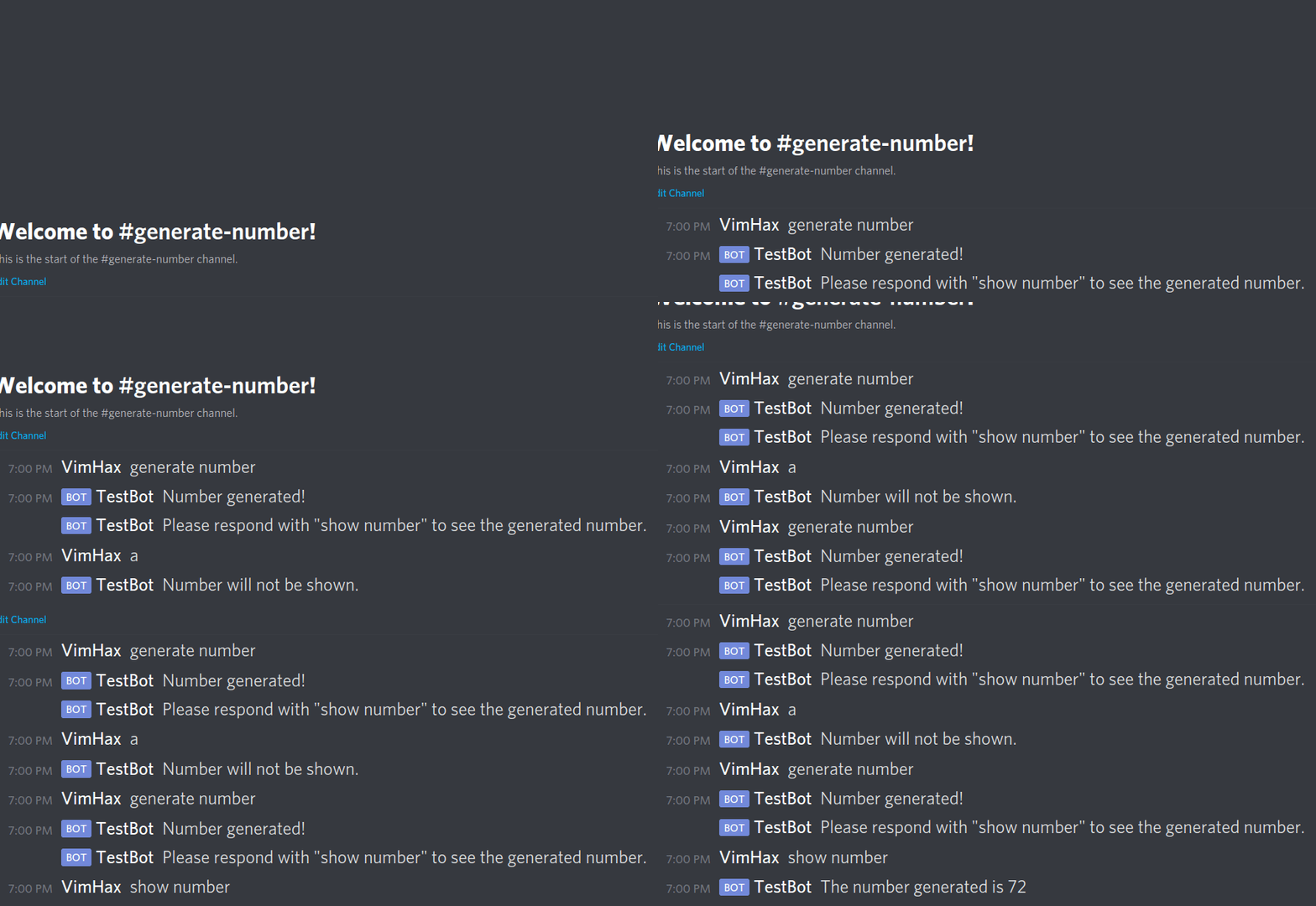
import * as Abyssal from 'abyssal';

const GenNumber = new Abyssal.Trigger('gennumber');

/* Set the trigger's condition */
GenNumber.condition(async util => {
	if (util.event !== 'message') return false;
	const { args: [message] } = util;
	return !message.author.bot && message.content === 'generate number';
});

/* Set the trigger's action */
GenNumber.action(async util => {
	const { args: [message] } = util;
	const number = Math.round(Math.random() * 100); // Generate number
	util.setStateProperty('number', number); // Save the number generated
	util.setStateProperty('user', message.author.id); // Save the user id
	util.setStateProperty('channel', message.channel.id); // Save the channel id
	await util.saveState(); // Update the actual state
	await util.addListener('showNumber'); // Add a listener to the 'showNumber' handler
	await message.channel.send('Number generated!'); // Send message
	const content = 'Please respond with "show number" to see the generated number.';
	message.channel.send(content); // Send message
});

/* Set the trigger's 'showNumber' handler */
// Called every time a 'message' event is emitted
// (because ['message'] is passed into the events parameter)
// assuming that a listener is attached to this handler
GenNumber.handler('showNumber', ['message'], async util => {
	const { args: [message] } = util;
	if (message.author.bot) return; // If the user is a bot, return
	if (message.content !== 'show number') { // If the content isn't 'show number'
		message.channel.send('Number will not be shown.'); // Send message
		await util.deleteState(); // Delete the actual state
        // Remove all listeners attached to the current instance
        // (which currently only includes the listener attached to this handler)
		await util.removeAllListeners();
		return;
	}
    // Update the local state with the actual state,
    // this has to be done since the actual state
    // isn't copied to the local state by default,
    // thus, values stored, previously, cannot be retrieved
	await util.loadState();
    // If the channel id differs, return
	if (message.channel.id !== util.getStateProperty('channel')) return;
    // If the author id differs, return
	if (message.author.id !== util.getStateProperty('user')) return;
	const number = util.getStateProperty('number');
	message.channel.send(`The number generated is ${number}`); // Send message
    // Delete the actual state & remove all the listeners
	await util.deleteState();
	await util.removeAllListeners();
});

export default GenNumber;
Example 2 - React Message
A Trigger which sends a message, whose description is the current reactions.
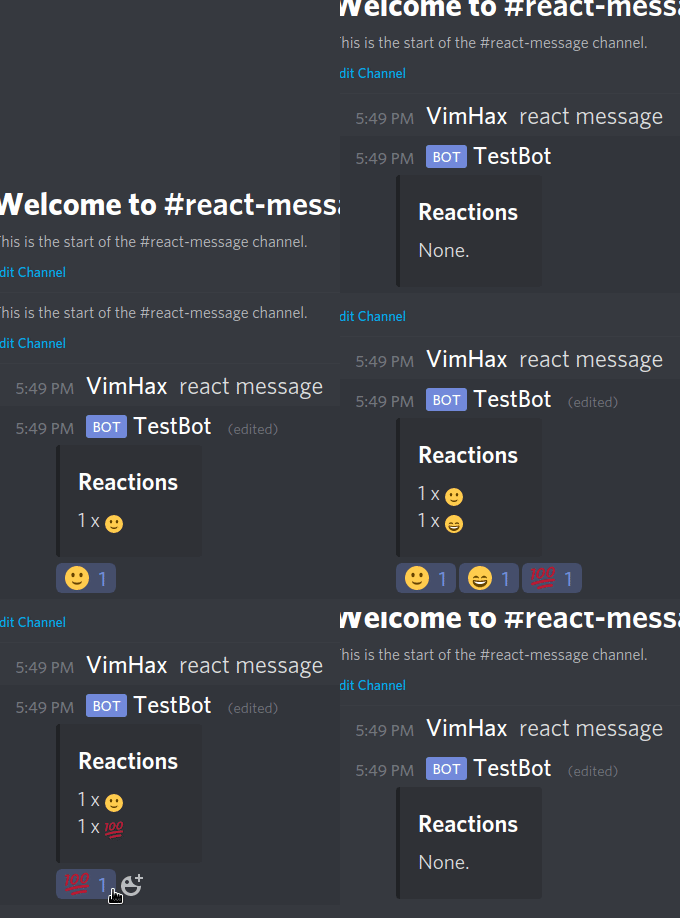
import * as Abyssal from 'abyssal';
import DiscordJS from 'discord.js';

const ReactMsg = new Abyssal.Trigger('reactmsg');

/* Set the trigger's condition */
ReactMsg.condition(async util => {
	if (util.event !== 'message') return false;
	const { args: [message] } = util;
	return !message.author.bot && message.content === 'react message';
});

/* Set the trigger's action */
ReactMsg.action(async util => {
	const { args: [message] } = util;
	const embed = new DiscordJS.MessageEmbed(); // Create embed
	embed.setTitle('Reactions').setDescription('None.'); // Set properties
	const msg = await message.channel.send(embed); // Send message
	util.setStateProperty('message', msg.id); // Store the message id
	await util.saveState(); // Update the actual state
    // Add a listener attached to the 'updateMessage' handler
	await util.addListener('updateMessage');
});

/* Set the trigger's 'updateMessage' handler */
// Executed everytime a 'messageReactionAdd' or 'messageReactionRemove'
// event is emitted, given that a listener is currently attached to the handler
ReactMsg.handler('updateMessage', ['messageReactionAdd', 'messageReactionRemove'], async util => {
	const { args: [{ message }] } = util;
	await util.loadState(); // Update the local state
    // If the message id differs, return
	if (message.id !== util.getStateProperty('message')) return;
	type Reactions = DiscordJS.Collection<string, DiscordJS.MessageReaction>;
	const reactions: Reactions = message.reactions.cache; // Get all the reactions
	let desc = 'None.'; // The default message
	if (reactions.size > 0) { // If there is atleast one reaction
		const mapper = (reaction: DiscordJS.MessageReaction) => {
			const expression = `${reaction.count} x ${reaction.emoji}`;
			return expression;
		};
        // Map the reactions to strings & join them together
		desc = reactions.map(mapper).join('\n');
	}
	const embed = new DiscordJS.MessageEmbed(); // Create embed
	embed.setTitle('Reactions').setDescription(desc); // Set properties
	message.edit(embed); // Edit the message
});

export default ReactMsg;
Example 3 - Calculate
A Trigger which can add, subtract, multiply or divide two numbers.
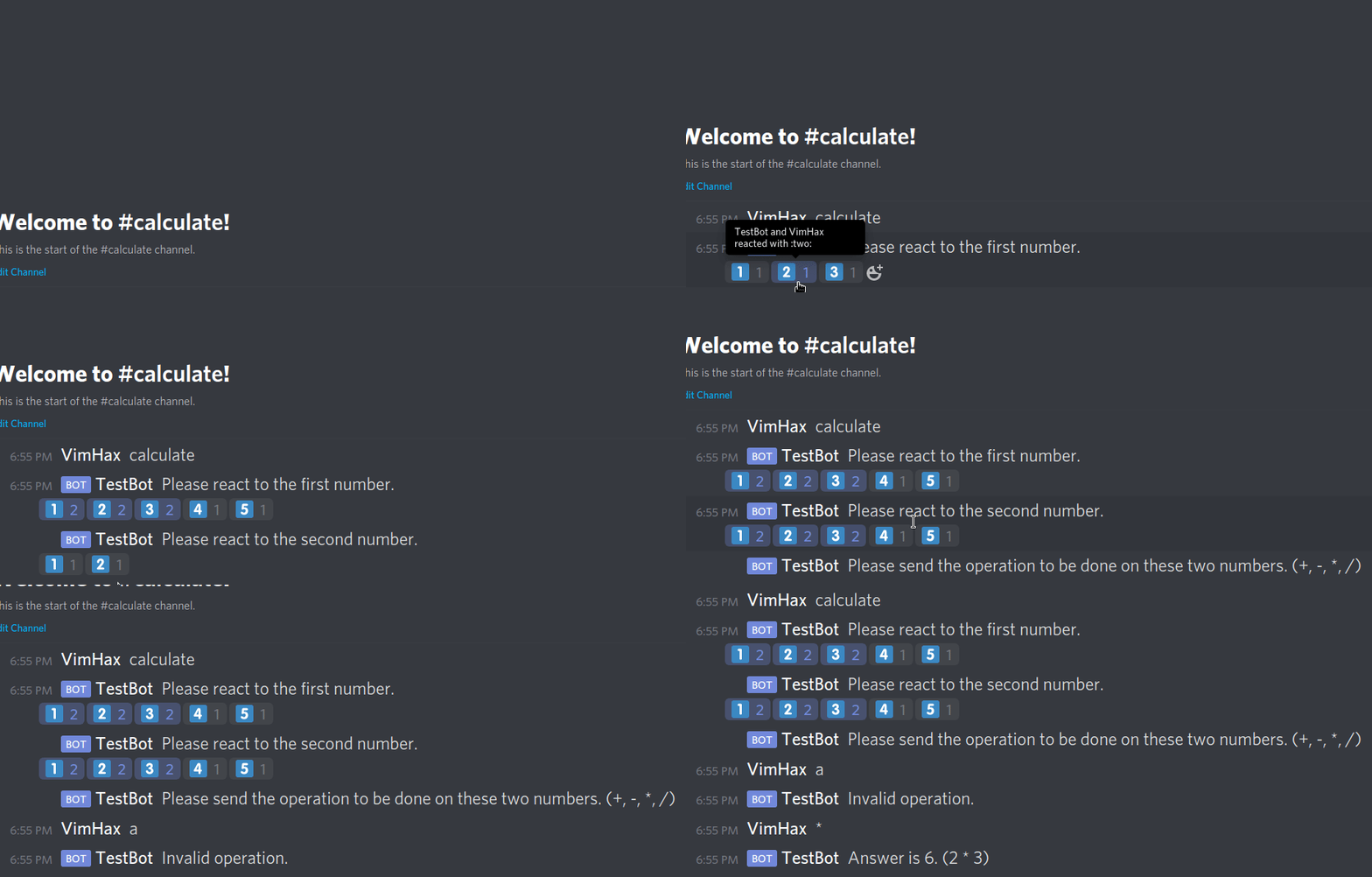
import * as Abyssal from 'abyssal';

const emojis = ['1️⃣', '2️⃣', '3️⃣', '4️⃣', '5️⃣']; // The number emojis
const operations = ['+', '-', '*', '/']; // The operations

const Calculate = new Abyssal.Trigger('calculate');

/* Set the trigger's condition */
Calculate.condition(async util => {
	if (util.event !== 'message') return false;
	const { args: [message] } = util;
	return !message.author.bot && message.content === 'calculate';
});

/* Set the trigger's action */
Calculate.action(async util => {
	const { args: [message] } = util;
    // Send message
	const msg = await message.channel.send('Please react to the first number.');
	util.setStateProperty('user', message.author.id); // Store the user id
	util.setStateProperty('message', msg.id); // Store the message id
	await util.saveState(); // Update the actual state
    // Add a listener attached to the 'numbers' handler to the database
	await util.addListener('numbers');
	for (const emoji of emojis) await msg.react(emoji); // React all the emojis
});

/* Set the trigger's 'numbers' handler */
// Called whenever a 'messageReactionAdd' event is emitted
// given that a listener is currently attached to the handler
Calculate.handler('numbers', ['messageReactionAdd'], async util => {
	const { args: [reaction, user] } = util;
	const message = reaction.message;
	if (user.bot) return; // If the user is a bot, return
	await util.loadState(); // Update local state
    // If the user id differs, return
	if (user.id !== util.getStateProperty('user')) return;
    // If the message id differs, return
	if (message.id !== util.getStateProperty('message')) return;
    // Find the index of the reacted emoji in the emoji array
	const idx = emojis.findIndex(emoji => emoji === reaction.emoji.toString());
	if (idx === -1) return; // if the index is -1, return
	const secondInput = util.getStateProperty('secondInput'); // get the flag
	if (secondInput) { // If the flag is true
		const content = 'Please send the operation to be done on these two numbers. (+, -, *, /)';
		message.channel.send(content); // Send message
		util.deleteStateProperty('message'); // Delete the message property
		util.deleteStateProperty('secondInput'); // Delete the flag
		util.setStateProperty('inputTwo', idx + 1); // Store the second input
		util.setStateProperty('channel', message.channel.id); // Store the channel id
		await util.saveState(); // Update the actual state
        // Remove the listener attached to this handler from the database
		await util.removeListener('numbers');
  		// Add a listener attached to the 'operation' handler to the database
		await util.addListener('operation');
	} else {
        // Send message
		const msg = await message.channel.send('Please react to the second number.');
		util.setStateProperty('message', msg.id); // Update the message id
		util.setStateProperty('inputOne', idx + 1); // Store the first input
		util.setStateProperty('secondInput', true); // Set the flag to true
		await util.saveState(); // Update the actual state
		for (const emoji of emojis) await msg.react(emoji); // React all the emojis
	}
});

/* Set the trigger's 'operation' handler */
Calculate.handler('operation', ['message'], async util => {
	const { args: [message] } = util;
	if (message.author.bot) return; // If the author is a bot, return
	await util.loadState(); // Update the local state
    // If the channel id differs, return
	if (message.channel.id !== util.getStateProperty('channel')) return;
    // If the author id differs, return
	if (message.author.id !== util.getStateProperty('user')) return;
    // Find the index of the operator in the operator array
	const idx = operations.findIndex(operation => operation === message.content);
    // If the index is -1, send message
	if (idx === -1) return message.channel.send('Invalid operation.');
	const input1 = util.getStateProperty('inputOne'); // Get the first input
	const input2 = util.getStateProperty('inputTwo'); // Get the second input
	let answer = input1;
    // Perform the operation
	switch (idx) {
		case 0: answer += input2; break;
		case 1: answer -= input2; break;
		case 2: answer *= input2; break;
		case 3: answer /= input2; break;
	}
	await util.deleteState(); // Delete actual state
    // Remove the listener attached to this event from the database
	await util.removeListener('operation');
	const expression = `${input1} ${operations[idx]} ${input2}`;
	message.channel.send(`Answer is ${answer}. (${expression})`); // Send message
});

export default Calculate;
Client - new Client(database: Database, clientOptions?: ClientOptions)
This class is a extension of the DiscordJS.Client & it manages how the Triggers are executed.
Interface
interface Client extends DiscordJS.Client {
    	addTrigger: (trigger: Trigger) => void;
    	removeTrigger: (id: TriggerID) => void;
}
Functionality
| Property | Function |
| :-------------: | ------------------------------------------------------------ |
| addTrigger | Activates the provided Trigger. |
| removeTrigger | Deactivates the Trigger with the provided id. Does not throw an error if a Trigger with the provided ID is not found. |
Example Usage
Assuming all the above Trigger examples are in the directory ./Examples/, the code below would import all of them, initialize the Client & add all the Triggers to it.
import * as Abyssal from 'abyssal';
// Import all the triggers
import Ping from './Examples/Ping';
import JoinLeaveMsg from './Examples/JoinLeaveMsg';
import GenNumber from './Examples/GenNumber';
import ReactMsg from './Examples/ReactMsg';
import Calculate from './Examples/Calculate';
import Add from './Examples/Add';

const client = new Abyssal.Client(new Abyssal.Database()); // Initialize client

// Add all the triggers
client.addTrigger(Ping);
client.addTrigger(JoinLeaveMsg);
client.addTrigger(GenNumber);
client.addTrigger(ReactMsg);
client.addTrigger(Add);
client.addTrigger(Calculate);

client.login('secret token'); // Login
Debug Logs
Abyssal's default classes provide debug logs, they use the debug npm package for logging. All the logs are under their respective names below.
abyssal, abyssal:client, abyssal:util, abyssal:trigger, abyssal:database