
adaptivecards-uhub
v1.0.2
Published
Custom adaptive cards renderer for uhub based on the original adaptive cards module from microsoft

Maintainers
 hernancote7
Readme
Adaptive Cards
Adaptive Cards are a new way for developers to exchange card content in a common and consistent way.
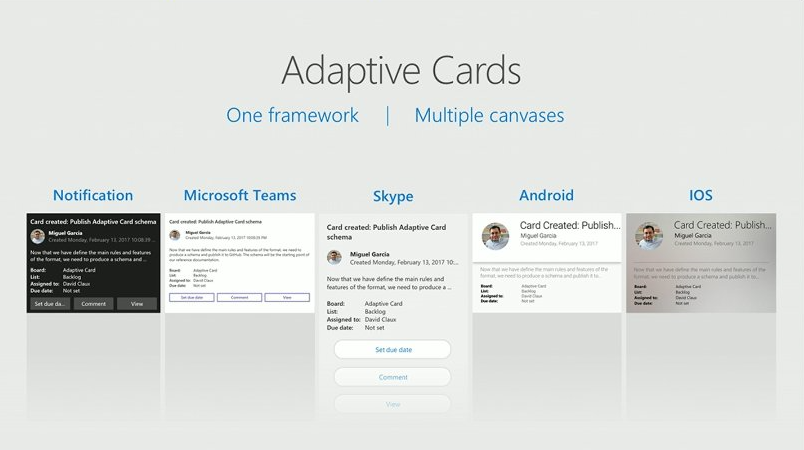
Expressive cards, open framework, multiple platforms
Break outside the box of templated cards. Adaptive Cards let you describe your content as you see fit and deliver it beautifully wherever your customers are.
The simple open card format enables an ecosystem of shared tooling, seamless integration between producers and consumers, and native cross-platform performance on any device.
Get Started
Check out the full documentation for more
Install
Node
npm install adaptivecards --saveCDN
<script src="https://unpkg.com/adaptivecards/dist/adaptivecards.js"></script>Usage
NOTE: BREAKING CHANGE
The standalone
renderCard()helper function was removed as it was redundant with the class methods. Please useadaptiveCard.render()as described below.
Import the module
// Import the module:
import * as AdaptiveCards from "adaptivecards";

// Or require it:
var AdaptiveCards = require("adaptivecards");

// If you referenced the library from CDN, the global AdaptiveCards variable is already
// defined and can be used directly:
var adaptiveCard = new AdaptiveCards.AdaptiveCard();
Render a card
// Author a card
// In practice you'll probably get this from a service
// see http://adaptivecards.io/samples/ for inspiration
var card = {
    "type": "AdaptiveCard",
    "version": "1.0",
    "body": [
        {
            "type": "Image",
            "url": "http://adaptivecards.io/content/adaptive-card-50.png"
        },
        {
            "type": "TextBlock",
            "text": "Hello **Adaptive Cards!**"
        }
    ],
    "actions": [
        {
            "type": "Action.OpenUrl",
            "title": "Learn more",
            "url": "http://adaptivecards.io"
        },
        {
            "type": "Action.OpenUrl",
            "title": "GitHub",
            "url": "http://github.com/Microsoft/AdaptiveCards"
        }
    ]
};

// Create an AdaptiveCard instance
var adaptiveCard = new AdaptiveCards.AdaptiveCard();

// Set its hostConfig property unless you want to use the default Host Config
// Host Config defines the style and behavior of a card
adaptiveCard.hostConfig = new AdaptiveCards.HostConfig({
    fontFamily: "Segoe UI, Helvetica Neue, sans-serif"
    // More host config options
});

// Set the adaptive card's event handlers. onExecuteAction is invoked
// whenever an action is clicked in the card
adaptiveCard.onExecuteAction = function(action) { alert("Ow!"); }

// For markdown support you need a third-party library
// E.g., to use markdown-it, include in your HTML page:
//     <script type="text/javascript" src="https://unpkg.com/markdown-it/dist/markdown-it.js"></script>
// And add this code to replace the default markdown handler:
//     AdaptiveCards.processMarkdown = function(text) { return markdownit().render(text); }

// Parse the card payload
adaptiveCard.parse(card);

// Render the card to an HTML element:
var renderedCard = adaptiveCard.render();

// And finally insert it somewhere in your page:
document.body.appendChild(renderedCard);
Webpack
If you don't want adaptivecards in your bundle, make sure the script is loaded and add the following the your webpack.config.json
module.exports = {
  ...
  externals: [
    { adaptivecards: { var: "AdaptiveCards" } }
  ]
};