
adm-trv
v1.2.0
Published
Pure AngularJs TreeView

Maintainers
 mete-30
Readme
ADM-treeView


Pure AngularJs TreeView by ADM | Amirkabir Data Miners
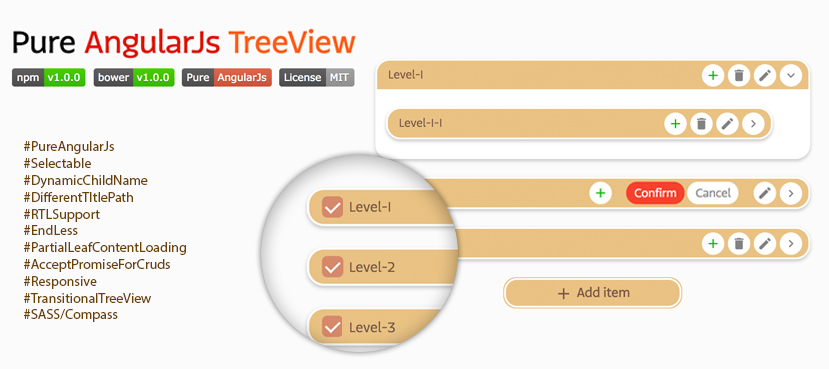
Updates in V1.2.0
- Nothing changed since V1.0.1, the version upgrade is just because of npm bug.
Demo
See ADMtrv live HERE.
Implementation steps
Step 1: Install ADM-treeView
npm install adm-trv
bower install adm-trv
Step 2: Include the files in your app
<!doctype html>
<html ng-app="myApp">
    <head>
        <link rel="stylesheet" href="css/ADM-treeView.min.css" />
        <script src="js/angular.min.js"></script>
        <script src="js/ADM-treeView.min.js"></script>
        ...
    </head>
    <body>
        ...
    </body>
</html>
Step 3: Inject the ADM-treeView module
var app = angular.module('myApp', ['ADM-treeView']);Step 4: Add the adm-trv directive to a DOM element
<adm-trv ng-model="model"></adm-trv>Options
Set options for entire of app
app.config(['ADMtrvProvider', function(ADMtrv) {
    ADMtrv.setConfigs({
        childName: 'kids',
        title: '$item.mainDS.title',
        trackBy: '$item.mainDS.id',
        dictionary: {
            noItem: ' :( '
        },
        ...
    });
}]);
Set options for each directive
<!-- pass options from controller -->
<adm-trv ng-model="ctrl.model1" configs="tree1Options"></adm-trv>
<!-- or write them inline -->
<adm-trv ng-model="ctrl.model1" configs="{childName: 'levels', readOnly: true}"></adm-trv>
Quick look
Name | Type | Default | Description ------------- | ------------- | ------------- | ------------- childName | String | childs | Set the name of childs wrapper. (e.g. 'childs', 'categories', ...) title | String | $item.title | Set path to 'title'. '$item' can be ignore and path can be nested. (e.g. '$item.titleHolder1.titleHolder2.title') singleRoot | Boolean | False | When it's true only one main root can be add. readOnly | Boolean | False | This option disable add, edit and delete methods. selectable | Boolean | False | Add checkbox before title to enable multi selecting. trackBy | String | -- | For selectable mode, can be useful for finding items. '$item' can be ignore and path can be nested. (e.g. '$item.mainDS.id') maxDepth | Number | -- | Set maxDepth for treeView. direction | String | ltr | Change treeView direction. (e.g. 'ltr', 'rtl') dictionary | Object | (EN) | Change buttons and placeholders name upon your language. Check the Docs below. onKidOpen | Function | -- | Pass HTML content to show it on leaf clicking. accept both 'string' and 'promise' to fill the content. onAdd | Function | -- | Event on adding item to tree. Can return promise to wait for server response and add server 'id' to object. onEdit | Function | -- | Event on editing item. Can return promise to wait for server response. onDelete | Function | -- | Event on deleting item. Can return promise to wait for server response.
onKidOpen event
In readOnly mode 'onKidOpen' event fire whenever the tree leafs clicked! You can return HTML content directly or by promise to show under leaf.
// return string
$scope.tree2_2Options = {
    childName: 'categories',
    readOnly: true,
    onKidOpen: function(node) {
        return 'The Node title is: "' + node.title + '"';
    }
}

// return promise
$scope.tree2_2Options = {
    childName: 'categories',
    readOnly: true,
    onKidOpen: function(node) {
        var deferred = $q.defer();
        setTimeout(function() {
            deferred.resolve('The Node title is: "' + node.title + '"');
        }, 2000);
        return deferred.promise;
    }
}
onAdd event
The 'onAdd' event fire on adding item to tree. In case you want to post each node to server on add event, you can return promise to adm-trv to add node after server response. Return value can be 'Object' or 'Boolean'.
- Boolean: adm-trv continue adding node to tree by catching 'true' value.
- Object: In case server add 'Id' to your object after inserting to DB, that might be need for further editing or deleting, adm-trv will extend client object with your returned object. Return false to avoid adding node to tree.
// return Booelan
$scope.tree3_1Options = {
    childName: 'organizations',
    dictionary: {
        titlePlaceholder: 'A-Z only ...'
    },
    onAdd: function(parentNode, newNode, titleOnly) {
        return !/[^a-zA-Z]/.test(titleOnly);
    }
}

//return promise
$scope.tree3_2Options = {
    childName: 'organizations',
    onAdd: function(parentNode, newNode, titleOnly) {
        var deferred = $q.defer();
        setTimeout(function() {
            deferred.resolve({
                id: Math.floor(Math.random() * 1000)
            });
        }, 500);
        return deferred.promise;
    }
}
onEdit & onDelete events
// return Booelan
$scope.tree4_1Options = {
    onEdit: function (currentNode, parentNode) {
        return true; // or False
    },
    onDelete: function (currentNode, parentNode) {
        return true; // or False
    }
}


//return promise
$scope.tree4_2Options = {
    onEdit: function (currentNode, parentNode) {
        var deferred = $q.defer();
        setTimeout(function() {
            deferred.resolve(true); // or False
        }, 500);
        return deferred.promise;
    },
    onDelete: function (currentNode, parentNode) {
        var deferred = $q.defer();
        setTimeout(function() {
            deferred.resolve(true); // or False
        }, 500);
        return deferred.promise;
    }
}
Selectable
<adm-trv ng-model="ctrl.model4_1" selected="ctrl.model4_1Selected" configs="tree4_1Options"></adm-trv>
<adm-trv ng-model="ctrl.model4_2" selected="ctrl.model4_2Selected" configs="tree4_2Options"></adm-trv>
$scope.ctrl.model4_1Selected = [];
$scope.tree4_1Options = {
childName: 'bAghAlies',
selectable: true
}
$scope.ctrl.model4_2Selected = [];
$scope.tree4_2Options = {
childName: 'bAghAlies',
title: '$item.mainBAghAliDS.title',
trackBy: '$item.mainBAghAliDS.id',
selectable: true
}Dictionary
$scope.tree5_1Options = {
    childName: 'golAbies',
    dictionary: {
        noItem: 'No golAbi! :(',
        titlePlaceholder: 'Type ...',
        rootAddBtn: 'Add main golAbi',
        confirmBtn: 'YES',
        cancelBtn: 'NO'
    }
}

$scope.tree5_2Options = {
    childName: 'golAbies',
    direction: 'rtl',
    dictionary: {
        noItem: 'موردی وجود ندارد!',
        titlePlaceholder: 'عنوان ...',
        rootAddBtn: 'افزودن',
        confirmBtn: 'تایید',
        cancelBtn: 'انصراف'
    }
}