
adminator
v1.0.0
Published
HTML Admin Template


Readme
Adminator HTML5 Admin Template
Adminator is a responsive Bootstrap 4 Admin Template. It provides you with a collection of ready to use code snippets and utilities, custom pages, a collection of applications and some useful widgets. Preview of this awesome admin template available here: https://colorlib.com/polygon/adminator/index.html
Preview
Screenshot
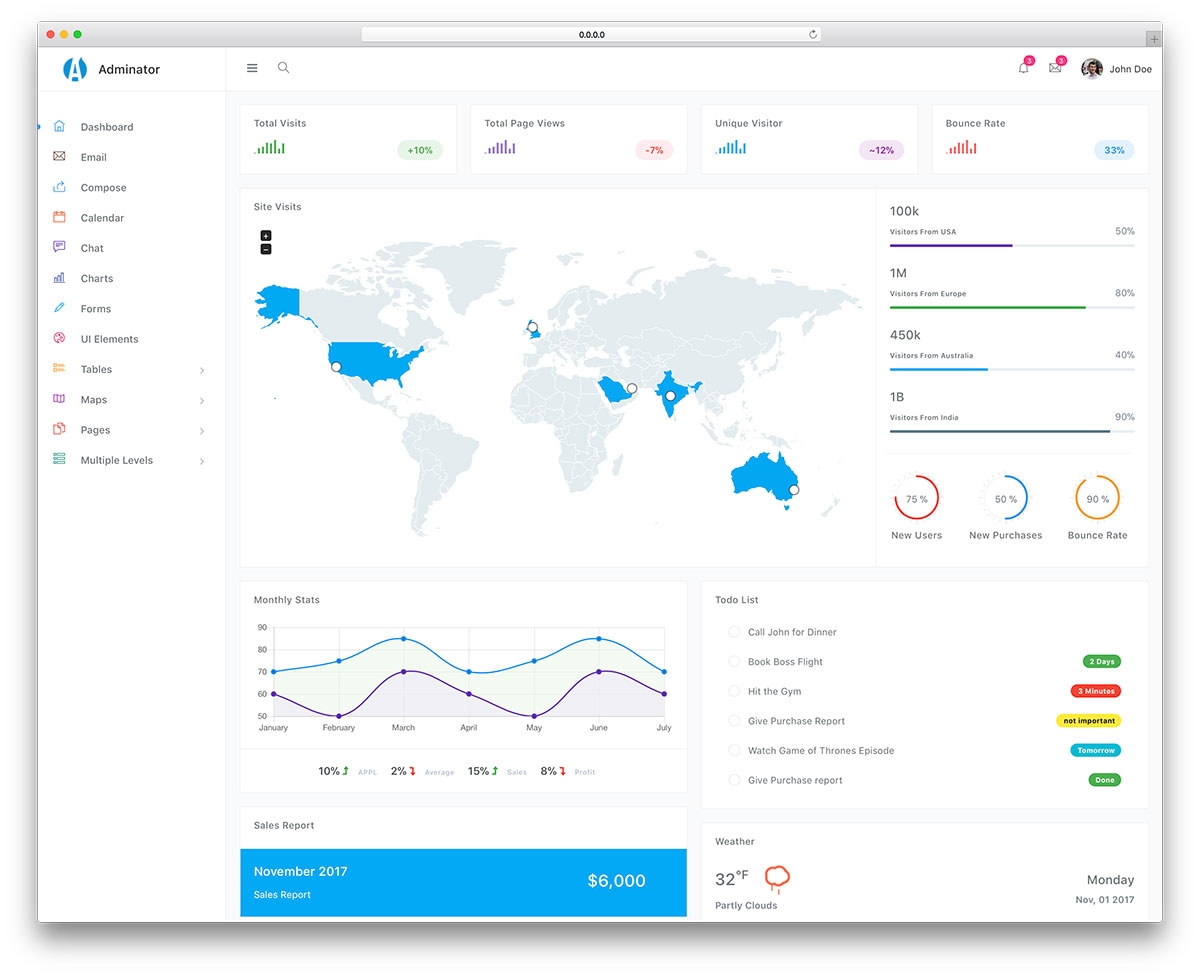
Demo Site: Here
TOC
Getting Started
In order to run Adminator on your local machine all what you need to do is to have the prerequisites stated below installed on your machine and follow the installation steps down below.
Prerequisites
- Node.js
- Yarn or NPM
- Git
Installing & Local Development
Start by typing the following commands in your terminal in order to get Adminator full package on your machine and starting a local development server with live reload feature.
> git clone https://github.com/puikinsh/Adminator-admin-dashboard.git adminator
> cd adminator
> npm install
> npm run dev
Files/Folders Structure
Here is a brief explanation of the template folder structure and some of its main files usage:
└── src                         # Contains all template source files.
│   └── assets                  # Contains JS, CSS, images and icon fonts.
│   │   └── scripts             # Contains all JavaScript files.
│   │   │   └── charts          # Chart.js, Sparkline & Pie Chart plugins init.
│   │   │   └── chat            # All chat app JS code.
│   │   │   └── constants       # Template constant values like color values.
│   │   │   └── datatable       # Date table plugin init.
│   │   │   └── datepicker      # Bootstrap datepicker init.
│   │   │   └── email           # All email app code.
│   │   │   └── fullcalendar    # Fullcalendar plugin init.
│   │   │   └── googleMaps      # Google maps API integration code.
│   │   │   └── masonry         # Masonry layout code.
│   │   │   └── popover         # Bootstrap popover plugin init.
│   │   │   └── scrollbar       # Perfect scrollbar plugin init.
│   │   │   └── search          # Topbar toggle search init.
│   │   │   └── sidebar         # Sidebar JS code.
│   │   │   └── skycons         # Animated icons plugin init.
│   │   │   └── utils           # Basic utils used for proper rendering.
│   │   │   └── vectorMaps      # Vector maps plugin init.
│   │   │   └── index.js        # Indicator file.
│   │   │
│   │   └── static              # Contains the non-code files.
│   │   │   └── fonts           # Contains icon fonts.
│   │   │   └── images          # Contains all template images/svg.
│   │   │
│   │   └── styles              # Contains all SCSS files.
│   │       └── spec            # Contains custom SCSS files.
│   │       │   └── components  # Contains all template components.
│   │       │   └── generic     # Contains basic scaffolding styles.
│   │       │   └── screens     # Contains views specific styles.
│   │       │   └── settings    # Contains all template variables.
│   │       │   └── tools       # Contains all mixins.
│   │       │   └── utils       # Contains helper classes.
│   │       │   └── index.scss  # Indicator file.
│   │       │
│   │       └── vendor          # Contains all plugin files & custom styles.
│   │       └── index.scss      # Indicator file.
│   │
│   └── *.html                  # All HTML pages files .
└── webpack                     # Contains Webpack init code.
│   └── plugins                 # Contains all Webpack plugins config.
│   └── rules                   # Contains Loaders config code.
│   └── config.js               # Contains Webpack config object.
│   └── devServer.js            # Webpack dev server config code.
│   └── manifest.js             # All build system constants.
│
└── .babelrc                    # Babel ES6 Transpiler.
└── .editorconfig               # Keep same coding styles between code editors.
└── .eslintrc.yml               # JavaScript Linting.
└── .gitattributes              # Git Attributes.
└── .gitignore                  # Ignored files in Git.
└── .stylelintrc.yml            # SCSS/CSS Linting.
└── browserslist                # Supported Browsers.
└── CHANGELOG.md                # Versioning.
└── package.json                # Package metadata.
└── README.md                   # Manual file.
└── webpack.config.js           # Webpack main config file.
└── yarn.lock                   # Yarn metadata.
Deployment
In deployment process, you have two commands:
- Build command Used to generate the final result of compiling src files into build folder. This can be achieved by running the following command:
> npm run build- Preview command Used to create a local dev server in order to preview the final output of build process. This can be achieved by running the following command:
> npm run previewBuilt With
- Babel
- Webpack
- Eslint
- Sass
- Postcss
- Stylelint
- Bootstrap
- Chart.js
- Datatables
- Easy Pie Chart
- Fullcalendar
- Jquery
- Jquery Sparkline
- Jvectormap
- Load Google Maps API
- Lodash
- Masonry
- Moment
- Perfect Scrollbar
- Skycons
- Fontawesome
- Themify Icons
- Roboto Font
- Bootstrap Datepicker
Changelog
V 1.0.0
Initial Release
Authors
License
Adminator is licensed under The MIT License (MIT). Which means that you can use, copy, modify, merge, publish, distribute, sublicense, and/or sell copies of the final products. But you always need to state that Colorlib is the original author of this template.