
aframe-gearvr-controls-component
v0.1.7
Published
GearVR Controller Component component for A-Frame.

Maintainers
 machenmusik
Readme
aframe-gearvr-controls-component
A GearVR Controller component for A-Frame.
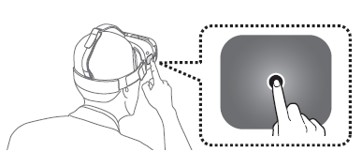
The gearvr-controls component interfaces with the Gear VR Touchpad controller exposed by the Carmel and Samsung Internet VR browsers. The tracked-controls component cannot provide its usual functionality, since the Gear VR touchpad has no pose. Instead, the look-controls component is used to mimic a 3DOF controller. (Note that a dummy instance of tracked-controls is currently added anyway for compatibility, since other components such as aframe-teleport-controls query for entities with that component attached.)
This component adds button mappings and events, but does not currently provide a controller model since it is assumed that end users will use this indirectly through higher level components such as the hand-controls component.
As there is only one Gear VR Touchpad, currently this component should only be bound to one hand (e.g. to the right hand, not the left).
Example
<a-entity gearvr-controls></a-entity>Value
| Property | Description | Default Value | |----------------------|----------------------------------------------------|----------------------| | hand | The hand that will be tracked (i.e., right, left). | right | | model | Whether the controller model is loaded. | false | | rotationOffset | Offset to apply to model rotation. | 0 |
Events
| Event Name | Description | | ---------- | ----------- | | trackpaddown | Trackpad pressed. | | trackpadup | Trackpad released. |
Installation
Browser
Install and use by directly including the browser files:
<head>
  <title>My A-Frame Scene</title>
  <script src="https://aframe.io/releases/0.4.0/aframe.min.js"></script>
  <script src="https://rawgit.com/chenzlabs/gearvr-controls/master/dist/aframe-gearvr-controls-component.min.js"></script>
</head>

<body>
  <a-scene>
    <a-entity gearvr-controls></a-entity>
  </a-scene>
</body>
npm
Install via npm:
npm install aframe-gearvr-controls-componentThen register and use.
require('aframe');
require('aframe-gearvr-controls-component');