
agent-binod
v1.1.1
Published
A simple agent that reviews your git code, comments on your PR (pull requests), automated using the Anthropic API.


Readme
Agent Binod - a pull request review agent 🤖
Token-authenticated, multi-platform AI agent for automated pull request reviews.
Table of Contents 📋
Platform 🌐
Currently integrated for:
- Gitea (default)
- GitHub
Current tools 🛠️
Claude can only do these 5 things:
| Tool | What it does |
|---|---|
| list_open_prs | Lists all open PRs |
| get_pr_diff | Gets the code changes of a PR |
| get_pr_commits | Gets the commit history of a PR |
| get_pr_comments | Reads existing comments on a PR |
| post_pr_comment | Posts a comment on a PR |
Prompts that won't work:
"Close PR #5"— no close tool"Approve PR #5"— no approve tool"Assign PR #5 to someone"— no assign tool
The prompt controls what Claude thinks and says — the tools control what it can actually do.
Tip - Add new tools to get things done by Agent Binod
Getting Started 🚀
Agent Binod can be used in two ways — as a global CLI tool (recommended) or run locally from source.
Option 1: Global CLI ⚡ (recommended)
- Setup 🔧 Install globally via npm:
npm install -g agent-binod- Configuration ⚙️
Create a
.envfile in your project directory. Refer.env.examplefor the variables to configure with your tokens (at least one platform need to be configured):
ANTHROPIC_API_KEY=sk-ant-api03-xxxxxxxxxxxxxxxxxxxx

# Gitea configuration (default platform)
GITEA_TOKEN=f631f4axxxxxxxxxxxxxxxxxxxx
GITEA_BASE=https://git.example.in/api/v1
GITEA_REPO=owner/repo

# GitHub configuration (use --platform=github)
GITHUB_TOKEN=ghp_xxxxxxxxxxxxxxxxxxxx
GITHUB_REPO=owner/repo

# Optional: base branch used when fetching PR diffs via local git (default: origin/main).
# The agent first tries to diff the PR locally using your cloned repo (faster, no API call).
# Set this to the branch your PRs are merged into, e.g. origin/main or upstream/main.
# If unset or if the local diff fails, the agent falls back to fetching the diff via the platform API.
BASE_BRANCH=

# Optional: max open PRs to fetch per listing (default: 50, GitHub max: 100)
PR_FETCH_LIMIT=
- Execution ▶️ Then run from anywhere inside your project:
agent-binod "Review PR #1 and post comment"Tip: You can give various variations in your prompt, examples are given below under
Usagetitle
- Updating 🔄 When a new version is published, update your global install:
npm install -g agent-binod@latestOption 2: Run from Source
- Clone the repository 📥
   git clone [email protected]:Smi0001/agent-binod.git
cd agent-binod- Install Dependencies 📦
node- v22^anthropic-ai/sdk- v0.7^typescript- v5^
npm i
Configuration ⚙️ Create a
.envfile with your Anthropic API key, and other repo path & token configurations. Refer.env.examplefor the variables to configure.Execution ▶️
Then run from anywhere inside your project:
npm start "Review PR #1 and post comment"Tip: You can give various variations in your prompt, examples are given below under
Usagetitle
How to find the values for the env variables ? 🔑
ANTHROPIC_API_KEY
- Go to console.anthropic.com
- Sign in (or create an account)
- Click API Keys in the left sidebar
- Click Create Key, give it a name (e.g. agent-binod-key)
- Copy the key immediately — it's only shown once
ANTHROPIC_API_KEY=sk-ant-api03-xxxxxxxxxxxxxxxxxxxx
Platform=Gitea
GITEA_REPO — easy, it's just owner/repo from your Gitea URL:
https://git.example.com/owner/repo → GITEA_REPO=owner/repo
GITEA_TOKEN — create an access token in Gitea:
- Go to your Gitea instance → click your avatar (top-right) → Settings
- Left sidebar → Applications
- Under Manage Access Tokens, enter a token name (e.g. agent-binod)
- Select permissions:
- Issues → Read & Write (for posting PR comments)
- Pull Requests → Read (for listing/reading PRs)
- Click Generate Token and copy it immediately
GITEA_TOKEN=7cd244f5xxxxxxxxxxxxxxxx
GITEA_BASE — your Gitea instance API URL. Always append /api/v1:
https://git.example.com → GITEA_BASE=https://git.example.com/api/v1
Platform=Github
GITHUB_REPO — easy, it's just owner/repo from your GitHub URL:
https://github.com/owner/repo → GITEA_REPO=owner/repo
GITHUB_TOKEN — create a Personal Access Token (PAT):
- Go to github.com → Settings (top-right avatar menu)
- Scroll down to Developer settings (bottom of left sidebar)
- Personal access tokens → Tokens (classic)
- Click Generate new token (classic)
- Give it a name (e.g. agent-binod)
- Select scopes:
- repo — to read PRs and post comments on private repos
- public_repo — if the repo is public (lighter permission)
- Click Generate token and copy it immediately (shown only once)
GITHUB_TOKEN=ghp_xxxxxxxxxxxxxxxxxxxx
BASE_BRANCH — optional. For a typical GitHub repo it would be something like: BASE_BRANCH=origin/main
If you leave it blank, the agent still works but local git diffs will fall back to the Gitea default branch, which likely won't exist for a GitHub repo — so local git will fail and it'll fall back to the GitHub API for diffs automatically.
Usage 💡
Agent Binod will act as a senior programmer who can review codes and post comments (for now). Add new tools and watch him put the CLI on fire 🔥.
- If only one platform is configured, i.e.
GITEA_TOKENorGITHUB_TOKEN, etc. single token is set in.env, Agent Binod is smart enough to pick that as the default platform. - If you have configured multiple platforms, then you need to inform him. Override anytime with
--platform=giteaor--platform=github.
Each example below shows both the global CLI and local dev command.
List open PRs 📂
agent-binod "List all open PRs"npm start "List all open PRs"Review a specific PR 🔍
Gitea - default platform, if multiple platforms are configured
agent-binod "Review PR #1001 and post the review as comments"npm start "Review PR #1001 and post the review as comments"Agent Binod - platform Gitea - PR review and post comments
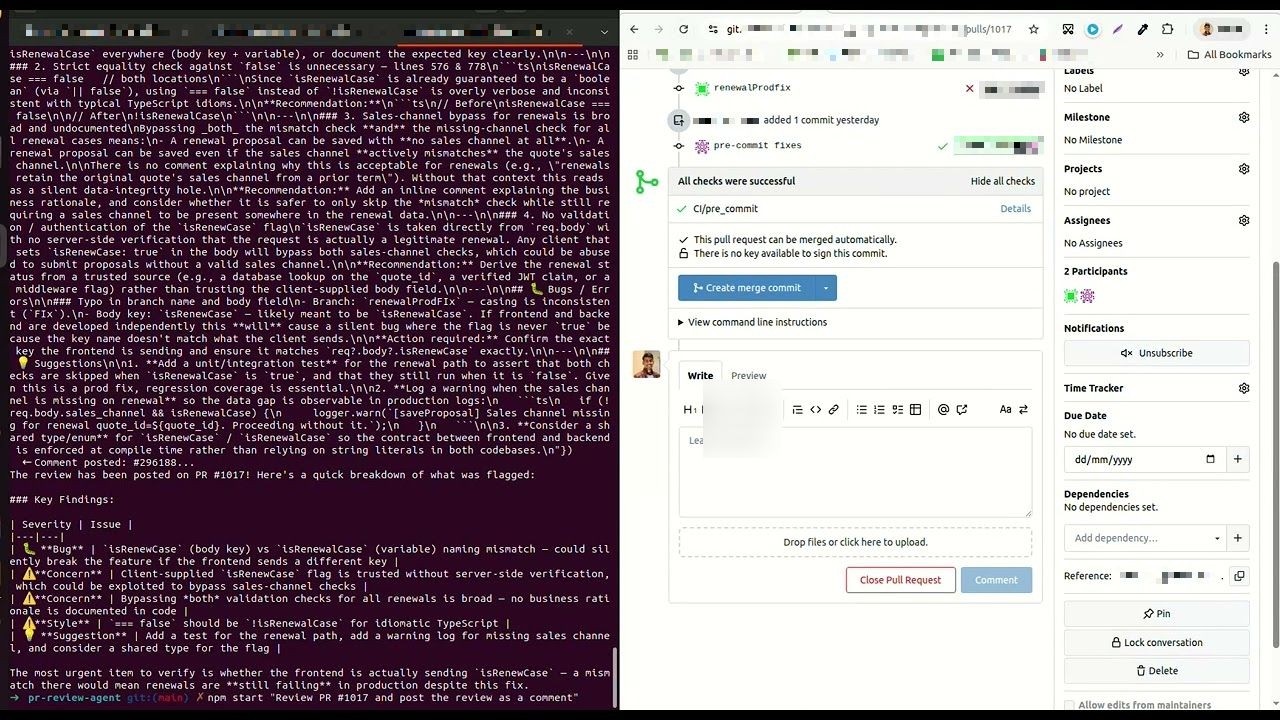
Github - mention platform as github
agent-binod --platform=github "Review PR #1001 and post the review as comments"npm start -- --platform=github "Review PR #1001 and post the review as comments"Agent Binod - platform Github - PR review and post for new commits only (small tweak in the prompt)
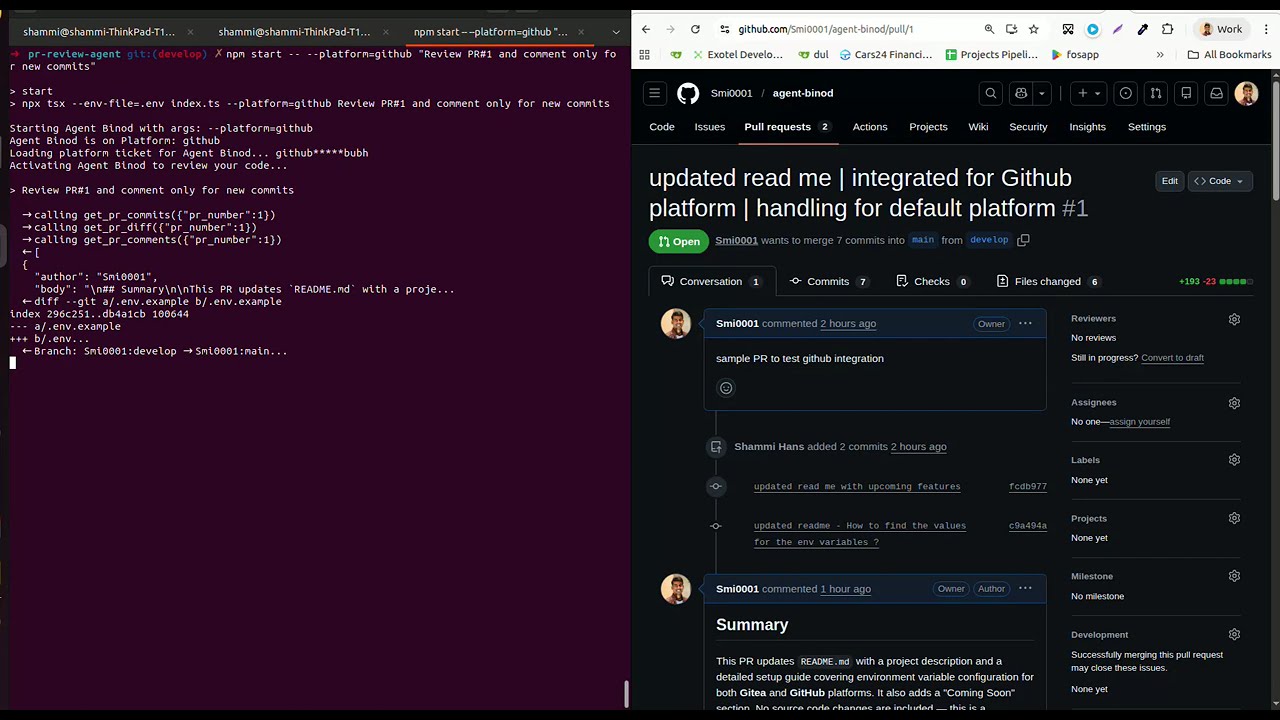
Just analyze, don't post 🧪
agent-binod "Review PR #1001 and tell me the concerns without posting"npm start "Review PR #1001 and tell me the concerns without posting"Github - mention platform as github
agent-binod --platform=github "Review PR #1001 and do not post"npm start -- --platform=github "Review PR #1001 and do not post"Agent Binod - platform Github - PR review without posting, and post comments on new prompt
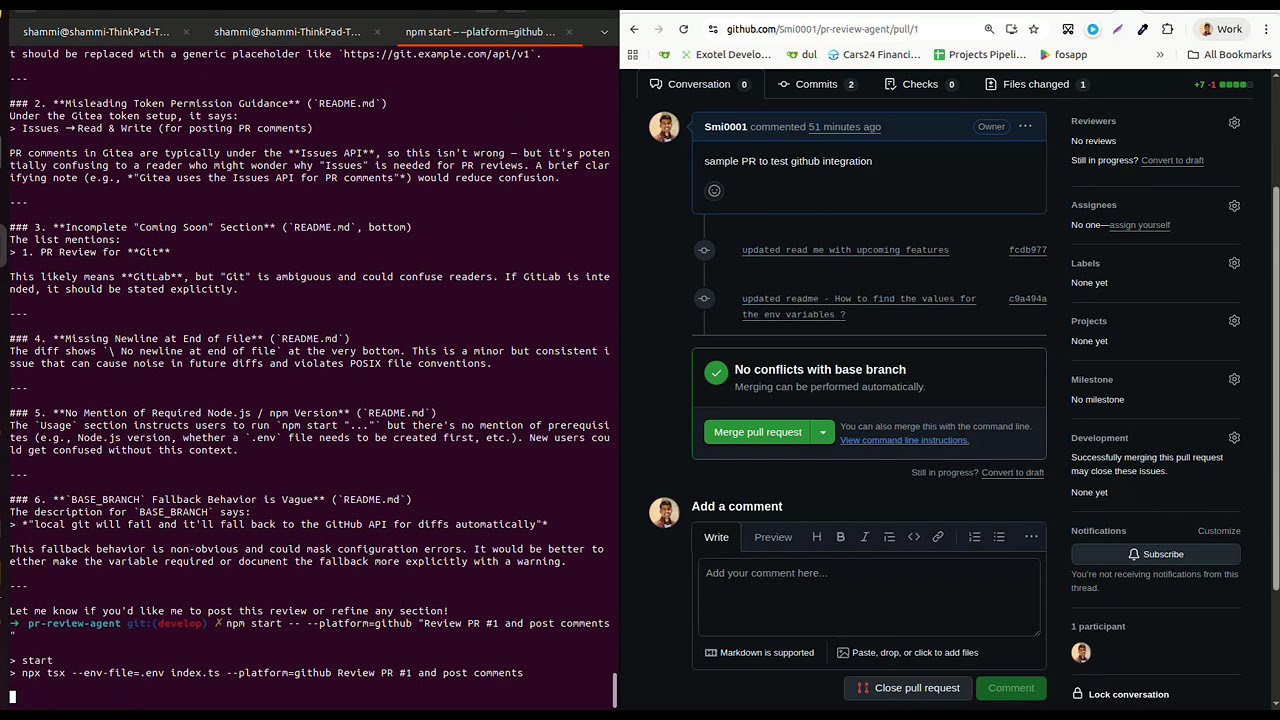
Review all open PRs 🔄
agent-binod "List open PRs and review each one, post comments"npm start "List open PRs and review each one, post comments"Links 🔗
- GitHub: https://github.com/Smi0001/agent-binod
- npm: https://www.npmjs.com/package/agent-binod
What's New 🆕
v1.1.1 — Error Handling 🛡️
- Agent no longer crashes on tool errors — Each tool call is now wrapped in try/catch. If a tool fails, the error is logged and returned to Claude as
is_error: trueso it can recover and continue the review instead of crashing the whole run.→ calling get_pr_comments({"pr_number":1019}) ← ERROR [get_pr_comments]: Failed to fetch comments for PR #1019: The target couldn't be found. - Safe comments fetch —
get_pr_commentsvalidates the API response before calling.map(). Gitea error objects (e.g. PR not found, auth failure) now throw a clear message instead ofTypeError: comments.map is not a function.
v1.1.0 — Large PR Support 📦
Multi-pass chunked review — Large PR diffs are automatically split at file boundaries. Claude fetches each chunk in sequence and accumulates them before writing a full review. No file is ever cut in half.
Note: Chunking splits only between files, not within a single file. A PR that modifies only one large file will always be reviewed as a single chunk, regardless of
DIFF_MAX_CHARS.Smart single-call fallback — If the diff fits within
DIFF_MAX_CHARS, it's returned in one call with no chunking overhead.Session diff cache — Full diff is fetched once and served from memory for all subsequent chunk calls. Eliminates redundant
git fetch+git diffper chunk.Git command timeout — All
execSynccalls (git fetch,git diff,git log) now respectGIT_TIMEOUT_MS(default: 30s) to prevent hanging on slow networks or large repos.Diff logs — Each
get_pr_diffcall prints to the terminal so you can follow what's happening.Small PR (single pass):
[diff] fetching PR #42 diff (limit: 20000 chars)
[diff] source: local git
[diff] total size: 8500 chars
[diff] single pass (fits within limit)
Large PR (chunked, multiple files):
[diff] fetching PR #42 diff (limit: 20000 chars)
[diff] source: local git
[diff] total size: 85000 chars
[diff] chunk 1/5 (19800 chars)
[diff] PR #42 served from cache (85000 chars)
[diff] chunk 2/5 (18200 chars)
...
API fallback (local git unavailable — no upstream remote, wrong
BASE_BRANCH, timeout, etc.):[diff] fetching PR #42 diff (limit: 20000 chars) [diff] local git failed (Command failed: git fetch upstream ...), falling back to github API [diff] source: github API [diff] total size: 8500 chars [diff] single pass (fits within limit)API fallback due to timeout (
GIT_TIMEOUT_MSexceeded):[diff] fetching PR #42 diff (limit: 20000 chars) [diff] local git failed (spawnSync /bin/sh ETIMEDOUT), falling back to github API [diff] source: github API [diff] total size: 8500 chars [diff] single pass (fits within limit)
v1.0.3 — Diff Configuration 🔧
- Configurable diff limit —
DIFF_MAX_CHARScontrols the chunk size and chunking threshold (default: 20000, safe up to ~100000). - Noisy file filtering — Configure
DIFF_SKIP_FILESin.envto skip lock files, generated files, and build output from diffs (e.g.package-lock.json,dist/,*.min.js).
v1.0.2 — Global CLI ⚡
- Install globally —
npm install -g agent-binodand run from anywhere asagent-binod "...". - Fixed Node v18 compatibility — Replaced
--env-fileflag (Node v20+ only) withdotenv, making the tool work on Node v18+. .npmignore— Added explicit publish rules to keep.env,.claude/, and dev files out of the npm package.
v1.0.1 — GitHub Platform Support 🐙
- GitHub integration — Full support for GitHub PRs alongside Gitea.
- Auto platform detection — Agent auto-selects the platform based on which token is configured in
.env. Override with--platform=githubor--platform=gitea. PR_FETCH_LIMIT— Configurable max open PRs to fetch per listing (default: 50).- Env validation — Exits early with a clear error if required env variables are missing for the selected platform.
Coming Soon ⏳
- ~~PR Review for Github~~
- ~~Validation for missing configuration (env variables)~~
- PR Review for Gitlab
- Add new tools
- Tag users in comments
- Close PR
- Approve PR
- Assign PRs to users
- Interactive CLI commands